# 用API批次修改文章權限(PyHackMD)
|Suggested by|Description|HackMD Profile
|--|--|--|
|Willis Chen|採用貢獻者的 PyHackMD 來用 Python 接 API,修改編輯權限與刪除文件文件|[@wiimax](https://hackmd.io/@wiimax)
## HackMD API ,來用 Python 串接吧
[Colab示範](https://colab.research.google.com/gist/willismax/eefb5ebe70b4e2c24ba6a6780e49fd62/pyhackmd.ipynb#scrollTo=ArwACMvUoa88)
:::spoiler Gist
{%gist eefb5ebe70b4e2c24ba6a6780e49fd62 %}
:::
- 安裝套件
```python
!pip install PyHackMD
```
- 設定自己的 Token,參閱 [HackMD User notes API](https://hackmd.io/@docs/HackMD_API_Book/https%3A%2F%2Fhackmd.io%2F%40hackmd-api%2Fdeveloper-portal)
```python
HACKMD_API_TOKEN = <HACKMD_API_TOKEN>
```
- 取得筆記列表
```python
from PyHackMD import API
from pprint import pprint
api = API(HACKMD_API_TOKEN)
data = api.get_note_list()
pprint(len(data)) #顯示筆記數量
pprint(data[0]) #顯示第一筆
```

## 取得編輯權限非owner的筆記,並且全改成owner
因為自己筆記預設權限為登入者可編輯,可用API一次修正。
- 取得編輯權限非owner的筆記
```python
from PyHackMD import API
api = API(HACKMD_API_TOKEN)
data = api.get_note_list()
for note in data:
if note['writePermission'] != 'owner':
print(note['id'], note['title'], note['writePermission'])
```

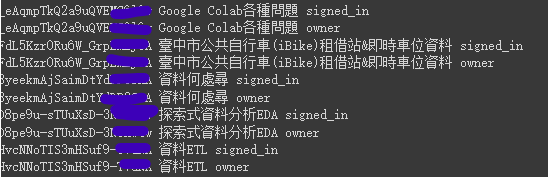
- 取得編輯權限非owner的筆記,並且全改成owner
```python
from PyHackMD import API
import time
api = API(HACKMD_API_TOKEN)
data = api.get_note_list()
for note in data:
# 取得編輯權限非owner的筆記
if note['writePermission'] != 'owner':
print(note['id'], note['title'], note['writePermission'])
time.sleep(1)
# 依note_id將編輯權限全改成owner
api.update_note( note_id=note['id'], write_permission = "owner")
time.sleep(1)
_ = api.get_note(note_id=note['id'])
print(_['id'], _['title'], _['writePermission'])
```
## 刪除名稱未定義,內容為空的筆記
用API一次刪除沒有使用到的筆記。
- 空筆記特徵:
- `'title': 'Untitled'`
- `'content': ''`
```python
from PyHackMD import API
from pprint import pprint
import time
api = API(HACKMD_API_TOKEN)
data = api.get_note_list()
for note in data:
if (note['title'] == 'Untitled') :
# print(note)
_ = api.get_note(note_id = note['id'])
if _["content"] == "":
print(_['id'], _['title'], _["content"])
api.delete_note(_['id'])
```


 Sign in via Google
 Sign in via Facebook
 Sign in via X(Twitter)
 Sign in via GitHub
 Sign in via Dropbox
 Sign in with Wallet
Connect another wallet
Sign in with Wallet
Connect another wallet