# Embedded System Course 2023
###### tags: `embbed system` `computer science` `assembly language`
The following information represents the comprehensive notes from the ‘’Embedded System Course 2023’’. These notes provide the fundamental concepts, principles, and practical applications covered in the course. They serve as a valuable resource for students and professionals seeking to enhance their knowledge and skills in the field of embedded systems.
## Chapter 1
### **Bit**
* 1 (True)
* 0 (False)
### **Byte**
* 8 bits
### **Three of the most common forms of notation**
* Binary (base 2), 01
* Decimal (base 10), 0123456789
* Hexadecimal (base 16), 0123456789ABCDEF
### **Syntax in C**
The following lines of code are **all the same** (the compiler does not care what base the programmer uses)
char x = 2 + 1;
char x = 0b10 + 1;
char x = 0x2 + 1;
char x = 0x02 + 0x01;
## Chapter 2
### **Variables**
Variables must be declared by specifying the variable’s **name** and **type** of information that it will hold. Multiple variable can be created in one declaration.
<Type> <VariableName>
int total;
<Type> <VariableName1>, <VariableName2>, ...
float count, temp, result;
### **Reserved Words**
Primitive data types cannot use as a variable. Below only list some frequently used data types.
* char
* short
* int
* long
* double
* float
* for
* if
* else
* break
* continue
* return
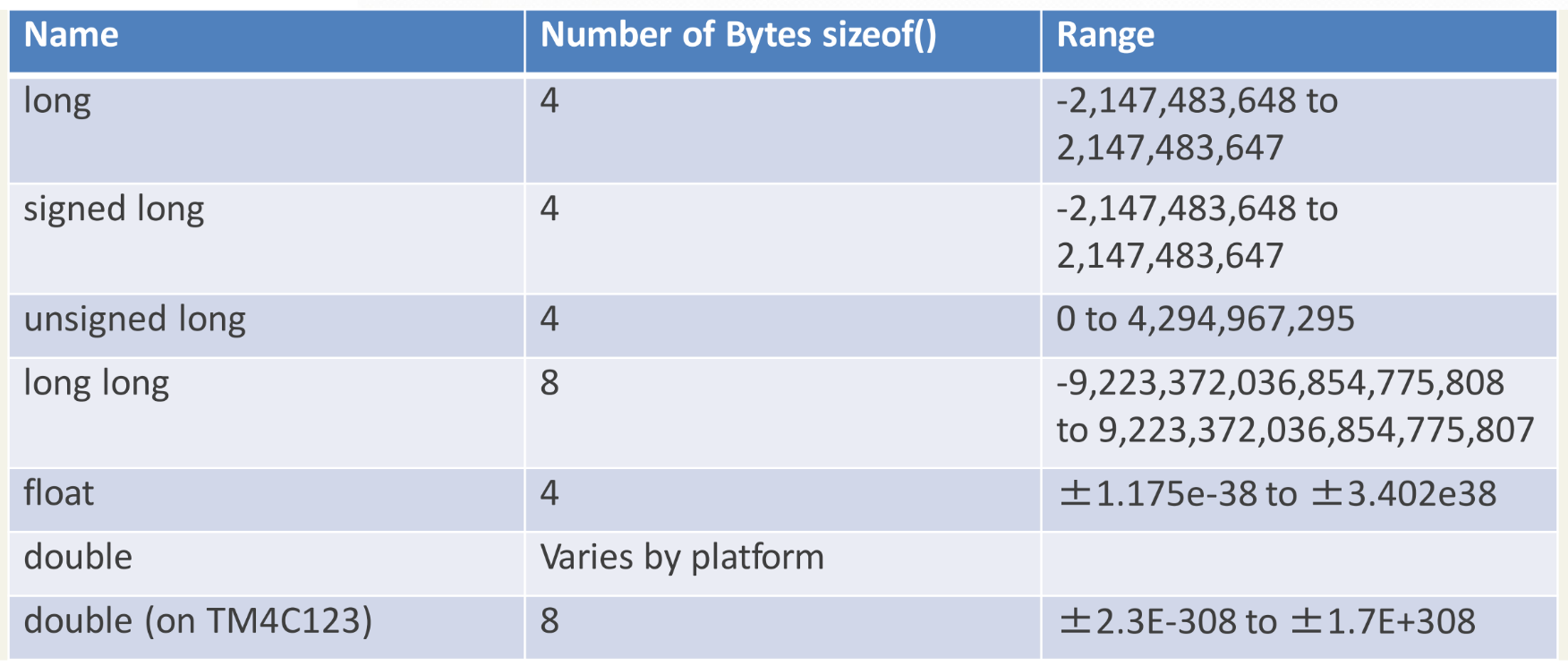
### **Primitive Types and Sizes**

### Arrays in C
* Zero-indexed (starts at 0 rather than 1)
* Curly brackets [] used for initialize the array.
<Type> <VariableName>[NumOfElements]
int my_array[100]
Array copy example
int Array1[20]; // An array of 20 integers
int Array2[20]; // An array of 20 integers
for (int i = 0; i < 20; i++)
{
Array1[i] = Array2[i]
}
### String in C
> There are no String in C. String are represented as char arrays.
The **end** of a string (char array) is signified by a **null byte**.
For example, below str1 and str2 each consume 4 bytes of memory and are equivalent in value.
char str1[] = "123";
char str2[4] = {'1', '2', '3', 0};
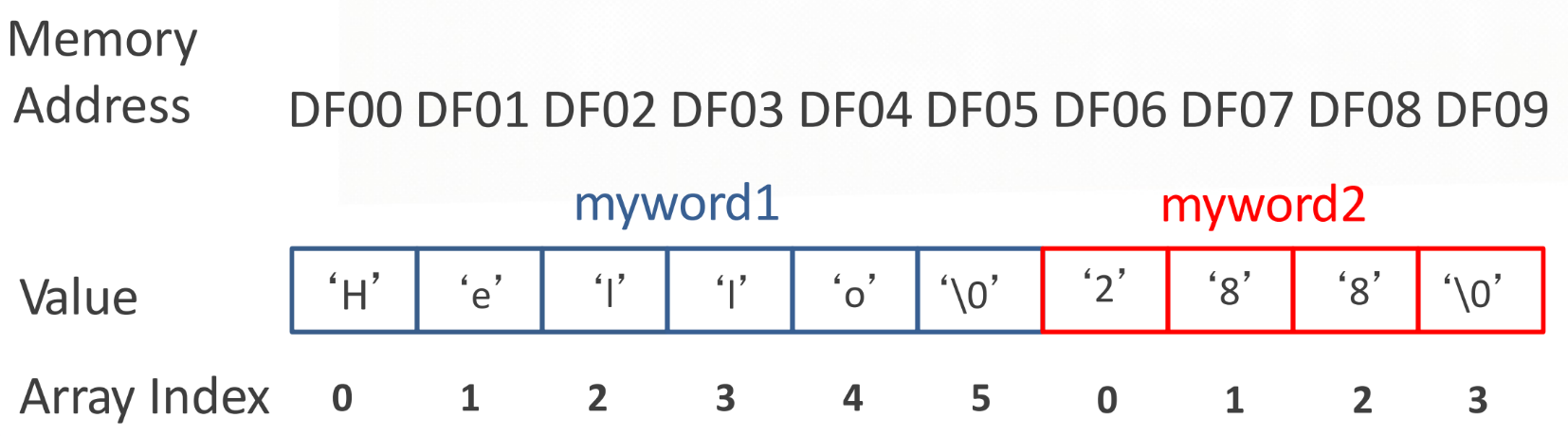*String in C example*
### Formatting Strings
These functions have an argument called a formatter string that **accepts %** escaped variables.
int age = 18;
char message[] = “Hello World”;
printf(“My age is %d”, age);
// gives: My age is 18
printf(“Say %s my age is %d”, message, age);
//gives: Say Hello World my age is 18
### Struct in C
The struct type allows a programmer to define a **compound (混合) data type**. The size of a struct is the **size of its components** added together. [For more…](https://en.wikipedia.org/wiki/Struct_(C_programming_language))
struct point {
int x;
int y;
};
int main(void)
{
struct point p = { 1, 3 }; /* initialized variable */
struct point q; /* uninitialized */
q = p; /* copy member values from p into q */
return 0;
}
### Union in C
Merge multiple components. The size of a union variable is the **size of its maximum component**.
Below example the size is 4, since the largest component is 4 bytes.
union u_tag {
int ival; // size 4 bytes
short sval; // size 2 bytes
float fval; // size 4 bytes
};
### Key features of structure and union
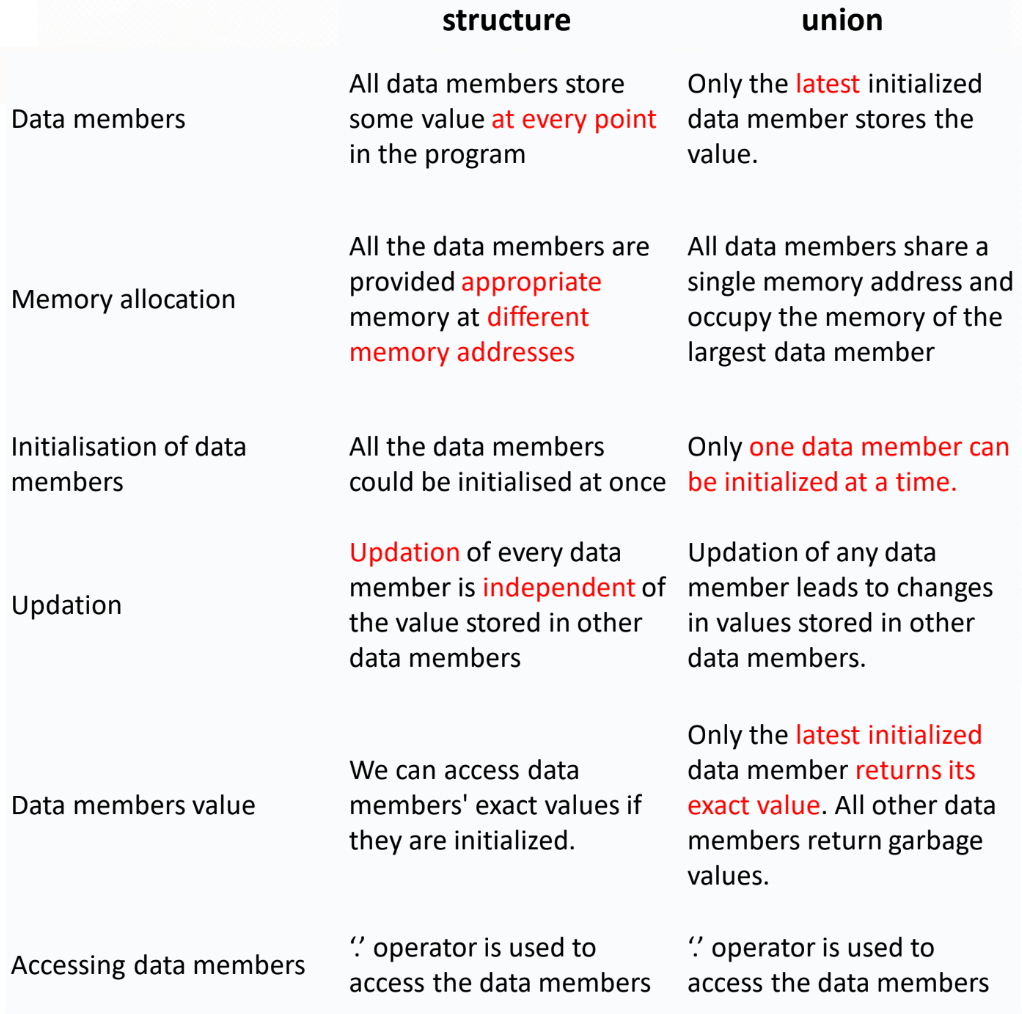*Key features comparison of structure and union*
### Pointer
* A **variable** whose value is interpreted as a **location in memory**.
* A **variable** that can be **dereferenced** (i.e. you can go to the place in memory indicated by the pointer’s value).
int* ptr1; // pointer to type int
int *ptr2; // alternative declaration
char* ptr3; // pointer to type char
int** ptr4; // pointer to an int pointer
Setting the pointer to the address of a variable
— “**&”** is the **address** operator
— “**&Variable”** is the **address of Variable**
To dereference a pointer, use the ***** operator before the pointer’s variable name. **Dereference** means to “**go to**” the location in Memory.
short i = 5; // initialize variable i
short* ip = &i; // ip point to the address of i
short x = *ip; // dereference, now x == 1 == 5
A ***** operator is used for both **declaring** and for **dereferencing** a pointer.
int i = 5;
int *ip = &i; // declare
*ip = 7; // dereference
## Chapter 3
### Microprocessor
> CPU built on a single chip
Main problems with early microprocessor were **speed, word width, and memory size**.
### Microcontroller
> Whole microprocessor system/microcomputer manufactured on a single chip — “one chip solution” (small, cheap, flexible, powerful)
### Central Processing Unit (CPU)
> The heart of a computer
performs the following tasks:
* **Fetches** (去拿… 給) instruction(s) and/or data from memory
* **Decodes** the instruction(s)
* **Executes** the indicated sequence of operations
**CPU functional sections**
1. Control Unit (CU, 控制單元)
— times and regulates
— decodes
— program counter
— status register
1. Arithmetic/Logic Unit (ALU, 算術邏輯單元)
— arithmetic(算數) operations
— logic(邏輯) operations
1. Registers (暫存器)
— store addresses of data, instruction operands (i.e., data), or the
results of arithmetic calculations/logic operations
1. Internal Bus (匯流排)
— communication lines that links internal CPU elements
### Bus System
A bus consists of a set of wires carrying addresses, data and control information.
Three types of Bus usually exist:
1. Address Bus
— Uni-directional (單向的)
— specify the **address** of the memory location or I/O device
1. Data Bus
— Bi-directional (雙向的)
— **data** between the processor and external units
1. Control Bus
— Uni-directional (8-bit processor)
— Bi-directional (16-bit processor)
— carries necessary **commands** and other signals
](https://cdn-images-1.medium.com/max/2000/1*0jnqHnRMU7F7CnV7o6RKbg.png)*[https://en.wikipedia.org/wiki/Bus_%28computing%29](https://en.wikipedia.org/wiki/Bus_%28computing%29)*
### Memory
> A mechanism in which information can be stored
Operations that can be performed on memory are **reading **information from it, or **writing** information to it. Memory is used to store everything that has to be accessible to the CPU.
## Chapter 4
### ARM Architecture Overview
Why using assembly programming?
* Full access to **hardware** features.
* Writing **time-critical** portions (部分) of code.
In the market, 75% are using **32-bit** embedded **RISC** microprocessors. Because of the following advantage.
* High performance
* Low power consumption
* Low system cost
### RISC v.s. CISC
* RISC: Reduced Instruction Set Computing
Instruction typically **constant length and constant time.**
* CISC: Complex Instruction Set Computing
Instructions often **variable length and variable time**
Typical RISC has following features.
* LD/Store based: ALU to memory **transaction via registers**.
* Most **instruction** are the **same length**.
* Typically much **less instructions** than a CISC architecture.
* Typically much **more registers** than CISC.
* Typically **low number of instruction** makes hardware design are **simpler** than CISC.
### ARM CPU Core Summary
* Instructions are 16-bit or 32-bit.
* Simple three-stage pipeline.
* Registers are 32-bit.
* Address are 32-bit.
### ARM: Harvard Architecture

**Program memory**
* **Flash** based: Program **stays** even if **power turned off**.
**Data Memory**
* **SRAM** based: Data **disappears** if power is **turned off.**
### ARM: Logical Data Memory organization
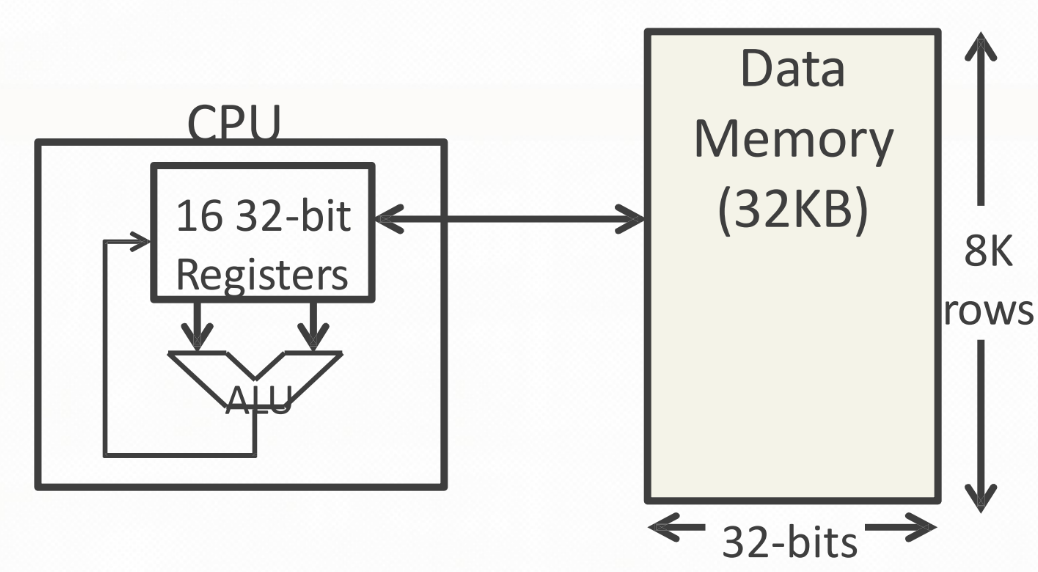
**Registers**
* Directly accessible by ALU.
**Data Memory**
* Must use a register to move to/from the ALU
### Understanding Data
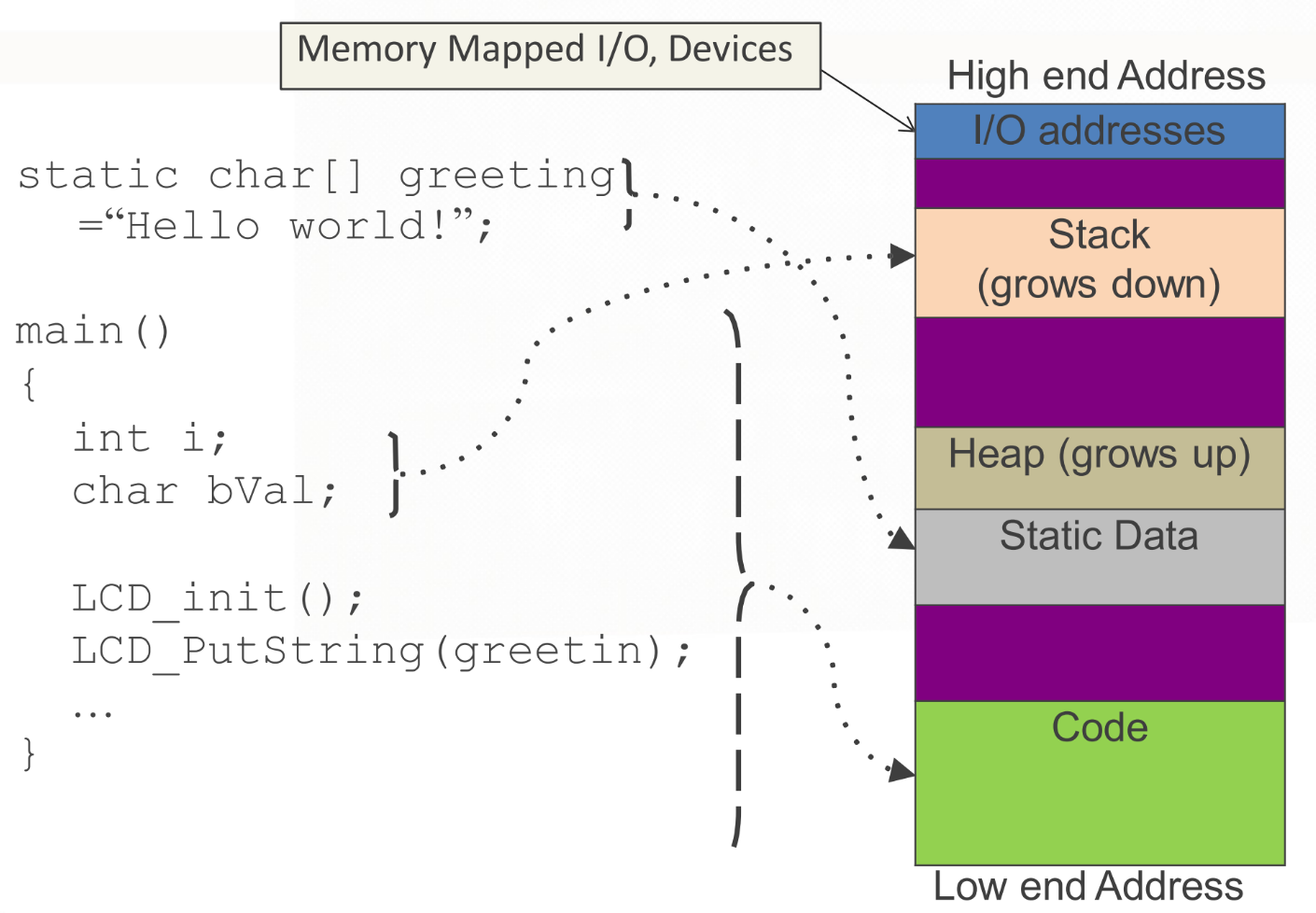
**Stack**
* Stores data related to **function variables, function calls, parameters, return variables**, etc.
* **Starts at the top** of the program’s data memory space.
* Stack accesses **local variables only**.
**Heap**
* Stores **dynamically** allocated data.
* **Starts at bottom** of program’s data memory space.
* Access variables **globally**.
### Function and Stack
Why stack?
The LIFO order matches perfectly with functions call/return order.
* LIFO: Last In, First Out
* Function: Last called, first returned
Efficient memory allocation and de-allocation.
* Allocation: Decrease SP (stack top): PUSH
* De-allocation: Increase SP: POP
### Status REGister (SREG)
Bellow shows some common flags.
* Z: Zero flag
* C: Carry flag
* N: Negative
* V: Overflow
### Bitwise Operations
Why use bitwise operations in embedded systems programming?
* Each single bit may have its own meaning.
* Data from input o I/O ports may be packed.
* Data in memory may be packed to save space.
Common programming tasks:
* **Clear/Reset certain bit(s)**
C bitwise AND : “ **& ”
**Bitwise-AND with a mask of 0(s)
char op1 = 1011 1100; // We want to clear bit 4 to 0.
char op2 = 1110 1111; // We use op2 as a mask
char op3;
op3 = op1 & op2;
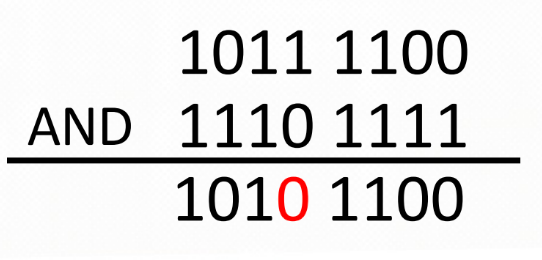*bitwise-AND*
* **Set certain bit(s)
**C bitwise OR: “ | ”
Bitwise-OR with a mask of 1(s)
char op1 = 1000 0101; // We want to set bit 4 to 1.
char op2 = 0001 0000; // We use op2 as a mask
char op3;
op3 = op1 | op2;
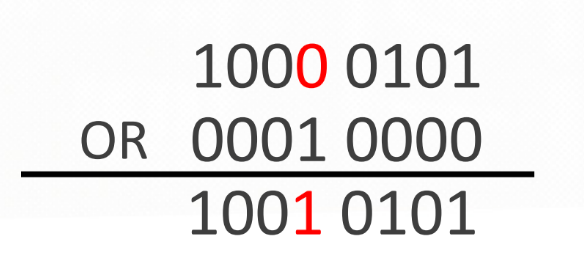*bitwise-OR*
* **Toggle certain bits
**C bitwise XOR: “ ^ ”
Bitwise-XOR with a mask of 1(s)
ch = ch ^ 0x3C;
// Toggle bits 5, 4, 3, 2
// Preserve bits 7, 6, 1, 0
*bitwise-XOR*
* **Invert certain bits
**C bitwise invert: “ ~ ”
ch = ~ch;
// ch = 0b00001111
// ~ch = 0b11110000
*bitwise invert*
* **Shift bits around
**Shift-Left: “ << ”
Shift-Right: “ >> ”
// shift left
unsigned char my_reg = 0b00000001;
unsigned char shift_amount = 5;
unsigned char my_result;
my_result = my_reg << shift_amount;
// shift right
unsigned char my_reg = 0b10000000;
unsigned char shift_amount = 5;
unsigned char my_result;
my_result = my_reg >> shift_amount;
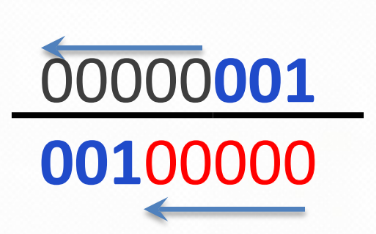
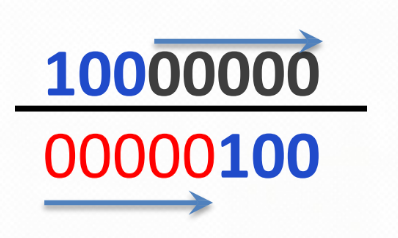*shift left/right*
With signed type, >> is shift-right arithmetic sign bit value are shifted in from the left.
signed char my_reg = 0b10000000;
unsigned char shift_amount = 5;
unsigned char my_result;
// positive sign shift right
my_result = my_reg >> shfit_amount;
// negative sign shift right
my_reg = 0b01111111;
my_result = my_reg >> shfit_amount;
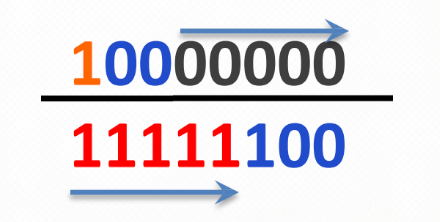
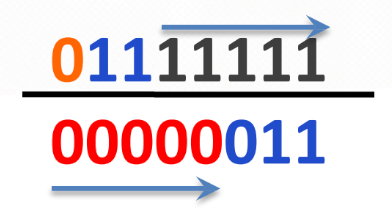*shift signed value*
**Shift and Multiple/Divide**
* n << k is equivalent to n * 2k
* n >> k is equivalent to n / 2k
// multiple by 2^2
5 << 2 = 5*4 == 20
0b0000 0101 << 2 = 0b0001 0100
// divide by 2^2
20 >> 2 = 20/4 == 5
0b0001 0100 >> 2 = 0b0000 0101
**Shift and Set**
Shift the 1(s) of the MASK to the appropriate position, then **OR** with my_result to **force corresponding bit positions to 1**.
unsigned char my_mask = 0000 0001;
unsigned char shift_amount = 5;
unsigned char my_result = 1101 0101; // Want to force bit 5 to a 1
my_result = my_result | (my_mask << shift_amount);
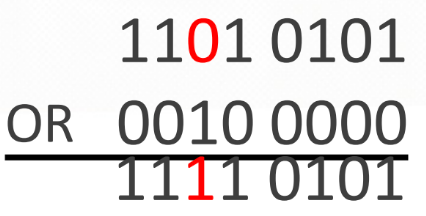*shift and set*
**Shift and Clear**
Shift the 0(s) of the MASK to the appropriate position, then **AND** with my_result to **force corresponding bit positions to 0**.
unsigned char my_mask = 0000 0111;
unsigned char shift_amount = 5;
unsigned char my_result = 1011 0101; // Want to force bit 7-5 to a 0
my_result = my_result & ~(my_mask << shift_amount);

### Bitwise Testing
Testing if any of a set of bits is set to 1
1. Decide which bits you want to test
1. Isolate those bits (i.e. force all other bits to 0)
Testing if all bits of a set of bits are set to 1
1. Decide which bits you want to test
1. Isolate those bits (i.e. force all other bits to 0)
1. Compare for equality with the Mask
Generic systematic checking example:
if( (x & MASK_ALL1s) == MASK_ALL1 &&
(~x & MASK_ALL0s) == MASK_ALL0s &&
(x & MASK_ANY1s) &&
(~x & MASK_ANY0s) )
## Chapter 5
### General Purpose Input Output (GPIO)
> It’s embedded programming as input/output pins are the only way to interface with the microcontroller.
GPIO abilities may include:
* GPIO pins can be configured to be input or output
* GPIO pins can be enabled/disabled
* Input values are readable (usually high or low)
* Output values are writable/readable
### Interrupt Service Routines (ISR)
> Code to be executed to deal with the hardware event that has occurred.
Interrupt: A mechanism that allows hardware to inform the CPU that an event has occurred.
**General Interrupt to ISR flow**
1. Hardware event causes an interrupt to occur
1. Interrupt notifies the CPU
1. CPU pauses the program
1. CPU disables interrupts and saves its “state”
1. CPU re-enables interrupts and executes the proper ISR
1. Once the ISR completes, the CPU disables interrupts and
restores its state to what it was before the interrupt occurred
1. CPU re-enables interrupts, and continues the program from
where it paused.
### UART Interface Overview
* USART
Universal Synchronous & Asynchronous Serial Receiver & Transmitter
* Asynchronous (**no common clock**)
* Can transmit over **long link distances**
* Uses **start** and **stop** to sandwich data bits
* **Parity bit** can be used for **error detection**
* i.e. RS-232 Serial Cable
**Baud Rate vs Bit Rate**
* Bit rate
**the number of binary ‘bits’**, 1s or 0s to be transmitted per second
* Baud rate
**the number of line ‘symbols’** transmitted per second
* Channels
the number of transmission channels
Bit rate = baud rate * bits per symbol (/baud)* Channels
## Chapter 6
### Instructions to move data
* **MOV**e
<---
MOV Rd, Rt // Move Between Registers: Rd ← Rt
MOVW Rd, #Imm16 // Constant to Register: Rd ← #Imm16
MOVT Rd, #Imm16 // Constant to upper Register: Rd ← #Imm16
(example)
MOVW r2, #0x5511; // r2 = 0x5511
MOVW r5, #0x3322; // r5 = 0x3322
MOVT r5, #0x5544; // r5[31:16] = 0x5544
* Load (**L**oa**D** to **R**egister)
<----
LDR Rd, [Rn, #Offset] // Load 32-bit: Rd ← [Rn + #Offset]
LDRB Rd, [Rn, #Offset] // Load 8-bit: Rd ← [Rn + #Offset]
LDRH Rd, [Rn, #Offset] // Load 16-bit: Rd ← [Rn + #Offset]
* Store (**ST**ore from **R**egister)
---->
STR Rt, [Rn, #Offset] // Store 32-bit: [Rn + #Offset] ← Rt
STRB Rt, [Rn, #Offset] // Store 8-bit: [Rn + #Offset] ← Rt
STRH Rt, [Rn, #Offset] // Store 16-bit: [Rn + #Offset] ← Rt
STRD Rt, Rt2, [Rn, #Offset] // Store 64-bit: [Rn + #Offset] ← Rt
// [Rn + #Offset+4]← Rt2
Move, Load, Store example
(C)
int a, b; // a is at 0xF000A000, b is at 0xF000B000
a = b;
------------------------------
(Assembly)
// place address of "b" into a register
MOVW r5, #0xB000; // r5 = 0xB000
MOVT r5, #0xF000; // r5[31:16] = 0xF000
// load value of "b" into a register
LDR r1, [r5, #0]; // r1 = [0xF000B000]
// place address of "a" into a register
MOVW r5, #0xA000; // r5 = 0xA000
MOVT r5, #0xF000; // r5[31:16] = 0xF000
// store value into variable "a"
STR r1, [r5, #0]; // [0xF000A000] = r1
### Arithmetic Instruction
Brief overview of arithmetic instructions
**Addition**: ADD, ADC, ADDW
**Subtraction**: SUB, SBC
**Logic**: AND, ORR, EOR
**Shift**: LSL, LSR, ASR, ROR
**Compliments**: NEG
**Multiplication**: MUL, SMULL, UMULL
## Chapter 7
### Real-Time System & Real-Time Operating System
* **Soft Real Time
**If the deadlines are not met, performance is considered low.
* **Hard Real Time
**A computer system in which at least one task must meet deadlines in time. If the deadlines are not met, the system has failed.
### Programs or Processes
A Program or Process is a unit of computation with the following attributes:
* Code/instructions
* Data
* Context/State
* Resources (memory, I/O devices, semaphores)
### Threads or Tasks
Thread is **a unit of computation** with code and context, but no private data. Threads may even share code with each other. Thread(s) is/are owned by a program/process. Threads are like **pieces** within a program which can be **scheduled by the OS** independently.
Task (basic notion in RTOS) = Thread (lightweight process). A task may communicate with other tasks. A task may **use system resources** such as memory blocks. We may have **timing constraints** for tasks.
Process 1 is a **single-threaded** process.
Process 2 is a **multi-threaded** process.
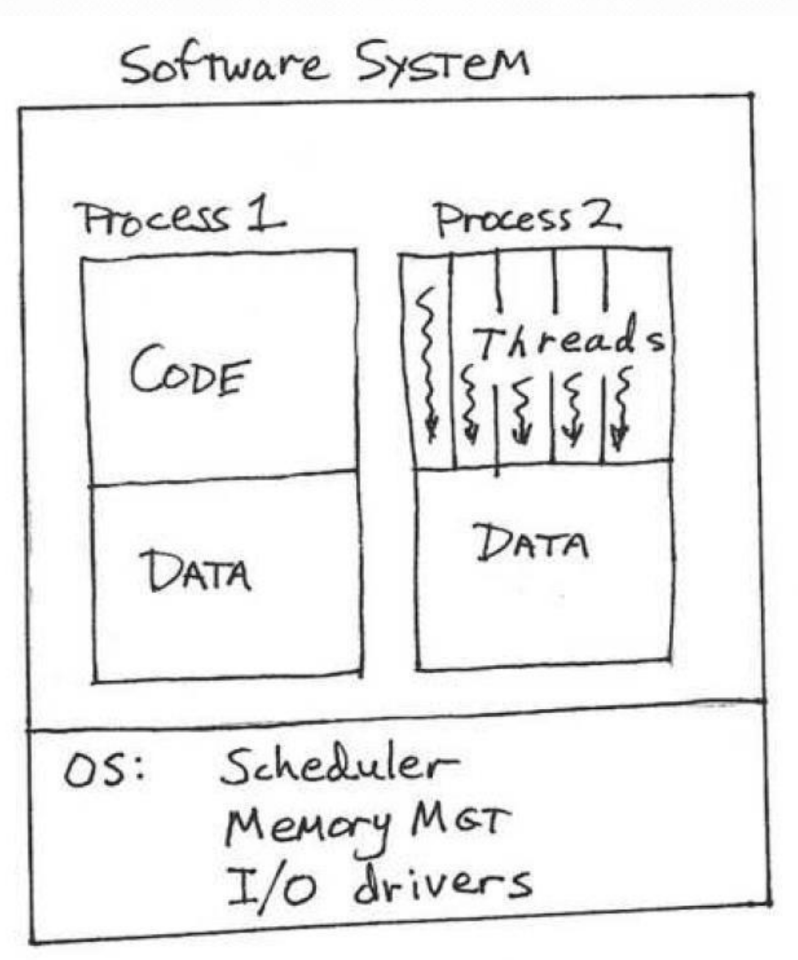
What are the advantages?
* Since threads have a smaller context than programs/processes, context switching is **faster**.
* **Only save/restore CPU state**.
* **No need to change memory setup**.
Tasks/Threads can be in one of four states:
1. **RUNNING** (or EXECUTING)
1. **READY** to RUN (but not running)
1. **WAITING** (for something other than the CPU → e.g., event)
1. **INACTIVE** (or TERMINATED, or DORMANT, or SLEEPING)
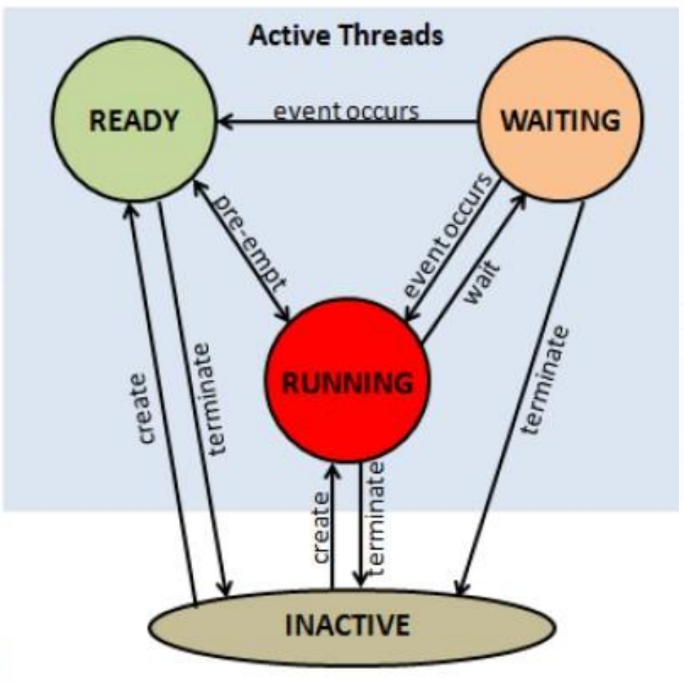*tasks/threads four states*
Types of Tasks
1. **Periodic** Tasks: **regular intervals** (arriving at a fixed frequency), also called **time-driven** tasks.
1. **Intermittent** Tasks: Found in all types of applications, i.e. send an email every night at 4:00AM.
1. **Background** Tasks: A soft real time or non real time task. **Lower Priority**. Will be accomplished only as CPU time is available when no hard real time tasks are ready.
1. **Complex** Tasks: Found in all types of applications. **Continuous** need for CPU time. **Frequent requests for I/O** which free up the CPU. **Waits for user input **which free up CPU. For example, Microsoft Word.
### General Purpose Operating System(GPOS)
Criteria needs to know
* **Waiting** time: S**um of times spent** (in Ready queue) waiting to be
scheduled on the CPU.
* **Response** Time: **time from submission till the first response** is
produced (mainly for interactive jobs).
Here lists out some type of GPOS scheduling examples
* **First-Come, First-Served (FCFS) Scheduling**
— Serve the jobs in the order they arrive.
— Non-preemptive.
— Simple and easy to implement.
— Very fair, immune to job size.
***First-Come, First-Served (FCFS) Scheduling***
If the processes arrive in the order: P1, P2, P3
Waiting time for P1 = 0; P2 = 24; P3 = 27
Average waiting time: (0 + 24 + 27)/3 = 17
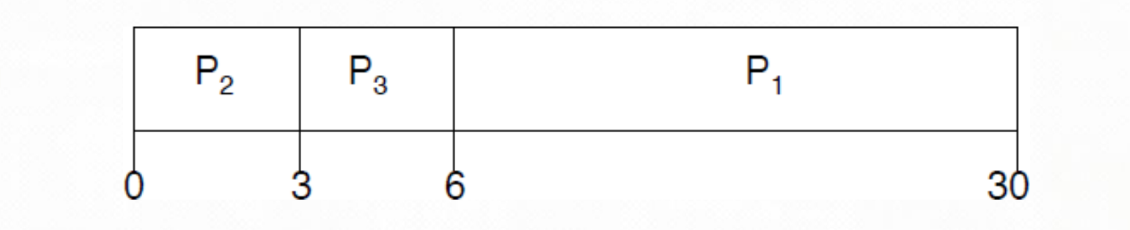***First-Come, First-Served (FCFS) Scheduling***
If the processes arrive in the order: P2, P3, P1
Waiting time for P1 = 6; P2 = 0; P3 = 3
Average waiting time: (6 + 0 + 3)/3 = 3
**Convoy effect (護送效應) short process behind long process.**
* **Shortest-Job-First (SJF) Scheduling
**Associate with each process **the length of its next CPU burst**. Use these **lengths to schedule** the process in the shortest time. SJF is optimal — gives **minimum average waiting time** for a given set of processes.
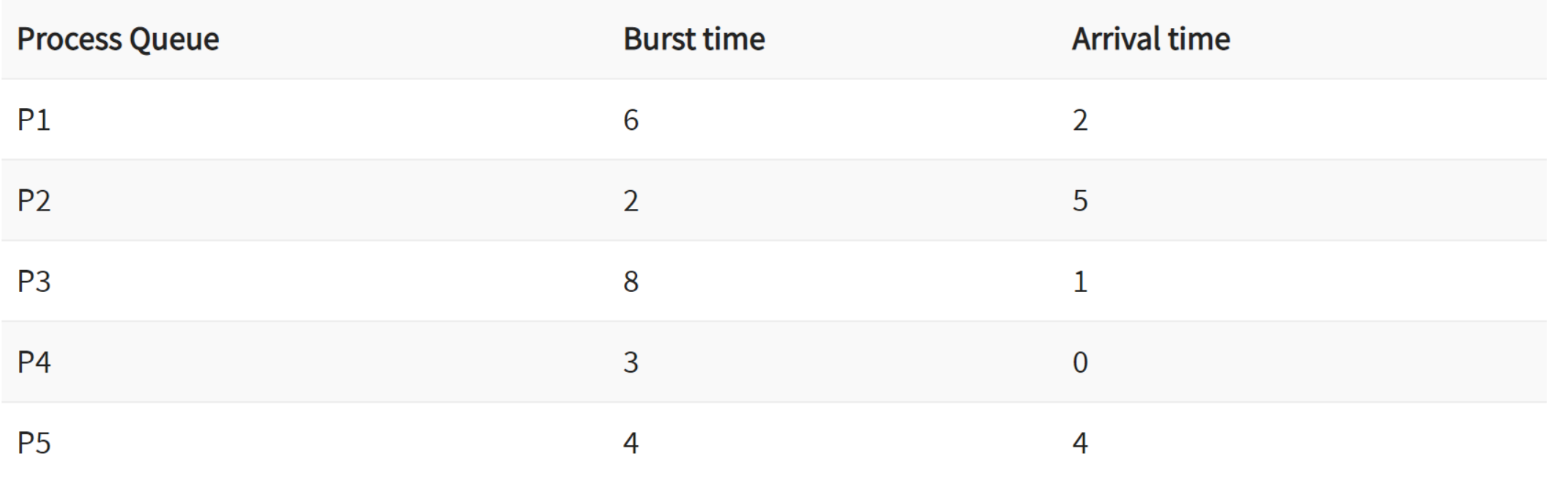
***Shortest-Job-First (SJF) Scheduling***
Wait time
P4 = 0–0 = 0
P1 = (3–2) + 6 = 7
P2 = 5–5 = 0
P5 = 4–4+2 = 2
P3 = 15–1 = 14
Average Waiting Time = 0+7+0+2+14/5 = 23/5 =4.6
* **Round Robin (RR) Scheduling
**Each process gets a **small unit** of CPU time (time quantum): usually 10 to 100 milliseconds. After this time has elapsed, the process is preempted and **added to the end of the ready queue**.
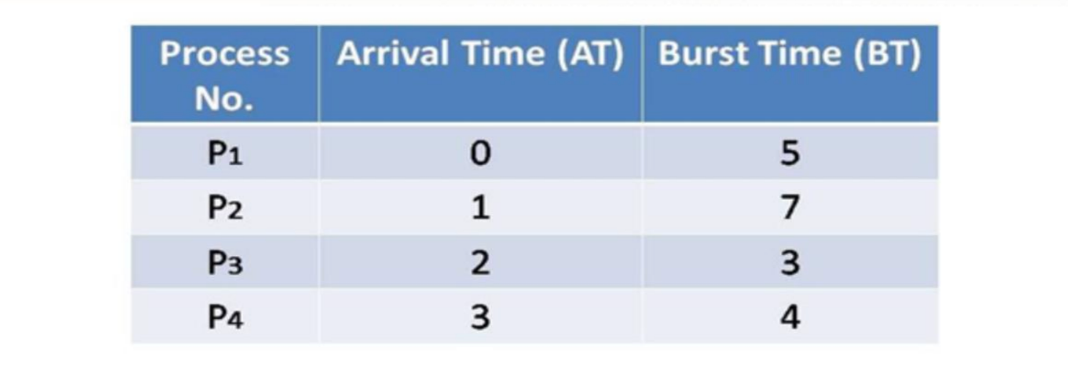
*Round-Robin Scheduling*
For the considered example, if time quantum size drops to 2s from 8s,
the number of **context switches will increase**, but **response time will
decreases**. But context switches are** not free!**
Context switches involve
— Saving/restoring registers
— Switching address spaces
— Indirect costs (cache pollution)
### OS Scheduling Techniques
* Round-Robin Scheduling
Each executable task is assigned a **fixed-time quantum** called a time slice in which to execute.
*Round-Robin Scheduling*
* Rate Monotonic Scheduling (RMS)
This is static priority-driven preemptive scheduling. The static priorities are assigned according to the **cycle duration of the job**, so a **shorter cycle duration** results in a **higher job priority**. Short period = high priority.
## Chapter 8
### Real-Time Operating System (RTOS)
Must **respond to input/event** within prescribed time limits. Must **operate within specified time** constraints.
### Race condition
They occur when two computer program processes, or threads, attempt to **access the same resource at the same time** and cause problems in the system. Race conditions are considered a **common issue for multithreaded applications**.
Thank you for taking the time to read this article, and I sincerely hope that the information provided proves to be valuable to you. Whether you are a student, professional, or simply someone interested in embedded systems, it is my utmost wish that these notes enhance your understanding and contribute to your success in this field. Thank you once again, and best of luck on your journey in the world of embedded systems!
 Sign in with Wallet
Connect another wallet
Sign in with Wallet
Connect another wallet