# Unit-Tests in Python
slide: https://hackmd.io/@waschm/rkOR4pNe9#/
Repo: [Lernfeld 8](https://gitlab.com/edu.waldemarschmidt/lernfeld-8)
---
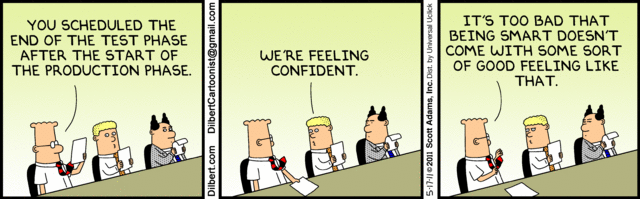
### Wann sollte man testen?
---
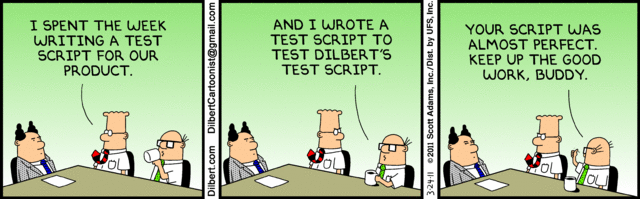
### Wieviel Aufwand für Test-Automatisierung?
---
### Fehlerkosten
- Frühes aufdecken von Fehlern, spart tendenziell Kosten
- Manuelle und automatisierte Testansäzte helfen
- Bei Änderungen müssen die automatisierten Tests angepasst werden
- Durchdachtes Design ist wichtig
----

---
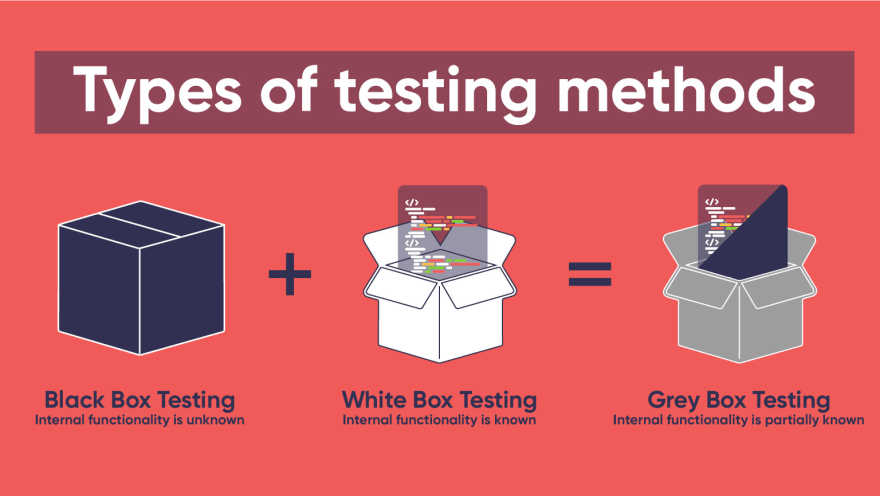
### Unterschiede der folgenden Testarten?
----
#### Black–Box Tests
<!-- .slide: data-background="#000" -->
- Tests anhand der Spezifikation / Anwendungsfällen
- Kein Zugriff auf den Softwarecode
- „Test als Hacker“
----
#### White–Box Tests
<!-- .slide: data-background="#fff" -->
- Innere Funktionsweise ist bekannt
- Zugang zum Quellcode
- z. B. Testen einer bestimmten Methode oder programminterner Abläufe
- „Test als Entwickler“
----
#### Grey–Box Tests
<!-- .slide: data-background="#888" -->
- Kombination aus Black-Box- und White-Box-Tests
- z. B. hat ein Tester auch Zugriff zum Code oder ein Entwickler versetzt sich in die Lage eines Anwenders
- „Test als User mit Zugang zu einigen Daten“
---
### Testpyramide
<!-- .slide: style="font-size: 20px;" -->
> The test pyramid is a way of thinking about different kinds of automated tests should be used to create a balanced portfolio. Its essential point is that you should have many more low-level [UnitTests](https://martinfowler.com/bliki/UnitTest.html) than high level [BroadStackTests](https://martinfowler.com/bliki/BroadStackTest.html) running through a GUI.
>
> A broad-stack test is a test that exercises most of the parts of a large application. It's often referred to as an **end-to-end** test or **full-stack test**.
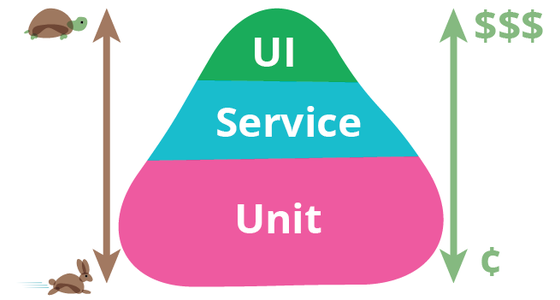
Quelle: Martin Fowler [Testpyramid](https://martinfowler.com/bliki/TestPyramid.html)
----
### Kent Beck zu UI-Tests
<!-- .slide: style="font-size: 20px;" -->
> „I don’t like user interface-based tests. In my experience, tests based on user interface scripts are too brittle to be useful. When I was on a project where we used user interface testing, it was common to arrive in the morning to a test report with twenty or thirty failed tests. A quick examination would show that most or all of the failures were actually the program running as expected. Some cosmetic change in the interface had caused the actual output to no longer match the expected output. Our testers spent more time keeping the tests up to date and tracking down false failures and false successes than they did writing new tests.“
> Kent Beck: Schöpfer von SUnit-Testframework, der „Mutter aller Unit Tests Frameworks“.
---
### Testpyramide

----
**Unit-Tests:**
- Relativ einfach zu erstellen und durchzuführen
- Werden meistens von Entwicklern geschrieben
----
**Service-Tests (auch Integrationstests genannt):**
- Testen isoliert einen Service, z. B. Schnittstellen
- Die Umgebung des Service kann simuliert („gemockt“) werden, z. B. eine In-Memory-Daten für Testzwecke
----
**UI (auch Ende-zu-Ende oder Systemtests genannt):**
- Decken Anwendungsfälle ab
- Kostenintensiv
---
```python=
# Programmcode
class HalloWelt:
def __init__(self):
self.message = 'Hallo Welt!'
print(self.message)
# Testergebnis:
Testergebnis
1 Failure
Expected :'Hallo Welt!'
Actual :'Hello World!'
```
----
```python=
# Testcode
import unittest
from hallo_welt import HalloWelt
class HalloWeltTestCase(unittest.TestCase):
def test_passes_hallo_welt(self):
hw = HalloWelt()
self.assertEqual(hw.message, 'Hallo Welt!')
def test_fails_hallo_welt(self):
hw = HalloWelt()
self.assertEqual(hw.message, 'Hello World!')
if __name__=='__main__':
unittest.main()
```
---
### Tipps für Unit-Tests
<!-- .slide: style="font-size: 20px;" -->
- Tests sollten isoliert sein und unabhängig voneinander ausführbar, die Reihenfolge der Ausführung hat somit keinen Einfluß auf das Testergebnis. Dadurch können auch bei fehlschlagen eines Tests, weitere Tests ausgeführt werden.
- Sichern eine bestimmte Eigenschaft ab
- Sind möglichst leicht verständlich
- Die Paradigmen, die für den Produktivcode gelten, gelten auch für Unit-Tests:
- Vermeidung von Redundanz,
- Code Konventionen,
- ...
- Können einfach ausgeführt werden
---
### Beispiele für Assert
<!-- .slide: style="font-size: 20px;" -->
| Method | Prüft | Neu in |
| ------ | ----- | ------ |
| [assertEqual(a, b)](https://) | ```a == b``` | |
| [assertNotEqual(a, b)](https://) | ```a != b``` | |
| [assertTrue(x)](https://) | ```bool(x) is True``` | |
| [assertFalse(x)](https://) | ```bool(x) is False``` | |
| [assertIs(a, b)](https://) | ```a is b``` | 3.1 |
| [assertIsNot(a, b)](https://) | ```a is not b``` | 3.1 |
| [assertIsNone(x)](https://) | ```x is None``` | 3.1 |
| [assertIsNotNone(x)](https://) | ```x is not None``` | 3.1 |
| [assertIn(a, b)](https://) | ```a in b``` | 3.1 |
| [assertNotIn(a, b)](https://) | ```a not in b``` | 3.1 |
| [assertIsInstance(a, b)](https://) | ```isinstance(a, b)``` | 3.2 |
| [assertNotIsInstance(a, b)](https://) |```not isinstance(a, b)```| 3.2 |
---
# Unit-Tests in der Kommandozeile
<!-- .slide: style="font-size: 20px;" -->
Das **unittest** Modul kann in der Kommandozeile verwendet werden, um Tests mit Modulen, Klassen oder individuellen Methoden durchzuführen. Dies kann Ihnen beispielsweise bei der Einrichtung einer **CI/CD Pipeline** helfen.
```python=
python -m unittest test_module1 test_module2
python -m unittest test_module.TestClass
python -m unittest test_module.TestClass.test_method
```
----
<!-- .slide: style="font-size: 20px;" -->
You can pass in a list with any combination of module names, and fully qualified class or method names.
Test modules can be specified by file path as well:
```python=
python -m unittest tests/test_something.py
```
This allows you to use the shell filename completion to specify the test module. The file specified must still be importable as a module. The path is converted to a module name by removing the ‘.py’ and converting path separators into ‘.’. If you want to execute a test file that isn’t importable as a module you should execute the file directly instead.
----
<!-- .slide: style="font-size: 20px;" -->
You can run tests with more detail (higher verbosity) by passing in the -v flag:
```python=
python -m unittest -v test_module
```
----
<!-- .slide: style="font-size: 20px;" -->
When executed without arguments Test Discovery is started:
```python=
python -m unittest
```
----
<!-- .slide: style="font-size: 20px;" -->
For a list of all the command-line options:
```python=
python -m unittest -h
```
Changed in version 3.2: In earlier versions it was only possible to run individual test methods and not modules or classes.
Quelle: [Python-Doku](https://docs.python.org/3/library/unittest.html#command-line-interface)
---
# Vielen Dank!
{"metaMigratedAt":"2023-06-16T20:12:59.299Z","metaMigratedFrom":"YAML","title":"Unit-Tests in Python","breaks":true,"description":"Eine kurze Einführung in .","contributors":"[{\"id\":\"9f489dc8-8ce5-439c-86fd-e78755aec784\",\"add\":10814,\"del\":2808}]"}