---
tags: salle, creatividad, PMA
---
# Introducción a la electrónica
[TOC]
## Conceptos básicos
**Carga eléctrica**
Los objetos pueden tener una carga eléctrica positiva, negativa o no tener ninguna y ser neutros. A nivel de las partículas subatómicas los protones tienen una carga positiva, los electrones negativa y los neutrones son, como su nombre nos indica, neutros. En los átomos, el núcleo contiene a los protones y neutrones mientras los electrones orbitan alrededor.

**Energía**
Los electrones pueden ser forzados a salir de su órbita alrededor del núcleo **si les aplicamos energía.** Al hacer esto creamos areas con una carga positiva y otras con una carga negativa (como son los polos de una batería).

**Voltaje**
Cuando forzamos la acumulación de electrones en un área determinada dejamos otra con menos electrones y creamos una **diferencia de voltaje**. Cuando dos objetos o áreas tienen una diferencia de voltaje, podríamos decir que los electrones _quieren_ brincar para balancear la situación y hacerla estable.
**Corriente**
Cuando dos objetos están sujetos a una diferencia de voltaje, los electrones tratarán de regresar a su posición original y al hacerlo **generán lo que llamamos una corriente eléctrica,** la cual medimos en **Amperios.**

**Resistencia**
Cuando los electrones viajan de un punto a otro por causa de una diferencia de voltaje pueden encontrar diferentes niveles de dificultad en su recorrido, **a esta dificultad se le llama resistencia** y se mide en **Ohms.**

Imaginémoslo con agua

:::success
 
### La Ley de Ohm
Georg Ohm descubrió que el ( V ) Voltaje, la ( R ) resistencia y la ( I ) Corriente tienen una relación que se describe con la siguiente fórmula:

f38f-47f5-b7de-10a27e3dda6f.png)
Más información en la [wikipedia]((https://es.wikipedia.org/wiki/Ley_de_Ohm))
:::
### Circuitos
>Un circuito eléctrico es una interconexión de componentes eléctricos (como baterías, resistores, inductores, capacitores, interruptores, semiconductores, entre otros) que transportan la corriente eléctrica a través de una trayectoria cerrada.
desde [wikipedia](https://es.wikipedia.org/wiki/Circuito)

:::info
**Recursos**
[Voltage, Current, Resistance, and Ohm's Law](https://learn.sparkfun.com/tutorials/voltage-current-resistance-and-ohms-law)
[What is Electricity? ](https://learn.sparkfun.com/tutorials/what-is-electricity)
[What is a Circuit?](https://learn.sparkfun.com/tutorials/what-is-a-circuit)
[Electric Power](https://learn.sparkfun.com/tutorials/electric-power)
:::
## Presentación de los materiales
### El Arduino

### La Breadboard

### El Led

### La resistencia

### Los Cable Jumpers

### Ejercicio
:::success
**Hands ON**
* Armado de la placa para prototipar
* Conectar el led, si y con push-button.
---


:::
## Microcontroladores
En la electrónica digital la información es representada por la presencia o ausencia de voltaje, un simple interruptor puede expresar estos dos valores al cambiar de encendido a apagado y guardar un bit de información. Esta es la razón clave por la cual el sistema binario es utilizado en los sistemas digitales.
De esta manera definimos los niveles lógicos que se utilizan en todos los dispositivos digitales que nos rodean: 1 y 0, True y False, High y Low, etc.

Agrupando multiples switches podemos guardar números de cualquier extensión.

No sería ideal si tuviéramos un switch en miniatura que puediéramos controlar fácilmente?: **el transistor** nos permite muy fácilmente _abrir o cerrar_ el flujo de electrones para transmitir un 0 o un 1.

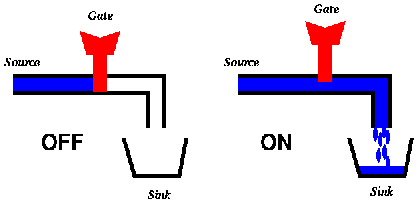
Combinando multiples transistores podemos formar compuertas lógicas


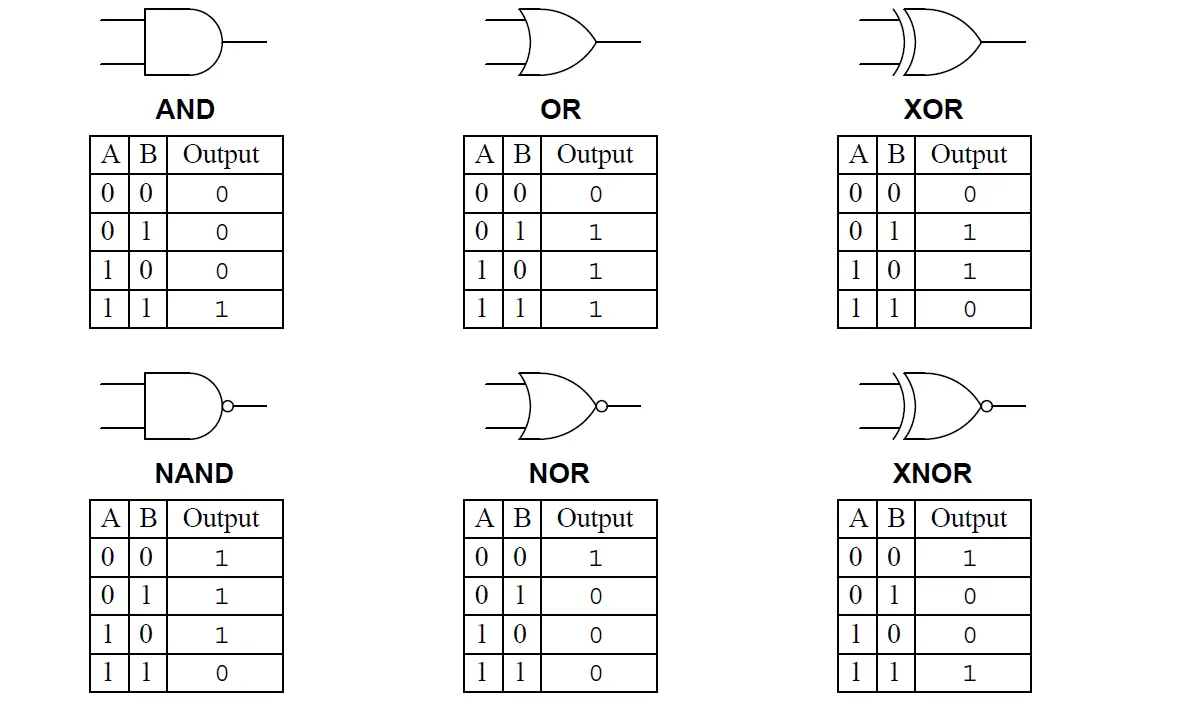
Con múltiples compuertas lógicas podemos formar circuitos [integrados](https://learn.sparkfun.com/tutorials/integrated-circuits) más complejos que resuelvan problemas concretos.



{%youtube Fxv3JoS1uY8%}
## ¿Arduino?
 
> Arduino is an open-source hardware and software company, project, and user community that designs and manufactures single-board microcontrollers and microcontroller kits for building digital devices. Its hardware products are licensed under a CC BY-SA license, while the software is licensed under the GNU Lesser General Public License (LGPL) or the GNU General Public License (GPL), permitting the manufacture of Arduino boards and software distribution by anyone. Arduino boards are available commercially from the official website or through authorized distributors.
from [wikipedia](https://en.wikipedia.org/wiki/Arduino)

### Freedom to use, understand, modify and share your tools.
The Arduino project has been very important in opening **black boxes**, the electronic world has changed dramatically since this project became popular, introducing people from completely different fields to the world of electronics and allowing the use of this tools in all kind of creative processes.

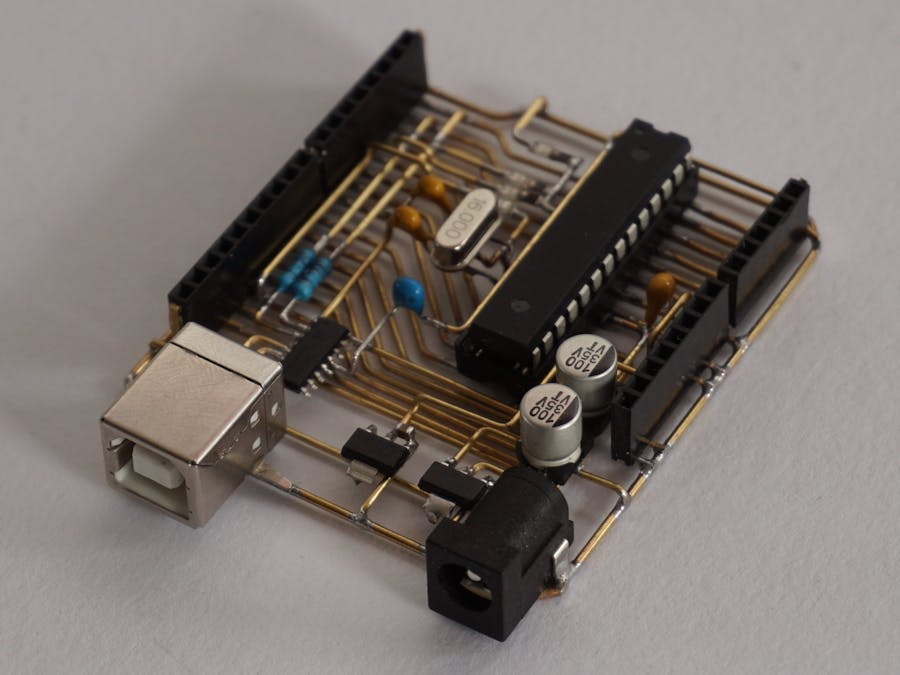
### Arduino components
Arduino is not just a board, it is composed by tree complementary parts, obviously the **hardware**, the **software**, and the **community**.
Each of this has an important role on growing collective knowledge on electronics. Their approach is always **based on openness and the idea of summing efforts**, on the hardware side you will see support for all type of boards, independently if there are produced by Arduino group or not, they also release circuit schematics, so anyone can produce and sell boards.
On the software side, creating an accessible IDE, and most importantly _cores_ and libraries that allow easy access to previously difficult and very technical features and functions. Allowing beginners and non technical inclined people to begin prototyping their own ideas.
And the community as producer of a very large amount of knowledge in the form of tutorials, libraries, open sourced projects.

:::info
**Resources**
[Arduino The Documentary (2010)](https://www.youtube.com/watch?v=D4D1WhA_mi8)
[How Arduino is open-sourcing imagination | Massimo Banzi](https://www.youtube.com/watch?v=UoBUXOOdLXY)
[The Arduino ecosystem](https://docs.arduino.cc/learn/)
[Adafruit Learn Arduino series](https://learn.adafruit.com/series/learn-arduino)
:::
### Pinout
[](https://i2.wp.com/marcusjenkins.com/wp-content/uploads/2014/06/ARDUINO_V2.png)
## Inputs y Outputs

Cruzando la calle
Obtenemos información con los **ojos** - _**INPUTS**_
Tomamos decisiones con el **cerebro** - _**PROCESSING**_
Actuamos con las **piernas** - _**OUTPUTS**_
## Reading a button
Input digital con la función [DigitalRead()](https://www.arduino.cc/reference/en/language/functions/digital-io/digitalread/)

~~~arduino
int buttonPin = 2;
int value = 0;
void setup() {
pinMode(buttonPin, INPUT);
Serial.begin(115200);
}
void loop() {
value = digitalRead(buttonPin);
Serial.println(value);
}
~~~
## Blinking led
Output digital con la función [digitalWrite()](https://www.arduino.cc/reference/en/language/functions/digital-io/digitalwrite/) haciendo uso de la función [delay](https://www.arduino.cc/reference/en/language/functions/time/delay/)

```arduino
int ledPin = 9;
void setup() {
pinMode(ledPin, OUTPUT);
}
void loop() {
digitalWrite(ledPin, HIGH);
delay(1000);
digitalWrite(ledPin, LOW);
delay(1000);
}
```
## Input y output digital

~~~arduino
int buttonPin = 2;
int ledPin = 9;
int value = 0;
void setup() {
pinMode(buttonPin, INPUT);
pinMode(ledPin, OUTPUT);
}
void loop() {
value = digitalRead(buttonPin);
if (value == HIGH) {
digitalWrite(ledPin, HIGH);
} else {
digitalWrite(ledPin, LOW);
}
}
~~~
 Sign in via Facebook
 Sign in via X(Twitter)
 Sign in via GitHub
 Sign in via Dropbox
 Sign in with Wallet
Connect another wallet
Sign in with Wallet
Connect another wallet