---
robots: noindex, nofollow
tags: JavaScript
---
# JavaScript 基礎課程 (7)
## 上次上課提要
- Loop(迴圈)
- While Loop
符合某條件時,重複執行某件事
```javascript=
let randomNumber = 0;
while (randomNumber < 0.5) {
randomNumber = Math.random();
console.log(randomNumber);
}
```
- For Loop
重複執行某件事固定的次數
```javascript=
for (let i = 0; i < 5; i++) {
console.log(i);
}
```
搭配陣列使用
```javascript=
// index 0 1 2 3 4
let numbers = [1, 2, 3, 4, 5];
for (let i = 0; i < numbers.length; i++) {
console.log(numbers[i]);
}
for (let number of numbers) {
console.log(number);
}
numbers.forEach(function printNumber(number) {
console.log(number);
});
// for each number in numbers, print each number
```
- `break`:跳脫迴圈
- `continue`:跳過某一次迭代
## 網頁的 JavaScript 是怎麼執行的?
- 我們打開瀏覽器
- 輸入網址連到某個網站
- 那個網址的伺服器會回傳一份 HTML 文件 `index.html`
- 瀏覽器收到文件後,一行一行閱讀(它看得懂 HTML、CSS、JavaScript)
- 只要瀏覽器發現 HTML 裡面有 JavaScript,就會執行
## 如何在網頁裡放入 JavaScript?
```html=
<html>
<head>
<!-- Inline Script -->
<script>
console.log('Hello');
console.log('World');
</script>
<!-- External Script -->
<script src="scripts.js"></script>
</head>
<body>
</body>
</html>
```
> 講到這邊會發現,之前幾堂課教的 JavaScript 大部分都跟網頁互動沒什麼關係,比較像是教你怎麼儲存跟轉換資料⋯⋯
## JavaScript 怎麼知道現在 HTML 長怎樣的?
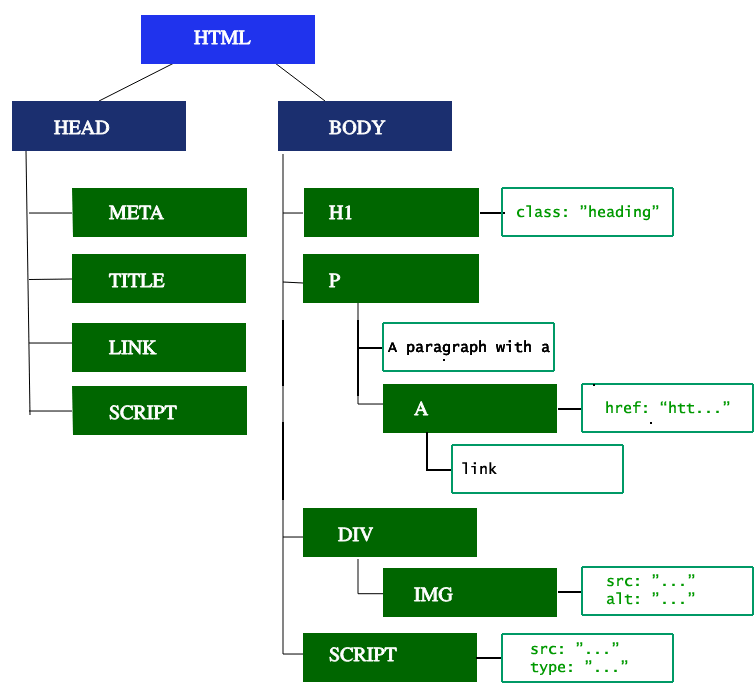
倚靠一個叫做 Document Object Model (DOM) 的東西。它是對應 HTML 結構的 JavaScript 物件,也是 HTML 跟 JavaScript 的橋樑。我們可以利用它來存取、甚至改變 HTML Document。
> 有興趣的同學可以參考下列文件(預告:就算切換到中文還是很不好懂):
> https://developer.mozilla.org/en-US/docs/Web/API/Document_Object_Model
> https://developer.mozilla.org/en-US/docs/Web/API/Document_Object_Model/Introduction
## JavaScript 套路
- 操縱 HTML
先選到某個 HTML 元素,再操縱它(例如:讀取/改變它的值、複製它、刪除它)。
- 監聽事件
觀察視窗或使用者的狀態,當某些行為/事件發生時,觸發特定的動作。
## 操縱 HTML
**先選**到某個元素,之**後**再改**變**它。
### 選取元素
```html=
<html>
<head>...</head>
<body>
<header>
<nav>...</nav>
</header>
<div>
<h1>...</h1> <!-- 假設目標要選到它 -->
<div>
<p>...</p>
<p>...</p>
<p>...</p>
</div>
</div>
<footer>...</footer>
</body>
</html>
```
#### 抽絲剝繭、層層推進
```javascript=
document.body // <body>
document.body.children // [<header>, <div>, <footer>]
document.body.children[1] // <div>
document.body.children[1].children // [<h1>, <div>]
document.body.children[1].children[0] // <h1>
document.body.children[1].children[1].children[2] // 最後一個 <p>
```
#### Document.querySelector()
- Input: CSS 選擇器
- Output: 選到的**第一個**元素 或 `null`
```javascript=
// 有符合 CSS 選擇器的元素
let h1Tag = document.querySelector('h1');
console.log(h1Tag); // <h1>
// 沒有符合 CSS 選擇器的元素
let h2Tag = document.querySelector('h2');
console.log(h2Tag); // null
```
---
#### 資料型別:`null`
刻意表示沒有值的資料型別。`null` 跟 `undefined` 很容易搞混,前者是「有值但沒內容」,後者是「還沒有值」。
---
#### Document.querySelectorAll()
- Input: CSS 選擇器
- Output: 包含選到所有元素的陣列 或 空陣列 `[]`
```javascript=
// 有符合 CSS 選擇器的元素
let divTags = document.querySelectorAll('div');
console.log(divTags); // [<div>, <div>, ...]
// 沒有符合 CSS 選擇器的元素
let hrTags = document.querySelectorAll('hr');
console.log(hrTags); // []
```
### 改變元素
#### 移除元素
```javascript=
let emptySpan = document.querySelector('spanaqio');
if (emptySpan !== null) {
emptySpan.remove();
}
```
#### 變更元素的屬性或樣式
```javascript=
// 改變某個 <p> 的文字
let pTag = document.querySelector('p');
pTag.textContent = '新的文字';
// 改變某個 <div> 的樣式
let divTag = document.querySelector('.hello'); // <div>
// 增減 class
divTag.classList.add('hidden'); // <div class="hidden">
divTag.classList.remove('hideen'); // <div>
// 加上 inline styles
divTag.style.color = 'gray'; // <div style="color: gray;">
divTag.style.display = 'none'; // <div style="color: gray; display: none;">
```
#### 新增元素
```javascript=
// 產生一個 <div>
let myDiv = document.createElement('div');
// 改變 <div> 的文字
myDiv.textContent = '平凡無奇的 DIV';
// 把 <div> 加到 <body> 裡面
let bodyTag = document.querySelector('body');
bodyTag.appendChild(myDiv);
```
## 程式練習
1. 更新 `.eslintrc.json`:
```json=
{
"env": {
"browser": true,
"es2021": true
},
"extends": [
"airbnb-base"
],
"parserOptions": {
"ecmaVersion": 12,
"sourceType": "module"
},
"rules": {
"func-names": "off",
"linebreak-style": "off",
"no-alert": "off",
"no-console": "off",
"no-continue": "off",
"no-param-reassign": [
2,
{ "props": false }
],
"no-plusplus": [
"error",
{ "allowForLoopAfterthoughts": true }
],
"no-restricted-syntax": [
"error",
{
"selector": "ForInStatement",
"message": "for..in loops iterate over the entire prototype chain, which is virtually never what you want. Use Object.{keys,values,entries}, and iterate over the resulting array."
},
{
"selector": "LabeledStatement",
"message": "Labels are a form of GOTO; using them makes code confusing and hard to maintain and understand."
},
{
"selector": "WithStatement",
"message": "`with` is disallowed in strict mode because it makes code impossible to predict and optimize."
}
],
"prefer-arrow-callback": "off",
"prefer-const": "off",
"prefer-template": "off"
}
}
```
4. 下載 `where-are-the-cats.zip`
5. 解壓縮到 `javascript-basics` 底下的 `src` 資料夾裡
6. 打開 `javascript-basics/src/where-are-the-cats/scripts/code-challenge.js`
7. 按照裡面說明寫出對應的程式碼
8. 想辦法讓網頁看起來變成[這樣](https://mingjunlu.github.io/lazy-loading-example/)
## w13 作業
:::danger
期限:**5/23(週日)23:59**
:::
### 1. 完成上述程式練習
- 完成上述程式練習後,單獨將 `where-are-the-cats` 資料夾上傳到 Netlify 後,繳交網站連結到 [monday.com](https://gsstw.monday.com/boards/1074623203/)
### 2. 透過 Slack 發問
- 可問:
- 上課的內容
- 跟 JavaScript 有關的問題
- 看不懂的 ESLint 錯誤訊息
- 寫作業或課堂練習時遇到的困難
- 程式類的問題請附上程式碼或錯誤訊息
- 行數少的話,直接用 Slack 的 code block 功能附上
- 行數多的話請貼到 CodePen 再附上連結
- 跟別人問一樣的問題也沒關係,總之習慣發問就對了
---
<div style="display: flex; justify-content: space-between;">
<a href="https://hackmd.io/@gsscsid/javascript-basics-6">⬅️ JavaScript 基礎入門課程 (6)</a>
<a href="https://hackmd.io/@gsscsid/javascript-basics-8">JavaScript 基礎入門課程 (8) ➡️</a>
</div>
 Sign in with Wallet
Connect another wallet
Sign in with Wallet
Connect another wallet