---
robots: noindex, nofollow
tags: JavaScript
---
# JavaScript 基礎課程 (5)
## 上次課程提要
- Function
- Function 的四個組成要素
- 定義與呼叫 function
- 資料型別:`undefined`
### 補充:參數的順序
```javascript
function print(first, second, third, fourth) {
console.log(first);
console.log(second);
console.log(third);
console.log(fourth);
}
// 全部參數都傳
print(1, 2, 3, 4);
// 1
// 2
// 3
// 4
// 只傳前面三個參數
print('Ann', 'Bob', 'Cindy');
// 'Ann'
// 'Bob'
// 'Cindy'
// undefined
// 只傳第四個參數
print(undefined, undefined, undefined, 'David');
// undefined
// undefined
// undefined
// 'David'
```
## 今日進度
- 資料型別:
- Object(物件)
- Array(陣列)
- Netlify 操作簡介
## Object(物件)
- 把相關的資訊以 key-value pair 的形式儲存在同一個值
- 以 `string` 當作 key(不能重複)
- value 可以存放任意資料型別(內容重複也無所謂)
- key 會指向 value,但反過來不行
### Key-Value Pair
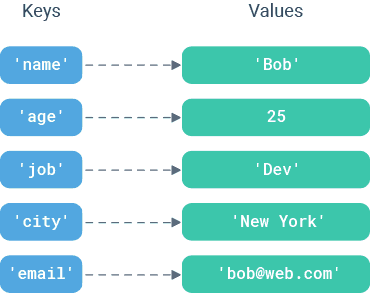
### 想成是銀行保險箱⋯⋯

- key:保險箱號碼
- value:保險箱裡頭的東西
- 可以依照鑰匙號碼找到對應的保險箱,並拿出裡面的東西
- 光看拿出來的東西,無法回推保險箱的號碼
### 使用方法
#### 宣告物件
```javascript
let myBook = {
title: '原子習慣',
author: 'James Clear',
translator: '蔡世偉',
price: 330, // 以前不加最後一個逗號,現在新的瀏覽器可加可不加
};
```
#### 存取物件的屬性(property)
```javascript
objectName.propertyName
// └── 把「.」看成「的」,某物件的某屬性
```
```javascript
myBook.title // '原子習慣'
myBook.pageCount // undefined
```
> 我們用 `console.log` 的時候,其實就是在存取 `consnole` 這個物件的 `log` 屬性
#### 更改某個屬性的值
```javascript
myBook.price = 261;
```
#### 移除某個屬性
```javascript
delete myBook.translator;
console.log(myBook.translator); // undefined
```
### 使用 Object 的好處
#### 把多個參數包成一個參數,減少參數數量
```javascript
function evaluateCourse(course) {
// 選課邏輯
if (course.time < 12) {
return false;
}
if (course.difficulty > 3) {
return false;
}
if (course.funLevel === 1) {
return false;
}
return true;
}
// 英文
let englishCourse = {
credit: 2,
difficulty: 5,
funLevel: 2,
time: 8,
};
// 色彩學
let colorTheoryCourse = {
credit: 2,
difficulty: 2,
funLevel: 1,
time: 15,
};
// 視覺傳達理論
let visualCommunicationCourse = {
credit: 3,
difficulty: 5,
funLevel: 4,
time: 13,
};
// 真正在使用時,不需要傳遞很多參數
let shouldTakeEnglishCourse = evaluate(englishCourse);
let shouldTakeColorTheoryCourse = evaluate(colorTheoryCourse);
let shouldTakeVisualCommunicationCourse = evaluate(visualCommunicationCourse);
```
## Array(陣列)
- 把相關的資訊按照順序儲存在同一個值
- 陣列有 index(索引值)紀錄每個值的順序(從 0 開始算)
- 生活中的例子:定期紀錄體重、瀏覽紀錄、Instagram 的貼文順序

### 使用方法
#### 宣告陣列
```javascript
let myScores = [62, 70, 48, 80];
```
#### 存取陣列裡的值
```javascript
myScores[0] // 62
myScores[1] // 70
myScores[2] // 48
myScores[3] // 80
myScores.length // 4(目前陣列的長度)
myScores[myScores.length - 1] // 存取陣列最後一個值
```
#### 更改陣列裡某個值
```javascript
myScores[0] = 64;
```
#### 增加/移除陣列裡的值
```javascript
// 把值加到陣列的最後面
myScores.push(76);
console.log(myScores); // [64, 70, 48, 80, 76]
// 移除陣列最後一個值
myScores.pop();
console.log(myScores); // [64, 70, 48, 80]
// 把值加到陣列的最前面
myScores.unshift(83);
console.log(myScores); // [83, 64, 70, 48, 80]
// 移除陣列第一個值
myScores.shift();
console.log(myScores); // [64, 70, 48, 80]
// 移除中間的值
myScores.splice(2, 1); // 找到第 2 個索引值位置,移除 1 個值,不加上新的值
console.log(myScores); // [64, 70, 80]
// 在中間加東西
myScores.splice(1, 0, 7); // 找到第 1 個索引值位置,移除 0 個值,加上 7 這個值
console.log(myScores); // [64, 7, 70, 80]
```
#### 示意動畫(`push`、`pop`、`shift`、`unshift`)
https://simplestepscode.com/array-push-pop-shift-unshift
### Object vs. Array
| | Object | Array |
| ------------ | ----------------------- | ----------- |
| 資料儲存形式 | key-value pair | 依序儲存 |
| 資料存放限制 | key: 字串; value: 任意 | 任意 |
| 如何存取值 | 透過 property | 透過 index |
| 使用時機 | 順序不重要時 | 資料順序重要時 |
## Netlify 操作簡介
- 重新上傳網頁
- 上傳新的網頁
- 改網站名稱
- 刪除網站
---
<div style="display: flex; justify-content: space-between;">
<a href="https://hackmd.io/@gsscsid/javascript-basics-4">⬅️ JavaScript 基礎入門課程 (4)</a>
<a href="https://hackmd.io/@gsscsid/javascript-basics-6">JavaScript 基礎入門課程 (6) ➡️</a>
</div>
 Sign in with Wallet
Connect another wallet
Sign in with Wallet
Connect another wallet