# Room and Data Store
雖然現在大部分APP都是雲資料,但是我們沒辦法控制使用者的連線狀況,為了維繫在連線狀態的流暢度,我們會存一些輕量的資料在手機裡面。
Room 是一個 Object-relational mapping (ORM, O/RM, and O/R mapping),讓 OOP 2的 code 跟 關聯是資料庫產生連結在一起。
### 目的
room 提供了一個抽象層,讓開發者不用直接用 sql 語法,也可以使用物件做資料的操作
## Room 的三大元件
* Database : 保存資料庫,並且讓資料庫跟程式保持連線的存取點
* Entity: 資料庫裡面的資料表
* Data Access Object: 提供應用程式可用於查詢、更新、插入及刪除資料庫中資料的方法

## Annotation in Room
### 1. @Entity
每一個被宣告為 entity 的 class 就是一個 table。在這個table 裡面,每一個 column 都是 @ColumnInfo ,並且每一個 table 會用
另外我們會看到另一個annotation 叫做 @PrimaryKey,這在每一個 table 只會有一個,用來唯一識別整個table 所有的 row 的紀錄
對應 PrimaryKey 的是 @ForeignKey,當其他table 與自己相關聯的時候,我們的資料做了任何更動,foreignkey 就可以幫助我們也去更動其他table的指令(這個提高效率、自動幫資料庫彼此關聯的過程稱為 referential integrity) 。
### 2. @Dao
Dao 全名被叫做 Data Access Object (DAO),負責定義存取資料庫的 methods。而在 kotlin 裡面,我們會用dao 去 一個定義 interface 或是 abstract class ,來讓我們整合到 coroutine。
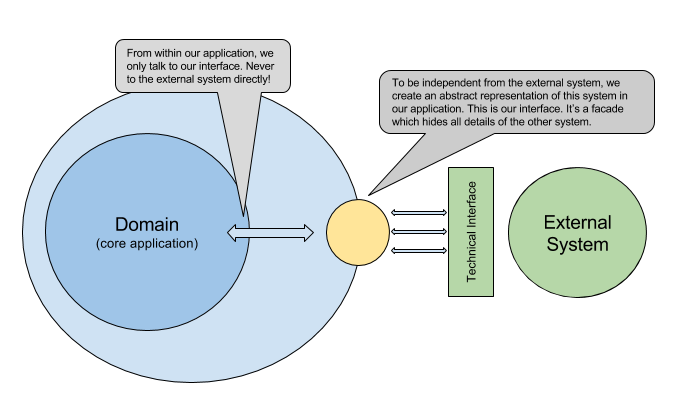
為什麼我們會使用 interface呢 ? 透過interface 或是抽象化的物件時,我們就可以降低兩個物件的耦合程度,只讓interface 或是 abstract class來幫忙溝通,而interface 裡面是空的,除了對準彼此的資料型別,不會幫我們多做任何事情。
這樣做的好處是,我們可以確保在我回傳的資料型別一致為前提之下,我仍然可以完整使用另一個物件的服務,另一方面則是單元測試比較單純。
### 3. CRUD
#### **@Insert**
標示一個 function 為 insert method,插入資料到資料庫
#### **@Update**
表示 function 是更新整個資料的 method
#### **@Upsert**
標示一個 method 為 insert 或 update method。根據 primary key 檢查參數中的 entity 是否已經在資料庫。如果已經存在,它會更新此筆 entity。
#### **@Delete**
表示 function 是刪去資料的 method
#### **@Query**
標示一個 method 為 query method。而在room 裡面,我們會需要用SQL Method 來和 room 溝通
**4. @Transaction**
在被標示 transaction 的 function 裡面,裡面有兩項以上的 Query 可以在不中斷的前提之下進行。
**5. @Database**
標示一個 class是RoomDatabase,而這個 class 必須為 abstract class 。在這個class 裡面,我們可以宣告一個 dao()取得 上面的 data access object。
```kotlin=
@Database(entities = [User::class], version = 1)
abstract class AppDatabase : RoomDatabase() {
abstract fun userDao(): UserDao
}
```
### 為什麼 Room 會需要使用 Coroutine?
為了避免資料搜尋會耽誤到 UI Thread,Room 不允許在 Main Thread 上存取資料庫。因此,我們勢必會需要把 dao 設定為非同步。
那 suspend function 的意義是什麼? 雖然suspend function 不是必要的,但如果我們在coroutine 裡面使用function 而沒有mark 成suspend function ,那這個function 可能會塞住整個thread,造成crash 的風險 。
## Data Migration
### 自動遷移
在我們的程式裡面,如果我們的資料庫新增了某些column ,而這個時候使用者沒有即時更新自己的程式,那這個時候使用者所使用的程式找不到新的欄位,程式就有可能閃退。
為了避免這個情況發生,我們會需要寫好邏輯,當使用者找不到欄位時,我們的程式可以自動幫使用者遷移到新的資料庫。
```kotlin=
// Database class before the version update.
@Database(
version = 1,
entities = [User::class]
)
abstract class AppDatabase : RoomDatabase() {
...
}
// Database class after the version update.
@Database(
version = 2,
entities = [User::class],
autoMigrations = [
AutoMigration (from = 1, to = 2)
]
)
abstract class AppDatabase : RoomDatabase() {
...
}
```
在上面的程式碼中,除了記錄了database 有兩個 version ,也透過`` autoMigration``來告訴資料庫說,當這個資料庫沒辦法在這個程式運作正常時,我就自動把資料庫從第一版到第二版。
### 手動遷移
如果 Migration 過度複雜,Room 可能沒辦法自動產生合適的Migration Path。這個情況必須導入 Migration Class 來自定義 Migration Path。
當我們要實踐 Migration ,``Migration`` Class 會透過override ``Migration.migrate()`` 方法,明確定義 ``startVersion`` 和 ``endVersion`` 之間的遷移路徑。使用 ``addMigrations()`` 方法將 ``Migration ``類別新增至Database
```kotlin=
val MIGRATION_1_2 = object : Migration(1, 2) {
override fun migrate(database: SupportSQLiteDatabase) {
database.execSQL("CREATE TABLE `Fruit` (`id` INTEGER, `name` TEXT, " +
"PRIMARY KEY(`id`))")
}
}
val MIGRATION_2_3 = object : Migration(2, 3) {
override fun migrate(database: SupportSQLiteDatabase) {
database.execSQL("ALTER TABLE Book ADD COLUMN pub_year INTEGER")
}
}
Room.databaseBuilder(applicationContext, MyDb::class.java, "database-name")
.addMigrations(MIGRATION_1_2, MIGRATION_2_3).build()
```
### Testing Migration
建議一次測完所有 Database
```kotlin=
@RunWith(AndroidJUnit4::class)
class MigrationTest {
private val TEST_DB = "migration-test"
// Array of all migrations.
private val ALL_MIGRATIONS = arrayOf(
MIGRATION_1_2, MIGRATION_2_3, MIGRATION_3_4)
@get:Rule
val helper: MigrationTestHelper = MigrationTestHelper(
InstrumentationRegistry.getInstrumentation(),
AppDatabase::class.java.canonicalName,
FrameworkSQLiteOpenHelperFactory()
)
@Test
@Throws(IOException::class)
fun migrateAll() {
// Create earliest version of the database.
helper.createDatabase(TEST_DB, 1).apply {
close()
}
// Open latest version of the database. Room validates the schema
// once all migrations execute.
Room.databaseBuilder(
InstrumentationRegistry.getInstrumentation().targetContext,
AppDatabase::class.java,
TEST_DB
).addMigrations(*ALL_MIGRATIONS).build().apply {
openHelper.writableDatabase.close()
}
}
}
```
# Reference
1. https://developer.android.com/training/data-storage/room?hl=zh-tw
2. https://waynestalk.com/android-room/
3. https://www.youtube.com/watch?v=bOd3wO0uFr8
 Sign in with Wallet
Connect another wallet
Sign in with Wallet
Connect another wallet