# Software Testing
[TOC]
Testing plays a pivotal role in guaranteeing the reliability and stability of software systems. Beyond merely detecting bugs, it represents a strategic investment in the quality and long-term maintainability of your codebase. By rigorously testing software, you safeguard against unforeseen complications arising from code modifications. For research software, systematic testing can ensure the reliability, accuracy, and scientific validity of the software, thereby enhancing the credibility and reproducibility of research findings.
:::info
⏩ **Recommended resources**
For a solid introduction and motivation on writing tests, you might want to explore
- the Turing Way: [**Chapter on code testing**](https://the-turing-way.netlify.app/reproducible-research/testing)
- Carpentries Intermediate Research Software Development: [**Testing at scale**](https://carpentries-incubator.github.io/python-intermediate-development/20-section2-intro/index.html)
- the Code Refinery: [**Lesson on testing**](https://coderefinery.github.io/testing/motivation/)
:::
## Introduction to writing tests
### What to test?
In designing test cases for research software, it can be useful to conceptually differentiate between tests that verify **the technical correctness** the code and tests that check **the scientific validity** of the results. With technical software tests, you can for example check whether a function behaves correctly for multiple input data types and produces errors and exceptions accordingly. With a scientific test, you could compare the outcome of a function to known experimental results.
The following questions can help you decide what to test in your software:
- How can I ensure the algorithms and mathematical models implemented in the software are correct?
- How can I verify that the input data types, formats, and ranges adhere to expected standards and constraints?
- How does the software behave at boundary conditions and extreme values of input parameters?
- How does the software perform under varying workloads and dataset sizes, and is it scalable for large-scale simulations or data processing tasks?
- How do I compare the software's results against existing literature, experimental data, or validated simulations to validate their accuracy?
### Types of tests
In writing tests for research software, we can differentiate between four types of tests: **unit tests**, **integration tests**, **regression tests**, and **end-to-end tests**.
#### Unit tests
A unit test is a type of test where individual units or components of the software application are tested in isolation from the rest of the application. A unit can be a function, method, or class. The main purpose of unit testing is to validate that each unit of the software performs as designed.
#### Integration tests
Integration testing is a level of software testing where individual units are combined and tested as a group. The purpose is to verify that the units work together as expected and that the interfaces between them function correctly. Integration tests aims to expose defects in the interactions between integrated components.
#### Regression tests
Regression testing aims to verify that recent code changes haven't adversely affected existing features or functionality. It involves re-running previously executed test cases to ensure that the software still behaves as expected after modifications. The primary purpose of regression testing is to catch unintended side effects of code changes and ensure that new features or bug fixes haven't introduced regressions or broken existing functionality elsewhere in the code. Regression tests can include both unit tests and integration tests, as well as higher-level tests such as system tests. They are a good place to test the scientific validity of the software.
#### End-to-end tests
End-to-end testing are focussed on validating the entire system from start to finish, simulating real use cases. The goal is to verify the software functions as a whole from the user's perspective.
## Getting started with testing
#### Designing a test case
For more complex integration, regression, or end-to-end tests, it can be useful to first describe the test case in words.
1. **Description:** _Description of test case_
1. **Preconditions:** _Conditions that need to be met before executing the test case_
1. **Test Steps:** _To execute test cases, you need to perform some actions. Mention all the test steps in detail and the order of execution_
1. **Test Data:** _If required, list data that needed to execute the test cases_
1. **Expected Result:** _The result we expect once the test cases are executed_
1. **Postcondition:** _Conditions that need to be achieved when the test case was successfully executed_
#### Testing strategy
1. Learn the basics of testing for your programming language.
2. Choose and setup a testing framework.
3. Practice with writing unit tests for small functions or methods.
4. Identify critical parts of your software that requires testing and write tests to verify its proper technical and scientific functioning.
5. Incrementally add tests. Whenever you add or change a function, try to write a test to cover the code.
:::info
:bulb: **Tips and good practices**
- Choose descriptive and meaningful names for your test files and functions that clearly indicate what aspect of the code they are testing. For example, tests for the function `draw_random_number()` should be contained in the file `test_draw_random_number.py`. This file will then contain all tests for this function.
- Large functions are difficult to test. Aim to write modular code consisting of small functions.
- Ensure that each test case is independent and does not rely on the state of other tests or external factors.
- Limit the number of assert statements per test. The executation of a test function is terminated after an assert statement fails.
- Aim for comprehensive test coverage to ensure that critical parts of your codebase are thoroughly tested. A good benchmark is to test at least 70% of your code base with unit tests.
- Design tests to run quickly to encourage frequent execution during development and continuous integration.
- Store your tests in a separate folder, either in the root of your repository called `tests/` or in `src/tests/`.
:::
## Testing in Python
In Python, two popular frameworks are used: `pytest` and `unittest`. In this guide, we demonstrate the use of `pytest`. When starting out with testing in Python, it is [**recommended to use `pytest`**](https://realpython.com/pytest-python-testing/#what-makes-pytest-so-useful).
:::spoiler *What is the difference between pytest and unittest?*
The main difference the two frameworks is that `pytest` offers a more user-friendly and less verbose syntax, allowing for simpler test writing and better readability. `unittest` is part of the Python standard library and follows a more traditional object-oriented style of writing tests.
:::
#### Step 1. Setup a testing framework
Install pytest using pip
```bash
pip install pytest
```
Setup your test framework with the following structure in your repository:
```markdown
src/
mypkg/
__init__.py
add.py
draw_random_number.py
tests/
test_add.py
test_draw_random_number.py
...
```
#### Step 2. Identify testable units
Identify functions, methods, or classes that need to be tested within the Python codebase.
#### Step 3. Write test cases
Write test functions using the pytest framework to test the identified units. For example:
```python
# src/mypkg/add.py
def add(x,y):
return x + y
```
```python
# tests/test_add.py
from mypkg import add
def test_add():
assert add(1, 2) == 3
assert add(0, 0) == 0
assert add(-1, -1) == -2
```
:::success
:bulb: Limit the number of assert statements in a single test function. Otherwise, when an assert fails, pytest will not test the remaining assertions in the test function.
:::
#### Step 4. Run tests locally
Run the test suite locally using the pytest command to ensure it executes correctly.
```bash
pytest test_add.py
```
Pytest will automatically discover all files that are prepended with `test_`. To run all tests, execute `pytest` without any arguments.
#### Step 5. Interpret and fix tests
Interpret the test results displayed in the console to identify any failures or errors. If errors occur, debug the failing tests by examining failure messages and stack traces.
#### Step 6. Run coverage report locally
Generate a coverage report to gain insights into which parts of the codebase have been executed during testing (see [Code Coverage](#Code-Coverage)).
#### Step 7. Run tests remotely
Integrate the test suite with a Continuous Interation service (e.g., GitHub Actions) to automate testing.
:::success
:bulb: **Learning materials for automated testing**
- [Intermediate Research Software Development - CI for Automated Testing](https://carpentries-incubator.github.io/python-intermediate-development/23-continuous-integration-automated-testing/index.html)
- [Code Refinery - Automated testing](https://coderefinery.github.io/testing/continuous-integration/)
:::
#### Examples of repository with tests
- eScience Center - [Project `matchms`](https://github.com/matchms/matchms)
- Pandas library - [Repository tests](https://github.com/pandas-dev/pandas/tree/main/pandas/tests)
:::info
:book: **Further reading:**
- Pytest - [Getting Started](https://docs.pytest.org/en/8.0.x/getting-started.html#get-started)
- Code Refinery - [Pytest exercise](https://coderefinery.github.io/testing/pytest/)
- RealPython - [Effective testing with pytest](https://realpython.com/pytest-python-testing/)
:::
## Testing in MATLAB
MATLAB supports **script-based**, **function-based**, and **class-based** unit tests, allowing for a range of testing strategies from simple to advanced use cases. See the MATLAB documentation for more information:
- [Matlab - Ways to write unit tests](https://nl.mathworks.com/help/matlab/matlab_prog/ways-to-write-unit-tests.html)
- [Script-based testing](https://nl.mathworks.com/help/matlab/matlab_prog/write-script-based-unit-tests.html)
- [Function-based testing](https://nl.mathworks.com/help/matlab/matlab_prog/write-function-based-unit-tests.html)
- [Class-based testing](https://nl.mathworks.com/help/matlab/matlab_prog/author-class-based-unit-tests-in-matlab.html)
Because of the limiting features of the script- and function-based testing, this guide will discuss **class-based testing**. Class-based tests give you access to shared test fixtures, test parameterizaton, and grouping tests into categories.
### Writing tests in MATLAB
:::success
:movie_camera: Check out this short [**MATLAB video**](https://nl.mathworks.com/support/search.html/videos/matlab-unit-testing-framework-74975.html?fq%5B%5D=asset_type_name:video&fq%5B%5D=category:matlab/matlab-unit-test-framework&page=1) on writing class-based tests.
:::
The naming convention for writing a test for a particular MATLAB script is to prefix “test_” to the name of the script that is being tested. For example, a test for the file `draw_random_number.m` should be called `test_draw_random_number.m`. In general, MATLAB will recognize any scripts that are prefixed or suffixed with the string `test` as tests.
:bulb: Check out the MATLAB documentation: [Write Simple Test Case Using Classes](https://nl.mathworks.com/help/matlab/matlab_prog/write-simple-test-case-using-classes.html)
::::info
Additionally, here is an template with explanation for writing of a class-based unit test in MATLAB for the file `sumNumbers.m`:
:::spoiler :eyes: Click to view annotated class-based test example
{%hackmd jSsFy_K2Sp-tL6gZxLWKQg %}
:::
::::
### Executing tests in MATLAB
MATLAB offers four ways to run tests.
#### 1. Script editor
When you open a function-based test file in the MATLAB® Editor or Live Editor, or when you open a class-based test file in the Editor, you can interactively run all tests in the file or run the test at your cursor location.
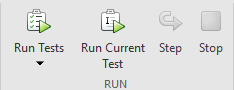
:point_right: [Script Editor documentation](https://nl.mathworks.com/help/matlab/matlab_prog/run-tests-in-editor.html)
#### 2. `runtests()` in Command Window
You can run tests through the MATLAB Command Window, by executing the following command in the root of your repository:
```matlab
results = runtests(pwd, "IncludeSubfolders", true);
```
MATLAB will automatically find all tests. If you make use of tags to categorize tests, you can run specific tags with:
```matlab
results = runtests(pwd, "IncludeSubfolders", true, "Tag", '<tag-name>');
```
:point_right: [`runtests()` documentation](https://nl.mathworks.com/help/matlab/ref/runtests.html#d126e1481769)
#### 3. MATLAB Test Browser App
The Test Browser app enables you to run script-based, function-based, and class-based tests interactively. The app is available since R2023a.
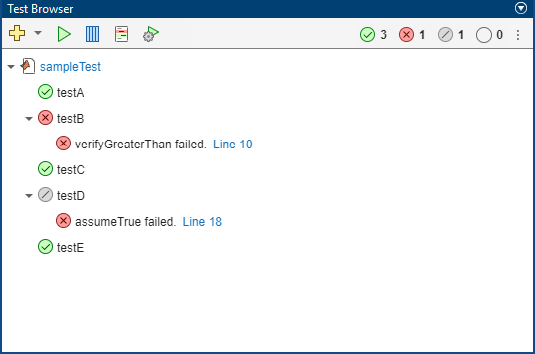
:point_right: [MATLAB Test browser documentation](https://nl.mathworks.com/help/matlab/matlab_prog/run-tests-using-test-browser.html)
#### 4. MATLAB Test
MATLAB Test provides tools for developing, executing, measuring, and managing dynamic tests of MATLAB code, including deployed applications and user-authored toolboxes.
:point_right: [MATLAB Test Addon documentation](https://nl.mathworks.com/products/matlab-test.html)
### MATLAB Simulink
In addition to script, function, and class-based unit tests, MATLAB offers [Simulink Test](https://nl.mathworks.com/products/simulink-test.html) for comprehensive simulation-based testing for Simulink.
- Simulink Test - [Introduction video](https://nl.mathworks.com/videos/simulink-test-overview-99891.html)
- Simulink Test - [Examples](https://nl.mathworks.com/help/sltest/examples.html)
## Useful testing concepts
#### Code Coverage
A code coverage report is a tool to measure the effectiveness of testing by providing insights into which parts of the codebase have been executed during testing.
- MATLAB - [Collect code coverage with Command Window execution](https://nl.mathworks.com/help/matlab/ref/runtests.html#d126e1481788) *(since R2023b)*
- MATLAB - [Code coverage with Test Browser](https://nl.mathworks.com/help/matlab/ref/testbrowser-app.html#:~:text=Generate%20Code%20Coverage%20Report) *(since R2023a)*
- MATLAB - [Collect code coverage](https://nl.mathworks.com/help/matlab/matlab_prog/collect-statement-and-function-coverage-metrics-for-matlab-source-code.html)
- Pytest - [pytest-cov](https://pypi.org/project/pytest-cov/)
- Python coverage - [Documentation](https://coverage.readthedocs.io/en/latest/)
#### Error handling
It is not only useful to test that your code generates the expected behaviour for the appropriate inputs, it is also useful to check that your functions throw the correct expections when this is not the case.
- MATLAB - [Verify function throws specific exceptions](https://nl.mathworks.com/help/matlab/ref/matlab.unittest.qualifications.verifiable.verifyerror.html)
- Pytest - [Assert raised exceptions](https://docs.pytest.org/en/stable/how-to/assert.html#assertraises)
#### Fixtures
Fixtures are predefined states or sets of data used to set up the testing environment, ensuring consistent conditions for tests to run reliably.
- MATLAB - [Create shared fixtures](https://nl.mathworks.com/help/matlab/matlab_prog/write-test-using-shared-fixtures.html)
- Pytest - [How to use fixtures](https://docs.pytest.org/en/7.1.x/how-to/fixtures.html)
#### Parameterization
Parameterization involves running the same test with different inputs or configurations to ensure broader coverage and identify potential edge cases.
- MATLAB - [Create a basic parameterized test](https://nl.mathworks.com/help/matlab/matlab_prog/create-basic-parameterized-test.html)
- Pytest - [Parameterizing unit tests](https://carpentries-incubator.github.io/python-intermediate-development/22-scaling-up-unit-testing/index.html#parameterising-our-unit-tests)
#### Mocking
Mocking is a technique used to simulate the behavior of dependencies or external systems during testing, allowing isolated testing of specific components. For example, if your software requires a connection to a database, you can *mock* this interaction during testing.

- MATLAB - [Create Mock Object](https://nl.mathworks.com/help/matlab/matlab_prog/create-mock-object.html)
- Pytest - [How to monkeypatch/mock modules and environments](https://docs.pytest.org/en/latest/how-to/monkeypatch.html)
:::spoiler :monkey: *Ethymology of monkeypatching*
*The term monkey patch seems to have come from an earlier term, guerrilla patch, which referred to changing code sneakily – and possibly incompatibly with other such patches – at runtime. The word guerrilla, nearly homophonous with gorilla, became monkey, possibly to make the patch sound less intimidating.*
:::
#### Marks and tags
You can use test tags to group tests into categories and then run tests with specified tags.
- MATLAB - [Tag unit tests](https://nl.mathworks.com/help/matlab/matlab_prog/tag-unit-tests.html)
- Pytest - [Working with custom markers](https://docs.pytest.org/en/7.1.x/example/markers.html)
#### Specific library tests
In Python, some libraries come with their own specific test assertions, often compatible with `pytest`. For example, numpy includes a set of assertions for testing a `numpy.ndarray`. For more information, check out [Numpy Test Support](https://numpy.org/doc/stable/reference/routines.testing.html).
 Sign in with Wallet
Connect another wallet
Sign in with Wallet
Connect another wallet