# Automation for software development
[TOC]
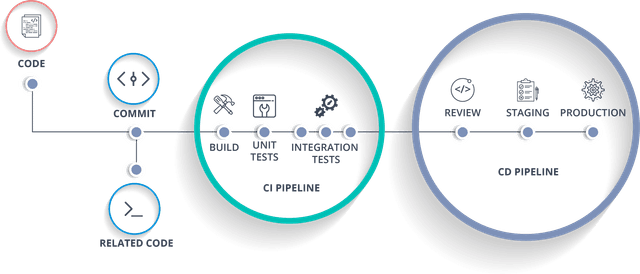
Continuous Integration (CI) refers to the build and unit testing stages of the software release process. Every revision that is committed can trigger an automated build and test. With Continuous Delivery (CD), code changes are automatically built, tested, and prepared for a release to production.
## GitHub Actions
[GitHub Actions](https://docs.github.com/en/actions) is a Continuous Integration and Continuous Delivery (CI/CD) platform that allows you to automate your build, test, and deployment pipeline. You can create workflows that build and test every pull request to your repository, or deploy merged pull requests to production.
:::info
:computer: **Exploring GitHub Actions:** Setting up a demo workflow in GitHub Actions following: https://docs.github.com/en/actions/quickstart.
:::
:::success
**💡 Tips:**
- GitHub has templates available. Go to the **Actions tab** in your repository and select **new workflow** for an overview.
- You can find [**workflow examples**](https://github.com/sdras/awesome-actions) shared in the community.
- Add **`workflow_dispatch`** as a trigger for your GitHub Actions workflow. With this trigger, you can [**manually run an action**](https://docs.github.com/en/actions/managing-workflow-runs/manually-running-a-workflow), instead of having to rely on external triggers. This is quite useful when testing your workflow.
- Test your workflow in a separate branch to avoid committing many small changes during debugging of the workflow.
:::
:::warning
:wrench: **GitLab pipelines**
The TU Delft Gitlab does not (yet) have preconfigured servers available to run [**Gitlab pipelines**](https://docs.gitlab.com/ee/ci/pipelines/), the equivalant of GitHub Actions. In order to set up a pipeline, you will need to request a TU Delft Virtual Private Server and configure a Gitlab runner there. The DCC has developed a [**step-by-step guide**](https://tu-delft-dcc.github.io/infrastructure/gitlab/gitlab_docker.html).
:::
### Automating testing
A common usecase of automation is to trigger automatic testing when pushing changes and creating pull requests.
#### Python
The example below is taken from the CodeRefinery lesson on [Continuous Integration](https://coderefinery.github.io/testing/continuous-integration/).
:::spoiler :rocket: Python testing
```yaml
name: Python package testing
on:
push:
branches: [ "main", "develop" ]
pull_request:
branches: [ "main", "develop" ]
workflow_dispatch:
jobs:
test:
permissions:
contents: read
pull-requests: write
runs-on: ubuntu-latest
steps:
- uses: actions/checkout@v4
- name: Set up Python 3.10
uses: actions/setup-python@v5
with:
python-version: "3.10"
- name: Install dependencies
run: |
python -m pip install --upgrade pip
python -m pip install flake8 pytest pytest-cov
if [ -f requirements.txt ]; then pip install -r requirements.txt; fi
- name: Lint with flake8
run: |
# stop the job if there are Python syntax errors or undefined names
flake8 . --count --select=E9,F63,F7,F82 --show-source --statistics
# exit-zero treats all errors as warnings. The GitHub editor is 127 chars wide
flake8 . --count --exit-zero --max-complexity=10 --max-line-length=127 --statistics
- name: Test with pytest and calculate coverage
run: |
pytest --cov-report "xml:coverage.xml" --cov=.
- name: Create Coverage
if: ${{ github.event_name == 'pull_request' }}
uses: orgoro/coverage@v3.1
with:
coverageFile: coverage.xml
token: ${{ secrets.GITHUB_TOKEN }}
```
:::
#### MATLAB
Matlab has multiple pre-defined GitHub Actions available to use in your workflows: https://github.com/matlab-actions.
:::spoiler :rocket: MATLAB testing
```yaml
name: Generate Test and Coverage Artifacts
on:
push:
branches: [ "main", "develop" ]
pull_request:
branches: [ "main", "develop" ]
workflow_dispatch:
jobs:
test:
name: Run MATLAB Tests
runs-on: ubuntu-latest
steps:
- name: Check out repository
uses: actions/checkout@v4
- name: Set up MATLAB
uses: matlab-actions/setup-matlab@v2
with:
release: R2023b
- name: Run tests
uses: matlab-actions/run-tests@v2
with:
source-folder: src
test-results-junit: test-results/results.xml
code-coverage-cobertura: code-coverage/coverage.xml
- name: Upload coverage reports to Codecov
uses: codecov/codecov-action@v4.0.1
with:
file: code-coverage/coverage.xml
token: ${{ secrets.CODECOV_TOKEN }}
```
:::
This workflow uses Codecov to analyse the coverage report (free service for public repositories).
:arrow_right: Learn more about [Codecov](https://about.codecov.io/)
### Automating documentation generation
[GitHub Pages](https://docs.github.com/en/pages/getting-started-with-github-pages/about-github-pages) is a static site hosting service that takes HTML, CSS, and JavaScript files straight from a repository on GitHub, optionally runs the files through a build process, and publishes a website.
In order to deploy the documentation generated by the workflow below, you need to navigate to **Setting > Pages** in your repository and set:
1. Source: "Deploy from a branch"
1. Branch: `gh-pages` from `root`
It is a best practice to only deploy new documentation to the `gh-pages` branch upon a Pull Request to the `main` branch. This avoids mismatches between the available source code and the documentation.
:::spoiler :rocket: Sphinx building with gh-pages from branch
```yaml
name: documentation
on: [push, pull_request, workflow_dispatch]
permissions:
contents: write
jobs:
docs:
runs-on: ubuntu-latest
steps:
- uses: actions/checkout@v4
- uses: actions/setup-python@v5
with:
python-version: '3.10'
- name: Install dependencies
run: |
pip install -r docs/requirements.txt
- name: Sphinx build
run: |
sphinx-build docs/ docs/_build/
- name: Deploy to GitHub Pages
uses: peaceiris/actions-gh-pages@v4
if: ${{ github.event_name == 'push' && github.ref == 'refs/heads/main' }}
with:
publish_branch: gh-pages
github_token: ${{ secrets.GITHUB_TOKEN }}
publish_dir: docs/_build/
force_orphan: true
```
:::
:::info
**Customizing the workflow:**
- Install dependencies: This example assumes you have a separate `requirements.txt` in the `/docs` folder. Update the location of the `requirements.txt` if you store the sphinx dependencies in the root
:::
:::warning
- With GitHub Free Plan cannot deploy a Pages from a private repository.
- GitHub Pages sites are publicly available on the internet, even if the repository for the site is private.
:::
### Workflows for building Python packages
You can automate the publishing of a new version of your Python package through a GitHub Action. Notice that in the workflow below, the trigger is the creation of a new release on GitHub.
:::spoiler :rocket: Building a Python package
```yaml
name: Upload Python Package
on:
release:
types: [published]
jobs:
deploy:
runs-on: ubuntu-latest
steps:
- uses: actions/checkout@v4
- name: Set up Python
uses: actions/setup-python@v5
with:
python-version: '3.11'
- name: Install dependencies
run: |
python -m pip install --upgrade pip
pip install build
- name: Build package
run: python -m build
- name: Publish package
uses: pypa/gh-action-pypi-publish@release/v1
with:
password: ${{ secrets.PYPI_API_TOKEN }}
```
:::
This action should of course only be triggered if all other workflows (testing, building) have passed.
### Additional concepts
#### Variables and secrets
Secrets are variables that you create in an organization, repository, or repository environment. The secrets that you create are available to use in GitHub Actions workflows. GitHub Actions can only read a secret if you explicitly include the secret in a workflow.
:arrow_right: More information on [Using secrets in Github actions](https://docs.github.com/en/actions/security-guides/using-secrets-in-github-actions).
#### Matrix strategy
A matrix strategy lets you use variables in a single job definition to automatically create multiple job runs that are based on the combinations of the variables. For example, you can use a matrix strategy to test your code in multiple versions of a language or on multiple operating systems.
A job will run for each possible combination of the variables. In the example below, the workflow will run 12 jobs, one for each combination of the `os` and `python-version` variables.
```yaml
jobs:
example_matrix:
strategy:
matrix:
os: [ubuntu-latest, windows-latest, macos-latest]
python-version: ['3.8', '3.9', '3.10', '3.11']
runs-on: ${{ matrix.os }}
steps:
- uses: actions/checkout@v4
- uses: actions/setup-python@v4
with:
python-version: ${{ matrix.python-version }}
```
:arrow_right: [More information on using a matrix for your jobs](https://docs.github.com/en/actions/using-jobs/using-a-matrix-for-your-jobs)
#### Artifacts
[Artifacts](https://docs.github.com/en/actions/using-workflows/storing-workflow-data-as-artifacts) are files or sets of files that are produced during the execution of a workflow and need to be stored or shared between jobs in a workflow.
To upload an artifact, you typically add a step in your workflow:
```yaml
steps:
- name: Upload build output
uses: actions/upload-artifact@v4
with:
name: build-output
path: <path/to/build/output>
```
Artifacts can be downloaded in subsequent jobs of the same workflow using the `actions/download-artifact` action. This is done with a step like:
```yaml
steps:
- name: Download build output
uses: actions/download-artifact@v4
with:
name: build-output
path: <path/to/download>
```
By default, artifacts are retained for 90 days.
## SonarCloud
To automate checking your code quality, we can also make use of a third-party service. [SonarCloud](https://docs.sonarcloud.io/) is a cloud-based code analysis service designed to detect coding issues in 26 different programming languages. The [free plan](https://docs.sonarcloud.io/organizations/payment-and-visibility/) allows you to analyse an unlimited numbers of **public repositories**. Private projects will not be importable on this plan.
1. Make your repository public.
1. Link your GitHub repository to SonarCloud via their [login page](https://sonarcloud.io/login).
1. Follow the [instructions](https://docs.sonarcloud.io/getting-started/github/) to set up the code analysis.
You can also integrate [SonarCloud code analysis in GitHub Actions](https://docs.sonarsource.com/sonarcloud/advanced-setup/ci-based-analysis/github-actions-for-sonarcloud/). Typically, you would create a new workflow file, for example `.github/workflows/sonarcloud.yml`, and configure triggers to your needs. You will need to setup a SonarCloud Token to Github Secrets and configure what needs to be analyzed in `sonar-project.properties`.
:::spoiler Example of SonarCloud GitHub Action
```
name: SonarCloud Workflow
push:
branches:
- master
- main
pull_request:
types: [opened, synchronize, reopened]
jobs:
sonarcloud:
runs-on: ubuntu-latest
steps:
- uses: actions/checkout@v4
with:
fetch-depth: 0 #Their recommendation - disabling shallow clone is recommended for improving relevancy of reporting.
- name: SonarCloud Scan
uses: sonarsource/sonarcloud-github-action@<action version>
env:
SONAR_TOKEN: ${{ secrets.SONAR_TOKEN }}
```
:::
The basic usage step-by-step is described in their [GitHub repository](https://github.com/SonarSource/sonarcloud-github-action).
:::success
:books: **Further reading**
- [Additional configuration examples](https://github.com/sonarsource/sonarcloud-github-action-samples/)
- [Possible analysis parameters](https://docs.sonarsource.com/sonarcloud/advanced-setup/analysis-parameters/)
:::
## Resources
:::spoiler References used in this guide
1. [GitHub Actions Documentation](https://docs.github.com/en/actions)
1. [Awesome Actions - A collection of cool GitHub Actions](https://github.com/sdras/awesome-actions)
1. [GitHub Actions Manual Trigger](https://docs.github.com/en/actions/managing-workflow-runs/manually-running-a-workflow)
1. [GitLab CI/CD Pipelines Documentation](https://docs.gitlab.com/ee/ci/pipelines/)
1. [TU Delft DCC GitLab and Docker Guide](https://tu-delft-dcc.github.io/infrastructure/gitlab/gitlab_docker.html)
1. [CodeRefinery Continuous Integration](https://coderefinery.github.io/testing/continuous-integration/)
1. [MATLAB GitHub Actions](https://github.com/matlab-actions)
1. [Codecov](https://about.codecov.io/codecov-free-trial/?utm_source=google&utm_medium=cpc&utm_campaign=Google_Search_Brand_EMEA_SignUp_Beta&utm_content=g&utm_term=codecov&gclid=Cj0KCQjw9vqyBhCKARIsAIIcLMGgiUOh5fY5fHB_sMK8oeFzVxcs9hvnugmNQVrC3ZlBvJ3l3ZOBkr0aAoPTEALw_wcB&utm_id=%7B20648826161%7D&gad_source=1&gclid=Cj0KCQjw9vqyBhCKARIsAIIcLMGgiUOh5fY5fHB_sMK8oeFzVxcs9hvnugmNQVrC3ZlBvJ3l3ZOBkr0aAoPTEALw_wcB)
1. [GitHub Pages Documentation](https://docs.github.com/en/pages/getting-started-with-github-pages/about-github-pages)
1. [Using Secrets in GitHub Actions](https://docs.github.com/en/actions/security-guides/using-secrets-in-github-actions)
1. [Using a Matrix for Jobs in GitHub Actions](https://docs.github.com/en/actions/using-jobs/using-a-matrix-for-your-jobs)
1. [Storing Workflow Data as Artifacts](https://docs.github.com/en/actions/using-workflows/storing-workflow-data-as-artifacts)
1. [SonarCloud Documentation](https://docs.sonarcloud.io/)
1. [SonarCloud Getting Started Guide](https://docs.sonarcloud.io/getting-started/github/)
1. [SonarCloud GitHub Action Setup](https://docs.sonarsource.com/sonarcloud/advanced-setup/ci-based-analysis/github-actions-for-sonarcloud/)
:::
 Sign in with Wallet
Connect another wallet
Sign in with Wallet
Connect another wallet