# Refactoring and Code Quality
[TOC]
## Code quality
The quality of your software is a critical factor in software development, affecting maintainability, scalability, and reliability. The practice of writing **clean code** refers to writing code that is simple to understand and easy to read for others, not just for the original author. It should be easy to debug and collaborate on, and it should be accessible to future modifications and extensions. Clean code will:
- Clearly communicate its purpose and functionality, avoiding obscure names or complex constructions.
- Be as simple as it possibly can be, with no unnecessary elements.
- Have a clear structure and flow that is understandable to others.
- Have a consistent naming convention.
- Be easily testable.
Both **refactoring** and **clean code practices** aim to make software easier to manage and enhance, making it more reliable and robust over time.
>"Everyone knows that debugging is twice as hard as writing a program in the first place. So if you're as clever as you can be when you write it, how will you ever debug it?""
>**Brian W. Kernighan**
:::info
**Additional reading for quality criteria**
- [A set of Common Software Quality Assurance Baseline Criteria for Research Projects](https://indigo-dc.github.io/sqa-baseline/)
- https://www.eosc-synergy.eu/for-developers/
:::
### Python Enhancement Proposals (e.g. PEP8)
Just as we have ISO standards for a wide range of industries, there are guidelines and best practices on how to write Python code. The main goal for PEP8 is to enhance the readability and consistency of Python code. The reasoning for PEP8 was to create and maintain consistency in code layout, naming conventions, and design patterns. Making it easier to understand and share different developers code across diverse projects worldwide.
:::success
:bulb: **Consider looking into these PEP8 resources:**
- https://realpython.com/python-pep8/
- https://peps.python.org/pep-0008/
- The [`pycodestyle` GitHub repository](https://github.com/PyCQA/pycodestyle) library. It checks your Python code against style conventions found in PEP8.
:::
### Error handling
You can enhance the reliability of your code through proactive error handling. While it's beneficial that errors alert users that something is wrong, the downside is that the error messages they receive are often not helpful or informative.
The University of Utrecht offers a good introduction to handling errors and exceptions in their workshop on [Writing Reproducible Code](https://utrechtuniversity.github.io/workshop-computational-reproducibility/):
:::spoiler Slides from *Writing Reproducible Code* on Code Robustness
<iframe src="https://utrechtuniversity.github.io/workshop-computational-reproducibility/slides/slides_code-quality.html#28" style="width:100%; height:400px;" ></iframe>
:::
::: success
:book: **Further reading**
- [The Turing Way - Writing Robust Code](https://the-turing-way.netlify.app/reproducible-research/code-quality/code-quality-robust.html?highlight=error)
- [Utrecht University - Writing Reproducible Code](https://utrechtuniversity.github.io/workshop-computational-reproducibility/)
:::
### Checking code quality
#### Linters for Python
Linters are tools that analyze source code to flag programming errors, bugs, syntax errors, and suspicious constructs. For Python, linters play a crucial role in ensuring code quality and adherence to coding standards. Moreover, linters can be integrated into most IDEs and they can also be part of a Continuous Integration workflow.
Two common linters are [`pylint`](https://pypi.org/project/pylint/) and [`flake8`](https://pypi.org/project/flake8/).
:::spoiler **When to use `pylint` and when to use `flake8`?**
1. `pylint` is one of the most popular and comprehensive linters for Python. It checks for errors in the code, tries to enforce a coding standard, and looks for code smells. It can also be customized to adjust to any coding style and supports plugins to add additional checks.
2. `flake8` is a wrapper around `PyFlakes` (checks Python code for syntax errors) and `pycodestyle` (checks whether Python code is compliant with PEP8 conventions). It’s highly configurable, with options to ignore certain checks and errors, and is often used in continuous integration systems.
While `pylint` provides thorough analysis, `flake8` offers speed and simplicity for basic style enforcement. Many combine both tools to maximize code quality and compliance, using `flake8` for rapid checks and `pylint` for more detailed examinations.
:::
#### Formatters for Python
Formatters are tools that automatically adjust the formatting of your code to make it consistent and readable according to predefined style guidelines. They do not identify errors in the logic of the code but instead restructure the whitespace, line breaks, and indentation so that the code is more uniform across a project. For Python, [Black](https://pypi.org/project/black/) is commonly used as a formatter.
:arrow_right: [Black Documentation](https://black.readthedocs.io/en/stable/index.html)
:::info
:exclamation: **Linters vs formatters**
In short, linters are about code quality and correctness, while formatters focus on code aesthetics and consistency.
:::
:::success
:books: **Further reading**
* [Turing Way - Code Quality](https://the-turing-way.netlify.app/reproducible-research/code-quality)
* [Turing Way - Code Style](https://the-turing-way.netlify.app/reproducible-research/code-quality/code-quality-style)
* [Python Code Quality](https://realpython.com/python-code-quality/)
* [The Alan Turing Institute - Linters](https://alan-turing-institute.github.io/rse-course/html/module07_construction_and_design/07_03_linters.html)
:::
#### Tools for MATLAB
MISS_HIT is a compiler framework designed for MATLAB, accompanied by a suite of tools aimed at enhancing code quality and accuracy. It provides a range of tools suitable for various levels of static analysis.
[MISS_HIT Documentation](https://florianschanda.github.io/miss_hit/)
[MISS_HIT Website](https://misshit.org)
#### SonarCloud
[SonarCloud](https://sonarcloud.io/) is a cloud-based service that provides inspection of code quality to perform automatic reviews with static code analysis to detect bugs, code smells and security vulnerabilities in a project. It supports many programming languages and integrates with GitHub (and GitLab and Bitbucket) as part of the Continuous Integration workflows. SonarCloud is particularly useful for projects that require compliance with coding standards or need regular feedback on the quality of the code.
:::warning
:information_source: **Consideration**
While SonarCloud offers valuable features for code quality analysis, be aware that for **non open-source projects it is a paid service**, and pricing model depends on how many lines of code you want to check.
- [SonarCloud Documentation](https://docs.sonarsource.com/sonarcloud/)
- [Example setup for repository from eScience Center](https://github.com/matchms/matchms)
:::
#### Code coverage
Code coverage quantifies the proportion of source code that is run by a software program’s (unit) test suite (also see the [Testing guide](https://hackmd.io/w5Zc9QgGQkebFe1yV_vVEg#Useful-testing-concepts)). It helps to identify which parts of the codebase have been tested, and achieving a high code coverage generally indicates a lower likelihood of hidden bugs. However, it is important to note that high code coverage does not necessarily translate to high code quality - it simply tells us how much of the codebase is being tested.
Recommended services:
- [SonarCloud](https://docs.sonarsource.com/sonarcloud/enriching/test-coverage/overview/)
- [codecov](https://about.codecov.io/)
#### OpenSSF
The Open Source Security Foundation (OpenSSF) Best Practices badge provides a way for Free/Libre and Open Source Software (FLOSS) projects to demonstrate their adherence to best practices. Projects can choose to self-certify for free. Inspired by the numerous badges available on GitHub, the OpenSSF Best Practices Badge allows to quickly identify which FLOSS projects are committed to best practices and are therefore more likely to deliver high-quality and secure software.
The criteria for earning the passing badge and additional details about the OpenSSF Best Practices Badging program can be found on GitHub.
- [OpenSSF](https://www.bestpractices.dev/en)
- [Best Practices Badge GitHub repository](https://github.com/coreinfrastructure/best-practices-badge)
## Refactoring
Refactoring is the process of **restructuring existing code without changing its external behavior**. Refactoring helps make the code more maintainable and understandable, which in turn makes it easier to build on and less likely to develop bugs. This can include:
- Improving readability - making code easier to understand, which helps future maintainers and external partners.
- Reducing complexity - simplifying complex code structures, which can involve breaking down large functions into smaller, more manageable pieces or removing unnecessary dependencies.
- Optimizing software design - making it more robust and adaptable for future needs.
- Identifying and eliminating redundancies - removing duplicated or unnecessary code.
- Ensuring consistency - adhere to a consistent coding style accross the codebase to ensure the code is uniform.
### Refactoring workflow
#### When to refactor code?
1. **Rule of three:** Begin refactoring when the same or very similar code is being written for the third time.
2. **When adding a feature:** Refactoring existing code before adding new features can help simplify the integration of new functionality.
3. **When fixing a bug:** Cleaning up code in the areas around a bug can make it easier to identify and fix the issue.
4. **During a code review:** Refactoring during code reviews can prevent issues from becoming part of the public codebase and streamline the development process.
5. **Finding a code smell** (see below)
:arrow_right: [Refactoring.Guru - When to refactor?](https://refactoring.guru/refactoring/when)
#### How to refactor code?
Refactoring should be done through minor changes without breaking the underlying code. Each iteration should make your code slightly better, and could be done according to this checklist:
1. **Maintain clean code:** Refactor with the aim to make the code cleaner and more efficient.
2. **Avoid adding new features:** Refactor without introducing new functionalities.
3. **Keep tests passing:** All existing [tests](https://hackmd.io/w5Zc9QgGQkebFe1yV_vVEg?view#Software-Testing) should still be passing after refactoring, ensuring no new bugs are introduced.
:arrow_right: [Refactoring.Guru - How to refactor?](https://refactoring.guru/refactoring/how-to)
:::success
:books: **Further reading**
- [Refactoring techniques from Refactoring.Guru](https://refactoring.guru/refactoring/techniques)
- [The Alan Turing Institute - Refactoring](https://alan-turing-institute.github.io/rse-course/html/module07_construction_and_design/07_04_refactoring.html)
:::
## Code smells

Code smells are software characteristics that suggest there might be an issue with the code's design or implementation. While code smells themselves might not always indicate a bug or malfunction, they can make the code harder to understand, maintain, and extend, which can lead to bugs and other issues down the line. Code smells are usually noticed and addressed during code reviews, when writing tests, adding new features, fixing bugs, and during automated code analysis.
#### 👃 The "long method"
A "long method" is a common code smell that refers to a method/function that is excessively long and contains a large number of lines of code. Long methods can make code difficult to understand, maintain, and debug.
> "Functions should do one thing. They should do it well. They should do it only."
> **Robert C. Martin**
::::info
**Solution**
Identify logical blocks of code within the long method/function and extract them into separate methods with descriptive names. We should aim to make each method responsible for a singular task and compose more complex functionalities from modular components.
:::spoiler ❗ Example long method
```python
def load_data(filepath: str):
# Check data file exists
# If file extension is .json: load json data
# If file extionsion is .pickle: load pickled data
# If file extionsion is .csv: load cvs data
# Verify content of data set
```
:::
:::spoiler ✅ Example solution long method
```python
def load_data(filepath: str) -> Data:
verify_filepath(filepath: str)
data = read_data(filepath: str)
verify_data(data)
return data
def verify_filepath(filepath: str): pass
def read_data(filepath: str) -> Data:
_, extension = os.path.splitext(filepath)
data_types = {
".json": read_from_json,
".pickle": read_from_pickle,
".csv": read_from_csv,
}
return data_types[extension](filepath)
def read_from_json(filepath: str): pass
def read_from_pickle(filepath: str): pass
def read_from_csv(filepath: str): pass
def verify_data(data: Data) -> bool: pass
```
:::
::::
#### 👃 Monolithic design and large classes
A monolithic design is where the entire application or system is built as a single, tightly coupled unit, without clear separation of responsibilities or modularization. Often, this smell is encountered as large classes and indicates that a single class in the codebase is responsible for handling too many responsibilities or has grown too complex.
::::info
**Solution**
- Follow the **Single Responsibility Principle (SRP)** - Ensure that each class has only one job. If a class is doing too much, split its responsibilities into separate classes.
- Use **dependency injection**: Reduce class coupling by calling dependencies as arguments (injecting dependencies) rather than hard-coding them. This promotes modularity and testability, as well as making it easier to swap out components.
:::spoiler ❗Example of violating the Single Responsibility Principle
In this example, the KiteController class is responsible for both adjusting the kite angle based on wind speed and generating power from the kite.
```python
class WindSensor:
def measure_wind_speed(self):
# Placeholder for wind speed measurement
return 10
class KiteController:
def __init__(self):
self.wind_sensor = WindSensor()
def adjust_kite_angle(self):
wind_speed = self.wind_sensor.measure_wind_speed()
# Logic to adjust kite angle based on wind speed
if wind_speed > 15:
print("Strong wind detected. Adjusting kite angle for stability.")
else:
print("Moderate wind detected. Maintaining kite angle.")
def generate_power(self):
# Logic to generate power based on kite angle and wind speed
wind_speed = self.wind_sensor.measure_wind_speed()
if wind_speed > 15:
print("Generating high power from kite.")
else:
print("Generating moderate power from kite.")
def main():
kite_controller = KiteController()
kite_controller.adjust_kite_angle()
kite_controller.generate_power()
if __name__ == "__main__":
main()
```
:::
:::spoiler ✅ Example solution with dependency injection
The `main` function serves as the entry point and demonstrates dependency injection by creating instances of `WindSensor`, `KiteController`, and `PowerGenerationSystem` externally and passing them to each other's constructors.
```python
class WindSensor:
def measure_wind_speed(self):
# Simulate wind speed measurement
return 10 # Placeholder value for demonstration purposes
class KiteController:
def __init__(self, wind_sensor):
self.wind_sensor = wind_sensor
def adjust_kite_angle(self):
wind_speed = self.wind_sensor.measure_wind_speed()
# Logic to adjust kite angle based on wind speed
if wind_speed > 15:
print("Strong wind detected. Adjusting kite angle for stability.")
else:
print("Moderate wind detected. Maintaining kite angle.")
class PowerGenerationSystem:
def __init__(self, kite_controller):
self.kite_controller = kite_controller
def generate_power(self):
self.kite_controller.adjust_kite_angle()
# Logic to generate power based on kite angle and wind speed
print("Generating power from kite.")
# Dependency Injection
def main():
wind_sensor = WindSensor()
kite_controller = KiteController(wind_sensor)
power_generation_system = PowerGenerationSystem(kite_controller)
power_generation_system.generate_power()
if __name__ == "__main__":
main()
```
:::
::::
#### 👃 Code duplication
Duplicated code refers to instances where similar or identical blocks of code appear in multiple places within a codebase. This code smell can increase maintenance efforts, as changes in one place might require corresponding changes in other places.
:::info
**Solution**
- Refactor the code to accept parameters as arguments, instead of hard-coding them.
- Extract common functionality into functions or methods.
- Refactor duplicated code into higher-level abstractions.
- Make use of utility functions to centralize common code and avoid duplication.
:::
#### 👃 Hard coding and magic numbers
This happens when constants and specific values are directly embedded into the code instead of being defined as variables or passed as arguments. Hard-coding makes the code less flexible and harder to maintain because changing the behavior requires modifying the source code rather than adjusting parameters. This smell is often noticed when you need to make changes to the source code in order to change the behaviour of the software at runtime.
::::info
**Solution**
Using configurable parameters or constants can make the code more adaptable and easier to maintain.
:::spoiler ❗Example of hard coding and magic numbers
```python
def calculate_area(radius):
# Hard-coded value of pi
return 3.14 * radius * radius
def check_temperature(temperature):
# Hard-coded magic numbers for temperature thresholds
if temperature > 30:
print("It's too hot!")
elif temperature < 10:
print("It's too cold!")
```
:::
:::spoiler ✅ Example solution with parameters
```python
def calculate_area(radius, pi):
return np.pi * radius * radius
def check_temperature(temperature, hot_threshold=30, cold_threshold=10):
# If needed, you can use default values
if temperature > hot_threshold:
print("It's too hot!")
elif temperature < cold_threshold:
print("It's too cold!")
```
:::
::::
#### 👃 Deep nesting
Deep nesting occurs when there are too many levels of indentation in the code, making it harder to understand, maintain, and debug. It can lead to spaghetti code and decreased readability.
::::info
**Solution**
Refactoring to reduce nesting levels and employing techniques like early returns or breaking down complex logic into smaller, more modular functions can help alleviate this code smell.
:::spoiler ❗ Example deep nesting
```python
def validate_model_convergence(model: Model) -> bool:
if model.convergence > 1:
if model.convergence < 0.1:
if model.secondary_condition == True
return True
else:
return False
else:
return False
else:
return False
```
:::
:::spoiler ✅ Example solution 1 deep nesting
```python
def validate_model_convergence(model: Model) -> bool:
if model.convergence <= 1:
return False
if model.convergence >= 0.1:
return False
if model.secondary_condition == False
return False
return True
```
:::
:::spoiler ✅ Example solution 2 deep nesting
Or alternatively using the `any/all` built-in functions
```python
def validate_model_convergence(model: Model) -> bool:
return all([
model.convergence > 1,
model.convergence < 0.1,
model.secondary_condition == True,
])
```
with the equivalent in MATLAB
```matlab
function result = validate_model_convergence(model)
result = all([model.convergence > 1, model.convergence < 0.1, model.secondary_condition == true]);
end
```
:::
::::
#### 👃 Long parameter list
A function or method accepts parameters that are not necessary for its operation, leading to increased coupling and decreased readability. It can make the code harder to understand and maintain, as well as increase the risk of errors due to the misuse of parameters. Refactoring to reduce the number of parameters and passing only the necessary data can help improve code clarity and maintainability.
::::info
**Solution**
- If a function requires a large number of parameters, it may be a sign that it's doing too much. Break down the function into smaller, more focused functions or classes with clearer responsibilities.
- Instead of passing a long list of parameters, encapsulate related data into meaningful objects or data structures. By passing objects or data structures, you can reduce the number of parameters while still providing necessary information to the function.
:::success
:bulb: **Tip** You can combine dataclasses with data validation through [**Pydantic**](https://docs.pydantic.dev/latest/).
:::
:::spoiler ✅ Example solution with dataclasses
```python
from dataclasses import dataclass
@dataclass
class KiteFlightData:
wind_speed: float
kite_angle: float
power_generated: float
def process_kite_flight(kite_data):
# Process kite flight data
print("Wind Speed:", kite_data.wind_speed)
print("Kite Angle:", kite_data.kite_angle)
print("Power Generated:", kite_data.power_generated)
# Additional processing logic...
# Usage
flight_data = KiteFlightData(wind_speed=20.5, kite_angle=45.0, power_generated=150.0)
process_kite_flight(flight_data)
```
:::
:::warning
**Divide and conquer:** Be careful not to create too large datastructures as this increases complexity and may introduce tight coupling. Instead, break down large datastructures into smaller, more manageable pieces based on logical grouping or functionality. Use composition to combine smaller data classes into larger ones where necessary.
:::
::::
#### 👃 Inappropriate intimacy
This smell occurs when one class knows too much about the internal structure of another class, leading to tight coupling. Tight coupling makes the code harder to understand, maintain, and refactor because changes to one class can have ripple effects on other classes.
::::info
**Solution**
Follow the principles of least knowledge ([**Law of Demeter**](https://en.wikipedia.org/wiki/Law_of_Demeter)). Each unit should have only limited knowledge about other units, i.e. don't talk to strangers.
:::spoiler ❗ Example of violating Law of Demeter
```python
class GroundStation:
def __init__(self, station_name):
self.station_name = station_name
self.kite = Kite()
def get_kite_name(self):
# Violation of the Law of Demeter:
# Accessing a property of an object returned by another object
return self.kite.name
class Kite:
def __init__(self):
self.name = "Kite_1"
# Usage
ground_station = GroundStation("TUD")
kite_name = ground_station.get_kite_name()
```
:::
:::spoiler ✅ Example solution 1 - using a getter method
```python
class GroundStation:
def __init__(self, station_name, kite):
self.station_name = station_name
self.kite = kite
def get_kite_name(self):
return self.kite.get_name()
class Kite:
def __init__(self, name):
self.name = name
def get_name(self):
return self.name
# Usage
kite = Kite("Kite_1")
ground_station = GroundStation("TUD", kite)
kite_name = ground_station.get_kite_name()
```
:::
:::spoiler ✅ Example solution 2 - limiting access
```python
class GroundStation:
def __init__(self, station_name, kite_name):
self.station_name = station_name
self.kite_name = kite_name
def get_kite_name(self):
return self.kite_name
# Usage
ground_station = GroundStation("TUD", "Kite_1")
kite_name = ground_station.get_kite_name()
```
:::
::::
#### 👃 Side effects and external state
Side effects refer to observable changes or interactions that a function or expression has on the external world beyond its return value. Non-pure functions are functions that have side effects or rely on external state, making their behavior dependent on factors other than their inputs.
:::success
**Pure functions** are **deterministic** and have **no side-effects**.
:::
Instead, non pure functions may
- **modify state outside their scope**, such as changing the value of a global variable, printing to the console, or modifying files
- produce **different results** for the same input depending on the state of external (global) variables or resources
- use random number generation and are thus **non-deterministic**
- **read input** from the user or write output to a display
- interact with databases, APIs, or other **external services**
:::info
**Solution**
Ensure that each function or module has a single responsibility. Break down complex functions into smaller, focused functions that perform specific tasks. This helps in isolating non-pure functions with side effects from pure functions.
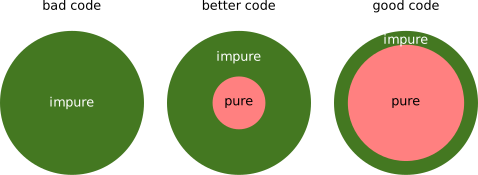
*CC-BY-4.0 CodeRefinery*
:::
#### 👃 Dead and commented code
Dead and commented code refers to parts of the code that are no longer in use or have been superseded but are not deleted, only commented out. Such code can clutter the codebase, making it hard to read and maintain.
:::info
**Solution**
Remove it. Commit the removal of the commented-out code with a meaningful commit message explaining why it was removed. This allows you to track the change and easily revert it if necessary.
:::
:::success
**Further reading**
- [Ten simple rules for quick and dirty scientific programming](https://journals.plos.org/ploscompbiol/article?id=10.1371/journal.pcbi.1008549)
- [Good enough practices in scientific computing](https://journals.plos.org/ploscompbiol/article?id=10.1371/journal.pcbi.1005510)
:::
## Resources
:::spoiler Check out the resources covered in this guide
- [SonarCloud Documentation](https://docs.sonarsource.com/sonarcloud/)
- [Website for CODECHECK](https://codecheck.org.uk)
- [OpenSSF Best Practices Badge GitHub Repository](https://github.com/coreinfrastructure/best-practices-badge)
- https://peps.python.org/pep-0008/
- https://realpython.com/python-pep8/
- [pycodestyle GitHub Repository](https://github.com/PyCQA/pycodestyle)
- [Python Code Quality](https://realpython.com/python-code-quality/)
- [The Alan Turing Institute - Linters](https://alan-turing-institute.github.io/rse-course/html/module07_construction_and_design/07_03_linters.html)
- [MISS_HIT Documentation](https://florianschanda.github.io/miss_hit/)
- [MISS_HIT Website](https://misshit.org)
- [The Turing Way - Code Quality](https://the-turing-way.netlify.app/reproducible-research/code-quality)
- [The Turing Way - Writing Robust Code](https://the-turing-way.netlify.app/reproducible-research/code-quality/code-quality-robust.html?highlight=error)
- [ArjanCode - Python Exception Handling Techniques](https://arjancodes.com/blog/advanced-python-exception-handling-techniques-and-best-practices/)
- [Refactoring techniques from Refactoring.Guru](https://refactoring.guru/refactoring/techniques)
- [Refactoring.Guru - When to refactor?](https://refactoring.guru/refactoring/when)
- [Refactoring.Guru - How to refactor?](https://refactoring.guru/refactoring/how-to)
- [The Alan Turing Institute - Refactoring](https://alan-turing-institute.github.io/rse-course/html/module07_construction_and_design/07_04_refactoring.html)
- [Clean Code by Uncle Bob](https://gist.github.com/wojteklu/73c6914cc446146b8b533c0988cf8d29)
:::
 Sign in via Facebook
 Sign in via X(Twitter)
 Sign in via GitHub
 Sign in via Dropbox
 Sign in with Wallet
Connect another wallet
Sign in with Wallet
Connect another wallet