# [IM006] - z index and stacking context
> **前言**
> 2020 秋天,我將用 30 天的時間,來嘗試回答和網路前端開發相關的 30 個問題。30 天無法一網打盡浩瀚的前端知識,有些問題可能對有些讀者來說相對簡單,不過期待這趟旅程,能幫助自己、也幫助讀者打開不同的知識大門。有興趣的話,跟著我一起探索吧!
>
## Another "context"
在上一篇文章當中,談到了 Block Formatting Context,除此之外,我們也知道有其他的 formatting context 像是
* inline formatting context
* grid formatting context
* flex formatting context
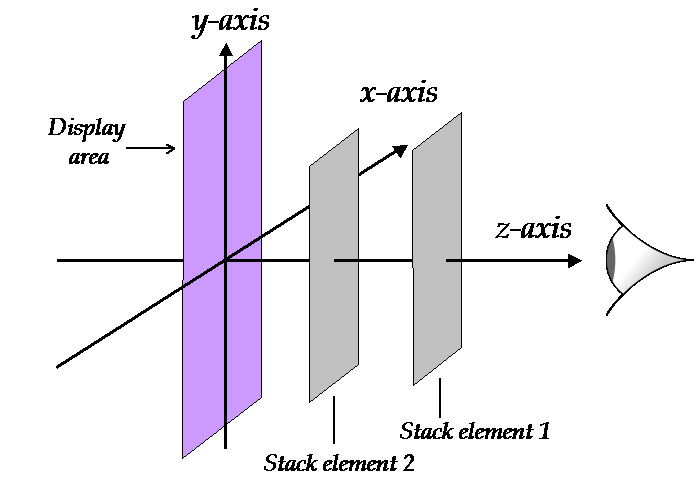
等等,這些 context 定義了當中的 elements 會如何「排列」。不過到目前為止,上面所談到的「排列」,指的是在二維平面上的排列,實際上當瀏覽器在渲染畫面的時候,還會考慮到第三個維度,也就是 z 軸的順序,來決定如何渲染。
可以想像一個網頁畫面的寬與高,分別代表了 x 與 y 軸,而 z 軸則是垂直於網站,指向使用者。也就是說,如果一個 element 的 z 軸的值越高,那麼就代表越接近使用者,也會遮擋住 z 軸值較低的 element
## z index
同時,我們也知道在 CSS 當中,有一個 `z-index` 的屬性,可以讓我們決定 elements 之間彼此的重疊狀況。
於是,就讓我們馬上來試試看如何操作 z-index。首先,先建立了兩個 block elements,然後為了製造重疊的效果,我透過負的 margin 讓下面的 Box-2 往上移動進而擋住了 Box-1。
最後,我嘗試使用 `z-index` ,讓 Box-1 可以跑到 Box-2 的前面,也是不會被遮蓋住。
```htmlmixed=
<!-- html -->
<div>
<div class="box box-1">Box-1</div>
<div class="box box-2">Box-2</div>
</div>
```
```css
/* css */
.box {
width: 100px;
height: 100px;
color: white;
text-align: center;
}
.box-1 {
z-index: 2; /* 期待將 div 移動到較上層 */
background: green;
}
.box-2 {
z-index: 1; /* 期待將 div 移動到較下層 */
background: blue;
margin: -50px 0 0 25px;
}
```

結果發現,一點效果也沒有。原因是 `z-index` 只會作用在 `position` 屬性不為 `static` 的 elements 上,所以只要將 CSS 改為
```css
/* css */
.box {
width: 100px;
height: 100px;
color: white;
text-align: center;
position: fixed; /* 新增這行 */
}
.box-1 {
z-index: 2;
background: green;
}
.box-2 {
z-index: 1;
background: blue;
margin: -50px 0 0 25px;
}
```

Box-1 跑到前面來了!不過這裡我是把 `position: fixed` 同時加入到兩個 boxes,也就是 `.box` 當中,如果只加到 `.box-1` 當中也會有同樣的效果,但是如果只加到 `.box-2` 當中,則就沒有效果。
另一方面,如果我們不加入 `position` ,而是加入 `opacity` 在 `.box-1` 當中,結果出現
```css
/* css */
.box {
width: 100px;
height: 100px;
color: white;
text-align: center;
}
.box-1 {
z-index: 2;
background: green;
opacity: 0.9; /* 新增這行 */
}
.box-2 {
z-index: 1;
background: blue;
margin: -50px 0 0 25px;
}
```

會發現 box-1 就這樣神奇地出現在前面了!為什麼會這樣子呢?
答案是
> 原本 box-1 和 box-2 都在相同的 stacking context 當中,後出現的 element 自然會排在前面。然而當我們在 box-1 加上 `opacity` 屬性之後,box-1 自己會建立一個全新的 stacking context,而這個 stacking context 出現在原先的 (root) stacking context 之後,所以就自然會排在前面!
## Create a stacking context
Stacking context 是一個告訴當中的 elements 該如何堆疊的環境,其實規則也很簡單,就是在 HTML 文件當中,後出現的 elements,會排在先出現的 elements 前面,也就是 z 軸的值較大,較接近使用者。
然而,在一個網頁當中,並不是所有的 elements 都存在在同一個 stacking context。這裡的概念,跟先前提到的 Block formatting context 很像。在某些條件下,element 會創造出新的 formatting context,並套用在它所有的後代元素上。
根據 [MDN](https://developer.mozilla.org/en-US/docs/Web/CSS/CSS_Positioning/Understanding_z_index/The_stacking_context),會創造出新的 stacking context 的常見的條件有:
* Root element of the document (html)
* Element with a position value absolute or relative and z-index value other than auto.
* Element with a position value fixed or sticky (sticky for all mobile browsers, but not older desktop).
當 HTML 文件建立的時候,就會自動生成一個 context(要不然所有東西都不知道如何堆疊了)。另外,只要有設定上述的 `position` 與 `z-index` 條件,也會產生新的 context。這也就是剛剛的例子當中的第一種解法。
還有其他條件,像是創造出 flex 或是 grid 的 context,本身就會同時建立新的 stacking context:
* Element that is a child of a flex (flexbox) container, with z-index value other than auto.
* Element that is a child of a grid (grid) container, with z-index value other than auto.
另外一個比較特別的,是關於 `opacity` 的設定,也就是剛剛的例子當中的第二種解法,也會產生新的 stacking context
* element with a opacity value less than 1
還有其他許多條件,這裡就先不多談了。只要有新的 stacking context 被建立,這個 context 當中的 element 的 `z-index` 就只會和在同一個 context 下的 element 進行比較。
也就是說,在 z 軸方向較為下面的 stacking context 當中的 element 不管 `z-index` 有多大,都無法超越較為上面的 context 當中的 element。
舉例來說,回到剛剛的例子,如果分別在兩個 boxes 中間加入 sub-box,並將 box-2 當中的 sub-box 的 `z-index` 設定為 9999
```htmlmixed=
<!-- html -->
<div class="container">
<div class="box box-1">Box-1
<div class="subbox box-1-1">Box-1-1</div>
</div>
<div class="box box-2">Box-2
<div class="subbox box-2-1">Box-2-1</div>
</div>
</div>
```
```css
/* css */
.box {
width: 100px;
height: 100px;
color: white;
text-align: center;
}
.box-1 {
z-index: 2;
background: green;
opacity: 0.99; /* 建立出新的 stacking context*/
}
.box-2 {
z-index: 1;
background: blue;
margin-top: -50px;
margin-left: 25px;
}
.subbox {
width: 100px;
height: 25px;
background: red;
}
.box-2-1 {
z-index: 9999; /* 再高的值都不會跑到 box-1 之上*/
}
```

會發現一點效果也沒有,因為 box-1 和 box-2 已經在不同的 stacking context 當中。
## So what's the order?
看到這裡,希望不要覺得世界好像很複雜。最後這裡整理一下關於 stacking 順序的判斷條件
1. 在 HTML 當中,若後出現的 element 建立了新的 stacking context,就自然會比先前建立的 stacking context 的 z 軸高度較高。
2. 在一個 stacking context 當中,其基準點就是建立出這個 context 的 element,也就是 `z-index: 0` 的位置
3. 承上,在這個 context 當中,如果 element 設定 `z-index` 為負值,則會跑到基準點後面。也就是會跑到建立這個 context 的 element 的後面。
4. 承上,如果沒有設定 `z-index`,則會依照出現的順序堆疊:後出現在 z 軸較上方的位置。
5. 承上,如果有設定 `z-index` 為正值,那麼 z 軸高度都會高於第 4 點當中所有的 elements。
## Ending
xxx
### Ref:
* [前端三十|04. [CSS] z-index 與 Stacking Context 的關係是什麼?](https://medium.com/schaoss-blog/%E5%89%8D%E7%AB%AF%E4%B8%89%E5%8D%81-04-css-z-index-%E8%88%87-stacking-context-%E7%9A%84%E9%97%9C%E4%BF%82%E6%98%AF%E4%BB%80%E9%BA%BC-d29076c9b545)
* [Elaborate description of Stacking Contexts](https://www.w3.org/TR/CSS21/zindex.html)
* [What No One Told You About Z-Index](https://philipwalton.com/articles/what-no-one-told-you-about-z-index/)
***
> **TD**
> 在北緯一度努力踏上軟體工程師之路的物理人,對世界運作的方式充滿好奇
> *"Life is like riding a bicycle. To keep your balance, you must keep moving."*
> [More about me](https://tsungtingdu.github.io/profile/)
***
###### tags: `ironman` `CSS`
 Sign in via Google
 Sign in via Facebook
 Sign in via X(Twitter)
 Sign in via GitHub
 Sign in via Dropbox
 Sign in with Wallet
Connect another wallet
Sign in with Wallet
Connect another wallet