---
title: SQL INTERSECT Operator - Scaler Topics
description: INTERSECT operator in SQL returns results from two SELECT statements. It returns the result that is common in both the SELECT statements. Learn more on Scaler Topics.
category: SQL
author: Rahul Negi
---
:::section{.abstract}
In SQL, the `INTERSECT` operator combines the result sets of two or more `SELECT` statements, returning only the rows that appear in all result sets. This can be useful for finding common rows between data sets or performing set operations in SQL. For example, if you have two tables with similar data and want to find the rows that are common to both tables, you can use INTERSECT to combine the results of two SELECT statements that retrieve the data from each table.
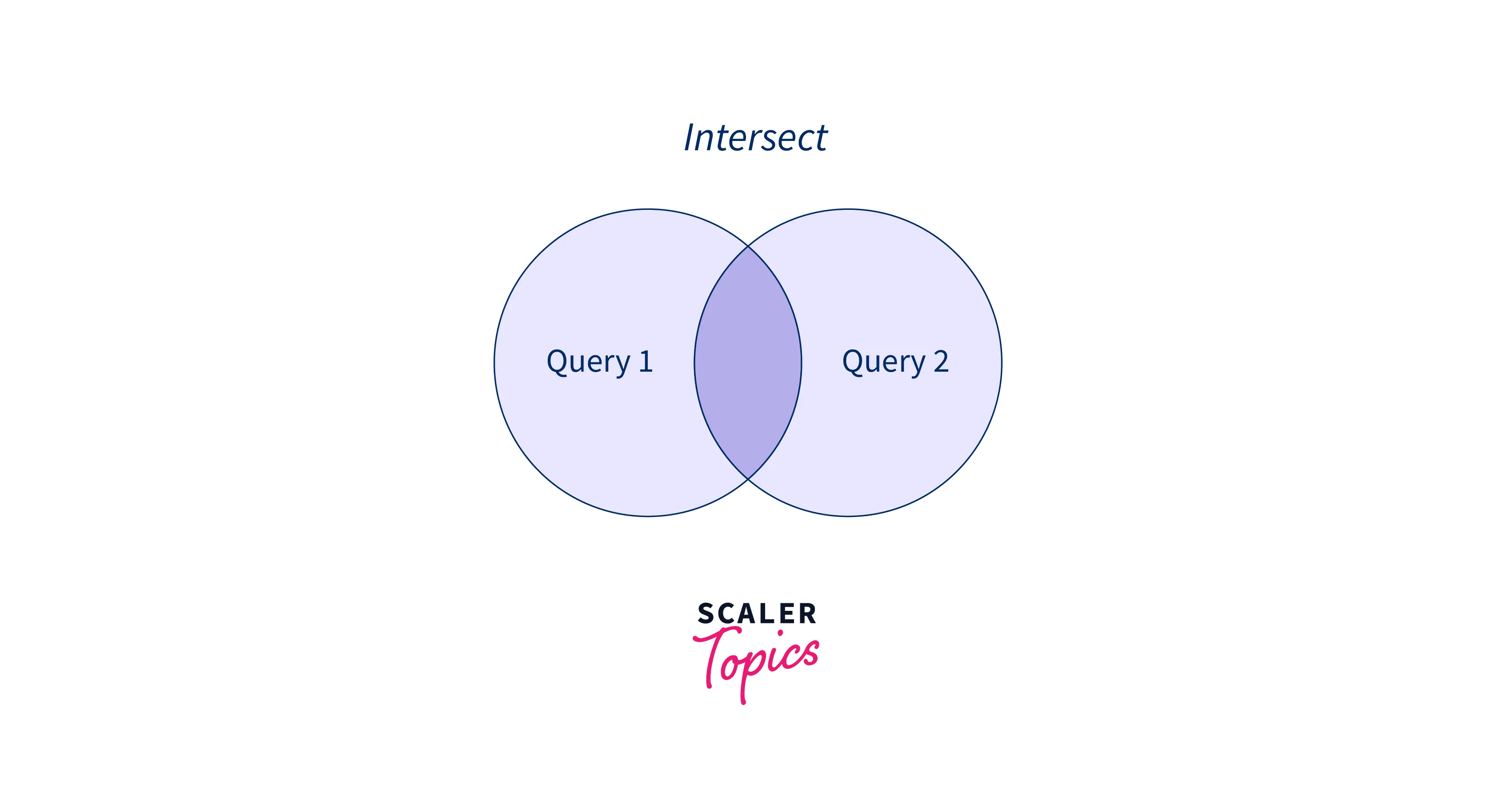
To use the `INTERSECT` in SQL, certain conditions need to be met.
- The number of columns and their order from both `SELECT` statements should be the same.
- The data types from both `SELECT` statements should be compatible.
### Syntax
```sql
SELECT expression1, expression2, ... expression_n
FROM tables
[WHERE conditions if required]
INTERSECT
SELECT expression1, expression2, ... expression_n
FROM tables
[WHERE conditions if required];
```
The expression refers to columns you must extract from the table through `SELECT` statements. The `WHERE` statement is optional and can be used to filter the result further.
### Example
Suppose we have been given two tables below.
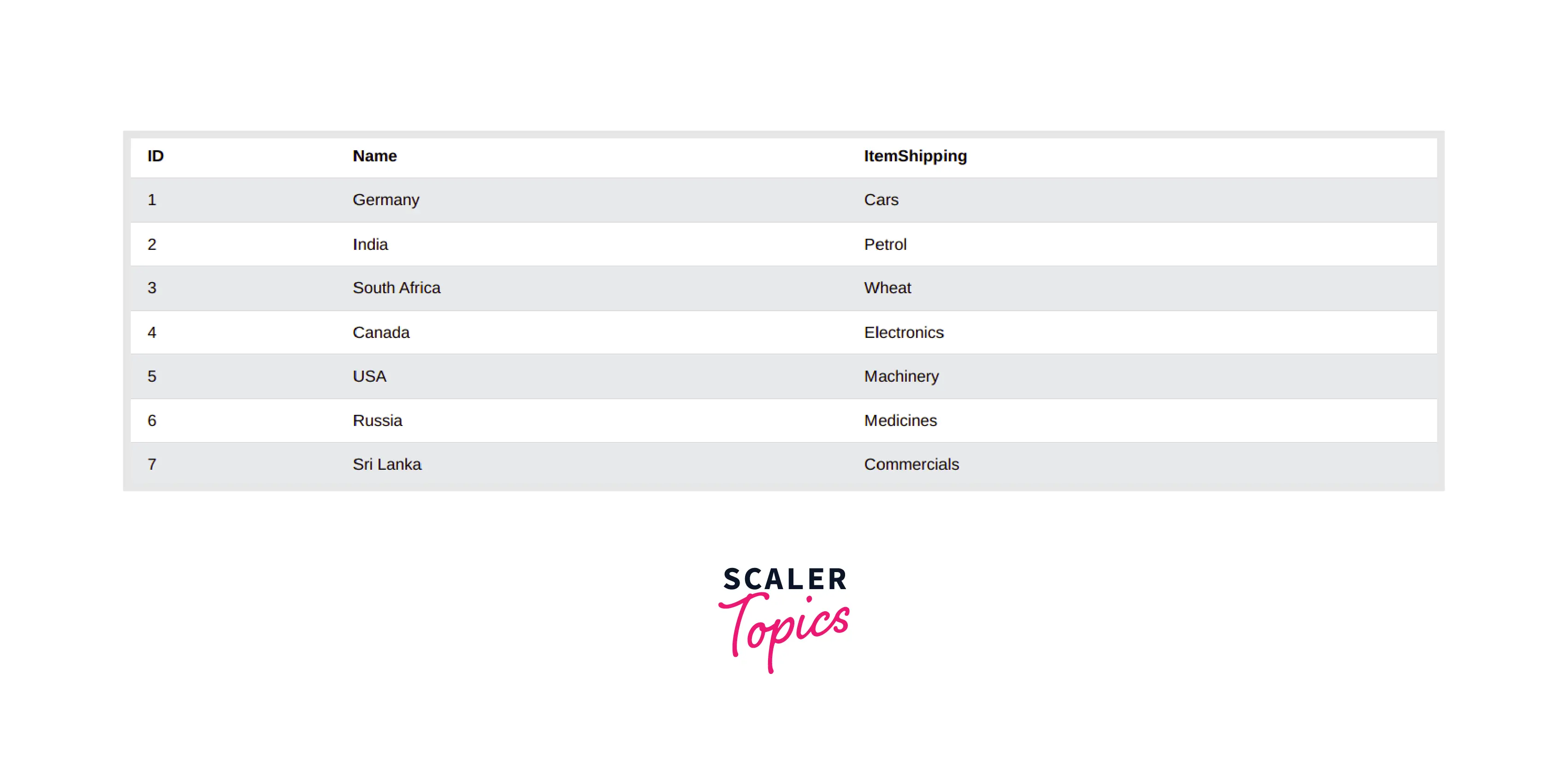
**To create this table in MySQL, you can use the below-given code:**
```sql
CREATE Table CountryImporting(
ID INT,
Name VARCHAR(20),
ItemShipping VARCHAR(20)
);
INSERT INTO CountryImporting VALUES (1, 'Germany', 'Cars');
INSERT INTO CountryImporting VALUES (2, 'India', 'Petrol');
INSERT INTO CountryImporting VALUES (3, 'South Africa', 'Wheat');
INSERT INTO CountryImporting VALUES (4, 'Canada', 'Electronics');
INSERT INTO CountryImporting VALUES (5, 'USA', 'Machinery');
INSERT INTO CountryImporting VALUES (6, 'Russia', 'Medicines');
INSERT INTO CountryImporting VALUES (7, 'Sri Lanka', 'Commercials');
SELECT * FROM CountryImporting;
```
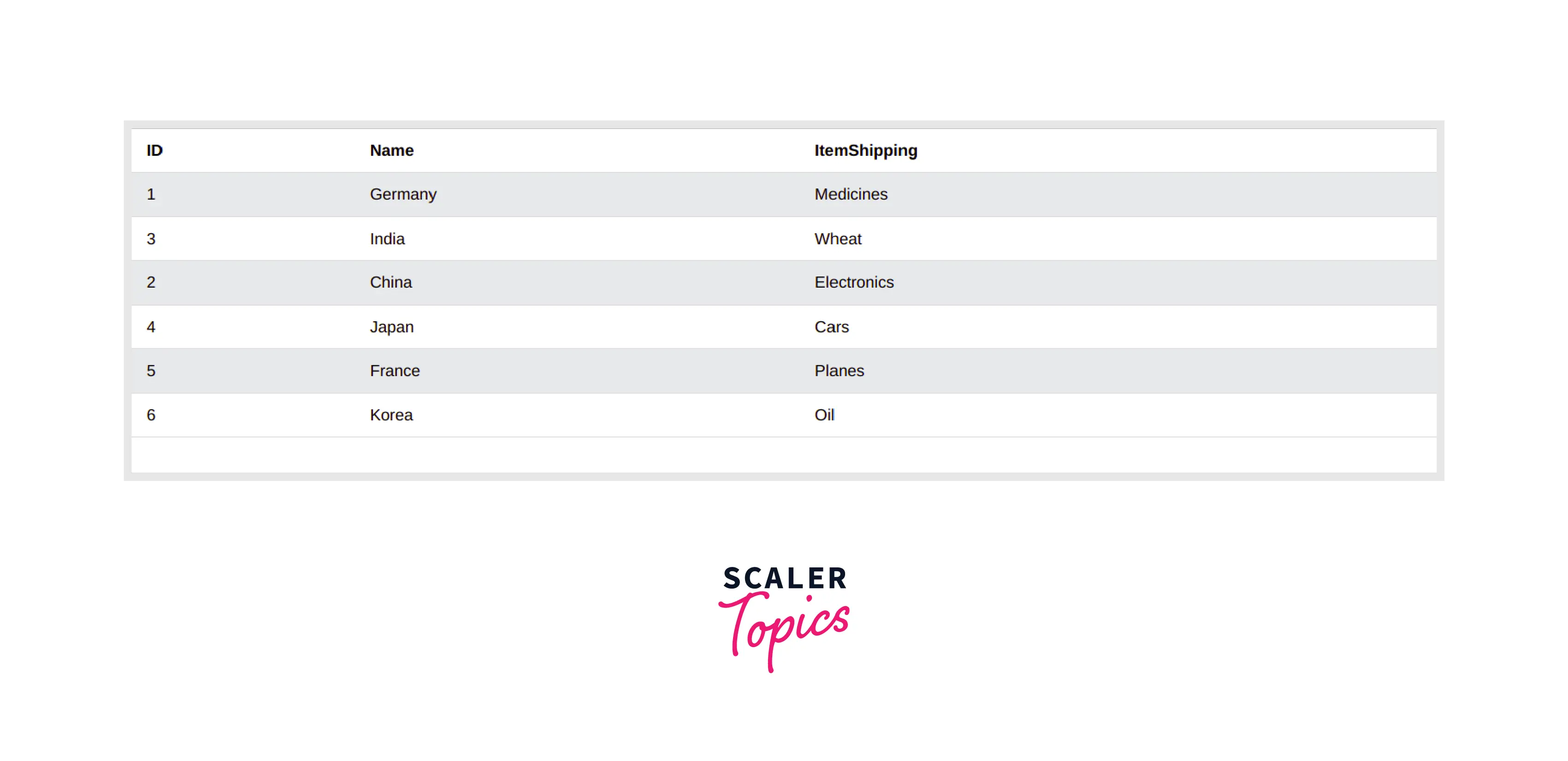
**The Code of the given table is given below:**
```sql
CREATE Table CountryExporting(
ID INT,
Name VARCHAR(20),
ItemShipping VARCHAR(20)
);
INSERT INTO CountryExporting VALUES (1, 'Germany', 'Medicines');
INSERT INTO CountryExporting VALUES (2, 'India', 'Wheat');
INSERT INTO CountryExporting VALUES (3, 'China', 'Electronics');
INSERT INTO CountryExporting VALUES (4, 'Japan', 'Cars');
INSERT INTO CountryExporting VALUES (5, 'France', 'Planes');
INSERT INTO CountryExporting VALUES (6, 'Korea', 'Oil');
SELECT * FROM CountryExporting;
```
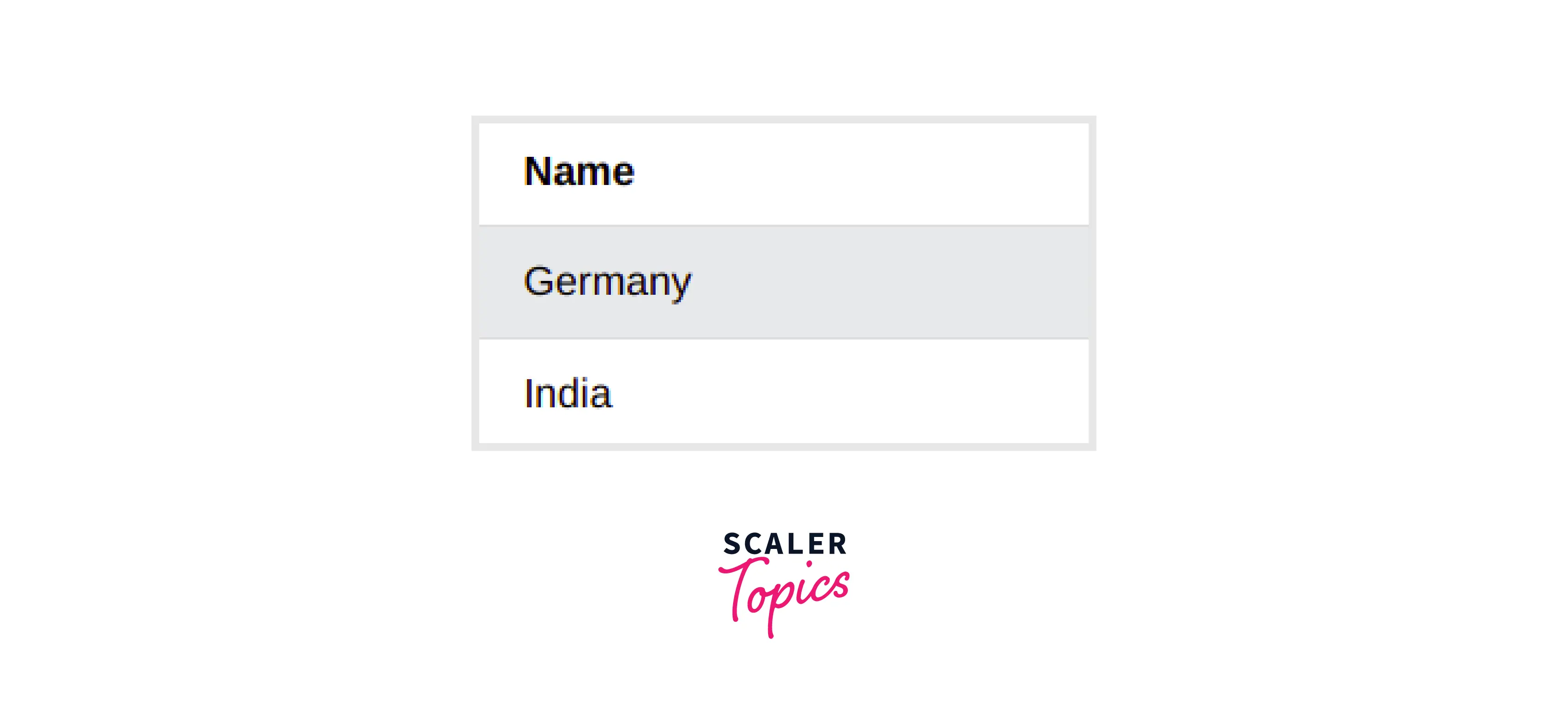
Now, we are asked tond countries that import and export. So this meansThisuire a `SELECT` statement from both tables.
Now, we need to add the intersect operator, and we will have our answers. So, the final Query would be.
```sql
SELECT name FROM CountryExporting
INTERSECT
SELECT name FROM CountryImporting;
```
**The output would of the above query be:**
:::
:::section{.main}
## INTERSECT with BETWEEN Operator
We can use Intersect in SQL between operators to specify some columns with specific values in the range. Let's Understand it better using below example-
### Example
```sql
SELECT name FROM CountryExporting
WHERE ID BETWEEN 1 AND 5
INTERSECT
SELECT name FROM CountryExporting
WHERE ID BETWEEN 2 AND 6;
```
### Output
| Name |
|:-------------------:|
| India |
| China |
| Japan |
| France |
**Explanation:** The above SQL query selects the names of countries from the `CountryExporting` table where the ID falls between 1 and 5, and also between 2 and 6. The INTERSECT operator combines the results of both SELECT statements, returning only the names that appear in both result sets. Hence, the output of the above query will be common in both conditional queries, which will be the names of countries with IDs 2,3,4,5.
:::
:::section{.main}
## INTERSECT with IN Operator
The `IN` operator is used to select some column that is present in the mentioned list using the In operator. We can use the Intersect in sql with In in different scenarios like the below example:
### Example
```sql
SELECT name FROM CountryExporting
WHERE ItemShipping IN ('Planes','Wheat','Medicines')
INTERSECT
SELECT name FROM CountryExporting
WHERE ItemShipping IN ('Electronics','Wheat');
```
### Output
| Name |
|:-------------------:|
| India |
**Explanation:** In the above SQL query selects the names of countries that export both 'Wheat' and either 'Planes' or 'Medicines', as well as 'Wheat' and 'Electronics'. It uses the INTERSECT operator to find the common results between the two SELECT statements. The output of the above query will be item shipping common in both the query that will be names of the countries that ship `Wheat` as the item.
:::
:::section{.main}
## INTERSECT with LIKE Operator
We can use the Like operator with Intersect in SQL to find common rows that match a given pattern.
### Example
```sql
SELECT name FROM CountryExporting
WHERE ItemShipping LIKE 'E%'
INTERSECT
SELECT name FROM CountryExporting
WHERE ItemShipping Like '%s';
```
### Output
| Name |
|:-------------------:|
| China |
**Explanation:** In the above example, the output of the first subquery will be a row with id 3, and for the second subquery, the output will be rows with id 1,3 and 5. Hence, The output of the above query will be itemshipping common in both queries, which will be the names of countries that ship `Electornics` as the item.
:::
:::section{.summary}
## Conclusion
- The **Intersect** operator in SQL is applied on two `SELECT` statements. It returns all rows that are common from both `SELECT` statements.
- To apply the Intersect operator in SQL, the number of columns returned by both `SELECT` statements should be the same, and their data types should be compatible.
- **Intersect** in sql works on the row while **AND** operator works on columns.
- **Intersect** operator can be combined with other SQL operators to get data as per-user convenience.
:::
 Sign in via Facebook
 Sign in via X(Twitter)
 Sign in via GitHub
 Sign in via Dropbox
 Sign in with Wallet
Connect another wallet
Sign in with Wallet
Connect another wallet