---
title: Find Documents using AND and OR Condition - Scaler Topics
description: This article on Scaler Topics covers Find Documents using AND and OR Condition in Mongo DB with examples, explanations and use cases, read to know more.
author: Abantika Saha
category: Mongo DB
---
:::section{.abstract}
## Overview
MongoDB is a popular NoSQL database used in modern web applications for its flexibility and scalability. We can find documents using **AND and OR condition** in MongoDB using **AND operator and OR operator** along with the `find()` method. The **AND operator** is used with the `find()` method to retrieve the documents that satisfy all the given criteria simultaneously. The **OR operator** is used with the `find()` method to retrieve documents that satisfy at least one of the given criteria. MongoDB Find Documents using AND and OR Condition can help us write complex queries to efficiently retrieve specific data from MongoDB.

:::
:::section{.main}
## Introduction
We can find documents using **AND and OR Condition** in MongoDB. Using the **AND operator**, we can combine two or more conditions to filter our data more precisely. It can combine multiple conditions in a single query by using **logical AND**. It can be used with the `find()` method to retrieve documents that match all the designated criteria.
By using the **OR operator**, we can combine multiple conditions in a single query by using **logical OR**. It can be used with the `find()` method to retrieve documents that match at least one of the specified criteria.
When working with MongoDB, mastering the use of logical operators like `AND` and `OR` is crucial to efficiently find documents that meet specific criteria, which is why knowing how to perform MongoDB Find Documents using AND and OR Condition is essential for developers.
In this article, we will explore how to Find Documents using `AND` and `OR` Condition in MongoDB.
:::
:::section{.main}
## What is the Find Method in MongoDB?
The `"find()"` method in MongoDB is a very significant and effective tool for querying data from a MongoDB database. It retrieves documents that match the criteria we specify. The method returns a cursor object, which can be used to loop through the matching documents and perform additional analysis or processing. We can also specify which fields to include or exclude in the results.
**Syntax**
```javascript
db.collection.find(query, projection, options)
```
| Parameter | Type | Description |
|:--------------:|:--------:|:-----------------------------------------------------------------------------------------------------------------------------------------------------------------------------------------------------------------------------:|
| **query** | document | (Optional) It is used to specify the search criteria using query operators for selecting documents from a collection. We can remove this parameter or pass an empty document ({}), to return all documents in the collection. |
| **projection** | document | (Optional) It specifies which fields should be returned in documents that match the query filter. We should remove this parameter if we want to return all the fields of the documents which match the specified filter. |
| **options** | document | (Optional) It specifies additional query options. |
We can understand the "`find()` method" better with the help of some examples.
**Example 1:**
We have six documents in the "movies" collection.
**Syntax:**
```javascript
db.movies.find()
```
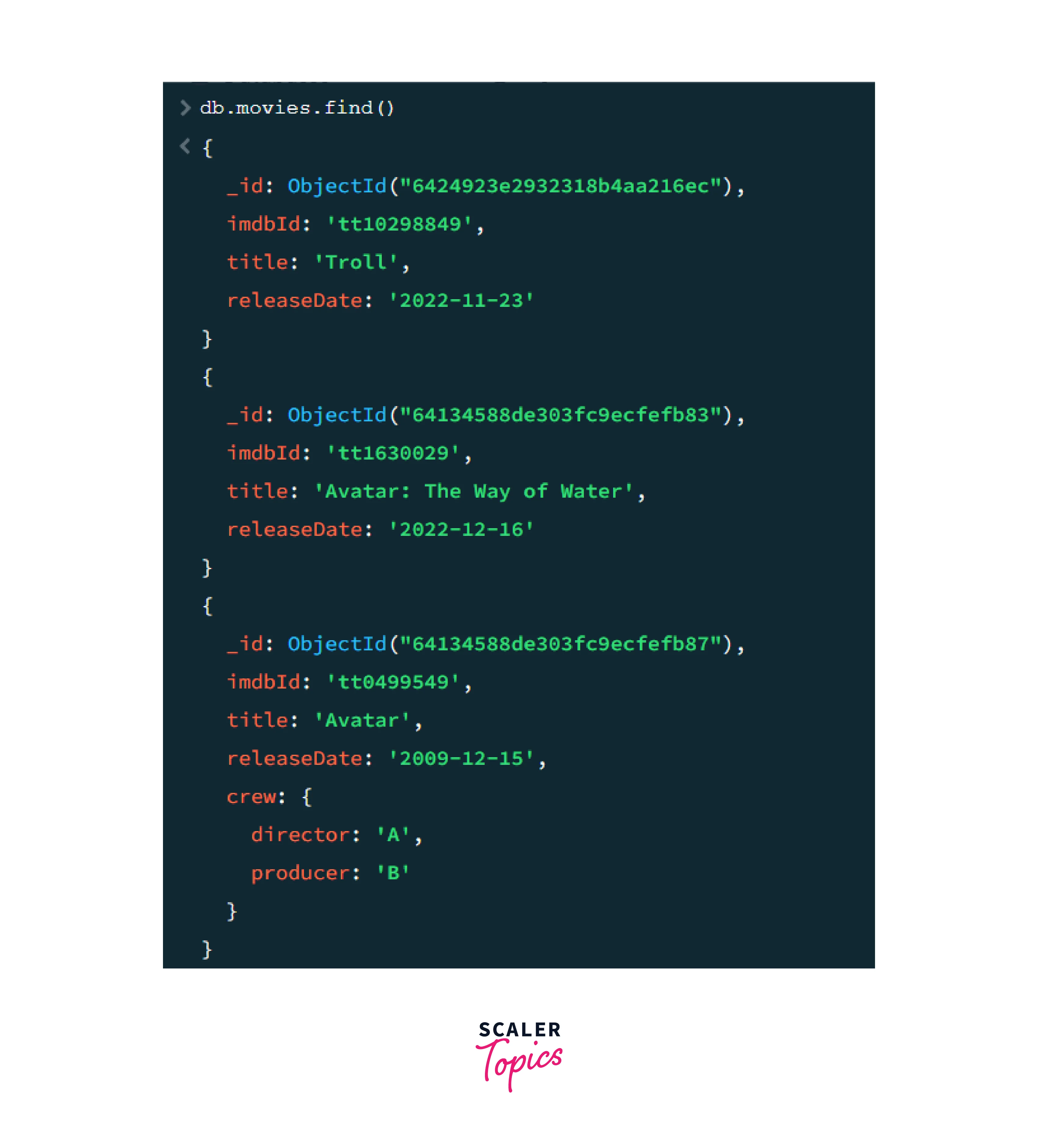
We can see that we retrieved all the six documents present in the "movies" collection after using the "`find()` method", without any parameter.
**Example 2:**
We can also specify the criteria based on which we can find a document.
We want to find all the documents which have the **title = "Troll"**.
**Syntax:**
```javascript
db.movies.find({title: "Troll"})
```
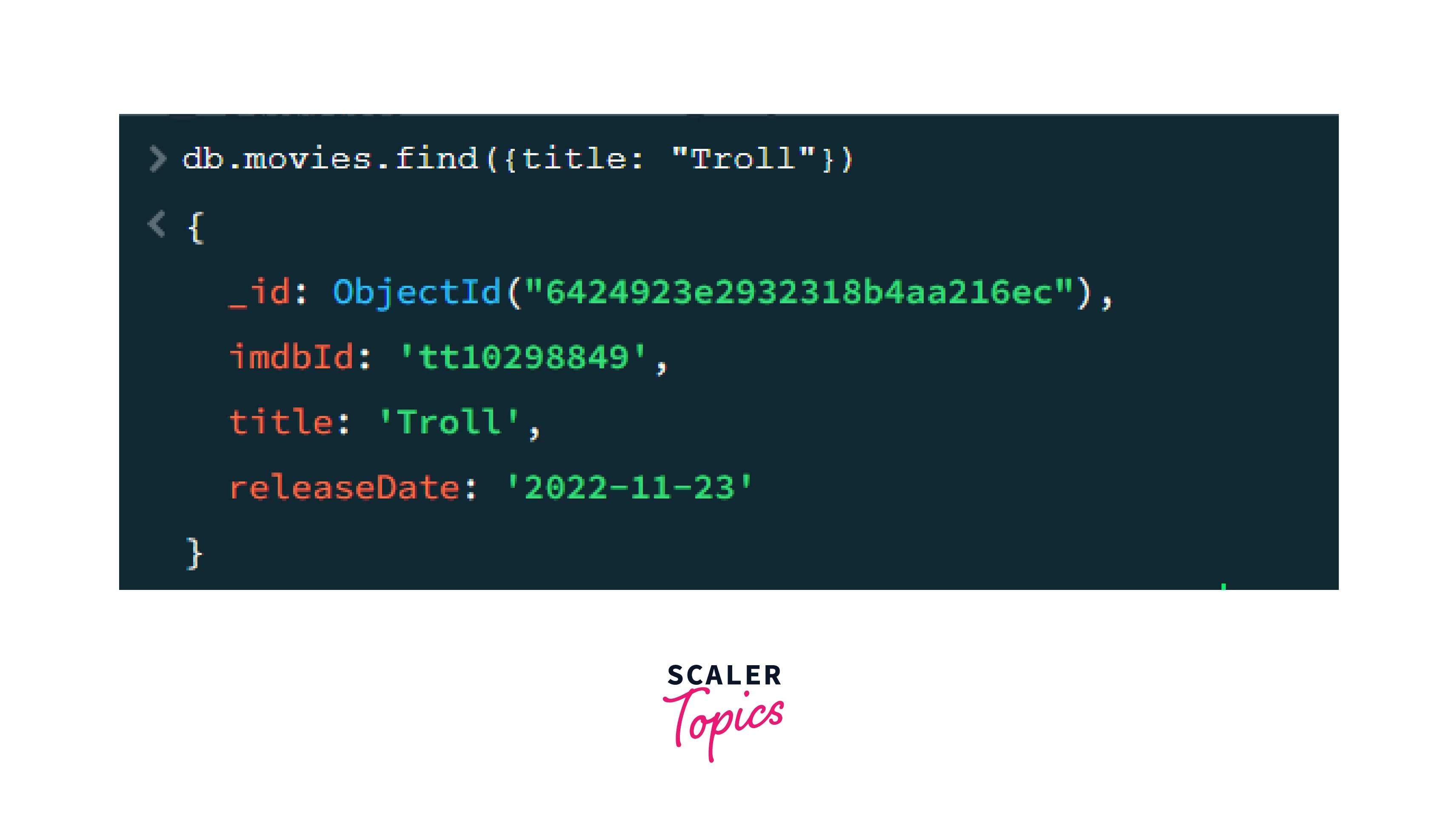
Since there is only one document present in the **"movies"** collection with the **title = "Troll"**, that document is returned, as shown in the above image.
### The findOne() Method
We also have the `findOne()` method in MongoDB. This method is used to find the first document in the collection that matches the specified criteria. If there are no documents matching the specified filter, it returns *NULL*.
To gain a better understanding of how the `findOne()` method works, let us see an example.
**Example 3:**
We insert another document in the ***"movies"*** collection.
The document is:
```javascript
{
"imdbId": "tt64433466",
"title": "Black Adam",
"releaseDate": "2022-10-19"
}
```
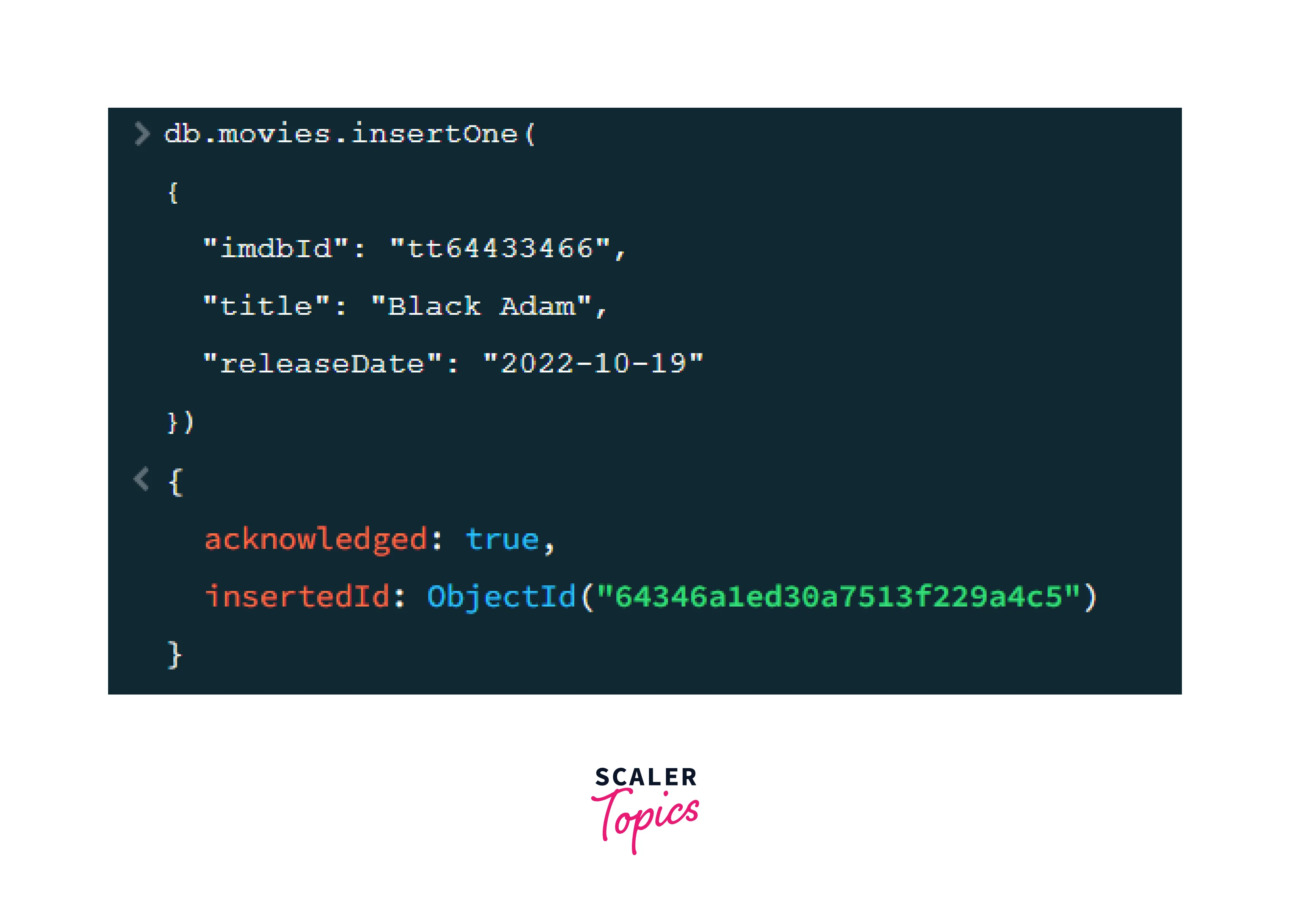
Thus now we have seven documents in the **"movies"** collection.
If we use the `find()` method for finding all the documents with **title = "Black Adam"**, two documents are returned, as shown in the image below.
**Syntax:**
```javascript
db.movies.find({title: "Black Adam"})
```
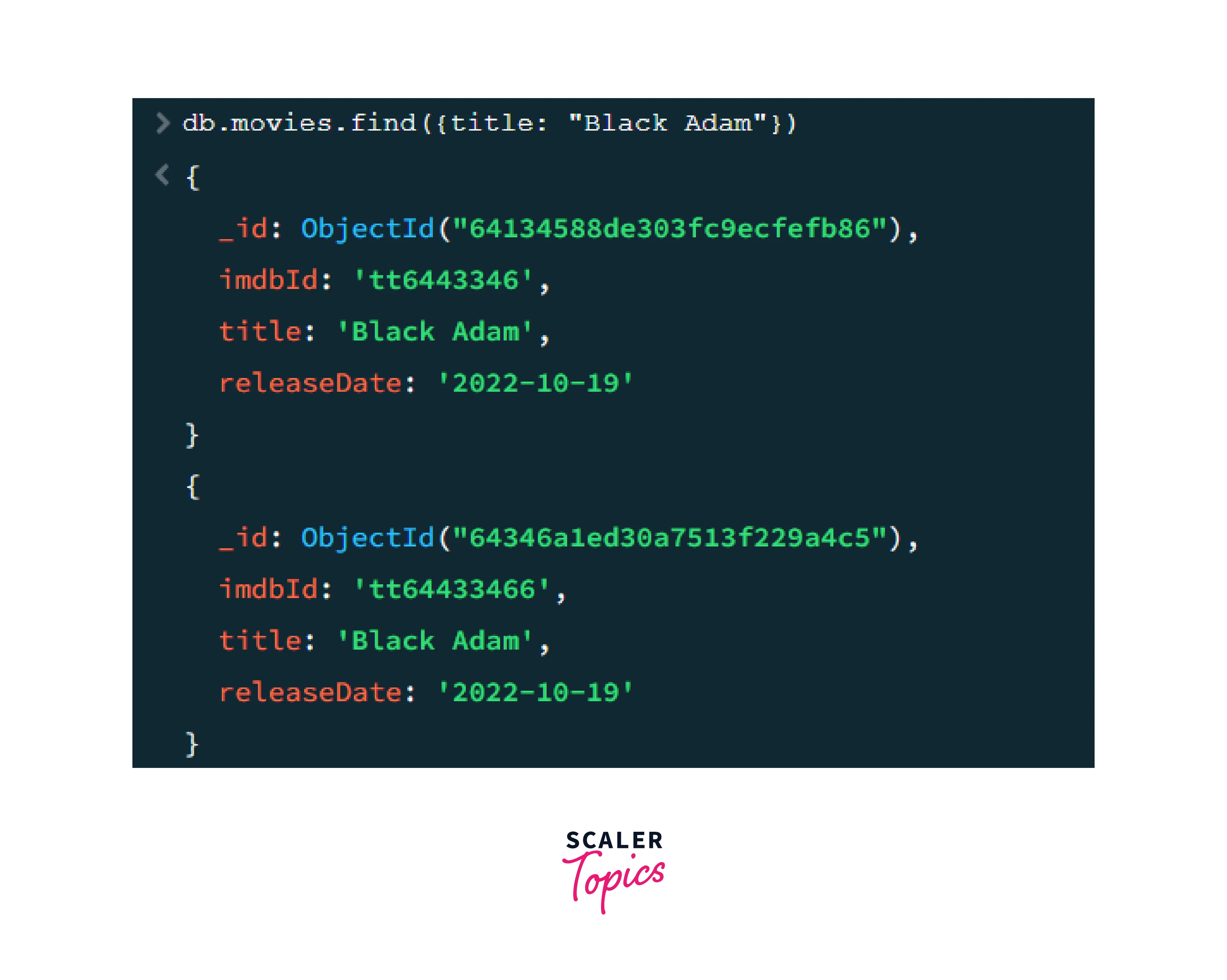
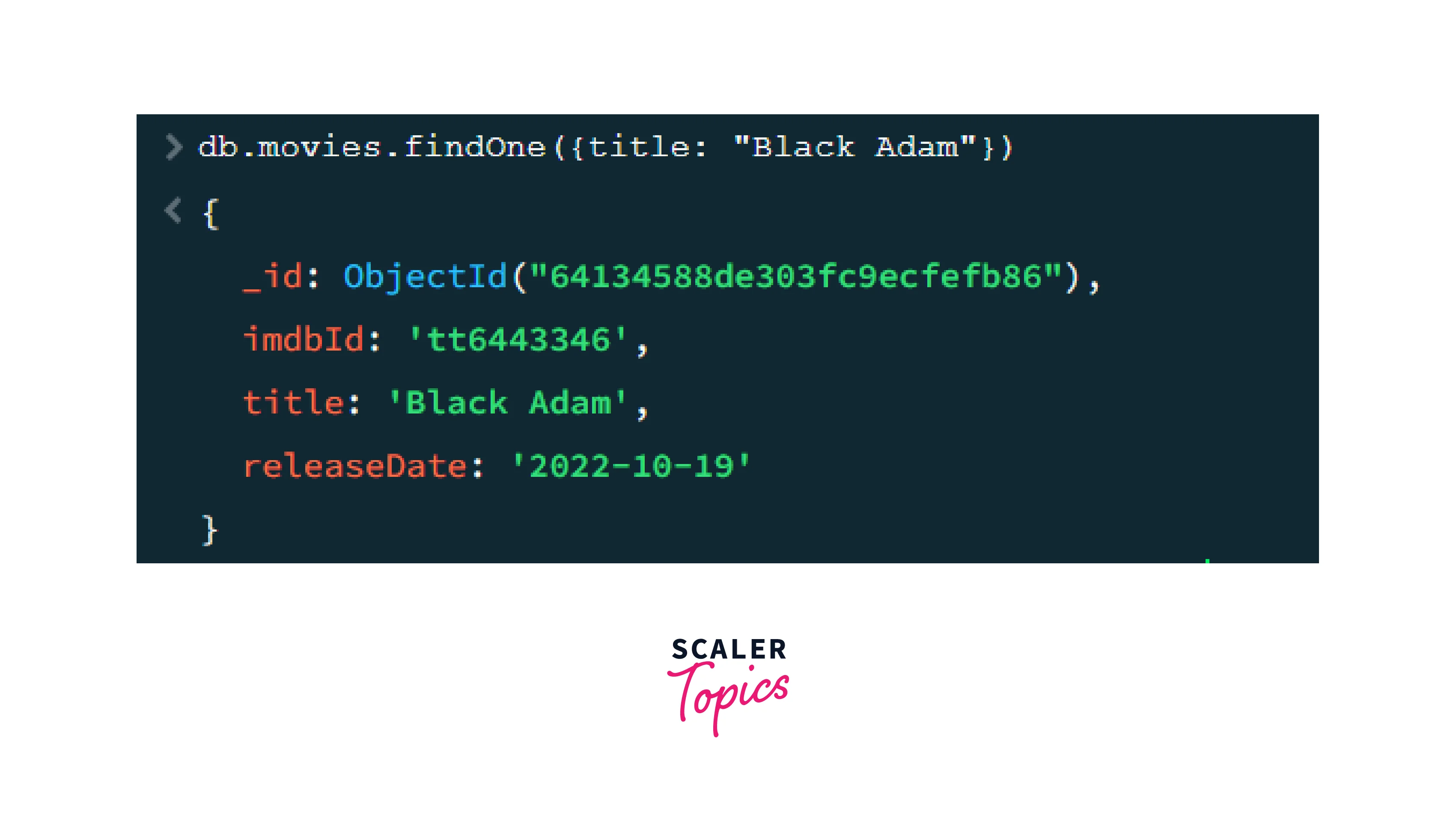
Whereas, on using the `findOne()` method to find a document with **title = "Black Adam"**, only 1 document, that is, the first document with the **title = "Black Adam"** is returned. It has been shown in the image given below.
**Syntax:**
```javascript
db.movies.findOne({title: "Black Adam"})
```
:::
:::section{.main}
## What is AND in MongoDB?
When searching for specific data in a collection, the `$and` operator in MongoDB allows us to combine various search conditions. It returns only the documents that satisfy every criterion that has been specified. The AND operator is used to retrieve documents that match multiple criteria simultaneously, and it is very useful when we need to search for documents that meet numerous requirements at once. For a document to be included in the result set when using the AND operator, all of the conditions specified must be true.
**Syntax**
```javascript
{ $and: [ { <expression1> }, { <expression2> } , ... , { <expressionN> } ] }
```
`$and` operator performs a logical AND operation on an array of one or more than one expression `(<expression1>, <expression2>, ..., <expressionN>)`. It returns the documents that satisfy all the expressions.
:::
:::section{.main}
## What is OR in MongoDB?
When searching for specific data in a collection, the `$or` operator in MongoDB enables us to combine multiple search conditions by performing a logical OR operation. It returns the documents that satisfy any of the criteria that have been specified. The **OR operator** is helpful when we want to find documents that match any of the given conditions instead of requiring all of them to be met simultaneously. For a document to be included in the result set when using the OR operator, at least one of the conditions specified must be true. This provides greater flexibility in querying data and allows for more efficient searching of large collections.
**Syntax**
```javascript
{ $or: [ { <expression1> }, { <expression2> }, ... , { <expressionN> } ] }
```
`$or` operator performs a logical OR operation on an array of one or more than one expression `(<expression1>, <expression2>, ..., <expressionN>)`. It returns the documents that satisfy at least one of the expressions.
:::
:::section{.main}
## How to Use the AND Method to Find Documents?
As we have discussed before, the AND operator is used to retrieve documents that match all the specified conditions. So we can use the AND operator along with the `find()` method to narrow down the search and return all the documents in the collection which match the specified criteria at once.
**Syntax**
```javascript
db.collection.find( { $and: [ { <expression1> }, { <expression2> } , ... , { <expressionN> } ] } )
```
Here, the `find()` method finds and returns documents from the "collection", after performing **logical AND operation** on one or more than one expressions `(<expression1>, <expression2>, ..., <expressionN>)`. The documents returned match all of the specified expressions.
Let us understand how we can use **AND method** to find documents with the help of some examples:
**Example 1:**
Now, we want to show all the documents with the **releaseDate = "2022-10-19"** and the **title = "Black Adam"**.
**Syntax**
```javascript
db.movies.find({$and:[{"releaseDate":"2022-10-19"},{"title": "Black Adam"}]})
```
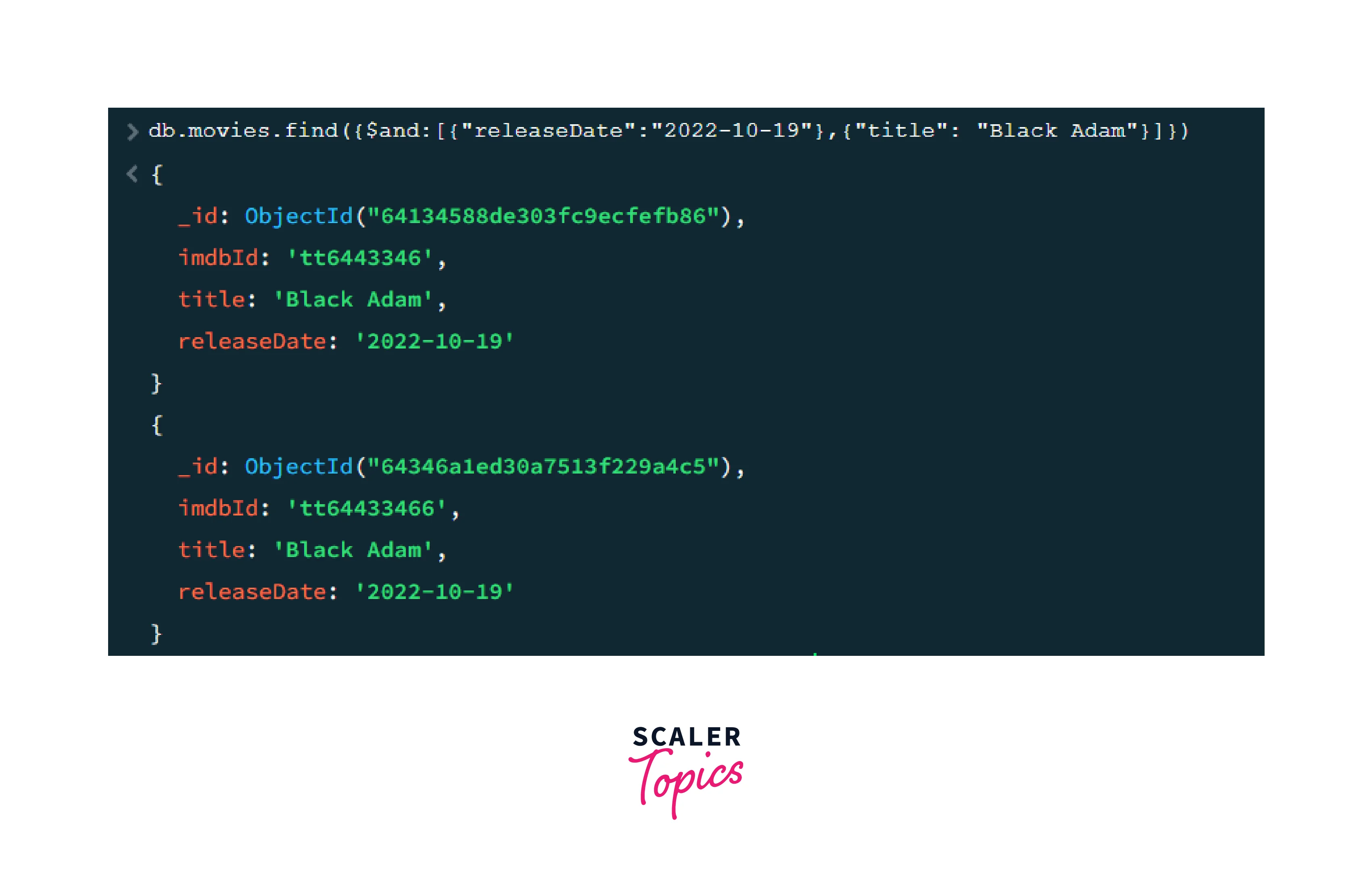
Therefore, two documents that match both the specified criteria are returned.
**Example 2:**
Now, we want to show all the documents with the **imdbId = "tt6443346"** and the **title = "Black Adam"**.
**Syntax**
```javascript
db.movies.find({$and:[{"imdbId": "tt6443346"},{"title": "Black Adam"}]})
```
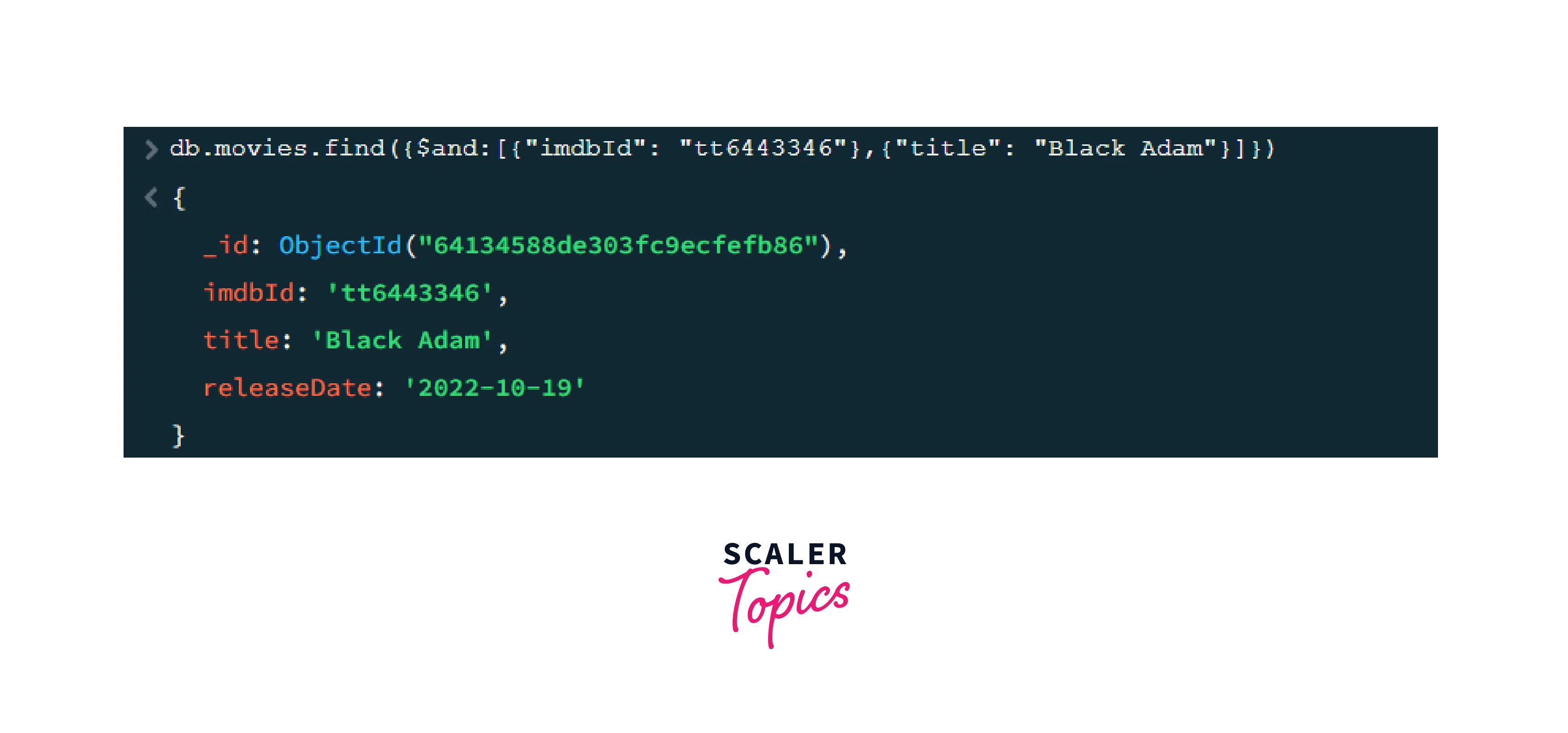
Therefore, we can see that only one document has been returned because there are two documents that have the **title = "Black Adam"**, but only one of them has the **imdbId = "tt6443346"**. Thus we can see that the **AND operator** returns documents that satisfy all the specified conditions.
:::
:::section{.main}
## How to Use OR Method to Find Documents?
As we have discussed before, the **OR operator** is used to retrieve documents that match at least one of the specified conditions. So we can use the **OR operator** along with the `find()` method to return all the documents in the collection which match at least one of the specified criteria.
**Syntax**
```javascript
db.collection.find( { $or: [ { <expression1> }, { <expression2> } , ... , { <expressionN> } ] } )
```
Here, the `find()` method finds and returns documents from the "collection", after performing logical OR operation on one or more than one expression `(<expression1>, <expression2>, ..., <expressionN>)`. The documents returned match at least one of the specified expressions.
Let us understand how we can use **OR method** to find documents with the help of some examples:
**Example 1:**
We want to show all the documents with the **imdbId = "tt3447590"** or with the **title = "Black Adam"**.
**Syntax**
```javascript
db.movies.find({$or:[{"imdbId": "tt3447590"},{"title": "Black Adam"}]})
```
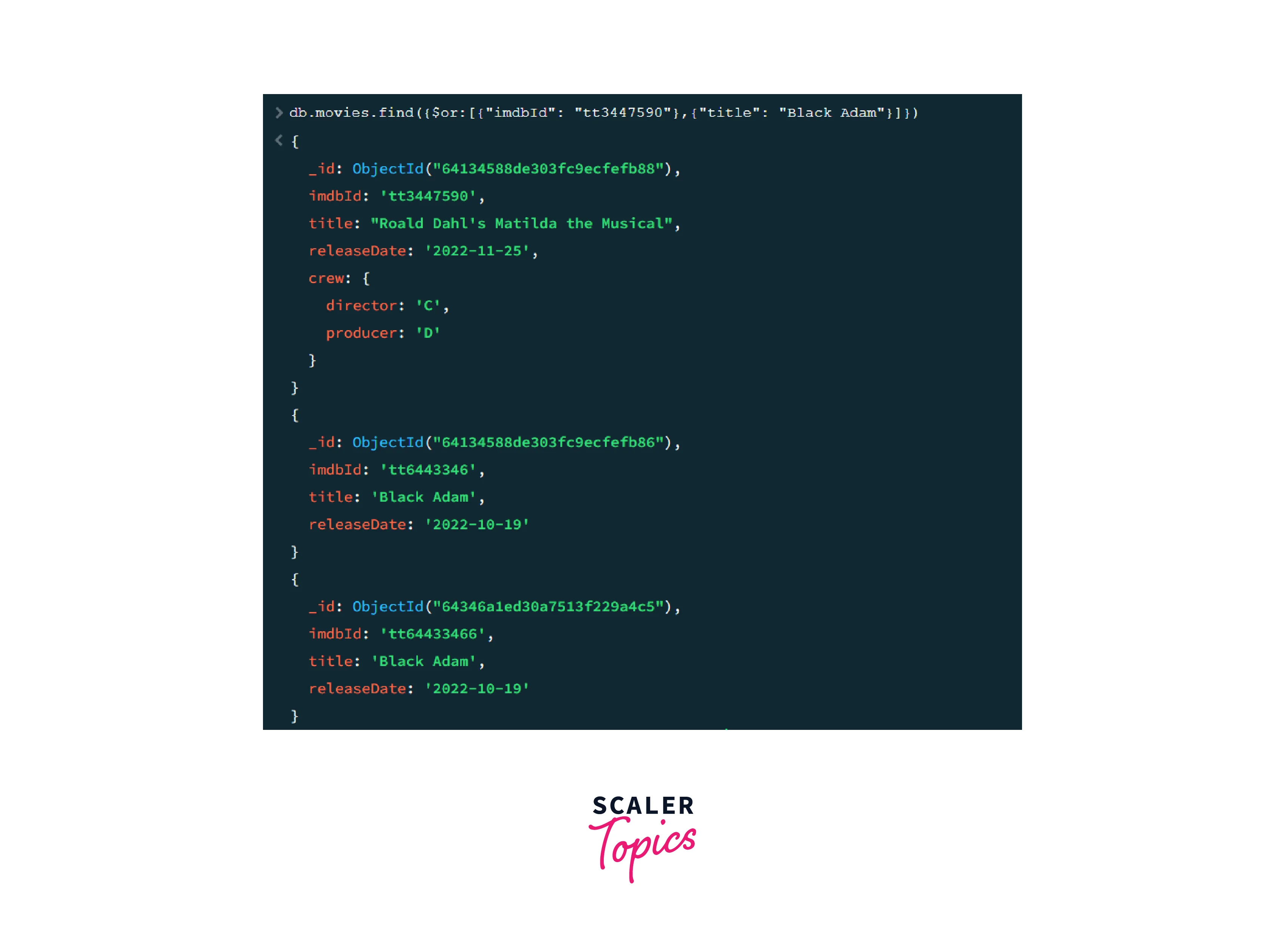
Therefore, three documents are returned. One document has the **imdbId = "tt3447590"** and two documents have the **title = "Black Adam"**.
**Example 2:**
We want to show all the documents with the **releaseDate = "2009-12-15"** or with the **title = "Troll"**.
**Syntax**
```javascript
db.movies.find({$or:[{"releaseDate": "2009-12-15"},{"title": "Troll"}]})
```
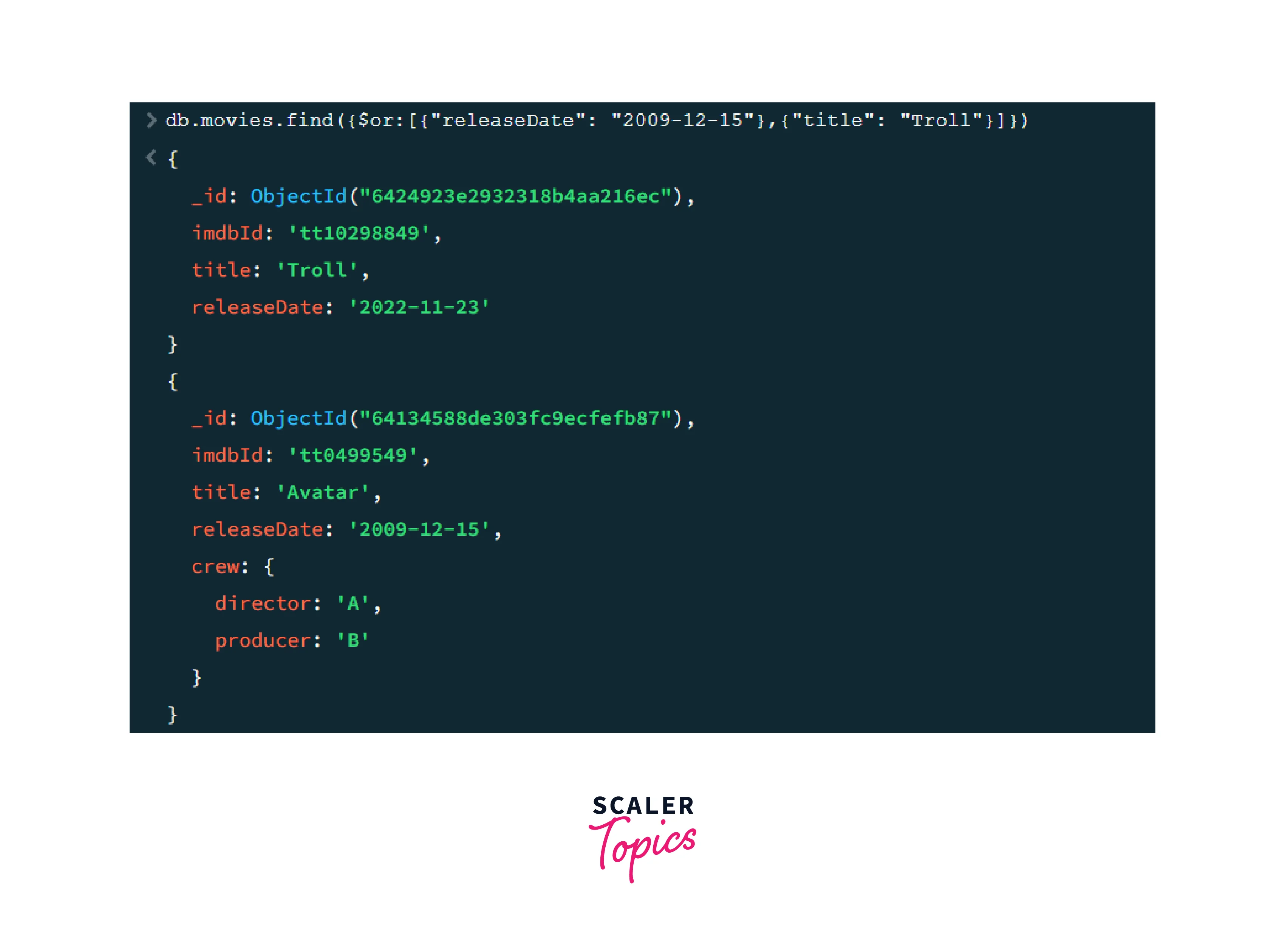
Therefore, we can see that two documents have been returned. One document has `releaseDate = "2009-12-15"`, another document has `title = "Troll"`. Thus we can see that the **OR operator** returns documents that satisfy at least one of the specified conditions.
:::
:::section{.summary}
## Conclusion
1. The **find() method** is used for retrieving documents according to the specified conditions. It returns all the documents that match the given conditions. If no condition has been provided, then it retrieves all the documents present in the collection.
2. The **findOne() method** in MongoDB is used to search a collection and retrieve the first document that meets the specified search criteria, even if multiple documents match those criteria. This method stops searching once it finds a matching document and returns only that document.
3. The **AND operator** in MongoDB combines various search conditions and returns only the documents that satisfy every specified criterion.
4. The **OR operator** in MongoDB combines multiple search conditions by performing a logical OR operation and returns the documents that satisfy any of the specified criteria.
5. We can use the **find() method with the AND operator** to retrieve documents that match all the specified criteria at once.
6. We can use the **find() method with the OR operator** to retrieve documents that match at least one of the specified criteria.
7. We have explored how to Find Documents using `AND` and `OR` Condition in MongoDB.
:::
 Sign in with Wallet
Connect another wallet
Sign in with Wallet
Connect another wallet