# Week 1 - CodersSchool - Izu 2020
## Table of Content
[TOC]
## Day 1
### hackmd.io - tool for markdown language
- Markdown language: https://paperhive.org/help/markdown
- Feature of hackmd.io: https://hackmd.io/s/features#Edit
### What is data?
- collection of facts, information
- data include qualitative and quantitative data
- Quantitative data:
* Discrete: Specific number
* Continuous: Can dive deeper into the number
### Why do we need data?
- to get useful information for decision making
- to make the machine understand thing
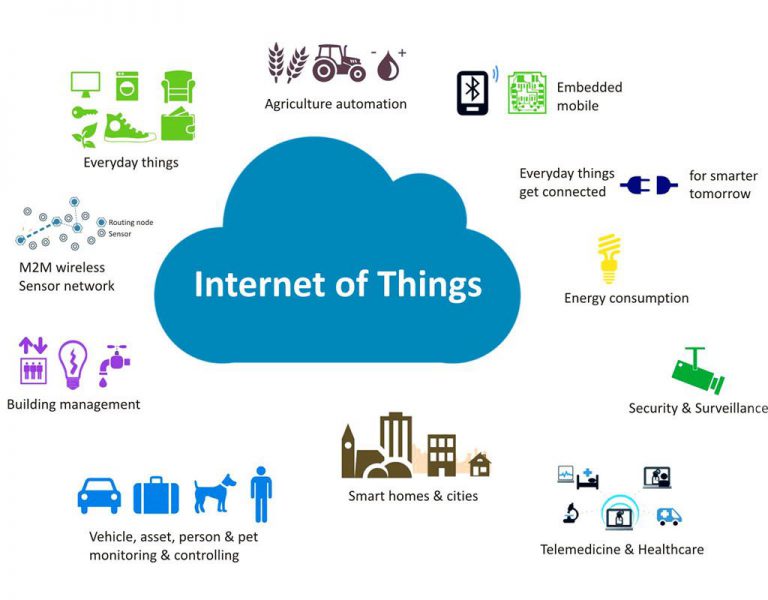
### Internet of things (IoT)

### Census vs Sample
- Census: a collection of information from all units in the population or a 'complete enumeration' of the population
- Sample: a collection of information from part of population
### Structured vs Unstructured data
- Structured data is highly-organized and formatted in a way so it's easily searchable in relational databases
- Unstructured data has no pre-defined format or organization, making it much more difficult to collect, process, and analyze
### What is data science?
- The goal of Data science is extract insight from messy data
### DA vs DE vs DS
- DA or BI: analyze data to help company make better decision => clean data, visualize, explore insight, make dashboard, present
- DE: develop, contruct, test and maintain complete architecture => apply the model to pipeline
- DS: analyze and interpert complex data => build data model
### What is machine learning?
- give ability to learn without being explicity programmed.
### AI vs Machine Learning vs Deep learning
- AI: enable machine minic human behavior
- Machine learning: subset of AI which use statistical methods to enable machine to improve with experience
- Deep learning: subset of machine learning- inspired by human brin - which make the computation of multi-layer neural network feasible
### Supervised learning vs unsupervised learning
- Supervised learning: the algorithm learns on a labeled dataset, providing an answer key that the algorithm can use to evaluate its accuracy on training data
- Unsupervised learning: the algorithm tries to make sense of by extracting features and patterns on its own
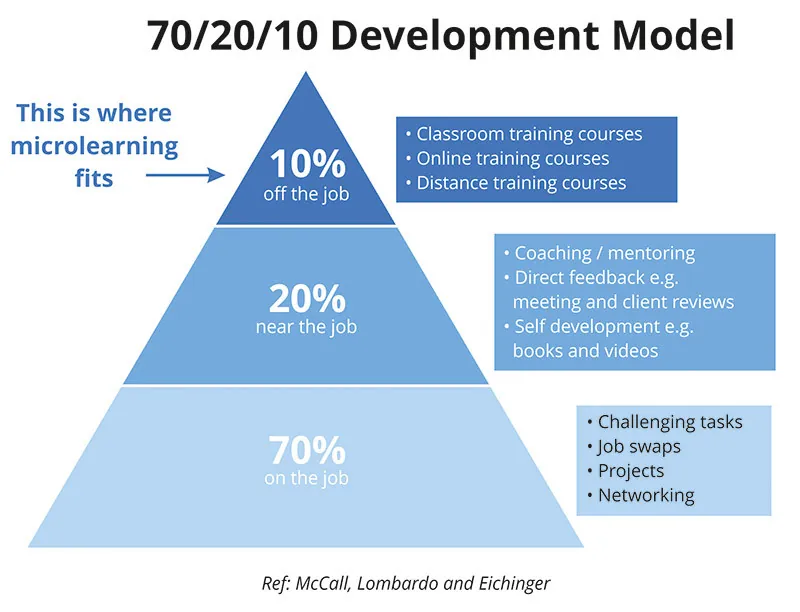
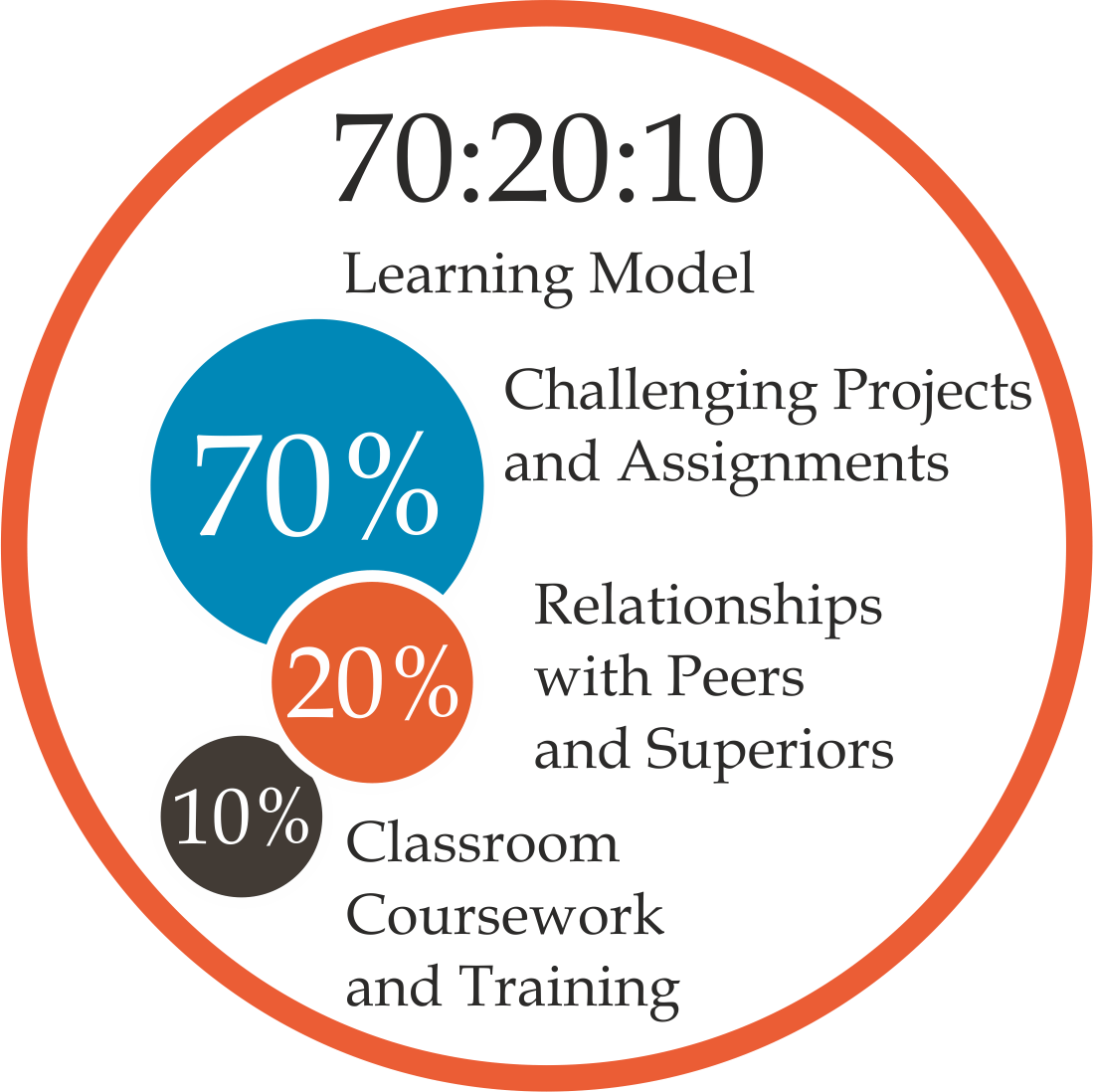
### 70/20/10 development model
## Day 2
### Swap 2 numbers
*Input*
```
a = 1
b = 2
a, b = b, a
print(a, b)
```
*Output*
```
2 1
```
### Operator
| Operator | Name | Description |
|--------------|----------------|--------------------------------------------------------|
| ``a + b`` | Addition | Sum of ``a`` and ``b`` |
| ``a - b`` | Subtraction | Difference of ``a`` and ``b`` |
| ``a * b`` | Multiplication | Product of ``a`` and ``b`` |
| ``a / b`` | True division | Quotient of ``a`` and ``b`` |
| ``a // b`` | Floor division | Quotient of ``a`` and ``b``, removing fractional parts |
| ``a % b`` | Modulus | Integer remainder after division of ``a`` by ``b`` |
| ``a ** b`` | Exponentiation | ``a`` raised to the power of ``b`` |
| ``-a`` | Negation | The negative of ``a`` |
> ### Comparision operation
| Operation | Description | Operation | Description |
|---------------|-------------|---------------|-----------|
| ``a == b`` | ``a`` equal to ``b`` | ``a != b`` | ``a`` not equal to ``b`` |
| ``a < b`` | ``a`` less than ``b`` || ``a > b`` | ``a`` greater than ``b`` |
| ``a <= b`` | ``a`` less than or equal to ``b`` || ``a >= b`` | ``a`` greater than or equal to ``b`` |
### Lists
> Lists in Python represent ordered sequences of values. They can be defined with comma-separated values between square brackets.
* **Example 1**
*Input*
```
planets = ['Mercury', 'Venus', 'Earth', 'Mars', 'Jupiter', 'Saturn', 'Uranus', 'Neptune']
# Input 1
print(planets[0:9])
# Input 2
print(planets[0:4:1])
# Input 3
print(planets[3::-1])
# Input 4
print(planets[-5::-1])
```
*Output*
```
# Output 1
['Mercury', 'Venus', 'Earth', 'Mars', 'Jupiter', 'Saturn', 'Uranus', 'Neptune']
# Output 2
['Mercury', 'Venus', 'Earth', 'Mars']
# Output 3
['Mars', 'Earth', 'Venus', 'Mercury']
# Output 4
['Mars', 'Earth', 'Venus', 'Mercury']
```
* **Example 2**
*Input*
```
planets = ['Mercury', 'Venus', 'Earth', 'Mars', 'Jupiter', 'Saturn', 'Uranus', 'Neptune']
planets[3] = 'Malacandra'
print(planets)
```
*Output*
```
['Mercury', 'Venus', 'Earth', 'Malacandra', 'Jupiter', 'Saturn', 'Uranus', 'Neptune'
```
### Tuple
Tuples are almost exactly the same as lists. They differ in just two ways.
1. The syntax for creating them uses (optional) parentheses () rather than square brackets []
2. They cannot be modified (they are ***immutable***).
**Tuples over List**
- ***Tuples are faster than lists***. If you're defining a constant set of values and all you're ever going to do with it is iterate through it, use a tuple instead of a list.
- It makes your **code safer** if you **“write-protect”** data that does not need to be changed. Using a tuple instead of a list is like having an implied assert statement that this data is constant, and that special thought (and a specific function) is required to override that.
- **Some tuples can be used as dictionary keys** (specifically, tuples that contain immutable values like strings, numbers, and other tuples). **Lists can never be used as ~~dictionary keys~~**, because lists are not immutable.
### Dictionary
> It's a very useful data structure in Python.
> A dictionary is a collection which contains many pairs of keys and values.
> Unlike list, dictionary is super fast to search, retrieve, delete, change value using the key. In fact, the complexity for those operations is O(1)
* **Example 1**
*Input*
```
# Loop through dictionary of dictionaries
for child_key in my_family_dict:
print("key:", child_key)
each_child = my_family_dict[child_key]
print("value:", each_child)
for info_key in each_child:
print("info: ", each_child[info_key])
print("--------------------------------------")
```
*Output*
```
key: child1
value: {'name': 'Emil', 'year': 2004}
info: Emil
info: 2004
--------------------------------------
key: child2
value: {'name': 'Tobias', 'year': 2007}
info: Tobias
info: 2007
--------------------------------------
key: child3
value: {'name': 'Linus', 'year': 2011}
info: Linus
info: 2011
--------------------------------------
```
* **Example 2**
*Input*
```
# Loop through list of dictionaries
for child in my_family_list:
print("child:", child)
for info_key in child:
print("info: ", child[info_key])
print("--------------------------------------")
```
*Output*
```
child: {'name': 'Emil', 'year': 2004}
info: Emil
info: 2004
--------------------------------------
child: {'name': 'Tobias', 'year': 2007}
info: Tobias
info: 2007
--------------------------------------
child: {'name': 'Linus', 'year': 2011}
info: Linus
info: 2011
--------------------------------------
```
## Day 3
### Set vs list
* **Set**
*Input*
```
set([4,5,5,3])
```
*Output*
```
{3, 4, 5}
```
* **List**
*Input*
```
[4,5,5,3]
```
*Output*
```
[4,5,5,3]
```
### List comprehension
* **Example 1:**
*Input*
```
for x in range(2):
for y in range(3):
print(x, y)
```
*Output*
```
0 0
0 1
0 2
1 0
1 1
1 2
```
* **Example 2:**
*Input*
```
pairs = [(x, y) for x in range(2) for y in range(3)]
```
*Output*
```
[(0, 0), (0, 1), (0, 2), (1, 0), (1, 1), (1, 2)]
```
* **Example 3:**
*Input*
```
# the same with the one above but longer way and easier to understand
pairs = [(x, y)
for x in range(2)
for y in range(3)] # 100 pairs (0,0) (0,1) ... (9,8), (9,9)
pairs
```
*Output*
```
[(0, 0), (0, 1), (0, 2), (1, 0), (1, 1), (1, 2)]
```
### Generator

*Input*
```
def generate_sandwich(n):
i = 0
while i < n:
sandwich_name = 'Sandwich ' + str(i) # define the number/object that you want to create
yield sandwich_name # every 'yield' produces a value, then return it
i += 1
my_store = generate_sandwich(10)
for i in my_store:
print(i)
```
*Output*
```
Sandwich 0
Sandwich 1
Sandwich 2
Sandwich 3
Sandwich 4
Sandwich 5
Sandwich 6
Sandwich 7
Sandwich 8
Sandwich 9
```
>> After the generator finishes generating all elements based on its definition, it cannot generate more item.
*Input*
```
next(my_store) # give you error message: StopIteration
```
*Output*
```
StopIteration
```
> ### The asterisk (*) performs argument unpacking, which uses the elements of pairs as individual arguments to zip
```
def f(*args, **kwargs):
print('args = ', args) # this is a list
print('kargs = ', kwargs) # this is a dictionary
print("----------------")
for name in args:
print('Hi ' + name)
for key in kwargs:
print(key, '=' ,kwargs[key])
```
* **Example 1**
*Input*
```
def f(*args, **kwargs):
print('args = ', args) # this is a list
print('kargs = ', kwargs) # this is a dictionary
print("----------------")
for name in args:
print('Hi ' + name)
for key in kwargs:
print(key, '=' ,kwargs[key])
# Input 1
f('Tom','Quan','Nhan','Ai', year='1992', school='cool', some_number=1234)
# Input 2
f('Minh', 'Tom', coder=True, school=True, test=False, hihi=6)
# Input 3
f('Minh', 'Tom', 'Nhan', 'Quan', coder=True, school=True, test=False)
```
*Output*
```
# Output 1
args = ('Tom', 'Quan', 'Nhan', 'Ai')
kargs = {'year': '1992', 'school': 'cool', 'some_number': 1234}
----------------
Hi Tom
Hi Quan
Hi Nhan
Hi Ai
year = 1992
school = cool
some_number = 1234
# Output 2
args = ('Minh', 'Tom')
kargs = {'coder': True, 'school': True, 'test': False, 'hihi': 6}
----------------
Hi Minh
Hi Tom
coder = True
school = True
test = False
hihi = 6
# Output 3
args = ('Minh', 'Tom', 'Nhan', 'Quan')
kargs = {'coder': True, 'school': True, 'test': False}
----------------
Hi Minh
Hi Tom
Hi Nhan
Hi Quan
coder = True
school = True
test = False
```
* Example 2
*Input*
```
def flexible_compute(*args, **kwargs):
operator = kwargs["operator"]
divide = kwargs["divide_by_2"]
first_num = args[0]
second_num = args[1]
if operator == "Mul":
result = first_num * second_num
elif operator == "Add":
result = first_num + second_num
else:
result = first_num - second_num
if divide == True:
result /= 2
return result
print(flexible_compute(3, 2, divide_by_2=True, operator='Mul'))
print(flexible_compute(3, 2, divide_by_2=True, operator='Add'))
print(flexible_compute(3, 2, divide_by_2=True, operator='Minus'))
```
*Output*
```
3.0
2.5
0.5
```
### Python Decorator
```
def my_decorator(func):
def wrapper_decorator(*args, **kwargs):
# Do something before here
value = func(*args, **kwargs)
# Do something after here
return value
return wrapper_decorator
@my_decorator
def my_fuction(...):
...
```
* Example 1
*Input*
```
def my_decorator(func):
def wrapper(*args, **kwargs):
print("Something is happening before the function is called.")
func(*args, **kwargs)
print("Something is happening after the function is called.")
return wrapper
@my_decorator
def greeting(name):
print("Hi", name)
greeting('coderschool')
```
*Output*
```
Something is happening before the function is called.
Hi coderschool
Something is happening after the function is called.
```
* Example 2
*Input*
```
def draw_hash(func):
def wrapper(*args, **kwargs):
print("#"*20)
func(*args, **kwargs)
print("#"*20)
return wrapper
def draw_star(func):
def wrapper(*args, **kwargs):
print("*"*20)
func(*args, **kwargs)
print("*"*20)
return wrapper
@draw_hash #this decorator only draw hash symbols
@draw_star #this decorator only draw star symbols
def greeting(name):
"""Just a docstring"""
print("Hi", name)
greeting('everyone at Izu')
```
*Output*
```
####################
********************
Hi everyone at Izu
********************
####################
```
* Application of Decorator
```
# Time Function
import functools
import time
def timer(func):
"""Print the runtime of the decorated function"""
@functools.wraps(func)
def wrapper_timer(*args, **kwargs):
start_time = time.perf_counter() # 1
value = func(*args, **kwargs)
end_time = time.perf_counter() # 2
run_time = end_time - start_time # 3
print(f"Finished {func.__name__!r} in {run_time:.4f} secs")
return value
return wrapper_timer
@timer
def waste_some_time(num_times):
for _ in range(num_times):
sum([i**2 for i in range(10000)])
```
```
# Debugging tool
import functools
def debug(func):
"""Print the function signature and return value"""
@functools.wraps(func)
def wrapper_debug(*args, **kwargs):
args_repr = [repr(a) for a in args] # 1
kwargs_repr = [f"{k}={v!r}" for k, v in kwargs.items()] # 2
signature = ", ".join(args_repr + kwargs_repr) # 3
print(f"Calling {func.__name__}({signature})")
value = func(*args, **kwargs)
print(f"{func.__name__!r} returned {value!r}") # 4
return value
return wrapper_debug
@debug
def check_prime_number(n):
if n < 2:
return False
for i in range(2, (n // 2) + 1):
if n % i == 0:
return False
return True
@debug
def sum_prime(limit=100):
s = 0
for i in range(limit):
if check_prime_number(i):
s += i
return s
```
```
# Check form input information
customers = [
{'name':'A', 'phone':'0981231234', 'age':10},
{'name':'B', 'phone':'0981231234123123', 'age':100},
{'name':'C', 'phone':'0981231235', 'age':20},
{'name':'D', 'phone':'0981231236', 'age':30},
]
import functools
def valid_phone_number(func):
@functools.wraps(func)
def wrapper(customers):
# Do something before
valid_customers = []
for cus in customers:
if len(cus['phone']) == 10:
valid_customers.append(cus)
func(valid_customers)
# Do something after
return wrapper
@valid_phone_number
def read_customer_info(customers):
for cus in customers:
print(cus)
@valid_phone_number
def mean_age(customers):
s = 0
for cus in customers:
s += cus['age']
print('Mean age:', s/len(customers))
mean_age(customers)
```
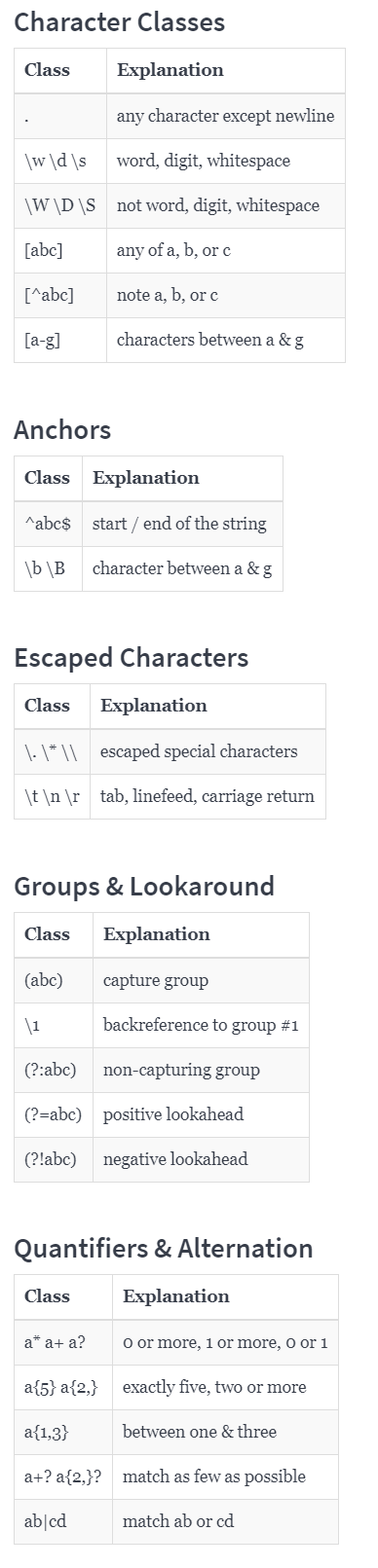
### Regular Expression
* Example
*Input*
```
import re
# List of patterns to search for
patterns = [ 'term1', 'term2' ]
# Text to parse
text = 'This is a string with term1, but it does not have the other term.'
for pattern in patterns:
print(f'Searching for {pattern} in: \n{text}' )
#Check for match
if re.search(pattern, text):
print '\n'
print 'Match was found. \n'
else:
print '\n'
print 'No Match was found.\n'
```
*Output*
```
Searching for "term1" in:
"This is a string with term1, but it does not have the other term."
Match was found.
Searching for "term2" in:
"This is a string with term1, but it does not have the other term."
No Match was found.
```
## Day 4
### Working with files and directories
* `mkdir dir1 dir2 dir3` creates three directories
* `rmdir dir1 dir2 dir3` removes the empty directories
* `rm -R dir` deletes non-empty directory
* `cp file1 file2` copies file, `-i` (interactive mode) to prompt user to answer if they want to overwrite file.
* `mv file1 file2` moves file
* `touch file_name` creates an empty file
### File inspection
* `cat file_name` views a file's contents or concatenate several files
* `less large_file` one page is displayed at a time; space bar to page down; `q` to quit (`less` serveral files: `:n` to move to next file, `:p` to go back, `:q` to quit
* `head -n 3 file_name` prints the first 3 lines of the file
* `tail -n 3 file_name` prints the last 3 lines of the file
* `shuf -n 3 file_name` prints randomly 3 lines of the file
* `wc file_name` counts number of lines, words, and characters in the file
* `column -s"," -t example_data.csv` (be careful to use `column` on very large files)
* `sort file_name` sortes the content (`-r` to reverse, `-u` for getting rid of duplicates)
### grep
- `grep Hello greetings.txt`: find line with the word “Hello”
- `grep —-ignore-case hello greetings.txt` = `grep -i hello greetings.txt` argument with more than one letter start with two dash
- `grep -E ‘[Hh]ello’ greetings.txt`: apply regex
- `grep —-invert-match hello greetings.txt` = `grep -v hello greetings.txt` : find every line that not contains “hello”
- `grep -i -v hello greeting.txt`: find every line that not contain the case-insensitive “hello”
- `grep -r Hello folder/`: search every subfolder and file for the string “Hello”
### sed
- `sed ‘s/Hello/Goodbye/‘ greetings.txt`: s(substitute) → substitute “Hello” with “Goodbye” for every line in the file. `sed` printed out changes but not actually change the file. `cat greetings.txt` to see
- `sed -E ‘s/Hello|hello/GOODBYE/’ greetings.txt`: regex
- `sed -i‘old’ ‘s/Hello/Goodbye/‘ greetings.txt`: change the file and create a new “old” file as back up. Then if you don’t want reverse you can do `mv greetings.old.txt greetings.txt`
- `sed -i‘’ ‘s/Hello/Goodbye/’ greetings.txt`: change the file without backup
### Print the directory tree with bash command
* **Example 1:**
*Input*
```
find . | sed -e "s/[^-][^\/]*\// |/g" -e "s/|\([^ ]\)/|-\1/"
```
*Output*
```
|-app
| |-.gitignore
| |-app.py
| |-blueprints
| | |-home_page
| | | |-blueprints.py
| | | |-__init__.py
| | |-__init__.py
| |-static
| | |-index.js
| | |-styles.css
| |-templates
| | |-base.html
| | |-home.html
|-data
| |-raw
| |-test
| |-train
| |-validation
|-notebooks
|-script.sh
|-scripts
| |-model.py
| |-preprocess.py
| |-train.py
```
* **Example 2:**
*Input*
```
find | sed 's|[^/]*/|- |g'
```
*Output*
```
- app
- - .gitignore
- - app.py
- - blueprints
- - - home_page
- - - - blueprints.py
- - - - __init__.py
- - - __init__.py
- - static
- - - index.js
- - - styles.css
- - templates
- - - base.html
- - - home.html
- data
- - raw
- - test
- - train
- - validation
- notebooks
- script.sh
- scripts
- - model.py
- - preprocess.py
- - train.py
```
### Git commands
- `git clone <url>`: makes a copy of a repository and stores it on your computer.
- `git init`: makes the current folder as a git repository
- `git add`: adds a file to "staging area", which means telling git to include the file in the next time it saves a version of the repo. `git add .` to add all changed files.
- `git status`: a helpful command, to see what's currently going on in the git repo
- `git commit`: saves the version of the repository.
- `git push -u origin master`: pushes the changes I made on my computer up to the Github repo
- `git pull`: is opposite of `git push`, pull the most recent version of the online repository.
- **Merge Conflicts**: Let say two developers work on the same line of a file, and both of them push the code up to Github. So Git's not going to be able to know what to do in that situation, because it doesn't know which kind of version of the code to believe. So you have to resolve that merge conflict by specifically telling Git which version of the code you want to use.
- `git log`: to see all the version that you have saved and you can see the commit message is a very good indicator or reminder of what was changed in a particular version. So make sure you use good commit messages.
- `git reset --hard <commit>`: reverts code back to a previous commit
`git reset --hard origin/master`: reverts code back to remote repository version
- **Branching**: Branch is a version of the repository. Each branch has its own commit history and current version.
`git branch`: shows all branches of code
`git branch <branch_name>`: creates a new branch
`git checkout <branch_name>`: switches to a branch
`git merge <branch_name>`: merges the branch <branch_name> with current branch
- **Pull request:** This happens frequently in open-source projects. If you've made a change to a repository, and you may want to request to kind of merge those changes back into the original version. That's when you want to submit a pull request. And Github has functionality for pull requests to allow for whoever owns the repository to kind of review and either decide to approve or reject those changes.
- `git config --global alias.sla 'log --oneline --decorate --graph --all` makes `git log` a bit prettier.
## Day 5
### HTML is not a programming language
> HTML - Hyper Text Markup Language is a ***markup language*** for documents designed to be displayed in a web browser
* HTML stands for Hyper Text Markup Language
* HTML is the standard markup language for creating Web pages
* HTML describes the structure of a Web page
* HTML consists of a series of elements
* HTML elements tell the browser how to display the content
* HTML elements label pieces of content such as "this is a heading", "this is a paragraph", "this is a link", etc.
### Basis structure of website

### CSS is not a programming language
> CSS - Cascading Style Sheets is a ***style sheet language*** used for describing the presentation of a document written in a markup language such as HTML
* CSS describes how HTML elements are to be displayed on screen, paper, or in other media
* CSS saves a lot of work. It can control the layout of multiple web pages all at once
* External stylesheets are stored in CSS files
 Sign in with Wallet
Connect another wallet
Sign in with Wallet
Connect another wallet