## Collaborative Lesson Development!
<!-- Put the link to this slide here so people can follow -->
slides: <https://hackmd.io/@timdennis/HJs_6ysOR>
---
#### Welcome!
Congratulations 🎉 on your lesson proposal being selected for the Lessons for Librarians in Open Science

---
#### Who are we?
- Tim Dennis :fleur_de_lis: , Program Director
- Zhiyuan Yao :world_map:, Program Coordinator
- Lawrence Lee :sun_with_face:, Lesson Infastructure Developer
---
#### Carpentries Lesson Development Lifecycle
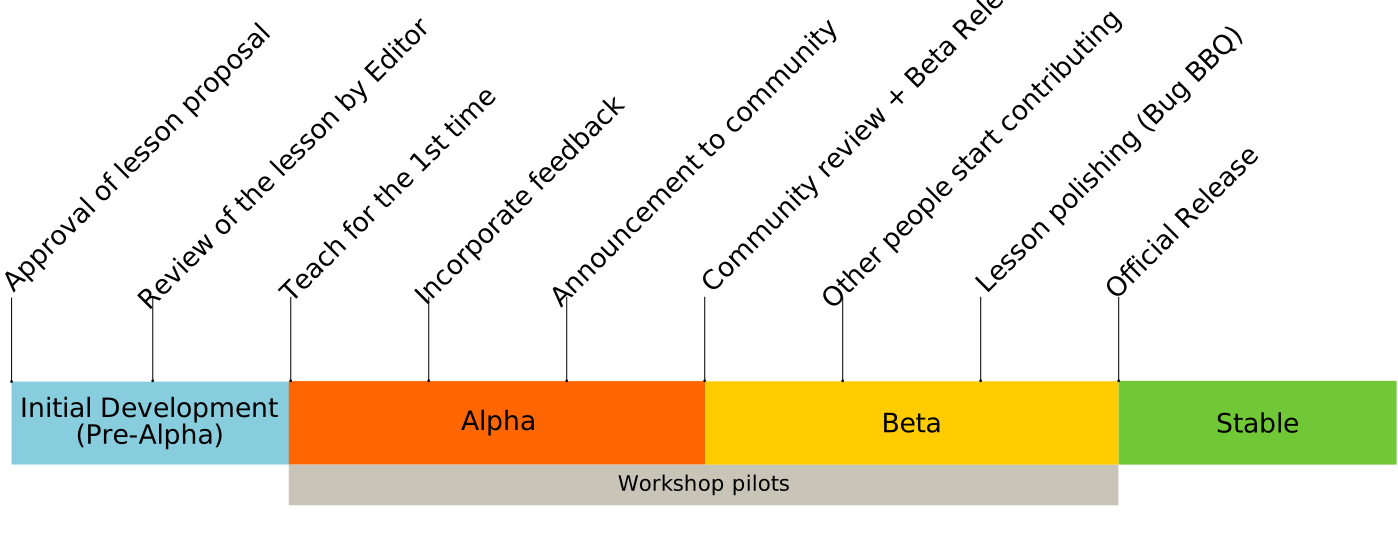
Source: <https://cdh.carpentries.org/the-lesson-life-cycle.html>
---
#### Minimum requirement for your lessons

Note:
* We don't expect a "finished" lesson
* We want a teachable lesson
* In the Carpentries template (Workbench)
* In a place that can be collaborated on and further developed
---
### Carpentries Lifecycle
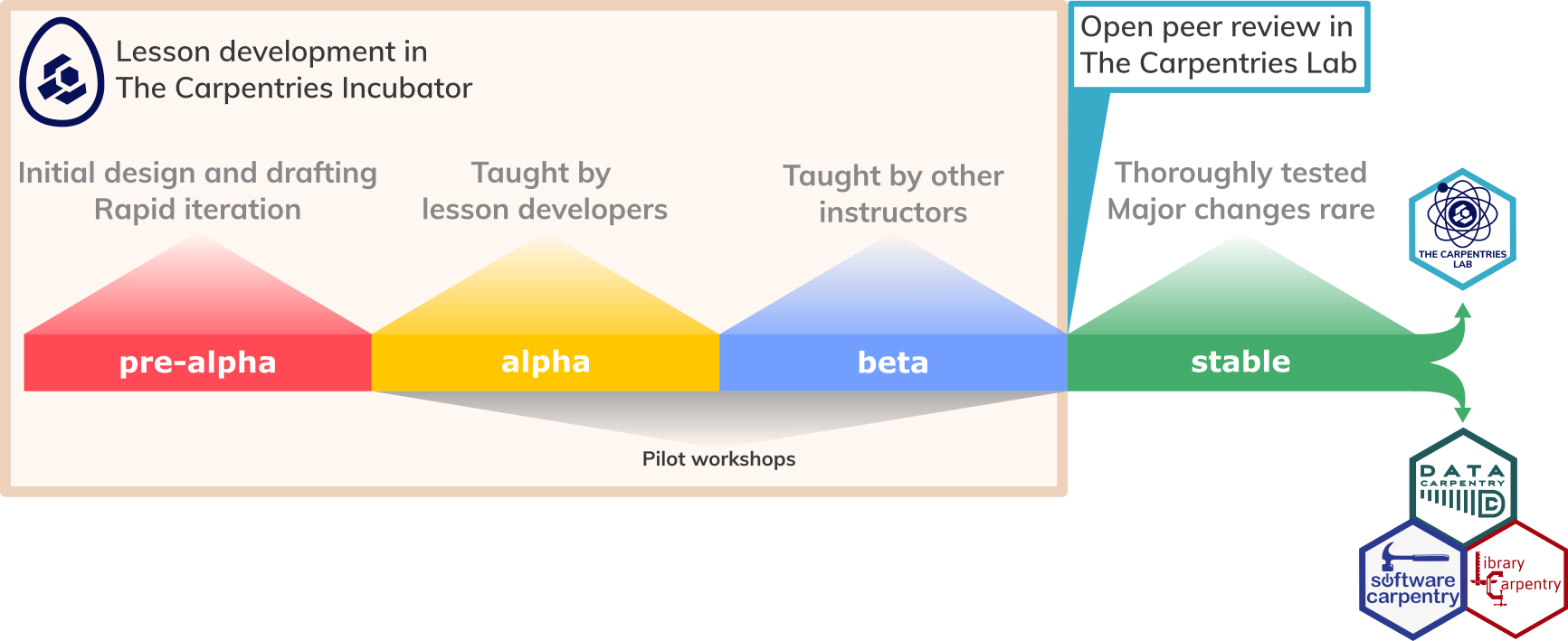
* **pre-alpha**: a first draft of the lesson is still being constructed.
* **alpha**: the lesson has been/is being taught by the original authors, but has not been fully tested.
* **beta**: the lesson is ready to be taught by instructors who have not been significantly involved in its developed to this point.
* **stable**: the lesson has been extensively tested by the authors and others. It can be considered broadly complete and unlikely to undergo any drastic changes without warning.
---
#### Roadmap (Draft)
| <!--- --> | <!-- --> |
| -------- | -------- |
| **1.** Lesson development workshop (July-Aug. 2024) | **5.** Pilot lesson to your author group (or us) (Nov. 2024 -Jan. 2025) |
| **2.** Continue development (Aug. 19-Sept. 2024) | **6.** Feedback and improvements for Alpha (Jan.-Mar. 2025) |
| **3.** Workbench/GitHub Training (Oct. 2024) | **7.** Taught by external instructor(s) (April -- 2025) |
| **4.** Lesson templating in Carpentries format (Oct.-Nov. 2024) | **8.** Library Carpentry/Incubator lesson adoption (after above) |
Note:
* Lessons will be built in our UCLA-IMLS github organization, you all will be invited to that afer our workshop.
* We'd like the lessons to visible on that org
* We can move to Carpentries Incubator or Library Carpentry after lesson pilot - we'll coordinate with authors
* After piloting and then external instruction, you'll be invited to a LC-CAC meeitng. We can talk about your roles, e.g. do you want to be a maintainer
---
#### UCLA-IMLS Support
Lesson Infrastructor Developers (and Zhyiuan & Tim) can help with and meet on:
* Lesson structure and components
* Capentries Workbench (set up, fixing configurations)
* GitHub/Git (set up & config)
* Mapping content to tempate (Carpentries Workbench)
* Adding content to the template and repository
Note:
* Since we will be working in a GitHub organization we control, we can help at the code level
* We'll have a calendly where you can meet with us in good TZ coverage
---
### Where your lesson will reside
1. Ideally as part of [LC Curriculum](https://librarycarpentry.org/)
2. [Carpentries Incubator](https://carpentries-incubator.org/)
3. [Carpentries Lab](https://carpentries-lab.org/)
4. Discoverable via [UCLA-IMLS Website](https://ucla-imls-open-sci.info/)
---
### Your TODOs:
1. Write a great lesson using the Carpentries template (structured content components)
2. Pilot lesson and capture feedback
3. Iterate and improve on the lesson after feedback and self-pilot and external pilot
4. Visit [Library Carpentry CAC](https://librarycarpentry.org/cac/) to talk about lesson fit with LC or if better in Incubator
5. Consider using [Carpentries Lab](https://carpentries-lab.org/) for further peer review/publishing
6. Help write a Carpentries blog announcing lesson
7. Alpha version in template is due Mar. 2025
---
### Questions - before we move on to the workshop
---
### Collaborative Development Worshop
---
### Our First Exercise (10 minutes)
What was the best lesson you ever followed (were taught in a class, read through online, read in a book)? Try to differentiate between what was good about the performance of the teacher/trainer and what was good about the content of the lesson itself. Take a few minutes to write down some notes about your answer in our shared notes document.
---
### Today:
1. Lesson design process
2. Target audience
3. Prerequisites
---
### Workshop goals
* This workshop teaches best practices in lesson design, development, and open-source collaboration.
* It is ideal for groups collaborating on a lesson project but also accommodates individual authors
---
### This training covers:
* Identifying and characterizing the **target audience**
* Defining **SMART learning objectives**
* Explaining the pedagogical value of **authentic tasks**
* Creating exercises for **formative assessment**
* Considering **cognitive load** in lesson pacing, length, and organization
Note:
SMART - Specific, Measurable, Attainable, Realistic & Timely
---
### Lesson Design
---
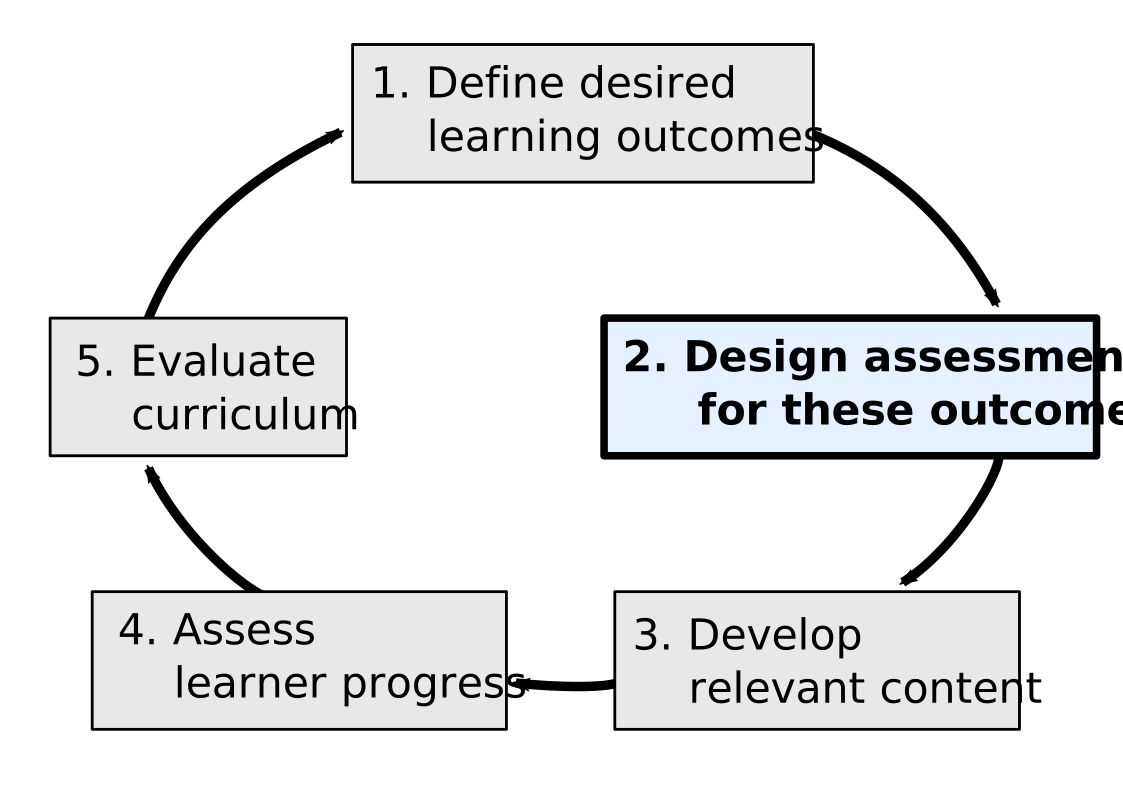
#### Lesson Design Process (Adapted)
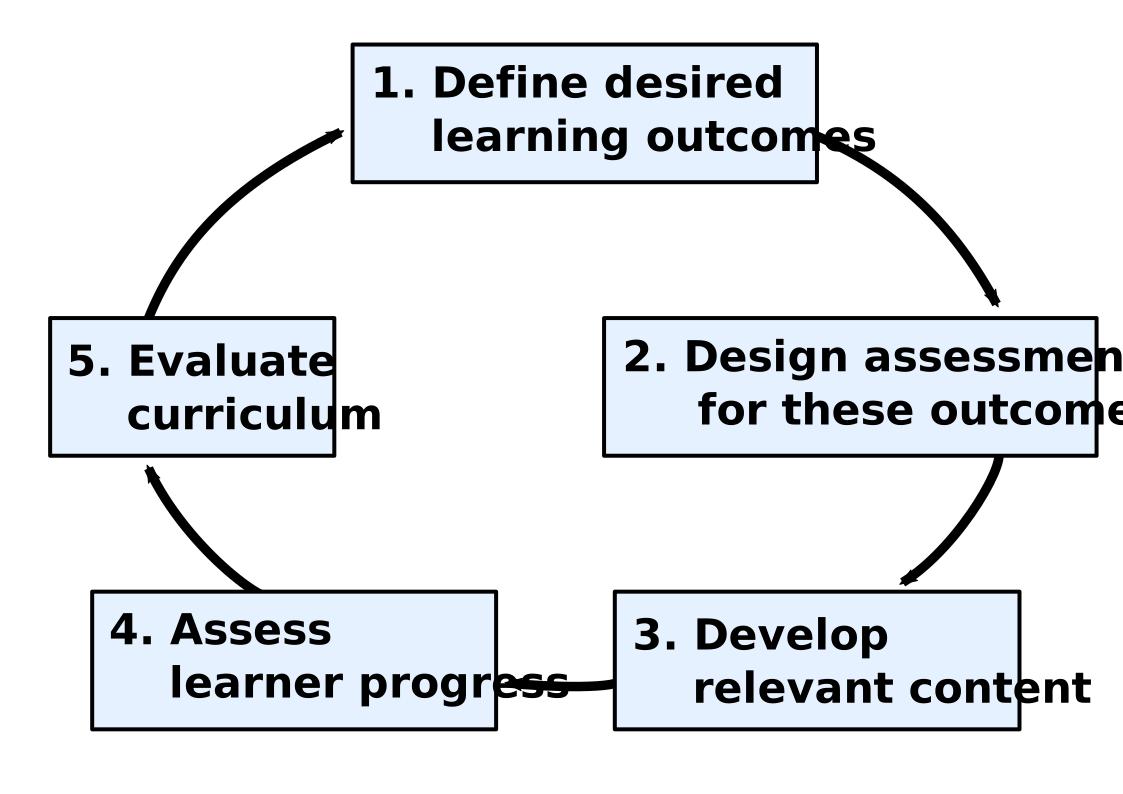
*Adapted from Gill Nicholl's [five phase paradigm for curriculum design](https://www.routledge.com/Developing-Teaching-and-Learning-in-Higher-Education/Nicholls/p/book/9780415236966).*
Note:
* In The Carpentries, most workshops are relatively short-format, so there is not enough time for extensive summative assessment.
* Instead, The Carpentries places an emphasis on formative assessment, which takes place while the teaching is still going on.
* Formative assessment gives instructors the opportunity to evaluate the teaching and lesson content before the end of the workshop.
* This allows instructors to make adjustments to the lesson as needed, ensuring that learners are on track to achieve the learning outcomes.
---
### Identifying Your Target Audience
#### :female-astronaut: :book: :person_with_ball: :bulb:
---
#### Why Think About the Target Audience Early?
- Define the lesson's scope: what learners need to know before and what they will learn after.
- Helps define learning outcomes and attract the right audience.
- Thinking about the target audience early helps with defining desired learning outcomes.
- Displaying a description of the target audience helps attract people with the right motivation and relevant prior knowledge.
---
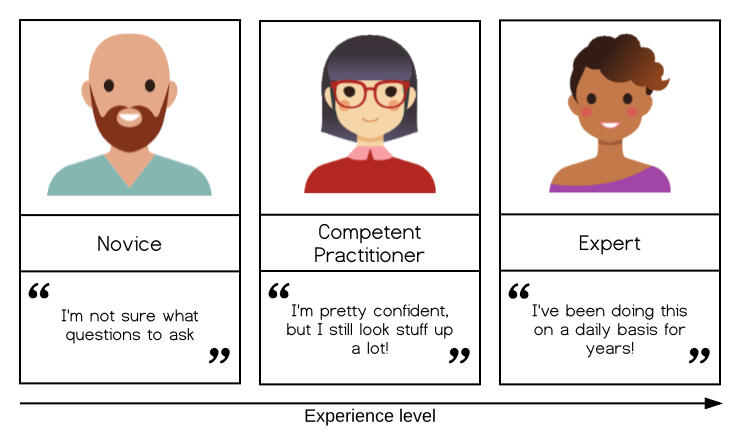
### Expertise Levels
Note:
- Identify the audience's expertise level: novice, competent practitioner, or expert.
- Novices do not know what they do not know.
- Competent practitioners have enough understanding for everyday purposes.
- Experts handle out-of-ordinary situations easily and use prior knowledge effectively.
---
### Novice vs Competent Practitioner
- Novices need step-by-step, tutorial-like lessons.
- Competent practitioners benefit from explorative activities.
- Ensure prior knowledge is activated and misconceptions are corrected early.
---
### Aligning with Audience Motivation
- Align lessons with the audience's needs and motivations.
- Understanding their background helps design valuable lessons.
- Positive expectancies make the lesson seem worthwhile to learners.
---
#### Be Specific About Your Audience
- Avoid vague terms like "PhD students."
- Focus on real or imagined personae to represent the target audience.
- Stay connected to learners' different priorities and challenges.
- You are not your learners; they will have different priorities, interests, and challenges.
---
### Exercise: Lesson Design Notes Document
- Take a moment and create a copy of the [Lesson Design Notes Template](https://docs.google.com/document/d/1evDfzhtEWADnkvtULr4mzymng1wynztv1QAsj1QKSR0/edit#heading=h.mez47is5kou0).
- Rename it for your lesson and make sure your team can access it.
- Please invite datascience@g.ucla.edu to the document.
- Share and fill out the template with the lesson title and notes throughout the training.
- Trainers will provide the template for trainees to fill in.
---
#### Exercise: thinking about target audience
(15 minutes total for both parts)
Part 1 (all, 5 minutes): think about a member of the target audience for your lesson,
and answer the following questions in the context of your lesson topic:
1. What is their background?
2. What do they already know how to do?
3. What do they want to do with the skills they will learn from your lesson?
4. What problem will your lesson help them solve?
---
#### Part 2a (for groups, 10 minutes)
1. Share your answers with your collaborators. How do they compare?
1. If you have identified different audiences, are they compatible?
1. Or would your time be better spent focussing on one particular audience for this lesson?
Take notes on your discussion in your Lesson Design Notes document. It can be particularly helpful to note down any decisions made e.g. potential target audiences that were explicitly discounted, and your reasons for doing so.
---
#### Part2b (for solo developers)
Take notes about your choice of target audience in your Lesson Design Notes document. It can be particularly helpful to note down any decisions made e.g. potential target audiences that were explicitly discounted, and your reasons for doing so.
Then write 1-2 diagnostic questions, for use before the lesson is taught, to help you assess whether a respondent falls within the intended audience for your lesson.
---
### Further Considerations for Target Audience
- Consider vocabulary and potential language differences.
- Avoid confusion from different meanings in learners' domains.
---
#### Exercise: Defining Prerequisite Knowledge
- List required skills/knowledge for learners.
- For novice audiences, consider basic skills like touch typing, using a browser, or command line interactions.
---
### Today
1. Learning Objectives
2. Break
3. Episodes
---
## Learning Objectives
Note:
* At this stage, you should know your lesson's target audience and their initial knowledge and skills.
* Now, focus on the knowledge and skills they will gain: these are the lesson's learning outcomes.
* Defining your goals early is crucial, though it may feel abrupt.
* This clarity helps determine suitable activities and examples, ensuring appropriate content and scope for the lesson.
---
#### Focus on Skills
- Keep your audience **motivated** by teaching **skills**, not just **tools**.
- Center lessons on **empowering learners** and focusing on their **benefits**, not just **functions** or **commands**.
- Emphasizing **skills over tools** helps **prioritize key concepts** and enhances the **impact** on learners' work.
---
#### Learning Objectives
- Design lessons with **clear objectives** focused on teaching new **cognitive skills**.
- **Cognitive skills** involve **remembering** and **distinguishing** concepts before **applying** and **creating**.
- **Remembering** and **distinguishing** are easier to learn than **applying** and **creating**.
- Clear objectives help develop **necessary content**, avoid **distractions**, and ensure **important points** are covered.
---
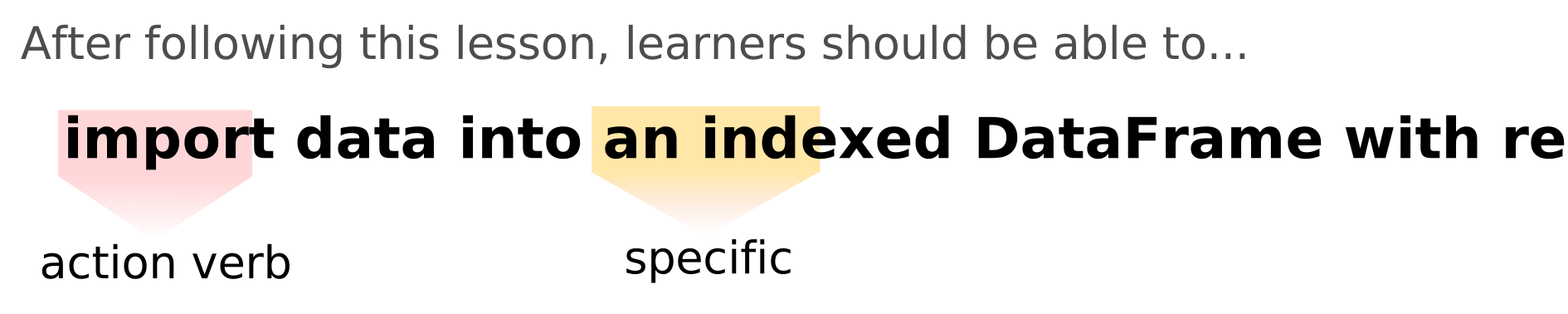
### What Does an Objective Look Like?
---
### Objectives for the current section of this training:
1. **Explain** the importance of defining **specific**, **measurable**, **attainable**, **relevant**, and **time-bound** objectives for a lesson.
2. **Evaluate** a written lesson objective according to these criteria.
---

---
#### Learning Objectives
- **Define learning objectives** for the entire lesson and individual sections.
- Each objective should start with a **verb** and describe one **measurable skill** the learner will obtain.
- Use **action verbs** like **"explain," "choose," or "predict"** rather than **passive verbs** like **"know," "understand," or "appreciate."**
- Use [**Bloom's Taxonomy**](https://cft.vanderbilt.edu/guides-sub-pages/blooms-taxonomy/) to help define objectives.
- Write objectives in a way that **motivates** the learner.
---

---
#### SMART Objectives Should Be:
- **Specific**: Clearly describe a particular **skill or ability** the learner should have.
- **Measurable**: It should be possible to **observe** and **ascertain** when the learner has acquired the skill.
- **Attainable**: The learner should **realistically** be able to acquire the skills within the **available time**.
- **Relevant**: They should be **relevant** to the overall **topic** of the lesson.
- **Time-bound**: Include a **timeframe** within which the goal will be reached.
---
### Exercise: Evaluating Learning Objectives (10 minutes)
- Look at the example learning objectives on the next slide (also in our collaborative notes doc).
- Fill in the table for each objective, checking off the cells if you think an objective meets the criteria or leaving it unchecked if not.
- Assume each objective is for a lesson to be taught in a two-day workshop.
- Note any observations and, if time permits, imagine the titles of lessons that would have these objectives.
---
#### Example Objectives:
1. **Create** formatted page content with Markdown.
2. **Program** with Rust.
3. **Fully understand** GitHub Actions.
| Objective | Action verb? | Specific | Measurable | Attainable |
|-----------|--------------|----------|------------|------------|
| 1 | | | | |
| 2 | | | | |
| 3 | | | | |
---
#### Solution:
| Objective | Action verb? | Specific | Measurable | Attainable |
|-----------|--------------|----------|------------|------------|
| 1 | :white_check_mark: | :question: | :question: | :white_check_mark: |
| 2 | :question: | :x: | :x: | :question: |
| 3 | :x: | :x: | :x: | :question: |
Objective 1 is the closest to what we ideally want in a lesson objective, but it illustrates how difficult it can be to make an objective truly specific. For example, a more specific and measurable version of this objective could be: _**write** links, headings, and bold and italicized text with Markdown._
---
### Lesson Scope
- Refers to the amount of **content** that should be included in a lesson.
- Avoid trying to fit too much content into a lesson, as this can be **counterproductive**.
- When writing learning objectives, it is helpful to consider the **order in which new skills must be acquired**.
- **Higher-level cognitive skills** take longer to acquire, so it is unrealistic to aim to have learners completing **creative tasks** in the beginnning of a lesson.
- Lessons can be broadly considered as blocks of content associated with a **particular learning objective**.
---
### Exercises
**Defining Objectives for Your Lesson (20 minutes)**
- **Write learning objectives** for your lesson into the relevant section of your **Lesson Design Notes** document. What do you want learners to be able to do at the end of the workshop? Your lesson proposals are linked
- Follow the **SMART framework**: make them specific, measurable, attainable, relevant, and time-bound.
- Take notes about your discussion in your Lesson Design Notes document.
---
#### Reviewing Lesson Objectives (15 minutes)
- Swap objectives written in the previous exercise with a partner and review them with the following questions in mind:
- Are the objectives **clear**?
- Do they use **"action" verbs**?
- Could you directly **observe** whether a learner had reached this objective?
- Do the results match your assessment?
- (Optional) Are these objectives **realistic**, given the target audience of the lesson?
---
### Advertising Your Lesson
- Learning objectives and the list of **prerequisite knowledge** are very useful information to include when **advertising a workshop**.
- They help potential participants understand if the event is a **good fit for them** and manage their **expectations**.
---
### Key Points
- **Defining objectives** for a lesson can help to **focus your content** on the most important outcomes, and outline the **scope** of the project.
- Following the **SMART framework** can help make your learning objectives as useful as possible.
- Leaving objectives **unrealistic** or **undefined** increases the risk of a lesson losing focus or spending time on activities that do not help learners gain the most important skills.
---
### BREAK (10 min)
---
### Defining Episodes
---
#### Key Question
- **How can the objectives for a lesson be used to break its content into sections?**
---
#### Learning Objective
- **Identify appropriate parts** of their lesson to break into individual **sections**.
---
### Why Break Lessons into Episodes?
- **Manage cognitive load** by organizing content into **coherent**, **self-contained chunks**.
- Makes it easier for instructors to **schedule breaks**.
- Helps consider the **path learners will take** to reach defined objectives.
- Identifies **component skills** and **knowledge** needed.
---
### What is an Episode?
- In The Carpentries, individual parts of a lesson are called **episodes**.
- Episodes are **self-contained units** with their own **narrative arc**.
- Contribute to the larger **theme or story** of the lesson.
- Typical length: **20-60 minutes** of content (teaching + exercises).
---
### Planning Your Episodes
1. **Number and Order**:
- Use **learning objectives** to plan episodes.
- Each objective can correspond to one episode.
2. **Decompose Objectives**:
- Break down **lesson-level objectives** into more **finely-grained steps**.
---
### Example:
- Lesson-level objective: **"create formatted page content with Markdown"**
- Episodes:
- **"create bold, italic, and linked text with Markdown"**
- **"explain different header levels in Markdown"**
- **"add images with caption and alt text in Markdown"**
---
### Questions to Help Break Down Objectives
- What **new knowledge and skills** are needed to meet the overall objectives?
- What **order** should these concepts and skills be introduced in? Are some **dependent** on others?
- Can complex concepts and skills be **broken down further**?
---
### Exercise: Defining Episodes for a Lesson (25 minutes)
1. **Divide the lesson** into logical blocks (episodes) that each take approximately **20-60 minutes** to teach.
- Think of these blocks as **topics** to cover, but do not define learning objectives for individual episodes yet.
2. **Assign responsibility** for one episode to each team member.
- Focus on this episode for the rest of the training.
- Teach these episodes in a **trial run**.
---
**If the list of episodes is smaller than the number of team members**:
- Assign **two people** to a single episode.
- Each takes responsibility for a **subset of the objectives**.
**If there are more episodes than team members**:
- Do not assign more than one episode to each collaborator initially.
- Assign **consecutive episodes** at the beginning of the lesson.
---
### Key Points
- **Learning objectives** can help split lesson content into **manageable chunks**.
---
## End Week 2
---
## Week 3: Episode LOs & Assessments
---
## Defining Episode-Level Learning Objectives
---
### Last Week
- Last week, you created a list of the **learning objectives** for your lesson as a whole.
- This process helps set the **end goal** and describes the **scope** of the lesson, considering the **expected prior knowledge** of the target audience.
---
### Defining Episode Objectives for Lessons
**Purpose**:
- **Stay focused** on essential topics.
- **Determine** whether learners are attaining the desired skills.
- **Summarize** the skills the learner can expect to gain.
---
### Defining Episode Objectives for Lessons
**Benefits:**
* Ensures clarity and purpose in teaching.
* Enhances learner's understanding and expectations.
* Streamlines content creation for better instructional quality.
---
#### Recommendations for Episode-Level Objectives
1. **Number of Objectives**:
- Aim for **2-4 objectives** per episode.
- If more than that, consider **breaking** the section into multiple episodes.
2. **Alignment with Lesson Goals**:
- Identify which **lesson-level objectives** your episode will contribute to.
3. **Component of Higher-Level Skills**:
- Ensure the objectives for your episode fit as a **component** of the higher-level skills/understanding defined in the **lesson-level objectives**.
---
### Example Objectives
- **Lesson-Level Objective**: Create formatted page content with Markdown
- **Episode Objectives**:
1. **Create bold, italic, and linked text** with Markdown.
2. **Explain different header levels** in Markdown.
3. **Add images with captions and alt text** to a Markdown document.
---
### Exercise: Defining Episode-Level Objectives (20 minutes)
1. **Work with your team** to define 2-4 objectives for each episode of your lesson.
2. **Align these objectives** with your lesson-level objectives.
3. **Write down** the objectives in your Lesson .
---
### Key Points
- **Episode-level objectives** help keep the content focused and relevant.
- They ensure alignment with the **overall lesson goals**.
- Clearly defined objectives make it easier to **assess learner progress**.
---
### Assessments
---
---

---
### Assessments
- **summative assessments** - used to verify whether learners achieved the stated learning objectives after instruction.
- **formative assessments** - used to detect changes in learner performance *during* instruction, to provide feedback and insight into the learners' developing mental models of the topic taught and to identify any old or developing misconceptions. Enhance metacognition.
---

---
### Memory and Exercises
**Memory Types:**
- Working memory: limited and quick access.
- Long-term memory: unlimited but slow access.
**Exercises:**
- Move information from working to long-term memory.
- Occur frequently to free up working memory.
---
### Designing Exercises
**Exercise Design:**
- Based on learning objectives.
- Use specific action verbs.
- Match exercises to intended skills.
---
### Resources for Assessment Types
**Further Reading:**
- [Exercise Types - Teaching Tech Together](https://teachtogether.tech/en/index.html#s:exercises)
- [Edutopia's Formative Assessments](https://www.edutopia.org/groups/assessment/250941)
- [21 Ways to Check Student Understanding](https://www.opencolleges.edu.au/informed/features/21-ways-to-check-for-student-understanding/)
- [H5P Interactive Content](https://h5p.org/content-types-and-applications)
---
### Exercise: Exercise Types and When to Use Them (15 minutes)
<https://carpentries.github.io/lesson-development-training/formative-assessment.html#exercise-exercise-types-and-when-to-use-them-15-minutes>
---
"**Different types** of **lesson objectives (LOs)** are better fit for **novices**, while others are better fit for **competent practitioners**, etc. and if **exercises (formative assessments)** are well aligned to **LOs**, they will automatically serve the corresponding **audience**. Thinking in terms of **LOs** (What should a learner do in order to achieve this specific **LO**? Is this **LO** exactly what learners are expected to achieve by the end of this piece of instruction? etc.) is easier than thinking in terms of **LOs** + **audience** + **content**. **LOs** should be tailored to the **audience**, and, if this is well done, you may stop worrying about the **audience**. Create **LOs** for the specific **audience** and create **assessments** for specific **LOs**."
>- Dr. Allegra Via, Carpentries Instructor Trainer
---
### Exercise: Assessing an Objective (30 minutes)
<https://carpentries.github.io/lesson-development-training/formative-assessment.html#exercise-assessing-progress-towards-an-objective-30-minutes>
---
### Key Points
- Assessments ensure lesson objectives are met.
- Exercises commit learning to long-term memory.
- Match exercises to audience and objectives.
- Formative assessments provide feedback during teaching.
---
## Homework:
1. Write other formative assessments for your learning objectives and add to your Lesson Design Notes.
2. Refine and finish LOs for your Episodes.
3. Optional Homework: Reflection Exercise (not included in timing) - In our Collaborative Notes doc.
---
## End Week 3
---
## Week 4: Data and Narrative
---
### Where we are in the lesson development lifecycle
<img src = 'https://codimd.carpentries.org/uploads/upload_42cf275bbf3acbadcd35c0ee4c256a88.svg' width = 600>
---
#### Roadmap (Draft)
| <!--- --> | <!-- --> |
| -------- | -------- |
| **1.** Lesson development workshop (July-Aug. 2024) | **5.** Pilot lesson to your author group (or us) (Nov. 2024 -Jan. 2025) |
| **2.** Continue development (Aug. 19-Sept. 2024) | **6.** Feedback and improvements for Alpha (Jan.-Mar. 2025) |
| **3.** Workbench/GitHub Training (Oct. 2024) | **7.** Taught by external instructor(s) (April -- 2025) |
| **4.** Lesson templating in Carpentries format (Oct.-Nov. 2024) | **8.** Library Carpentry/Incubator lesson adoption (after above) |
---
## Objectives
- Find candidate datasets for a lesson.
- Evaluate dataset suitability for lessons.
- Choose examples for formative assessments.
- Develop a compelling narrative.
**Note:
These objectives set the stage for the participants, highlighting the core skills they will develop during this episode.
---

---
## Creating a Narrative
- Storytelling boosts engagement and motivation.
- Connect lesson content to learners' real-world scenarios.
- Use images wisely to enhance, not distract.
Note:
Emphasize the power of narrative in teaching and the careful use of visuals to maintain focus.
---
## Varying Examples
- Use varied examples for abstract concepts.
- Multiple examples reinforce understanding.
Note:
Highlight the importance of diversity in examples to help grasp abstract ideas.
---
## Finding Images
- Use only images with clear reuse licenses (e.g., CC0, CC-BY).
- Create your own images if necessary.
Note:
Discuss the legal and ethical considerations when selecting images.
---
## Finding a Dataset
- Aim for authentic, simple datasets.
- Check the license: CC0 recommended.
- Consider ethical implications.
Note:
Walk through the thought process of selecting a dataset, emphasizing simplicity and ethical considerations.
---
### Examples of Public Repositories -
<div style = 'text-align: left'>When looking for data to reuse, consider public repositories in the subject area for your lesson or general data repositories such as:
- [Dryad](https://datadryad.org/)
- [Dataverse network](https://dataverse.org/installations)
- [The Data Curation Network’s datasets](https://datacurationnetwork.org/datasets/)
- [The Offical Portal for European Data](https://data.europa.eu/)
- [DataONE](https://www.dataone.org/)
- [The Official Portal for Argentina Data (in Spanish)](https://www.datos.gob.ar/)
- [LANFRICA](https://lanfrica.com/)</div>
---
## Exercise: Choosing a Dataset or Narrative (see Collab Google Doc)
- Find a suitable dataset or narrative.
- List pros and cons of each.
- Record your choices and reasoning.
Note:
Encourage participants to apply the concepts discussed by selecting and evaluating potential datasets or narratives for their lessons.
---
## Key Points
- Narratives streamline learning.
- Consider licensing and ethics in dataset choice.
- Open data can be found in various repositories.
Note:
Final slide with a concise recap of the critical points for easy recall.
---
## How to Write a Lesson
---
#### Objectives
- Estimate teaching time for a lesson.
- Summarize lesson content with questions and key points.
- Connect examples/exercises to learning objectives.
Note:
Clear objectives guide participants in what they should achieve by the end of the episode.
---
## Writing Explanatory Text
- Connect examples and exercises cohesively.
- Balance verbosity to meet learner needs.
- Be explicit; don’t assume prior knowledge.
Note:
Emphasize the importance of clarity and connectivity in explanatory content.
---
## Using Spoilers for Optional Materials
- Manage “scope creep” with spoiler boxes.
- Keep spoilers minimal and clearly titled.
- <https://carpentries.github.io/lesson-development-training/explanation.html>
- See the full set of available components: https://carpentries.github.io/sandpaper-docs/component-guide.html#tabbed-callouts
Note:
Discuss how to use spoilers to manage content without overwhelming learners.
---
## Lesson Time Management
- Prioritize essential content.
- Consider realistic workshop lengths.
- Pilot workshops to adjust timing.
Note:
Stress the importance of not overloading a lesson and piloting for timing adjustments.
---
As you consider the length of your lesson discuss with your collaborators and ask yourself:
1. What is essential to include?
2. What can be left out if needed?
3. Are there checkpoints where the lesson could end if needed?
4. Can important concepts be moved up earlier to ensure they are covered?
---
## Less is More
- Cover less, but more effectively.
- Shorter lessons allow for better retention.
- Teach key concepts earlier to ensure coverage.
Note:
Highlight that focusing on core material enhances learning outcomes.
---
The five ways to handle an extraneous overload situation are to:
- eliminate extraneous material (coherence principle),
- insert signals emphasizing the essential material (signaling principle),
- eliminate redundant printed text (redundancy principle),
- place printed text next to corresponding parts of graphics (spatial contiguity principle), and
-eliminate the need to hold essential material in working memory for long periods of time (temporal contiguity principle).”
- [Renkl](https://www.cambridge.org/core/books/cambridge-handbook-of-multimedia-learning/worked-examples-principle-in-multimedia-learning/8753055D1FB47CF1E2BB897FD44FBEF8) (2014)
---
### Exercise
LESSON TIME MANAGEMENT (10 MINUTES)
(5 minutes) In the shared notes document, note down your answers to these questions:
- From a design perspective, at what point is a lesson too long?
- What factors influence and constrain the length of a lesson?
- How might you prioritise what to keep if you have to cut lesson content down?
(5 minutes) Discussion based on the responses.
---
## Avoiding Demotivating Content
- [dismissive language](https://carpentries.github.io/instructor-training/04-expertise.html#just-and-other-dismissive-language) - e.g. ‘simply’, ‘just’
- use of [stereotypes](https://carpentries.github.io/instructor-training/04-expertise.html#just-and-other-dismissive-language) (check learner profiles for stereotypes too)
- [expert awareness gaps](https://carpentries.github.io/instructor-training/04-expertise.html#mind-the-gap), i.e. places where you may be assuming the learners know more than they actually do
- fluid representations, i.e. using different terms with the same meaning interchangeably
Note:
Encourage careful review of language and structure to maintain motivation and inclusivity.
---
### Other Important Considerations for Lesson Text
- unexplained or unnecessary jargon/terminology (as your learners may come from different backgrounds, may be novices, not native English speakers, and a term in one domain/topic may mean something else entirely in another)
- unexplained assumptions
- sudden jumps in difficulty/complexity
---
## Polishing a Lesson
- Use feedback to refine content over time.
- [Checklists and reviews](https://github.com/carpentries-lab/reviews/blob/main/docs/reviewer_guide.md#reviewer-checklist) ensure high standards.
- Don’t aim for perfection initially—iterate.
Note:
Reinforce that lessons evolve and improve through practice and feedback.
---
## Key Points
- Objectives and assessments frame the episode.
- Review for demotivating language and cognitive load.
- Remove unnecessary objectives to streamline content.
Note:
A final recap of the most critical considerations when writing a lesson.
---
### Less is more
Trying to fit too much content into a lesson is counter-productive. It is better to cover less and provide a smaller but stable foundation for learners to build upon.
---
As you consider the length of your lesson discuss with your collaborators and ask yourself:
- What is essential to include?
- What can be left out if needed?
- Are there checkpoints where the lesson could end if needed?
- Can important concepts be moved up earlier to ensure they are covered?
---
https://carpentries.github.io/instructor-training/02-practice-learning.html#mapping-a-mental-model
In the end, the only way to know for sure is to teach the lesson, measuring how long it takes to teach.
If, after piloting your new lesson, you find that you did not have time to cover all the content, approach cutting down the lesson by identifying which learning objectives to remove.
---
You should also review your text thinking about accessibility. This includes:
- Avoiding regional/cultural references and idioms that will not translate across borders/cultures
- Avoiding contractions i.e. don’t, can’t, won’t etc.
---
## End Week 4
---
# Week 5
---
### Today:
- Visit from Cody Hennesy, University of Minnesota, Computational Research Librarian, Library Carpentry CAC
- How We Operate
- Running a pilot
- Next Steps
---
## How We Operate
---
### Lesson Life Cycle Revisited
- The life cycle helps communicate the status of a lesson to instructors and learners.
---
## Indicating Progress
- The life cycle stage is displayed on the lesson site, GitHub repository, and Carpentries websites.
- Configured in the `config.yaml` file under the `life_cycle` field.
- https://carpentries.github.io/lesson-development-training
---
### Pathways out of Lesson Incubation
1. **Join an existing lesson program**: Subject to review by the [Curriculum Advisory Committee](https://carpentries.org/curriculum-advisors/).
-> Library Carpentry!
2. **Submit for open peer review**: In The Carpentries Lab or The Journal of Open Source Education (JOSE).
---
### Pilot Workshops
---
### Key Quote
> "No lesson survives first contact with learners."
> — Greg Wilson
---
- Pilot workshops are important for testing and evaluating lessons.
- Collect feedback on timing, technical issues, learner questions, and more.
---
## Pilot Workshop Notes
- Use the [pilot workshop notes template](https://codimd.carpentries.org/lesson-pilot-observation-notes-template#) to capture feedback.
- Assign a team member to observe and take notes during the workshop.
- Share and discuss notes with the lesson authors post-workshop.
- Convert feedback into action items and log them as issues in the lesson repository.
---
### Beta Pilot Workshops (2025)
- Beta workshops involve instructors not deeply involved in lesson development.
- Provide pre-workshop briefings and post-workshop debriefs to gather valuable feedback.
---
### Community Channels
- The `ucla-imls-opensci` channel on The Carpentries Slack workspace. A channel for this project, so we can chat with each other about how the lesson progresses.
- **Slack (`lesson-dev` channel)**: Ask questions and share announcements.
- **TopicBox (`incubator-developers` list)**: Stay updated with relevant announcements.
- **Coworking Sessions**: Engage with other developers monthly. Listed on [The Carpentries community calendar](https://carpentries.org/community/#community-events).
---
## Exercise: Join Relevant Channels
- Take 5 minutes to explore and join any communication channels that interest you.
---
## Preparing to Teach
---
### Objectives
- Summarize lesson content as a teaching plan.
- Add Setup Instructions and Instructor Notes to the lesson site.
- Create a feedback collection plan.
---
## Overview
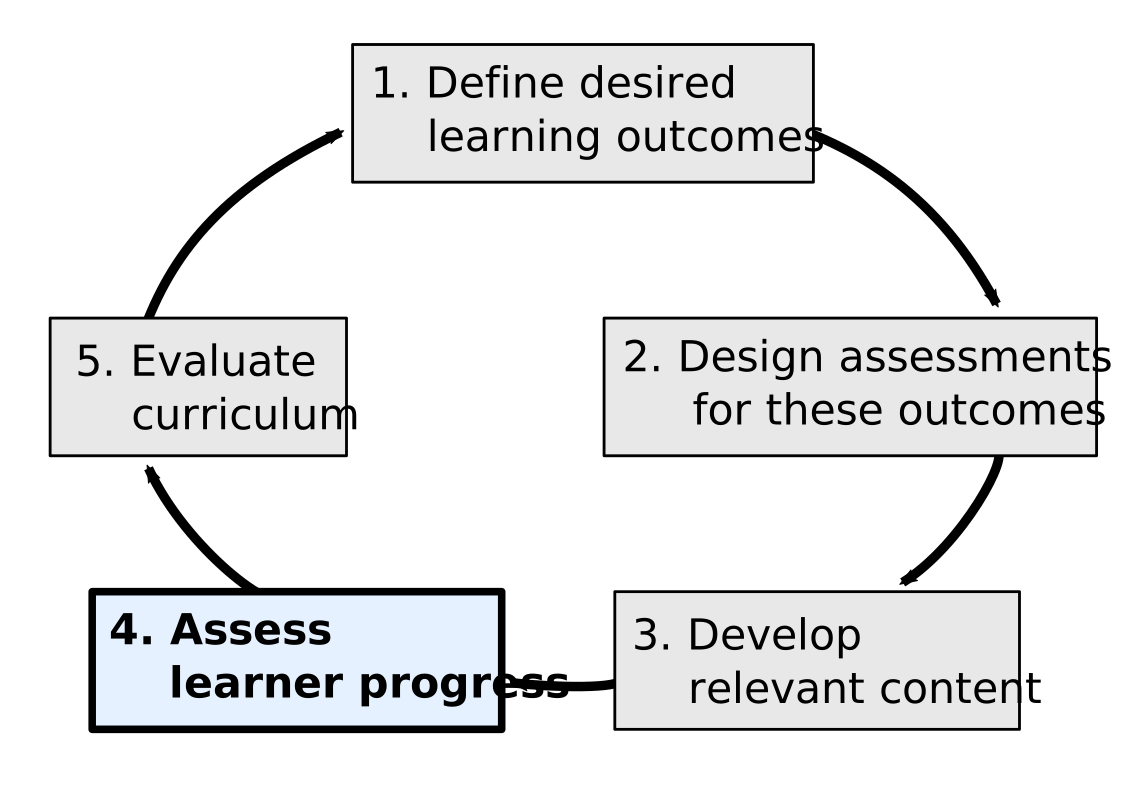
- Measure learner progress and gather feedback during lesson teaching.
- Focus on teaching plan, setup instructions, and feedback collection.
---
## Teaching Plan
A teaching plan outlines your session structure:
- **Welcome & Introductions**: Introduce yourself and lesson objectives.
- **Setup**: Ensure everyone is ready to proceed.
- **Teaching Segments**: Break down lesson content into segments, including exercises.
- **Checkpoints**: Planned stops to check-in with learners.
- **Visual Aids**: Slides, figures, and resources needed.
- **References**: List of additional resources and reading materials.
---
### Checkpoints
- Use checkpoints, especially at the start, to ensure learners are ready.
- Ask questions or have learners indicate completion of tasks.
---
### Perspective
Detailed notes organized in a concept map/workflow ensure consistency. Though initial preparation is intense, it greatly reduces future lesson prep time and is invaluable to other teachers.
— Dr. Allegra Via, Carpentries Instructor and Trainer
---
## Exercise: Prepare a Teaching Plan
---
### Setup Instructions
- Create clear download, installation, and setup instructions if your lesson involves software, tools, or data.
- Circulate these instructions before the workshop to save time during the lesson.
- Troubleshooting setup issues on the spot can be time-consuming and stressful.
- This info will show up on the [landing page](https://librarycarpentry.org/lc-python-intro/) of your lesson.
---
## Exercise: Add Setup Instructions
- Take a moment and add set up instructions to your lesson design notes.
---
## Instructor Notes
- **Purpose**: Help instructors deliver the lesson effectively.
- **Include**: Lesson design rationale, teaching tips, challenges, and troubleshooting.
---
### Hidden Curriculum
- Hidden curriculum refers to the unofficial social and cultural norms, behaviors, and values that learners absorb, often unconsciously, from the way a lesson is taught.
- These effects influence learning beyond the explicit content of the lesson.
- Consider what learners might pick up from the way your lesson is delivered, in addition to its written content.
- Use Instructor Notes to guide instructors on managing the hidden curriculum, recommending practices to support positive learning experiences.
---
## Exercise: Add Instructor Notes
---
### Feedback Collection Plan
- Feedback is important when trialing a new lesson.
- Assign feedback collection roles before the pilot.
- **Methods**:
- Constant feedback through notes and "minute cards."
- Dedicated wrap-up and feedback session.
- Use post-workshop surveys for detailed insights.
---
### Tasks before we regroup in Oct:
1. Continue to write your lesson.
2. Teach **one episode** of your lesson and collect feedback.
3. Reflect on what worked, what didn’t, and what you’ll change.
---
### October Meeting Plans and Options
1. I will send out a poll to schedule three meetings in October.
2. One meeting will focus on your lessons and reflect on the state of the lesson & any trials. If you aren't learning the workbench, provide your content so we can start populating the template.
3. A training session on The Carpentries Workbench will be offered with optional attendance.
4. Another optional meeting will be dedicated to GitHub training using the Workbench.
---
## Discussion: Questions
- What questions do you have about the trial run?
- How should you approach teaching it?
- What resources would help you prepare?
---
{"title":"Slides UCLA-IMLS Collaborative Lesson Dev Slides","description":"View the slide with \"Slide Mode\".","slideOptions":"{\"theme\":\"simple\"}","contributors":"[{\"id\":\"1421b929-3417-4b58-b481-d440da17fe5d\",\"add\":92473,\"del\":51565}]"}