<!-- Put the link to this slide here so people can follow -->
**slides: https://hackmd.io/p/SJhSRzUo4#/**
---
## Who are we?
---
### Why Git/GitHub?
* Code & data sharing and collaboration
* Democratic databases: science on GitHub
* [Scientists are turning to a software–development site to share data and code](https://www.nature.com/news/democratic-databases-science-on-github-1.20719)
* Making Code Citeable https://guides.github.com/activities/citable-code/
* [Our path to better science in less time using open data science tools]( https://www.nature.com/articles/s41559-017-0160)
---
### Why Git/GitHub?
* Curated list of awesome lists https://github.com/sindresorhus/awesome
* Instructional materials
* Library Carpentry Lessons https://github.com/LibraryCarpentry
* Covid data/code: [John Hopkins](https://github.com/CSSEGISandData/COVID-19), [NYTimes](https://github.com/nytimes/covid-19-data), [LA Times](https://github.com/datadesk/california-coronavirus-data), [more](https://github.com/awesomedata/awesome-public-datasets#healthcare)
* GitHub really strong in enabling users to share and iterate on code & data
---
### Why Git/GitHub?
* Git has been taken up by the data science community
* Use it for source code (R, Python, Stata, etc.)
* And to manage the unruly collection of files that make up typical data analytical projects:
* data, figures, reports, and, yes, source code.
---
## Git
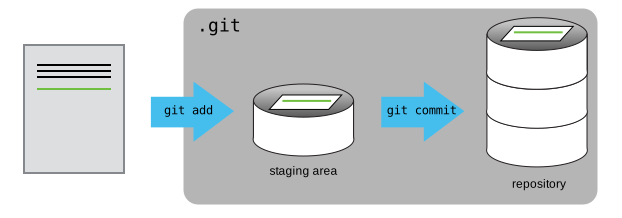
* Git is an open source **version control system** for tracking changes in files and coordinating work on those files among multiple people
* Git stores the metadata and files in a directory/data structure called a repository
* Created by Linus Torvalds in 2005 for managing Linux
* Git is often used as a command line tool but does have GUI based tools
---
## GitHub
* GitHub is a **web-based hosting service** for Git and has some additional features.
* GitHub is not the only option, [GitLab](https://gitlab.com/) main competitor
---
## Version Control
* Version control is a system that records changes to a file or set of files over time
* It allows you to compare, restore, and merge changes to your files
* Not for **preservation** but for versioning of current project
* Think of it an unlimited undo button
---
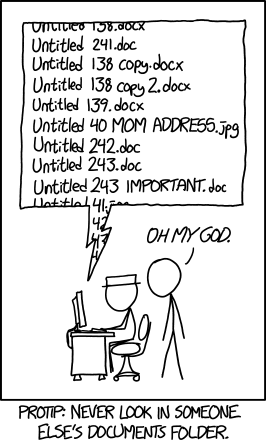
## It helps with some of this pain:
---
## Examples of Version Control You Might Use
* Google Docs Revision History
* 
* Box and Dropbox also have rudimentary version control
---
## Should You Use Git and GitHub?
* Might be overkill for solo projects
* Big learning curve
* You can use Google Drive, Box, Dropbox -- gives you some version control
* Power comes about in working in teams
---
---
## Exercises https://hackmd.io/j3ntMawkSL-ZiMpMk-AALA?view
---
{"metaMigratedAt":"2023-06-14T21:28:41.607Z","metaMigratedFrom":"YAML","title":"Git Intro for Librarians","breaks":true,"description":"Git for librarians lesson.","slideOptions":"{\"theme\":\"simple\"}","contributors":"[{\"id\":\"1421b929-3417-4b58-b481-d440da17fe5d\",\"add\":12598,\"del\":9390}]"}