## Version control w/the Command Line Git and GitHub
## BITSS Research Transparency and Reproducibility Training
---
## Tim Dennis (UCLA)
I am the Director of [Library Data Science Center](https://www.library.ucla.edu/location/data-science-center) at UCLA
I am also a [Carpentries](https://carpentries.org/) instructor
Slides: https://hackmd.io/@timdennis/HJ0a0nuBD
Etherpad: <https://pad.carpentries.org/2021-rt2>
---

---
<img src="https://i.imgur.com/KN8JjZp.png" alt="versions" width="550"/>
---
### Why Version Control
* Roll-back functionality
* Branching - working on several issues/features in one project
* Collaboration - easier to share b/t collaborators and manage versions
* Reproducibility - version the code you used in your paper & isolate possible bugs
---
### Why Git
* Can run anywhere
* Very popular: chances are high you will use or need to contribute to projects maintained in Git
* Distributed: good backup, no single point of failure
* Platforms such as GitHub, GitLab, and Bitbucket build on top of Git
* Sharing software and data
---
### Git more like:
<img src="https://i.imgur.com/JpyrC3F.jpg" alt="espresso" width="600"/>
---
### Than this:
<img src="https://i.imgur.com/mkNEuuB.jpg" alt="instant coffee" width="600"/>
---
Git isn’t the most user friendly and has its design quirks, but its comprehensive design is great. It is definitely the most popular and what you are most likely to need to know.
---
## Example uses of Git/GitHub
* Software ([packages](https://github.com/qinwf/awesome-R), [modules](https://github.com/vinta/awesome-python), analytic code)
* Communicate research ([Jupyter](https://github.com/harryprince/awesome-rmarkdown) & [R notebooks](https://github.com/jupyter/jupyter/wiki/A-gallery-of-interesting-Jupyter-Notebooks))
* Websites & blogs
* Create & maintain lessons
* Others?
---
### Today
1. Getting started and configuration (9:25-9:45)
1. Basics of git (9:45-10:10am)
1. Reverting changes (10:10-10:20)
1. Linking up to GitHub (10:20-10:40)
1. Collaboration (time permitting)
1. Q&A
---
### Unix file system

---
---
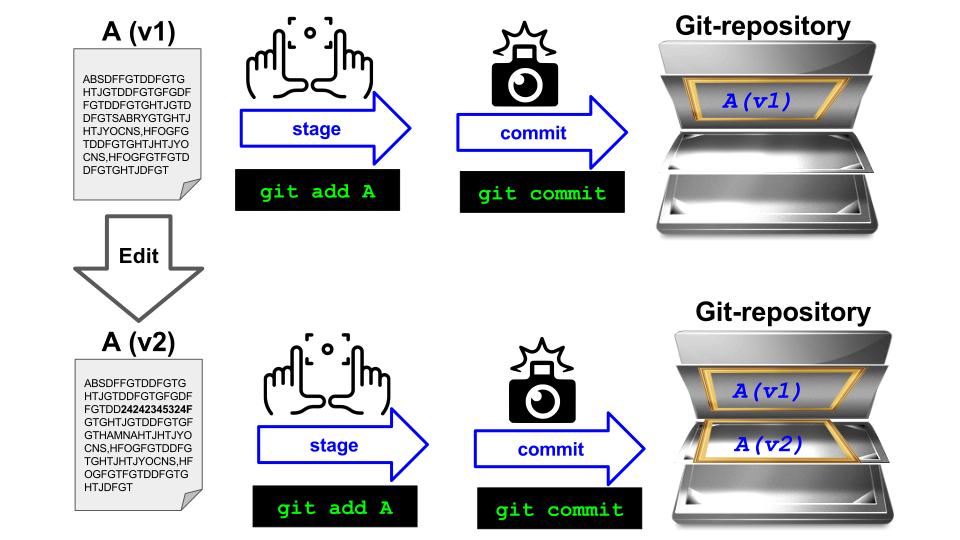
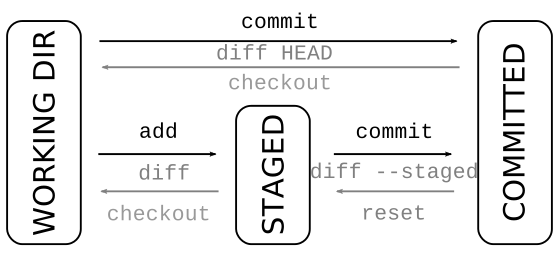
## Think of staging like a box:

---
* You have a box to pack your things in.
* You wouldn’t want to mix items from the bathroom, kitchen and living room into the same box.
* The box corresponds to the staging area of Git, where you can **craft your commits**.
* Committing is like sealing the box and sticking a label on it.
* You wouldn’t want to label your box with “stuff”, but rather give a more descriptive label.
---
---
## Thanks! :raised_hands:
Etherpad: <https://pad.carpentries.org/2021-rt2>
These Slides: <https://hackmd.io/@timdennis/HJ0a0nuBD>
Class notes: <https://jt14den.github.io/SWC-Cheatsheets/html/git-novice.html>
{"metaMigratedAt":"2023-06-15T13:12:57.634Z","metaMigratedFrom":"YAML","title":"Git Rt2","breaks":true,"description":"View the slide with \"Slide Mode\".","slideOptions":"{\"theme\":\"white\"}","contributors":"[{\"id\":\"1421b929-3417-4b58-b481-d440da17fe5d\",\"add\":4501,\"del\":1318}]"}