# ASP.NET Core - Filter
Filter 可以 在Action `執行前` 和 `執行後` 對 Request 進行加工處理,包括錯誤處理、快取、授權等等。使用 Filter 的好處是可以避免重複的程式碼,例如,錯誤處理可以透過 Filter 合併處理錯誤。
<!-- more -->
## Filter 的運作方式
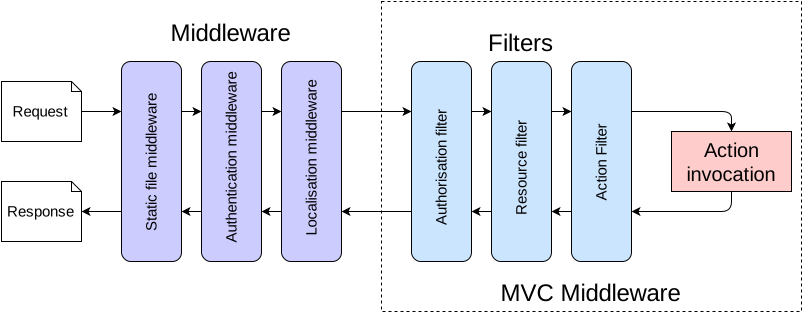
Filter 會在 Middleware 執行完後執行。Filter 和 Middleware 都可以達到類似的目的,要使用哪個取決於是否需要存取 MVC context。
Middleware 只能存取 HttpContext,而 Filter 可以存取整個 MVC context,所以 Filter 可以存取 Routing data 和 model binding 的資訊。
一般來說,如果關注的點是和 MVC 無關的則可以使用 Middleware,若是需要驗證或是修改值則要使用 Filter 才有辦法進行存取。
關於 Middleware 的更多資訊請參考 [ASP.NET Core - Middleware](https://tienyulin.github.io/asp-net-core-middleware/)。
## Filter的類型
Filter 總共有以下幾種不同的類型,會依照順序執行
* Authorization Filter :
最先執行,驗證 Request 是否合法,若不合法則會直接回傳驗證失敗或`401`之類的,若是要經過邏輯運算驗證的則不能在此驗證,需使用 ActionFilter,待邏輯運算回傳後再處理。
* Resource Filter :
在 Authorization Filter 和其他所有 Filter 都執行完之後會執行,用來處理快取或 Model Binding,如果 Cache 中已經有需要的值那就不需要再繼續執行剩下的步驟了,也可以限制檔案上傳大小等等。
* Action Filter :
在 Action 前後執行,處理傳入的 Action 的參數和回應的結果。
* Exception Filter :
處理應用程式沒有處理的例外狀況。
* Result Filter :
應用程式執行無誤後才會執行,若在 Authorization、Resource 或是 Exception 的 Filter 被攔截回傳的話則不會執行 Result Filter

## 實作 Filter
以下以 Dotnet Core 3.1 實作,分別繼承不同類型的 Filter 的 Interface 去實作,範例皆為非同步的方法。
await next() 前代表執行前的處理,呼叫 await next() 代表呼叫執行下一個 Filter,await next() 後的則代表執行後的處理。
另外需特別注意的是如果在執行前的處理已經指派值給 context.Result,則不能再呼叫 await next()。
若要使用同步方法,則繼承的 Interface 去除 Async 即可,而同步的實作分為兩個 function,分別為 OnExecuting (執行前)和 OnExecuted (執行後)。
### Authorization Filter
實作 `IAsyncAuthorizationFilter` 或 `IAuthorizationFilter`
範例: 以 cookie 中帶 token 傳入驗證為例,若 token 驗證不過則回傳 401 未授權
```csharp=
/// <summary>
/// Class AuthorizationFilter
/// </summary>
/// <seealso cref="Microsoft.AspNetCore.Mvc.Filters.IAsyncAuthorizationFilter" />
public class AuthorizationFilter : IAsyncAuthorizationFilter
{
/// <summary>
/// Called early in the filter pipeline to confirm request is authorized.
/// </summary>
/// <param name="context">The <see cref="T:Microsoft.AspNetCore.Mvc.Filters.AuthorizationFilterContext" />.</param>
public async Task OnAuthorizationAsync(AuthorizationFilterContext context)
{
var cookies = context.HttpContext.Request.Cookies;
cookies.TryGetValue("token", out string token);
if (token.Equals("123456"))
{
var response = new FailResultViewModel
{
CorrelationId = Guid.NewGuid().ToString(),
Method = $"{context.HttpContext.Request.Path}.{context.HttpContext.Request.Method}",
Status = "UnAuthorized",
Version = "1.0",
Error = new FailInformation()
{
Domain = "ProjectName",
Message = "未授權",
Description = "授權驗證失敗"
}
};
context.Result = new ObjectResult(response)
{
// 401
StatusCode = (int)HttpStatusCode.Unauthorized
};
}
}
}
```
### Resource Filter
實作 `IAsyncResourceFilter` 或 `IResourceFilter`
範例 : 以 Cahce 為例,當傳入相同的 Request 時直接從 Cache 回傳結果
```csharp=
/// <summary>
/// Class CacheResourceFilter
/// </summary>
/// <seealso cref="Microsoft.AspNetCore.Mvc.Filters.IAsyncResourceFilter" />
public class CacheResourceFilter : IAsyncResourceFilter
{
private static readonly Dictionary<string, ObjectResult> _cache = new Dictionary<string, ObjectResult>();
/// <summary>
/// Called asynchronously before the rest of the pipeline.
/// </summary>
/// <param name="context">The <see cref="T:Microsoft.AspNetCore.Mvc.Filters.ResourceExecutingContext" />.</param>
/// <param name="next">The <see cref="T:Microsoft.AspNetCore.Mvc.Filters.ResourceExecutionDelegate" />. Invoked to execute the next resource filter or the remainder
/// of the pipeline.</param>
public async Task OnResourceExecutionAsync(ResourceExecutingContext context, ResourceExecutionDelegate next)
{
var cacheKey = context.HttpContext.Request.Path.ToString();
if (_cache != null && _cache.ContainsKey(cacheKey))
{
var cacheValue = _cache[cacheKey];
if (cacheValue != null)
{
context.Result = cacheValue;
}
}
else
{
var executedContext = await next();
var result = executedContext.Result as ObjectResult;
if (result != null)
{
_cache.Add(cacheKey, result);
}
}
}
}
```
### Action Filter
實作 `IAsyncActionFilter` 或 `IActionFilter`
這裡分別針對執行前和執行後做兩個範例
範例1 : 對執行前傳入的參數檢查,若檢查未通過則回傳參數驗證失敗
```csharp=
/// <summary>
/// Class ValidationActionFilter
/// </summary>
/// <seealso cref="Microsoft.AspNetCore.Mvc.Filters.IAsyncActionFilter" />
public class ValidationActionFilter : IAsyncActionFilter, IOrderedFilter
{
public int Order { get; set; } = 0;
/// <summary>
/// Called asynchronously before the action, after model binding is complete.
/// </summary>
/// <param name="context">The <see cref="T:Microsoft.AspNetCore.Mvc.Filters.ActionExecutingContext" />.</param>
/// <param name="next">The <see cref="T:Microsoft.AspNetCore.Mvc.Filters.ActionExecutionDelegate" />. Invoked to execute the next action filter or the action itself.</param>
public async Task OnActionExecutionAsync(ActionExecutingContext context, ActionExecutionDelegate next)
{
var parameter = context.ActionArguments.SingleOrDefault();
if (parameter.Value is null)
{
var response = new FailResultViewModel
{
CorrelationId = Guid.NewGuid().ToString(),
Method = $"{context.HttpContext.Request.Path}.{context.HttpContext.Request.Method}",
Status = "Error",
Version = "1.0",
Error = new FailInformation
{
Domain = "ProjectName",
Message = "參數驗證失敗",
Description = "傳入參數為null"
}
};
context.Result = new ObjectResult(response)
{
// 400
StatusCode = (int)HttpStatusCode.BadRequest
};
}
else
{
await next();
}
}
}
```
範例2 : 將執行後的結果再包裝成特定格式後回傳
```csharp=
/// <summary>
/// Class MessageActionFilter
/// </summary>
/// <seealso cref="Microsoft.AspNetCore.Mvc.Filters.IAsyncActionFilter" />
public class MessageActionFilter : IAsyncActionFilter, IOrderedFilter
{
public int Order { get; set; } = 0;
/// <summary>
/// Called asynchronously before the action, after model binding is complete.
/// </summary>
/// <param name="context">The <see cref="T:Microsoft.AspNetCore.Mvc.Filters.ActionExecutingContext" />.</param>
/// <param name="next">The <see cref="T:Microsoft.AspNetCore.Mvc.Filters.ActionExecutionDelegate" />. Invoked to execute the next action filter or the action itself.</param>
public async Task OnActionExecutionAsync(ActionExecutingContext context, ActionExecutionDelegate next)
{
var executedContext = await next();
var result = executedContext.Result as ObjectResult;
// ModelStateDictionary存放錯誤訊息
if (result != null
&& !(result.Value is HttpResponseMessage)
&& !(result.Value is SuccessResultViewModel<object>)
&& !(result.Value is FailResultViewModel)
&& !(result.Value is SuccessResultViewModel<ModelStateDictionary>))
{
var responseModel = new SuccessResultViewModel<object>
{
Version = "1.0",
Method = $"{context.HttpContext.Request.Path}.{context.HttpContext.Request.Method}",
Status = "Success",
CorrelationId = Guid.NewGuid().ToString(),
Data = result.Value
};
executedContext.Result = new ObjectResult(responseModel)
{
// 200
StatusCode = (int)HttpStatusCode.OK
};
}
}
}
```
ActionExecutingContext 提供以下幾個參數 :
* ActionArguments : 讀取輸入的值
* Controller : 管理 Controller
* Result : 設定 `Result` 會影響後續的 Filter 運作
ActionExecutedContext 提供以下幾個參數 :
* Canceled : 如果 Action 被其他 Filter 攔截並回傳則為`true`
* Exception : 如果 Action 或是先前的 Action Filter 拋出 Exception 則不會是 null
### Exception Filter
實作 `IAsyncExceptionFilter` 或 `IExceptionFilter`
範例: 針對 Action 拋出的例外狀況進行攔截並包裝成特定格式後回傳
```csharp=
/// <summary>
/// Class ExceptionFilter
/// </summary>
/// <seealso cref="Microsoft.AspNetCore.Mvc.Filters.IAsyncExceptionFilter" />
public class ExceptionFilter : IAsyncExceptionFilter
{
/// <summary>
/// Called after an action has thrown an <see cref="T:System.Exception" />.
/// </summary>
/// <param name="context">The <see cref="T:Microsoft.AspNetCore.Mvc.Filters.ExceptionContext" />.</param>
/// <returns>
/// A <see cref="T:System.Threading.Tasks.Task" /> that on completion indicates the filter has executed.
/// </returns>
public Task OnExceptionAsync(ExceptionContext context)
{
var response = new FailResultViewModel
{
CorrelationId = Guid.NewGuid().ToString(),
Method = $"{context.HttpContext.Request.Path}.{context.HttpContext.Request.Method}",
Status = "Error",
Version = "1.0",
Error = new FailInformation
{
Domain = "ProjectName",
ErrorCode = 40000,
Message = context.Exception.Message,
Description = context.Exception.ToString()
}
};
context.Result = new ObjectResult(response)
{
// 500
StatusCode = (int)HttpStatusCode.InternalServerError
};
// Exceptinon Filter只在ExceptionHandled=false時觸發
// 所以處理完Exception要標記true表示已處理
context.ExceptionHandled = true;
return Task.CompletedTask;
}
}
```
### Result Filter
實作 `IAsyncResultFilter` 或 `IResultFilter`
範例 : 將訊息加入 Header 回傳
```csharp=
/// <summary>
/// Class ResultFilter
/// </summary>
/// <seealso cref="Microsoft.AspNetCore.Mvc.Filters.IAsyncResultFilter" />
public class ResultFilter : IAsyncResultFilter
{
/// <summary>
/// Called asynchronously before the action result.
/// </summary>
/// <param name="context">The <see cref="T:Microsoft.AspNetCore.Mvc.Filters.ResultExecutingContext" />.</param>
/// <param name="next">The <see cref="T:Microsoft.AspNetCore.Mvc.Filters.ResultExecutionDelegate" />. Invoked to execute the next result filter or the result itself.</param>
public async Task OnResultExecutionAsync(ResultExecutingContext context, ResultExecutionDelegate next)
{
if (!(context.Result is EmptyResult))
{
var headerName = "OnResultExecuting";
var headerValue = new string[] { "ResultExecuting Successfully" };
context.HttpContext.Response.Headers.Add(headerName, headerValue);
await next();
// 無法在執行後加入 Header,因為 Response 已經開始,此時 Response 可能已經到 Client 端那便無法修改了
}
else
{
// 若已經被其他 Filter 攔截回傳或是接收到的 context 是空的,則取消 Result 回傳
// 但是若提前被攔截則並不會進到 ResultFilter
context.Cancel = true;
}
}
}
```
## Filter 的執行順序
預設註冊相同類型的 Filter 是採用先進後出,依照註冊的順序和層級都會影響執行順序。
| 順序 | Filter 範圍 | Filter Method |
| -------- | -------- | -------- |
| 1 | Global | OnActionExecuting |
| 2 | Controller或Razor Page | OnActionExecuting |
| 3 | Method | OnActionExecuting |
| 4 | Method | OnActionExecuted |
| 5 | Controller或Razor Page | OnActionExecuted |
| 6 | Global | OnActionExecuted |
可以透過實作 IOrderedFilter 來更改執行的順序
```csharp=
public class ValidationActionFilter : IAsyncActionFilter, IOrderedFilter
{
public int Order { get; set; } = 0;
public async Task OnActionExecutionAsync(ActionExecutingContext context, ActionExecutionDelegate next)
{
// ...
}
}
```
在註冊 Filter 時,填入 Order 來決定執行順序,數字越小代表越先執行
```csharp=
public static class FilterExtensions
{
public static void AddMessageFilter(this MvcOptions options)
{
options.Filters.Add(new ValidationActionFilter() { Order = 0 });
options.Filters.Add(new MessageActionFilter() { Order = 1 });
}
}
```
## Filter 的使用方式
### 註冊全域 Filter
建立一個擴充類別,填入要註冊的 Filter
```csharp=
/// <summary>
/// Class FilterExtensions
/// </summary>
public static class FilterExtensions
{
/// <summary>
/// Adds the message filter.
/// </summary>
/// <param name="options">The options.</param>
public static void AddMessageFilter(this MvcOptions options)
{
options.Filters.Add<AuthorizationFilter>();
options.Filters.Add<CacheResourceFilter>();
options.Filters.Add<ExceptionFilter>();
options.Filters.Add(new ValidationActionFilter() { Order = 0 });
options.Filters.Add(new MessageActionFilter() { Order = 1 });
options.Filters.Add<ResultFilter>();
}
}
```
前一步建立了擴充方法後便可以在 Startup 裡的 ConfigureServices 直接註冊使用
```csharp=
services.AddControllers(options =>
{
options.AddMessageFilter();
});
```
### 使用 Attribute 套用特定 Controller 或 Action
在 Controller 或 Action 上加上 `[TypeFilter(type)]` 就可以進行區域註冊
```csharp=
[Route("api/[controller]")]
[ApiController]
[TypeFilter(typeof(ValidationActionFilter))]
public class UserController : ControllerBase
{
[HttpGet("[action]")]
[TypeFilter(typeof(ValidationActionFilter))]
public async Task<UserViewModel> FindByUserIdAsync(int userId)
{
// ...
}
}
```
使用 `[TypeFilter(type)]` 有點不直覺也太長了,可以直接在 Filter 繼承 Attribute
```csharp=
public class ValidationActionFilter : IAsyncActionFilter, Attribute
{
public async Task OnActionExecutionAsync(ActionExecutingContext context, ActionExecutionDelegate next)
{
// ...
}
}
```
`[Attribute]` 註冊就可以改成直接填入Filter名稱
```csharp=
[Route("api/[controller]")]
[ApiController]
[ValidationActionFilter]
public class UserController : ControllerBase
{
[HttpGet("[action]")]
[ValidationActionFilter]
public async Task<UserViewModel> FindByUserIdAsync(int userId)
{
// ...
}
}
```
## 參考
[1][Filters in ASP.NET Core](https://docs.microsoft.com/en-us/aspnet/core/mvc/controllers/filters?view=aspnetcore-3.1)
[2][Filters 過濾器](https://ithelp.ithome.com.tw/articles/10208961)
[3][ASP.NET Core 2 系列 - Filters](https://ithelp.ithome.com.tw/articles/10195407)
[4][使用 Filter 統一 API 的回傳格式和例外處理](https://ithelp.ithome.com.tw/articles/10198206)
[5][Exploring Middleware as MVC Filters in ASP.NET Core 1.1](https://andrewlock.net/exploring-middleware-as-mvc-filters-in-asp-net-core-1-1/)
[6][Middleware vs Filters ASP. NET Core](https://dotnetcultist.com/middleware-vs-filters-asp-net-core/)
[7][Filters in ASP.NET Core MVC](https://code-maze.com/filters-in-asp-net-core-mvc/)
###### tags: `C#` `Filter`
 Sign in with Wallet
Connect another wallet
Sign in with Wallet
Connect another wallet