# 2021上系統管理-作業
## HW1
### 問題1:SSH連不上自己的server端
第二段ssh連綫評分,server端出現以下問題:
* client端


沒有任何錯誤訊息回報
* server端錯誤訊息

### 問題2:突然ping不到主機
* 在學校上課想繼續完成作業一,但突然發現ping不到sa的server
* **猜測1**:好像是不小心按到windows的PrtSc鍵,在Freebsd上開啓了tty,重開機后正常

試著重現,竟然還是ping得到,所以不是這個原因

* **猜測2**:沒有機會嘗試,所以不知道(kini:可能是網路界面使用NAT模式時,沒有進行Port Forwarding)
### **今天10/1 submit:然後我就過了??????**

#### 回想之前作了什麽,才發現是.ssh/authorized_keys路徑名字錯誤:*原爲.ssh/authorrized_keys(多一個r),昨晚修正了這個錯誤*

錯誤可重現,所以證據確鑿
#### 相關有用資訊與問題討論
> 引用鏈接:
> https://groups.google.com/g/nctunasa/c/rJD-2WNkE5U
> >**1. 使用 Wireguard 而不是 ssh 的原因**
>
> VPN 跟 SSH 本質上還是不同的,SSH 是讓管理員遠端操控某台機器,而 VPN 則是讓你的電腦和其他電腦可以構成一個虛擬的區域網路,舉個例子,如果你想跟同學玩 CS 1.6 的多人遊戲(希望我們還在同一個世代內QQ),但你們不在同一個區域網路內,用 SSH 是沒辦法做到的,需要用 VPN 才能做到。
>
> 通常 VPN 會用在像是跨國公司的運作上,或是遠距工作,公司的某些網路服務會限制只能內網使用,透過 VPN 的機制讓不同的辦公室接入同一個內網。
> >**2. 設定檔與 Client、Server 的設定**
> 因為以 VPN 的角色來說,是「你連入助教設定的區域網路」,當你連入助教的區域網路後,才會由 Online Judge 這邊發起 ssh / ftp 等等的連線到你的電腦
> 如果沒有 VPN 就直接做 SSH 連線也可以,但問題是
> 1. 大部分同學沒有固定 IP
> 2. 讓 ssh 在網路上裸奔(沒有防火牆、沒有管理)有一定程度的危險,網路上有很多無聊的人會寫程式自動掃描所有的 IP 去看看有沒有誰忘記升級 ssh / mysql / ftp ... etc 然後做自動化的攻擊,如果你把 ssh 開在網路上(listen 0.0.0.0、public ip),可以去看看 Log,就會發現有一堆來暴力嘗試密碼的記錄
> 不過更精確來說 Wireguard 比較沒有所謂的 Client-Server 架構,它比較是 Peer to Peer 的 VPN 架構。
> >**3. 為什麼是 Online Judge 產生 private & public key**
> 你的敘述正確,這邊延伸推薦可以去閱讀「非對稱加密」相關的文章,可以更瞭解 private key & public key 是什麼(可以解答你最後的問題)。
>
> 至於為什麼這次是 Online Judge 產生 Private key 然後在請你們複製走,我個人的想法是(這題不是我出的XD),單純為了簡化流程,正常流程是,你產生 private key & public key 後要把 public key 提供給我們,我們在進機器去設定,但如果 150 位同學都這樣做,助教會忙死,當然也可以寫成系統自動填入,但每次在伺服器填入新的 public key 都會需要重開 wireguard server,會讓正在線上的同學斷線,為了方便,所以改成助教這邊幫每位同學產生不同的 private key。
#### ~~HW1結束, HW2地獄開始~~
## HW2
### HW2-1:one-liner script
#### 問題一:我的log在哪裏~~~~~
* 剛打開要寫2-1就有點懵@@我所要用的audit_ip.txt,audit_sudo.txt和audit_user.txt在哪?
* 查了群組,突然覺得自己好蠢= =, 以上三個txt檔是自己要產生的,而我要用的是auth.log
* 答案:
來源:https://groups.google.com/u/2/g/nctunasa/c/WMgsyFnJXNc
#### 編寫audit_\*.txt檔
1. 上課教了grep,sed,xargs,awk等等的内容,最終使用了功能最爲强大的awk來撰寫one-liner script
2. 找到的相關教材:
1. [GeekstoGeeks: AWK command in Unix/Linux with examples](https://www.geeksforgeeks.org/awk-command-unixlinux-examples/)(初步瞭解awk和内建variable)
2. [AWK Language Programming - A User's Guide for GNU AWK](https://www.math.utah.edu/docs/info/gawk_toc.html)(最有用,最齊全的内容)
3. 實際撰寫:
1. **audit_ip.txt:記錄所有ssh login failed的ip**
1. 分析/var/log/auth.log:
2. 主要鎖定keyword:*sshd,error*和*Authentication error*
2. **audit_sudo.txt**:記錄某個user使用sudo的指令
3. **audit_user.txt**:
4. 輸出:由於題目限制只能在script出現一次 > operand, 所以利用awk的for loop來撰寫
### HW2-2: System Info Panel (10/22-10/29)
利用 [dialog](https://www.freebsd.org/cgi/man.cgi?query=dialog&sektion=1) 指令製作一個TUI(Text User Interface)
> Use flow: <https://www.figma.com/file/ADvrfqOk6hDRhonqBXXHB0/HW2-2?node-id=0%3A1>
* Entrance Page 
* Post Announcement
* Post message 
* User List 
* User Action 
1. Lock/Unlock it
1. Confirm message
2. succeeded message
3. User action change to unlock it after action
2. Group info
1. export path 
3. Port info
1. all ports
2. specific port info按下OK回到all ports info
4. Login history
5. Sudo log
## HW3:File Server & Backup
### HW3-1 FTP Server:
* FTP over TLS:
* reference:[Pure-FTPd: TLS Encryption](https://download.pureftpd.org/pub/pure-ftpd/doc/README.TLS)
* Certificate Self-signing:
* ```mkdir -p /etc/ssl/private```
* Generating DH parameter:```openssl dhparam -out /etc/ssl/private/pure-ftpd-dhparams.pem 2048```
Result:
* generating RSA private key:
```
openssl req -x509 -nodes -newkey rsa:2048 -sha256 -keyout \
/etc/ssl/private/pure-ftpd.pem \
-out /etc/ssl/private/pure-ftpd.pem
```
Result:
* Change permission:```chmod 600 /etc/ssl/private/*.pem```
* The key and certificate:same as described in the documentation.


* Configuration:*/usr/local/etc/pure-ftpd.conf*
```
# This option accepts three values:
# 0: disable SSL/TLS encryption layer (default).
# 1: accept both cleartext and encrypted sessions.
# 2: refuse connections that don't use the TLS security mechanism,
# including anonymous sessions.
# Do _not_ uncomment this blindly. Double check that:
# 1) The server has been compiled with TLS support (--with-tls),
# 2) A valid certificate is in place,
# 3) Only compatible clients will log in.
TLS 2
```
* 該做了都作完了,但沒辦法連上綫:
* 最後發現configuration少做一項:要include 上面的Certificate才能使用TLS。

* 還有TLS Cipher Suite.
```
# Cipher suite for TLS sessions.
# The default suite is secure and setting this property is usually
# only required to *lower* the security to cope with legacy clients.
# Prefix with -C: in order to require valid client certificates.
# If -C: is used, make sure that clients' public keys are present on
# the server.
TLSCipherSuite HIGH
```
* *sysadm* login:
* 利用adduser增加一個sysadm:
* *ftp-vip1,ftp-vip2* login:
* 利用pure-pw增加*ftp-vip1,ftp-vip2*兩個virtual users:
* *anonymous* login:
* anonymous本身是以ftp(user)的身份登進去,所以處理anonymous等同于處理ftp(user)的權限
* 但上傳後還是有問題:


* 問題出在pure-ftpd.conf的AntiWarez設爲yes,所以無法下載anonymous上傳的檔案->把AntiWarez設爲no
```
# Disallow downloads of files owned by the "ftp" system user;
# files that were uploaded but not validated by a local admin.
AntiWarez no
```
* [solving downloads unavailable problem](https://blog.51cto.com/sonice/1877019)
* Log Rotate: [Pure-Ftpd documentation - FAQs:log files](https://download.pureftpd.org/pub/pure-ftpd/doc/FAQ)
>\* Log files
>
>-> Where does logging info go ? How to redirect it to a specific file ? How
>to suppress logging ?
>
>Log messages are sent to the syslog daemon. The syslog daemon is often
>called syslogd or syslog-ng. He's in charge of dispatching logging events
>from various programs to log files, according to a "facility" (category)
>and a "priority" (urgency: debug, info, warning, error, critical...) .
>
>Pure-FTPd logging messages are send with the "ftp" facility by default (or
>"local2" on some older systems without the "ftp" facility) . Unless you told
>the syslogd to redirect messages with the "ftp" facility to a specific file,
>the messages will be merged into /var/adm/messages, /var/log/messages,
>/var/adm/syslog or /var/log/syslog.
>
>Check /etc/syslogd.conf. You should have a line like:
>
>`*.*;mail.none;news.none -/var/log/messages`
>
>just add `ftp.none`:
>
>`*.*;ftp.none;mail.none.news.none -/var/log/messages`
>
>And if you want FTP info go in a specific file, just add:
>
>`ftp.* /var/log/ftp`
>
>and all FTP messages will go in /var/log/ftp . And only there.
>
>The facility can be changed if you add the `-f <facility>` option to pure-ftpd
>(or `--facility=<facility>`) .
>To completely disable logging, use -f none (or --facility=none) . If you
>don't read your log files, it's recommended: it will improve performance
>and reduce disk I/O.
## 其他
### windows virtualization問題
windows本身具有Hypervisor的feature,而當我啓用它時發現無論virtualbox或者VMware都無法使用。上網查詢似乎是因爲windows的為 **Type-1 (native) Hypervisor**, 而VirtualBox,VMware都是**Type-2 Hypervisor**,當啓動時只能使用預設的type1 hypervisor,而其餘的就無法使用

解決方案:
* 利用**bcdedit**,把預設的boot entry hypervisorlaunchtype off掉,然後利用 bcdedit /copy複製原本的boot entry,再修改複製過的boot entry的hypervisorlaunchtype為auto(打開OS本身的Hypervisor)

* 但重啓後發現OS本身會直接幫我boot到default entry,要切換不同的boot entry還要手動打開設定重啓,還不如在cmd直接切換hypervisorlaunchtype
* 最後發現是可以調整Windows Boot Manager的timeout,從0(也就是直接boot進default entry)變成1
* 
* 調整成1 
**相關資料鏈接:https://www.tenforums.com/tutorials/139405-run-hyper-v-virtualbox-vmware-same-computer.html**
**名詞解釋:**
* **hypervisor**:也可稱爲Virtual Machine Monitor,允許host通過virtualization共享資源(memory、processing)來支持多個guest VM。
* **Boot and UEFI**:
* 
### 想把freebsd變成fullscreen mode...
跑了下述指令安裝virtualbox-ose-additions……

.
.
.
.
.
.
.
.
.
.
.
.
.
.
.
.
.
.
.
.
.
.
**結果……**
.
.
.
.
.
.
.
.
.
.
.
.
.
.
.
.
.
.
.
.
.
.
.
不知道在下載什麽跑個不停……(我明明只是想改螢幕大小orz……)

* 最後發現需要的是vidcontrol指令,但我似乎沒得選……
* 圖:
### 想透過putty以ssh的方式連綫
從HW1學得教訓 ~~(應該)~~ ,并且在HW2-1需要列出沒連綫成功的ip,所以想説想用port forwarding的方式連綫,同時也能解決上面改變不了解析度的問題,一舉多得,多好?
* 問題一:port forwarding要如何設定?
* 查資料:https://www.kjnotes.com/devtools/77
* Port Forwarding Rule: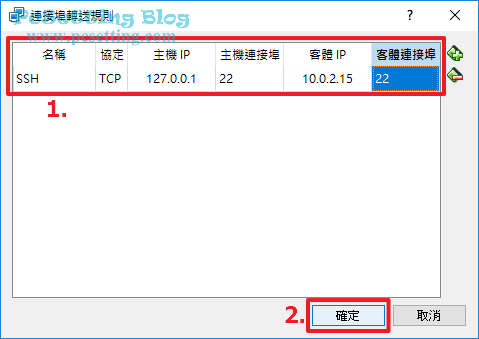
> 『名稱』欄位可以填你日後能看得明白名稱;『協定』欄位,以SSH服務來說就選擇預設的『TCP』;『主機 IP』因為筆者想要從本機的主系統連上去,所以就填了『127.0.0.1』的IP位址;『主機連結埠』欄位就填寫你要使用到的Port號,以SSH服務來說,筆者會給他設『22』的Port號,當然假設你電腦的主系統的22 Port號已經被監聽(被其他服務使用著),那你可以改至其他的Port,比如說『2222』;『客體 IP』欄位就填寫剛剛在上面第一部分Step 2已經查好的作業系統IP位址,如:筆者剛剛查到的IP位址是『10.0.2.15』;『客體連接埠』以SSH服務來說,預設的Port號就是『22』。
* 先設定 host IP:127.0.0.1(loopback),port 22; guest IP 10.0.2.15, port為 **2222** (感覺是因爲從nasa測試主機要來連綫的話需要也listen這個port,想説改另一個會不會比較好)
* 主機連綫: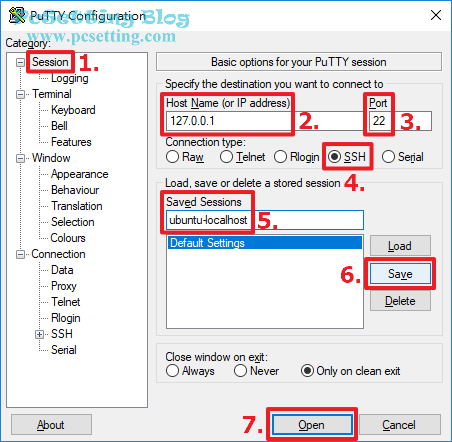
* 但是被拒絕了

可能是因爲該port沒有打開的原因
* 後來查到發現只要service sshd有在執行,port 22就會是打開的,於是把port 2222改成22

* **成功!**

### ssh與sshd的差異
基本上就是client端與server端設定的差別
server:**sshd**
client: **ssh**

 Sign in with Wallet
Connect another wallet
Sign in with Wallet
Connect another wallet