# ROS Review
## Why ROS2
:::warning
Known issues of ROS
- Multi-robots capability (Swarm)
:::
### ROS Namespace
1. Names that start with `"/"` are global -- they are considered fully resolved.
2. Names that start with a `"~"` are private. They ==convert the node's name into a namespace==.
Example:
| Node | Relative (default) | Global | Private |
| ---- | ------------------ | ------ | ------- |
| ==/node1== | bar -> /bar | /bar -> /bar | ~bar -> ==/node1/bar== |
| /wg/node2 | bar -> /wg/bar | /bar -> /bar | ~bar -> /wg/node2/bar |
| /wg/node3 | foo/bar -> /wg/foo/bar | /foo/bar -> /foo/bar | ~foo/bar -> /wg/node3/foo/bar |
Create a subscriber using **Private Names**
```c++
ros::NodeHandle nh("~my_private_namespace");
ros::Subscriber sub = nh.subscribe("my_private_topic", ...);
```
會使目前的 node 訂閱到 ==`<node_name>/my_private_namespace/my_private_topic`== 這個 topic 上,`<node name>` 前面可能也有 namespace。
<br>
### ROS Launch
ROS Launch file 為 XML 語法的檔案,用於啟動多個 node,或是設置參數 (Parameter server),也可以 include 其他 launch file,基本上就是將全部要執行的功能全部寫在 launch file 中。
Example of a ros launch file:
[moveo_ros/moveo_moveit_config/launch/demo.launch](https://github.com/jesseweisberg/moveo_ros/blob/master/moveo_moveit_config/launch/demo.launch)
```xml
<launch>
...
<!-- Load the URDF, SRDF and other .yaml configuration files on the param server -->
<include file="$(find moveo_moveit_config)/launch/planning_context.launch">
<arg name="load_robot_description" value="true"/>
</include>
<!-- If needed, broadcast static tf for robot root -->
<node pkg="tf" type="static_transform_publisher" name="virtual_joint_broadcaster_0" args="0 0 0 0 0 0 odom base_link 100" />
<!-- We do not have a robot connected, so publish fake joint states -->
<node name="joint_state_publisher" pkg="joint_state_publisher" type="joint_state_publisher">
<param name="/use_gui" value="$(arg use_gui)"/>
<rosparam param="/source_list">[/move_group/fake_controller_joint_states]</rosparam>
</node>
<!-- Given the published joint states, publish tf for the robot links -->
<node name="robot_state_publisher" pkg="robot_state_publisher" type="robot_state_publisher" respawn="true" output="screen" />
<!-- Run the main MoveIt executable without trajectory execution (we do not have controllers configured by default) -->
<include file="$(find moveo_moveit_config)/launch/move_group.launch">
<arg name="allow_trajectory_execution" value="true"/>
<arg name="fake_execution" value="true"/>
<arg name="info" value="true"/>
<arg name="debug" value="$(arg debug)"/>
</include>
...
</launch>
```
node tag attributes:
| attribute | Description |
| --------- | ----------- |
| pkg | Package of node. |
| type | Node type. There must be a corresponding executable with the same name in the package.
| name | Node name. NOTE: name cannot contain a namespace. |
| ==ns== | Start the node in the 'foo' namespace. |
啟動一個 node
```xml
<node pkg="rospy_tutorials" type="listener.py" name="listener1" ns="foo" />
```
使用環境變數修改 namespace
```xml
<... ns=$(env ENVIRONMENT_VARIABLE) />
```
<br>
## MoveIt
若在一個現有的 roscore 下,加入一個新的機器人 (可能與現有型號的不同),原本舊有的程式碼需要修改哪些地方?
MoveIt 架構圖

### URDF and SRDF
URDF (Unified Robot Description Format) 用來描述一個機器人的模型,包括 link 和 link 之間的距離及形狀,連接 link 之間 joint 的型態 (轉動式或滑動式) 和轉動的方向軸等。
這些資訊會給運動學 (kinematic) 和碰撞偵測等功能使用。
SRDF (Semantic Robot Description Format) 可以定義機器人的姿勢 (pose)、設定 link joint 的群組,排除某幾個 link 的碰撞偵測(用來減少運算量)等。

<br>
Load URDF and SRDF onto parameter server.
`$(arg robot_description)` will simply evaluate to `robot_description` in this case.
[moveo_ros/moveo_moveit_config/launch/planning_context.launch](https://github.com/jesseweisberg/moveo_ros/blob/master/moveo_moveit_config/launch/planning_context.launch)
```xml
<arg name="robot_description" default="robot_description"/>
<param name="$(arg robot_description)"
textfile="$(find moveo_urdf)/urdf/moveo_urdf.urdf"/>
<param name="$(arg robot_description)_semantic"
textfile="$(find moveo_moveit_config)/config/moveo_urdf.srdf" />
```
List all parameters in the system.
```bash
$ rosparam list
...
/robot_description
/robot_description_kinematics/arm/kinematics_solver
/robot_description_kinematics/arm/kinematics_solver_attempts
/robot_description_kinematics/arm/kinematics_solver_search_resolution
/robot_description_kinematics/arm/kinematics_solver_timeout
/robot_description_planning/joint_limits/Gripper_Idol_Gear_Joint/has_acceleration_limits
/robot_description_planning/joint_limits/Gripper_Idol_Gear_Joint/has_velocity_limits
/robot_description_planning/joint_limits/Gripper_Idol_Gear_Joint/max_acceleration
/robot_description_planning/joint_limits/Gripper_Idol_Gear_Joint/max_velocity
/robot_description_planning/joint_limits/Gripper_Servo_Gear_Joint/has_acceleration_limits
/robot_description_planning/joint_limits/Gripper_Servo_Gear_Joint/has_velocity_limits
/robot_description_planning/joint_limits/Gripper_Servo_Gear_Joint/max_acceleration
/robot_description_planning/joint_limits/Gripper_Servo_Gear_Joint/max_velocity
/robot_description_planning/joint_limits/Joint_1/has_acceleration_limits
/robot_description_planning/joint_limits/Joint_1/has_velocity_limits
/robot_description_planning/joint_limits/Joint_1/max_acceleration
/robot_description_planning/joint_limits/Joint_1/max_velocity
...
/robot_description_semantic
...
```
為了新增一個機器人,可能會將 `robot_description` 重新命名,這時就必須了解 moveIt 要怎麼設定讀進不同的 URDF。
<br>
### How moveIt read **`robot_desciption`**
以下簡略說明 moveIt 程式碼 (omit C++ namespaces)
move_group.cpp
```c++=76
const std::string MoveGroup::ROBOT_DESCRIPTION =
"robot_description"; // name of the robot description (a param name, so it can be changed externally)
```
Constructor of `MoveGroup` (adapted from move_group.h)
```c++=1146
MoveGroup(const Options& opt,
const boost::shared_ptr<tf::Transformer>& tf =
boost::shared_ptr<tf::Transformer>(),
const ros::WallDuration& wait_for_servers = ros::WallDuration());
```
move_group.h
```c++=84
class MoveGroup
{
public:
static const std::string ROBOT_DESCRIPTION;
struct Options
{
Options(const std::string& group_name, const std::string& desc = ROBOT_DESCRIPTION,
const ros::NodeHandle& node_handle = ros::NodeHandle())
: group_name_(group_name), robot_description_(desc), node_handle_(node_handle)
{
}
...
}
...
}
```
如果要更改預設要讀進的 `robot_description`,可以 instantiate 一個 `Option` 的物件,並將它傳入 `MoveGroup` 的 Constructor。
上面說明的都是 `robot_description` 怎麼被更改,底層真正讀進 parameter server 的 **URDF** 則是使用 `RobotModelLoader`
common_objects.cpp
```c++=89
robot_model::RobotModelConstPtr getSharedRobotModel(const std::string& robot_description)
{
SharedStorage& s = getSharedStorage();
boost::mutex::scoped_lock slock(s.lock_);
if (s.model_loaders_.find(robot_description) != s.model_loaders_.end())
return s.model_loaders_[robot_description]->getModel();
else
{
robot_model_loader::RobotModelLoader::Options opt(robot_description);
opt.load_kinematics_solvers_ = true;
robot_model_loader::RobotModelLoaderPtr loader(new robot_model_loader::RobotModelLoader(opt));
s.model_loaders_[robot_description] = loader;
return loader->getModel();
}
}
```
<br>
### tf Library
tf stands for transfrom. 用來處理機器人中的座標轉換,為 ROS 中最基本的函式庫,從機械手臂的座標轉換到機器人的定位,皆會使用到 tf。
以下為簡單說明

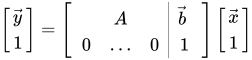
圖上有兩個座標系 $\{A\}$ 和 $\{B\}$,其中 $\{B\}$ 相對於 $\{A\}$ 的旋轉矩陣為 $^A{R}_B$,兩個座標系之間的平移向量為 $^A{P}_B$ ($A$ 的原點指向 $B$ 的原點),目標是將 $^BP$ 相對於 $B$ 座標系的向量轉換到 $^AP$(圖中虛線)。
> $R$ 為 3x3 矩陣
首先必須先讓兩個座標系有相同的方向 (orientation),再進行平移,因此可寫成:
$$
^AP = \ ^A{R}_B{^BP} + \ ^A{P}_B \\
^AP = \ ^A{T}_B{^BP}
$$
此轉換稱為 homogenous transformation,$T$ 一般會寫成 4x4 的矩陣。
<center>
</center>
<br>
修改傳入 `MoveGroup` constructor 的參數,使 `MoveGroup` 能訂閱到個別機器人的 tf topic。
```c++
const boost::shared_ptr<tf::Transformer> tf;
tf.setTransform(...);
...
move_group(PLANNING_GROUP, tf);
```


## 結論
新增一個機器人到現有的 roscore 中,可能要修改的地方包括:
1. (如果與現有的機器人不同) 須修改 `robot_desciption`,包含在 parameter server 裡的還有使用到 moveIt 的程式碼。
2. 修改 `robot_state_publisher` 所使用的 `tf_prefix`,讓新舊機器人可以區隔個別的 `tf` topic。並且使用的 `tf_prefix` 也必須傳入 `MoveGroup`。
3. 所有 node 都必須加入 namespace,如 `robot_state_publisher`、`joint_state_publisher` 等。
到此只修改到最陽春的版本,還沒有使用到運動學、3d perception、point cloud 等。
<br>
---
References:
- ROSWiki
- [MoveIt](https://moveit.ros.org)
- [機器人各個坐標系的管理
](https://charlyhuangrostutorial.wordpress.com/2017/04/01/%e6%88%91%e7%9f%a5%e9%81%93%e6%88%91%e7%9a%84%e6%89%8b%e8%87%82%e5%9c%a8%e5%93%aa%e8%a3%a1%e5%97%8e%ef%bc%9f%e9%82%a3%e6%88%91%e7%9a%84%e7%9c%bc%e7%9d%9b%e5%91%a2%ef%bc%9f/)
- [tf: The Transform Library](http://wiki.ros.org/Papers/TePRA2013_Foote?action=AttachFile&do=get&target=TePRA2013_Foote.pdf)
- [Introduction to Robotics](http://www.mech.sharif.ir/c/document_library/get_file?uuid=5a4bb247-1430-4e46-942c-d692dead831f&groupId=14040)
:::warning
- ROS NODE 是否都會有 IP 位置
- urdf tags
:::
 Sign in via Facebook
 Sign in via X(Twitter)
 Sign in via GitHub
 Sign in via Dropbox
 Sign in with Wallet
Connect another wallet
Sign in with Wallet
Connect another wallet