---
tags: SQLite, SQL
---
# SQLite
* * *
[TOC]
* * *
## [_sqlite commands_](https://sqlite.org/cli.html)
| commands | 使用command時結尾不 + ; |
| ------------ | ----------------------------------------------------------------------------------------------------- |
| `.help` | commands 選單 |
| `.databases` | 顯示資料庫 |
| `.table` | 顯示表 |
| `.system` | (+ commands) 使用系統的指令(cd ...) 沒有簡寫! ~~ll~~ - (ls-l) |
| `.show` | 設置顯示(可在 ~/.sqliterc, 追加設定值修改預設) |
| `.mode` | 表顯示格式 {"csv", "column", "html", "insert", "line"(行顯示), "list", "quote"(字串有引號'string'), "tabs", "tcl"} |
| `.schema` | (+ table) 顯示table column資料 |
| `.separator` | ('str')分隔符號設定 |
| `.header` | (on, off)表示標題column_name |
| `.timer` | (on, off) 顯示操作時間 |
| `.backup` | (+ file_name.db) 備份目前開啟的資料庫(複製一份資料) |
| `.open` | (+ file_name.db) 開啟某個資料庫 |
| `.output` | (+ file_name.txt) 輸出表格到檔案 |
| `.once` | 輸出表格到檔案 |
| `.schema` | 顯示table的格式 |
## example:
#### .separator ','
hello, 10
goodbye, 20
#### .mode quote:
'hello',10
'goodbye',20
#### .mode list:
hello|10
goodbye|20
#### .mode line:
one = hello
two = 10
one = goodbye
two = 20
#### .mode column:
one two
---------- ----------
hello 10
goodbye 20
#### .width 12 6:
one two
------------ ------
hello 10
goodbye 20
### ~/.sqliterc
> 可以加入設定可以修改預設值
* * *
## SQLite 語法: 使用結尾 + ;
### 1. `SELECT`
- `SELECT` {column_list} `FROM` table
- `SELECT` \* `FROM` table (all columns)
#### `DISTINCT`
- `SELECT DISTINCT` {column_list} `FROM` table (刪除沒有DISTINCT的表中 重複的rows)
#### `ORDER BY`
- `ORDER BY` column1 `ASC`, column2 `DESC` ...
- `ASC` (小->大), `DESC` (大->小)
- column1 優先 column2
#### `WHERE`
- `WHERE` column 條件;
- column = 100;
- column `IN` (1,2,3); {`IN, NOT IN`}
- column `LIKE` '\_str%';
- column `BETWEEN` 10 AND 20;
#### `LIMIT`
- 限制筆數
- `LIMIT` num; index:(0 ~ num-1)
- `LIMIT` num1 OFFSET num2; index:(num1 ~ num1+num2)
#### `LIKE & GLOB`
- `LIKE` 模糊搜尋(大小寫不拘)
- `%` : 空字串 or 多個任意字元
- `_` : 一個任意字元
- `GLOB` 嚴格搜尋(大小寫分別)
- `*` : 空字串 or 多個任意字元
- `?` : 一個任意字元
#### `JOIN`
- `JOIN` table2 `ON` tA.col = tB.col
- 結合兩個表, 選用單一的column 彼此關係結合
- `INNER JOIN`, `JOIN` (tA.col, tB.col有相同才顯示) = SELECT兩個表 WHERE tA.col = tB.col
- `LEFT JOIN` (原表擁有的row都一定會顯示)
- `FULL OUTER JOIN` (兩者相同col結合, 不相同也會個別列出)(取消支援ing)
- `CROSS JOIN` (顯示所有排列組合 row-num = row1\*row2, 後不接相等的col指令) = SELECT兩個表 沒有 WHERE
#### `GROUP BY`
- `GROUP BY` column 分群
- 使用配合計算FUC(column)
- exp: MIN, MAX, SUM, COUNT, AVG
#### `HAVING`
- `HAVING` column 條件 (使用同WHERE)
- `GROUP BY` 後的 `WHERE`
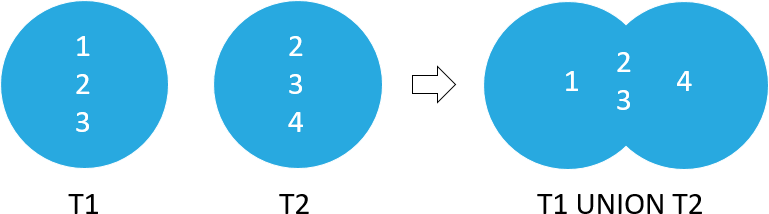
#### `UNION`
- table1 `UNION` table2; (table1 & table2 same column-number)
- 結合兩個同col數目的表, 結合方式是column結合, shape(5, 2) + (3, 2) = (?, 2)
- New table column_name 繼承前面的table1
- 'UNION' (會刪除重複相同的row, DISTINCT相同)
- `UNION ALL`
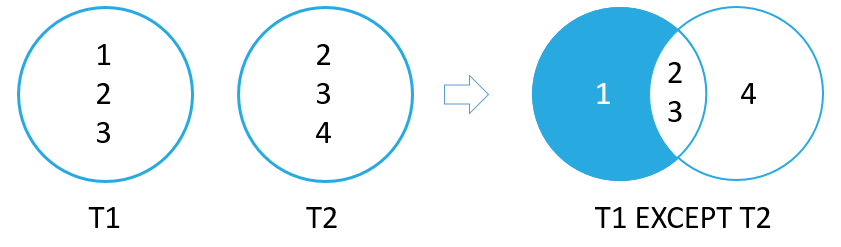
#### `EXCEPT`
- table1 `EXCEPT` table2; (table1 & table2 same column-number)
- 結合兩個同col數目的表, 結合方式是column結合, shape(5, 2) + (3, 2) = (>=5, 2)
- New table column_name 繼承前面的table1
- 'EXCEPT' (只顯示table1唯一的row)
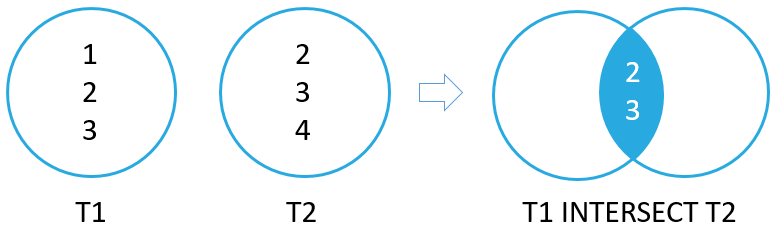
#### `INTERSECT`
- table1 `INTERSECT` table2; (table1 & table2 same column-number)
- 結合兩個同col數目的表, 結合方式是column結合, shape(5, 2) + (3, 2) = (>3, 2)
- New table column_name 繼承前面的table1
- 'INTERSECT' (只顯示table1, table2相同的row)
#### `CASE`
- `CASE` column `WHEM` A `THEN` B `ELSE` C `END` `AS` new_column (可以有多組`WHEN ~ THEN`)
- `CASE` `WHEM` column 判斷式 `THEN` B `ELSE` C `END` `AS` new_column (可以有多組`WHEN ~ THEN`)
* * *
### 2. `CREATE`
- `CREATE TABLE` table (column1 Data Type Constraint(s), ...);
* * *
### 3. `INSERT`
- `INSERT` `INTO` table(column1, ...) `VALUES` (value1, ...), ...;
* * *
### 4. `UPDATE`
- `UPDATE` table `SET` column_1=value_1, column_2=value_2 `WHERE` ...
- 更新以 row 計算
* * *
### 5. `DELETE`
- `DELETE` `FROM` table `WHERE`...
- 更新以 row 計算
* * *
#### _Data Types:_
| Storage | Class Meaning |
| ------- | --------------------------------------------------------------------------------------------------------------------------------- |
| NULL | NULL values mean missing information or unknown. |
| INTEGER | Integer values are whole numbers (either positive or negative). An integer can have variable sizes such as 1, 2,3, 4, or 8 bytes. |
| REAL | Real values are real numbers with decimal values that use 8-byte floats. |
| TEXT | TEXT is used to store character data. The maximum length of TEXT is unlimited. SQLite supports various character encodings. |
| BLOB | BLOB stands for a binary large object that can be used to store any kind of data. The maximum size of BLOBs is unlimited. |
#### _Constraint:_
| Constraint | / |
| --------------- | ----------------------------------------- |
| `PRIMARY KEY` | 主鍵, 一個表只能有一個主鍵, 同時有`NOT NULL`, `UNIQUE`特性 |
| `AUTOINCREMENT` | 自動添加, 常用於主鍵 |
| `NOT NULL` | 確保column中的值不接受`NULL` |
| `UNIQUE` | 獨一性, 確保column中的值都不相同 |
| `CHECK` | 追加於檢查column的特性, 例如文本長度檢查 |
* * *
### 6. `DROP`
- `DROP TABLE` table;
* * *
### 7. `ALTER`
- `ALTER TABLE` table **method**
- `RENAME TO` new_table
- `ADD COLUMN` Data Type Constraint(s)
* * *
### 8. `VIEW`
- `CREATE VIEW` view `AS` (SELECT... ) AS 不能省略
- `SELECT` \* `FROM` view (觀看)
- `DROP VIEW` view (丟棄)
- 存下一個`SELECT`, 不占空間, 同時修改它也能修改到原本的表!
- `VIEW` 無法配合 `SUM(), MIN(), MAX(), COUNT(), DISTINCT, GROUP BY, HAVING, UNION` !!
 Sign in with Wallet
Connect another wallet
Sign in with Wallet
Connect another wallet