[toc]
# 我是誰
[2018TSAI03](https://www.worldcubeassociation.org/persons/2018TSAI03)
<!--
3x3x3 Single 台灣排名~~25~~ ~~30~~ ~~45~~ ~~50~~ 56。 世界排名~~1499~~ 3247。

永遠進不去sub 10平均大關 (除了某次PLL Skip加持)

-->
# 網站
## 比賽
台灣魔術方塊協會:
https://cubing-tw.net/event/
世界魔術方塊協會:
https://www.worldcubeassociation.org
## 工具
### 轉動模擬
- https://alg.cubing.net/
### 計時器
- https://cstimer.net/
- https://qqtimer.net/
### 教學網站
- [郭君逸](https://www.davidguo.idv.tw/Cube2/)
- [J Perm](https://jperm.net/)
- [CubeSkills](https://www.cubeskills.com/)
### 購買魔術方塊
- [小丸號方塊屋](https://maru.tw/how-to-buy-cubes/) (TW) (有自研方塊)
- [TheCubicle](https://www.thecubicle.com/) (US)
- [SCS](https://speedcubeshop.com/) (CN)
- 淘寶 (去官方店鋪買, 很便宜)
# 結構
復原時的顏色: 白對黃, 藍隊綠, 紅對橘 (白上綠前右紅)
結構:
- 中心塊 -> 有6個, 中心塊不會移動

- 邊塊 -> 有12個, 每個邊塊有2個顏色。

- 角塊 -> 有8個, 每個邊塊有3個顏色。

# 一些用語
orientation: 方向
position: 位置
permutation: 排列位置
adjacent: 鄰
diagonal: 斜對
edge: 邊塊
corner: 角塊
algorithm: 公式(代表一個List的Notations)
scramble: 打亂/打亂公式
pop: 方塊轉一轉爆開
# Standard Notation
(註記: BLD)
一個字母代表轉90 degrees
- 左右前後上下 分別叫做 ```LRFBUD```
U  D  R  L  F  B 
- ```'```代表逆時針
U'  D'  R'  L'  F'  B' 
- ```2```代表轉兩次 (U2仍然算1步)
U2  D2  R2  L2  F2  B2 
- 小寫代表連中間一起
u  d  r  l  f  b 
- 轉動整顆方塊
x  y  z 
# 基礎復原方法
## Overview
- 第一層
- cross (邊塊)

- corners 角塊

- 第二層

- 頂層 Orientation
- 頂層 十字 (邊塊)

- 頂層 角塊

- 頂層 Permutation
- 頂層 角塊

- 頂層 邊塊

## First Layer
---
### First Layer Cross
> 目標: 
(通常這裡新手會選用白色十字)
:::info
要找的: `有底色的edges`, 也稱作crossedge (4)
:::
:::success
如果是初學者, 建議把底色放在頂面做
:::
這裡沒有什麼公式的, 最需要思考的地方, 所以這裡或許是對於初學者來說最難的部分
可以優化到最多8步做完十字
:::warning
注意: 四個邊的顏色要跟中心塊要對上,因為還原的是邊塊,不是單一面。
:::
(簡單教學)
middle case: 移動U層, 直到能插進去, 再把U層回位
flip case (whether it's correct or not): `F` -> middle case
bottom layer, white is at D: 移動D層, 直到找到同個顏色, 再移上去
bottom layer, white is not at D: 移動D層, 直到找到同個顏色, `F` -> middle case
---
### First Layer Corners
> 目標: 
:::info
能任意旋轉的: `U 層`
要找的: `有底色的corners` (4)
:::
先做: `x2`, 把白色放在底下
我們現在要歸位4個`有底色的corners`。
先在頂層找, 找到的話, 轉動`U`到它要去的地方的上面,並且靠R側。
可能情況:
- **白色面對F (要記)**: ```U R U' R'``` 
- **白色面對R (要記)**: ```R U R'``` 
- **白色面對U (要記)**: ```R U2' R' U' R U R'``` 
如果有角卡在下面,方向/位置有誤 -> 做一次**白色面對R**拿出來就好了。
## Second Layer Edges
> 目標: 
:::info
能任意旋轉的: `U 層`
要找的: `沒有頂面顏色的Edges` (4)
:::
我們現在要歸位4個`沒有頂面顏色的edges`。
先在頂層找, 找到的話, 轉動`U`到它要去的地方的上面,並且讓側邊的顏色先跟中心塊對齊,並且靠R側。
可能情況:
- **Edge在左邊 (要記)**: ```(U R U' R') (F R' F' R)```

- **Edge在右邊 (要記)**: ```U' F' (R U R' U') R' F R```

- **flip**: `Edge在左邊` + `U2` + `Edge在左邊` OR `R2 U2 F R2 F' U2 R' U R'`

如果有角卡在裡面,方向/位置有誤 -> 做一次**Edge在左邊**拿出來就好了。
## Last Layer (Orientation)
:::info
能任意旋轉的: `U 層`
:::
---
### Last Layer Cross (Edges)
> 目標: 
**OLL 45 (要記)**: `F (R U R' U') F'`
( `[F: [R, U]]` )
可能情況:
- Dot shape
**OLL 45** -> 變成 L shape
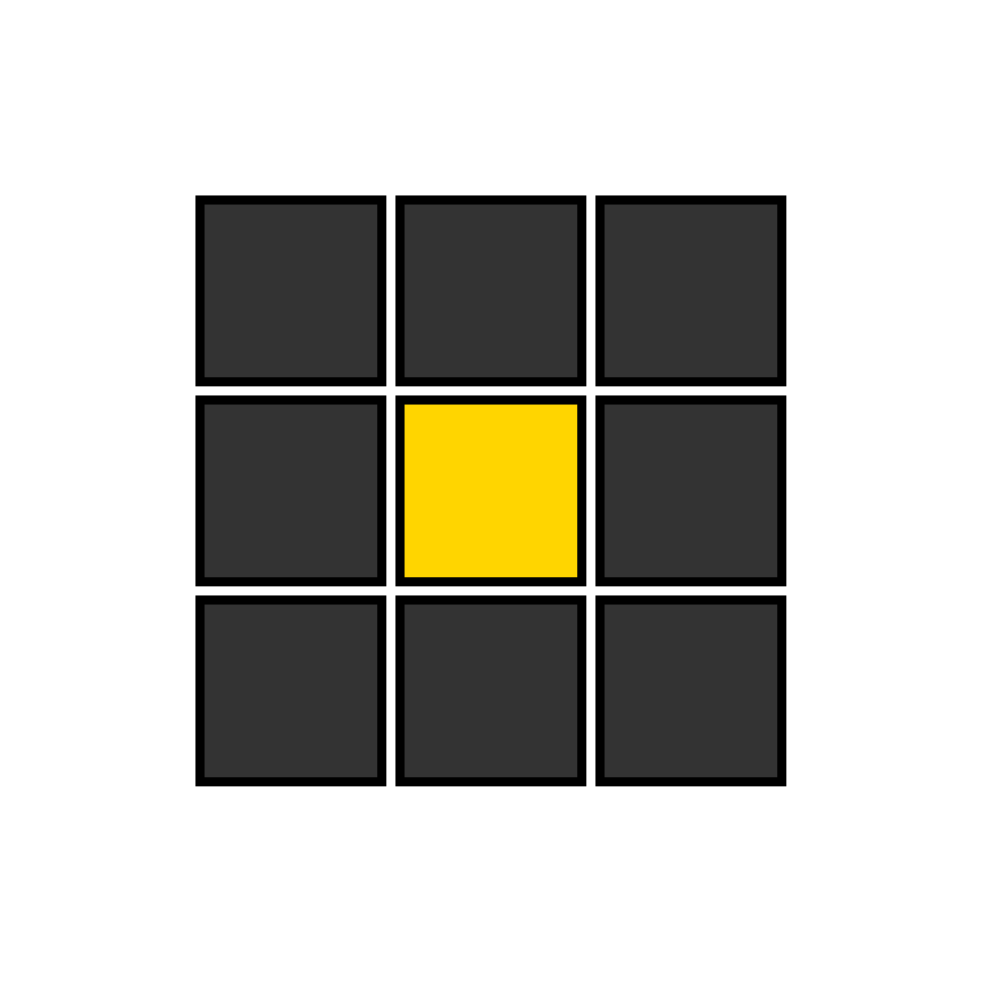
- L shape
**OLL 45** -> 變成 Line shape
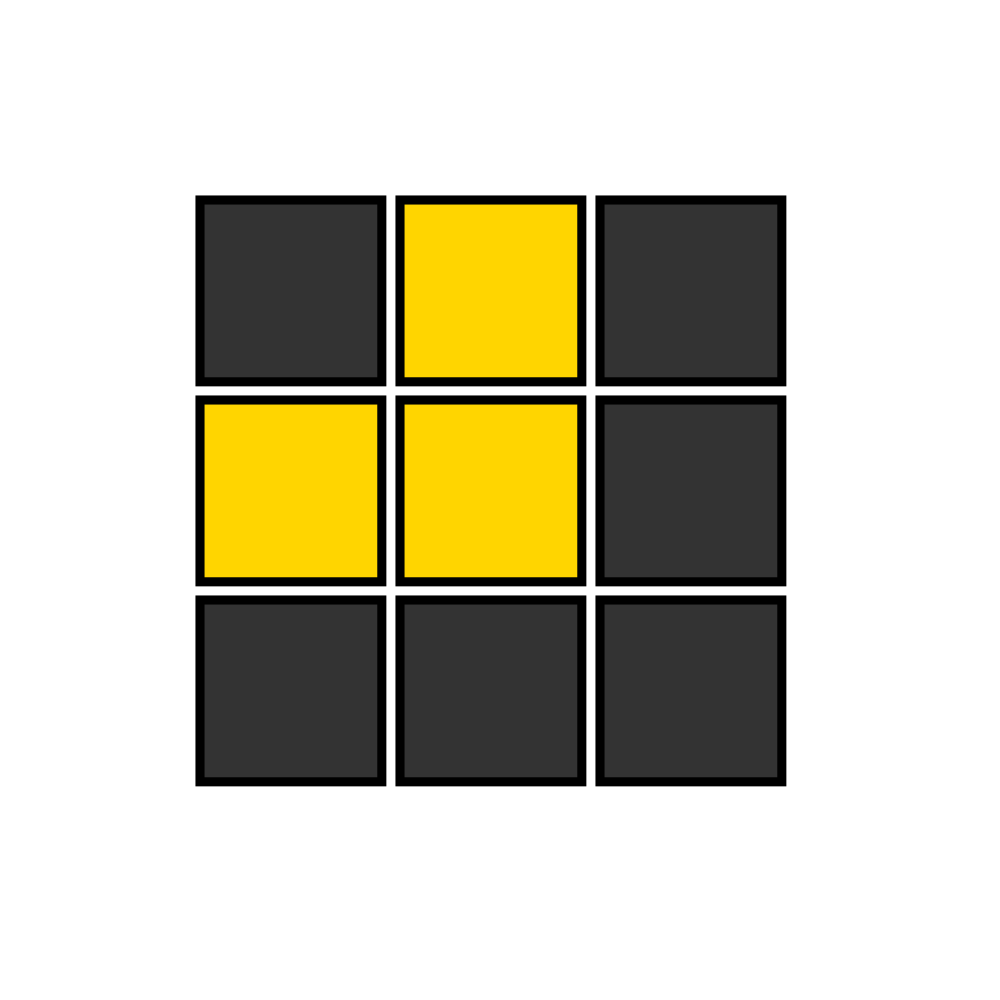
- Line shape
**OLL 45** -> 變成 All Edges Oriented
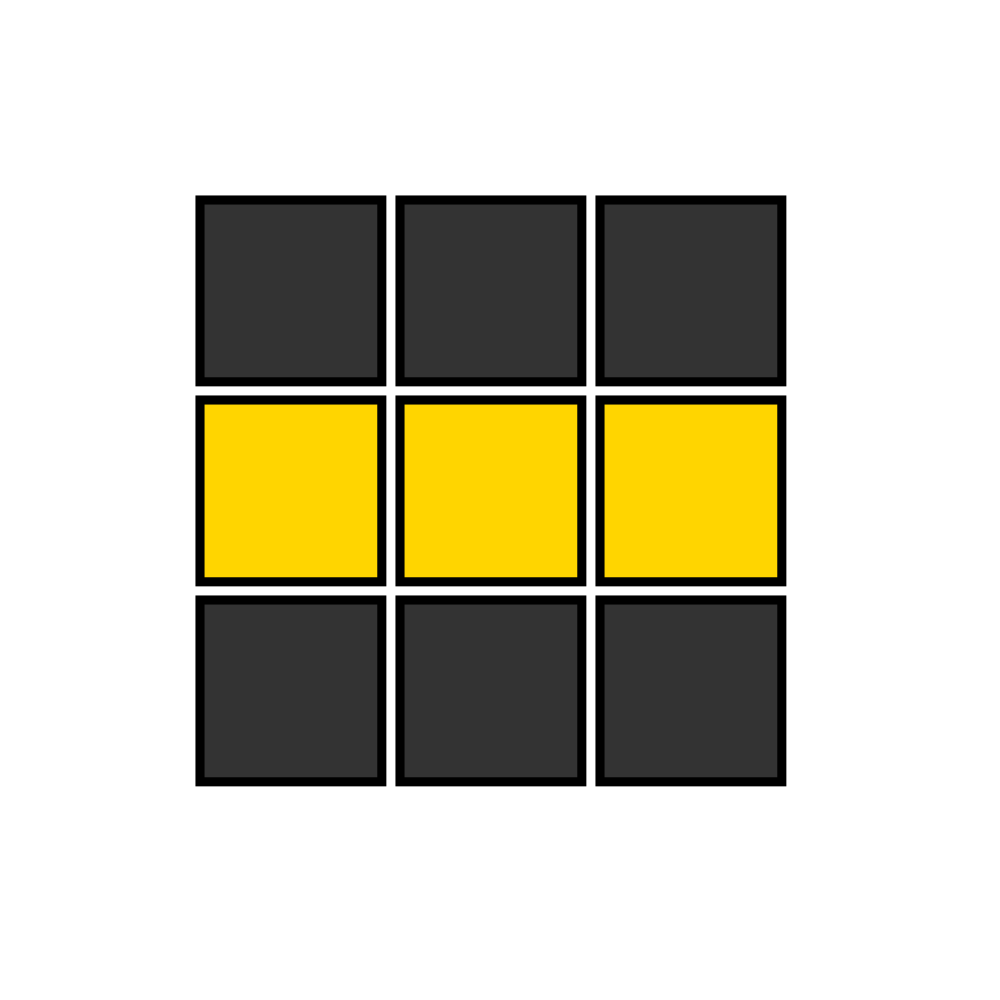
- All Edges Oriented (已經好了)
---
### Corner Orientations
> 目標: 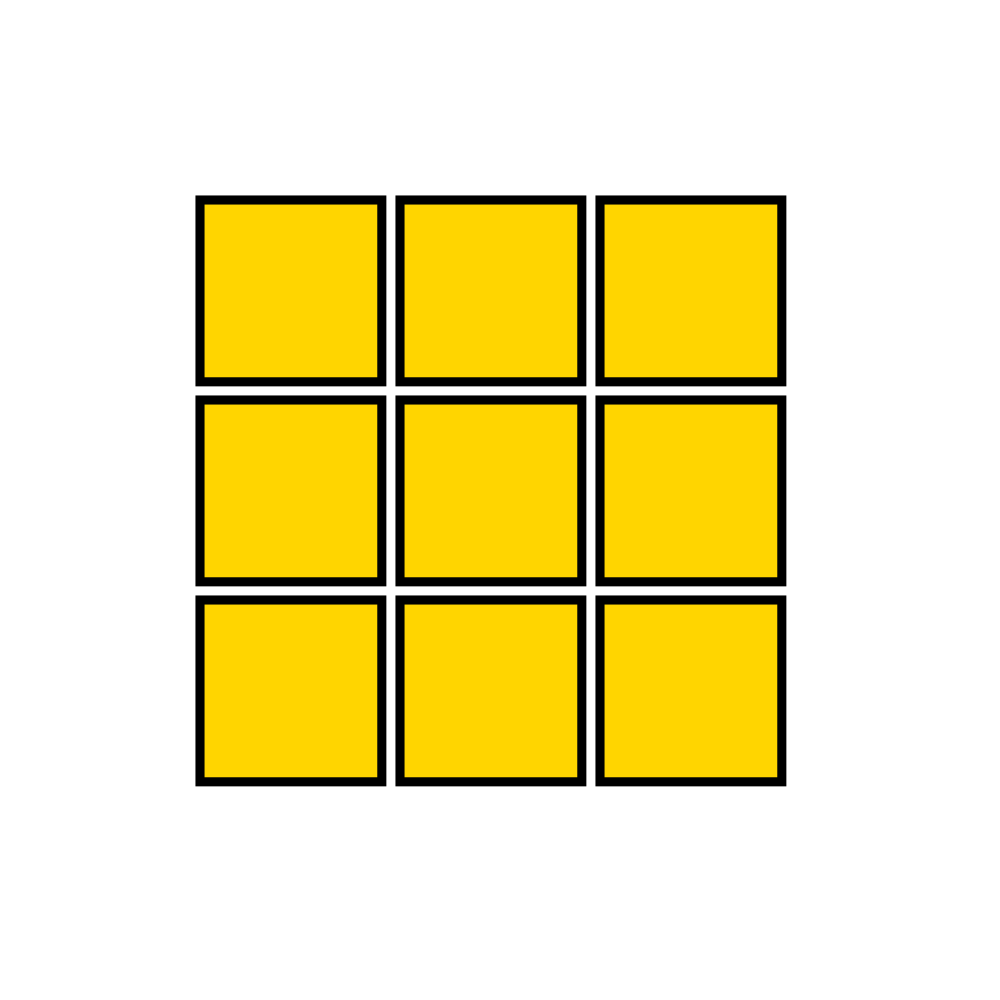
#### 解法一: 一個一個轉角
- **順時針轉角 (要記)**: ```(D' R' D R) (D' R' D R)```
- **逆時針轉角**: ```(R' D' R D) (R' D' R D)```
or **順時針轉角** 兩次
在轉的時候第1,2層亂掉沒有關係, 最後都會抵消回去。
#### 解法二: 用OLL 27
**OLL 27 (要記)**: `R U R' U R U2' R'`
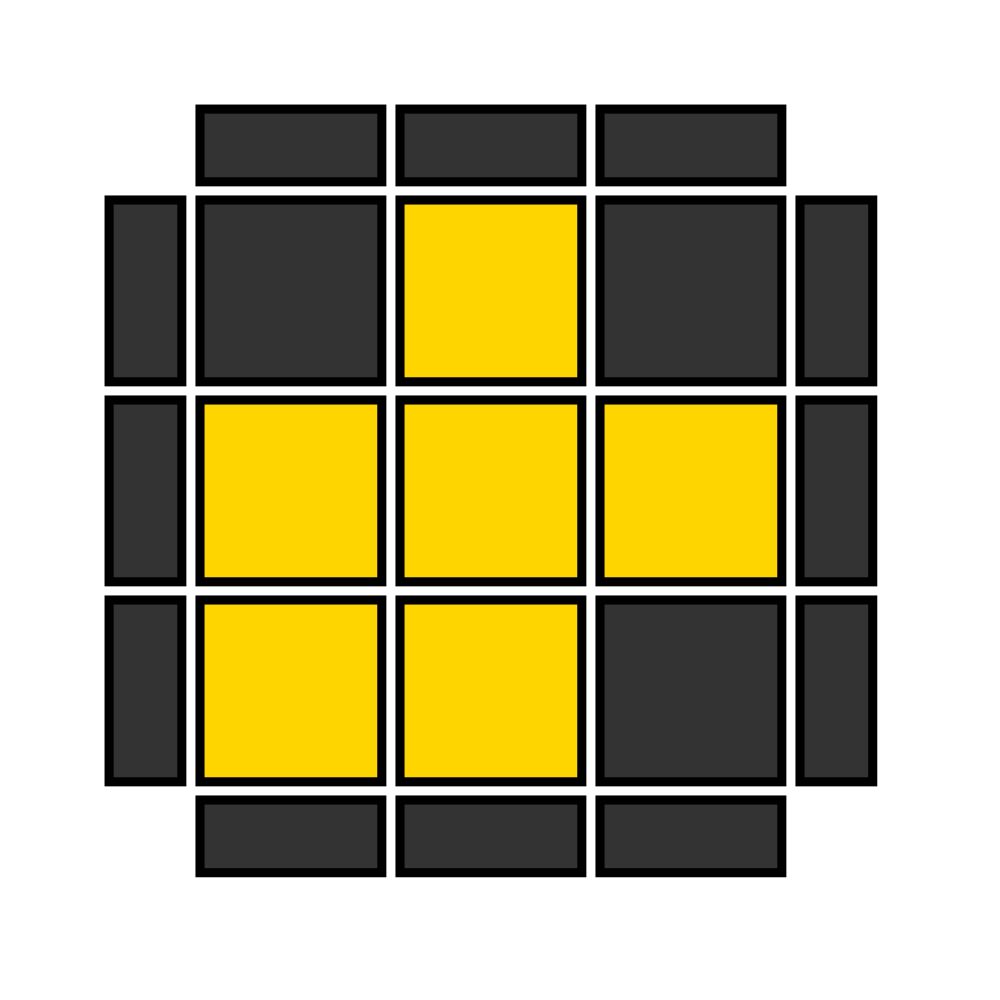
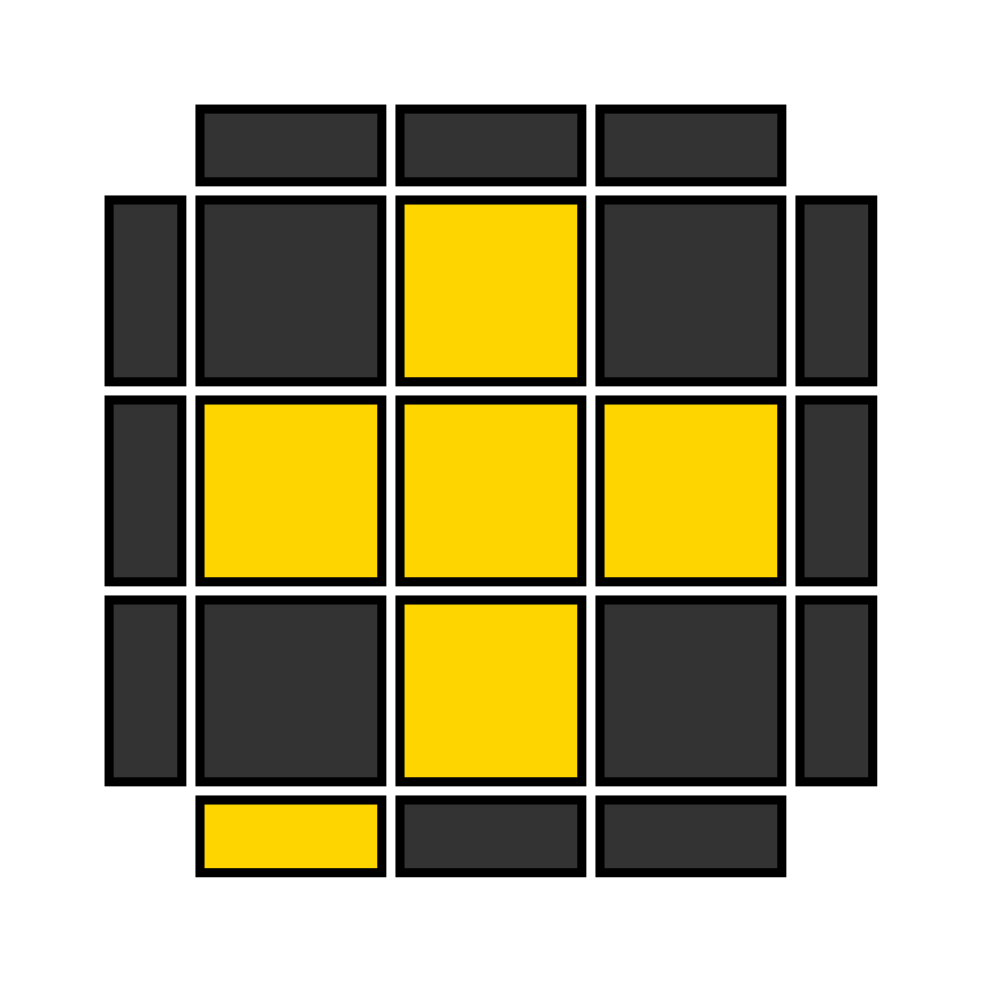
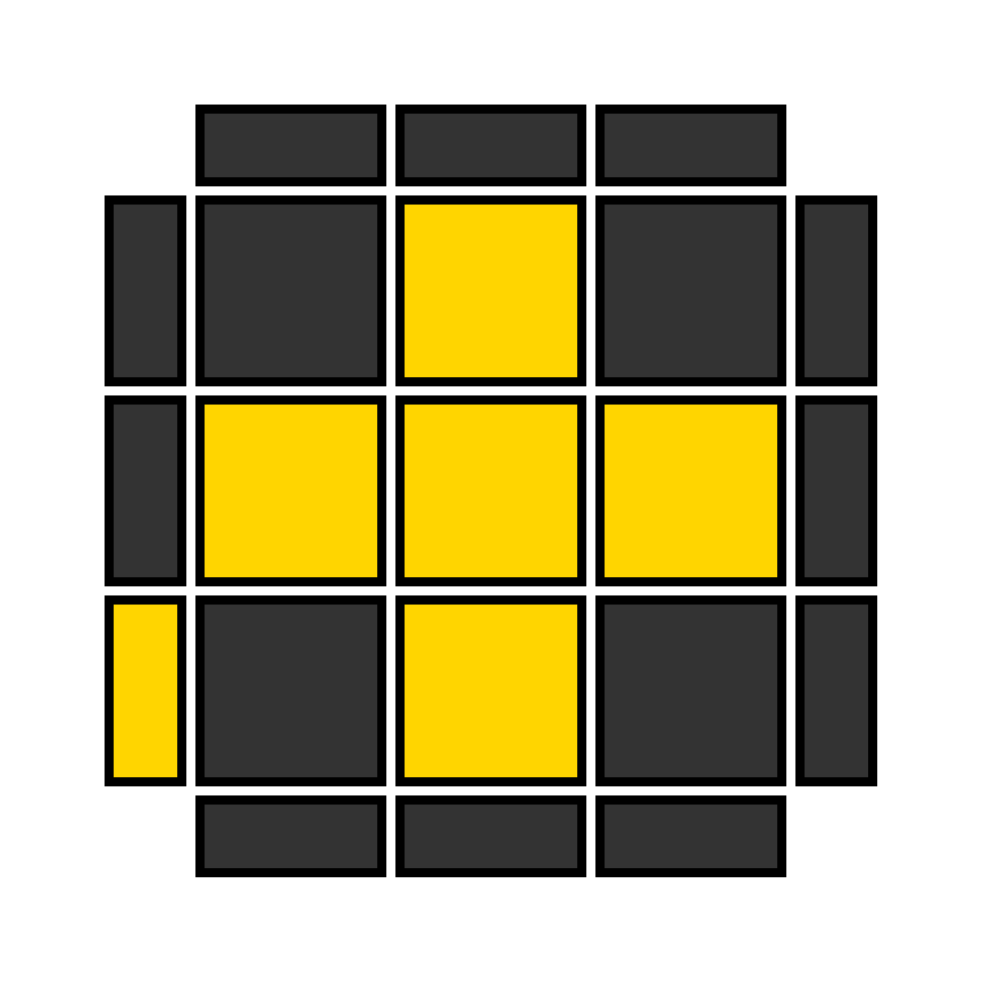
觀察有幾個Corners是Oriented的狀態
- 1個:
把它放在左下,做**OLL 27** 一到兩次
- 2個:
找到有一塊頂色是在F面,左邊的,做**OLL 27** -> 變成1個的情況
- 0個:
找到有一塊頂色是在L面,右側的,做**OLL 27** -> 變成1個的情況
## Last Layer (Permutation)
:::info
能任意旋轉的: `U 層`
:::
:::warning
2 Look PLL: 只用兩個公式把此步驟完成,但是要記6個公式(角2個, 邊4個)
:::
---
### Corner Permutations
<!--
> 目標: 
-->
接下來,我們嘗試找有沒有兩個同色的角塊在同一側。
#### 只記鄰角換的解法
- 有: 另一側的相鄰兩個角塊要互換。
- 把一樣的角塊歸位,放在L側,做一次**鄰角換**。
- 沒有: 對角要互換。
- 做一次**鄰角換** -> 變成有鄰角換的情況。
#### 2 Look PLL
- 有: 另一側的相鄰兩個角塊要互換。
- 把一樣的角塊歸位,放在L側,做一次**鄰角換**。
- 沒有: 對角要互換。
- 做一次**對角換**。
2種可能:
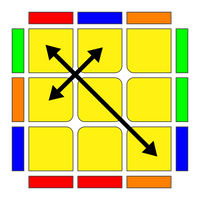
- **鄰角換 (Adjacent Swap) (T Perm) (要記)**: ```(R U R' U') (R' F R2 U') (R' U' R U) R' F'```
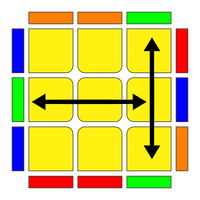 (換的鄰角是R側兩個)
- **對角換 (Diagonal Swap) (Y Perm)**: ```F R U' R' U' R U R' F' R U R' U' R' F R F'```
---
### Edge Permutations
<!--
> 目標: 
-->
#### 只記一個公式的解法
我們嘗試找有沒有三個同色的在同一側(bar)。
- 有: 三邊互換
(先把bar歸位)
- 順時針: 做**逆時針三邊**兩次 OR **順時針三邊**
- 逆時針: 做**逆時針三邊**
- 沒有: 四邊都要換
- 先做一次**逆時針三邊** -> 變成三邊互換的情況。
#### 2 Look PLL
直接記住底下四種情況
4種可能:
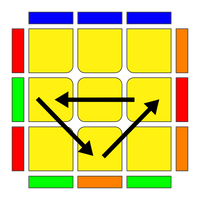
- **逆時針三邊 (Ua Perm) (要記)**:
```(R U') (R U) (R U) (R U') R' U' R2```
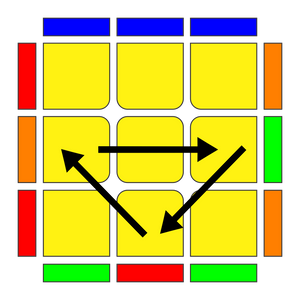
- **順時針三邊 (Ub Perm)**:
```R2 U R U R' U' R' U' R' U R'```
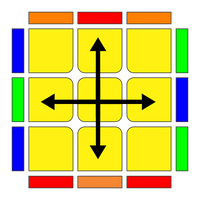
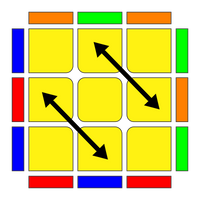
- **對邊 (H Perm)**: ```M2' U M2' U2 M2' U M2'```
- **鄰邊 (Z Perm)**: ```M2' U M2' U M' U2 M2' U2 M'```
---
## AUF
處理一下```U 層```就轉完了。
---
# 進階技巧
## CFOP進階技巧
- 全域技巧:
- **Color Natural (六色)**
- **預判優化**
- **手法優化**
- **減少rotation**
### Cross
- 技巧:
- **七步十字**
- 優化F2L
- **XCross** / **XXCross** / **XXXCross**
---
### F2L
- 技巧:
- **Keyhole**
- **Pesudoslotting**
- 優化OLL:
- 情況: 最後一組為: U R U' R'
- **Corner Last Slot** -> 強制跳OLL
- 情況: 最後一組為: U' R U' R' U2 R U' R', 頂層三Edge
- **Valk Last Slot** -> 強制跳OLL
- 情況: 最後一組為: R U' R', 頂層三Edge
- **Winter Variation** -> 強制跳OLL
- 情況: 最後一組為: U' F' R U R' U' R' F R, 頂層三Edge
- **Brook's Last Edge** -> 強制跳OLL
- 情況: Any
- (技巧) -> 強制十字OLL/跳OLL
---
### OLL
前期: 2 Look OLL (包含於OLL公式集)
- 優化PLL:
- 情況: 十字OLL
- **ZBLL** (強制結束)
- **COLL** (強制Corner Permutated PLL)
- 情況: Any
- **1LLL**
---
### PLL
前期: 2 Look PLL (包含於PLL公式集)
- AUF優化
<!--
# 常見問題
頂層公式是怎麼發明出來的?
-> 通常是拿其他公式/把第一二層亂湊湊出來的, 電腦找出來的公式步數可能比較少, 但通常不太順手。
3x3x3轉多快才能去比賽?
-> 平均一顆10分鐘內,是計時器的上限。
電腦用什麼解法?
-> 通常用[Kociemba Algorithm](https://github.com/hkociemba/RubiksCube-TwophaseSolver)
比賽的打亂怎麼生的?
-> [https://github.com/thewca/tnoodle](https://github.com/thewca/tnoodle)
-->
## 其他
交換子
[A, B] = A B A' B'
https://www.speedsolving.com/wiki/index.php?title=Commutator
共軛
[A: B] = A B A' (也就是Setup, 操作, Unset)
https://www.speedsolving.com/wiki/index.php?title=Conjugate
各種衍生定理
https://www.tandfonline.com/doi/full/10.1080/00029890.2023.2263158
 Sign in via Facebook
 Sign in via X(Twitter)
 Sign in via GitHub
 Sign in via Dropbox
 Sign in with Wallet
Connect another wallet
Sign in with Wallet
Connect another wallet