# GitLab Runner
###### tags: `gitlab`
GitLab Runner 即是為你代勞執行 CI Job 的 Worker,如果有架設多個 CI Runner 那麼在同一時間即可處理多項 CI Job,反之如果有大量的 CI Job 需要執行,但 Runner 數量有限,那麼 CI Job 就會出現 Pending 的狀態,必須等待 Runner 完成其他工作之後,才會輪到該 CI Job 被執行。
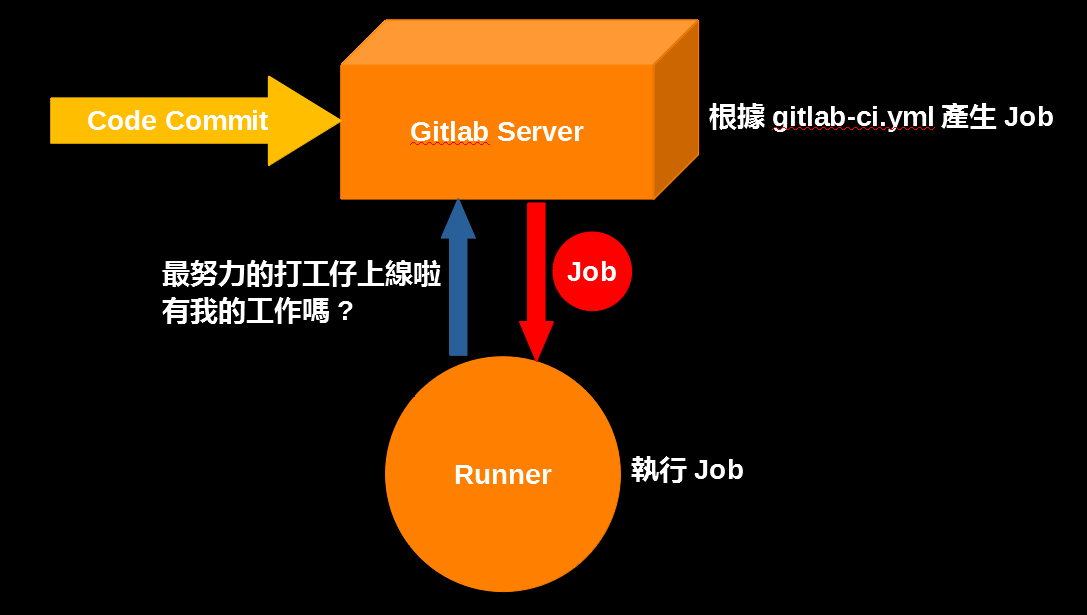
## Register a Runner
Gitlab Runner 可透過兩種方式向Gitlab註冊,互動式與非互動式,選擇互動式時,系統會向您詢問多個問題,例如Gitlab位置、Runner名稱、Token等等,非互動式會需要您直接從命令中指定參數的方式。
### Runner configuration
```
concurrent = 4
check_interval = 0
[[runners]]
name = "dind"
output_limit = 41943040
url = "https://gitlab.com.tw"
token = "yourtoken"
executor = "docker"
environment = ["GIT_SSL_NO_VERIFY=true", "DOCKER_TLS_CERTDIR=/certs"]
[runners.docker]
tls_verify = false
image = "docker:18"
privileged = true
disable_entrypoint_overwrite = false
oom_kill_disable = false
disable_cache = false
volumes = ["/certs/client", "/cache"]
extra_hosts = ["example.com.tw:10.1.0.4", "reg-example.com.tw:10.1.0.4"]
shm_size = 0
```
- concurrent : 限制同時運行的作業數
- check_interval: 定義新作業檢查之間的間隔長度(以秒為單位)
- output_limit: 設定build log大小,會影響在Gitlab job log的最大範圍
- token: 從Gitlab產出的token,會有全域與專案之分,如果是專案token,只有此專案才看的到透過專案token註冊的Runner(Config中的Token是runner的名稱)
- executor: Runner: 會透過哪種方式執行Job,有shell、docker、kubernetes等等
- environment: Runner在執行Job時,如git clone會使用到的環境變數
- image: Job預設執行的image
- volumes:
["/path/to/volume/in/container"] : 避免container stop 後資料遺失
["/path/to/bind/from/host:/path/to/bind/in/container:rw"] : 共享host與container內的目錄
- extra_hosts: 指定容器中的/etc/hosts
## GitLab CI/CD Pipeline Configuration
GitLab CI 會檢查專案內否含有<abbr title="Hyper Text Markup Language">.gitlab-ci.yml</abbr>,並根據該檔案所定義的內容自動建立 CI/CD Pipeline
### stages & jobs
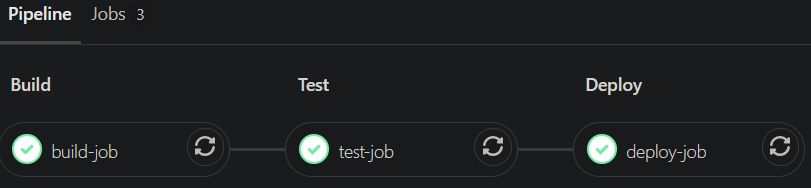
定義一個作業階段,同一階段可以有多個Job
```
stages:
- build
- test
- deploy
build-job:
stage: build
script:
- echo "build"
test-job:
stage: test
script:
- echo "testing"
deploy-job:
stage: deploy
script:
- echo "deploy"
```
### 全域設定值
可以在<abbr title="Hyper Text Markup Language">default:</abbr>內定義以下作業參數:
- image
- services
- before_script
- after_script
- tags
- cache
- artifacts
- retry
- timeout
- interruptible
```
default:
image: alpine #1
before_script: #2
- echo "I am before_script"
- cat "/etc/*-release"
after_script: #3
- echo "I am after_script:"
tags: #4
- dind
stages:
- build
build-job:
stage: build
script:
- echo "build"
```

### variables
```
stages:
- build
variables:
VAR: iamvariables
build-job:
stage: build
script:
- echo ${VAR}
```

###
### service
用來指定服務Docker image,此服務會與build container一起啟動,並鏈接在一起
```
stages:
- build
services:
- name: docker:dind
command: ["--insecure-registry=registry-fortress.fareastone.com.tw"]
build-job:
stage: build
script:
- cat /etc/hosts
- echo ${DOCKER_HOST}
- docker info
```
Container 狀態

Build container輸出內容

Dind的作法

https://docs.docker.com/engine/reference/commandline/cli/
https://github.com/docker-library/docker/blob/a73d96e731e2dd5d6822c99a9af4dcbfbbedb2be/19.03/dind/Dockerfile
### only/ except
定義Job會在哪個分支上運行
- only
- except
```
stages:
- build
- test
- deploy
build-job:
stage: build
script:
- echo "build"
test-job:
stage: test
script:
- echo "testing"
except:
- branches
deploy-job:
stage: deploy
script:
- echo "deploy"
only:
- master
```
On branch

### allow_failure
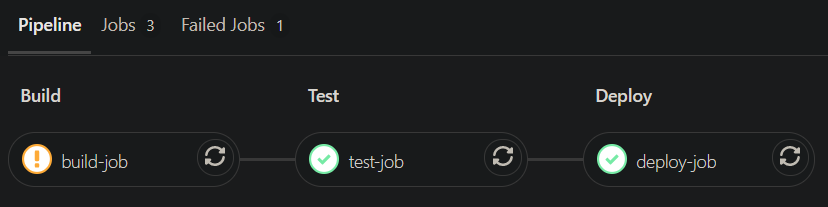
允許作業失敗而不會影響CI的其餘部分
啟用後,如果作業失敗,該作業將在UI中顯示橙色驚嘆號。Pipeline的邏輯流程將認為作業成功
```
stages:
- build
- test
- deploy
build-job:
stage: build
script:
- cat nonexistent_file
allow_failure: true
test-job:
stage: test
script:
- echo "testing"
deploy-job:
stage: deploy
script:
- echo "deploy"
```
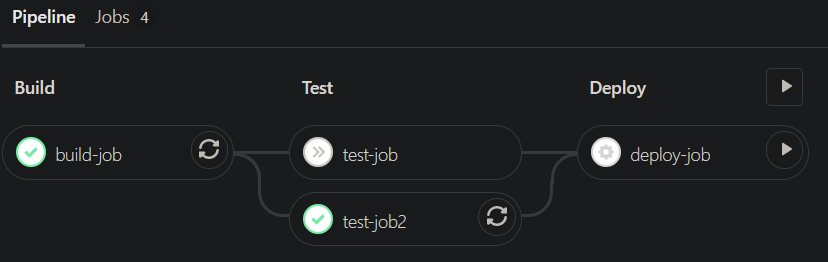
### when
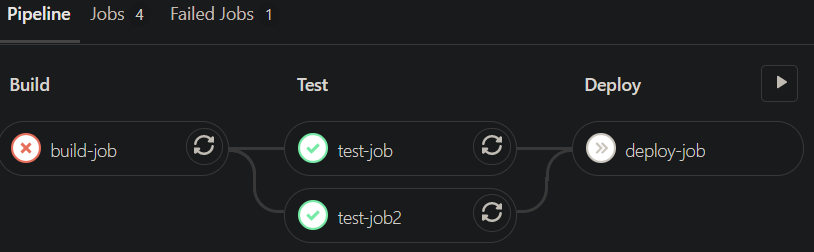
用於上一階段發生故障或發生故障時運行的作業,可以設置為以下值之一:
- on_success
- on_failure
- always
- manual
- delayed
```
stages:
- build
- test
- deploy
build-job:
stage: build
script:
- cat nonexistent_file
test-job:
stage: test
script:
- echo "testing"
when: on_failure
test-job2:
stage: test
script:
- echo "testing2"
when: always
deploy-job:
stage: deploy
script:
- echo "deploy"
when: manual
```
```
stages:
- build
- test
- deploy
build-job:
stage: build
script:
- echo "build"
test-job:
stage: test
script:
- echo "testing"
when: on_failure
test-job2:
stage: test
script:
- echo "testing2"
when: always
deploy-job:
stage: deploy
script:
- echo "deploy"
when: manual
```
### artifacts
用於儲存pipeline中產生的檔案
- name
- paths
- reports
- when :
- on_failure
- always
- expire_in
```
stages:
- build
- test
build-job:
stage: build
script:
- echo "build"
- touch build-file
artifacts:
name: "build-file"
paths:
- build-file
expire_in: 5 mins
```

After 5 mins

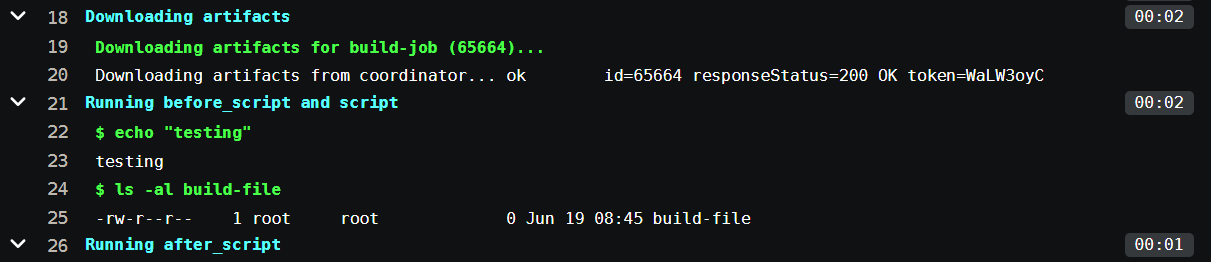
### dependencies
引用上一階段所儲存的檔案,直接將檔案存在工作目錄
```
stages:
- build
- test
build-job:
stage: build
script:
- echo "build"
- touch build-file
artifacts:
name: "build-file"
paths:
- build-file
expire_in: 5 mins
test-job:
stage: test
script:
- echo "testing"
- ls -al
dependencies:
- build-job
```
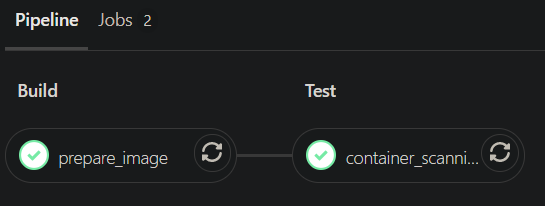
### include
將<abbr title="Hyper Text Markup Language">.gitlab-ci.yml</abbr>分成多個文件,可以提高文件可讀性,統一管理一些共用的腳本
- local
- file
- remote
- template
```
include:
- project: 'prod-discipline/template-gitlab-ci'
ref: master
file: 'container_scanning.yml'
```
https://gitlab.example.com.tw/group/project/-/blob/master/.gitlab-ci.yml
https://gitlab.example.com.tw/group/template-gitlab-ci/-/blob/master/container_scanning.yml
https://gitlab.com/gitlab-org/gitlab/-/tree/master/lib/gitlab/ci/templates
### Other
.gitlab-ci.yml 驗證工具
https://gitlab.example.com.tw/group/project/-/ci/lint
## Gitlab CI/CD
### Variables

Set variable


Ref: https://ithelp.ithome.com.tw/articles/10218938
Ref: https://docs.gitlab.com/ee/ci/yaml/
 Sign in via Google
 Sign in via Facebook
 Sign in via X(Twitter)
 Sign in via GitHub
 Sign in via Dropbox
 Sign in with Wallet
Connect another wallet
Sign in with Wallet
Connect another wallet