---
title: "从0-1:如何构建一个基于知识图谱的智能问答助手?"
date: 2021-12-30T14:04:31+08:00
draft: false
lightgallery: true
tags: ["Nebula Graph", "图数据库", "智能问答", "语音助手", "KBQA"]
categories: ["Nebula Graph", "Mini Project"]
description: "如何利用图数据库从0-1构建一个特定领域问答助手?本文手把手带你构建一个简易版的篮球领域智能问答机器人。"
featuredImage: "featured-image.webp"
featuredImagePreview: "featured-image.webp"
---
> 如何利用图数据库从0-1构建一个特定领域问答助手?本文手把手带你构建一个简易版的篮球领域智能问答机器人。
<!--more-->
## 前言
「问答机器人」在我们日常生活中并不少见到 :像是一些电商客服、智能问诊、技术支持等人工输入与沟通界面的场景下,机器人“智能”问答系统一定程度上可以在无需人力、不需要耗费终端用户心智去做知识库、商品搜索、科室选择等等的情况下实时给出问题答案。
问答机器人系统背后的技术有多重可能:
- 基于检索,全文搜索接近的问题
- 基于[机器学习阅读理解](https://arxiv.org/abs/1710.10723)
- 基于知识图谱(Knowledge-Based Question Answering system: KBQA)
- 其他
基于知识图谱构建问答系统在以下三个情况下很有优势:
- 对于领域类型是结构化数据场景:电商、医药、系统运维(微服务、服务器、事件)、产品支持系统等,其中作为问答系统的参考对象已经是结构化数据;
- 问题的解答过程涉及多跳查询,比如“姚明的妻子今年是本命年吗?”,“你们家的产品 A 和 A+ 的区别是什么?”;
- 为了解决其他需求(风控、推荐、管理),已经构建了图结构数据、知识图谱的情况。
为了方便读者最快速了解如何构建 KBQA 系统,我写了非常简陋的小 KBQA 项目,在本文中,我会带领大家从头到尾把它搭起来。
> 💡:这个小项目叫做 Siwi,它的代码就在 GitHub 上:[github.com/wey-gu/nebula-siwi](https://github.com/wey-gu/nebula-siwi/)
>
> Siwi 的发音是:`/ˈsɪwi/` 或者叫:`思二为` ,它是一个能解答 NBA 相关问题的机器人。
我们开始吧。
## 鸟瞰 TL;DR
KBQA 用一句话说就是把问题解析、转换成在知识图谱中的查询,查询得到结果之后进行筛选、翻译成结果(句子、卡片或者任何方便人理解的答案格式)。
> 💡:知识图谱的构建实际上是非常重要的过程,在本文中,我们专注在串起来 KBQA 系统的骨架,我们假设需求是基于一个已经有的图谱之上,为其增加一个 QA 系统。
「问题到图谱查询的转换」有不同的方法可以实现。
- 可以是对语义进行分析:理解问题的意图,针对不同意图匹配最可能的问题类型,从而构建这个类型问题的图谱查询,查得结果;
- 也可以是基于信息的抽取:从问题中抽取主要的实体,在图谱中获取实体的所有知识、关系条目(子图),再对结果根据问题中的约束条件匹配、排序选择结果。
> 💡:美团技术团队在[这篇文章](https://tech.meituan.com/2021/11/03/knowledge-based-question-answering-in-meituan.html)里分享了他们的真实世界实践,下图是美团结合了机器学习和 NLP 的方案。

而在 Siwi 里,我们一切从简,单独选择了语义分析这条路,它的特点是需要人为去标注或者编码一些问题类型的查询方式,但实际上在大多数场景下,尤其单一领域图谱的场景下反而是轻量却效果不差的方案,也是一个便于新手理解 KBQA 的合适的入门方式。
除了核心的问答部分,我还为 Siwi 增加了语音识别和语音回答(感谢浏览器接口标准的发展)的功能,于是,这个项目的结构和问答调用流程就是这样的了:一个语音问题自上而下分别经过三个部分:
- 基于网页的 Siwi Frontend 语音、文字问答界面
- Python Flask 实现的 Siwi Backend/API 系统
- [Nebula Graph](https://nebula-graph.com.cn) 开源分布式高性能图数据库之上的知识图谱
```asciiarmor
┌────────────────┬──────────────────────────────────────┐
│ │ │
│ │ Speech │
│ ┌──────────▼──────────┐ │
│ │ Frontend │ Siwi, /ˈsɪwi/ │
│ │ Web_Speech_API │ A PoC of │
│ │ │ Dialog System │
│ │ Vue.JS │ With Graph Database │
│ │ │ Backed Knowledge Graph │
│ └──────────┬──────────┘ │
│ │ Sentence │
│ ┌────────────┼──────────────────────────────┐ │
│ │ │ Backend │ │
│ │ ┌──────────▼──────────┐ │ │
│ │ │ Web API, Flask │ ./app/ │ │
│ │ └──────────┬──────────┘ │ │
│ │ │ Sentence ./bot/ │ │
│ │ ┌──────────▼──────────┐ │ │
│ │ │ Intent matching, │ ./bot/classifier│ │
│ │ │ Symentic Processing │ │ │
│ │ └──────────┬──────────┘ │ │
│ │ │ Intent, Entities │ │
│ │ ┌──────────▼──────────┐ │ │
│ │ │ Intent Actor │ ./bot/actions │ │
│ └─┴──────────┬──────────┴───────────────────┘ │
│ │ Graph Query │
│ ┌──────────▼──────────┐ │
│ │ Graph Database │ Nebula Graph │
│ └─────────────────────┘ │
└───────────────────────────────────────────────────────┘
```
> 💡:图数据库相比于其他知识图谱存储系统来说,因为其设计专注于数据内的数据关系,非常擅长实时获取海量数据下实体之间的复杂关联关系。
>
> Nebula Graph 的原生分布式设计和 share-nothing 架构使得它擅长于巨大数据量和高并发读写的场景,加上它的开源社区特别活跃,已经被国内很多团队用于支撑生产上的各种业务,[这里](https://nebula-graph.com.cn/cases/)有一些他们分享的选型、落地实践。
## 知识图谱
Siwi 构建于一个篮球相关的知识图谱之上,它其实是 Siwi 采用的开源分布式图数据库 [Nebula Graph](http://nebula-graph.com.cn/) 社区的官方文档里的示例[数据集](https://docs.nebula-graph.com.cn/master/3.ngql-guide/1.nGQL-overview/1.overview/#basketballplayer)。
在这个非常简单的图谱之中,只有两种点:
- player,球员
- team,球队
两种关系:
- serve 服役于(比如:姚明 `-服役于->` 休斯顿火箭)
- follow 关注 (比如:姚明 `-关注->` 奥尼尔)
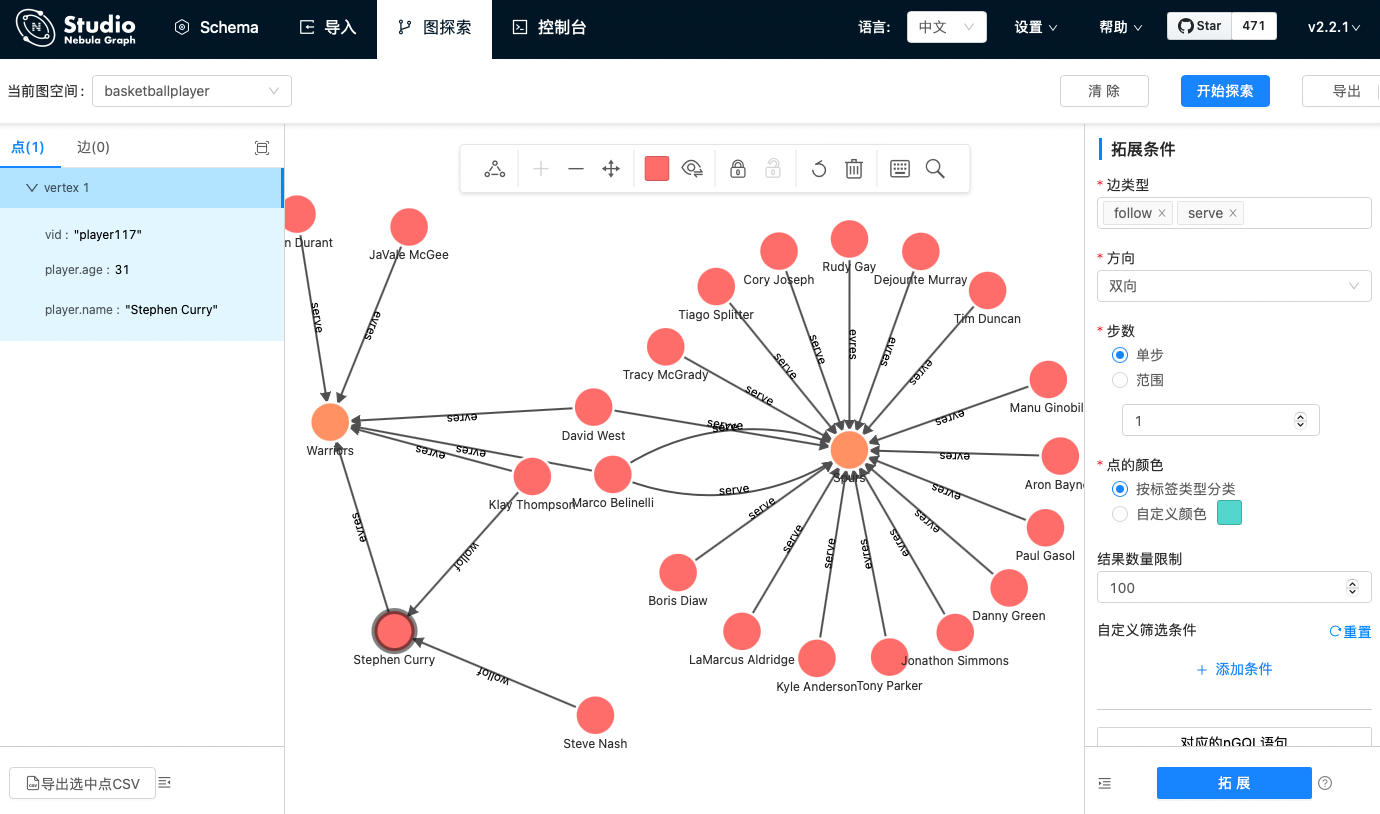
> 💡:这个数据集在 Nebula 社区上有一个 [在线体验](https://nebula-graph.com.cn/demo/) 环境,任何人都无需登录,通过[Nebula Graph Studio](https://docs.nebula-graph.com.cn/2.6.1/nebula-studio/about-studio/st-ug-what-is-graph-studio/) 可视化探索篮球图谱。
下图就是这个图谱的可视化探索截图,可以看到左边的中心节点勇士队(Warriors)有杜兰特(Durant)还有其他几个队员在其中服役(serve);除了服役之外,还可以看到队员和队员之中也有关注(follow)的关系存在。
有了这个知识图谱,咱们接下来就在它之上搭一个简单的基于语法解析的 QA 系统吧😁。
## Siwi-backend
```asciiarmor
┌────────────┼──────────────────────────────┐
│ │ Backend │
│ ┌──────────▼──────────┐ │
│ │ Web API, Flask │ ./app/ │
│ └──────────┬──────────┘ │
│ │ Sentence ./bot/ │
│ ┌──────────▼──────────┐ │
│ │ Intent matching, │ ./bot/classifier│
│ │ Symentic Processing │ │
│ └──────────┬──────────┘ │
│ │ Intent, Entities │
│ ┌──────────▼──────────┐ │
│ │ Intent Actor │ ./bot/actions │
└─┴──────────┬──────────┴───────────────────┘
│ Graph Query
┌──────────▼──────────┐
│ Graph Database │ Nebula Graph
└─────────────────────┘
```
如上图的设计流程,Siwi 的后端部分需要接收问句,处理之后访问知识图谱(图数据库),然后将处理结果返回给用户。
### 接收 HTTP 请求(app)
对于请求,就简单地用 Flask 作为 web server 来接收 HTTP 的 POST 请求:
> 💡:还不熟悉 Flask 的同学,可以在 [freeCodeCamp 上搜索一下](https://www.freecodecamp.org/news/tag/flask/),有一些不错的课程哈。
下边的代码就是告诉 Flask :
1. 如果用户发过来 `http://<server>/query` 的 POST 请求,提的问题就在请求的 body 里的 `question` 的 Key 之下。
2. 取得问题之后,调用把请求传给 `siwi_bot` 的 `query()`,得到 `answer` 。
代码段:`src/siwi/app/__init__.py`
```python
#...
from siwi.bot import bot
#...
@app.route("/query", methods=["POST"])
def query():
request_data = request.get_json()
question = request_data.get("question", "") # <----- 1.
if question:
answer = siwi_bot.query(
request_data.get("question", "")) # <----- 2.
else:
answer = "Sorry, what did you say?"
return jsonify({"answer": answer})
```
接下来我们来实现 `siwi_bot`,真正处理提问的逻辑。
### 处理请求(bot)
```asciiarmor
│ │ Sentence ./bot/ │
│ ┌──────────▼──────────┐ │
│ │ Intent matching, │ ./bot/classifier│
│ │ Symentic Processing │ │
│ └──────────┬──────────┘ │
│ │ Intent, Entities │
│ ┌──────────▼──────────┐ │
│ │ Intent Actor │ ./bot/actions │
└─┴──────────┬──────────┴───────────────────┘
```
前边提到过,KBQA 基本上是
a. 把问题解析、转换成在知识图谱中的查询
b. 查询得到结果之后进行筛选、翻译成结果
这里,我们把 a. 的逻辑放在 `classifier` 里,b. 的逻辑放在 `actions`(actor) 里。
a. HTTP 请求的问题句子 `sentence` 传过来,用 `classifier` 解析它的意图和句子实体
b. 用意图和句子实体构造 `action`,并链接图数据库执行,获取结果。
代码段:`src/siwi/bot/bot/__init__.py`
```python
from siwi.bot.actions import SiwiActions
from siwi.bot.classifier import SiwiClassifier
class SiwiBot():
def __init__(self, connection_pool) -> None:
self.classifier = SiwiClassifier()
self.actions = SiwiActions()
self.connection_pool = connection_pool
def query(self, sentence):
intent = self.classifier.get(sentence) # <--- a.
action = self.actions.get(intent) # <--- b.
return action.execute(self.connection_pool)
```
首先咱们来进一步实现一下 `SiwiClassifier` 吧。
#### 语义解析(classifier)
`classifier ` 需要在 `get(sentence)` 方法里将句子中的实体和句子的意图解析、分类出来。通常来说,这里是需要借助机器学习、NLP去分词、分类实现的,这里只是为了展示这个过程实际上只是各种 `if/ else`。
我们这里实现了三类意图的问题:
- 关系(A,B):获得 A 和 B 在图谱中的关系路径,比如姚明和湖人队的关系是?
- 服役情况:比如乔纳森在哪里服役?
- 关注情况:比如邓肯关注了谁?
> ❓ 开放问题:
>
> 如果看教程的你觉得这几个问题太没意思了,这里留一个开放问题,你可以在 Siwi li 帮我们实现:「共同好友(A,B)获得 A 和 B 的一度共同好友」这个意图(或者更酷的其他句子)么?欢迎来 Github:github.com/wey-gu/nebula-siwi/ 提 PR 哦,看看谁先实现。
代码片段:`src/siwi/bot/classfier/__init__.py`
```python
class SiwiClassifier():
def get(self, sentence: str) -> dict:
"""
Classify Sentences and Fill Slots.
This should be done by NLP, here we fake one to demostrate
the intent Actor --> Graph DB work flow.
sentense:
relation:
- What is the relationship between Yao Ming and Lakers?
- How does Tracy McGrady and Lakers connected?
serving:
- Which team had Jonathon Simmons served?
friendship:
- Whom does Tim Duncan follow?
- Who are Tracy McGrady's friends?
returns:
{
"entities": entities,
"intents": intents
}
"""
entities = self.get_matched_entities(sentence)
intents = self.get_matched_intents(sentence)
return {
"entities": entities,
"intents": intents
}
```
这里,我把匹配的规则(等价于 if else...)写在了 `src/siwi/bot/test/data` 之下的 YAML 文件里,这样增加 `classifier` 之中新的规则只需要更新这个文件就可以了:
##### 意图识别(intent)
```python
def load_entity_data(self) -> None:
# load data from yaml files
module_path = f"{ siwi.__path__[0] }/bot/test/data"
#...
with open(f"{ module_path }/intents.yaml", "r") as file:
self.intents = yaml.safe_load(file)["intents"]
```
对于每一个意图来说:
- `intents.<名字>` 代表名字
- 名字之后的 `action` 代表后边在要实现的相应的 `xxxAction` 的类
- 比如 `RelationshipAction` 将是用来处理查询关系(A,B)这样的问题的 Action 类
- `keywords` 代表在句子之中匹配的关键词
- 比如问句里出现 serve,served,serving 的字眼的时候,将会匹配服役的问题
> 💡:写 if else 条件来对应意图是不容易的,因为不同意图不可能没有关键词相交的情况,我们的实现只是一个非常简陋、不严谨的方式。在实际场景下,训练模型去做匹配效果会更好,有意思的是,那些做的比较好的模型的输入和我们的 YAML 的格式是很类似的。
```yaml
---
intents:
fallback:
action:
FallbackAction
keywords: []
relationship:
action:
RelationshipAction
keywords:
- between
- relation
- relationship
- related
- connect
- correlate
serve:
action:
ServeAction
keywords:
- serve
- served
- serving
friend:
action:
FollowAction
keywords:
- follows
- followed
- follow
- friend
- friends
```
##### 实体识别(entity)
类似的,实体识别的部分本质上也是 if else,只不过这里利用到了**[Aho–Corasick算法](https://zh.wikipedia.org/wiki/AC%E8%87%AA%E5%8A%A8%E6%9C%BA%E7%AE%97%E6%B3%95)**来帮助搜索实体,在生产(非玩具)的情况下,应该用 NLP 里的分词的方法来做。
> 💡:大家可以去了解一下这个 [AC自动机算法](https://zh.wikipedia.org/wiki/AC%E8%87%AA%E5%8A%A8%E6%9C%BA%E7%AE%97%E6%B3%95)
```python
def setup_entity_tree(self) -> None:
self.entity_type_map.update({
key: "player" for key in self.players.keys()
})
self.entity_type_map.update({
key: "team" for key in self.teams.keys()
})
self.entity_tree = ahocorasick.Automaton()
for index, entity in enumerate(self.entity_type_map.keys()):
self.entity_tree.add_word(entity, (index, entity))
self.entity_tree.make_automaton()
#...
def get_matched_entities(self, sentence: str) -> dict:
"""
Consume a sentence to be matched with ahocorasick
Returns a dict: {entity: entity_type}
"""
_matched = []
for item in self.entity_tree.iter(sentence):
entities_matched.append(item[1][1])
return {
entity: self.entity_type_map[entity] for entity in _matched
}
```
至此,我们的 `SiwiClassifier.get(sentence)` 已经能返回解析、分类出来的意图和实体了,这时候,它们会被传给 Actions 来让 siwi bot 知道如何去执行只是图谱的查询啦!
#### 构造图谱查询(action)
还记得前边的 bot 代码里,最后一步,图谱查询的动作是这么被构造的:
`action = self.actions.get(intent)`
现在咱们就把它实现一下:
1. 在前边提到过的 `intents.yaml` 里获取这个意图里配置的意图的类名称
2. 导入相应的 Action 类
代码段:`src/bot/actions/__init__.py`
```python
class SiwiActions():
def __init__(self) -> None:
self.intent_map = {}
self.load_data()
def load_data(self) -> None:
# load data from yaml files
module_path = f"{ siwi.__path__[0] }/bot/test/data"
with open(f"{ module_path }/intents.yaml", "r") as file:
self.intent_map = yaml.safe_load(file)["intents"]
def get(self, intent: dict):
"""
returns SiwiActionBase
"""
if len(intent["intents"]) > 0:
intent_name = intent["intents"][0]
else:
intent_name = "fallback"
cls_name = self.intent_map.get(
intent_name).get("action") #-------> 1.
action_cls = getattr( #-------> 2.
importlib.import_module("siwi.bot.actions"), cls_name)
action = action_cls(intent)
return action
```
最后,我们来实现这个类吧,比如 `RelationshipAction` 对应的代码如下:
1. 根据提供的 A 和 B,构造并执行图数据库之中的 `FIND PATH`
2. 将 `FIND PATH` 的结果进行解析,通过 `as_path()` 方法的封装,获得 path 类型的数据,并处理一个句子返回给用户
> 💡:FIND PATH 就是字面意思的查找路径,[这里](https://docs.nebula-graph.com.cn/2.6.1/3.ngql-guide/16.subgraph-and-path/2.find-path/)有详细的解释哦。
```python
class RelationshipAction(SiwiActionBase):
"""
USE basketballplayer;
FIND NOLOOP PATH
FROM "player100" TO "team204" OVER * BIDIRECT UPTO 4 STEPS;
"""
def __init__(self, intent):
print(f"[DEBUG] RelationshipAction intent: { intent }")
super().__init__(intent)
try:
self.entity_left, self.entity_right = intent["entities"]
self.left_vid = self._vid(self.entity_left)
self.right_vid = self._vid(self.entity_right)
except Exception:
print(
f"[WARN] RelationshipAction entities recognition Failure "
f"will fallback to FallbackAction, "
f"intent: { intent }"
)
self.error = True
def execute(self, connection_pool) -> str:
self._error_check()
query = (
f'USE basketballplayer;'
f'FIND NOLOOP PATH '
f'FROM "{self.left_vid}" TO "{self.right_vid}" '
f'OVER * BIDIRECT UPTO 4 STEPS;'
)
print(
f"[DEBUG] query for RelationshipAction :\n\t{ query }"
)
with connection_pool.session_context("root", "nebula") as session:
result = session.execute(query) #--------------------> 1.
if not result.is_succeeded():
return (
f"Something is wrong on Graph Database connection when query "
f"{ query }"
)
if result.is_empty():
return (
f"There is no relationship between "
f"{ self.entity_left } and { self.entity_right }"
)
path = result.row_values(0)[0].as_path() #-------------------> 2.
relationships = path.relationships()
relations_str = self._name(
relationships[0].start_vertex_id().as_string())
for rel_index in range(path.length()):
rel = relationships[rel_index]
relations_str += (
f" { rel.edge_name() }s "
f"{ self._name(rel.end_vertex_id().as_string()) }")
return (
f"There are at least { result.row_size() } relations between "
f"{ self.entity_left } and { self.entity_right }, "
f"one relation path is: { relations_str }."
)
```
至此,咱们就已经实现了后端的所有功能,我们可以把它启动起来试试了!
### 测试一下
#### 启动图数据库
我们在 Nebula Graph 里建立(导入数据)一个篮球的知识图谱。
> 💡:在导入数据之前,请先部署一个 Nebula Graph 集群。最简便的部署方式是使用 Nebula-UP 这个小工具,只需要一行命令就能在 Linux 机器上同时启动一个 Nebula Graph 核心和可视化图探索工具 [Nebula Graph Studio](https://docs.nebula-graph.com.cn/2.6.1/nebula-studio/about-studio/st-ug-what-is-graph-studio/)。如果你更愿意用 Docker 部署,请参考[这个文档](https://docs.nebula-graph.com.cn/2.6.1/4.deployment-and-installation/2.compile-and-install-nebula-graph/3.deploy-nebula-graph-with-docker-compose/)。
本文假设我们使用 [Nebula-UP](https://siwei.io/nebula-up/) 来部署一个 Nebula Graph:
```bash
curl -fsSL nebula-up.siwei.io/install.sh | bash
```
之后,我们会看到这样的提示:

按照提示,我们可以通过这个命令进入到有 Nebula Console 的容器里:
> 💡:[Nebula Console](https://github.com/vesoft-inc/nebula-console) 是命令行访问 Nebula Graph 图数据库的客户端,支持 Linux,Windows 和 macOS,下载地址:[这里](https://github.com/vesoft-inc/nebula-console/releases)
```bash
~/.nebula-up/console.sh
```
然后,在 `#` 的提示符下就表示我们进来了,我们在里边可以执行:
```
nebula-console -addr graphd -port 9669 -user root -p nebula
```
这样就表示我们连接上了 Nebula Graph 图数据库:
```mysql
/ # nebula-console -addr graphd -port 9669 -user root -p nebula
Welcome to Nebula Graph!
(root@nebula) [(none)]>
```
在这里,我们就可以通过 nGQL 去操作 Nebula Graph,不过我们先退出来,执行 `exit`:
```mysql
(root@nebula) [(none)]> exit
Bye root!
Fri, 31 Dec 2021 04:11:28 UTC
```
我们在这个容器内把基于 nGQL 语句的数据下载下来:
```bash
/ # wget https://docs.nebula-graph.io/2.0/basketballplayer-2.X.ngql
```
然后通过 Nebula Console 的 `-f <file_path>` 把数据导入进去:
```bash
nebula-console -addr graphd -port 9669 -user root -p nebula -f basketballplayer-2.X.ngql
```
至此,我们就启动了一个 Nebula Graph 图数据库,还在里边加载了篮球的知识图谱!
> 💡:还记得前边我们提到的 [在线体验](https://nebula-graph.com.cn/demo/) 环境么?现在,我们可以在这个利用 Nebula-UP 部署了 Nebula 的环境里启动自己的 Nebula Studio 啦,按照上边 Nebula-UP 的提示:http://<本机IP>:7001 就是它的地址,然后大家可以参考[文档](https://docs.nebula-graph.com.cn/2.6.1/nebula-studio/deploy-connect/st-ug-connect/)和[在线体验介绍](https://www.bilibili.com/video/BV1hq4y1177e)去了解更多。
>
> 
#### 启动 Siwi-backend
大家可以直接 clone 我的代码:`git clone https://github.com/wey-gu/nebula-siwi/`
然后安装、启动 Siwi Backend:
```bash
cd nebula-siwi
# Install dependencies
python3 -m pip install -r src/requirements.txt
# Install siwi backend
python3 -m build
# Configure Nebula Graph Endpoint
export NG_ENDPOINTS=127.0.0.1:9669
# Run Backend API server
gunicorn --bind :5000 wsgi --workers 1 --threads 1 --timeout 60
```
启动之后,我们可以另外开窗口,通过 cURL 去发起问题给 backend,更多细节大家可以参考 GitHub 上的 README:
[](https://github.com/wey-gu/nebula-siwi/blob/main/images/backend-demo.webp)
至此,我们已经写好了 QA 系统的重要的代码啦,大家是不是对一个 KBQA 的构成有了更清晰的概念了呢?
接下来,我们为它增加一个界面!
## Siwi-frontend
### 聊天界面
我们利用 [Vue Bot UI](https://github.com/juzser/vue-bot-ui) 这个可爱的机器人界面的 Vue 实现可以很容易构造一个
代码段:`src/siwi/frontend/src/App.vue`
```vue
<template>
<div id="app">
<VueBotUI
:messages="msg"
:options="botOptions"
:bot-typing="locking"
:input-disable="locking"
@msg-send="msgSender"
/>
</div>
</template>
<script>
import { VueBotUI } from 'vue-bot-ui'
```
[](https://github.com/wey-gu/nebula-siwi/blob/main/src/siwi_frontend/images/demo.webp)
注意到那个小飞机按钮了吧,它是发出问题请求的按键,我们要在按下它的时候对后端做出请求。
### 访问后端
这部分用到了[Axios](https://github.com/axios/axios),它是浏览器里访问其他地址的 HTTP 客户端。
1. 在按下的时候,`@msg-send="msgSender"` 会触发 `msgSender()`
2. ` msgSender()`去构造`axios.post(this.apiEndpoint, { "question": data.text })` 的请求给 Siwi 的后端
3. 后端的结果被 `push()` 到界面的聊天消息里,渲染出来 `this.msg.push()`
代码段:`src/siwi/frontend/src/App.vue`
```vue
<template>
<div id="app">
<button id="mic_btn" @click="record = !record">
{{record?'👂':'🎙️'}} --------------------------> 1.
</button>
<vue-web-speech
v-model="record"
@results="onResults" --------------------------> 1.
@unrecognized="unrecognized"
>
</vue-web-speech>
...
<vue-web-speech-synth
v-model="agentSpeak"
:voice="synthVoice"
:text="synthText"
@list-voices="listVoices" --------------------------> 4.
/>
</div>
</template>
<script>
import { VueBotUI } from 'vue-bot-ui'
import axios from "axios";
export default {
name: 'App',
components: {
VueBotUI,
},
onResults (data) { -------------------------> 2.
this.results = data;
this.locking = true;
this.msg.push({
agent: "user",
type: "text",
text: data[0],
});
this.locking = true;
console.log(data[0]);
axios.post(this.apiEndpoint, { "question": data[0] }).then((response) => {
console.log(response.data);
this.msg.push({
agent: "bot",
type: "text",
text: response.data.answer,
});
this.synthText = response.data.answer; ----------> 3.
this.agentSpeak = true;
});
this.locking = false;
},
}
}
</script>
```
现在,我们已经有了一个图形界面的机器人啦,不过,更进一步,我们可以利用现代浏览器的接口,实现语音识别和机器人说话!
### 语音识别
我们借助于 [Vue Web Speech](https://github.com/Drackokacka/vue-web-speech), 这个语音 API 的 VueJS 的绑定,可以很容易在按下 🎙️ 的时候接收人的语音,并把语音转换成文字发出去,在回答被返回之后,它(还是他/她😁?)也会把回答的句子读出来给用户。
1. `record` 在 `🎙️` 被按下之后,变成 `👂`
2. 触发 `onResults()` 监听
3. 把返回结果发给 `this.synthText` 合成器,准备读出
4. `<vue-web-speech-synth>` 把语音读出
代码段:`src/siwi/frontend/src/App.vue`
```vue
<template>
<div id="app">
<button id="mic_btn" @click="record = !record">
{{record?'👂':'🎙️'}} -----------------------------> 1.
</button>
<vue-web-speech
v-model="record"
@results="onResults" -----------------------------> 1.
@unrecognized="unrecognized"
>
</vue-web-speech>
...
<vue-web-speech-synth
v-model="agentSpeak"
:voice="synthVoice"
:text="synthText"
@list-voices="listVoices" ---------------------------> 4.
/>
</div>
</template>
<script>
import { VueBotUI } from 'vue-bot-ui'
import axios from "axios";
export default {
name: 'App',
components: {
VueBotUI,
},
onResults (data) { -------------------> 2.
this.results = data;
this.locking = true;
this.msg.push({
agent: "user",
type: "text",
text: data[0],
});
this.locking = true;
console.log(data[0]);
axios.post(this.apiEndpoint, { "question": data[0] }).then((response) => {
console.log(response.data);
this.msg.push({
agent: "bot",
type: "text",
text: response.data.answer,
});
this.synthText = response.data.answer; ----------------------> 3.
this.agentSpeak = true;
});
this.locking = false;
},
}
}
</script>
```
## 总结
至此,我们已经学会了搭建自己的第一个 KBQA:知识图谱驱动的问答系统。
回顾下它的代码结构:
- `src/siwi` 对应后端
- App 是 Flask API 处理的部分
- Bot 是处理请求、访问 Nebula Graph 的部分
- `src/siwi_frontend` 是前端
希望大家在这个简陋的基础之上,多多探索,做出来更加成熟的聊天机器人,欢迎你来给我邮件、留言告诉我呀,这里:https://siwei.io/about 有我的联系方式。
```bash
.
├── README.md
├── src
│ ├── siwi # Siwi-API Backend
│ │ ├── app # Web Server, take HTTP requests and calls Bot API
│ │ └── bot # Bot API
│ │ ├── actions # Take Intent, Slots, Query Knowledge Graph here
│ │ ├── bot # Entrypoint of the Bot API
│ │ ├── classifier # Symentic Parsing, Intent Matching, Slot Filling
│ │ └── test # Example Data Source as equivalent/mocked module
│ └── siwi_frontend # Browser End
│ ├── README.md
│ ├── package.json
│ └── src
│ ├── App.vue # Listening to user and pass Questions to Siwi-API
│ └── main.js
└── wsgi.py
```
如果你很喜欢这样的小项目,欢迎来看看我之前的分享: 「[从0-1:如何构建一个企业股权图谱系统?](https://siwei.io/corp-rel-graph/)」哦。
> 💡:你知道吗,我其实借助于 Katacoda 已经为大家搭建了一个交互式体验 Siwi + Nebula 的部署的环境,如果您的网络条件够快(Katacoda服务器在国外),可以在[这里](https://siwei.io/learn/nebula-101-siwi-kgqa/)点点鼠标就交互式体验它。
>
> 视频介绍
>
> <iframe src="//player.bilibili.com/player.html?aid=421964672&bvid=BV1Rm4y1Q7B5&cid=448090671&page=1" scrolling="no" border="0" frameborder="no" framespacing="0" allowfullscreen="true"> </iframe>
## 感谢用到的开源项目 ❤️
这个小项目里我们用到了好多开源的项目,非常感谢这些贡献者们的慷慨与无私,开源是不是很酷呢?
### Backend
- [KGQA on MedicalKG](https://github.com/liuhuanyong/QASystemOnMedicalKG) by [Huanyong Liu](https://liuhuanyong.github.io/)
- [Flask](https://github.com/pallets/flask)
- [pyahocorasick](https://github.com/WojciechMula/pyahocorasick) created by [Wojciech Muła](http://0x80.pl/)
- [PyYaml](https://pyyaml.org/)
### Frontend
- [VueJS](https://vuejs.org/) for frontend framework
- [Vue Bot UI](https://github.com/juzser/vue-bot-ui), as a lovely bot UI in vue
- [Vue Web Speech](https://github.com/Drackokacka/vue-web-speech), for speech API vue wrapper
- [Axios](https://github.com/axios/axios) for browser http client
- [Solarized](https://en.wikipedia.org/wiki/Solarized_(color_scheme)) for color scheme
- [Vitesome](https://github.com/alvarosaburido/vitesome) for landing page design
### Graph Database
- [Nebula Graph](https://github.com/vesoft-inc/nebula/) 高性能、云原生的开源分布式图数据库
 Sign in via Facebook
 Sign in via X(Twitter)
 Sign in via GitHub
 Sign in via Dropbox
 Sign in with Wallet
Connect another wallet
Sign in with Wallet
Connect another wallet