# 2020q3 Homework5 (render)
contribute by <`simpson0114`>
###### tags: `sysprog2020`
----
## 作業要求
- [ ] 修正浮點數和定點數算繪程式展現的缺失,並提出改進 precision 及 accuracy 的方式
- [ ] 輸出算繪過程的 frame rate,日後當我們進一步提升算繪程式的效率時,這會是效能評比的方式之一
- [ ] 利用 tools/precalculator.cpp 產生運算表格,修改相關程式碼,使得程式碼在編譯時期才去產生運算表格,後者以標頭檔案 (generated header) 的形式存在並編譯進入主程式
- [ ] 解說現有 fixed-point 實作機制,並探討前述表格產生的機制,需要提及其中的考量點
- [ ] 將 raycaster 以 C99/C11 (或 gnu99/gnu11) 重寫,允許在執行時期載入 fixed-point 和 floating-point 為基礎的 renderer
## 程式執行
進入資料夾 make 後,輸入 `./main` 即可執行程式
## 程式原理
### Raycasting
raycasting 的原理是在 screen 範圍內打出一條條的光線,偵測物體距離,藉此把 2D 轉為 3D
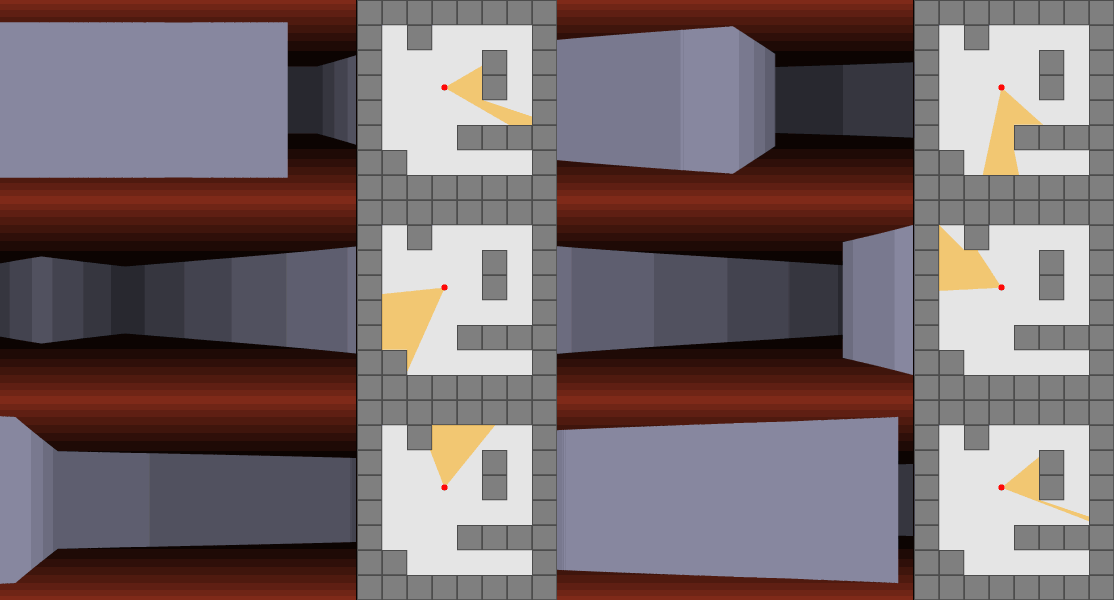
在專案內 renderer.cpp 中的 TraceFrame 實現此原理
用 x 去模擬每一條光線
```c=11
for (int x = 0; x < SCREEN_WIDTH; x++)
```
## 修正程式缺失
### floating-point 靠近牆壁畫面破碎

原程式碼 `raycaster_float.cpp`:150
```c=150
if (distance > 0) {
*screenY = INV_FACTOR / distance;
auto txs = (*screenY * 2.0f);
if (txs != 0) {
*textureStep = (256 / txs) * 256;
if (txs > SCREEN_HEIGHT) {
auto wallHeight = (txs - SCREEN_HEIGHT) / 2;
*textureY = wallHeight * (256 / txs) * 256;
}
}
} else {
*screenY = 0;
}
```
可觀察到因為 `*screenY` type 為 `uint8_t` ,所以 `*screenY` 會 overflow ,因此我先修正了 overflow 的問題。
又由 `renderer.cpp`:22
```c=22
nt16_t ws = HORIZON_HEIGHT - sso;
if (ws < 0) {
ws = 0;
sso = HORIZON_HEIGHT;
}
```
因在 `renderer.cpp` 中 `sso` 就是 `*screenY` ,可觀察到若 `sso` > `HORIZON_HIGHT` ,則 `sso` = `HORIZON_HIGHT` ,因此若 `*screenY` overflow ,則將 `*screenY` 設為 `HORIZON_HIGHT`
以下為修改後程式碼
`raycaster_float.cpp`:136
```c=136
if (distance > 0) {
float tmp = INV_FACTOR / distance;
*screenY = tmp;
auto txs = (tmp * 2.0f);
if (txs != 0) {
*textureStep = (256 / txs) * 256;
if (txs > SCREEN_HEIGHT) {
auto wallHeight = (txs - SCREEN_HEIGHT) / 2;
*textureY = wallHeight * (256 / txs) * 256;
*screenY = HORIZON_HEIGHT;
}
}
} else {
*screenY = 0;
}
```
修正後:

### floating-point 角落牆面消失

因為在角落才會出現這個 bug ,所以推斷是 `distance` 在邊界時才會發生。
測試後發現是在 `playerX` 或 `playerX` 有趨近 1.0 的情況時就會發生牆面消失,反之則不會。
參考影片 [Wolfenstein 3D's map renderer](https://www.youtube.com/watch?v=eOCQfxRQ2pY) 去釐清原理。
在 raycaster_float.cpp 中測試,經過實驗發現在 `offsetX` 或 `offsetY` 等於 0 時會發生此情形。影片中 $xIntercept = x + dx + -dy / \tan(\theta)$ 對應到程式內的 `float interceptX = rayX + startDeltaX;`。而 `offset` 是影響到 `startDelta` 的關鍵,所以在決定 `startDeltaX` 和 `startDeltaY` 的值時出問題。
這邊看到程式在 offset 為 0 時會特別處理
```cpp=56
if (offsetY == 0) {
startDeltaX = (1) * fabs(tan(rayA));
} else {
startDeltaX = (offsetY) *fabs(tan(rayA));
}
```
我認為這樣很奇怪,按照式子來看 $-dy / \tan(\theta)$ 應該為 0,這邊卻是 $(1) * fabs(\tan(\theta))$。所以對式子進行修正,將 1 改為 0
```cpp=56
if (offsetY == 0) {
startDeltaX = (0) * fabs(tan(rayA));
} else {
startDeltaX = (offsetY) *fabs(tan(rayA));
}
```
發現原本的問題解決了,於是接著精簡程式碼。當 if 成立時 offset 必定是 0,所以整個判斷式變得多餘,直接保留 else 內部的運算就好。
以下為修正的程式碼
```c=52
float startDeltaX, startDeltaY;
if (rayA <= M_PI_2) {
startDeltaX = (1 - offsetY) * tan(rayA);
startDeltaY = (1 - offsetX) / tan(rayA);
} else if (rayA <= M_PI) {
startDeltaX = (offsetY) *fabs(tan(rayA));
startDeltaY = -(1 - offsetX) / fabs(tan(rayA));
} else if (rayA < 3 * M_PI_2) {
startDeltaX = -(offsetY) *fabs(tan(rayA));
startDeltaY = -(offsetX) / fabs(tan(rayA));
} else {
startDeltaX = -(1 - offsetY) * fabs(tan(rayA));
startDeltaY = (offsetX) / fabs(tan(rayA));
}
```
修正後:

### fixed-point 角落多一面牆面

因為也是在角落才會出現的問題,所以判斷是 `distance` 在邊界才會發生。
觀察 `raycaster_fixed.cpp` 處理 fixed-point 的計算,一樣在程式內尋找使用 distance 的地方。
`raycaster_fixed.cpp`:74
```c=74
if (distance >= 256) {
const uint16_t ds = distance >> 3;
if (ds >= 256) {
*height = LOOKUP8(g_farHeight, 255) - 1;
*step = LOOKUP16(g_farStep, 255);
}
*height = LOOKUP8(g_farHeight, ds);
*step = LOOKUP16(g_farStep, ds);
} else {
*height = LOOKUP8(g_nearHeight, distance);
*step = LOOKUP16(g_nearStep, distance);
}
```
可觀察到在 76 行,當 `ds` 超過 256 時會將 `*height` 和 `*step` 修正,但隨後會再把修正覆蓋掉。
修正後程式:
`raycaster_fixed.cpp`:74
```c=74
if (distance >= 256) {
const uint16_t ds = distance >> 3;
if (ds >= 256) {
*height = LOOKUP8(g_farHeight, 255) - 1;
*step = LOOKUP16(g_farStep, 255);
}
else {
*height = LOOKUP8(g_farHeight, ds);
*step = LOOKUP16(g_farStep, ds);
}
} else {
*height = LOOKUP8(g_nearHeight, distance);
*step = LOOKUP16(g_nearStep, distance);
}
```
修正後:

### fixed-point 牆面距離不正確
可觀察下面兩張圖,可發現 fixed-point 在不同牆面距離會有所差距,但 floating-point 不會有差距,因此可以推測是 fixed-point 有問題。


觀察 `raycaster_float.cpp` 和 `raycaster_fixed.cpp` 中 `IsWall` 的差別。
可觀察到
`raycaster_fixed.cpp`
```c=61
inline bool RayCasterFixed::IsWall(uint8_t tileX, uint8_t tileY)
{
if (tileX > MAP_X - 1 || tileY > MAP_Y - 1) {
return true;
}
return LOOKUP8(g_map, (tileX >> 3) + (tileY << (MAP_XS - 3))) &
(1 << (8 - (tileX & 0x7)));
}
```
`raycaster_float.cpp`
```c=16
if (tileX < 0 || tileY < 0 || tileX >= MAP_X - 1 || tileY >= MAP_Y - 1) {
return true;
}
return g_map[(tileX >> 3) + (tileY << (MAP_XS - 3))] &
(1 << (8 - (tileX & 0x7)));
```
可觀察到 `raycaster_fixed.cpp` 中的第 63 行的 if 判斷式並沒有判斷到等於的情況
因此修正後程式碼如下:
`raycaster_fixed.cpp`
```c=61
inline bool RayCasterFixed::IsWall(uint8_t tileX, uint8_t tileY)
{
if (tileX >= MAP_X - 1 || tileY >= MAP_Y - 1) {
return true;
}
return LOOKUP8(g_map, (tileX >> 3) + (tileY << (MAP_XS - 3))) &
(1 << (8 - (tileX & 0x7)));
}
```
修正後:

### 發現 `g_map` 中地圖與實際不同

觀察 `raycaster_float.cpp` 及 `raycaster_fixed.cpp` 可得知 `IsWall()` 是判斷障礙物與否,而障礙物資訊是紀錄在 `raycaster-data.h` 的 `g_map` 中
由 `IsWall()` 推斷 `g_map` 有關資訊如下:
* A bit as a pixel.
* 大小為正方形 (32x32) pixel, 四個 uint8_t element 為一個 X axis ,共分成 32 rows, that is, Y axis.
按照二維方向排列應該長這樣:
```
0b00000000, 0b00000000, 0b00000000, 0b00000000,
0b00000000, 0b00000000, 0b00000000, 0b00000000,
...
0b00000000, 0b00000000, 0b00000000, 0b00000000,
```
橫向 32 bit,縱向 32 rows.
**圖片大小推測**
`raycaster_float.cpp` line:16
```c=16
if (tileX < 0 || tileY < 0 || tileX >= MAP_X - 1 || tileY >= MAP_Y - 1) {
return true;
}
```
`MAP_X` $=$ `MAP_Y` $= 32$
由以上程式碼可推斷若 `tileX` 或 `tileY` $< 0$ 以及 `tileX` 或 `tileY` $>= 31$ ,則為超過邊界
因此可得知地圖大小為 $32*32$
`raycaster_float.cpp` line:19
```c=19
return g_map[(tileX >> 3) + (tileY << (MAP_XS - 3))] &
(1 << (8 - (tileX & 0x7)));
```
* 此段程式碼為判斷座標 (`tileX`, `tileY`) 是否為障礙物,由於 `g_map` 中,每個 element 皆為 `uint_8` ,因此每個 element 可以代表 8 個 pixel,$8=2^3$,因此 `tileX` 需除 8 ,也就是 >> 3 。
* `g_map` 是 1d array ,因此要計算 Y 方向應除掉 X 方向的長度, X 方向共包含 32 個 bit ($32=2^5$) ,但是一個 element 可以代表 8 個 bit ,因此,應除 $32/8=4$ 或 `>> 4`。
* `MAP_XS` 的意義為地圖大小的 2 指數,即 `2^5=32` ,其中 32 為 `MAP_X` ,`MAP_XS` 為指數部分。
* 第 18 行用來取 X axis 的 bit ,需注意的是,地圖中 LSB 為 X 正向, MSB 為 X 反向,與數值大小方向相反。取 7 的原因為,一個 element 可以代表 8 個 bit,這 8 個 bit 恰好是 X 座標的 3 個 LSBs 因此取 3 個 LSB 全為 1 的情況,即為 `0x7`。
:::warning
這邊的 `8-(tileX & 0x7)` 應該錯了,考慮 `tileX` 最大即最小情況:
- 最小 `tileX` =0 時,`8-0=8`:1<<8,會超過 uint8_t 的範圍
- 最大 `tileX` =7 時,`8-7=1`:1<<1=2,發現永遠沒有 1 的情況
因此應該將 8 修正為 7。
:::
修正後可發現障礙物位置與 `g_map` 相同
 Sign in with Wallet
Connect another wallet
Sign in with Wallet
Connect another wallet