# Sesc Lab Códigos Abertos (quartas-feiras)
## `hackmd.io/@sesc-av-paulista/lab-codigos-abertos`

## 2025
- Fabricação digital
### 2025-03-26
- Explorando o [FreeCAD](https://freecad.org)
- importa e exporta STL?
- interface Python (console e "macro editor")
- Gerando G-Code com a bancada Path (agora chama CAM) https://www.youtube.com/watch?app=desktop&v=RrhahfJNn9s&ab_channel=OpenSourceCNC
-
- Experimentos [do ano passado](https://hackmd.io/PqKxBSMYRJq_VJjP1Y1fWQ?both#2024-08-14---FreeCAD-e-seus-desafios)

- Video https://www.youtube.com/watch?v=yp6yBTcdcII&ab_channel=ArifK.Rafiq
- 
- GPT_stepper para o Marcelo
- https://www.youtube.com/watch?v=7spK_BkMJys&ab_channel=HowToMechatronics
- https://docs.arduino.cc/libraries/gpt_stepper/?_gl=1*iahx59*_up*MQ..*_ga*MjA0NDc3NjY5Ni4xNzQzMDE1MzEw*_ga_NEXN8H46L5*MTc0MzAxNTMwNy4xLjAuMTc0MzAxNTMwNy4wLjAuMTA5OTQ2OTM1Ng..
### 2025-03-19
Desafio do dia, automar fazer muitos "chaveiros" com texto diferente em cada
- Tentamos um pouco de automação com Python no Blender
- Criar objeto: https://blender.stackexchange.com/questions/163487/how-to-add-text-in-blender-using-python
- bpy.context.object.data.extrude = 0.17
- bpy.ops.font.open(filepath="C:\\Windows\\Fonts\\ALGER.TTF", relative_path=True)
- Contém dica de ajustar unidades/dimensões https://www.talleye.com/pt-BR/posts/configuracao-do-blender-para-impressao-3d-para-iniciantes
- Vamos tentar um pouco com py5, trimesh, shapely
```python
"""
From https://github.com/villares/villares/blob/main/shapely_helpers.py
"""
from shapely import Polygon, MultiPolygon
import py5
import trimesh
def draw_shapely(shps, sketch: py5.Sketch=None):
"""
Draw most shapely objects with py5.
This will use the "current" py5 sketch as default.
"""
s = sketch or py5.get_current_sketch()
s.shape(py5.convert_shape(shps))
draw_shapely_objs = draw_shapely # para retro-compatibilidade
def polys_from_text(words, font: py5.Py5Font, leading=None, alternate_spacing=False):
"""
Produce a list of shapely Polygons (with holes!) from a string.
New-line chars will try to move text to a new line.
The alternate_spacing option will pick the glyph
spacing from py5.text_width() for each glyph, it can be
too spaced, but good for monospaced font alignment.
"""
leading = leading or font.get_size()
py5.text_font(font)
space_width = py5.text_width(' ')
results = []
x_offset = y_offset = 0
for c in words:
if c == '\n':
y_offset += leading
x_offset = 0 # assuming left aligned text...
continue
glyph_pt_lists = [[]]
c_shp = font.get_shape(c, 1)
vs3 = [c_shp.get_vertex(i) for i in range(c_shp.get_vertex_count())]
vs = set()
for vx, vy, _ in vs3:
x = vx + x_offset
y = vy + y_offset
glyph_pt_lists[-1].append((x, y))
if (x, y) not in vs:
vs.add((x, y))
else:
glyph_pt_lists.append([]) # will leave a trailling empty list
if alternate_spacing:
w = py5.text_width(c)
else:
w = c_shp.get_width() if vs3 else space_width
x_offset += w
# filter out elements with less than 3 points
# and stop before the trailling empty list
glyph_polys = [Polygon(p) for p in glyph_pt_lists[:-1] if len(p) > 2]
if glyph_polys: # there are still empty glyphs at this point
glyph_shapes = process_glyphs(glyph_polys)
results.extend(glyph_shapes)
return results
def process_glyphs(polys):
"""
Try to subtract the shapely Polygons representing a glyph
in order to produce appropriate looking glyphs!
"""
polys = sorted(polys, key=lambda p: p.area, reverse=True)
results = [polys[0]]
for p in polys[1:]:
# works on edge cases like â and ®
for i, earlier in enumerate(results):
if earlier.contains(p):
results[i] = results[i].difference(p)
break
else: # the for-loop's else only executes after unbroken loops
results.append(p)
return results
if __name__ == '__main__':
def setup():
global malha, margem
py5.size(800, 800, py5.P3D)
py5.color_mode(py5.HSB)
#py5.stroke_weight(10)
#mp = MultiPoint([(200, 200), (100, 100), (200, 300)])
#draw_shapely(mp)
t = 'Sesc Av.Paulista\n' \
'Quarto: 099'
d_font = py5.create_font('BlackOpsOne-Regular.ttf', 60)
shapes = MultiPolygon(polys_from_text(
t, d_font, alternate_spacing=True))
min_x, min_y, max_x, max_y = shapes.bounds
margem = 20
chapa = Polygon(((min_x - margem, min_y - margem),
(max_x + margem, min_y - margem),
(max_x + margem, max_y + margem),
(min_x - margem, max_y + margem)))
placa_furada = chapa - shapes
malha = trimesh.creation.extrude_polygon(
placa_furada,
10)
def draw():
py5.background(0, 0, 100)
py5.translate(margem * 2, 400)
py5.rotate_x(py5.radians(py5.mouse_y))
py5.stroke(200, 200)
draw_shapely(malha)
py5.run_sketch(block=False)
```
- Dicas de leitura para aprender Python
- https://abav.lugaralgum.com/material-aulas/Processing-Python-py5/
- https://automatetheboringstuff.com/
- https://penseallen.github.io/PensePython2e/
### 2025-03-12
- Inkscape -> SVG -> Blender -> extrusão -> STL -> fatiamento -> GCODE
## 2024
### 2024-09-25
#### Mais ideias de estudo
- Mapas
- https://github.com/marceloprates/prettymaps
- Fazer um exemplo de *add-on* (plug-in) no Blender
- Fotogrametria com Python
- Edição de malhas 3D https://www.meshlab.net/
- GIFs animados
- py5 - https://abav.lugaralgum.com/como-instalar-py5/
```python=
from py5_tools import animated_gif
FPS = 30
def setup():
size(500, 500)
frame_rate(FPS)
animated_gif('out.gif',
frame_numbers=range(1, 256, 2), # inicio, parada, passo
duration=2 * 1/FPS)
def draw():
background(0)
f = frame_count % 256
fill(255 - f)
circle(200, 200, f * 5)
#print(f)
window_title(f'{get_frame_rate():.1f}')
```
### Linear intERPolation (LERP)
```python
from py5_tools import animated_gif
FPS = 30
cor_a = color(0, 0, 200)
cor_b = color(255, 255, 0)
def setup():
size(500, 500)
frame_rate(FPS)
no_stroke()
animated_gif('out.gif',
frame_numbers=range(1, 256, 2), # inicio, parada, passo
duration=2 * 1/FPS)
def draw():
background(cor_a)
f = frame_count % 256
t = f / 255 # f:0 -> t:0 f:255 -> t:1
a = TWO_PI * t # em radianos t:0 -> a:0 t:1 -> a: 360 graus
cor_c = lerp_color(cor_b, cor_a, t)
fill(cor_c)
circle(200, 200, f * 5)
x = 250 + 200 * cos(a)
fill(255)
circle(x, 350, 50)
y = 250 + 200 * sin(a)
fill(255)
circle(350, y, 50)
fill(0)
r = 200
cx, cy = width / 2, height / 2
x = cx + r * cos(a)
y = cy + r * sin(a)
circle(x, y, 50)
x = cx + r * cos(-a)
y = cy + r * sin(-a)
circle(x, y, 50)
#print(f)
window_title(f'{get_frame_rate():.1f}')
```
##### Exemplo final
```python=
from py5_tools import animated_gif
FPS = 30
cor_a = color(0, 0, 200)
cor_b = color(255, 255, 0)
def setup():
size(500, 500)
frame_rate(FPS)
no_stroke()
animated_gif('out.gif',
frame_numbers=range(1, 256, 2), # inicio, parada, passo
duration=2 * 1/FPS)
def draw():
background(cor_a)
f = frame_count % 256
t = f / 255 # f:0 -> t:0 f:255 -> t:1
a = TWO_PI * t # em radianos t:0 -> a:0 t:1 -> a: 360 graus
cor_c = lerp_color(cor_b, cor_a, t)
fill(cor_c)
circle(200, 200, f * 5)
for i, y in enumerate(range(50, height, 50)):
ty = (t + i / 9) % 1
if ty < 0.5:
x = lerp(50, width - 50, back_ease_in_out(ty * 2))
fill(255)
circle(x, y, 50)
else:
x = lerp(width - 50, 50, back_ease_in_out((ty * 2)-1))
fill(255)
circle(x, y, 50)
#print(f)
window_title(f'{get_frame_rate():.1f}')
def cubic_ease_in_out(p):
if p < 0.5:
return 4 * p ** 3
else:
f = ((2 * p) - 2)
return 0.5 * f ** 3 + 1
def back_ease_in_out(p):
c1 = 1.70158
c2 = c1 * 1.8 #1.525
p2 = p * 2
if p < 0.5:
return (p2 ** 2 * ((c2 + 1) * p2 - c2)) / 2
else:
return ((p2 - 2) ** 2 * ((c2 + 1) * (p2 - 2) + c2) + 2) / 2
```

### 2024-09-18
- Visualização estilo "map tree"
- 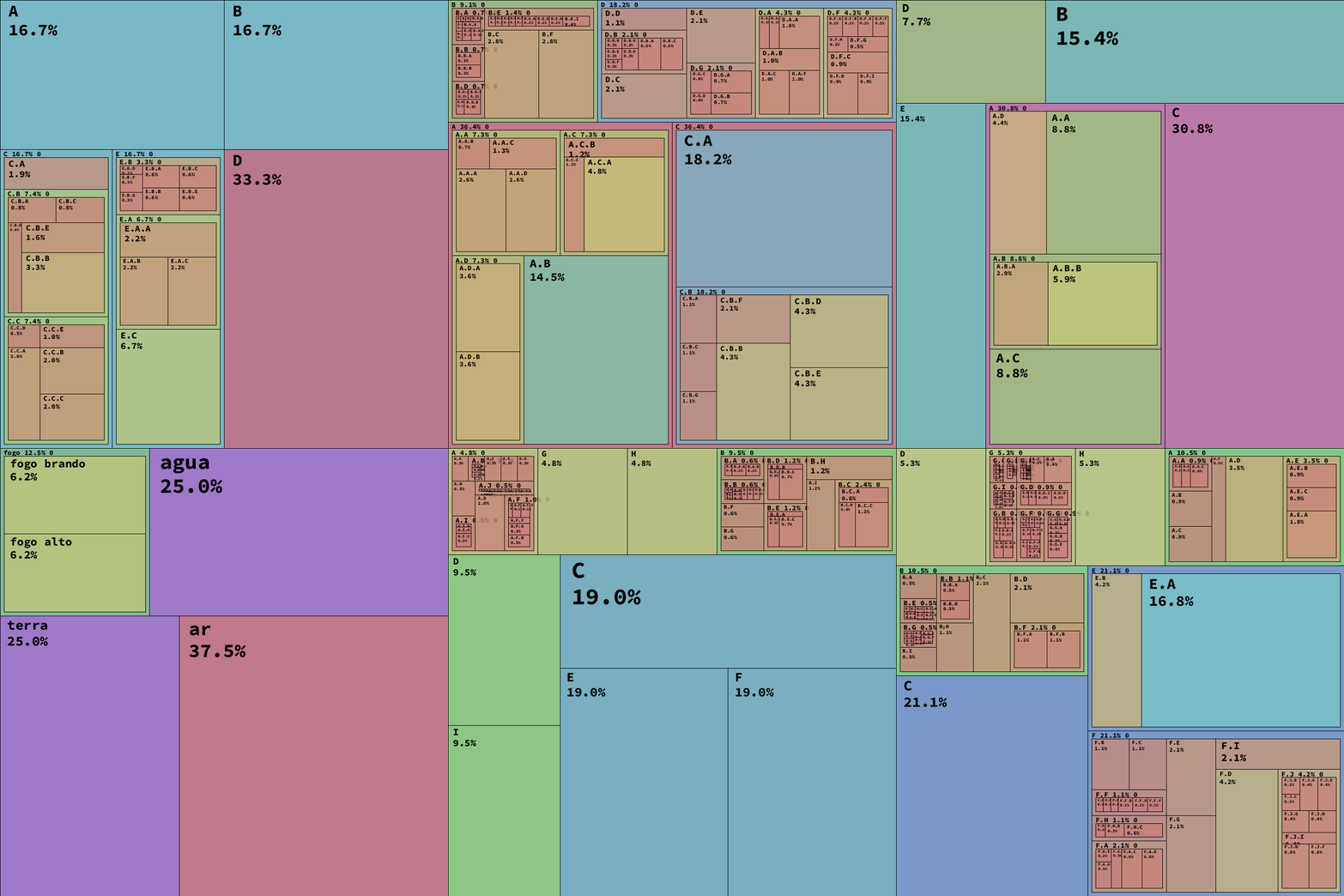
- https://github.com/villares/sketch-a-day/blob/main/2024/sketch_2024_09_21/sketch_2024_09_21.py
### 2024-09-11
- Fuzzy Matching e Levenshtein Distance
- Na biblioteca padrão (Standard Library)
- ```python
from difflib import SequenceMatcher
def similar(a, b):
return SequenceMatcher(None, a, b).ratio()
```
-
```python
difflib.get_close_matches(word, possibilities, n=3, cutoff=0.6)
```
- Estudo similaridades (não deu muito certo)
```python
from pathlib import Path
from difflib import get_close_matches, SequenceMatcher
from pprint import pprint
pasta = Path('C:/Users/ETA/Downloads')
arquivo = Path('C:/Users/ETA/Downloads/sashikodiversos.svg')
nomes = []
for path in pasta.iterdir():
nomes.append(path.stem.replace(' ', '').lower())
print(get_close_matches('sashiko', nomes, n=10, cutoff=0.3))
# ['sashikodiversos', 'reguasashikofinal', 'eiko', 'reguasashikofinal(1)',
# 'um2c_reguasashikofinal', 'desktop', '10sashikotemplates-3852387',
# '10sashikotemplates-3852387', 'ss-d-farol', 'anita']
# SequenceMatcher(None, 'tide', 'diet').ratio()
palavra_teste = 'sashiko'
arquivos = {}
for path in pasta.iterdir():
arquivos[path.stem.lower()] = path
nomes = arquivos.keys()
for nome in nomes:
metrica = SequenceMatcher(None, palavra_teste, nome).ratio()
if metrica > 0.40:
print(nome[:15], metrica)
```
- Subpastas do Downloads
```python=
from pathlib import Path
from difflib import get_close_matches, SequenceMatcher
from pprint import pprint
pasta = Path('C:/Users/ETA/Downloads')
extensions = set() # conjunto set
for path in pasta.iterdir():
if path.is_file():
extensions.add(path.suffix[1:]) # sufixo sem o '.'
extensions = sorted(extensions)
print(extensions)
for ext in extensions:
nova_pasta = pasta / ext
nova_pasta.mkdir(parents=True, exist_ok=True)
print(nova_pasta, nova_pasta.exists())
for path in pasta.iterdir():
if path.is_file():
ext = path.suffix[1:]
# path: C:\... Downloads\blahbla.jpg
# pasta / blahbla.jpeg
# pasta / jpeg / blahbla.jpg
destino = pasta / ext / path.name
path.rename(destino)
```
- Tuplas e listas - https://abav.lugaralgum.com/material-aulas/Processing-Python-py5/lacos_py.html#um-pouco-sobre-tuplas-e-listas
- Dicionários https://abav.lugaralgum.com/material-aulas/Processing-Python-py5/dicionarios.html
- Conjuntos https://abav.lugaralgum.com/material-aulas/Processing-Python-py5/conjuntos.html
### 2024-09-04
- Atividade anterior (Grupo de estudos em Python - Sesc) de Processamento de Linguagem Natural https://hackmd.io/@sesc-av-paulista/estudos-em-python-18-junho
- TF-IDF - abreviação do inglês term frequency–inverse document frequency, métrica de importância de palavras (termos) em um "corpus".
- https://hackmd.io/@villares/mares-de-texto#TF-IDF
```python=
from collections import Counter
from pathlib import Path
import nltk
import numpy as np
nltk.download('punkt')
nltk.download('stopwords')
from nltk.corpus import stopwords
palavras_a_remover = stopwords.words('portuguese')
pontuacao = ['|', '–', '$', '’', '“', '”','•','•', '', ',','.','!','?',';','-','"',"'",'[',']','(',')','@', '\x97',
'--', '...', ':', 'si', 'sr', 'd', '\x93',
'tão', 'sra', 'lo', 'la', 'lhe', 'aqui',
'Então', 'porque']
dir_atual = Path.cwd()
pasta_txts = dir_atual / 'artigos'
if not pasta_txts.exists():
print('Não achei a pasta com os artigos')
exit()
contadores_por_doc = {} # dict chave documento : valor dict.Counter
for txt_path in sorted(pasta_txts.iterdir())[:50]:
with open(txt_path, encoding='utf-8') as txt:
#texto = txt.read() # texto bruto
linhas = txt.readlines()
bruto = ''.join(linhas)
#print(bruto)
words = nltk.word_tokenize(bruto)
good_words = [item for item in words
if (item.lower() not in pontuacao and
item.lower() not in palavras_a_remover)
# if not (item in pontuacao or
# item in palavras_a_remover)
]
contador = Counter(good_words)
contadores_por_doc[txt_path.stem] = contador
#print(txt_path.stem, contador.most_common(5))
num_docs = len(contadores_por_doc)
#contador_doc = contadores_por_doc['teatro']
for doc, contador_doc in contadores_por_doc.items():
print(f'**** {doc} ****')
tf_idf_palavras = {} # dict
for palavra, tf in contador_doc.items():
existe_em_n_docs = 0
for id_doc, contador in contadores_por_doc.items():
if palavra in contador:
existe_em_n_docs += 1 # e = e + 1 # R/C e++
idf = np.log10(num_docs / (existe_em_n_docs + 1)) # parece melhor!
tf_idf_palavras[palavra] = tf * idf
resultado = sorted((i, k) for k, i in tf_idf_palavras.items() if i > 1)
for tf_idf, termo in resultado[-5:]:
print(termo, f'{tf_idf:.2f}')
```
- https://automatetheboringstuff.com/
### 2024-08-28
- Estudar [terceira parte do tutorial de Python no Blender](https://tabreturn.github.io/code/blender/python/2020/11/01/a_quick_intro_to_blender_creative_coding-part_3_of_3.html) do *tabreturn* (Tristan Bunn)

#### primeiro passo
Abrir o Blender
- Abrir o console do sistema **Window > Toggle System Console** (Não tem no MacOS, então seguimos parte das intruções [deste vídeo](https://www.youtube.com/watch?v=RbQCzk-ef3g&ab_channel=MichaelBridges))
- Interface de paineis - Workspace? **Scripting**
- 
- **+ New**
- 
- Menu **Text** > **Save as...**
- 
- Preferencias extra:
- 
- Documentação https://docs.blender.org/api/2.83/info_quickstart.html
- Object "location"
- **Quais as unidades do Blender?** são explícitas?
- Laço `for` com fábrica de números `range()`
-
```python
# range(stop)
# range(start, stop)
for numero in range(1, 11, 2): # range(start, stop, step)
print(numero)
```
Código do tutorial
```python=
import bpy
from math import sin, tau
# clear meshes in the scene
for obj in bpy.data.objects:
if obj.type == 'MESH':
bpy.data.objects.remove(obj)
# animation variables
total_frames = 150
theta = 0.0
# define a one hundred frame timeline
bpy.context.scene.frame_end = total_frames
bpy.context.scene.frame_start = 0
for x in range(5): # original era 30!
# generate a grid of cones
for y in range(5): # original era 30!
cone = bpy.ops.mesh.primitive_cone_add()
cone = bpy.context.object
cone.name = 'Cone-{}-{}'.format(x, y)
cone.location[0] = x * 2
cone.location[1] = y * 2
# add keyframes to each cone
for frame in range(0, total_frames):
bpy.context.scene.frame_set(frame)
cone.location.z = sin(theta + x) * 2 - 1
cone.keyframe_insert(data_path='location')
scale = sin(theta + y)
cone.scale = (scale, scale, scale)
cone.keyframe_insert(data_path='scale')
theta += tau / total_frames
```
Mais sobre seno e cosseno:
https://abav.lugaralgum.com/material-aulas/Processing-Python-py5/seno_cosseno_atan2.html
### 2024-08-21
- Ideias para desenho com programação
- p5js (JavaScript) -> https://p5js.org (da fundação Processing)
- Processing (Java) -> https://processing.org
- py5 (Python) -> material aberto https://abav.lugaralgum.com/material-aulas
#### Pesquisando automação e plugins em vários programas
Temos os **plug-ins**, **add-ons** ou **extensions** (extensões) que são artefatos mais acabados, embalados para distribuição, e temos em geral editores de **scripts** ou **macros**.
- **Blender** - Conceitos básicos e utilização por scripts em python (em inglês - usar plugin tradutor para quem tem dificuldade)
- Programação visual:
- https://nortikin.github.io/sverchok/
- https://docs.blender.org/manual/en/latest/modeling/geometry_nodes/index.html
- Requisitos , comandos básicos de blender,configurar o blender para rodar scripts em python, importar módulos e alguns conceitos básicos de python: inteiro, booleano, string, lista, tupla, dicionário e conjuntos, criar funções
- Tutorial de programação criativa no Blender https://tabreturn.github.io/code/blender/python/2020/06/06/a_quick_intro_to_blender_creative_coding-part_1_of_3.html
- Blender add-ons (tutorial plugins) em inglês
- https://docs.blender.org/manual/en/latest/advanced/scripting/addon_tutorial.html
- Krita - Para criação de plugins no Krita usa-se a programação python. No programa existe o "Editor de Script"
- Sobre os plug-ins em Python https://docs.krita.org/pt_PT/user_manual/python_scripting/install_custom_python_plugin.html
- Mais coisas em https://docs.krita.org/pt_PT/user_manual/python_scripting/krita_python_plugin_howto.html
- **Inkscape**
- biblioteca de extensões:
https://inkscape.org/pt-br/gallery/=extension/
- documentação: https://inkscape.gitlab.io/extensions/documentation/tutorial/index.html
- "effect extensions" -> pega o svg do inkscape, modifica de algum jeito, e retorna a versão modificada para o inkscape para ser renderizada no canvas.
- tutorial de extensão simples, para mudar o "fill" de qualquer objeto para vermelho: https://inkscape.gitlab.io/extensions/documentation/tutorial/my-first-effect-extension.html
- **Gimp** "Macros"
- Tem automação com Perl e com Python 2.7 :((
- Tem um lance que eles chamam de "pseudo código" (pseudo code) que parecem entradas no console Python
- Tem um console Python
- Ponto inicial na documentação: https://www.gimp.org/tutorials/Automate_Editing_in_GIMP/#motivation
- **Kdenlive**
- Kdenlive is based on the KDE frameworks and Qt. Most of the code is written in C++, with some parts in Qml.
- Para criar plugins no Kdenlive, você precisa de conhecimentos em C++ e Qt.
- CMT Plugins. This category consists of effects and filters from the LADSPA library pertaining to CMT (Computer Music Toolkit). They usually require specific hardware. https://docs.kdenlive.org/en/effects_and_filters/audio_effects/cmt_plugins/index.html
- LADSPA Plugins. This category consists of effects and filters from the LADSPA library. https://docs.kdenlive.org/en/effects_and_filters/audio_effects/ladspa_plugins/index.html
- TAP Plugins. This category consists of effects and filters from the LADSPA library pertaining to TAP (Tom's Audio Plugins). https://docs.kdenlive.org/en/effects_and_filters/audio_effects/tap_plugins/index.html
### 2024-08-14 - FreeCAD e seus desafios
- Apresentação
- Esta atividade é relacionada ao Grupo de estudos em Python (hackmd.io/@sesc-av-paulista/estudos-em-python)
- FreeCAD
- Comunidade
- Report issues
- forum
- Tradução
- Bug `inserir abas` -> `inserir TABs`
- documentação
- Um desafio!
- Desenhar uma estrela
- Desenhar uma placa com furo em forma de estrela
- Macro Python grade com furos do Ale
- Menu Macro -> botão Criar -> arquivo.py -> editar
- Na janela do editor, executa com botão do triângulo (verde na minha interface, pode ser outra cor) CTRL+F6
```python
import Part
from FreeCAD import Vector
largura, altura, espessura = 50, 80, 10
plate = Part.makeBox(largura, altura, espessura)
espaco, raio = 10, 4
furador = Part.makeCylinder(raio, espessura * 2, Vector(0, 0, -espessura / 2))
for x in range(0, largura, espaco):
for y in range(0, altura, espaco):
furo = furador.translated(Vector(x + espaco / 2, y + espaco / 2, 0))
plate = plate.cut(furo)
Part.show(plate)
```

#### Teste Melisso
```py
pl = FreeCAD.Placement()
points = [
FreeCAD.Vector(-24.233092308044434, 10.237299919128418, 0.0),
FreeCAD.Vector(15.492904663085938, 3.3072924613952637, 0.0),
FreeCAD.Vector(-6.303082466125488, -19.829988479614258, 0.0),
FreeCAD.Vector(-7.979696273803711, -4.181586265563965, 0.0),
FreeCAD.Vector(-36.7056999206543, -9.323204040527344, 0.0)
]
line = Draft.make_wire(points, placement=pl, closed=True, face=True, support=None)
Draft.autogroup(line)
```
Estrelinha
```python=
import Draft
from math import pi, cos, sin
from FreeCAD import Vector
pl = FreeCAD.Placement()
N = 20
points = []
ang = 2 * pi / N
r1, r2 = 8, 4
for i in range(N):
x = r1 * cos(ang * i)
y = r1 * sin(ang * i)
points.append(Vector(x, y, 0.0))
x = r2 * cos(ang * i + ang / 2)
y = r2 * sin(ang * i + ang / 2)
points.append(Vector(x, y, 0.0))
line = Draft.make_wire(points, placement=pl,
closed=True, face=True,
support=None)
Draft.autogroup(line)
App.ActiveDocument.recompute()
```
### 2024-04-24 - Tutorial Blender com programação criativa
- Vamos tentar seguir este [tutorial do Tristan Bunn (tabreturn)](https://tabreturn.github.io/code/blender/python/2020/06/06/a_quick_intro_to_blender_creative_coding-part_1_of_3.html)
#### Parte 1
- **Instrução do tutorial**: ~~No Windows usamos o terminal "Prompt de Comando" (interface de linha de comando CLI) com o camimnho (path) do blender.exe (`"C:\Program Files\Blender Foundation\Blender 4.0\blender-launcher.exe"`) que copiamos de dentro das propriedades do atalho do Blender.~~
- **NOVIDADE** Não precisa mais lançar pelo terminal, abra o Blender normalmente e procure o menu *Window*>*Toggle System Console*
- Dentro do Blender
- clicamos no layout/aba *Scripting*
- text > New...
- escrevi o código exemplo `print('oi oi oi')` (mas podia ter sido `print("Hello, World"`)
- Apertou o botão triangular play/run (executar)
- saiu o resultado na janela do terminal
#### Parte 2
- Escrever no console Pytho
- Mover com G o cubo na interface gráfica e ver o código que aperece (contém comando de translate)
- testamos colar um código de translate no console e ele andou com o cubo (de maneira relativa)
- dica: setinha pra cima para repetir últimos códigos do console
- `C` variável que conta do "contexto" (o que está selecionado no documento). `C.object` objeto selecionado
- Investigar a posição olhando o `C.object.location`
- Alterar a posição de maneira absoluta (não relativa) com `C.object.location = (0, 0, 0)`
- Python Tool Tips
- 
#### Parte 3
- No editor de texto é preciso importar a biblioteca que faz a interdafe com o Blender (`import bpy`), o que não é necessário no console interatico (árrea com o prompt `>>>`)
- Objetos do documento podem ser acessados com `bpy.data.objects`
- podemos converter todos objetos numa lista do Python com `list(bpy.data.objects)`
- exemplo do resultado: `[bpy.data.objects['Camera'], bpy.data.objects['Cube.001'], bpy.data.objects['Light'], bpy.data.objects['Light.001']]`
- Podemos acessar objetos com uma interface de chave entre colchetes (como um dicionário) com o nome do objeto `bpy.data.objects['Cube.001']`
- Alterar atributos do objeto:
```python
bpy.data.objects['Cube.001'].location = (2, 0, 0)
# ou só um componente da posição
bpy.data.objects['Cube'].location.x = 3
```
#### continua na semana que vem... (*to be continued...*)
### 2024-04-17 - Blender

- https://blender.org
- Modelador 3D (e mais...)
- Python no Blender: https://github.com/tabreturn/blender-creative-coding
- Básico [vídeo de 20m](https://youtu.be/Rqhtw7dg6Wk?si=FT44xhPOGmWVm8rS):
- "editores" (os módulos/janelas)
- zoom, orbit e pan
- Seleção
- **SHIFT**
- **A**ll (seleciona tudo)
- AA ou ALT+A deseleciona tudo
- **G**rab (mover), **R**otate, **S**cale
- X Y Z
- SHIF + X Y Z (trava um eixo e libera os outros 2)
- No editor de propriedades icone do quadradinho laranja tem coordenadas o objeto
- 
- Modos: objeto e edição (**TAB**)
- No modo de edição
- seleçaõ de vértices, arestas e faces
- 
- 1 2 3
- **Z** Armado, Sólido, Render e Raio-X (ALT+Z)
- 
- Conceitos: Edição "destrutiva" vs. "com histórico" (modificadores)
- **CTRL + J** "Join" junta objetos (um pouco como um grupo)
- **P** no modo de edição permite separar do join um as partes selecionadas
- Seda mostrou:
- Como ele fez as [máscaras low poly](https://www.danielseda.com/?pgid=jnisaeoa-3511510d-e02c-4056-b164-13207d098723)
- Add-ons:
- Para facilitar exportação para impressão 3D
- Export Papel Model
- Unidades ... para impressão 3D
- Em *Scene* > *Units*
- Escala da Grade
- Default - save startup file
- Modifier - Boolean
- selecionar objeto principal
- Add modifier
- conta-gotas para selecionar o secundário
- testamos differença e união
- pode esconder o objeto secundário
- ou pode usar o apply (que torna a operação destrutiva)
- Thingiverse: repositório de modelos
- https://thingiverse.com
---
### 2024-04-10 - Krita

- https://krita.org
- Ilustração digital, baseada em pixels (raster/bitmap)
- Anita Cavaleiro mostrou pra nós os primeiros passos!
- Usando uma mesa digitalizadora Wacon
### 2024-04-03 - Desenho vetorial
- Desenho digital vetorial
- SVG (Scalable Vector Graphics)
- Editor livre: https://inkscape.org
- Fontes typográficas digitais
- Postcript, TTF, OTF
- Um exemplo de SVG
```svg=
<svg height="220" width="500" xmlns="http://www.w3.org/2000/svg">
<polygon points="100,10 150,190 50,36" style="fill:lime;stroke:purple;stroke-width:3" />
Sorry, your browser does not support inline SVG.
</svg>
```
<svg height="220" width="500" xmlns="http://www.w3.org/2000/svg">
<polygon points="100,10 150,190 50,36" style="fill:lime;stroke:purple;stroke-width:3" />
Sorry, your browser does not support inline SVG.
</svg>

- Exemplos máscaras e 3D com trimesh https://gist.github.com/villares/036fba275576e85b7411170073a7153d
- Código de ler forma do texto com um fonte específica
https://gist.github.com/villares/036fba275576e85b7411170073a7153d#file-shapely_helpers-py
```python=
import py5
from shapely.geometry import Polygon, MultiPolygon, GeometryCollection, LineString, Point
# Experiment to extract poly shapes from a text rendered in a specific font
# Demo sketch for poly_from_text() and draw_shapely_objs()
def setup():
global d_font, i_font
py5.size(800, 800)
py5.color_mode(py5.HSB)
py5.stroke(255)
d_font = py5.create_font('Consolas', 300)
i_font = py5.create_font('Gill Sans MT', 300)
def draw():
py5.background(100)
py5.translate(50, 100)
t = 'Sesc Av. Paulista\nLaboratório Aberto'
f = i_font if py5.is_key_pressed else d_font
shapes = polys_from_text(
t, f, alternate_spacing=py5.is_mouse_pressed)
pshape = py5.convert_shape(GeometryCollection(shapes))
py5.shape(pshape, 0, 0)
def polys_from_text(words, font, alternate_spacing=False):
"""
Produce a list of shapely Polygons (with holes!) from a string.
New-line chars will try to move text to a new line.
The alternate_spacing option will pick the glyph
spacing from py5.text_width() for each glyph, it can be
too spaced, but good for monospaced font alignment.
"""
py5.text_font(font)
space_width = py5.text_width(' ')
results = []
x_offset = y_offset = 0
for c in words:
if c == '\n':
y_offset += font.get_size()
x_offset = 0 # assuming left aligned text...
continue
glyph_pt_lists = [[]] # começa com uma "lista atual" vazia
c_shp = font.get_shape(c, py5.mouse_x / 10)
# if c == 'a':
# print(py5.mouse_x / 10, c_shp.get_vertex_count())
vs3 = [c_shp.get_vertex(i) for i in range(c_shp.get_vertex_count())]
if c == 'a': print(c_shp.get_vertex(0))
vs = set()
for vx, vy, _ in vs3:
x = vx + x_offset
y = vy + y_offset
lista_atual = glyph_pt_lists[-1] # sempre a última lista
lista_atual.append((x, y))
if (x, y) not in vs:
vs.add((x, y))
else:
glyph_pt_lists.append([]) # will leave a trailling empty list
# [[(...,...)...], [(...,...)...], []]
if not vs3 or alternate_spacing:
w = py5.text_width(c)
else:
w = c_shp.get_width()
x_offset += w
# filter out elements with less than 3 points
# and stop before the trailling empty list
glyph_polys = [Polygon(p) for p in glyph_pt_lists[:-1] if len(p) > 2]
if glyph_polys: # there are still empty glyphs at this point
glyph_shapes = process_glyphs(glyph_polys)
results.extend(glyph_shapes)
return results
def process_glyphs(polys):
"""
Try to subtract the shapely Polygons representing a glyph
in order to produce appropriate looking glyphs!
"""
polys = sorted(polys, key=lambda p: p.area, reverse=True)
results = [polys[0]]
for p in polys[1:]:
# works on edge cases like â and ®
for i, earlier in enumerate(results):
if earlier.contains(p):
results[i] = results[i].difference(p)
break
else: # the for-loop's else only executes after unbroken loops
results.append(p)
return results
if __name__ == '__main__':
py5.run_sketch()
```
### 2024-03-27
- Pesquisar, instalar e explorar:
- foxdot (Supercollider)
- Seguindo o seguinte guia: https://foxdotcode.readthedocs.io/en/latest/guides/installation.html
- Instalar `git`
- https://github.com/git-for-windows/git/releases/download/v2.44.0.windows.1/Git-2.44.0-64-bit.exe
- Instalar `SuperCollider`
- https://github.com/supercollider/supercollider/releases/download/Version-3.13.0/SuperCollider-3.13.0_Release-x64-VS-3188503.exe
- Instalar o Python 3.12
- python
- Janela de sugestão de instalar o Python
- Abrimos o SuperCollider
- no editor `Quarks.install("FoxDot")` e **CNTRL+RETURN**
- 
- Também fiz CNTRL+RETURN em cada uma destas duas linhas:
```
Quarks.install("https://github.com/Qirky/FoxDotQuark.git")
Quarks.install("https://github.com/supercollider-quarks/BatLib.git")
```
- 
- Apagamos a pasta `C:\Users\ETA\AppData\Local\SuperCollider\downloaded-quarks\FoxDotQuark`
Tentamos usando o venv no Python do Window mas não rolou (desconfio que por ser Python 3.12, muito novo)
~~- Usamos `python -m venv C:\dir_do_env`
- para ativar:
- Não usar o powershell do windows
- Usando o Terminal normal (Prompt de Comando)
`C:\dir_do_env\Scripts\activate.bat`~~
- Abrimos o **Thonny** formos em opções > interpretador > criamos um env
- Abrir o shell do sistema
- Fizemos o `pip install FoxDot`
- `python -m FoxDot`
- A conxeção FoxDot -> SuperCollider parece funcionar
- Rodamos exemplos do Tutorial foxdot.org mas não sai som.
- No SC tem ` FAILURE IN SERVER /s_new SynthDef not found
*** ERROR: SynthDef pluck not found
FAILURE IN SERVER /s_new SynthDef not found
`
### 2024-03-20
- Usou o Inkscape.org para produzir um desenho vetorial de 50x50mm de um estêncil
- exportou em PNG (raster), preto e branco
- Abriu o PNG no CURA
- ajustou 0.5mm de altura máxima e 0mm na base
- escalou de novo pra 50x50mm
- Mara ajustou CURA para PLA branco diâmetro 2.75mm
- sem "brim" (saia que segura primeira camada)
- 20% infill (preenchimeto)
- altura 0.15mm (normal)
- o resto parece padrão...
-


### 2024-03-13
- Conversamos sobre software livre
- Fabricação digital
- Código que gera o STL com as estrelinhas
- https://github.com/villares/sketch-a-day/tree/main/2024/sketch_2024_03_03
- Escalamos no cura para 100x100x3mm
- Para rodar o código [Thonny + py5](https://abav.lugaralgum.com/como-instalar-py5/)
- https://abav.lugaralgum.com/material-aulas/Processing-Python-py5/
STL: https://github.com/villares/sesc-lab-codigos-abertos/tree/main/2024-03-20
 Sign in with Wallet
Connect another wallet
Sign in with Wallet
Connect another wallet