## Arrays
Stores a number of elements of the same type in a continuous block of memory.
```c
int arr[7] = {1, 5, 3, 2, 5, 6, 8};
```
---
How it looks in memory
```c
int arr[5] = {1, 2, 3, 4, 5};
```

---
```c=
int arr[7] = {1, 5, 3, 2, 5, 6, 8};
int garbage[10]; // uninitialised, elements are garbage
int arr[200] = {1, 2}; // last 198 els are set to 0
// a character array (length can be inferred for any type)
char hello[] = {'h', 'e', 'l', 'l', 'o', '\0'};
// more concise initialisation of a character array (string)
char hello_again[] = "hello again";
```
---
## Things to keep in mind
- Arrays in C have no slicing. (no `A[1:3]`)
- You can't compare two arrays with `A == B`
- You can't copy two arrays with `A = B`
- There is no length operator for arrays.
- Arrays need to be defined with a static size (no variable length)
- Arrays have static length, once we define a size, we cannot change it.
- Arrays do not store the number of elements defined (length), you need to keep a variable for it for yourself!
---
### Arrays and functions
- passing an array to a function passes a pointer to the first element of the array
- changes to an array in a function are kept
- no way to return an array from a function
- solutions
- pass an output array as an argument
- return a malloc'd array
---
```c=
#include <stdio.h>
void fillzeros(int[], int);
void fillzeros(int arr[], int n){
for (int i = 0; i < n; i++){
arr[i] = 0;
}
}
int main(int argc, char *argv[]) {
int arr[5] = {1, 2, 3, 4, 5};
fillzeros(arr, 5);
for (int i = 0; i < 5; i++) {
printf("%d ", arr[i]);
}
}
```
```c
0 0 0 0 0
```
<!-- .element: class="fragment" data-fragment-index="1" -->
---
```c=
void fillzeros(int arr[], int n){
for (int i = 0; i < n; i++){
arr[i] = 0;
}
}
int main() {
int arr[5] = {1, 2, 3, 4, 5};
fillzeros(arr + 2, 3);
// print array as before
}
```
```c
1 2 0 0 0
```
<!-- .element: class="fragment" data-fragment-index="1" -->
---
```c=
void fillzeros(int arr[], int n){
for (int i = 0; i < n; i++){
arr[i] = 0;
}
}
int main() {
int arr[5] = {1, 2, 3, 4, 5};
fillzeros(arr + 2, 5);
// print array as before
}
```
```c
Seg Fault!!!!
```
<!-- .element: class="fragment" data-fragment-index="1" -->
---
# 2D Arrays
2D arrays are exactly what they sound like... an array where each element is an array
```c
int arr[3][3] = {{1, 2, 3}, {4, 5, 6}, {7, 8, 9}};
```
Note: Technically the internal arrays do not have to all be the same length or same type, however it is rare to see this. As a general rule of thumb, use 2D arrays when they are the same length and type, otherwise use an array of structs (you will learn about this later)
---
There are two ways to visualise 2D arrays:
```c
0: 0 1 2 1: 0 1 2 2: 0 1 2
{{11, 27, 3}, {62, 4, 18}, {0, 7, 200}}
```
```c
0 1 2
0 {{11, 27, 3},
1 {62, 4, 18},
2 {0, 7, 200}}
```
---
### Accessing Values
```c
int arr[3][3] = {{11, 27, 3}, {62, 4, 18}, {0, 7, 200}};
printf("%d\n", arr[0][2]);
```
```
3
```
```c
printf("%d\n", arr[2][2]);
```
```
200
```
---
You can also index a 2D array as if it is a 1D one:
```c
int mat[3][4] = {
{1, 2, 3, 4},
{5, 6, 7, 8},
{9, 10, 11, 12}
};
int *p = mat[0];
printf("%d\n", p[6]);
```
```
7
```
---
Example: printing an $r \times c$ dimensional array.
```c!
for (int i = 0; i < r; i++) {
for (int j = 0; j < c; j++) {
printf("%d ", arr[i][j]);
}
printf("\n");
}
```
---
### Other ways of assigning 2D arrays
**Legal**: `int mat[][4] = {1, 2, 3, 4, 5, 6, 7, 8};`
=> can infer there are 2 int[4]s
Illegal: `int mat[][] = {1, 2, 3, 4, 5, 6, 7, 8};`
Where would mat[1][0] be?
Illegal: `int mat[4][] = {1, 2, 3, 4, 5, 6, 7, 8};`
**Rule of thumb**: we must give dimensions for all but the first dimension
---
### Passing 2D arrays to functions
```c
void print_int_arr0(int r, int c, int arr[r][c]){
// r and c must be passed in first
}
```
```c
void print_int_arr1(int arr[1][3]){
}
```
```c
void print_int_arr2(int c, int arr[][c]){
// r and c must be passed in first
// only legal with C99 compiler
}
```
```c
void print_int_arr1(int *arr, int r, int c){
}
```
---
# Sorting
## Insertion sort
Build the sorted array one element at a time.
1. Pick the first unsorted element, $x$
2. Shift it towards the left, until it is "in place" (element left of it is $\leq x$)
3. Repeat until there are no more unsorted elements
---
```c
void insertion_sort(int A[], int n) {
for (int i = 1; i < n; i++) { // i : first 'not sorted' index
for (int j = i; j > 0; j--) { // j : element being sorted
if (A[j - 1] >= A[j]) break; // A[j] in place?-> next element
int_swap(A + j - 1, A + j); // No? move A[j] one to the left
}
}
}
```
---
Personally I find sorting algorithms easiest to understand via animation. There are these Romanian folk dancing videos online for each sorting algorithm...
Insertion sort here: https://www.youtube.com/watch?v=EdIKIf9mHk0
---
# Searching
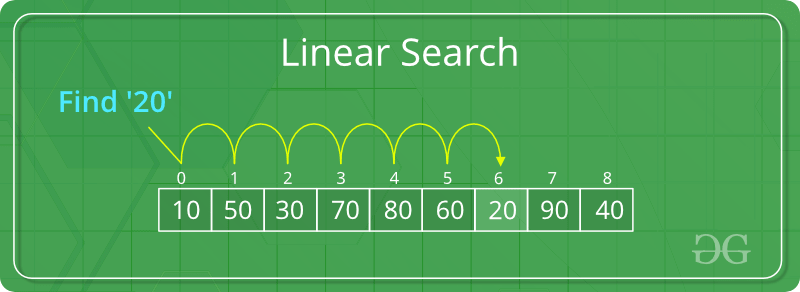
## Linear Search
Idea: Iterate one-by-one through the search space, checking if the target matches.
---
 Sign in with Wallet
Connect another wallet
Sign in with Wallet
Connect another wallet