Try Django 1.11 | Python Web Development
**Tittle 1 : Introduction to Django**
-
**1. What is Django?**
Django is a full-stack framework for creating web applications with the Python programming language. Full-stack means, django includes both the front-end and back-end. The front-end is the front side that will be seen by users, while the back-end is the back side that is related to the database and business logic.
**2. History of Django**
Django was originally developed in 2003 and 2005 by several web developers who were tasked with creating and maintaining web portals.
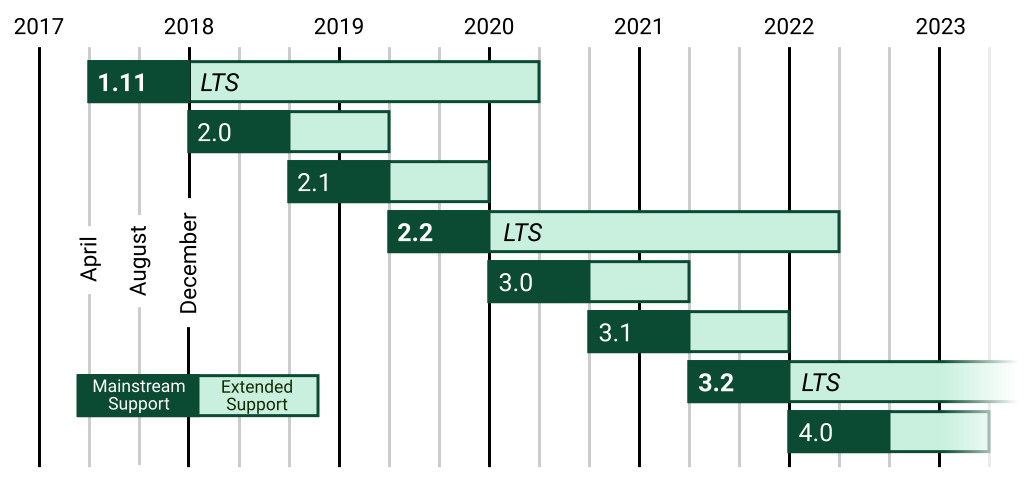
Django then continued to develop, then version 1.0 was released in September 2008. Now (2024) Django has reached version 4.0 and above.
The following is the Django release schedule roadmap:
**Tittle 2 : Getting started with Django**
-
**1. Tools Requirements**
The tools we need to create a Django project are:
1. Python
2. Virtualenv
3. Pip
**Python** is the language that will be the base of Django which will be installed later.
**Virtualenv** is a tool that functions to create isolated virtual environments. We have to use virtualenv because it doesn't conflict with other projects.
**Pip** is a tool that we will use for python package management. This also includes installing Django.
- Install all the required tools and dependencies.
```bash!
$ sudo apt install python3.8 python3-virtualenv python3.8-venv python3-pip libreadline-gplv2-dev libncursesw5-dev libpq-dev python3-dev libssl-dev libsqlite3-dev tk-dev libgdbm-dev libc6-dev libbz2-dev
```
- Make sure python and all tools are installed
```bash!
$ which python3
/usr/bin/python3
$ which pip
/usr/bin/pip
```
- See all python package
```bash!
$ pip list
```
- Make development directory for virtualenv
```bash!
$ mkdir Dev && cd Dev
```
- Make virtual environment
```bash!
$ python3 -m venv trydjango-1.11
```
- Activate the virtual environment that has been created
```bash!
$ cd trydjango-1.11/
$ source bin/activate
```
- See all of python package inside of virtual environment
```bash!
(trydjango-1.11)$ pip list
```
Python packages inside a virtual environment are definitely different than outside the virtual environment.
- Install Django 1.11
```bash!
(trydjango-1.11)$ pip install django==1.11.*
```
- Install Wheel if not already installed (opsional)
```bash!
(trydjango-1.11)$ pip install wheel
```
- Make a new project (mywebsite) in src directory
```bash!
(trydjango-1.11)$ mkdir src && cd src
(trydjango-1.11)$ django-admin startproject mywebsite .
```
**startproject** is the command to create a project;
**mywebsite** is the name of the project directory.
- See all of project file
```bash!
(trydjango-1.11)$ cd ..
(trydjango-1.11)$ tree src/
src/
├─ mywebsite/
│ ├─ __init__.py
│ ├─ urls.py
│ ├─ wsgi.py
│ ├─ settings.py
├─ manage.py
```
**2. Django Project Directory Structure**
**mywebsite/** is the root directory that contains all the files from the project. The name of this directory can be replaced with anything, because it won't be a problem for Django.
**manage.py** is a program for managing Django projects. We will often execute manage.py when we want to do something with a project, for example: running a server, migrating, creating something, etc.
**mywebsite/__init__.py** is an empty file that states this directory is a package (python package).
**mywebsite/settings.py** is where we configure the project.
**mywebsite/urls.py** is where we declare the URL.
**mywebsite/wsgi.py** is the entry point for WSGI-compatible.
- Make a new directory inside of mywebsite directory
```bash!
(trydjango-1.11)$ mkdir mywebsite/settings/
```
- Make 4 new files inside settings directory
```bash!
(trydjango-1.11)$ touch mywebsite/settings/__init__.py
(trydjango-1.11)$ touch mywebsite/settings/base.py
(trydjango-1.11)$ touch mywebsite/settings/production.py
(trydjango-1.11)$ touch mywebsite/settings/local.py
```
- Copy mywebsite/settings.py file to mywebsite/settings/base.py file
```bash!
(trydjango-1.11)$ cp mywebsite/settings.py mywebsite/settings/base.py
```
- Edit base.py file
Make sure the file contains like this.
```
BASE_DIR = os.path.dirname(os.path.dirname(os.path.dirname(os.path.abspath(__file__))))
```
- Edit mywebsite/settings/--init--.py file
```
from .base import *
from .production import *
try:
from .local import *
except:
pass
```
- Install some other installation
```bash!
(trydjango-1.11)$ pip install psycopg2
(trydjango-1.11)$ pip install gunicorn
(trydjango-1.11)$ pip install dj-database-url==0.4.2
(trydjango-1.11)$ pip install django-crispy-forms==1.6.1
(trydjango-1.11)$ pip install pillow
```
- Create requirement.txt
```bash!
(trydjango-1.11)$ pip freeze > requirements.txt
```
- Run migration & createsuperuser
```bash!
(trydjango-1.11)$ python manage.py migrate
(trydjango-1.11)$ python manage.py createsuperuser
```
- Run the server
```bash!
(trydjango-1.11)$ python manage.py runserver
```
Check on your browser with 127.0.0.1:8080

- Copy base.py to local.py and production.py in settings directory
```bash!
(trydjango-1.11)$ cp mywebsite/settings/base.py mywebsite/settings/local.py
(trydjango-1.11)$ cp mywebsite/settings/base.py mywebsite/settings/production.py
```
- Edit production.py file
Make sure the file contains like this.
```
DEBUG = False
SECRET_KEY = "add random letter or number"
```
- Start first our apps
```bash!
(trydjango-1.11)$ python manage.py startapp restaurants
(trydjango-1.11)$ tree restaurants/
restaurants/
├─ migrations/
├─ __init__.py
├─ admin.py
├─ apps.py
├─ models.py
├─ tests.py
├─ views.py
```
**3. Django Application Directory Structure**
**--init--.py** tells Python to treat the directory as a Python package.
**admin.py** contains settings for the Django admin pages.
**apps.py** contains settings for the application configuration.
**models.py** contains a series of classes that Django’s ORM converts to database tables.
**test.py** contains test classes.
**views.py** contains functions and classes that handle what data is displayed in the HTML templates.
**migrations/** folder to store migration files and model to write business logic.
- Edit views.py inside of restaurants directory
```
from django.http import HttpResponse
from django.shortcuts import render
def home(request):
return HttpResponse("hello")
```
- Edit urls.py inside of mywebsite directory
```
from django.conf.urls import url
from django.contrib import admin
from restaurants.views import home
urlpatterns = [
url(r'^admin/', admin.site.urls),
url(r'^$', home),
]
```
- Test on your web browser

**Tittle 3 : HTML & Django**
-
Next, we can attach our application with HTML language and HTML templates. First, we can try to render our application with HTML language.
**1. Render with HTML**
- Edit restaurants/views.py
```
from django.http import HttpResponse
from django.shortcuts import render
def home(request):
html_ = """<!DOCTYPE html>
<html lang=en>
<head>
<head/>
<body>
<h1>Hello world</h1>
<p>This is html coming trough</p>
</body>
</html>
"""
return HttpResponse(html_)
```
- Test on your web browser

**2. HTML using python variable**
- Edit restaurants/views.py
```
from django.http import HttpResponse
from django.shortcuts import render
def home(request):
html_var = 'f strings'
html_ = f"""<!DOCTYPE html>
<html lang=en>
<head>
<head/>
<body>
<h1>Hello world</h1>
<p>This is {html_var} coming trough</p>
</body>
</html>
"""
return HttpResponse(html_)
```
- Test on your web browser

**3. Render with templates**
Next, we'll try to use template and attach to our application.
- Make a new directory and html file in it
```bash!
(trydjango-1.11)$ mkdir templates/
(trydjango-1.11)$ touch templates/base.html
```
- Edit templates/base.html file
```
<!DOCTYPE html>
<html lang=en>
<head>
<head/>
<body>
<h1>
Hello world
</h1>
<p>
This is {html_var} coming trough
</p>
</body>
</html>
```
- Edit base.py inside of settings directory
```
TEMPLATES = [
'DIRS' : [os.path.join(BASE_DIR, 'templates')],
]
```
- Edit views.py inside of restaurants directory
```
from django.http import HttpResponse
from django.shortcuts import render
def home(request):
return render(request, "base.html", {})
```
- Edit mywebsite/settings/--init--.py
Make sure the file contains like this.
```
from .base import *
#from .production import *
#try:
# from .local import *
#except:
# pass
```
- Test on your web browser

**4. Render HTML templates using python variable**
- Edit views.py inside of restaurants directory
```
import random
from django.http import HttpResponse
from django.shortcuts import render
def home(request):
num = random.randint(0, 100000000)
return render(request, "base.html", {"html_var": True, "num": num})
```
- Edit templates/base.html file
```
<!DOCTYPE html>
<html lang=en>
<head>
<head/>
<body>
<h1>
Hello world
</h1>
<p>
This is {{ html_var }} coming trough
</p>
<p>
Random number is {{ num }}
</p>
</body>
</html>
```
- Test on your web browser

**5. Using context in Django templates**
Here, we'll try context, which means we can use 2 variables at once.
- Edit views.py inside of restaurants directory
```
import random
from django.http import HttpResponse
from django.shortcuts import render
def home(request):
num = None
some_list = [
random.randint(0, 100000000),
random.randint(0, 100000000),
random.randint(0, 100000000)
]
condition_bool_item = False
if condition_bool_item:
num = random.randint(0, 100000000)
context = {
"num": num,
"some_list": some_list
}
return render(request, "base.html", context)
```
- Edit templates/base.html file
```
<!DOCTYPE html>
<html lang=en>
<head>
<head/>
<body>
<h1>
Hello world
</h1>
<p>
This is <code>{% verbatim %}{{ html_var }}{% endverbatim %}</code> coming trough
</p>
<p>
{% if num is not None %}
Random number is {{ num }}
{% endif %}
</p>
<p>
{% for some_item in some_list %}
{% if some_item|divisibleby:"2" %}
Even number
{% endif %}
{{ some_item }}<br/>
{% endfor %}
</p>
<p>
Some item is {{ some_item }}
</p>
</body>
</html>
```
- Test on your web browser, if condition_bool_item is False

- Test on your web browser, if condition_bool_item is True

**6. Using template inheritance**
- Make a new file inside of templates directory
```bash!
(trydjango-1.11)$ touch templates/home.html
(trydjango-1.11)$ touch templates/about.html
(trydjango-1.11)$ touch templates/contact.html
```
- Edit urls.py inside of mywebsite directory
```
from django.conf.urls import url
from django.contrib import admin
from restaurants.views import home, about, contact
urlpatterns = [
url(r'^admin/', admin.site.urls),
url(r'^$', home),
url(r'^about/$', about),
url(r'^contact/$', contact),
]
```
- Edit views.py inside of restaurants directory
```
import random
from django.http import HttpResponse
from django.shortcuts import render
def home(request):
num = None
some_list = [
random.randint(0, 100000000),
random.randint(0, 100000000),
random.randint(0, 100000000)
]
condition_bool_item = False
if condition_bool_item:
num = random.randint(0, 100000000)
context = {
"num": num,
"some_list": some_list
}
return render(request, "home.html", context)
def about(request):
context = {
}
return render(request, "about.html", context)
def contact(request):
context = {
}
return render(request, "contact.html", context)
```
- Edit templates/base.html file
```
<!DOCTYPE html>
<html lang=en>
<head>
<title>{% block head_tittle %}SXD.com{% endblock head_tittle %}</title>
<head>
<body>
<h1>SXD.com</h1>
<a href="/">Home</a>
<a href="/about/">About</a>
<a href="/contact/">Contact</a>
<div class="container">
{% block content %}{% endblock content %}
</div>
</body>
</html>
```
- Edit templates/home.html file
```
{% extends "base.html" %}
{% block content %}
<h1>
Hello world
</h1>
<h3>
{{ block.super }}
</h3>
<p>
This is <code>{% verbatim %}{{ html_var }}{% endverbatim %}</code> coming trough
</p>
<p>
{% if num is not None %}
Random number is {{ num }}
{% endif %}
</p>
<p>
{% for some_item in some_list %}
{% if some_item|divisibleby:"2" %}
Even number
{% endif %}
{{ some_item }} <br/>
{% endfor %}
</p>
<p>
Some item is {{ some_item }}
</p>
{% endblock content %}
```
- Edit templates/about.html file
```
{% extends "base.html" %}
{% block head_tittle %}About || {{ block.super }}{% endblock head_tittle %}
{% block content %}
<p>About</p>
{% endblock %}
```
- Edit templates/contact.html file
```
{% extends "base.html" %}
{% block head_tittle %}Contact || {{ block.super }}{% endblock head_tittle %}
{% block content %}
<p>Contact</p>
{% endblock %}
```
- Test on your web browser, see home page

- Test on your web browser, see about page use hyperlink on home page

- Test on your web browser, see contact page use hyperlink on about page

**Using template tag**
- Make a new directory and a new file inside of template directory
```bash!
(trydjango-1.11)$ mkdir templates/snippets/
(trydjango-1.11)$ touch templates/snippets/nav.html
(trydjango-1.11)$ touch templates/snippets/css.html
(trydjango-1.11)$ touch templates/snippets/js.html
(trydjango-1.11)$ touch templates/snippets/sidebar.html
```
- Edit templates/base.html file
```
<!DOCTYPE html>
<html lang=en>
<head>
<title>{% block head_tittle %}SXD.com{% endblock head_tittle %}</title>
{% include 'snippets/css.html' %}
<head>
<body>
{% include 'snippets/nav.html' %}
<div class="container">
{% block content %}{% endblock content %}
</div>
{% include 'snippets/js.html' %}
</body>
</html>
```
- Edit nav.html inside of snippets directory
```
<div class="container">
<h1>SXD.com</h1>
<a href="/">Home</a>
<a href="/about/">About</a>
<a href="/contact/">Contact</a>
</div>
```
- Edit css.html inside of snippets directory
You can copy from [bootstrap cdn 3.3.7](https://blog.getbootstrap.com/2016/07/25/bootstrap-3-3-7-released/)
```
<link rel="stylesheet" href="https://maxcdn.bootstrapcdn.com/bootstrap/3.3.7/css/bootstrap.min.css" integrity="sha384-BVYiiSIFeK1dGmJRAkycuHAHRg32OmUcww7on3RYdg4Va+PmSTsz/K68vbdEjh4u" crossorigin="anonymous">
<link rel="stylesheet" href="https://maxcdn.bootstrapcdn.com/bootstrap/3.3.7/css/bootstrap-theme.min.css" integrity="sha384-rHyoN1iRsVXV4nD0JutlnGaslCJuC7uwjduW9SVrLvRYooPp2bWYgmgJQIXwl/Sp" crossorigin="anonymous">
```
- Edit js.html inside of snippets directory
You can copy link for [jquery core 3.2.1 (minified)](https://code.jquery.com/jquery-3.2.1.min.js)
```
<script src="https://code.jquery.com/jquery-3.2.1.min.js"></script>
<script src="https://maxcdn.bootstrapcdn.com/bootstrap/3.3.7/js/bootstrap.min.js" integrity="sha384-Tc5IQib027qvyjSMfHjOMaLkfuWVxZxUPnCJA7l2mCWNIpG9mGCD8wGNIcPD7Txa" crossorigin="anonymous"></script>
```
- Edit sidebar.html inside of snippets directory
```
<ul>
<li>item 1</li>
<li>item 2</li>
<li>item 3</li>
</ul>
```
- Add include tag on about.html & contact.html
```
{% extends "base.html" %}
{% block head_tittle %}About || {{ block.super }}{% endblock head_tittle %}
{% block content %}
<h1>About</h1>
{% include 'snippets/sidebar.html' %}
{% endblock %}
```
```
{% extends "base.html" %}
{% block head_tittle %}Contact || {{ block.super }}{% endblock head_tittle %}
{% block content %}
<h1>Contact</h1>
{% include 'snippets/sidebar.html' %}
{% endblock %}
```
- Test on your web browser, see 3 page views


**7. Class based views**
- Edit views.py inside of restaurants directory
```
import random
from django.http import HttpResponse
from django.shortcuts import render
from django.views import View
def home(request):
num = None
some_list = [
random.randint(0, 100000000),
random.randint(0, 100000000),
random.randint(0, 100000000)
]
condition_bool_item = False
if condition_bool_item:
num = random.randint(0, 100000000)
context = {
"num": num,
"some_list": some_list
}
return render(request, "home.html", context)
def about(request):
context = {
}
return render(request, "about.html", context)
def contact(request):
context = {
}
return render(request, "contact.html", context)
class ContactView(View):
def get(self, request, *args, **kwargs):
print(kwargs)
context = {
}
return render(request, "contact.html", context)
```
print(kwargs) will display the ID used in the terminal
- Edit urls.py inside of mywebsite directory
```
from django.conf.urls import url
from django.contrib import admin
from restaurants.views import home, about, contact, ContactView
urlpatterns = [
url(r'^admin/', admin.site.urls),
url(r'^$', home),
url(r'^about/$', about),
url(r'^contact/(?P<id>\d+)/$', ContactView.as_view()),
]
```
in urls we'll make it so that when we access the contact page, we have to use the ID.
- Test on your web browser
If we access without the id in browser.

And here, when we use the id.

In the terminal, we can see the ID we are using.

**8. Template view**
You can use 2 methods for make it.
First method,
- Edit views.py inside of restaurants directory
```
import random
from django.http import HttpResponse
from django.shortcuts import render
from django.views import View
from django.views.generic import TemplateView
class HomeView(TemplateView):
template_name = 'home.html'
def get_context_data(self, *args, **kwargs):
context = super(HomeView, self).get_context_data(*args, **kwargs)
num = None
some_list = [
random.randint(0, 100000000),
random.randint(0, 100000000),
random.randint(0, 100000000)
]
condition_bool_item = False
if condition_bool_item:
num = random.randint(0, 100000000)
context = {
"num": num,
"some_list": some_list
}
return context
class AboutView(TemplateView):
template_name = 'about.html'
class ContactView(TemplateView):
template_name = 'contact.html'
```
- Edit urls.py inside of mywebsite directory
```
from django.conf.urls import url
from django.contrib import admin
from restaurants.views import HomeView, AboutView, ContactView
urlpatterns = [
url(r'^admin/', admin.site.urls),
url(r'^$', HomeView.as_view()),
url(r'^about/$', AboutView.as_view()),
url(r'^contact/$', ContactView.as_view()),
]
```
Second method,
- Edit views.py inside of restaurants directory
```
import random
from django.http import HttpResponse
from django.shortcuts import render
from django.views import View
from django.views.generic import TemplateView
class HomeView(TemplateView):
template_name = 'home.html'
def get_context_data(self, *args, **kwargs):
context = super(HomeView, self).get_context_data(*args, **kwargs)
num = None
some_list = [
random.randint(0, 100000000),
random.randint(0, 100000000),
random.randint(0, 100000000)
]
condition_bool_item = False
if condition_bool_item:
num = random.randint(0, 100000000)
context = {
"num": num,
"some_list": some_list
}
return context
```
- Edit urls.py inside of mywebsite directory
```
from django.conf.urls import url
from django.contrib import admin
from django.views.generic import TemplateView
from restaurants.views import HomeView
urlpatterns = [
url(r'^admin/', admin.site.urls),
url(r'^$', HomeView.as_view()),
url(r'^about/$', TemplateView.as_view(template_name='about.html')),
url(r'^contact/$', TemplateView.as_view(template_name='contact.html')),
]
```
**Tittle 4: Remembering things**
-
**1. Remembering things with Models**
- Create a new superuser
```bash!
(trydjango-1.11)$ python manage.py createsuperuser
```
- Access to the Django Admin on your browser
Access to 127.0.0.1:8000/admin/ with new superuser that we have created.


In the Users section, the data is stored on db.sqlite3 file. The file created when we start the migration command. Next, we'll try to list our favourite restaurant by editing models.py on restaurants directory.
- Edit base.py inside of settings directory
Make sure the file contains like this.
```
INSTALLED_APPS = [
'django.contrib.admin',
'django.contrib.auth',
'django.contrib.contenttypes',
'django.contrib.sessions',
'django.contrib.messages',
'django.contrib.staticfiles',
'restaurants',
]
```
- Edit models.py inside of restaurants directory
```
from django.db import models
class Restaurant(models.Model):
name = models.CharField(max_length=120)
location = models.CharField(max_length=120, null=True, blank=True)
```
- Migrate the restaurant models
```bash!
(trydjango-1.11)$ python manage.py makemigrations
(trydjango-1.11)$ python manage.py migrate
```
- Edit admin.py inside of restaurants directory
```
from django.contrib import admin
from .models import Restaurant
admin.site.register(Restaurant)
```
- Check on your browser

We can see Restaurants section, after that we can add our favourite restaurant menu.
- Change the modul name
Edit the modul name in models.py and admin.py file
```
from django.db import models
class RestaurantLocation(models.Model):
name = models.CharField(max_length=120)
location = models.CharField(max_length=120, null=True, blank=True)
```
```
from django.contrib import admin
from .models import RestaurantLocation
admin.site.register(RestaurantLocation)
```
- Run migrate after change modul name
```bash!
(trydjango-1.11)$ python manage.py makemigrations
Did you rename the restaurants.Restaurant model to RestaurantLocation? [y/N]
(trydjango-1.11)$ python manage.py migrate
```
- Check on your browser

As we can see, the section name is change.

You can add your restaurant location in here.
**2. More on Models field**
- Edit models.py inside of restaurants directory
```
from django.db import models
class RestaurantLocation(models.Model):
name = models.CharField(max_length=120)
location = models.CharField(max_length=120, null=True, blank=True)
category = models.CharField(max_length=120, null=True, blank=True)
timestamp = models.DateTimeField(auto_now=False, auto_now_add=False)
```
- Run migrate
```bash!
(trydjango-1.11)$ python manage.py makemigrations
You are trying to add a non-nullable field 'timestamp' to restaurantlocation without a default; we can't do that (the database needs something to populate existing rows).
Please select a fix:
1) Provide a one-off default now (will be set on all existing rows with a null value for this column)
2) Quit, and let me add a default in models.py
Select an option: 1
Please enter the default value now, as valid Python
The datetime and django.utils.timezone modules are available, so you can do e.g. timezone.now
Type 'exit' to exit this prompt
>>> timezone.now
Migrations for 'restaurants':
restaurants/migrations/0003_auto_20240313_0626.py
- Add field category to restaurantlocation
- Add field timestamp to restaurantlocation
(trydjango-1.11)$ python manage.py migrate
```
- Check on your browser

**3. Displaying saved data**
- Edit views.py inside of restaurants directory
```
from django.http import HttpResponse
from django.shortcuts import render
from django.views import View
from django.views.generic import TemplateView
from .models import RestaurantLocation
def restaurants_listview(request):
template_name = 'restaurants/restaurants_list.html'
queryset = RestaurantLocation.objects.all()
context = {
"object_list": queryset
}
return render(request, template_name, context)
```
- Edit urls.py inside of mywebsite directory
```
from django.conf.urls import url
from django.contrib import admin
from django.views.generic import TemplateView
from restaurants.views import restaurants_listview
urlpatterns = [
url(r'^admin/', admin.site.urls),
url(r'^$', TemplateView.as_view(template_name='home.html')),
url(r'^restaurants/$', restaurants_listview),
url(r'^about/$', TemplateView.as_view(template_name='about.html')),
url(r'^contact/$', TemplateView.as_view(template_name='contact.html')),
]
```
- Add a new folder and file
```bash!
(trydjango-1.11)$ mkdir -p restaurants/templates/restaurants
(trydjango-1.11)$ touch restaurants/templates/restaurants/restaurants_list.html
```
- Edit the restaurants_list.html
```
{% extends "base.html" %}
{% block head_tittle %}Restaurants | {{ block.super }}{% endblock head_tittle %}
{% block content %}
<h1>Restaurants List</h1>
<ul>
{% for obj in object_list %}
<li>{{ obj }} <br/>
{{ obj.name }} {{ obj.location }} {{ obj.category }} {{ obj.timestamp }} {{ obj.update }}</li>
{% endfor %}
</ul>
{% endblock %}
```
- Edit models.py inside of restaurants directory
```
from django.db import models
# Create your models here.
class RestaurantLocation(models.Model):
name = models.CharField(max_length=120)
location = models.CharField(max_length=120, null=True, blank=True)
category = models.CharField(max_length=120, null=True, blank=True)
timestamp = models.DateTimeField(auto_now=True)
update = models.DateTimeField(auto_now_add=True)
def __str__(self):
return self.name
```
- Run make migrate
```bash!
(trydjango-1.11)$ python manage.py makemigrations
(trydjango-1.11)$ python manage.py migrate
```
- Check on your browser
Access to 127.0.0.1:8000/restaurants and make sure there is a data inside restaurants admin.

**4. Understanding QuerySets**
- Access to django shell
```bash!
(trydjango-1.11)$ python manage.py shell
Python 3.8.10 (default, Nov 22 2023, 10:22:35)
[GCC 9.4.0] on linux
Type "help", "copyright", "credits" or "license" for more information.
(InteractiveConsole)
>>>
```
- Try to showing data inside of Database
```bash!
>>> from restaurants.models import RestaurantLocation
>>> RestaurantLocation.objects.all()
<QuerySet [<RestaurantLocation: djefry>]>
>>> for obj in RestaurantLocation.objects.all():
... print(obj.name)
...
djefry
```
- Filter and Update queryset
```bash!
>>> qs = RestaurantLocation.objects.all()
>>> qs.filter(category__iexact='padang')
<QuerySet [<RestaurantLocation: djefry>]>
>>> qs.update(category='sunda')
1
>>> qs
<QuerySet [<RestaurantLocation: djefry>]>
>>> qs.filter(category__iexact='sunda')
<QuerySet [<RestaurantLocation: djefry>]>
```
- Try add Restaurants Location via shell
```bash!
>>> obj = RestaurantLocation()
>>> obj.name = "ujang"
>>> obj.location = "bandung"
>>> obj.category = "sunda"
>>> obj.save()
>>> qs
<QuerySet [<RestaurantLocation: djefry>, <RestaurantLocation: ujang>]>
```
- Add Restaurants Location by oneline
```bash!
>>> obj = RestaurantLocation.objects.create(name='burhan', location='bandung', category='sunda')
>>>
>>> qs = RestaurantLocation.objects.all()
>>> qs
<QuerySet [<RestaurantLocation: djefry>, <RestaurantLocation: ujang>, <RestaurantLocation: burhan>]>
```
- Filtering data with exclude
```bash!
>>> qs = RestaurantLocation.objects.filter(category__iexact='sunda').exclude(name__icontains='burhan')
>>> qs.count()
1
>>> qs
<QuerySet [<RestaurantLocation: ujang>]>
```
- Exit from shell
```bash!
>>> exit()
(trydjango-1.11)$
```
**5. Generic list view**
- Edit views.py inside of restaurants directory
```
from django.db.models import Q
from django.http import HttpResponse
from django.shortcuts import render
from django.views import View
from django.views.generic import TemplateView, ListView
from .models import RestaurantLocation
def restaurants_listview(request):
template_name = 'restaurants/restaurants_list.html'
queryset = RestaurantLocation.objects.all()
context = {
"object_list": queryset
}
return render(request, template_name, context)
class RestaurantListView(ListView):
def get_queryset(self):
slug = self.kwargs.get("slug")
if slug:
queryset = RestaurantLocation.objects.filter(
Q(category__iexact=slug) |
Q(category__icontains=slug)
)
else:
queryset = RestaurantLocation.objects.all()
return queryset
```
- Edit urls.py inside of mywebsite directory
```
from django.conf.urls import url
from django.contrib import admin
from django.views.generic import TemplateView
from restaurants.views import (
restaurants_listview,
RestaurantListView,
)
urlpatterns = [
url(r'^admin/', admin.site.urls),
url(r'^$', TemplateView.as_view(template_name='home.html')),
url(r'^restaurants/$', RestaurantListView.as_view()),
url(r'^restaurants/(?P<slug>\w+)/$', RestaurantListView.as_view()),
url(r'^about/$', TemplateView.as_view(template_name='about.html')),
url(r'^contact/$', TemplateView.as_view(template_name='contact.html')),
]
```
- Change name restaurant_list.html
```bash!
(trydjango-1.11)$ mv restaurants/tempalates/restaurants/restaurant_list.html restaurants/tempalates/restaurants/restaurantlocation_list.html
```
**6. Restaurant profile detail**
- Edit views.py inside of restaurants directory
```
from django.db.models import Q
from django.http import HttpResponse
from django.shortcuts import render, get_object_or_404
from django.views import View
from django.views.generic import TemplateView, ListView, DetailView
from .models import RestaurantLocation
def restaurants_listview(request):
template_name = 'restaurants/restaurants_list.html'
queryset = RestaurantLocation.objects.all()
context = {
"object_list": queryset
}
return render(request, template_name, context)
class RestaurantListView(ListView):
def get_queryset(self):
slug = self.kwargs.get("slug")
if slug:
queryset = RestaurantLocation.objects.filter(
Q(category__iexact=slug) |
Q(category__icontains=slug)
)
else:
queryset = RestaurantLocation.objects.all()
return queryset
class RestaurantDetailView(DetailView):
queryset = RestaurantLocation.objects.all()
def get_object(self, *args, **kwargs):
rest_id = self.kwargs.get('rest_id')
obj = get_object_or_404(RestaurantLocation, id=rest_id)
return obj
```
- Edit urls.py inside of mywebsite directory
```
from django.conf.urls import url
from django.contrib import admin
from django.views.generic import TemplateView
from restaurants.views import (
restaurants_listview,
RestaurantListView,
RestaurantDetailView,
)
urlpatterns = [
url(r'^admin/', admin.site.urls),
url(r'^$', TemplateView.as_view(template_name='home.html')),
url(r'^restaurants/$', RestaurantListView.as_view()),
url(r'^restaurants/(?P<rest_id>\w+)/$', RestaurantDetailView.as_view()),
url(r'^about/$', TemplateView.as_view(template_name='about.html')),
url(r'^contact/$', TemplateView.as_view(template_name='contact.html')),
]
```
- Make a new file inside of restaurant template
```bash!
(trydjango-1.11)$ touch restaurants/templates/restaurants/restaurantlocation_detail.html
```
- Edit restaurantlocation_detail.html file
```
{% extends "base.html" %}
{% block head_tittle %}Restaurants | {{ block.super }}{% endblock head_tittle %}
{% block content %}
<h1>{{ object.name }} <small> {{ object.category }}</small></h1>
<p>{{ object.location }}</p>
<p>{{ object.timestamp }}, Updated {{ object.update|timesince }} ago</p>
{% endblock %}
```
- Try to your browser

**7. SlugField & Unique Slug Generator**
- Edit models.py
```
from django.db import models
class RestaurantLocation(models.Model):
name = models.CharField(max_length=120)
location = models.CharField(max_length=120, null=True, blank=True)
category = models.CharField(max_length=120, null=True, blank=True)
timestamp = models.DateTimeField(auto_now=True)
update = models.DateTimeField(auto_now_add=True)
slug = models.SlugField(unique=True, null=True, blank=True)
def __str__(self):
return self.name
@property
def title(self):
return self.name
```
- Migrate the restaurant models
```bash!
(trydjango-1.11)$ python manage.py makemigrations
(trydjango-1.11)$ python manage.py migrate
```
- Make a new file inside restaurants directory
```bash!
(trydjango-1.11)$ touch restaurants/utils.py
```
- Edit utils.py inside of restaurants directory
```
import random
import string
from django.utils.text import slugify
def random_string_generator(size=10, chars=string.ascii_lowercase + string.digits):
return ''.join(random.choice(chars) for _ in range(size))
def unique_slug_generator(instance, new_slug=None):
if new_slug is not None:
slug = new_slug
else:
slug = slugify(instance.title)
Klass = instance.__class__
qs_exists = Klass.objects.filter(slug=slug).exists()
if qs_exists:
new_slug = "{slug}-{randstr}".format(slug=slug, randstr=random_string_generator(size=4))
return unique_slug_generator(instance, new_slug=new_slug)
return slug
```
**8. Signal for Unique Slug**
- Edit models.py inside of restaurants directory
```
from django.db import models
from django.db.models.signals import pre_save, post_save
from .utils import unique_slug_generator
# Create your models here.
class RestaurantLocation(models.Model):
name = models.CharField(max_length=120)
location = models.CharField(max_length=120, null=True, blank=True)
category = models.CharField(max_length=120, null=True, blank=True)
timestamp = models.DateTimeField(auto_now=True)
update = models.DateTimeField(auto_now_add=True)
slug = models.SlugField(unique=True, null=True, blank=True)
def __str__(self):
return self.name
@property
def title(self):
return self.name
def rl_pre_save_receiver(sender, instance, *args, **kwargs):
print("saving...")
print(instance.timestamp)
if not instance.slug:
instance.slug = unique_slug_generator(instance)
def rl_post_save_receiver(sender, instance, created, *args, **kwargs):
print('saved')
print(instance.timestamp)
instance.save()
pre_save.connect(rl_pre_save_receiver, sender=RestaurantLocation)
post_save.connect(rl_post_save_receiver, sender=RestaurantLocation)
```
- Edit some item in admin web
Edit and saved

You can see on terminal like this

**Tittle 5: Forms, Views, Models and more**
-
**1. Slugs as URL Params**
- Edit urls.py
```
from django.conf.urls import url
from django.contrib import admin
from django.views.generic import TemplateView
from restaurants.views import (
restaurants_listview,
RestaurantListView,
RestaurantDetailView,
)
urlpatterns = [
url(r'^admin/', admin.site.urls),
url(r'^$', TemplateView.as_view(template_name='home.html')),
url(r'^restaurants/$', RestaurantListView.as_view()),
url(r'^restaurants/(?P<slug>[\w-]+)/$', RestaurantDetailView.as_view()),
url(r'^about/$', TemplateView.as_view(template_name='about.html')),
url(r'^contact/$', TemplateView.as_view(template_name='contact.html')),
]
```
- Edit views.py
```
from django.db.models import Q
from django.http import HttpResponse
from django.shortcuts import render, get_object_or_404
from django.views import View
from django.views.generic import TemplateView, ListView, DetailView
from .models import RestaurantLocation
def restaurants_listview(request):
template_name = 'restaurants/restaurants_list.html'
queryset = RestaurantLocation.objects.all()
context = {
"object_list": queryset
}
return render(request, template_name, context)
class RestaurantListView(ListView):
def get_queryset(self):
slug = self.kwargs.get("slug")
if slug:
queryset = RestaurantLocation.objects.filter(
Q(category__iexact=slug) |
Q(category__icontains=slug)
)
else:
queryset = RestaurantLocation.objects.all()
return queryset
class RestaurantDetailView(DetailView):
queryset = RestaurantLocation.objects.all()
```
- Edit restaurantlocation_list.html
```
{% extends "base.html" %}
{% block head_tittle %}Restaurants | {{ block.super }}{% endblock head_tittle %}
{% block content %}
<h1>Restaurants List</h1>
<ul>
{% for obj in object_list %}
<li><a href="/restaurants/{{ obj.slug }}/">{{ obj }}</a><br/>
{{ obj.name }} {{ obj.location }} {{ obj.category }} {{ obj.timestamp }} {{ obj.update }}</li>
{% endfor %}
</ul>
{% endblock %}
```
- Check on your browser
Save all of data on database

Access to 127.0.0.1:8000/restaurants/

Now you can click one of the data that appears and it will make a slug

 Sign in with Wallet
Connect another wallet
Sign in with Wallet
Connect another wallet