# 💥Laser 💥

Laser machining is a process that uses thermal energy of a high-powered laser to remove material from surfaces. A laser cutter is a computer numerical control (CNC) machine.
It is a **subtractive** computer-aided machining **(CAM)** process.
## Types of Machines
<iframe width="560" height="315" src="https://www.youtube.com/embed/_DbzUdaoW_w?si=e6AJMhG_h7cu1SqU" title="YouTube video player" frameborder="0" allow="accelerometer; autoplay; clipboard-write; encrypted-media; gyroscope; picture-in-picture; web-share" referrerpolicy="strict-origin-when-cross-origin" allowfullscreen></iframe>
We have a **CO2 laser cutter** like many small to medium size makerspaces and labs.
## Laser System


### UP CFA FABLAB Laser System
Laser tube power: 100W
Bed size: 900mm x 1200mm
Laser CNC Software: [RDWorks](https://www.ruidacontroller.com/ruida-rdworks-software/)
## Safety
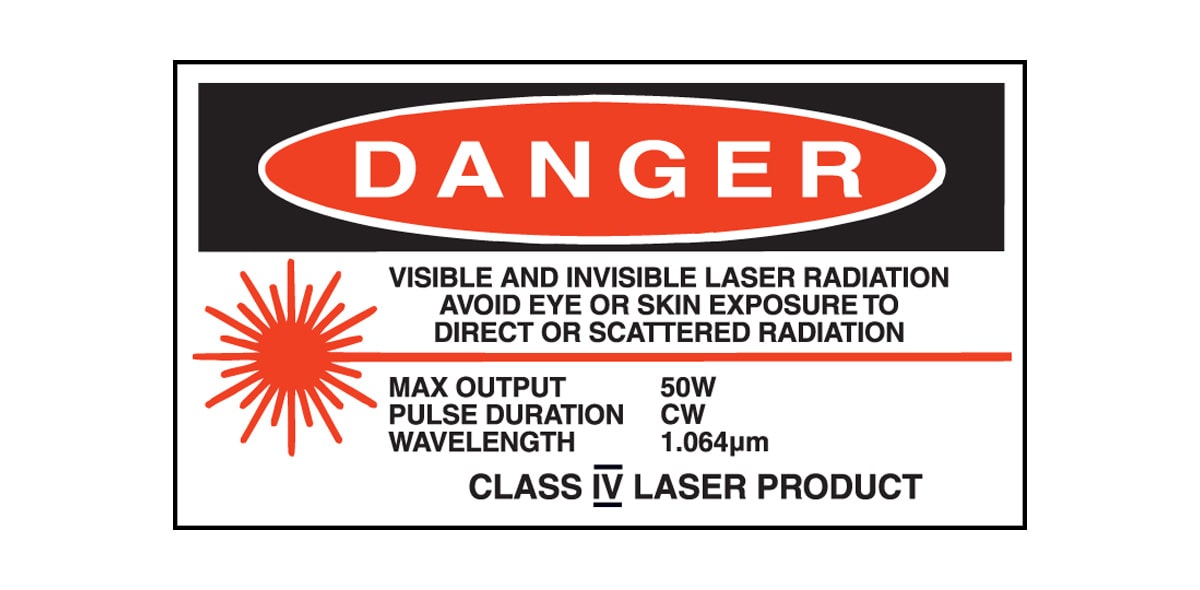
## 💀 NEVER USE THESE MATERIALS
⚠️⚠️⚠️⚠️⚠️⚠️⚠️⚠️⚠️⚠️⚠️⚠️⚠️⚠️⚠️⚠️⚠️⚠️

⚠️⚠️⚠️⚠️⚠️⚠️⚠️⚠️⚠️⚠️⚠️⚠️⚠️⚠️⚠️⚠️⚠️⚠️
## 👍🏾 Good Materials
Top 3:
1. Wood
2. Acrylic Sheet
3. Paper materials (cardboad, cardstock)
Runners-up:
Cork
Felt
MDF*
Leather
Textiles (cloth, jeans)
Biomaterials**
From [Dallas Makerspace Wiki](https://dallasmakerspace.org/wiki/Laser_Cutter_Materials)
<table>
<tbody><tr>
<th> Material
</th>
<th> Max thickness
</th>
<th> Notes
</th>
<th> WARNINGS!
</th></tr>
<tr>
<td> Many woods
</td>
<td> 1/2"
</td>
<td> Avoid oily/resinous woods
</td>
<td> (F) Be very careful about cutting oily woods, or very resinous woods as they also may catch fire.
</td></tr>
<tr>
<td> Plywood/Composite woods
</td>
<td> 1/2"
</td>
<td> (E) These contain glue, and may not laser cut as well as solid wood.
</td>
<td>
</td></tr>
<tr>
<td> MDF/Engineered woods
</td>
<td> 1/2"
</td>
<td> (E) These are okay to use but may experience a higher amount of charring when cut.
</td>
<td>
</td></tr>
<tr>
<td> Paper, card stock
</td>
<td> thick
</td>
<td> Cuts very well on the laser cutter, and also very quickly.
</td>
<td> (F) Cut single layer at a time. Multiple layers catch fire easily.
</td></tr>
<tr>
<td> Cardboard, carton
</td>
<td> thicker
</td>
<td> Cuts well but may catch fire.
</td>
<td> (F) Watch for fire.
</td></tr>
<tr>
<td> Cork
</td>
<td> 1/4"
</td>
<td> Cuts nicely, but the quality of the cut depends on the thickness and quality of the cork. Mostly, the cut depends on the glue used as a binder.
</td>
<td>
</td></tr>
<tr>
<td> Acrylic/Lucite/Plexiglas/PMMA
</td>
<td> 1/2"
</td>
<td> Cuts extremely well leaving a beautifully polished edge.
</td>
<td>
</td></tr>
<tr>
<td> Extruded Polystyrene
</td>
<td> 2"
</td>
<td> Blue or Pink rigid foam insulation. Expanded Polystyrene (usually white and made of small white balls) is not OK at this time. (foam coolers)
</td>
<td> (F) Please watch it carefully when cutting. Uses fastest speed possible and lowest power needed to cut through.
</td></tr>
<tr>
<td> Delrin (POM)
</td>
<td> thin
</td>
<td> Delrin comes in a number of shore strengths (hardness) and the harder Delrin tends to work better. Great for gears!
</td>
<td> (T) Contains formaldehyde (a known carcinogen) in the smoke generated during cutting. Advisable to keep ventilation system running for a couple minutes after cutting to clear out all of the smoke.
</td></tr>
<tr>
<td> High density (48 lb/ft3) urethane board.
</td>
<td>
</td>
<td> HD version of tooling/model/precision board. <a rel="nofollow" class="external free" href="https://www.inventables.com/technologies/precision-board-plus">https://www.inventables.com/technologies/precision-board-plus</a>
</td></tr>
<tr>
<td> Depron foam
</td>
<td> 1/4"
</td>
<td> a type of extruded polystyrene: <a rel="nofollow" class="external free" href="http://depronfoam.com/">http://depronfoam.com/</a> . Used a lot for hobby, RC aircraft, architectural models, and toys. 1/4" cuts nicely, with a smooth edge.
</td>
<td> (F) Must be constantly monitored.
</td></tr>
<tr>
<td> Foam Core
</td>
<td> any
</td>
<td> Cuts extremely well on the facings. The center can shrink and melt away if too much power or too low a speed is used.
</td>
<td> (F) Watch it carefully. Paper coated foam core is best. Be careful that your facing material isn't waxy, plastic or something on the prohibited list.
</td></tr>
<tr>
<td> Gator foam
</td>
<td>
</td>
<td> Foam core gets burned and eaten away compared to the top and bottom hard paper shell.
</td>
<td> (E) Not a fantastic thing to cut, but it can be cut if watched.
</td></tr>
<tr>
<td> PEVA or EVA Foam - (Poly) Ethylene Vinyl Acetate
</td>
<td> 1"
</td>
<td> Expanded foam rubber. Used for flip-flop soles, exercise foam floor mats, exercise equipment padding, foam sheets for crafts.
</td>
<td> Smells bad - can result in charred brown edges.
</td></tr>
<tr>
<td> Kapton tape (Polyimide)
</td>
<td> 1/16"
</td>
<td> Works well, in thin sheets and strips like tape.
</td>
<td>
</td></tr>
<tr>
<td> Mylar
</td>
<td> 1/16"
</td>
<td> Works well if it's thin. Thick mylar has a tendency to warp, bubble, and curl
</td>
<td> (E) Gold coated mylar will not work.
</td></tr>
<tr>
<td> Styrene, Solid
</td>
<td> 1/16"
</td>
<td> Smokes a lot when cut, but can be cut.
</td>
<td> (T) Keep it thin.
</td></tr>
<tr>
<td> Cloth/felt/hemp/cotton
</td>
<td>
</td>
<td> They all cut well. Our "advanced" laser training class teaches lace-making.
</td>
<td> Not plastic coated or impregnated cloth!
</td></tr>
<tr>
<td> Leather/Suede
</td>
<td> 1/8"
</td>
<td> Leather is very hard to cut, but can be if it's thinner than a belt (call it 1/8" or 4 oz). Our "Advanced" laser training class covers this. Smells like burning hair when cut, so let vent before opening after cut.
</td>
<td> (T) Real, veg-tanned leather only! <b>Not</b> chrome-tanned real leather. <b>Not</b> 'pleather' or other imitations!
</td></tr>
<tr>
<td> Magnetic Sheet
</td>
<td>
</td>
<td> Cuts beautifully
</td>
<td>
</td></tr>
<tr>
<td> NON-CHLORINE-containing rubber
</td>
<td>
</td>
<td> Fine for cutting.
</td>
<td> (T) Beware of chlorine-containing rubber! Use only rubber labeled "laserable" or "chlorine-free".
</td></tr>
<tr>
<td> Teflon (PTFE)
</td>
<td> thin
</td>
<td> Cuts OK in thin sheets
</td>
<td>
</td></tr>
<tr>
<td> Carbon fiber mats/weave<br>that has <b>not</b> had epoxy applied
</td>
<td>
</td>
<td> Can be cut, very slowly.
</td>
<td> (E) You must not cut carbon fiber that has been coated!!
</td></tr>
<tr>
<td> Coroplast ('corrugated plastic')
</td>
<td> 1/4"
</td>
<td> Difficult because of the vertical strips. Three passes at 80% power, 7mm speed, and it will be slightly connected still at the bottom from the vertical strips.
</td>
<td> Test. This data many be referring to the old lasers. -gorman 2018.01.18 (Coroplast is typically Polypropylene)
</td></tr></tbody></table>
> *[Is It Safe to Laser Cut MDF?](https://uk.xtool.com/blogs/xtool-academy/laser-cut-mdf)
Keep in mind that not every MDF is suitable or safe for laser cutting. There can be harmful and toxic materials that may harm you or others after coming in contact with the laser. The main reason is that MDF usually contains urea-formaldehyde, a synthetic resin that binds the wood fibers together. The high temperature of the laser beam vaporizes the resin, releasing toxic formaldehyde fumes.
**If unsure, always look for the Material Safety Data Sheet (MSDS)**
## Techniques/Modes
### Cutting
### Marking
### Engraving
## Advanced Techniques
### Stacking

https://www.instructables.com/Desktop-Lamp-simple/
### Fitting and Slotting

https://talk.vanhack.ca/t/laser-cut-earth-globe/4860
### Folding and Bending

Online template generator for papercraft and packaging: https://www.templatemaker.nl/en/

https://www.instagram.com/kieran_flaherty_textiles/
### Kerfing
[Kerfing Techniques from Melbourne School of Design Digital Fab Lab](https://ms-kb.msd.unimelb.edu.au/the-fablab/laser-cutting/laser-cutting/advanced-techniques)
Kerfing Technique 1: Straight Line Cutting

Kerfing Technique 2: Small Waves

Kerfing Technique 3: Large Honeycombs

Kerfing Technique 4: Wavy Cut Line

Kerfing Technique 5: Honey Combed Cut Line

Kerfing Technique 6: Narrow / Wide Waves


Kerfing Technique 7: Triangular Shape

### Soldering

https://www.instructables.com/Laserweld-Your-Own-Inflatables/
## File Preparation
### Vectors Programs
Adobe Illustrator
[Inkscape](https://inkscape.org/)
Save/Export file as: .ai, .dxf
### Techniques
#### Use minimal stroke width <0.01mm
#### Lines must be continuous
#### Avoid overlapping lines
#### Group lines into 'layers' by color
#### Text need to be outlined
### Raster Images
It's best to convert the image to black and white
You can embed images in Adobe Illustrator
Compatible file types: .jpg, .bmp, .png
## Machine Settings
### Speed & Power
Speed: How fast the laser head will move
Power: Percentage of power the laser will use
| Parameter | Setting | Effect/s |
| -------- | -------- | -------- |
| Power | Too low | material might not be cut |
| Power | Too high | darker burn marks |
| Power | Too high | more power usage (wears out the laser tube faster) |
| Speed | Too slow | longer machine usage |
| Speed | Too fast | material might not be fully cut |
### Number of Passes
How many times the machine runs your file
Instead of increasing the power too much, you can increase the number of passes to ensure that the material is fully cut or marked
### Raster Height
The distance between each engraved line
More height == Faster time but less resolution
## Design Considerations
### Material Waste
Parts should be laid out so that waste is minimized
### Tolerance

When cutting, the laser burns/evaporates some width of the material. This is called **kerf**.
If you are making fitted parts, best to make a test first for the exact tolerance.
### Kerfing

### Precision
Some materials are not fully flat. We can use weights or makeshift tools to keep them flat on the bed.
### Sequence
It's best to run in this order:
1. Raster engraving
2. Marking
3. Cutting inside/inner parts
4. Cutting outside/outer parts
## How to Operate
### Preparing the Machine
1. Turn on Chiller
2. Clear Laser Cutter bed
3. Turn on Laser Cutter
4. Plug USB to computer
### Using the Laser Cutter
1. Open RDWorks on the computer
2. Import the vector files or images
3. Double check the dimensions
4. Configure the settings: Minimum Power, Maximum Power, Speed, Number of Passes *For multiple passes, duplicate the paths on top of each other.
5. Prep the machine for cutting:
a. Place the material on the bed
b. Adjust distance of nozzle to bed to 8mm (focal point of the laser)
c. Move nozzle to initial position
6. Start and “Frame” to check if it fits.
- You can also "air cut"
8. Turn on the exhaust
9. Turn on the switches on the side (Laser switch, Light switch and Air switch)
10. Close machine
11. Start
### 👁️ Monitor your cut. Do not leave the lab. 👁️
### After cutting
1. If there are a lot of fume, wait until it clears out
2. Turn off the laser switch
3. Open the machine
4. Before moving anything, check if the material is fully cut. You may need to run it again if not.
5. Remove the material. Small parts might fall onto the holes.
6. Turn off the exhaust
### Powering Down
1. Turn off exhaust
2. Turn off chiller
3. Make sure the bed is clear
4. Turn off machine
## Maintenance
Laser tube replacement
Lens and mirrors cleaning/replacement
## Activity Time
### Decorate your fablab passports ✨
- Make some laser cut piece(s) to attach to your passport and glam it up
- It can also be functional
- Use the scrap felt materials from the lab
- Take a photo
## Resources
Fablab BCN Local Documentation: Fundamentals of Digital Fabrication
https://fablabbcn-projects.gitlab.io/learning/educational-docs/mdef/classes/fodf/s3-2dfab/
Fabacademy: Computer-controlled Cutting
https://fablabbcn-projects.gitlab.io/learning/educational-docs/fabacademy/classes/03-Computer-controlledCutting/
FabCreator: Materials
https://www.fabcreator.com/materials
Dallas Makerspace Laser Cutter Materials
https://dallasmakerspace.org/wiki/Laser_Cutter_Materials
Melbourne School of Design Digital Fabrication Laboratory (Fab Lab) Laser Cutting Advanced Techniques https://ms-kb.msd.unimelb.edu.au/the-fablab/laser-cutting/laser-cutting/advanced-techniques
 Sign in with Wallet
Connect another wallet
Sign in with Wallet
Connect another wallet