---
title: 'AirSuite – Dashboard/analytics options'
disqus: hackmd
---
# AirSuite – Dashboard/analytics options
:::warning
> **Useful resources**
> - RDS Data transfer costs: https://aws.amazon.com/blogs/architecture/exploring-data-transfer-costs-for-aws-managed-databases/
:::
[TOC]
# Background
AirSuite would like the capability to monitor portal data, and analyse trend data for the following:
* Active sensors
* Platform logins
* Page views
* Data storage.
## Functional requirements
* Data can be viewed as monthly trends
* Data can be exported/captured for use in Board reporting
## Assumptions
* All source data required is available in the AIRSUITE_FACTS MySQL RDS instance
* Dashboard userbase is small, and will remain small (~3)
* Enterprise features, such as [row-level security](https://cloud.google.com/bigquery/docs/row-level-security-intro), are not required
* Access to data should be secured, but not necessarily via SSO
* Size of data store is small (<1GB)
# Approach
Because the source data and proposed userbase is very small, a number of high-profile enterprise grade, more expensive, solutions (e.g. [Qlik](https://www.qlik.com/us/), [Tableau](https://www.tableau.com/), [Looker](https://cloud.google.com/looker/)) have been excluded from the outset. Three candidate solutions have been identified for further analysis. These are products known by the writer to excel at quick, highly-available analytics and dashboarding, with a minimum of additional workload or unnecessary complexity/cost.
There are a large number of dashboard/visualisation products on the market now, and it is a fast-moving landscape. This assessment represents a 'best efforts' review based on current knowledge and a brief market scan.
# Assessment
## 1. Power BI
> Useful resources
> - Product page: https://powerbi.microsoft.com/en-gb/
> - Power BI gateway: https://docs.aws.amazon.com/whitepapers/latest/using-power-bi-with-aws-cloud/connecting-the-microsoft-power-bi-service-to-aws-data-sources.html
Although Power BI does have enterprise-grade capabilities, the entry barrier in terms of cost and complexity is still relatively low. It is perfectly feasible to utilise the client tool (Power BI Desktop) to connect to a database, and prepare a functional dashboard in a matter of minutes.
A problem emerges when your test app needs to be 'published' for mass consumption, and refreshed automatically (i.e. anything meant for use beyond your own desktop). In this scenario the following additional requirements kick in:
* Other users can only access your app with a 'Pro' licence ($10/usr/mo)
* Non-Azure data sources require access via a 'Power BI Gateway', which provides an abstraction layer between your data source and the online Power BI service. A Windows host VM is required to run this software.
### Look and feel example

### Advantages & disadvantages
| Advantage | Disadvantage |
|---------|----------------------------------------------------------|
|Very easy to use | Requires a Windows gateway|
|Relatively low cost | Licencing model is not cost-effective|
|Integration with AD/Teams |
|Scalable to bigger userbases
|Import data up to 10GB
### Power BI: 12m TCO estimate
| Item | Description | Cost |
|-|-|-|
|Licencing|3x Power BI Pro licences for users|3@$10/mo = $360
|Power BI gateway|Windows Server t3a.large (per [minimum requirements](https://learn.microsoft.com/en-us/data-integration/gateway/service-gateway-install#requirements))|$150.91/mo = $1810.92 <sup>[1](https://calculator.aws/#/estimate?id=b6e24b7916739bd55bffb69ecf4c84200c30dc6e)</sup>
|App development|v1.0 app meeting initial requirements (20hrs)|$3600
|**TOTAL**||$5770.92|
<sup>**Note**: Does not include any MSP/Helpdesk costs, and assumes EC2 instance will be in same AZ as RDS instance to avoid data transfer costs.</sup>
## 2. AWS QuickSight
> Useful resources
> - Product page: https://aws.amazon.com/quicksight/
> - Connecting QuickSight to RDS: https://docs.aws.amazon.com/quicksight/latest/user/create-a-database-data-set.html
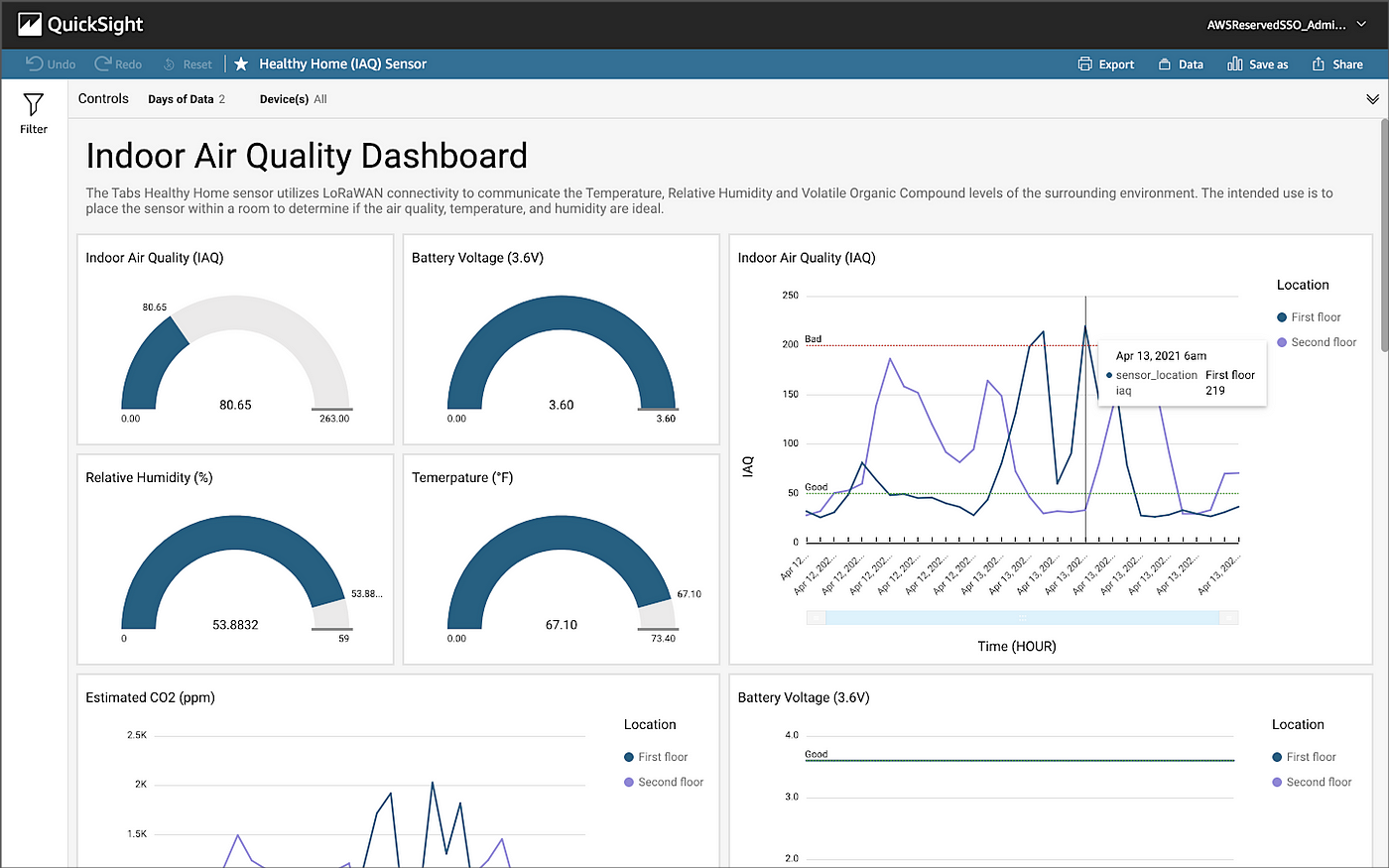
Probably best thought of as AWS' 'Power BI' clone although, frankly, a long way off in terms of overall functionality. It is perfectly adequate for a vast majority of regular reporting use cases. Arguably QuickSight's most interesting feature is its innovative pricing model. This is 'pay as you go', and is particularly cost-effective for users who may only engage intermittently (compared with Power BI where each user pays a flat rate, no matter what).
Being part of the AWS ecosystem, it is naturally easier to connect to RDS data stores and therefore no 'gateway' is required. User management is separate from IAM and, with some additional work, AD integration for SSO is possible.
### Look and feel example
### Advantages & disadvantages
| Advantage | Disadvantage |
|---------|----------------------------------------------------------|
|Cost-effective pricing model | Not widely used|
|Ease of connection to AirSuite data store | |
|Import up to 10GB to [SPICE](https://docs.aws.amazon.com/quicksight/latest/user/spice.html) for faster response
|Encompassed in AWS Support
### QuickSight: 12m TCO estimate
| Item | Description | Cost |
|-|-|-|
|Author subscription|1x Enterprise subscription to author and publish dashboards|1@$30/mo = $330
|Reader costs|2x Reader subscriptions to consume dashboards (50c/session, max $8.40/mo)|$16.80/mo = $184.80
|App development|v1.0 app meeting initial requirements (20hrs)|$3600
|**TOTAL**||$4114.80|
<sup>**Note**: All new QuickSight subscriptions get one month free of charge for up to 4 users. Does not include any MSP/Helpdesk costs, and assumes Readers hit max cost each month. A QuickSight 'session' is defined as a unique 30min period of usage.</sup>
## 3. Apache Superset
> Useful resources
> - Product page: https://superset.apache.org/
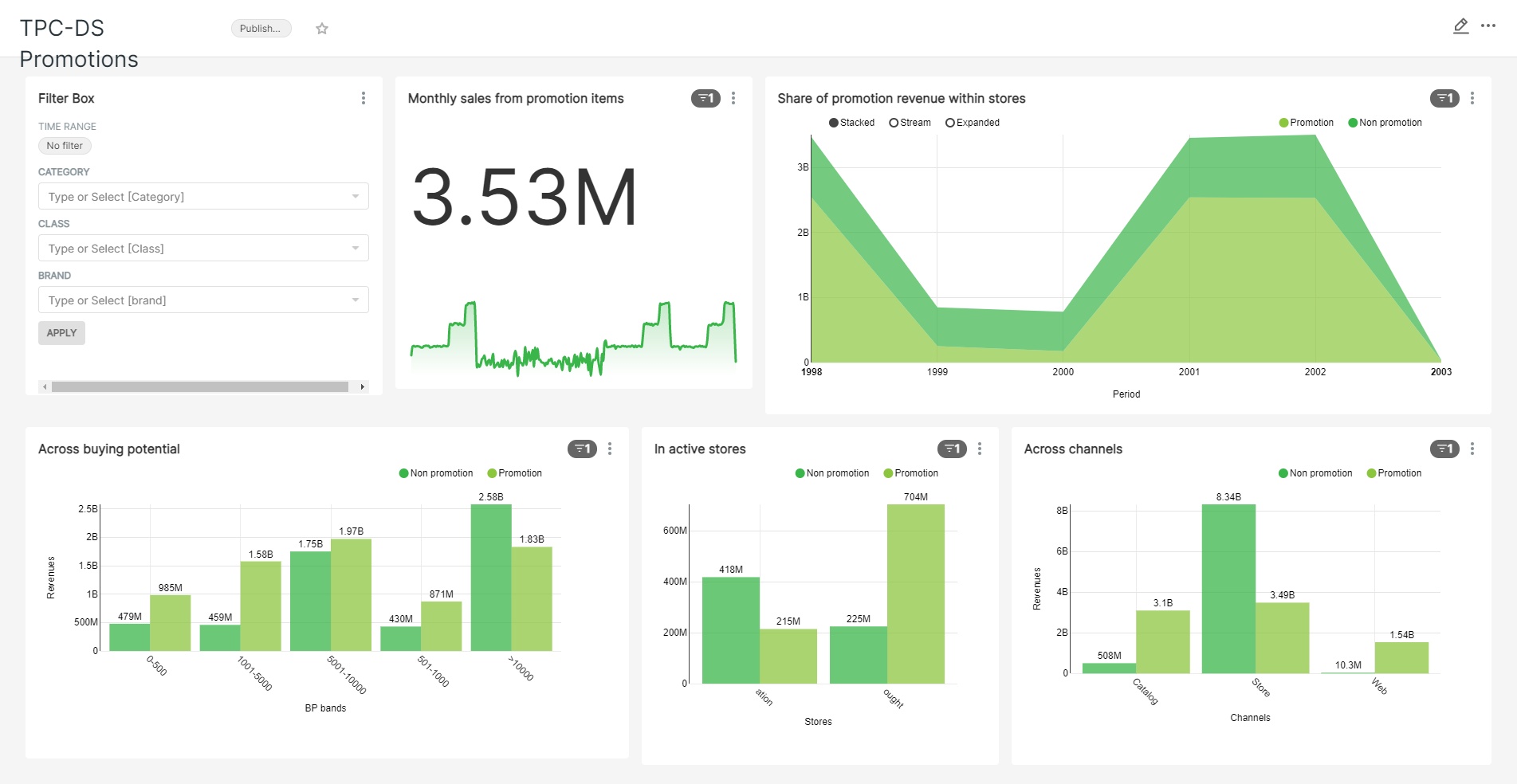
A relatively new data visualisation platform, Superset is targeted at a slightly more 'techy' audience. It can be utilised either as a DIY implementation (via source, Docker, PyPi or kubernetes and requiring a host VM) or SaaS via [preset.io](https://preset.io/).
The DIY implementation obviously has a very low cost advantage, balanced out by the need to maintain the host. Being open source there are no other ongoing charges or licence fees. Installation and setup is very simple.
It's important to note that Superset does not *store any data*. All visualisations and interactions trigger queries to the connected dataset. There is therefore slightly more work required upfront to build appropriate materialized views or have measures available as database objects, so that the user experience is not disappointing.
If implementing as DIY, an EC2 instance within same AZ as RDS instance will be required to avoid additional data transfer costs.
### Look and feel example
### Advantages & disadvantages
| Advantage | Disadvantage |
|---------|----------------------------------------------------------|
|Very low operating cost | Moderate setup effort|
|Ease of connection to AirSuite data store | Need to maintain product|
|Flexibility/customisation |Requires separate host (EC2) for DIY
| |Lack of data caching/latency
| |Data transfer cost from RDS (~0.05c/GB)
### Superset: 12m TCO estimate
| Item | Description | Cost |
|-|-|-|
|EC2 host|Ubuntu t4g.micro|1@$13.05/mo = $156.60<sup>[2](https://calculator.aws/#/estimate?id=d8813e20ed720436ec3bbd146c4ad082967444da)</sup>
|Instance setup|Implement Docker container (4hrs)|$720
|App development|v1.0 app meeting initial requirements (20hrs)|$3600
|**TOTAL**||$4476.60|
<sup>**Note**: Does not include any MSP/Helpdesk costs. No minimum technical requirements are available, but writer has successfully deployed to micro instances.</sup>
# Recommendation
Overall, the recommendation is to use **AWS QuickSight**.
This is a managed service, meaning that no other admin or maintenance is required. Furthermore, direct connection to the existing RDS data store can be made. An in-memory data store (SPICE) is available and provides 10GB of storage per Author (the same as Power BI). This means that filtering and interacting within a dashboard is very responsive. The strategy would be to refresh the SPICE cache on a daily basis.
This meets all core requirements at this stage and can be scaled out further if necessary, since the Enterprise subscription allows [Azure AD integration](https://docs.aws.amazon.com/quicksight/latest/user/aws-directory-service.html).
## Next steps
If the recommendation is accepted, then the following practical steps need to occur to progress:
* Complete [QuickSight setup](https://docs.aws.amazon.com/quicksight/latest/user/signing-up.html) within the AirSuite account, selecting Enterprise edition.
* Authorize QuickSight to connect to the RDS instance (https://docs.aws.amazon.com/quicksight/latest/user/enabling-access-rds.html).
From here, the Author account should be able to connect to the data source and being drafting the dashboard.
 Sign in with Wallet
Connect another wallet
Sign in with Wallet
Connect another wallet