gRPC 介紹
===
> https://grpc.io/docs/
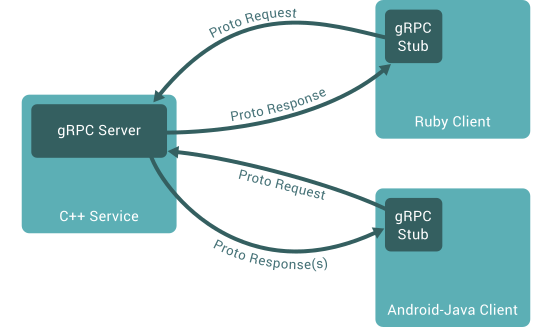
gRPC 是 google 所開發的 RPC 框架,主要的溝通方式是透過 Protocol Buffers 格式的資料結構來進行資料交換,常用於後端服務之間的溝通。
## 什麼是 RPC
> https://aws.amazon.com/compare/the-difference-between-rpc-and-rest/
Remote Procedure Call (RPC) 讓 client 可以像是使用本地的程式一樣使用 server 的程式。
RPC 和 REST 都是設計 API 的方法,在使用上的主要差異有以下幾個:
- HTTP method: 相較於 REST 的 `GET`, `POST`, `PUT`, `DELETE`;RPC 通常只使用 `POST`
- 資料傳輸: 在同一個 API 下,REST 並沒有限定 client 傳輸的資料格式;RPC 則是有固定的格式,client 如果用了錯誤的格式會導致傳輸失敗
## gRPC 做了什麼
- 基於 HTTP/2 協定和 Protocol Buffers 設計而成
- 傳輸資料被壓縮成 bytes
- 有支援各項主流程式語言
- 在單次連接下,client 和 server 可以做到雙向串流 (Bi-directional streaming)
## Protocol Buffers
> https://protobuf.dev/programming-guides/proto3/
> https://protobuf.dev/programming-guides/style/
```protobuf=
syntax = "proto3";
package test;
message SearchRequest {
string query = 1;
int32 page_number = 2;
int32 results_per_page = 3;
}
message SearchResponse {
repeated Result results = 1;
}
message Result {
string url = 1;
string title = 2;
repeated string snippets = 3;
}
service Test {
rpc Search(SearchRequest) returns (SearchResponse);
}
```
- syntax: 表示此檔案使用的 protobuf 的版本,沒有則為 `proto2`;另外,目前 gRPC 官方建議使用的 protobuf 的版本為 `proto3`
- package: 用來當作 message 的 namespace,避免遇到相同名稱的 message
- message: request 和 response 的資料結構
- service: 定義一個 RPC 服務,裡面包含了哪些 API
- rpc: 定義一個 API 的 request 和 response
### 如何將 proto 檔案轉成對應程式語言所需的檔案
1. 安裝 protoc: https://grpc.io/docs/protoc-installation/
```bash=
# ubuntu
apt install -y protobuf-compiler
# macOS
brew install protobuf
```
2. 編譯檔案: https://protobuf.dev/programming-guides/proto3/#generating
```bash=
protoc --proto_path=IMPORT_PATH --python_out=DST_DIR --csharp_out=DST_DIR path/to/file.proto
```
## 操作範例: Python
> https://grpc.io/docs/languages/python/quickstart/
> https://github.com/grpc/grpc/tree/master/examples/python
```python=
# client.py
import logging
import grpc
import helloworld_pb2
import helloworld_pb2_grpc
def run():
print("Will try to greet world ...")
with grpc.insecure_channel("localhost:50051") as channel:
stub = helloworld_pb2_grpc.GreeterStub(channel)
response = stub.SayHello(helloworld_pb2.HelloRequest(name="you"))
print("Greeter client received: " + response.message)
if __name__ == "__main__":
logging.basicConfig()
run()
```
```python=
# server.py
from concurrent import futures
import logging
import grpc
import helloworld_pb2
import helloworld_pb2_grpc
class Greeter(helloworld_pb2_grpc.GreeterServicer):
def SayHello(self, request, context):
return helloworld_pb2.HelloReply(message="Hello, %s!" % request.name)
def serve():
port = "50051"
server = grpc.server(futures.ThreadPoolExecutor(max_workers=10))
helloworld_pb2_grpc.add_GreeterServicer_to_server(Greeter(), server)
server.add_insecure_port("[::]:" + port)
server.start()
print("Server started, listening on " + port)
server.wait_for_termination()
if __name__ == "__main__":
logging.basicConfig()
serve()
```
## 操作範例: C#
> https://learn.microsoft.com/zh-tw/aspnet/core/tutorials/grpc/grpc-start?view=aspnetcore-7.0&tabs=visual-studio
## 發佈
gRPC with k8s
https://jwenz723.medium.com/deploy-kubernetes-grpc-workloads-with-zero-down-time-3585c146f74f
## 權限管理
> https://grpc.io/docs/guides/auth/
## proto 文件管理
- 各個 repo 管理自己的 proto 檔案
- 將 proto 檔案交由一個服務,由它統一編譯檔案
- 將編譯過的檔案統一管理,提供各個服務下載
 Sign in via Google
 Sign in via Facebook
 Sign in via X(Twitter)
 Sign in via GitHub
 Sign in via Dropbox
 Sign in with Wallet
Connect another wallet
Sign in with Wallet
Connect another wallet