###### tags: `golang` `A Tour of Go`
# A Tour of Go 勉強会
第一回の資料です。
### 今回の目的
チュートリアルを通して、全2回で基本的な文法を確認します。
`A Tour of Go`の勉強会が終了しだい、実践的な内容の勉強会が開催される予定です。
### 進め方
* 基本的に チュートリアル説明 + 演習時間 という方式で進めて行きます
* Goの経験者の方がおりますので、演習時間で質問可能です
* 本資料は`A Tour of Go` の補足メモです
## スケジュール
| 時間 | 内容 |
|:------------- | -------------------------------------------------------------------------------------------------------- |
| 19:30 - 19:40 | 簡単な挨拶など |
| 19:40 - 19:50 | [Welcome!](https://go-tour-jp.appspot.com/welcome/1) |
| 19:50 - 20:10 | [Packages, variables, and functions.](https://go-tour-jp.appspot.com/basics/1) |
| 20:10 - 20:30 | [Flow control statements: for, if, else, switch and defer](https://go-tour-jp.appspot.com/flowcontrol/1) |
| 20:30 - 20:40 | 休憩 |
| 20:40 - 21:30 | [More types: structs, slices, and maps.](https://go-tour-jp.appspot.com/moretypes/1) |
## Welcome!
今回のハンズオンでは、`Go Playground`での動作を想定しています。
Docker 環境で動かしたい方は、以下のように準備するとよいと思います。
### Dockerでの環境
```bash
#ディレクトリ
.
├── docker-compose.yml
├── Dockerfile
└── app/
└── main.go
```
<summary>docker-compose.yml</summary>
```yml=
version: "3"
services:
app:
build:
context: ./
dockerfile: ./Dockerfile
volumes:
- "./app:/go/src/app"
tty: true
```
<summary>Dockerfile</summary>
```Dockerfile=
FROM golang:1.13.7-buster
WORKDIR /go/src/app
ENV GO111MODULE=on
RUN apt-get update -qq && \
apt-get install -y git
CMD ["/bin/bash"]
```
<summary>コンテナ起動、main.go実行</summary>
```shell
$ docker-compose up -d
$ docker-compose exec app go run main.go
```
<summary>コンテナ停止、削除</summary>
```shell
$ docker-compose down --rmi all
```
### Go Playground で動かす
実際に操作します。
https://go-tour-jp.appspot.com/welcome/1
## Packages, variables, and functions.
### Packages (1/17)
godocという標準パッケージに関する文章があるので、実装コードを読むことができます。
https://godoc.org/
例: [math.sqrt](https://golang.org/src/math/sqrt.go#L92)
### Exported names (3/17)
異なるパッケージをimportした場合、`Public`で宣言されたもののみ使用できます。
* 小文字は `private`
* 大文字は `public`
例:[math.Pi](https://golang.org/pkg/math/#pkg-constants)
### Variables (8/17)
Goにおいて、初期値のない変数宣言は、以下のようなゼロ値が入ります。
詳細はZero values (12/17)
```
数値型(int,floatなど): 0
bool型: false
string型: "" (空文字列( empty string ))
```
### Type inference (14/17)
変数宣言の型省略(型推論)は、functionの内部スコープでのみ使用可能です。
以下の例では、compile error が発生します。
```go=
package main
import "fmt"
vvv := 4
func main() {
fmt.Printf("vvv is of type %T\n", vvv)
}
```
functionのスコープ外では、`var`または`const`を用いて宣言します。
### Numeric Constants (16/17)
`<<`または`>>`はビット桁をシフトさせます
例: 2<<5
```
# 10進数(decimal)を2進数(binary)に直すと
dec:2 -> bin:0000 0010
# 2進数を左に5桁シフト
bin:0100 0000 -> dec:64
```
## Flow control statements: for, if, else, switch and defer (8/14)
### Exercise: Loops and Functions
最小二乗法を用いて、平方根を求める問題です。
勾配が小さくなった時点でループを終了させます。
参考ページ:
* [For (1/14)](https://go-tour-jp.appspot.com/flowcontrol/1)
<summary>回答例(ループ10回)</summary>
```go=
package main
import (
"fmt"
)
func Sqrt(x float64) float64 {
z := 1.0
for i:=0; i<10; i++{
z -= (z*z - x) / (2*z)
fmt.Println(i,":",z)
}
return z
}
func main() {
fmt.Println(Sqrt(2))
}
```
<summary>回答例(誤差が小さくなったら終了)</summary>
```go=
package main
import (
"fmt"
"math"
)
func Sqrt(x float64) float64 {
z := 1.0
for back := 0.0; math.Abs(z-back) > 0.0001; z -= (z*z - x) / (2 * z) {
fmt.Println("z: ", z)
fmt.Println("diff: ", math.Abs(z-back))
back = z
}
return z
}
func main() {
fmt.Println(Sqrt(2))
}
```
とりあえず誤差1e-4でループを終了するようにしています。
### Switch (9/14)
switch 文の`case` は必ず`break` します。
他の言語と仕様が違います。
### defer (12/14)
`LIFO`でスタックされ、最後に実行されます。
Databaseのコネクションを開く、閉じるような処理を近い位置で書くことができます。。
```go
func main() {
...
// Database Connection を開く
DbConnection, _ := sql.Open("mysql", dbConf)
// Connection を閉じる
defer DbConnection.Close()
```
## More types: structs, slices, and maps.
この章から難易度少し上がります。
slack の`go` チャンネルに上がっていた下記サイトは、変数のメモリ格納について可視化されているため、わかりやすかったです。
https://divan.dev/posts/avoid_gotchas/
### Pointers to structs (4/27)
構造体ポインタは、フィールドを変更する際、`p.X`と書くことで、Goの内部で`(*p).X`と判断して処理されます。
```
package main
import "fmt"
type Vertex struct {
X int
Y int
}
func main() {
v := Vertex{1, 2}
p := &v
p.X = 1e9
fmt.Println(v)
}
```
### Struct Literals (5/27)
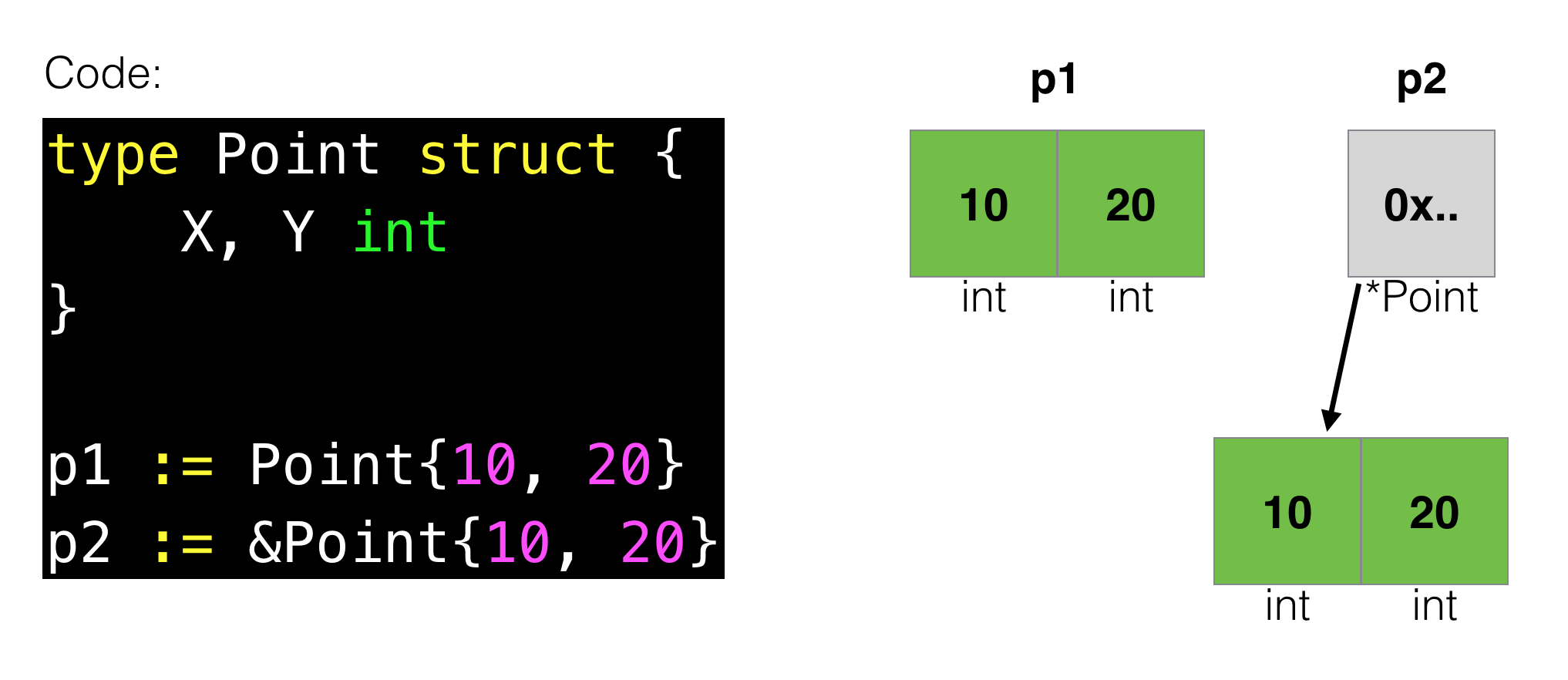
`p = &Vertex{1, 2} // has type *Vertex`
について、先程のサイト(https://divan.dev/images/pointers.png)の図を参照しました、
### Slice length and capacity (11/27)
スライスは、3つのフィールドを持つ構造体らしいです。
[godoc:slice](https://golang.org/src/runtime/slice.go#L11)
```go
type slice struct {
array unsafe.Pointer
len int
cap int
}
```
slice の`len`は参照している配列の長さです。
`cap`は配列のメモリを再割当せずに変数を格納できる長さを表しています。
例のサイトを見ることで、理解の助けになると思います。
https://divan.dev/posts/avoid_gotchas/
### Appending to a slice (15/27)
https://divan.dev/posts/avoid_gotchas/
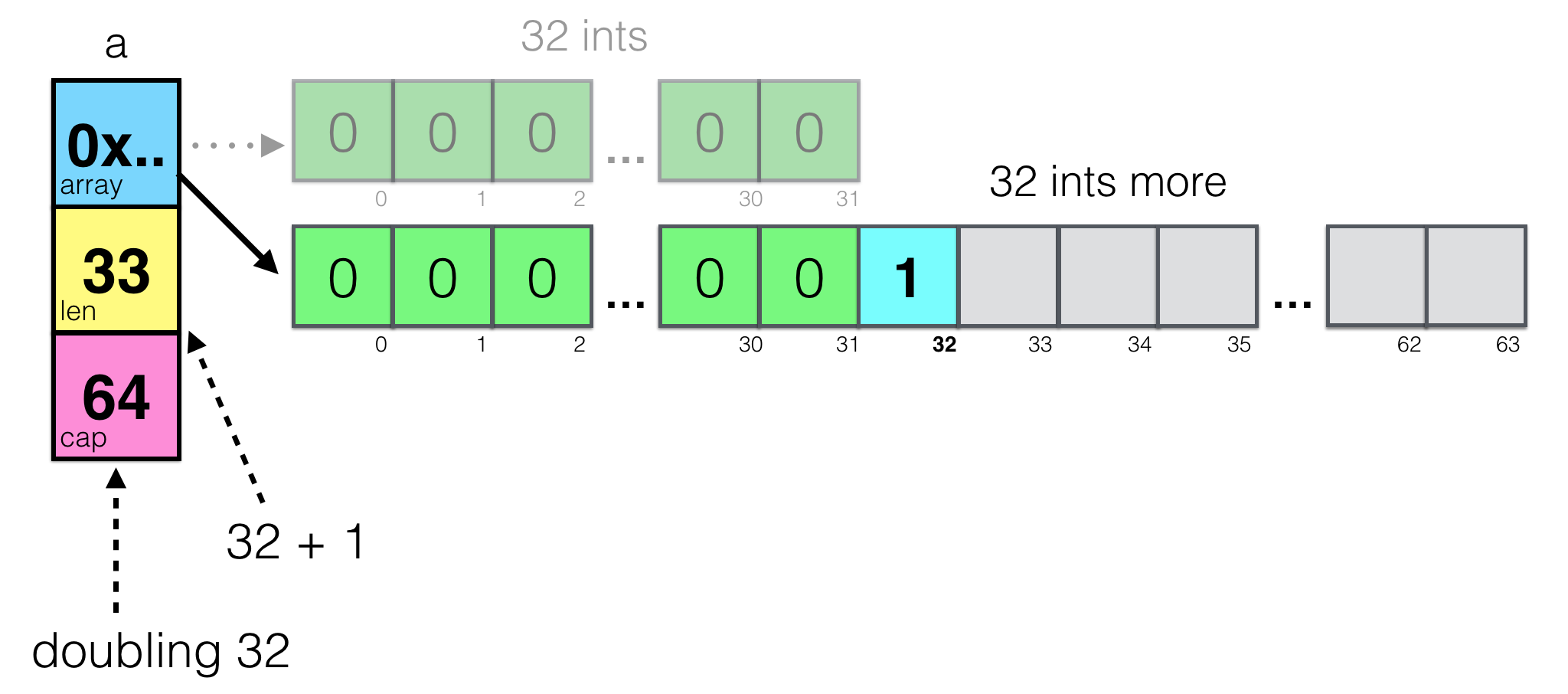
len=32,cap=32 のスライスを定義したあとに、1をappendします。
appendを行う際に、Goはスライスを拡張できるかcapを確認し足りない場合に新たに別メモリを割り当てます。
```go
a := make([]int, 32)
a = append(a, 1)
```
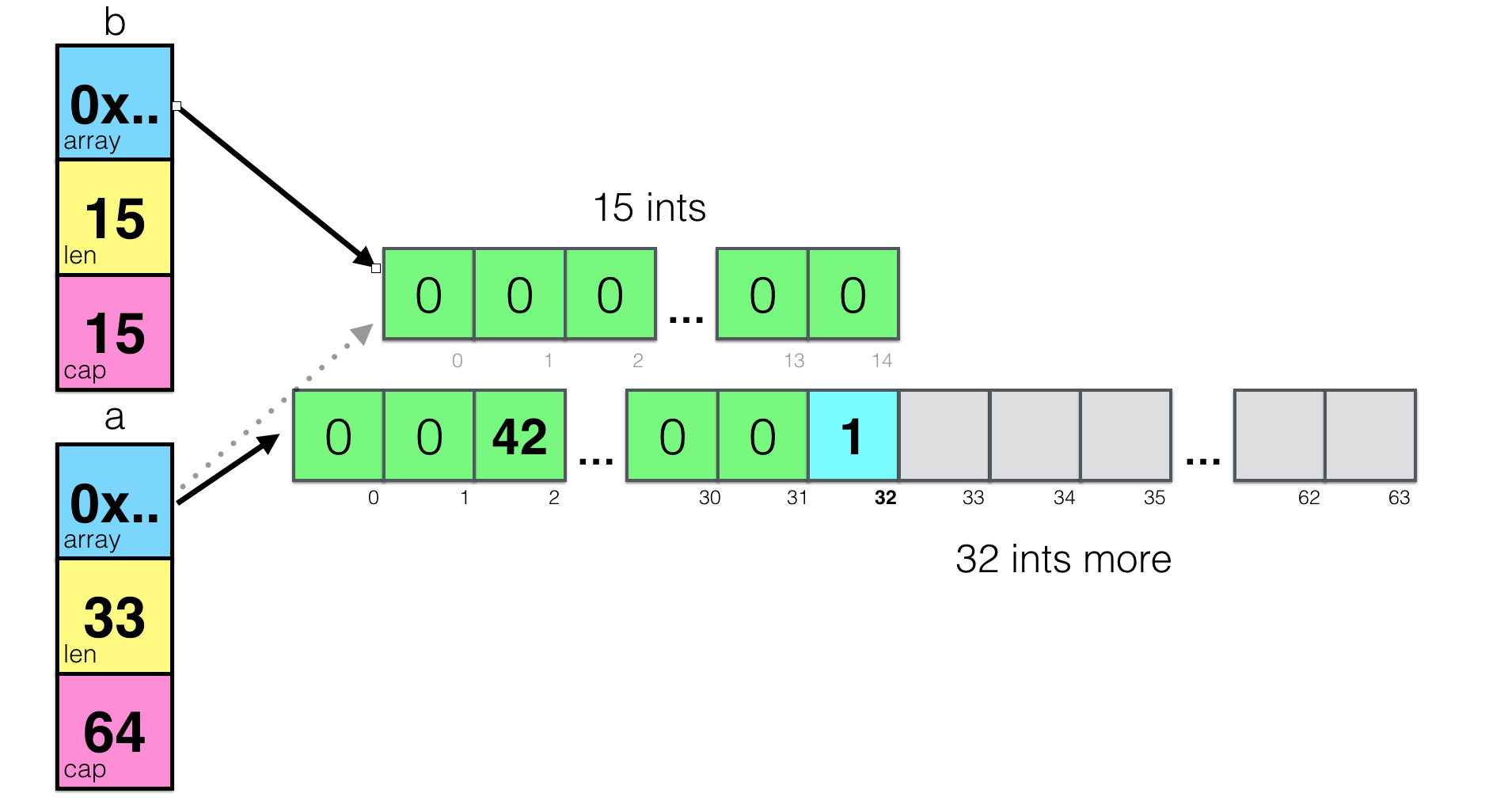
また次のように、スライスa を一部をbとして宣言したとき、別メモリが新たに確保されます。
```
a := make([]int, 32)
b := a[1:16]
a = append(a, 1)
a[2] = 42
```
### Range continued (17/27)
Goでは、使用していない変数があるとコンパイルエラーが発生します。
以下のようにRange の index を宣言するとエラーとなります。
```diff=
package main
import "fmt"
func main() {
pow := make([]int, 10)
for i := range pow {
pow[i] = 1 << uint(i) // == 2**i
}
- for i, value := range pow {
+ for _, value := range pow {
fmt.Printf("%d\n", value)
}
}
```
### Exercise: Slices (18/27)
参考ページ:
* [Slices of slices (14/27)](https://go-tour-jp.appspot.com/moretypes/14)
* [Range continued (17/27)](https://go-tour-jp.appspot.com/moretypes/17)
<summary>回答例</summary>
```go=
package main
import "golang.org/x/tour/pic"
func Pic(dx, dy int) [][]uint8 {
pic := make([][]uint8, dy)
for y := range pic {
pic[y] = make([]uint8, dx)
for x := range pic[y] {
pic[y][x] = uint8((x + y))
}
}
return pic
}
func main() {
pic.Show(Pic)
}
```
### Exercise: Maps (23/27)
参考ページ:
* [Range (16/27)](https://go-tour-jp.appspot.com/moretypes/16)
* [string.Fields](https://golang.org/pkg/strings/#Fields)
<summary>回答例</summary>
```go=
package main
import (
"fmt"
"golang.org/x/tour/wc"
"strings"
)
func WordCount(s string) map[string]int {
words := make(map[string]int)
fmt.Println(strings.Fields(s))
for _, key := range strings.Fields(s) {
words[key] += 1
}
return words
}
func main() {
wc.Test(WordCount)
}
```
### Exercise: Fibonacci closure (26/27)
参考:
* [Function closures (25/27)](https://go-tour-jp.appspot.com/moretypes/25)
<summary>回答例</summary>
```go=
package main
import "fmt"
// fibonacci is a function that returns
// a function that returns an int.
func fibonacci() func() int {
a, b := 1, 0
return func() int {
a, b = b, a+b
return a
}
}
func main() {
f := fibonacci()
for i := 0; i < 10; i++ {
fmt.Println(f())
}
}
```
 Sign in with Wallet
Connect another wallet
Sign in with Wallet
Connect another wallet