---
tags: teaching, hpc1
---
# 2022-11-15 <br> HPC1: Introduction to HPC at Leeds
Welcome to the hack pad for HPC1 course from Research Computing at the University of Leeds!
You can edit this document using [Markdown syntax](https://guides.github.com/features/mastering-markdown/).
## Links to resources
- **Contact Research Computing** - https://bit.ly/arc-help
- **Request HPC account** - https://leeds.service-now.com/it?id=sc_cat_item&sys_id=4c002dd70f235f00a82247ece1050ebc
- **Presentation for today** - https://bit.ly/hpc1intro
- **Exercises for today** - https://docs.google.com/document/d/1SPaZ2kmzYpMFIkiMSi-Qnu-ZqLaW4reSpVal3aOrmmk/edit
- **Github repository** - https://github.com/arctraining/hpc1-files
- **How to transfer files** -https://arcdocs.leeds.ac.uk/getting_started/file_transfer.html
## Agenda Day 1
| Time | Agenda |
| -------- | ------------------------------------------ |
| 0900 | Intro, connecting to ARC, what and why HPC?|
| 0950 | Break |
| 1000 | Login, HOME directory and looking around <br> Exercise 1 |
| 1050 | Break and Answers |
| 1100 | Simple job submission, qstat, qdel |
| 1150 | Questions |
| 1200 | Close |
## Agenda Day 2
| Time | Agenda |
| -------- | ------------------------------------------ |
| 0900 | Intro, Data Transfer, Modules |
| 0950 | Questions and break |
| 1000 | Interactive sessions, ib v smp, node types |
| 1050 | Questions and break |
| 1100 | User guided section, talking through <br> your hopes/fears for HPC |
| 1150 | Wrap up and questions |
| 1200 | Close |
## Pre workshop prep
If you haven’t already request an account for the HPC via this link - https://leeds.service-now.com/it?id=sc_cat_item&sys_id=4c002dd70f235f00a82247ece1050ebc
### For Windows Users
For Windows users please consult our documentation page and video at https://arcdocs.leeds.ac.uk/getting_started/logon.html#connecting-from-windows
You are required to download the software tool MobaXTerm for this workshop.
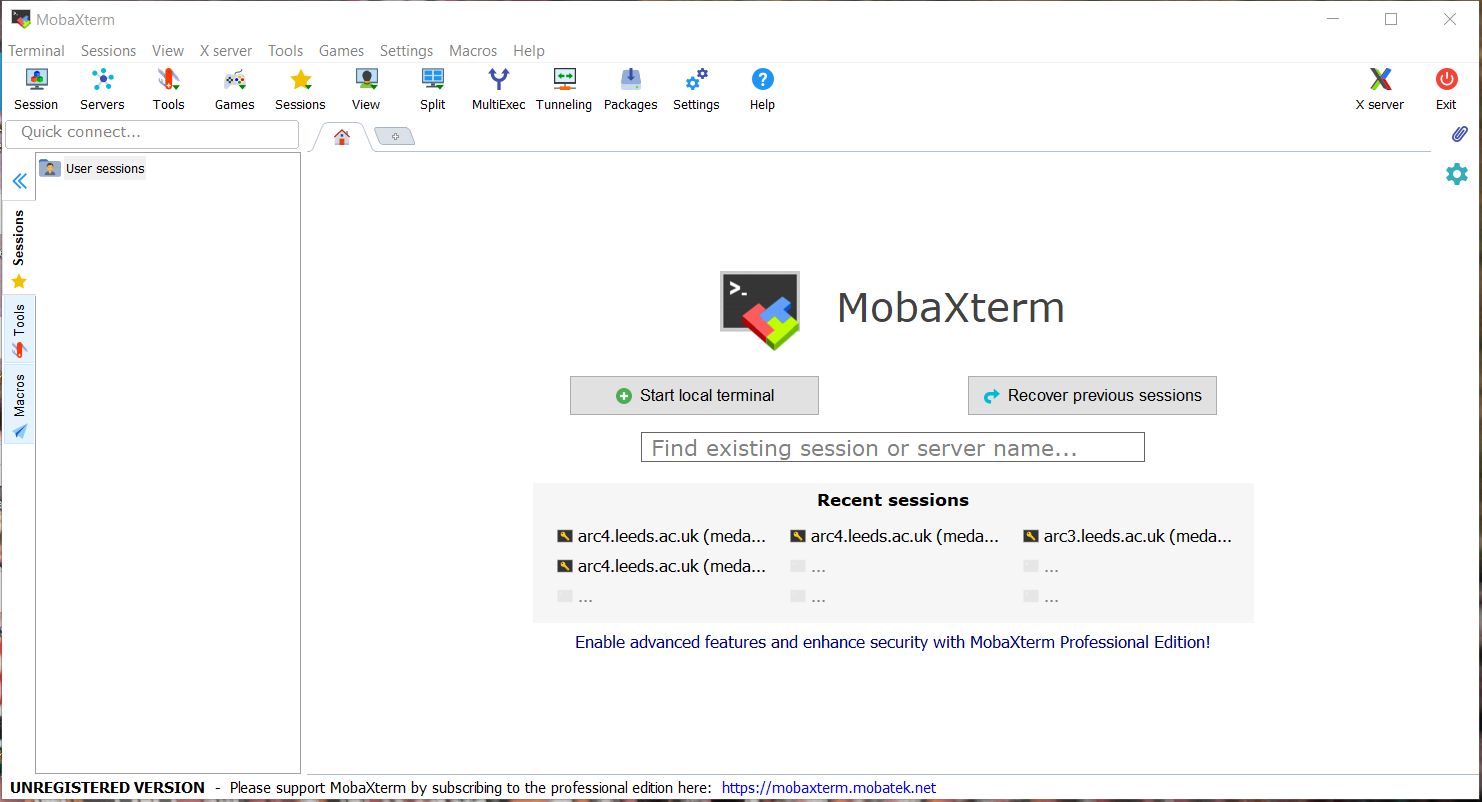
1. Navigate using a web browser to https://mobaxterm.mobatek.net/
2. Select Download
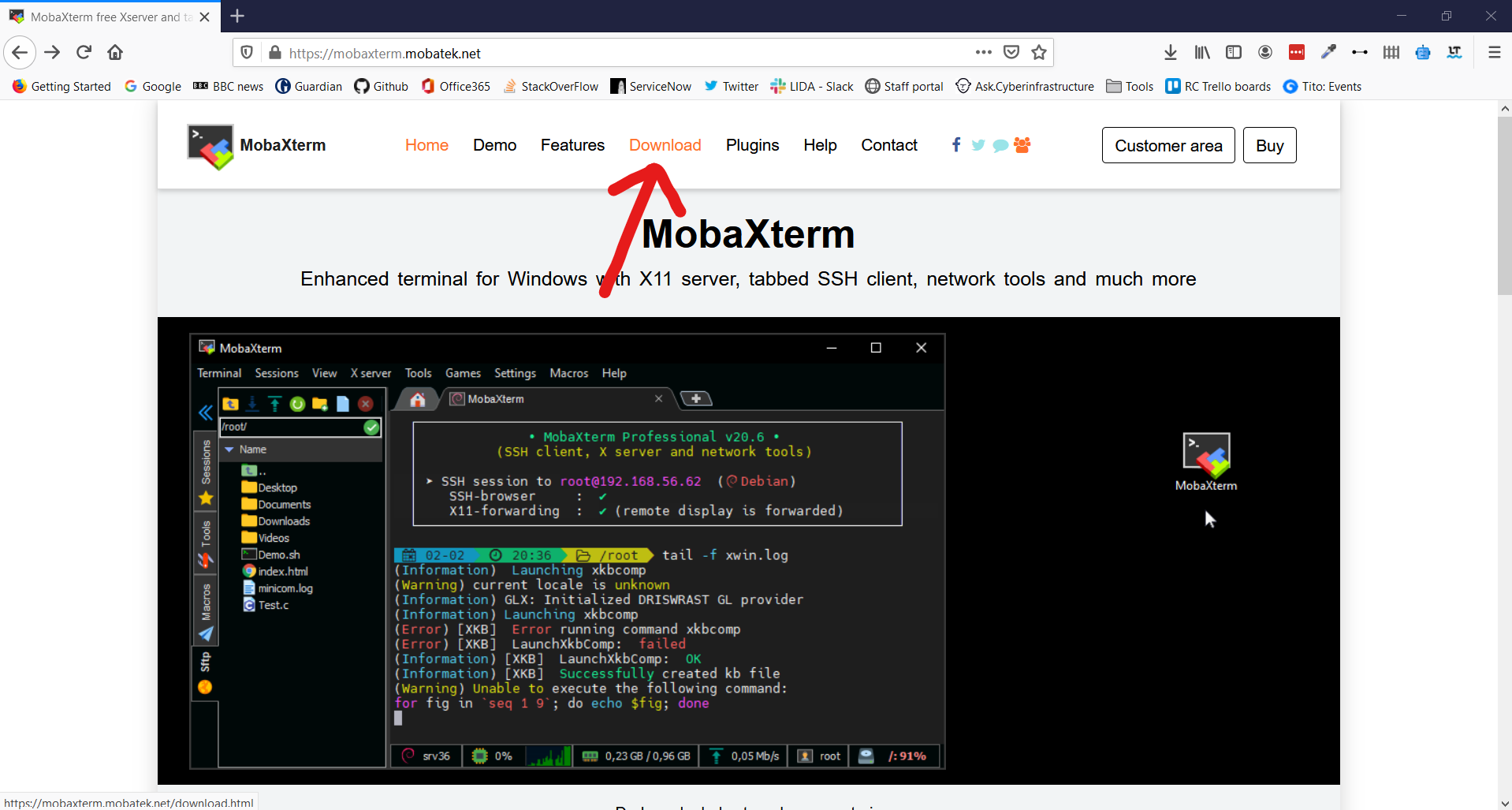
3. Click Download Now for the Home Edition
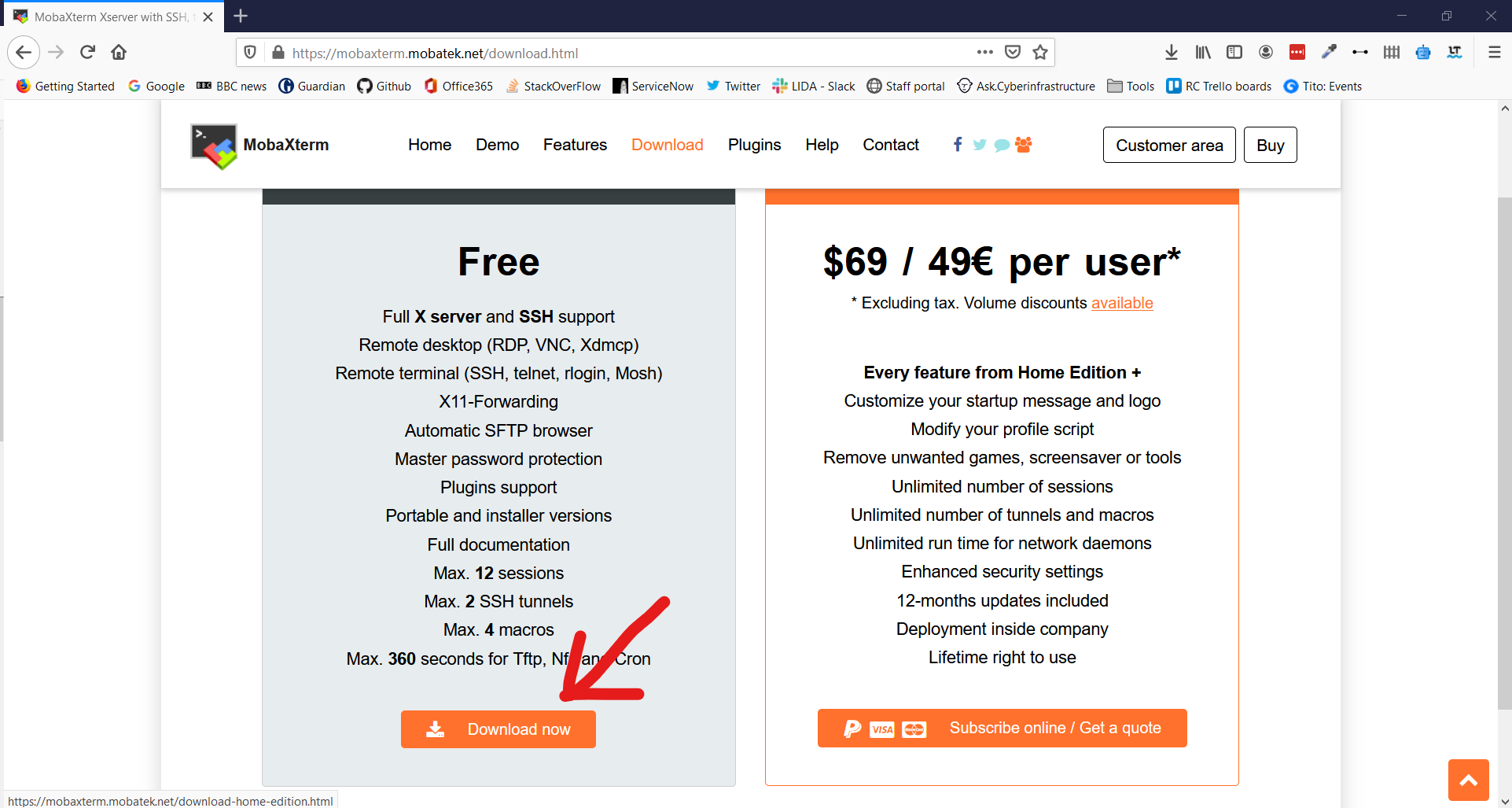
4. Select MobaXTerm Home Edition v21.0 (Portable edition)
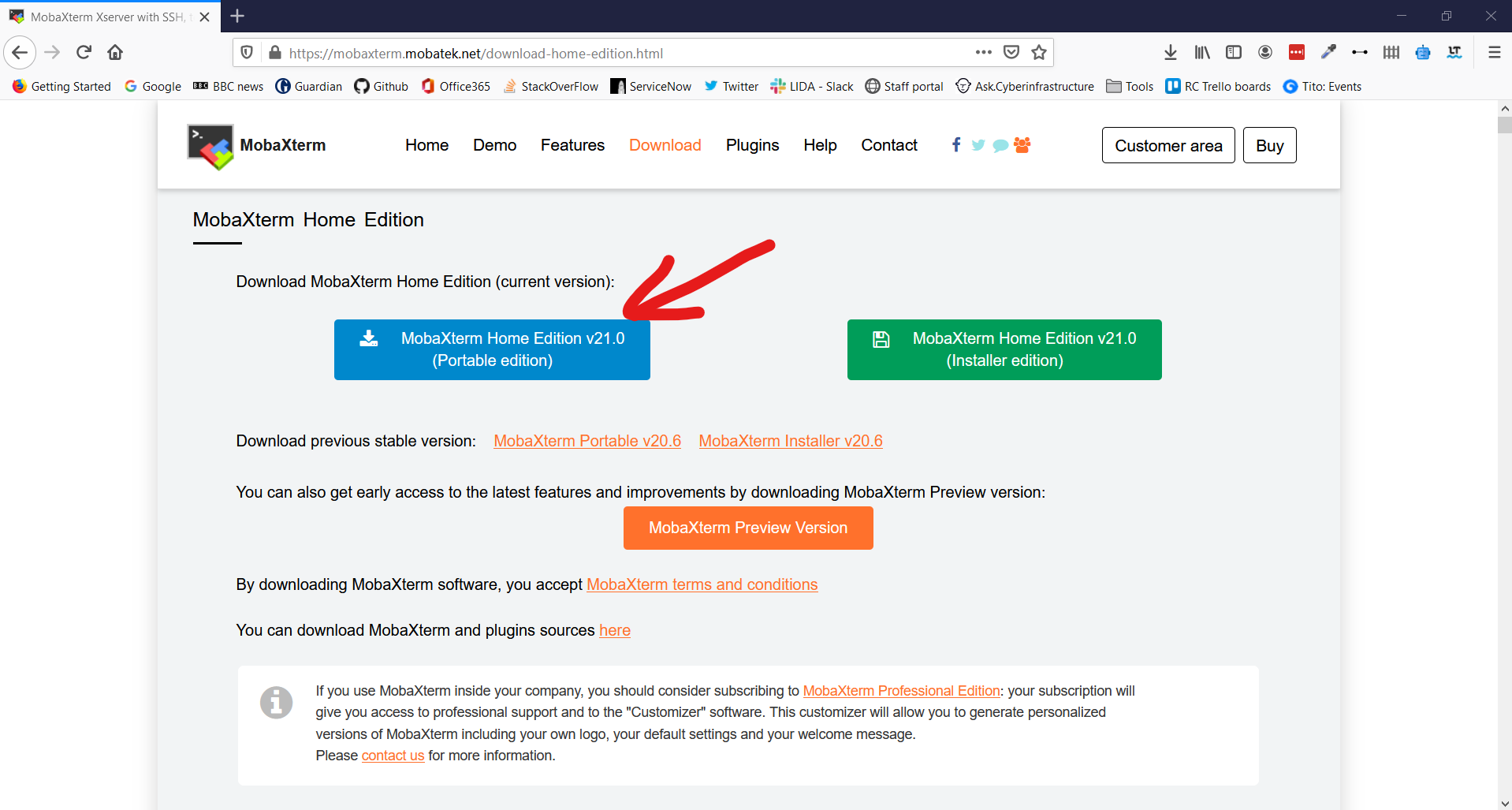
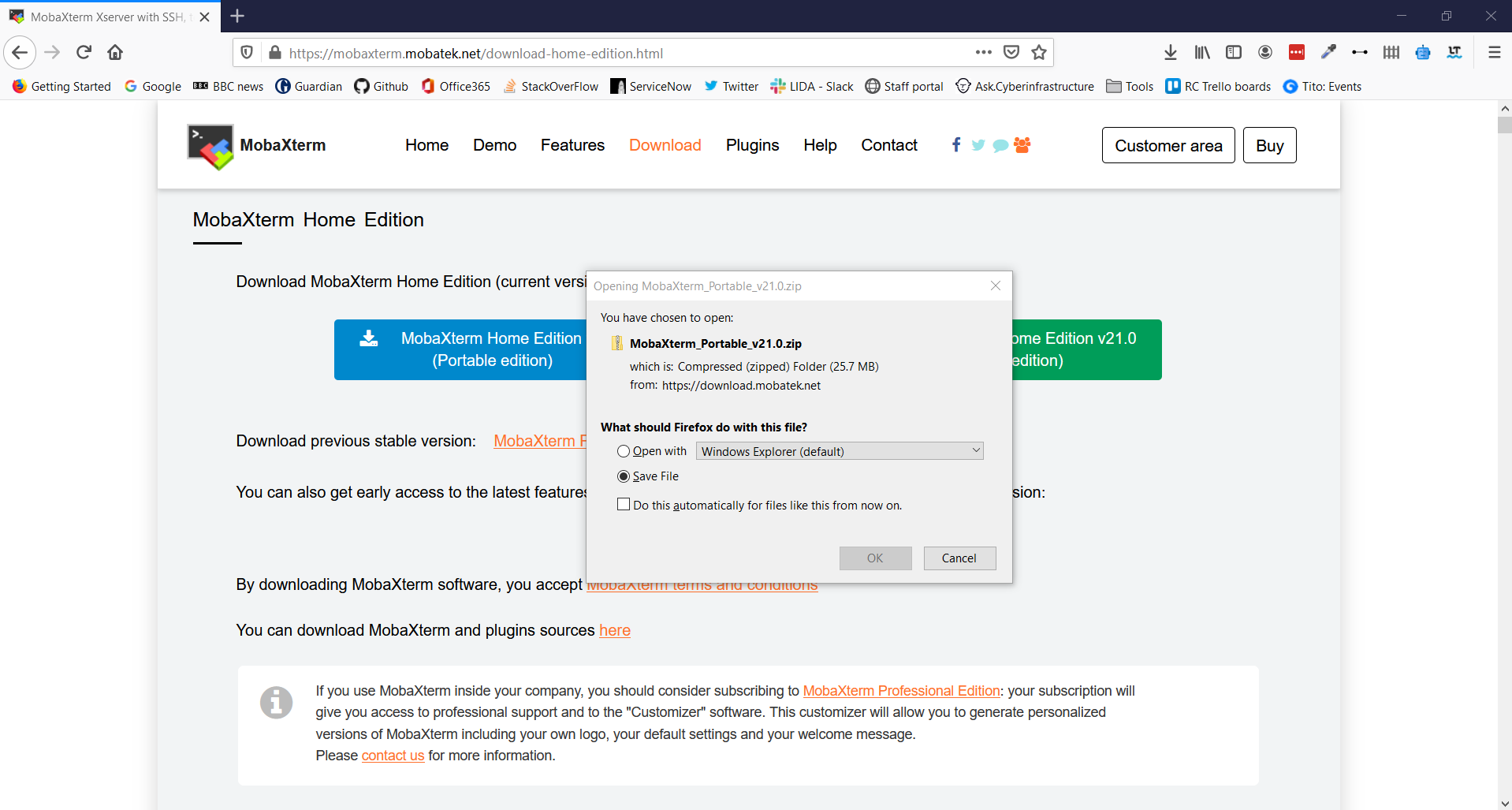
5. This opens a download prompt for a .zip file. Select Save File and click OK
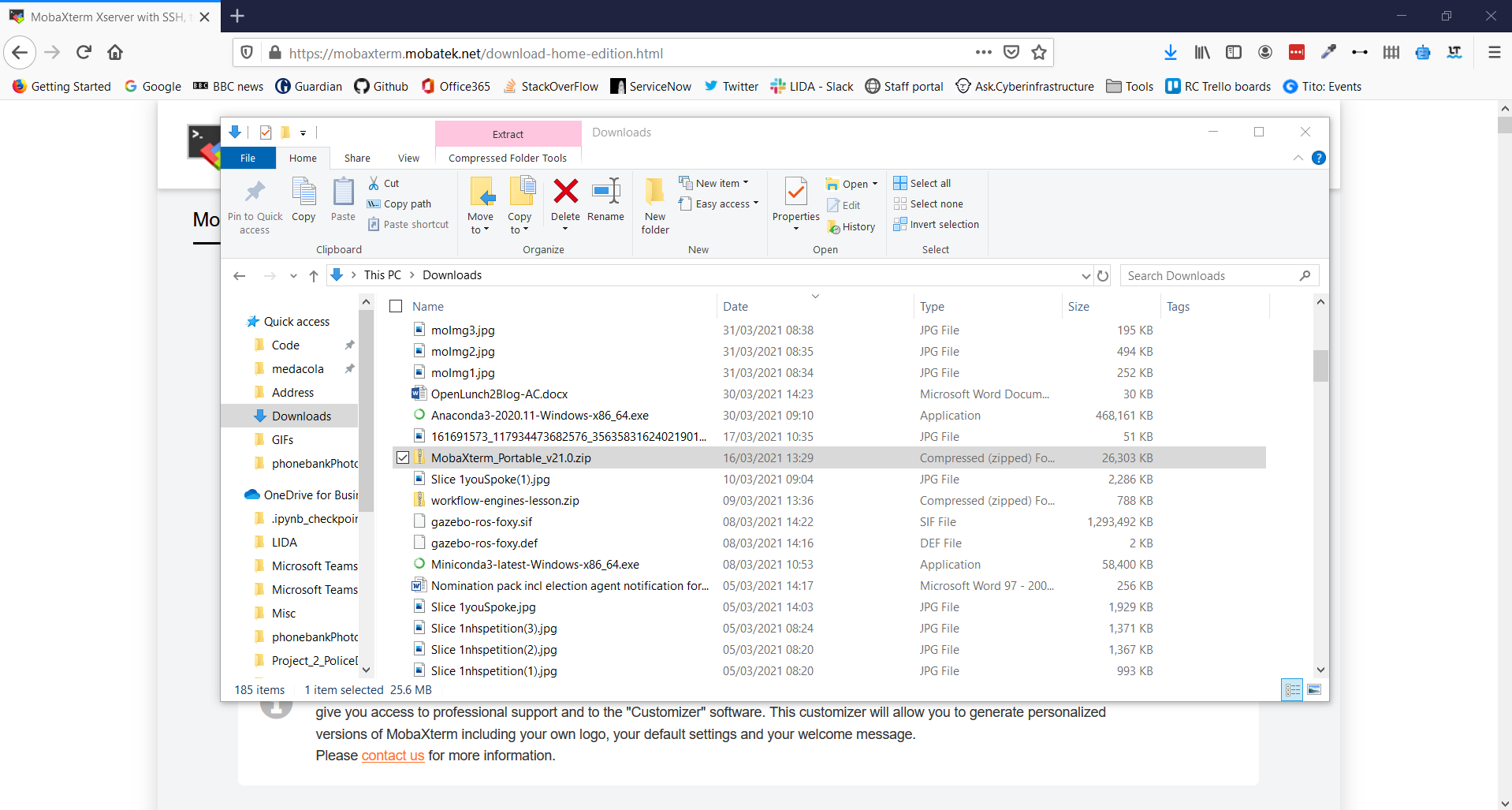
6. Go to your Download folder and find the .zip file you have just downloaded
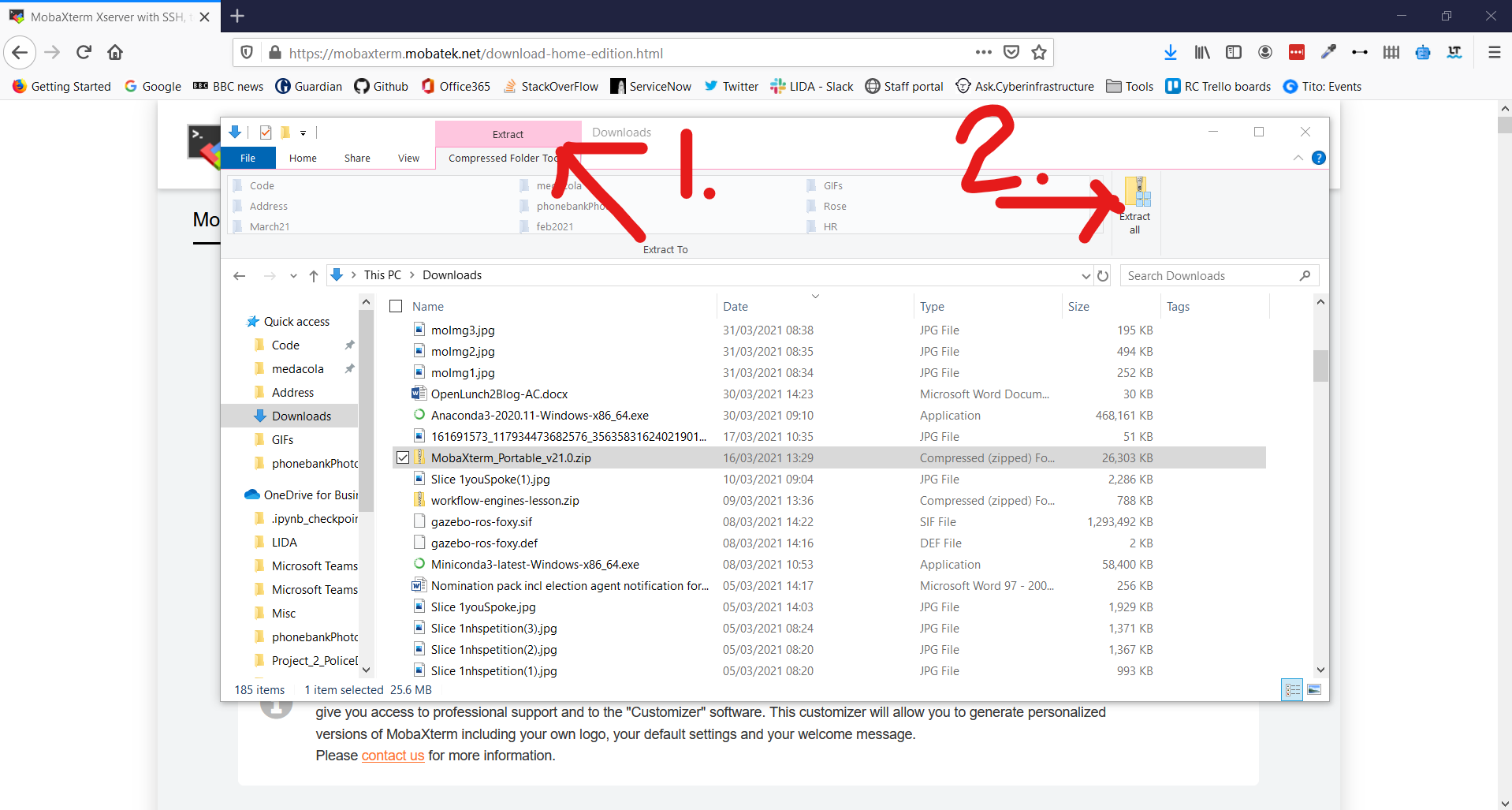
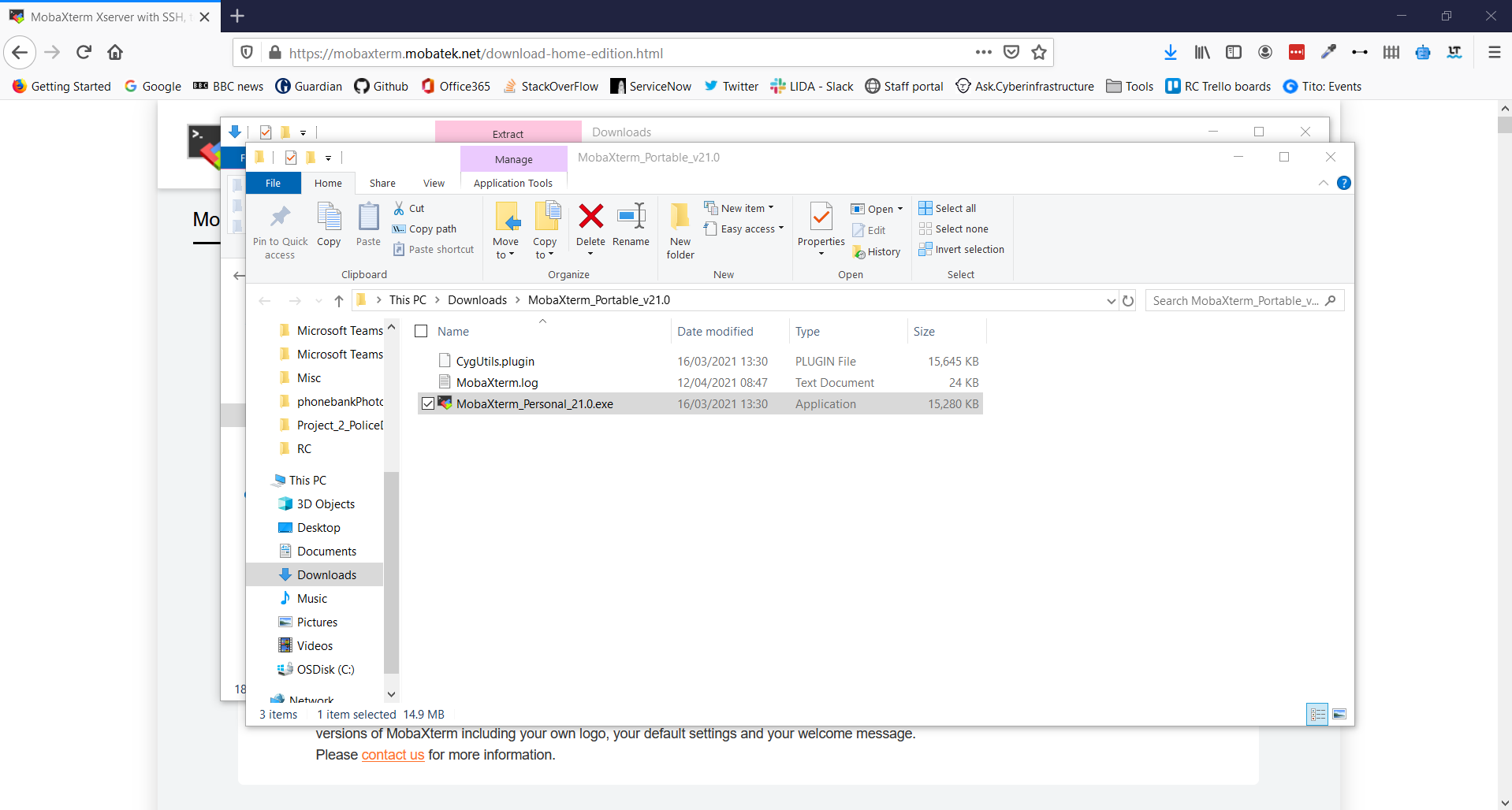
7. Click Extract in the Ribbon Bar and select Extract All
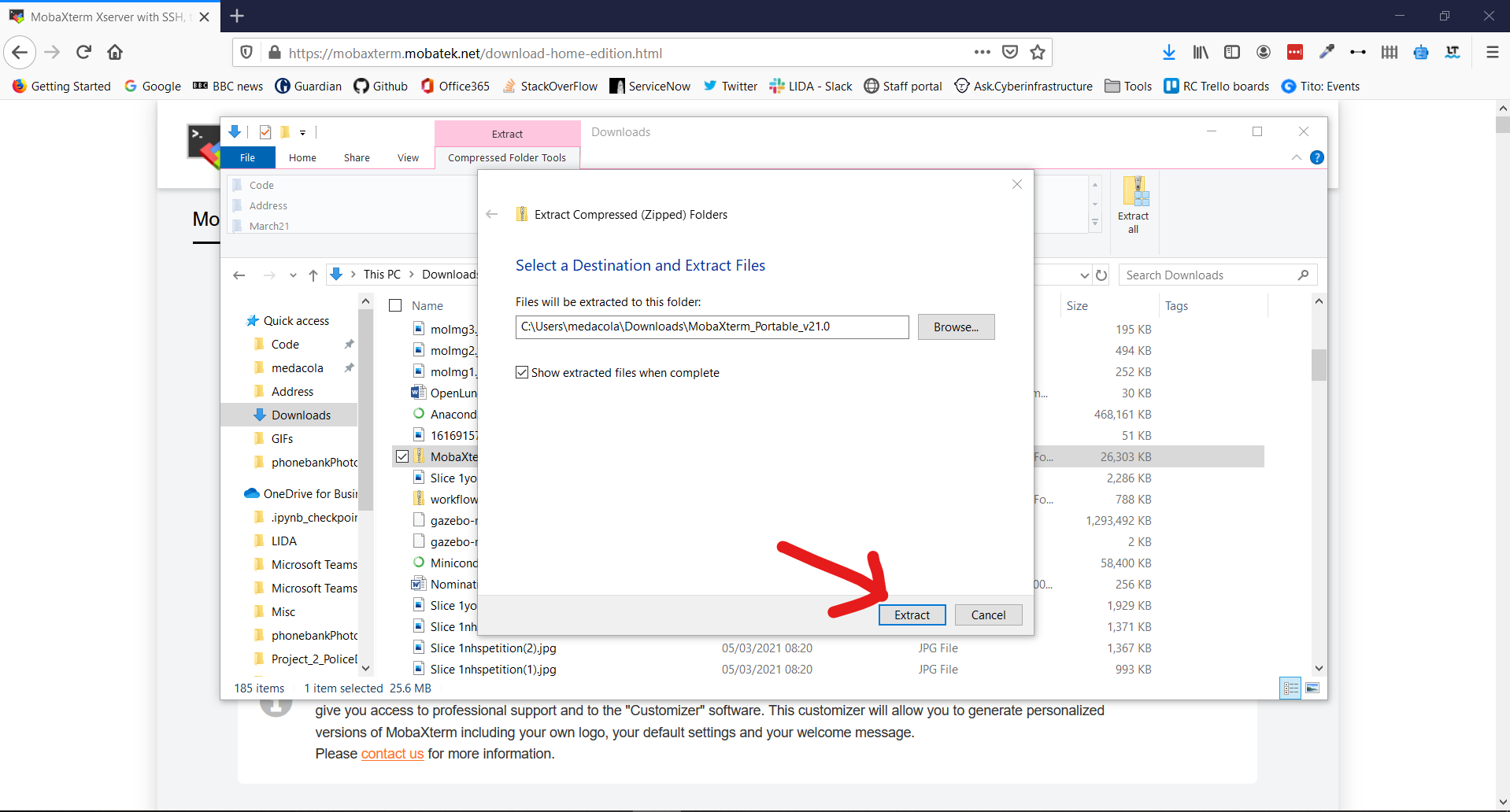
8. Using the Wizard window extract the folder at the suggested location
9. This should open the extracted folder immediately and allow you to double-click on the MobaXTerm_Personal_21.0 executable to start the application
**And you're all set for HPC1!🎉**
### For Mac/Linux Users:
**MacOS and Linux users do not need MobaXTerm** but can use your builtin Terminal application.
- You should follow the steps outlined in the bitesize video titled “Connecting to ARC off-campus via Linux/MacOS” on this page (https://arc.leeds.ac.uk/help/videos/)
- read carefully the documentation section here (https://arcdocs.leeds.ac.uk/getting_started/logon.html#connecting-from-linux-macos-systems) on connecting from Linux and MacOS, especially the section about configuring SSH for off-campus connections.
In order to connect to ARC when you're off campus you'll need to do some extra configuration so that your SSH connection goes via our `remote-access` server. The following steps outline how to setup this configuration:
1. Open a Terminal on your Linux/macOS machine
2. Create a directory called `.ssh` in your home directory (if one doesn't already exist)
```bash
$ mkdir ~/.ssh
```
3. Then open a text editor of your choice and create a file called `config` in your `.ssh` directory
```bash
# for instance use the simple nano text editor
$ nano ~/.ssh/config
```
4. Within this file include the following contents where `USERNAME` is replaced by your university username
```bash
Host *.leeds.ac.uk !remote-access.leeds.ac.uk
ProxyJump USERNAME@remote-access.leeds.ac.uk
User USERNAME
```
5. Save this file and attempt to connect using `ssh` to ARC4
```bash
# where USERNAME is your university username
$ ssh USERNAME@arc4.leeds.ac.uk
```
6. The first time you connect you will be prompted with several messages
```bash
The authenticity of host 'remote-access.leeds.ac.uk (129.11.190.34)' can't be established.
RSA key fingerprint is SHA256:SZN1IZ9rL0mhpnxhVG5uxbtVFMZAISg98X9ovHlh8Fg.
Are you sure you want to continue connecting (yes/no)?
```
Type Yes and hit `Enter`. You will then be prompted to enter your password for connecting to remote-access.leeds.ac.uk
```bash
Warning: Permanently added 'remote-access.leeds.ac.uk,129.11.190.34' (RSA) to the list of known hosts.
USERNAME@remote-access.leeds.ac.uk's password:
```
Please enter your password carefully, placeholder `*` characters will not appear but your keystrokes are being recorded. Once you have typed in your password press `Enter`.
You have now connected to remote-access but will now be prompted with similar messages for connecting to ARC4 itself.
```bash
The authenticity of host 'arc4.leeds.ac.uk (<no hostip for proxy command>)' can't be established.
ECDSA key fingerprint is SHA256:lPkw/7SrBqqQkS7lUm+tBN9JIGX9B8Gw7FdkK3MrpLM.
Are you sure you want to continue connecting (yes/no)?
```
Type Yes and hit `Enter`. You will then be prompted to enter your password for connecting to arc4.leeds.ac.uk
```bash
Warning: Permanently added 'arc4.leeds.ac.uk' (ECDSA) to the list of known hosts.
USERNAME@arc4.leeds.ac.uk's password:
```
Again enter your password carefully, placeholder `*` characters will not appear but your keystrokes are being recorded. Once you have typed in your password press `Enter`.
1. Once you have successfully entered your password you will be greeted by the following information on your Terminal
```bash
Advanced Research Computing Node 4 (arc4)
________________________________________________________________________
Information on using this facility may be obtained at the following URL:
http://www.arc.leeds.ac.uk
Please remember to acknowledge the use of ARC facilities in your
papers; details are on the website above.
________________________________________________________________________
[USERNAME@login1.arc4 ~]$
```
And success! You are all connected and ready to go! 🎉
## What's your name and where do you come from? And why do you want to use HPC?
- John Hodrien, Research Software Engineer, and I'm paid to use it. I've used HPC in some form since 1999, and have a particular love of Linux ;)
- Ahmed Ahmed, PhD student in Accounting and finance, want to use HPC to clean and manipulate a dataset of tweets
- Ollie Clark, Research Software Engineer in Research Computing. Paid to help people use it. Experience in databases, web and software engineering.
- Michael Zulyniak, Lecturer, Genomics
- Basudha Basu- Postdoctoral Researcher working with a lot of NGS data. I am learning how to do RNAseq analysis and my poor Mac laptop cannot cope! This is primarily why I am wanting to use HPC.
- Alex Derry, I am PhD student in chemistry and will be doing screens of fragments and validating hits.
- Emily Rolfe, PhD student in medical sciences, screening large libraries of small molecules and using molecular docking software to find hits to test for cardiometabolic disease :)
* Nick Smith. PhD student in molecular and cellular biology doing some cryo electron microscopy processing (hopefully!)
- Tanmay Bhore, PhD student in theoretical physics, Using the HPC for simulations of quantum systems.
- Rachael Lowe, PhD student in chemical engineering, using HPC for running modelling software
- Lauren Burton, PhD student in Earth and Environment. I use palaeoclimate modelling to inform our understanding of current and future climate change.
- Cristian Voinea, PhD student using HPC for quantum many body simulations.
- Jeni Sidwell, PhD student in evolutionary genomics
- Hugh Rice, postdoc in Geography, physicist, working on data science project for predicting physical and mental health outcomes from demographic data. :wave:
- Arundhati Kalyan, PhD student in climate science, using HPC to run climate model simulations
- Kenny Campbell, PhD student studying quantum communications. I want to use the HPC for simulating a distributed quantum computer with errors and noise
- Susannah Cowtan, PhD student in clinical trials methodology. I need to run simulations to optimise adaptive trials designs
- Xiaomian Tan, PhD student in School of Food Science and Nutrition, working on microRNA-sequencing
- Naomi Shakespeare-Rees, PhD student at School of Earth and Environment working on using machine learning techniques to investigate the geomagnetic field.
- Yiyu Wang, PhD student in School of Geography, CSAP cluster. I intend to use HPC to simulate pedestrian evacuation behaviours applying with Bayesian game theory.
- Nan Cui, PhD studnet in CSAP cluster, School of Geography. I want to use HPC for the simulation of pedestrian routes and behaviours in green spaces.
## Glossary of Terms
- Core: the basic computation unit of the CPU. This is unit that carries out the actual computations.
- Node: the physical machine/server. In current systems, a node would typically include one or more processors, as well as memory and other hardware.
- Parallel: run across multiple CPU cores, splitting the workload between them and solving the problem faster.
- Processor: the central processing unit (CPU) inside the node, which contains one or more cores.
- Serial: run on a single CPU core, solving one problem at a time
- Batch processing: Jobs that are run as and when the system is able to, rather than jobs run interactively
- Thread: A lightweight logical computation process. If a program is a sequence of instructions, this is the finger that works its way through the list of instructions. There can be many fingers, and you can have many more threads than you have hardware to run them.
- GPU: Graphical Processing Unit. Not necessarily graphical, but this type of hardware is good at some high parallelism problems. We have a small number of these in ARC3/4. Massive speed ups are possible - one GPU can be as powerful as 40 machines.
## Code along
`git clone https://github.com/arctraining/hpc1-files`
Marwaan Al-khafaji, turbulent combustion, school of Mechanical engineerig
 Sign in with Wallet
Connect another wallet
Sign in with Wallet
Connect another wallet