# Python Lists and For Loops
To create the list above, we:
Typed out a sequence of data points and separated each with a comma: 'Facebook', 0.0, 'USD', 2974676, 3.5
Surrounded the sequence with brackets: ['Facebook', 0.0, 'USD', 2974676, 3.5]
After we created the list, we stored it in the computer's memory by assigning it to a variable named row_1.

The syntax for retrieving individual list elements follows the model list_name[index_number]. For instance, the name of our list above is row_1 and the index number of the first element is 0 — following the list_name[index_number] model, we get row_1[0], where the index number 0 is in square brackets after the variable name row_1.

For instance, we can select the ratings for Facebook and Instagram, and find the average or the difference between the two:

In Python, we have two indexing systems for lists:
* Positive indexing: the first element has the index number 0, the second element has the index number 1, and so on.
* Negative indexing: the last element has the index number -1, the second to last element has the index number -2, and so on.

> row_1 = ['Facebook', 0.0, 'USD', 2974676, 3.5]
> row_2 = ['Instagram', 0.0, 'USD', 2161558, 4.5]
> row_3 = ['Clash of Clans', 0.0, 'USD', 2130805, 4.5]
> row_4 = ['Temple Run', 0.0, 'USD', 1724546, 4.5]
> row_5 = ['Pandora - Music & Radio', 0.0, 'USD', 1126879, 4.0]
> fb_rating_data = [row_1[0], row_1[3], row_1[-1]]
> insta_rating_data = [row_2[0], row_2[3], row_2[-1]]
> pandora_rating_data = [row_5[0], row_5[3], row_5[-1]]
> avg_rating = (fb_rating_data[2] + insta_rating_data[2] + pandora_rating_data[2])/3
When we need to select the first or last x elements (x stands for a number), we can use even simpler syntax shortcuts:
* a_list[:x] when we want to select the first x elements.
* a_list[-x:] when we want to select the last x elements.

So far, we've been working with a data set having five rows, and we've been storing each row as a list in a separate variable (the variables row_1, row_2, row_3, row_4, and row_5). If we had a data set with 5,000 rows, however, we'd end up with 5,000 variables, which will make our code messy and almost impossible to work with.
To solve this problem, we can store our five variables in a single list:

Above, we retrieved 3.5 in two steps: we first retrieved data_set[0], and then we retrieved fb_row[-1]. However, there's an easier way to retrieve the same value of 3.5 by chaining the two indices ([0] and [-1]) — the code data_set[0][-1] retrieves 3.5:

In our first example above, the process we wanted to repeat was "extract the last element for each list in app_data_set". This is how we can translate that process into Python syntax:

Let's try to get a better understanding of what happens above. Python isolates, one at a time, each list element from app_data_set, and assigns it to each_list (which basically becomes a variable that stores a list — we'll discuss this more on the next screen):

The code in the last diagram above is a much more simplified and abstracted version of the code below:


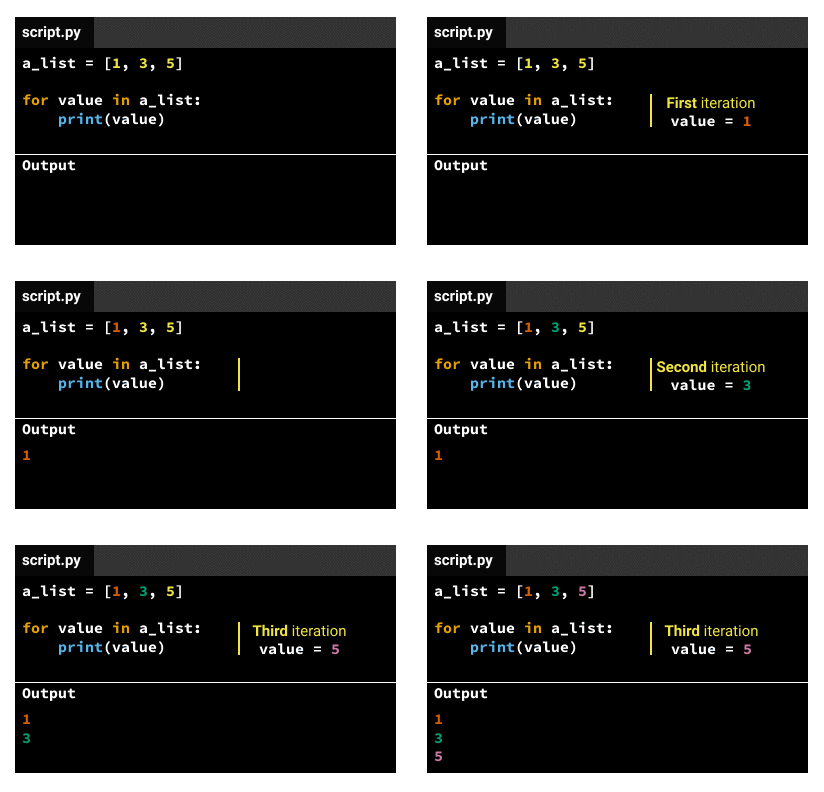
The indented code in the body gets executed the same number of times as elements in the iterable variable. If the iterable variable is a list that has three elements, the indented code in the body gets executed three times. We call each code execution an iteration, so there'll be three iterations for a list that has three elements. For each iteration, the iteration variable will take a different value, following this pattern:
Theoretically, we'd have two solutions:
We remove the first row from apps_data, and then we start over the iteration. We do that by:
Saving the header row to a separate variable named header
Saving apps_data[1:] back to apps_data — apps_data[1:] is a list slice that excludes the first row (the header row)
We iterate directly over apps_data[1:], which is a list slice that excludes the first row.

In the previous mission, we learned to convert strings to integers or floats (decimal numbers) using the int() and float() commands. The ratings are expressed as decimal points, so we'll convert them to floats using the float() command.

test
```pyhon=
opened_file = open('AppleStore.csv')
from csv import reader
read_file = reader(opened_file)
apps_data = list(read_file)
rating_sum = 0
for row in apps_data[1:]:
rating = float(row[7])
rating_sum += rating
print (rating_sum)
avg_rating = rating_sum / len(apps_data[1:])
print (avg_rating)
```
Now we'll learn an alternative way to compute the average rating value. Once we create a list, we can add (or append) values to it using the append() command.

test
```python=
opened_file = open('AppleStore.csv')
from csv import reader
read_file = reader(opened_file)
apps_data = list(read_file)
all_ratings = []
for row in apps_data[1:]:
all_ratings.append(float(row[7]))
print (all_ratings)
avg_rating = sum(all_ratings) / len(all_ratings)
print (avg_rating)
```
###### tags: `python`
 Sign in via Google
 Sign in via Facebook
 Sign in via X(Twitter)
 Sign in via GitHub
 Sign in via Dropbox
 Sign in with Wallet
Connect another wallet
Sign in with Wallet
Connect another wallet