# 도서 대여 시스템
Lv2 Intensive Coursework의 일환으로 MSA로 시스템을 구성하기 위한 계획단계부터 분석/설계/구현/운영까지의 프로젝트를 관리함
# 서비스 시나리오
도서대여 시스템 구현하기
### 기능적 요구사항
1. 사서가 도서를 입고한다.
1. 고객이 도서를 예약한다.
1. 고객에게 도서가 배송된다.
1. 도서 재고가 차감된다.
1. 도서 재고가 증가한다.
1. 고객이 예약을 취소한다.
1. 고객이 MyPage를 통해 예약 현황을 확인한다.
### 비기능적 요구사항
1. 트랜잭션
1. 고객이 예약을 취소하면 반드시 배송이 취소되어야한다.
1. 장애격리
1. 배송이 진행되지 않아도 예약은 가능해야 한다. (Circuit Breaker, Eventual Consistency)
2. 예약이 중단되어도 배송은 예정대로 진행해야 한다. (Circuit Breaker)
1. 성능
1. 상태가 바뀔때마다 MyPage에서 확인 가능해야 한다.
# 체크포인트
- 분석 설계
- 이벤트스토밍:
- 스티커 색상별 객체의 의미를 제대로 이해하여 헥사고날 아키텍처와의 연계 설계에 적절히 반영하고 있는가?
- 각 도메인 이벤트가 의미있는 수준으로 정의되었는가?
- 어그리게잇: Command와 Event 들을 ACID 트랜잭션 단위의 Aggregate 로 제대로 묶었는가?
- 기능적 요구사항과 비기능적 요구사항을 누락 없이 반영하였는가?
- 서브 도메인, 바운디드 컨텍스트 분리
- 팀별 KPI 와 관심사, 상이한 배포주기 등에 따른 Sub-domain 이나 Bounded Context 를 적절히 분리하였고 그 분리 기준의 합리성이 충분히 설명되는가?
- 적어도 3개 이상 서비스 분리
- 폴리글랏 설계: 각 마이크로 서비스들의 구현 목표와 기능 특성에 따른 각자의 기술 Stack 과 저장소 구조를 다양하게 채택하여 설계하였는가?
- 서비스 시나리오 중 ACID 트랜잭션이 크리티컬한 Use 케이스에 대하여 무리하게 서비스가 과다하게 조밀히 분리되지 않았는가?
- 컨텍스트 매핑 / 이벤트 드리븐 아키텍처
- 업무 중요성과 도메인간 서열을 구분할 수 있는가? (Core, Supporting, General Domain)
- Request-Response 방식과 이벤트 드리븐 방식을 구분하여 설계할 수 있는가?
- 장애격리: 서포팅 서비스를 제거 하여도 기존 서비스에 영향이 없도록 설계하였는가?
- 신규 서비스를 추가 하였을때 기존 서비스의 데이터베이스에 영향이 없도록 설계(열려있는 아키택처)할 수 있는가?
- 이벤트와 폴리시를 연결하기 위한 Correlation-key 연결을 제대로 설계하였는가?
- 헥사고날 아키텍처
- 설계 결과에 따른 헥사고날 아키텍처 다이어그램을 제대로 그렸는가?
- 구현
- [DDD] 분석단계에서의 스티커별 색상과 헥사고날 아키텍처에 따라 구현체가 매핑되게 개발되었는가?
- Entity Pattern 과 Repository Pattern 을 적용하여 JPA 를 통하여 데이터 접근 어댑터를 개발하였는가
- [헥사고날 아키텍처] REST Inbound adaptor 이외에 gRPC 등의 Inbound Adaptor 를 추가함에 있어서 도메인 모델의 손상을 주지 않고 새로운 프로토콜에 기존 구현체를 적응시킬 수 있는가?
- 분석단계에서의 유비쿼터스 랭귀지 (업무현장에서 쓰는 용어) 를 사용하여 소스코드가 서술되었는가?
- Request-Response 방식의 서비스 중심 아키텍처 구현
- 마이크로 서비스간 Request-Response 호출에 있어 대상 서비스를 어떠한 방식으로 찾아서 호출 하였는가? (Service Discovery, REST, FeignClient)
- 서킷브레이커를 통하여 장애를 격리시킬 수 있는가?
- 이벤트 드리븐 아키텍처의 구현
- 카프카를 이용하여 PubSub 으로 하나 이상의 서비스가 연동되었는가?
- Correlation-key: 각 이벤트 건 (메시지)가 어떠한 폴리시를 처리할때 어떤 건에 연결된 처리건인지를 구별하기 위한 Correlation-key 연결을 제대로 구현 하였는가?
- Message Consumer 마이크로서비스가 장애상황에서 수신받지 못했던 기존 이벤트들을 다시 수신받아 처리하는가?
- Scaling-out: Message Consumer 마이크로서비스의 Replica 를 추가했을때 중복없이 이벤트를 수신할 수 있는가
- CQRS: Materialized View 를 구현하여, 타 마이크로서비스의 데이터 원본에 접근없이(Composite 서비스나 조인SQL 등 없이) 도 내 서비스의 화면 구성과 잦은 조회가 가능한가?
- 폴리글랏 플로그래밍
- 각 마이크로 서비스들이 하나이상의 각자의 기술 Stack 으로 구성되었는가?
- 각 마이크로 서비스들이 각자의 저장소 구조를 자율적으로 채택하고 각자의 저장소 유형 (RDB, NoSQL, File System 등)을 선택하여 구현하였는가?
- API 게이트웨이
- API GW를 통하여 마이크로 서비스들의 집입점을 통일할 수 있는가?
- 게이트웨이와 인증서버(OAuth), JWT 토큰 인증을 통하여 마이크로서비스들을 보호할 수 있는가?
- 운영
- SLA 준수
- 셀프힐링: Liveness Probe 를 통하여 어떠한 서비스의 health 상태가 지속적으로 저하됨에 따라 어떠한 임계치에서 pod 가 재생되는 것을 증명할 수 있는가?
- 서킷브레이커, 레이트리밋 등을 통한 장애격리와 성능효율을 높힐 수 있는가?
- 오토스케일러 (HPA) 를 설정하여 확장적 운영이 가능한가?
- 모니터링, 앨럿팅:
- 무정지 운영 CI/CD (10)
- Readiness Probe 의 설정과 Rolling update을 통하여 신규 버전이 완전히 서비스를 받을 수 있는 상태일때 신규버전의 서비스로 전환됨을 siege 등으로 증명
- Contract Test : 자동화된 경계 테스트를 통하여 구현 오류나 API 계약위반를 미리 차단 가능한가?
## AS-IS 조직 (Horizontally-Aligned)

## TO-BE 조직 (Vertically-Aligned)

## Event Storming 결과
* MSAEZ 모델링 이벤트스토밍 결과:
* Revision 1
- 주문(order)/배송(delivery)/상품(product)로 Bounded Context 설정
- 주문에서 event별 상태값을 포함한 트랜젝션 중심로직을 설정하고 product에서 전체 재고 수량을 관리
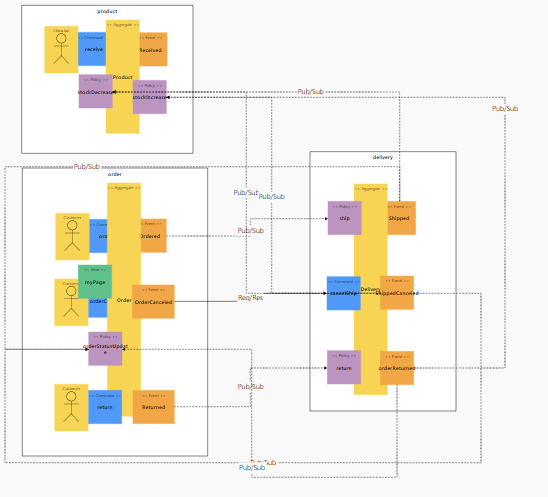
* MSAEZ 모델링 이벤트스토밍 최종:
- 예약(reservation)/배송(delivery)/상품(product)/개인화면(myPage)로 Bounded Context 설정
- 주문의 자연어 뜻이 혼동되어 예약으로 변경하고, 기존 주문에 집중된 로직을 분리함
- 전체 상품의 배송상태를 취합하여 조회가능한 myPage 신설
- 상품은 기본적인 수량변동만 취합
http://www.msaez.io/#/storming/mE0rA9pV1tPfOibSknVbRBhRqkY2/every/ccf36caac98aab7713fb43c28040d31f
<img width="658" alt="스크린샷 2021-02-24 오전 2 10 08" src="https://user-images.githubusercontent.com/34236968/108880349-8ddfaf80-7645-11eb-9b80-b7737dd1896c.png">
# 구현:
분석/설계 단계에서 도출된 헥사고날 아키텍처에 따라, 각 마이크로 서비스들을 스프링 부트 기반의 자바로 구현하였다. 구현한 각 서비스를 로컬에서 실행하는 방법은 아래와 같다 (각자의 포트넘버는 8081 ~ 808n 이다)
```
cd reservation
mvn spring-boot:run
cd delivery
mvn spring-boot:run
cd product
mvn spring-boot:run
cd mypage
mvn spring-boot:run
cd gateway
mvn spring-boot:run
```
## DDD 의 적용
- 각 업무단위 Bounded Context를 설정하고 Aggregate 객체를 Entity 로 선언하였다. 가능한 현업에서 이해할 수 있는 수준의 (유비쿼터스 랭귀지)를 사용하였으나 Entity 내부의 변수명은 MSA 구조에 맞추어 선언하였다.
Reservation 서비스
```
package book;
import javax.persistence.*;
import org.springframework.beans.BeanUtils;
import java.util.List;
import java.util.concurrent.TimeUnit;
import book.external.Delivery;
import book.external.DeliveryService;
@Entity
@Table(name="Reservation_table")
public class Reservation {
@Id
@GeneratedValue(strategy=GenerationType.AUTO)
private Long id;
private Long productId;
private Integer statusCode;
@PrePersist
public void onPrePersist(){
Reserved reserved = new Reserved();
BeanUtils.copyProperties(this, reserved);
reserved.publishAfterCommit();
}
@PreUpdate
public void onPreUpdate() throws Exception{
Canceled canceled = new Canceled();
BeanUtils.copyProperties(this, canceled);
canceled.publishAfterCommit();
Delivery delivery = new Delivery();
ReservationApplication.applicationContext.getBean(DeliveryService.class)
.cancel(delibery);
}
public Long getId() {
return id;
}
public void setId(Long id) {
this.id = id;
}
public Long getProductId() {
return productId;
}
public void setProductId(Long productId) {
this.productId = productId;
}
public Integer getStatusCode() {
return statusCode;
}
public void setStatusCode(Integer statusCode) {
this.statusCode = statusCode;
}
}
```
- Entity Pattern 과 Repository Pattern을 적용하여 JPA 를 통하여 다양한 데이터 소스 유형(H2/SQLite)에 대한 별도 처리가 없도록 데이터 접근 어댑터를 자동 생성하기 위하여 Spring Data REST 의 RestRepository 를 적용하였다
```
package book;
import org.springframework.data.repository.PagingAndSortingRepository;
public interface ReservationRepository extends PagingAndSortingRepository<Reservation, Long>{
}
```
- 적용 후 REST API 의 테스트
```
# reservation 서비스의 예약처리
http localhost:8081/reservations productId=1 statusCode=1
# product 서비스의 입고처리
http localhost:8083/products id=1 stock=10
# 도서 예약 상태 확인
http localhost:8084/myPages
```
## 폴리글랏 퍼시스턴스
myPage 서비스는 SQLLite DB를 적용하였다. Entity Pattern 과 Repository Pattern 적용과 데이터베이스의 설정 (application.yml) 만으로 sqlLite 에 부착시켰다
```
# pom.xml
<dependency>
<groupId>org.xerial</groupId>
<artifactId>sqlite-jdbc</artifactId>
<version>3.25.2</version>
</dependency>
# application.yml
spring:
profiles: default
jpa:
properties:
hibernate:
show_sql: true
format_sql: true
```
## 동기식 호출 과 Fallback 처리
분석 단계에서의 조건 중 하나로 예약(reservation)->배송(delivery) 간의 호출은 동기식 일관성을 유지하는 트랜잭션으로 처리하기로 하였습니다. 호출 프로토콜은 이미 앞서 Rest Repository 에 의해 노출되어있는 REST 서비스를 FeignClient 를 이용하여 호출하도록 한다.
- 배송 취소를 호출하기 위하여 Stub과 (FeignClient)를 이용하여 Service 대행 인터페이스(Proxy) 를 구현
```
# DeliveryService.java
@FeignClient(name="delivery", url="http://localhost:8082")
public interface DeliveryService {
@RequestMapping(method= RequestMethod.POST, path ="/deliveries")
public void cancel(@RequestBody Delivery delivery);
}
```
- 취소 후(@PostPersist) 배송을 취소하도록 처리
```
# Reservation.java
@PreUpdate
public void onPreUpdate() throws Exception{
Canceled canceled = new Canceled();
BeanUtils.copyProperties(this, canceled);
canceled.publishAfterCommit();
//Following code causes dependency to external APIs
// it is NOT A GOOD PRACTICE. instead, Event-Policy mapping is recommended.
//Delivery delivery = new Delivery();
// mappings goes here
book.external.Delivery delivery = new book.external.Delivery();
delivery.setId(getId()); //reservation Id
delivery.setOrderId(getId()); //reservation Id
delivery.setProductId(getProductId());
delivery.setStatusCode(3);
Thread.sleep(2000);//2초 슬립
ReservationApplication.applicationContext.getBean(DeliveryService.class).cancel(delivery);
System.out.println("##### TEST 2 : " + delivery.getStatusCode());
if(delivery.getStatusCode() == 3){
}
}
```
```
onPreUpdate 실행시 로그
##### TEST 2 : 3
Hibernate:
update
reservation_table
set
product_id=?,
status_code=?
where
id=?
Kafka 로그
{"eventType":"Canceled","timestamp":"20210223233224","id":1,"productId":null,"statusCode":null,"me":true}
{"eventType":"Canceled","timestamp":"20210223233305","id":1,"productId":1,"statusCode":2,"me":true}
{"eventType":"Canceled","timestamp":"20210223233316","id":1,"productId":null,"statusCode":null,"me":true}
delivery 상태값 변경
http http://localhost:8082/deliveries/1
Date: Tue, 23 Feb 2021 23:55:36 GMT
Transfer-Encoding: chunked
{
"_links": {
"delivery": {
"href": "http://localhost:8082/deliveries/1"
},
"self": {
"href": "http://localhost:8082/deliveries/1"
}
},
"orderId": 1,
"productId": null,
"statusCode": 3
}
```
```
동기호출 서비스 중지시
HTTP/1.1 500
Connection: close
Content-Type: application/json;charset=UTF-8
Date: Wed, 24 Feb 2021 01:39:44 GMT
Transfer-Encoding: chunked
{
"error": "Internal Server Error",
"message": "Could not commit JPA transaction; nested exception is javax.persistence.RollbackException: Error while committing the transaction",
"path": "/reservations",
"status": 500,
"timestamp": "2021-02-24T01:39:44.061+0000"
}
{"eventType":"Canceled","timestamp":"20210224013921","id":1,"productId":1,"statusCode":2,"me":true}
{"eventType":"Canceled","timestamp":"20210224013944","id":1,"productId":1,"statusCode":2,"me":true}
# delivery 재기동시 반영
{"eventType":"Delivered","timestamp":"20210224014034","id":1,"statusCode":2,"orderId":null,"productId":null,"me":true}
# 배송상태값 변경
transfer-Encoding: chunked
{
"_links": {
"delivery": {
"href": "http://localhost:8082/deliveries/1"
},
"self": {
"href": "http://localhost:8082/deliveries/1"
}
},
"orderId": null,
"productId": null,
"statusCode": 2
}
```
- 동기식 호출에서는 호출 시간에 따른 타임 커플링이 발생하며, 배송 시스템이 장애가 나면 배송취소가 불가능한 것을 확인:
```
# 배송(delivery) 서비스 ctrl+c
# 배송 실패
http localhost:8081/reservations productId=1 statusCode=1 #Fail
TTP/1.1 500
Connection: close
Content-Type: application/json;charset=UTF-8
Date: Wed, 24 Feb 2021 01:39:44 GMT
Transfer-Encoding: chunked
{
"error": "Internal Server Error",
"message": "Could not commit JPA transaction; nested exception is javax.persistence.RollbackException: Error while committing the transaction",
"path": "/reservations",
"status": 500,
"timestamp": "2021-02-24T01:39:44.061+0000"
}
```
```
# 배송(delivery) run
# 배송취소 성공 (delivery 상태값 3으로 업데이트)
http http://localhost:8081/reservations id=1 #Success
#delivery 재기동
{"eventType":"Delivered","timestamp":"20210224014034","id":1,"statusCode":2,"orderId":null,"productId":null,"me":true}
#delivery 상태값 반영
{
"_links": {
"delivery": {
"href": "http://localhost:8082/deliveries/1"
},
"self": {
"href": "http://localhost:8082/deliveries/1"
}
},
"orderId": null,
"productId": null,
"statusCode": 2
}
```
- 또한 과도한 요청시에 서비스 장애가 도미노 처럼 벌어질 수 있어 대응을 마련하였다. (서킷브레이커, 폴백 처리는 운영단계에서 설명한다.)
## 비동기식 호출 / 시간적 디커플링 / 장애격리 / 최종 (Eventual) 일관성 테스트
배송이 취소된 후에 변경된 상태값은 비동기방식으로 고객이 예약한 도서의 배송상태를 확인할 수 있다.
이를 위해 delivery canceled를 포함한 event가 발생할시 모든 상태값 변경은 updateStock page뷰로 전송한다
```
@StreamListener(KafkaProcessor.INPUT)
public void whenCanceled_then_DELETE_1(@Payload Canceled canceled) {
try {
if (canceled.isMe()) {
MyPage myPage = myPageRepository.findById(canceled.getId()).get();
myPage.setStatusCode(canceled.getStatusCode());
myPageRepository.save(myPage);
}
}catch (Exception e){
e.printStackTrace();
}
}
이외에도 동일한 로직으로 예약한 상품의 배송상태값 변화를 모두 myPage에서 조회 가능하게 하였습니다.
whenReserved_then_CREATE_1 (예약실행)
whenDelivered_then_UPDATE_1 (배송상태변경)
```
## 동기식 호출 / 서킷 브레이킹 / 장애격리
* 서킷 브레이킹 프레임워크의 선택: Spring FeignClient + Hystrix 옵션을 사용하여 구현함
시나리오는 예약(reservation) > 배송(delivery) 연결을 RESTful Req/Res 동기식으로 구현이 되어있고, 예약 취소 요청이 과도할 경우 CB 를 통하여 장애격리.
- Hystrix 설정: 요청처리 쓰레드에서 처리시간이 610ms 기준 CB 차단 설정
```
# application.yml
feign:
hystrix:
enabled: true
hystrix:
command:
default:
execution.isolation.thread.timeoutInMilliseconds: 610
```
# 운영
## CI/CD 설정
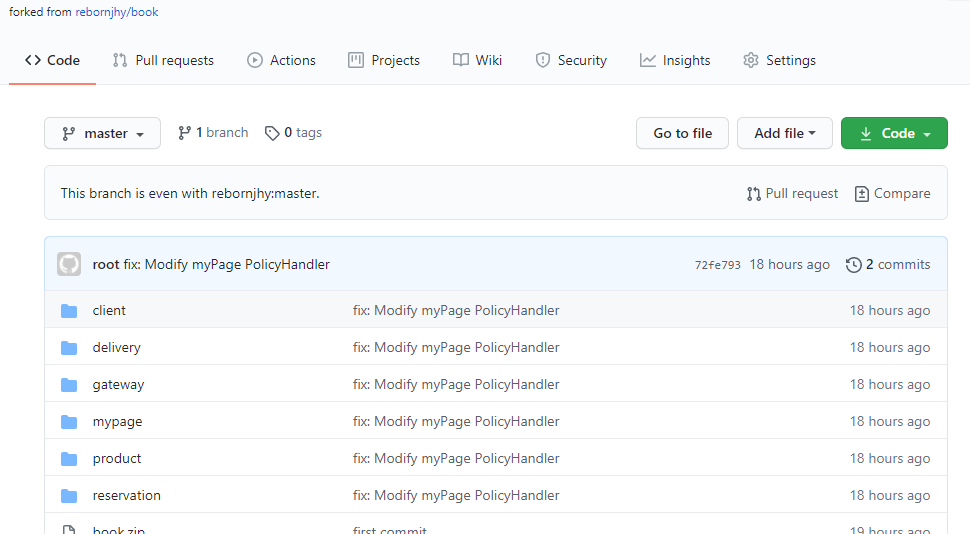
Github 내 소스 Commit 및 fork하여 소스 수정
## SLA 준수
### 셀프힐링
##### Liveness/Readiness Probe
유효하지 않은 path로 상태 체크 후 pod 확인(READY / RESTARTS)
```
# deployment.yml - 유효하지 않은 path 설정
readinessProbe:
httpGet:
path: '/test'
port: 8080
initialDelaySeconds: 10
timeoutSeconds: 2
periodSeconds: 5
failureThreshold: 10
livenessProbe:
httpGet:
path: '/test'
port: 8080
initialDelaySeconds: 120
timeoutSeconds: 2
periodSeconds: 5
failureThreshold: 5
# pod 확인 - RESTARTS 3회에 준비되지 않음 확인
NAME READY STATUS RESTARTS AGE
pod/reservation-f64ff99c9-nk5lb 0/1 Running 3 7m55
# describe 결과 - Warning Unhealthy 4s (x21 over 104s) kubelet, ip-192-168-88-143.ap-northeast-2.compute.internal Readiness probe failed: Get
Name: reservation-6c5db57c89-w44dv
Namespace: default
Priority: 0
Node: ip-192-168-88-143.ap-northeast-2.compute.internal/192.168.88.143
Start Time: Wed, 24 Feb 2021 10:29:35 +0900
Labels: app=reservation
pod-template-hash=6c5db57c89
Annotations: kubernetes.io/psp: eks.privileged
Status: Running
IP: 192.168.95.172
IPs:
IP: 192.168.95.172
Controlled By: ReplicaSet/reservation-6c5db57c89
Containers:
reservation:
Container ID: docker://95b46bef2da5009fb4264636a21e72a72c9e4e781a6261d53c322af1f7cfb22b
Image: 496278789073.dkr.ecr.ap-northeast-2.amazonaws.com/skteam01-reservation:latest
Image ID: docker-pullable://496278789073.dkr.ecr.ap-northeast-2.amazonaws.com/skteam01-reservation@sha256:90e3aa6c0f228e5aa80081bf0716775a2eaf144928a2686cda99dd7a56aed38d
Port: 8080/TCP
Host Port: 0/TCP
State: Running
Started: Wed, 24 Feb 2021 10:29:40 +0900
Ready: False
Restart Count: 0
Limits:
cpu: 10m
Requests:
cpu: 10m
Liveness: http-get http://:8080/products delay=120s timeout=2s period=5s #success=1 #failure=5
Readiness: http-get http://:8080/products delay=10s timeout=2s period=5s #success=1 #failure=10
Environment: <none>
Mounts:
/var/run/secrets/kubernetes.io/serviceaccount from default-token-k8chh (ro)
Conditions:
Type Status
Initialized True
Ready False
ContainersReady False
PodScheduled True
Volumes:
default-token-k8chh:
Type: Secret (a volume populated by a Secret)
SecretName: default-token-k8chh
Optional: false
QoS Class: Burstable
Node-Selectors: <none>
Tolerations: node.kubernetes.io/not-ready:NoExecute for 300s
node.kubernetes.io/unreachable:NoExecute for 300s
Events:
Type Reason Age From Message
---- ------ ---- ---- -------
Normal Scheduled 2m default-scheduler Successfully assigned default/reservation-6c5db57c89-w44dv to ip-192-168-88-143.ap-northeast-2.compute.internal
Normal Pulling 117s kubelet, ip-192-168-88-143.ap-northeast-2.compute.internal Pulling image "496278789073.dkr.ecr.ap-northeast-2.amazonaws.com/skteam01-reservation:latest"
Normal Pulled 117s kubelet, ip-192-168-88-143.ap-northeast-2.compute.internal Successfully pulled image "496278789073.dkr.ecr.ap-northeast-2.amazonaws.com/skteam01-reservation:latest"
Normal Created 117s kubelet, ip-192-168-88-143.ap-northeast-2.compute.internal Created container reservation
Normal Started 115s kubelet, ip-192-168-88-143.ap-northeast-2.compute.internal Started container reservation
Warning Unhealthy 4s (x21 over 104s) kubelet, ip-192-168-88-143.ap-northeast-2.compute.internal Readiness probe failed: Get http://192.168.95.172:8080/products: dial tcp 192.168.95.172:8080: connect: connection refused
```
### 오토스케일 아웃
HPA TARGET <unknown>/10% 이슈가 있었으나 resouces 제한으로 가능 - 트러블슈팅
```
# deployment.yml - resourses limits 10 낮게 설정
resources:
requests:
cpu: "10m"
limits:
cpu: "10m"
kubectl autoscale deploy pay --min=1 --max=10 --cpu-percent=10 # cpu-percent를 10%로 낮게 설정
kubectl get hpa # HPA 확인 max 10으로 autoscale 확인
# reservation Deployment/reservation 107%/10% 1 10 10 17m
kubectl get deploy -w # 모니터링 reservation이 max 10으로 autoscale 확인
# NAME READY UP-TO-DATE AVAILABLE AGE
# delivery 1/1 1 1 16h
# gateway 1/1 1 1 16h
# mypage 1/1 1 1 16h
# product 1/1 1 1 16h
# reservation 10/10 10 10 13m
# siege 1/1 1 1 15h
```
# 기타 - 시도한 것들..
### 부하 테스트
```
siege -c255 -t3600S -r10 --content-type "application/json" 'http://localhost:8081/reservations POST {"productId": 1, "statusCode": 1}'
```

 Sign in with Wallet
Connect another wallet
Sign in with Wallet
Connect another wallet