# MLE - Week 3
Summary
-------
- Regular Expression (RegEx)
- List Comprehensions
- Random
- Generator, Map, Zip
- Arguments and Keyword Arguments
- Others
RegEx
-----
### Raw strings
> :point_right: A raw string completely ignores all escape characters and prints any backslash that appears in the string. [[3]]
:penguin: Raw strings are helpful if you are typing string values that **contain many backslashes**, such as the strings used for Windows file paths like r'C:\Users\Al\Desktop' or **regular expressions**.
```python=
>>> pattern=r'A word\tAnother word\nA new line'
>>> print(pattern)
'A word\tAnother word\nA new line'
```
### RegEx functions
| Function | Description |
| -------- | ----------------------------------------------------------------- |
| `findall` | Returns **a list of strings** containing all matches |
| `search` | Returns a [Match object](#Match-object) if there is a match **anywhere** in the string |
|`match`|Returns a [Match object](#Match-object) if there is a match starting from **the beginning** of the string. :exclamation: avoid to use this:exclamation:|
| `split` | Returns **a list of strings** where the string has been split at each match |
| `sub` | Replaces one or many matches with a string |
Both `search` and `match` will return `None` if not found.
Example:
```python=
import re
txt = "The rain in Spain"
# findall
>>> x = re.findall("ai", txt)
>>> print(x)
['ai', 'ai']
# search
>>> x = re.search("ai", txt)
>>> print(x)
<_sre.SRE_Match object; span=(5, 7), match='ai'>
# match
>>> x = re.match("ai", txt)
>>> print(x)
None
>>> x = re.match(".*ai", txt)
>>> print(x)
<re.Match object; span=(0, 16), match='The rain in Spai'>
# split
# split the string at the first white-space character
>>> x = re.split("\s", txt, 1)
>>> print(x)
['The', 'rain in Spain']
>>> x = re.split("\s", txt)
>>> print(x)
['The', 'rain', 'in', 'Spain']
# sub
# replace the first two occurrences of a white-space character with the digit 9
>>> x = re.sub("\s", "9", txt, 2)
>>> print(x)
'The9rain9in Spain'
>>> x = re.sub("\s", "9", txt)
>>> print(x)
'The9rain9in9Spain'
```
:penguin: A better way to define the regEx that helps it readable:
```python=
phoneRegex = re.compile(r'''(
(\d{3}|\(\d{3}\))? # area code
(\s|-|\.)? # separator
(\d{3}) # first 3 digits
(\s|-|\.) # separator
(\d{4}) # last 4 digits
(\s*(ext|x|ext.)\s*(\d{2,5}))? # extension
)''', re.VERBOSE)
```
### Match object
> :point_right: The Match object has properties and methods used to retrieve information about the search, and the result [[4]]:
> - `.span()` returns a tuple containing the `start-`, and `end` positions of the match.
> - `.string` returns the string passed into the function
> - `.group()` returns the part of the string where there was a match
Example:
```python=
>>> txt = "The rain in Spain in Spring"
>>> x = re.search(r"(\bS\w+)", txt) # search the first match only
>>> print(x.span())
(12, 17)
>>> print(x.string)
'The rain in Spain in Spring'
>>> print(x.group())
'Spain'
>>> print(x.groups())
('Spain',)
>>> x = re.findall(r"(\bS\w+)", txt)
>>> print(x)
['Spain', 'Spring']
```
### Character classes
Cheatsheet: https://regexr.com
| Character | classes |
| ----------------------------- | -------------------------------------------------------------------------- |
| `.` | any character **except newline** - [matching newlines with the Dot character](#Matching-newlines-with-the-Dot-character) |
| `\w\d\s` | word, digit, whitespace |
| `\W\D\S` | not word, digit, whitespace |
| `[abc]` | any of a, b, or c |
| `[^abc]` | not a, b, or c |
| `[a-g]` | character between a & g |
| **Anchors** | |
| `^abc$` | start / end of the string |
| `\b\B` | word, not-word boundary |
| **Escaped characters** | |
| `\.\*\\` | escaped special characters - [more details](#Escape-character) |
| `\t\n\r` | tab, linefeed, carriage return |
| **Groups & Lookaround** | |
| `(abc)` | capture group |
| `\1` | backreference to group #1 |
| `(?:abc)` | non-capturing group |
| `(?=abc)` | positive lookahead |
| `(?!abc)` | negative lookahead |
| **Quantifiers & Alternation** | |
| `a* a+ a?` | 0 or more, 1 or more, 0 or 1 |
| `a{5} a{2,}` | exactly five, two or more |
| `a{1,3}` | between one & three |
| `a+? a{2,}?` | match as few as possible - [more details](#Greedy-and-Non-greedy-matching) |
| `ab|cd` | match ab or cd |
### Matching newlines with the Dot character
:penguin: By passing `re.DOTALL` as the second argument to `re.compile()`, you can make the dot character match *all* characters, including the newline character. [[2]]
```python=
>>> newlineRegex = re.compile('.*', re.DOTALL)
>>> newlineRegex.search('Serve the public trust.\nProtect the innocent.
\nUphold the law.').group()
'Serve the public trust.\nProtect the innocent.\nUphold the law.'
```
### Escape character
:point_right: If you want to detect these characters as part of your text pattern, you need to escape them with a backslash:
`\. \^ \$ \* \+ \? \{ \} \[ \] \\ \| \( \)`
:penguin: In sets, `+, *, .,|, (), $,{}` has no special meaning.[[4]]
### Greedy and Non-greedy matching
> :point_right: Python’s regular expressions are *greedy* by **default**, which means that in ambiguous situations they will **match the longest string possible**.
The *non-greedy* (also called *lazy*) version of the braces, which **matches the shortest string possible**, has the closing brace followed by **a question mark**.[[2]]
Example:
```python=
>>> greedyHaRegex = re.compile(r'(Ha){3,5}')
>>> mo1 = greedyHaRegex.search('HaHaHaHaHa')
>>> mo1.group()
'HaHaHaHaHa'
>>> nongreedyHaRegex = re.compile(r'(Ha){3,5}?')
>>> mo2 = nongreedyHaRegex.search('HaHaHaHaHa')
>>> mo2.group()
'HaHaHa'
```
:bangbang: The **question mark** can have **two** meanings in regular expressions: declaring a *non-greedy* match or flagging an *optional* group. These meanings are entirely unrelated.[[2]]
List Comprehension
------------------
```python=
even_numbers = [i for i in range(5) if i % 2 == 0] # [0, 1, 2,3,4]
pairs = [(x, y) for x in range(2) for y in range(3)]
print(x for x in range[5]) # TypeError: 'type' object is not subscriptable
```
:exclamation: Should not use more than 2 nested loop for a better readability.
Generator
---------
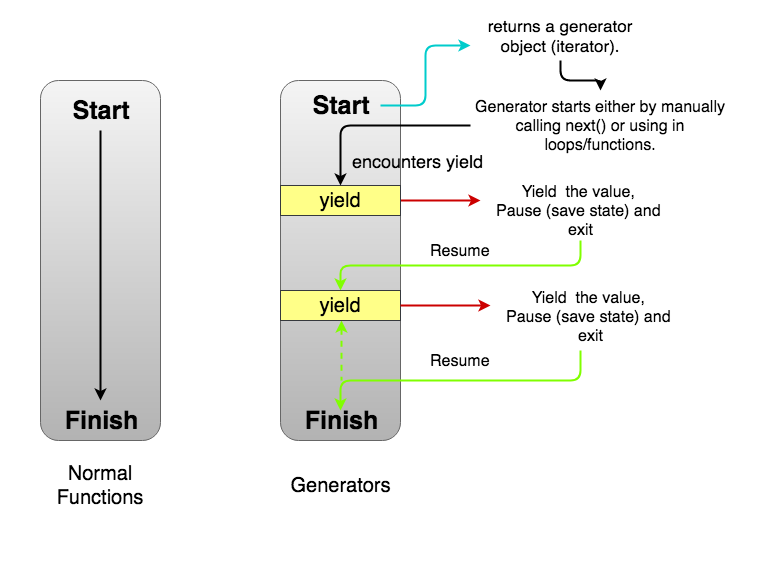
:point_right: Generator functions allow you to declare a function that behaves like an iterator, i.e. it can be used in a `for` loop [[8]].
:penguin: To make a function as a generator, use keyword `yield` instead of `return`.
:penguin: The reason to use a generator is because of the huge amount of data which can't be loaded into a limitted memory. The generator will load the data on-demand.
Random
------
`Random` is a special built-in [generator](#Generator).
| Type | Functions | Descriptions |
| ---------------------- | ----------------------------------------------------------------------------------------------------------- | --------------------------------------------------------------------------------------------------------------------------------- |
| Bookkeeping functions | `random.seed(a=None)` | Initialize the random number generator. If `a` is omitted or `None`, the current **system time** is used. |
| Functions for *integers* | `random.randrange(stop)`<br/><br/>`random.randrange(start, stop[, step])` <br/><br/> `random.randint(a, b)` | Return a randomly selected element from `range(start, stop, step)`<br/><br/>:bangbang:`random.randint(a, b) = randrange(a, b+1)`. |
|Functions for *sequences*|`random.choice(seq)`|Return a random element from the non-empty *sequence* `seq`. If `seq` is empty, raises `IndexError` [[7]].<br/><br/>:bangbang: *sequence* type includes: `str` `list` `tuple` `range` ([details](https://hackmd.io/gAhGf8pEQVaIkX7tiBy7tQ?view#Comparison))<br/><br/>:bangbang: `random.choice(sequence) = sequence[random.randint(0, len(sequence) – 1]`|
||`random.shuffle(x)`|Shuffle the *sequence* `x` in place.|
|Real-valued distributions|`random.random()`|Return the next random *floating point number* in the range `[0.0, 1.0)`.|
Map
---
:point_right: More often than not, you want to apply a `function` (that is designed to work with **1 single input**) on a `list` of values.
```python=
def add_2(n):
return n+2
# We double all numbers using map()
numbers = [1, 2, 3, 4]
result = map(add_2, numbers)
```
`map object` is a sort of [generator](#Generator); it only generates value upon request.
Zip
---
:point_right: The `zip` function transforms multiple `iterables` into a single `iterable` of `tuples`.
<img src="https://miro.medium.com/max/1200/1*rzvEG0LqZBSfa1rJgNOJrQ.png" width=400>
```python=
>>> list(zip([1,2,3], {'a', 'b', 'c'}))
[(1, 'a'), (2, 'b'), (3, 'c')]
>>> list(zip(range(3), range(4,7)))
[(0, 4), (1, 5), (2, 6)]
>>> list(zip({'a':1, 'b': 2}, {'c':3, 'd':4}))
[('a', 'c'), ('b', 'd')]
```
`zip object` is a sort of [generator](#Generator); it only generates value upon request.
Arguments and Keyword Arguments
-------------------------------
Arguments (`*args` - `tuple`) and Keyword arguments (`**kwargs` - `dict`) are useful when we do not know how many function inputs in advance.
```python=
def big_function(*args, **kwargs):
print('args = ', args) # this is a tuple
print('kargs = ', kwargs) # this is a dictionary
print("----------------")
for name in args:
print(f'Hi {name}')
for key in kwargs:
print(f'{key}: {kwargs[key]}')
>>> big_function('Minh', 'Tom',1, ['Quan'], coder=True, school=True, test=False, hihi=6) # Valid
>>> big_function('Tom','Quan','Nhan', year='1992', school='coderschool', 'Ai') # SyntaxError: positional argument follows keyword argument
```
Others
------
### Iterators
:point_right: The iterator objects themselves are required to support the following two methods, which together form the iterator protocol [[6]]:
- `iterator.__iter__()`: allow both *containers* and *iterators* to be used with the **for** and **in** statements.
- `iterator.__next__()`: return the *next item* from the container. If there are no further items, raise the **StopIteration** exception.
What built-in data type is an iterator?
- Mutable: `list` `set` `dict`
- Immutable: `string` `tuple` `range`
#### Exception Handling
:point_right: When code in a `try` clause causes an error, the program execution immediately moves to the code in the `except` clause. After running that code, the execution continues as normal. [[1]]
```python=
def spam(divideBy):
try:
return 42 / divideBy
except ZeroDivisionError:
print('Error: Invalid argument.')
```
### `PyInputPlus` library for input validation
PyInputPlus has several functions for different kinds of input [[5]]:
| Method | Description |
| --------------- | ------------------------------------------------------------------------------------------------------------------------------------------------------------- |
| `inputStr()` | Is like the built-in `input()` function but has the general `PyInputPlus` features. You can also pass a custom validation function to it |
| `inputNum()` | Ensures the user enters a number and returns an `int` or `float`, depending on if the number has a decimal point in it |
| `inputChoice()` | Ensures the user enters one of the provided choices |
| `inputMenu()` | Is similar to `inputChoice()`, but provides a menu with *numbered* or *lettered* options |
| `inputDatetime()` | Ensures the user enters *a date and time* |
| `inputYesNo()` | Ensures the user enters a `yes` or `no` response |
| `inputBool()` | Is similar to `inputYesNo()`, but takes a `True` or `False` response and returns a *Boolean* value |
| `inputEmail()` | Ensures the user enters a valid email address |
| `inputFilepath()` | Ensures the user enters a valid file path and filename, and can optionally check that a file with that name exists |
| `inputPassword()` | Is like the built-in input(), but displays `*` characters as the user types so that passwords, or other sensitive information, aren’t displayed on the screen |
These functions will automatically reprompt the user for as long as they enter invalid input.
```python=
>>> import pyinputplus as pyip
>>> response = pyip.inputNum()
five
'five' is not a number.
42
>>> response
42
```
The `min`, `max`, `greaterThan`, and `lessThan` Keyword Arguments:
```python=
>>> response = pyip.inputNum('Enter num: ', min=4, lessThan=6)
Enter num: 6
Input must be less than 6.
Enter num: 3
Input must be at minimum 4.
Enter num: 4
>>> response
4
```
The `blank` Keyword Argument:
```python=
>>> response = pyip.inputNum(blank=True)
(blank input entered here)
>>> response
''
```
The `limit`, `timeout`, and `default` Keyword Arguments:
```python=
>>> import pyinputplus as pyip
# limit
>>> response = pyip.inputNum(limit=2)
blah
'blah' is not a number.
Enter num: number
'number' is not a number.
Traceback (most recent call last):
--snip--
pyinputplus.RetryLimitException
# timeout
>>> response = pyip.inputNum(timeout=10)
42 (entered after 10 seconds of waiting)
Traceback (most recent call last):
--snip--
pyinputplus.TimeoutException
# default
>>> response = pyip.inputNum(limit=2, default='N/A')
hello
'hello' is not a number.
world
'world' is not a number.
>>> response
'N/A'
```
The `allowRegexes` and `blockRegexes` Keyword Arguments:
```python=
>>> import pyinputplus as pyip
# allowRegexes
>>> response = pyip.inputNum(allowRegexes=[r'(I|V|X|L|C|D|M)+', r'zero'])
XLII
>>> response
'XLII'
# blockRegexes
>>> response = pyip.inputNum(blockRegexes=[r'[02468]$'])
42
This response is invalid.
44
This response is invalid.
43
>>> response
43
```
[1]: https://automatetheboringstuff.com/2e/chapter3/
[2]: https://automatetheboringstuff.com/2e/chapter7/
[3]: https://automatetheboringstuff.com/2e/chapter6/
[4]: https://www.w3schools.com/python/python_regex.asp
[5]: https://automatetheboringstuff.com/2e/chapter8/
[6]: https://docs.python.org/3/library/stdtypes.html#iterator-types
[7]: https://docs.python.org/3/library/random.html
[8]: https://wiki.python.org/moin/Generators
###### tags: `mle` `week3` `regex` `generator` `map` `zip` `random`
 Sign in with Wallet
Connect another wallet
Sign in with Wallet
Connect another wallet