# Scrum facilitation
----
## Responsibilites
- Team organisation: time tracking, creating Kanban boards
- Looking after the team: unblocking, resolving conflicts, shielding from POs
- Planning: heading sprint planning, prioritising
- Documentation: ensuring useful commit messages, clear ReadMe
---
## Project Boards/Kanban
----
### Jira - How to use Jira
- Jira is has more comprehensive project boards than github
- Setting it up is a pain but [Hannah's tips](https://dev.to/hannahgooding/group-project-tip-how-to-set-up-a-jira-board-and-link-it-to-your-github-project-2n1d) help.
----
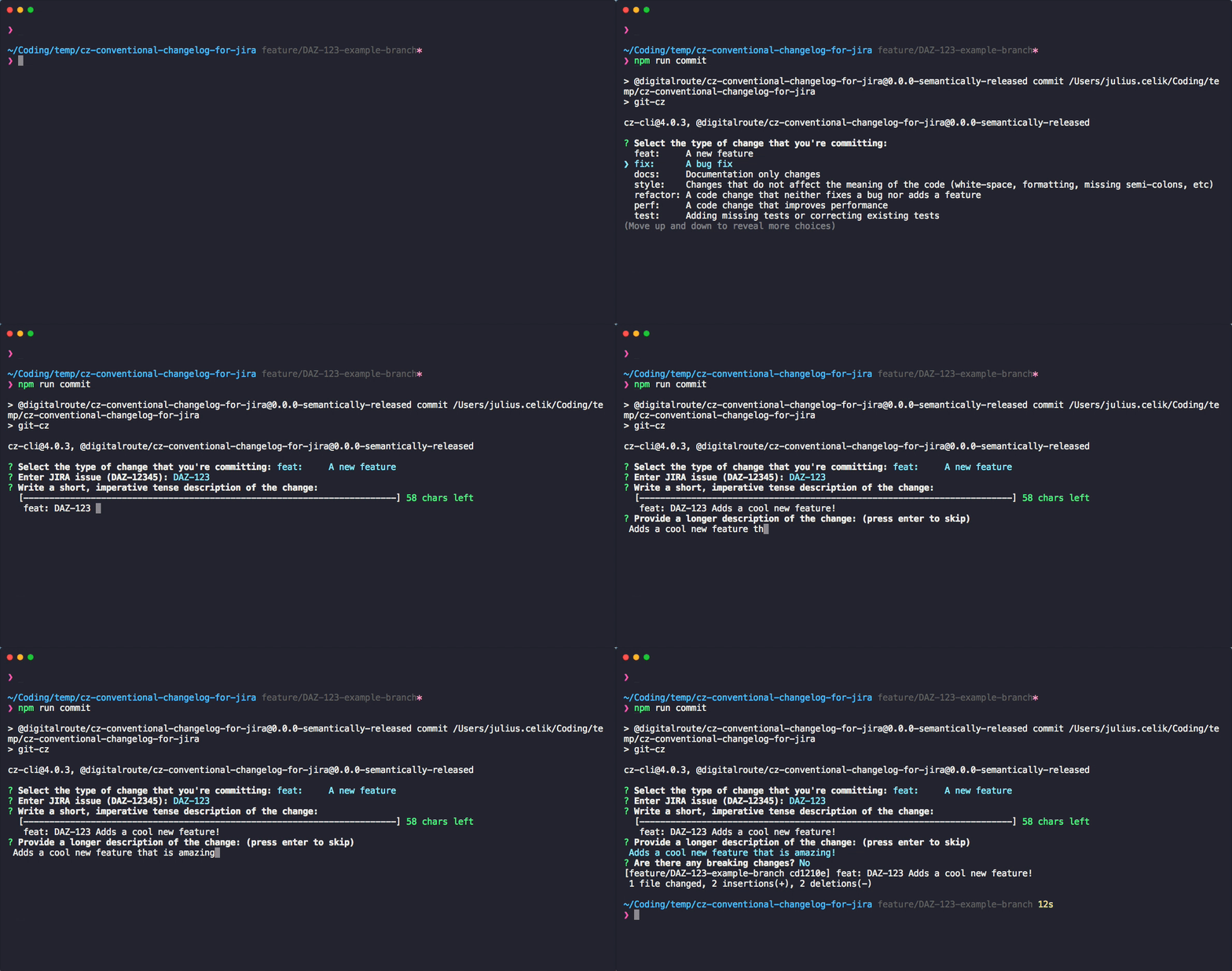
### Jira - Linking your repo to Jira
- Jira links your GitHub commits using project key.
- To make sure your commit messages link to Jira you can use the [cz-conventional-changelog-for-jira](https://github.com/commitizen/cz-cli) npm package
----
## Labels!!!

- Labels are incredibly useful to convey information about each issue quickly.
- It can also be a huge pain to manually add each label for every new project.
----
#### Dwyl labels
- [Dwyl labels](https://label-sync.herokuapp.com/) is an application that lets you copy labels from one repo to another.
- They have their own repo to take inspo/copy from.
- Select a source repo and a target repo.
----
:sunglasses: ezpz :sunglasses:

----

---
<!-- Jennifer -->
## Looking after the team - Daily procedure
- Holding daily stand up
- Creating some guidelines for tool usage
---
### Stand ups:
- 15 minutes to plan the next 24 hours
- Making sure everyone is on the same page
- 3 Qs:
- What did you do yesterday?
- What will you do today?
- Anything blocking your progress?
---
### Tips for the team
- Keep it snappy
- Keep your answer focussed
- Raise your blockers- don't be shy!
---
### Tips for the facilitator
- Getting too long? Agree a separate time to talk about the issue- that's the point of a stand up
- Get people to actually stand up!
- Have an incentive for attendance... stretch?
---
### Guidelines for tool usage, eg Github & Actions
- Are we going to ensure merges to master can only happen if tests have passed?
- Who will review and close pull requests? Should that person delete the branch and close the project issue too?
- Will we use tmetrics?
<!-- End of Jennifer's bit -->
---
## Time-Tracking
- integration with Github AND Jira!
- free trial
----
### Setup:
1. Sign up an account to Tmetric
2. Install Browser Extension
- chrome, moz, firefox, opera, edge, safari
3. Go to your Github Repo/Jira Account
----
### Allow the extension & integration

#### - Click on Tmetric extension in your extensions tab
----
### Locate timer on individual issue

----
### Start timer on the issue

----

You can go back to GH issue by clicking linked id next to issue name in Tmetric workspace
----
Edit time

----
* View a report
* If you're the Tmetric admin, it pulls these from GH and adds to Tmetric workspace:
* issue name
* issue ID
* project name
* labels
----
Quick T-metric/Jira Demo

{"metaMigratedAt":"2023-06-15T13:16:04.217Z","metaMigratedFrom":"YAML","title":"Scrum facilitation","breaks":true,"slideOptions":"{\"transition\":\"slide\",\"theme\":\"beige\",\"center\":false,\"parallaxBackgroundImage\":\"https://springsadvertiser.co.za/wp-content/uploads/sites/28/2015/06/rugby_ball_1200.jpg\"}","contributors":"[{\"id\":\"d51f438d-b983-4cc8-a985-89b90d1585d5\",\"add\":908,\"del\":40},{\"id\":\"54b20be6-da49-4378-a738-063e13100e14\",\"add\":628,\"del\":7},{\"id\":\"a92566bd-bde1-4917-8d3b-c43b71924ffd\",\"add\":1366,\"del\":84},{\"id\":\"39547f14-461f-48cc-9b11-dc54f80d8cc2\",\"add\":2028,\"del\":1027}]"}