### Using Pulp 3 - Simpler and Faster
Brian Bouterse
Senior Principal Software Engineer
bmbouter@redhat.com
slides: https://hackmd.io/@pulp/rJx0Ymdud
---
## Agenda
* What is Pulp?
* What's new with Pulp3
* Basic Terminology
* Show me the demos!
* container
* python
* ansible
* rpm
---
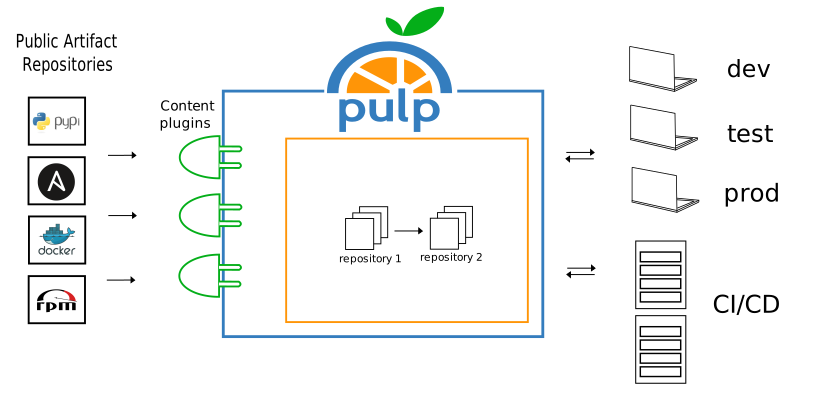
## What is Pulp?
* Sync packages from public repositories
* Organize and Share Packages
* Approve and promote packages
* Upload and distribute your own private packages
---
### Usage flow
---
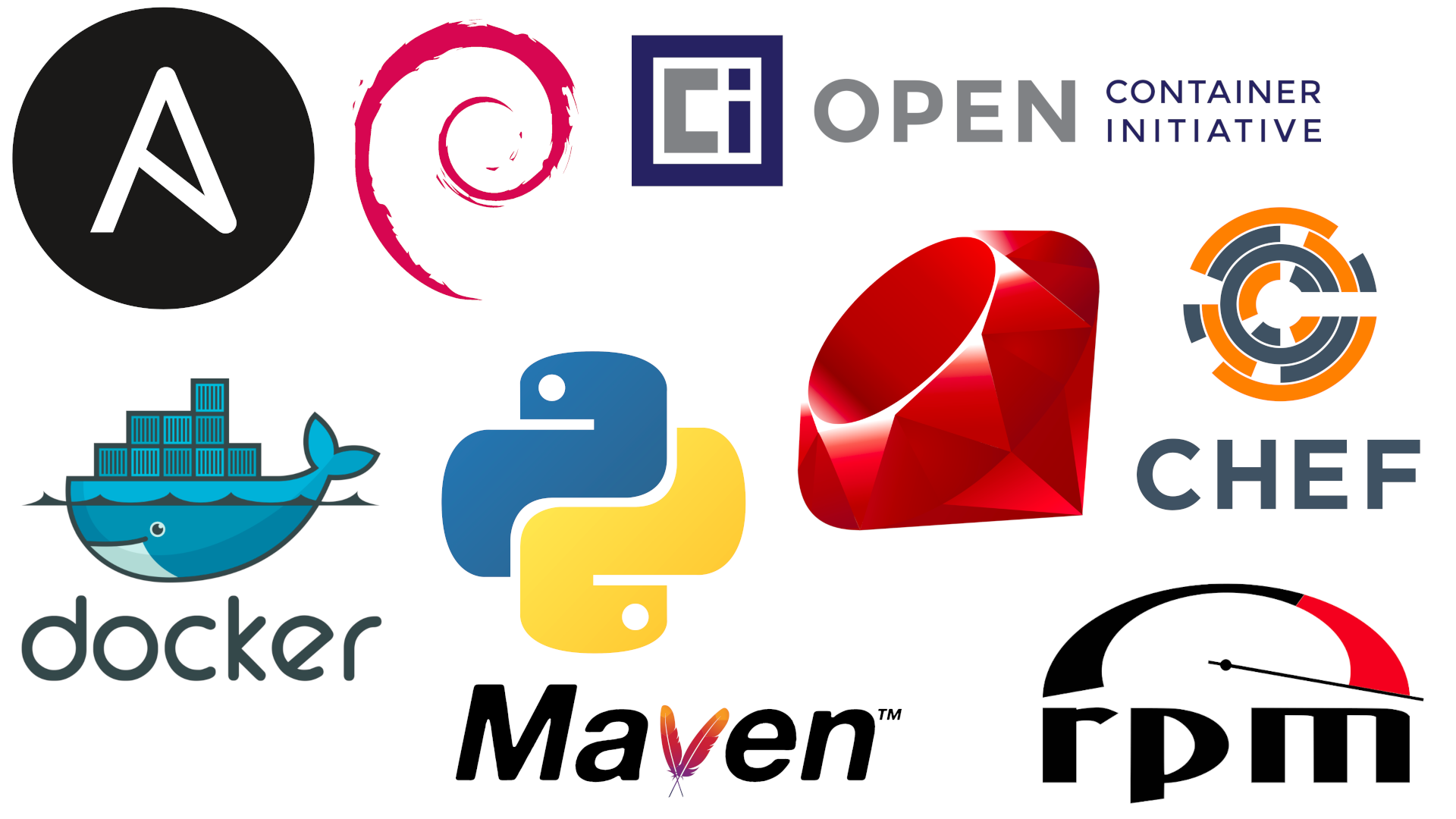
### What is Supported?
---
## New with Pulp3
3.0.0 released Dec 11, 2019
latest: 3.12.2 -- Apr 30, 2021
---
### Improved Performance and Data Integrity
Pulp 3 moves from MongoDB to PostgreSQL. :heart_eyes: :100:
---
### Faster Performance
:clock230: On testing, synchronizing in Pulp 3 ranges from 2x to 8x faster than Pulp 2.
---
### Versioned Repositories
:back: New ability to rollback safely to earlier versions.
---
### Disk Storage and Speed Solutions
Select from multiple synchronization options for all content types to suit specific environmental requirements.
---
### Storage Options
Can store data locally, or in the cloud with storage services like S3 and Azure. :cloud:
---
### Simplified Installation
* Use the Ansible based installer
* https://pulp-installer.readthedocs.io/en/latest/
* Or use pre-built containers
* https://pulpproject.org/pulp-in-one-container/
* Or use the operator for k8s
* https://github.com/pulp/pulp-operator
---
### Client bindings
Make Pulp’s API language agnostic, requiring no customization.
---
### Better docs
Browseable, auto-documented, OpenAPI.
---
### Better packaging
Python’s PyPI replaces RPMs as the main packaging method, which allows for easy installation across Linux distributions.
---
### Plugin API
Improvements to the Plugin API ensures compatibility with Pulp core and has led to an increasing list of Plugins.
---
## Migrating to Pulp3
* Use this migration plugin!
* https://pulp-2to3-migration.readthedocs.io/en/latest/
Can migrate: docker, rpm, debian, and ISO content
---
## What is a Repository
* A versioned set of packages/gems/containers/, aka content
* These are typed, e.g. RPM, python, etc
---
## What is a Remote
* Details about how to fetch content from other servers
* These are typed
---
## What is a Distribution
* Exposes a RepositoryVersion at a base path
* e.g. 'mypath' at http://localhost:8080/pulp/content/
---
## What is a Publication?
* Creates metadata for a set of content
* RPM, Python need this
* Container and Ansible don't
---
## Today's Demo
* Using the single container
* https://pulpproject.org/pulp-in-one-container/
* With the pulp-cli
* https://github.com/pulp/pulp-cli
---
### Pulling down the container
`podman pull pulp/pulp`
Or a specific version: `podman pull pulp/pulp`
---
### Create settings files
```
mkdir pulp
cd pulp
mkdir settings pulp_storage pgsql containers
```
```
echo "CONTENT_ORIGIN='http://$(hostname):8080'
ANSIBLE_API_HOSTNAME='http://$(hostname):8080'
ANSIBLE_CONTENT_HOSTNAME='http://$(hostname):8080/pulp/content'
TOKEN_AUTH_DISABLED=True" >> settings/settings.py
```
---
### Start the container with SELinux
* Running on port 8080
* http only (currently)
* Usable with either `podman` or `docker` commands
```
podman run --detach \
--publish 8080:80 \
--name pulp \
--volume ./settings:/etc/pulp:Z \
--volume ./pulp_storage:/var/lib/pulp:Z \
--volume ./pgsql:/var/lib/pgsql:Z \
--volume ./containers:/var/lib/containers:Z \
--device /dev/fuse \
pulp/pulp
```
---
### Start the container *without* SELinux
```
podman run --detach \
--publish 8080:80 \
--name pulp \
--volume ./settings:/etc/pulp \
--volume ./pulp_storage:/var/lib/pulp \
--volume ./pgsql:/var/lib/pgsql \
--volume ./containers:/var/lib/containers \
--device /dev/fuse \
pulp/pulp
```
---
### Assign an admin password
`podman exec -it pulp bash -c 'pulpcore-manager reset-admin-password'`
---
### Installing pulp-cli
`pip install pulp-cli`
https://github.com/pulp/pulp-cli
---
### Point pulp-cli at your container
`pulp config create`
`pulp config edit`
1. Point to "http://localhost:8080"
2. Add username, password
---
### Showing Container logs:
`podman logs -f pulp`
---
### Status check
`pulp status`
---
### Tasking Things
* `pulp task list --state=running`
* `pulp task list --state=failed`
* `pulp task cancel --href /pulp/api/v3/tasks/15b8608b-724a-4182-acc3-bb5eb13a8b18/`
---
### Clean up orphans
`pulp orphans delete`
---
### Interactive shell
`pulp shell`
---
### CLI Niceties
* Autocompletion
* --help` on all commands
---
### API Documentation
API Documentation: http://localhost:8080/pulp/api/v3/docs/
---
### Container Overview
Pulp3 is a registry supporting any client that adheres v2 regitry API:
* `docker`/`podman`
* `push`, `pull`, `tag` features
* https://docs.pulpproject.org/pulp_container/
---
### Container Demo
* Showing off with http, but https fully supported
* Showing off without RBAC, but RBAC fully supported
---
### Allow podman to use insecure
Add snippet to `/etc/containers/registries.conf`
```
[[registry]]
location = "localhost:8080"
insecure = true
```
---
### Login
`podman login localhost:8080 --tls-verify=false`
---
### Tag an Image
`podman tag pulp localhost:8080/asdf/pulp:latest`
---
### Push an Image
`podman push localhost:8080/asdf/pulp:latest`
---
### Pull an Image
`podman pull localhost:8080/asdf/pulp:latest`
---
### Pull Through Caching
podman <-> pulp <-> docker/quay
---
### Listing Pushes
`pulp container repository --type push list`
---
### Listing Distibutions
`pulp container distribution list`
---
### Python Overview
* Able to sync from PyPI
* `pip` compatible, `twine` compatible (soon)
* Integration with Bandersnatch
* https://pulp-python.readthedocs.io/
---
### Python Demo
* Create a repository
* Create a remote
* Sync from PyPI
---
### Create a Repository
`pulp python repository create --name pypi`
---
### PyPI mirroring
`pulp python remote create --name full-pypi --url https://pypi.org/`
---
### Sync Specific Packages
`pulp python remote create --name allowed-pypi --url https://pypi.org/ --includes '["shelf-reader", "numpy"]'`
---
### Use Package Filters
`pulp python remote update --name allowed-pypi --package-types '["bdist_wheel"]' --prereleases False`
---
### List Remotes
`pulp python remote list`
---
### Sync!
`pulp python repository sync --name pypi --remote allowed-pypi`
---
### Create Publication
`pulp python publication create --repository pypi`
---
### Publish Automatically
`pulp python repository update --name pypi --autopublish`
---
### Go live
`pulp python distribution create --name my-pypi --base-path my-pypi --publication <HREF>`
---
### Install with Pip
`pip install -i http://localhost:8080/pulp/content/my-pypi/simple/ numpy`
---
### Have pip always use Pulp
Edit `pip.conf`
```
cat <<EOT >> $VIRTUAL_ENV/pip.conf
[global]
index-url = http://localhost:8080/pulp/content/my-pypi/simple/
EOT
```
`pip install shelf-reader`
---
### Ansible Overview
* Sync's content from:
* galaxy.ansible.com
* cloud.redhat.com
* https://docs.pulpproject.org/pulp_ansible/
---
### Create an Ansible Repository
`pulp ansible repository create --name myrepo`
---
### Create an Ansible Remote
`pulp ansible remote -t collection create --name basic --url https://galaxy.ansible.com --requirements-file ~/Documents/Presentations/container_demo/basic.yml`
---
### Create an Ansible Distribution
`pulp ansible distribution create --name mydistro --base-path foo --repository myrepo`
---
### View it through the Galaxy API
http://localhost:8080/pulp_ansible/galaxy/foo/api/v3/collections/
---
### Sync content using the Remote into the Repo
`pulp ansible repository sync --name myrepo --remote basic`
---
### Installing using the CLI
1. Get the client URL for this repo from the distribution list: `pulp ansible distribution list`
2. Install with a command like: `ansible-galaxy collection install -s http://localhost:8080/pulp_ansible/galaxy/foo/ -p ./ pulp.pulp_installer`
---
### Uploading from the CLI (part 1)
* Get the client URL for this repo from the distribution list: `pulp ansible distribution list`
* Have a tarball, e.g. `https://galaxy.ansible.com/newswangerd/collection_demo`
---
### Uploading from the CLI (part 2)
* Upload the tarball with `ansible-galaxy collection publish -s http://localhost:8080/pulp_ansible/galaxy/foo/ newswangerd-collection_demo-1.0.10.tar.gz`
* View it's availability in the repository: `http://localhost:8080/pulp_ansible/galaxy/foo/api/v3/collections/`
---
### Creating a remote for Role content
1. First a word about the galaxy Role API
2. `pulp ansible remote -t role create --name someroles --url https://galaxy.ansible.com/api/v1/roles/?namespace__name=elastic`
---
### Syncing Roles
`pulp ansible repository sync --name myrepo --remote someroles`
Viewing them: http://localhost:8080/pulp_ansible/galaxy/foo/api/v1/roles/
---
### Installing Roles from the CLI
1. Get the client URL for this repo from the distribution list: `pulp ansible distribution list`
2. Install with a command like: `ansible-galaxy role install -s http://localhost.localdomain:8080/pulp_ansible/galaxy/foo/ -p ./ elasticsearch,6.2.4`
---
### Configuring the CLI permanently
Use an ansible.cfg like:
```
[galaxy]
server: http://localhost.localdomain:8080/pulp_ansible/galaxy/foo/
```
Then `ansible-galaxy role install -p ./ elasticsearch,6.2.4`
---
### Copying Content between Repositories
Not demo-ing but see these docs: https://docs.pulpproject.org/pulp_ansible/workflows/copy.html
---
### RPM Overview
* Sync and Host RPM repositories
* Supports EL5 - EL9
* `yum`/`dnf` compatible
* Lots of features
* https://docs.pulpproject.org/pulp_rpm/
---
### RPM Demo
---
### Create Repository
`pulp rpm repository create --name foo1`
---
### Create a Remote
`pulp rpm remote create --name foo --url https://fixtures.pulpproject.org/rpm-signed/ --policy on_demand`
---
### Sync
`pulp rpm repository sync --name foo1 --remote foo`
---
## Repository Versions
`pulp rpm repository version list --repository foo1`
---
### Create another Repository
`pulp rpm repository create --name foo2`
---
### Sync Again
`pulp rpm repository sync --name foo2 --remote foo`
---
### Create Repo with Remote
`pulp rpm repository create --name foo3 --remote foo`
---
### Sync that repository
`pulp rpm repository sync --name foo3`
---
### Create a publication
`pulp rpm publication create --repository foo1`
---
### Go live
`pulp rpm distribution create --name dist_bar --base-path some_rpm_content --publication <HREF>`
---
### Browse Repos
http://localhost:8080/pulp/content/
---
### Getting Help
* https://www.redhat.com/mailman/listinfo/pulp-list
* #pulp on Freenode
* See the docs for filing bugs, changes, etc.
---
### Feedback
Brian Bouterse
bmbouter@redhat.com
---
{"metaMigratedAt":"2023-06-16T00:15:37.531Z","metaMigratedFrom":"YAML","title":"Using Pulp 3 - Simpler and Faster","breaks":true,"description":"With the release of Pulp 3 in Dec 2019, Pulp underwent a complete technical overhaul. Pulp 3 has increased reliability and flexibility compared to earlier versions of Pulp. Over the last few months, there's been great focus on creating a Pulp 3 CLI. In this talk, Brian Bouterse will highlight Pulp 3 featureset through the brand new Pulp 3 CLI.","contributors":"[{\"id\":\"dc40d541-bddd-4823-82c8-6e5276fe233a\",\"add\":15357,\"del\":8389},{\"id\":\"8488a670-8213-4f2e-b419-4176c4203560\",\"add\":1975,\"del\":363},{\"id\":\"4b1152d2-c7d3-42a7-ae07-9821ff05bb92\",\"add\":1775,\"del\":55},{\"id\":\"cdde0969-b66b-4a2e-b8af-327ce25861bf\",\"add\":117,\"del\":1},{\"id\":\"1a6032ad-e6b7-434d-aa35-96e6ebf50256\",\"add\":1882,\"del\":431}]"}