# Container Management with Pulp
---
## Pulp
A software for managing software repositories
* Mirror remote repositories
* Upload private packages
* Version content
Note: What is Pulp? Is there anyone who does not know what is Pulp? Pulp is software for managing components, artifacts, or binaries throughout the whole software production and distribution process. Pulp is written in Python and it is completely open-sourced. It supports a multitude of formats, such as RPM, Debian, Python, Gem, OSTree, Maven, Helm Charts, or Docker images.
----
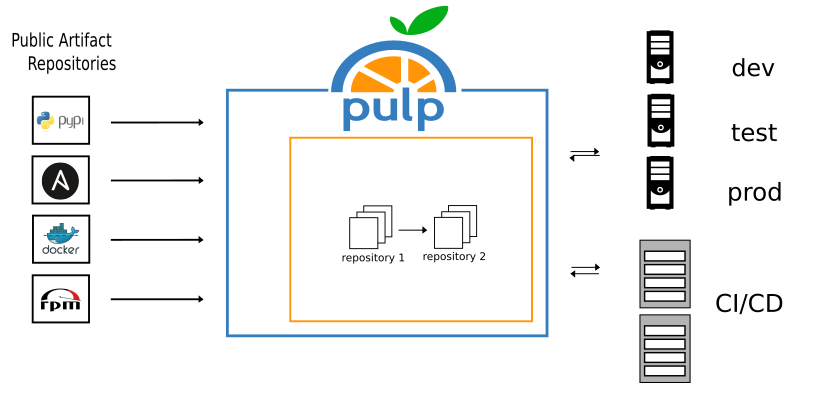
Note: So, here is Pulp in a nutshell. Imagine you are an administrator who wants to manage hundreds of packages or repositories. You can mirror the packages from remote sources into Pulp and select which of them you want to distribute to specific departments and how.
----
## Use Cases
* Securely share packages across the organization
* Approve packages and audit their usage
* Consume packages in automated builds
* Deliver packages where they are needed
* Proxy packages from remote repositories
Note: (1) Now, let's begin with some use cases. With Pulp, you can securely share packages within the organization. The first thing that might be appealing to you is the role-based access control. The key factor here is that you can define a set of rules based on which the Pulp instance will protect and serve packages. (2) Pulp may serve as a CDN. When snapshotting packages daily, the packages are versioned in repository versions that you can distribute to end clients. With the provided tooling, you can inspect the packages and their presence within specific repositories. Besides that, in a multi-node installation (where you can have multiple Pulp instances stacked), you can export data from an upstream Pulp instance and bring it to a downstream Pulp instance laying, for example, in an air-gapped environment. (3) If you want to push or pull packages from CI/CD, either as a part of the pull or push model, you can use Pulp. Pulp can run inside your CI/CD pipeline and you can play along with it. This should save you some bandwith. (4) By definition, a Pulp system is more available than other services, since it can be deployed on-premise. The local instance will help you tackle the outages on remote sources. Besides that, you can create Pulp replicas on separate nodes that will sync content from an upstream Pulp instance. Your replicas then function as a main source for distributing content in a particular region. (5) Proxying packages might be also important to you. You can proxy packages from remote repositories via Pulp. There exist a few proxy applications, like Squid. Squid acts as a proxy (referrable to the pull-through cache). However, it does not store data in a queryable way. Thus, it is something of a black box. In Pulp, you can query what artifacts and packages were cached during the pull-through operation. By the way, Pulp has built-in de-duplication machinery. This works either with regular file system backend, S3, or even Azure storage, which can save you a lot of money when storing packages on the cloud. At the end of this talk I will quickly demonstrate how you can utilize the pull-through caching capabilities in Pulp.
----
## Managing Containers
- hosting & serving images
- scoping policy via RBAC
----

----
----

----
## Mirroring Registries
- on-premise solutions
- employed pull rate limits
----
## Caching Registries
- simplifying the mirroring
- improving the availability
----
OBRAZOK
----
# Demo!
---
# Start Here!
- Try out Pulp:
https://pulpproject.org/pulp-in-one-container/
- Contact us:
https://discourse.pulpproject.org/
Note: To conclude, Pulp is here to help you solve your day-to-day problems with delivering packages on the cloud or on-premise. It supports role-based access control, repository versioning, package querying, artifact de-duplication, or proxy caching. These are features that will make your life easier. We invite you to take a look at our documentation at pulpproject.org to learn more about Pulp. We have a discourse forum where you can discuss various topics with our users and developers too. Thanks for watching! Until next time!
<!--
Pull-through caching in pulp-container
http :5001/pulp/api/v3/remotes/container/pull-through/ name=docker.io url=https://registry-1.docker.io
http :5001/pulp/api/v3/distributions/container/pull-through/ name=docker-cache base_path=docker-cache remote=
podman pull localhost:5001/docker-cache/library/busybox --tls-verify=false
podman image rm a416a98b71e2
podman pull localhost:5001/docker-cache/library/busybox --tls-verify=false
http :5001/pulp/api/v3/repositories/
-->
{"title":"Intro to Pulp","description":"slide: https://hackmd.io/p/template-Talk-slide","contributors":"[{\"id\":\"90ff3b0c-6df0-496c-b34d-f3fbd63247fc\",\"add\":17222,\"del\":13257},{\"id\":\"dc40d541-bddd-4823-82c8-6e5276fe233a\",\"add\":1248,\"del\":216},{\"id\":\"23e83f4b-20d5-4afe-8e1d-27b2b434ddae\",\"add\":3219,\"del\":5300}]"}