# How to change the profile which links open in?
<h3><center>Pu239 - GX</center></h3>
Say you are on discord/any other app and someone sends you a link. You have created a new profile "dum" which you want everything to open in (i.e. when you click on the link it shouldn't in the default profile.)
Here's how you can do that:
1. Go to `%APPDATA%\Microsoft\Internet Explorer\Quick Launch\User Pinned\TaskBar`, there you should see all the shortcuts on your taskbar:

2. Right click on the "dum" profile's shortcut. You should see this:
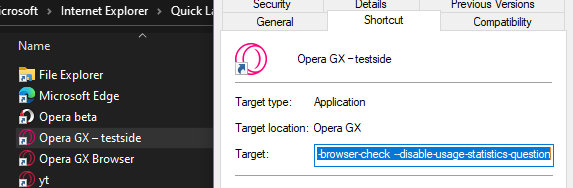
In the `Target` box, you will see this string: `--side-profile-name=33blablablabla37`, Copy this whole thing (not just ID). You can close these windows now.
3. Now type `regedit` in the windows search bar, it should take you to `Registry Editor`. (click on "Allow app to make changes").
4. In the address bar here, paste: `Computer\HKEY_CLASSES_ROOT\Opera GXStable\shell\open\command`. Here you will see this
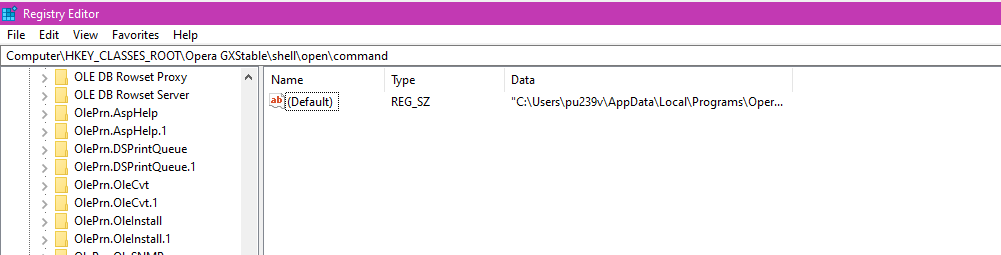
5. Double click on (Default) in the main area. You will get a popup like this:
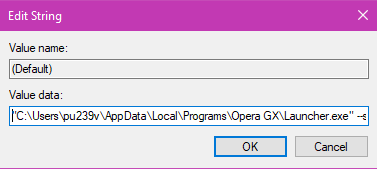
After the path (`"C:\Users\......\Launcher.exe"`), add the string we copied (i.e. `--side-profile-name=33blablablabla37`).
6. Click on OK. And you are done. (You might need to close the browsers once, but that's all.)
### Enjoy opening links in your new profile.
 Sign in via Google
 Sign in via Facebook
 Sign in via X(Twitter)
 Sign in via GitHub
 Sign in via Dropbox
 Sign in with Wallet
Connect another wallet
Sign in with Wallet
Connect another wallet