# Multiple Way Points Navigation
****
## 自主移動式機器人多點導航系統
* 以C++以及ROS為主體架構。
* 可以自由在地圖上設置機器人導航有順序姓的目標點,包含新增以及刪除。
* 可以對地圖進行修改,包括新增禁行區或是消除地圖上的雜點。
* 可以自由切換當前地圖。
* 由於本系統可以應用在含有手臂的移動平台,因此有對手臂的位姿有所限制,若手臂屬於不安全的狀態(車子移動時會有危險),則會發出相對應的警告,並停止移動。
* 可以使用UI介面亦或是搖桿操作本系統
* 本系統結合聲音告知使用者機器人當下狀態或請求援助。
* UI介面為ROS系統上的RVIZ,並結合新增的plugin。
* 本系統單點導航使用ROS原生[MoveBase](http://wiki.ros.org/move_base)。

****
## Map Modifier

A tool combined with rviz panel and rviz tool.
* **Map selector**
Selecting map from map folder. YAML and PGM file is needed.
* **Forbidden Line**:
Add virtual line to the map to let the robot not pass this area. You need to use line tool to draw a line first then use button to add new line. You can also delete previous line.
* **Forbidden Parallelogram**
Add virtual parallelogram to the map to let the robot not pass this area. You need to use parallelogram tool to draw a parallelogram first then use button to add new parallelogram. You can also delete previous parallelogram.
* **Free Space**
Add free space to the map to remove occupied space that you think is not occupied. You can change size by yourself. Please note that the priority of free space is lower than forbidden lines and parallelograms.
* **Save & Load & Clear**
You can save or load the config including all the changing from above tool. Otherwise you can also clear all the modified areas.
[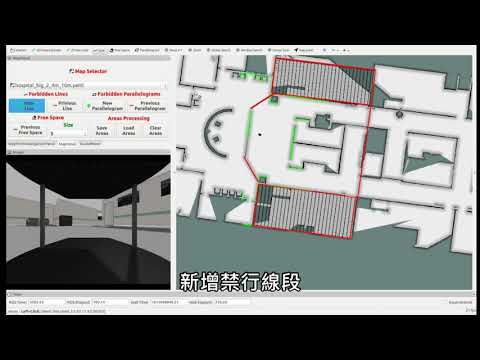](https://www.youtube.com/watch?v=CMteZJ9PuyQ&feature=youtu.be&ab_channel=%E6%9E%97%E6%94%BF%E7%A2%A9 "")
Video for modifying map and setting target points.
****
## Way Points Navigation

A tool for setting multiple points and send these points to movebase process.
* **Set Way Points**
You can use way point tool to set points. In addition, you can also delete previous setting point, save current points or load old points. Way points is relative with the map. Each map has its own file to save waypoints. You need to load map first before setting way points.
* **Auto Navigation**
* **Start & Stop:**
Start or stop navigation. It only starts when there is at least one goal is set. Make sure your localization process is opened before navigation start. It will wait several time depends on parameter `countDownStartTime`. You can set loops number from selector.
* **Pause & Continue**
Pause or continue navigation. It will cancel present action.
* **Skip**
Skip current target and go to next target. If skip last target, then it stops.
* **Clear Costmap**
Clear movebase costmap to help robot's obstacle detection and clearing.
* **Infomation Column**
* **Status**
| Status | Meaning |
| ----------- | ------------------------------------------------------ |
| STOP | Navigation off |
| ACTIVE | On navigation, there is the path |
| PAUSE | Pause when navigation |
| FIRSTSPIN | Turn around action before path following |
| FAILTOSTART | Can not find valid path when tending to go to the goal |
| WAITTOSTART | Wait for seconds before starting navigation |
* **Goal#**
Current target goal.
* **Distance**
Current path length.
* **Loop#**
Remaining loop count.
****
## Demo Video
ITRI Lab test
[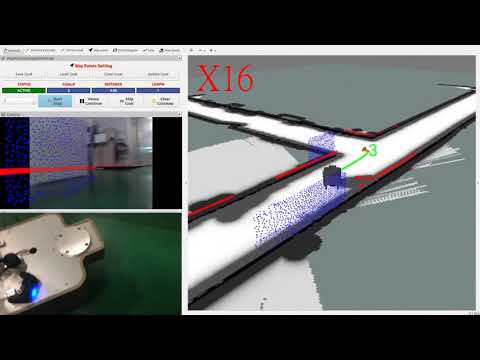](https://youtu.be/uVrmPyFzVtY "ITRI dinning room test")
2020 TAIROS, Large-Scale Crowded Environment
[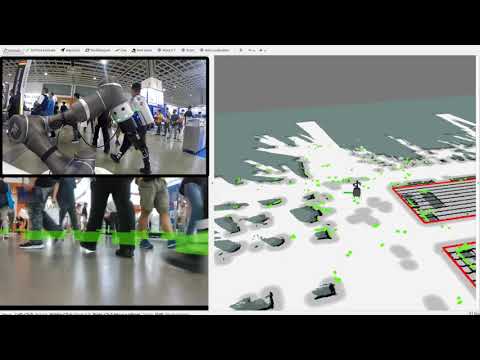](https://www.youtube.com/watch?v=8zQ6yS-9KR8&t=141s&ab_channel=MARSRobotics "")
 Sign in via Google
 Sign in via Facebook
 Sign in via X(Twitter)
 Sign in via GitHub
 Sign in via Dropbox
 Sign in with Wallet
Connect another wallet
Sign in with Wallet
Connect another wallet