# 衝刺班 - React
### 你覺得 React 解決了什麼問題?[若]
:::spoiler answer
1. 解決網頁規模變得更複雜時,管理不方便的問題。React 運用組件化思考,讓組件有封裝並能夠重複使用的特性,組件之間不會互相干擾,也容易維護。
2. React使用 Virtual DOM,解決了大量操作DOM帶來的效能問題。
3. 降低Debug難度。React採取 one data flow 的設計,資料的流向只能從父元件傳入子元件,而資料改變時會牽動 UI 自動改變,每當 React 偵測到 props 或 state 有更新時,就會自動重繪整個 UI 元件。所以我們可以確定一個元件在某個資料狀態下的畫面一定會是長什麼樣子,較好管理和Debug。
:::
### React 組件中的 property 和 state 有什麼不一樣?
:::spoiler answer
當我們想要傳資料給 component 的時候,傳進去的資料叫做 `props` ,而在component 裡面使用的變數叫做 `state`。兩者都是 JavaScript object。
`props` 通常用來做資料的初始化,一般來說是從父組件被傳入,且被傳入的 `props` 不可以被改變(如果想要新的值,只能從父組件重新傳入)。但有一個例外情況是也可以直接在 component 裡面設置一個 `props` 的 default 值。
`state` 是在組件內部的值,可以被改變,改變的方式是透過 `setState` 來進行。
:::spoiler Props 和 State 都是 JavaScript Object
### State
```jsx=
class Button extends React.Component {
constructor(props) {
super(props);
this.state = {
clicked: false
};
this.handleClick = this.handleClick.bind(this);
}
handleClick() {
this.setState(state => ({
clicked: !state.clicked
}));
}
render() {
return (
<button onClick={this.handleClick} />
);
}
}
/* hook version */
function Button() {
const [clicked, setClick] = useState(false);
const handleClick = () => setClick(!clicked);
return (
<button onClick={handleClick} />
);
}
```
### Props
```jsx=
/* you could use classes like so: */
class Player extends React.Component {
render() {
return <p>{this.props.name} plays for the {this.props.team}</p>
}
}
/* Or use function component like so: */
function Player(props) {
return <p>{props.name} plays for the {props.team}</p>
}
/* props 傳入的方式 */
function App() {
return (
<div>
<Player name="Ashlyn Harris" team="Orlando Pride" />
<Player name="Megan Rapinoe" team="Reign FC" />
<Player name="Julie Ertz" team="Chicago Red Stars" />
</div>
);
}
ReactDOM.render(
<App />,
document.getElementById('root')
);
```
:::
### 解釋一下 React Virtual DOM 的運作方式和優點?[月]
:::warning
Virtual DOM的優勢不在於單次的操作,而是在大量、頻繁的數據更新下,能夠對視圖進行合理、高效的更新。
:::
:::spoiler answer
1. 使用React render時,除了會產生出 DOM 渲染畫面,還會紀錄(快照)每個節點的資訊也就是 Virtual DOM。
2. 之後每當 component 的 `state` 改變時,React 會對比之前與現在的 Virtual DOM (同一層級)的節點,算出需要更新的部分(= diff 演算法)。
3. 更新需要變動的部分到 DOM(= patch)。

官方文件: https://github.com/acdlite/react-fiber-architecture

👨🏿💻:**優點勒?**
🙇🏿♀️:使用 Virtual DOM 最大的優點就是效能,傳統 diff 運算的時間複雜度為 O(n³),使用 Virtual DOM後的 diff 運算為 O(n),不過這不代表所有狀況 Virtual DOM 都會比操作 Real DOM 快速,但可以確保在普遍狀況下,都能有不錯的效能。
:::spoiler answer
### 解釋一下 React 組件的生命週期?[東]
:::spoiler Answer
## class components
<img src="https://s3.us-west-2.amazonaws.com/secure.notion-static.com/380fc2e3-2fd5-4ae1-99d8-257578ff339d/Screen_Shot_2021-05-27_at_2.38.01_PM.png?X-Amz-Algorithm=AWS4-HMAC-SHA256&X-Amz-Credential=AKIAT73L2G45O3KS52Y5%2F20210819%2Fus-west-2%2Fs3%2Faws4_request&X-Amz-Date=20210819T113059Z&X-Amz-Expires=86400&X-Amz-Signature=778304e6a2a60e2988f13c6cdb8ca7c137c16dad77a3ddac3f4b281005d9d576&X-Amz-SignedHeaders=host&response-content-disposition=filename%20%3D%22Screen_Shot_2021-05-27_at_2.38.01_PM.png%22" width="500px">
<br >
<img src="https://i.imgur.com/md7WAvN.png">
## Hooks
> 透過 `useEffect` 可以幾乎做到這三個生命週期的 method
#### `componentDidMount`
dependency 傳入**空陣列**
```javascript=
useEffect(()=>{
// component on mount 想做的事
},[])
```
#### `componentDidUpdate`
**不傳 dependency**,這個只能說是類似 componentDidUpdate,因為他在 componentDidMount 時候也會被呼叫
```javascript=
useEffect(()=>{
// component rerender(update) 想做的事
})
```
#### `componentWillUnmount`
不傳 dependency,這個只能說是類似 `componentDidUpdate`,因為他在 `componentDidMount` 時候也會被呼叫
```javascript=
useEffect(() => {
return () => {
// component unmount 想做的事
}
}, []);
};
```
##### Hooks 用 dependency 讓我們更好去寫“某個 state 改變以後要做的事”
```javascript=
class Component extends React.Component {
componentDidUpdate(prevProps) {
if (this.props.foo !== prevProps.foo) {
console.log("Behavior when the value of 'foo' changes.");
}
}
render() {
return <h1>Hello World</h1>;
}
};
```
```javascript=
const Component = ({ foo }) => {
useEffect(() => {
console.log("Behavior when the value of 'foo' changes.");
}, [foo]);
return <h1>Hello World</h1>;
};
```
:::
### 解釋一下 React 的 One-Way Data Flow 設計邏輯,能否舉例說明?
:::spoiler
* **React官方文件說明支援One-Way Data Flow,來達到高效模組化和與快速渲染。**
> React’s one-way data flow (also called one-way binding) keeps everything modular and fast.
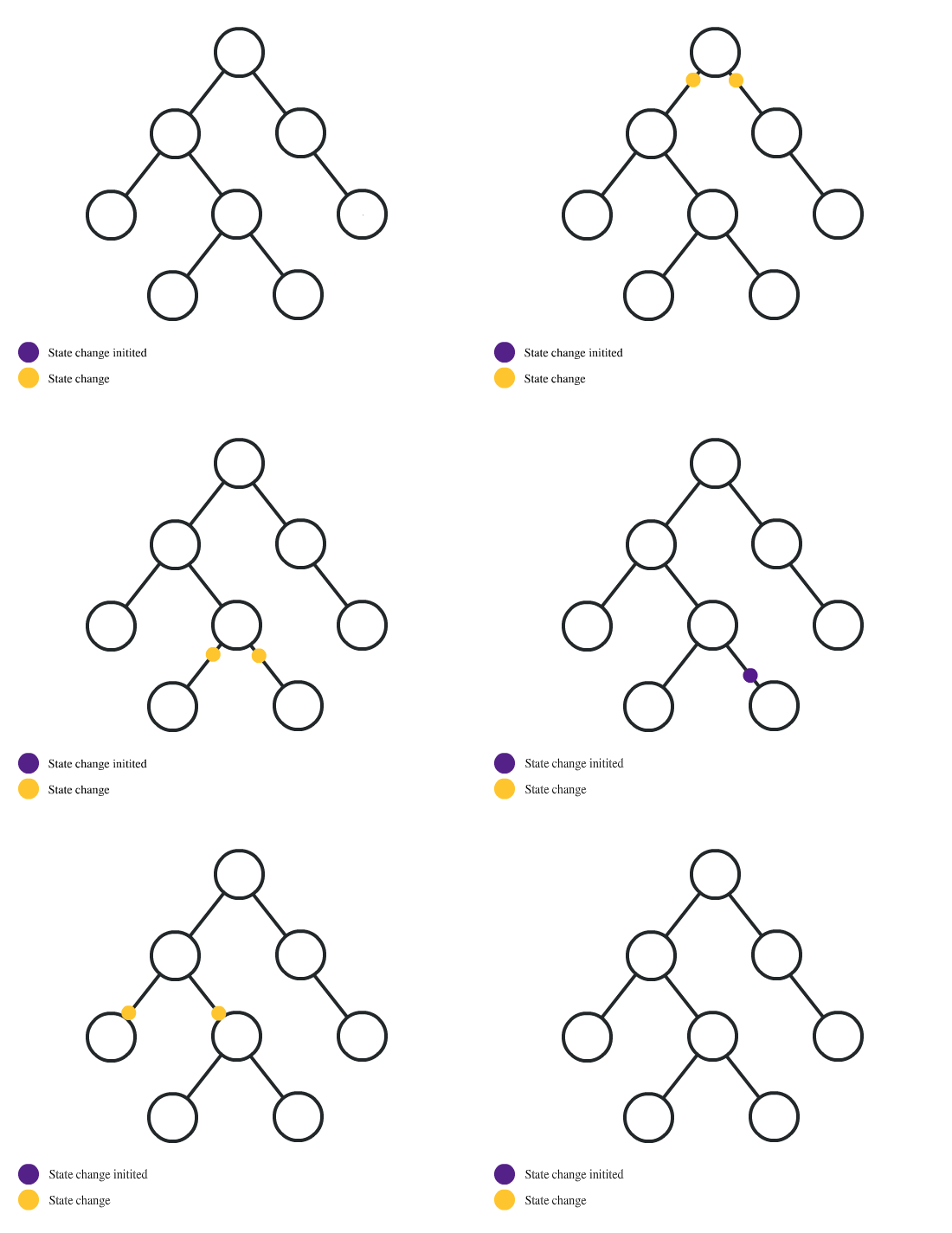
* **Data Flow又為資料綁定(Data Binding),資料端與 UI 端之間會透過事件的綁定,當某一端有異動時,另一端可以進行更新。**
* **state跟props去做狀態的管理與屬性的傳遞,UI 可以隨資料的異動去更新。**
A. 從資料端出發,資料一有異動,就通知 UI 端更新
B. 從 UI 端出發,UI 一有異動,就通知資料端更新

* **範例**
props傳遞
```
class Clock extends React.Component {
constructor(props) {
super(props);
// 宣告state初始值
this.state = { date: new Date() };
}
componentDidMount() {
// 定時器
this.timerID = setInterval(() => this.tick(), 1000);
}
componentWillUnmount() {
clearInterval(this.timerID);
}
tick() {
// 用setState更新state值
this.setState({
date: new Date()
});
}
render() {
return (
<div>
{/*接收上層的屬性值*/}
<h1>{this.props.header}</h1>
<h2>
It is
{/*更新state後 UI就會更新*/}
{this.state.date.toLocaleTimeString()}.
</h2>
</div>
);
}
}
ReactDOM.render(
<Clock header={"Hello, world!"} />,
document.getElementById("root")
);
```
* 補充:
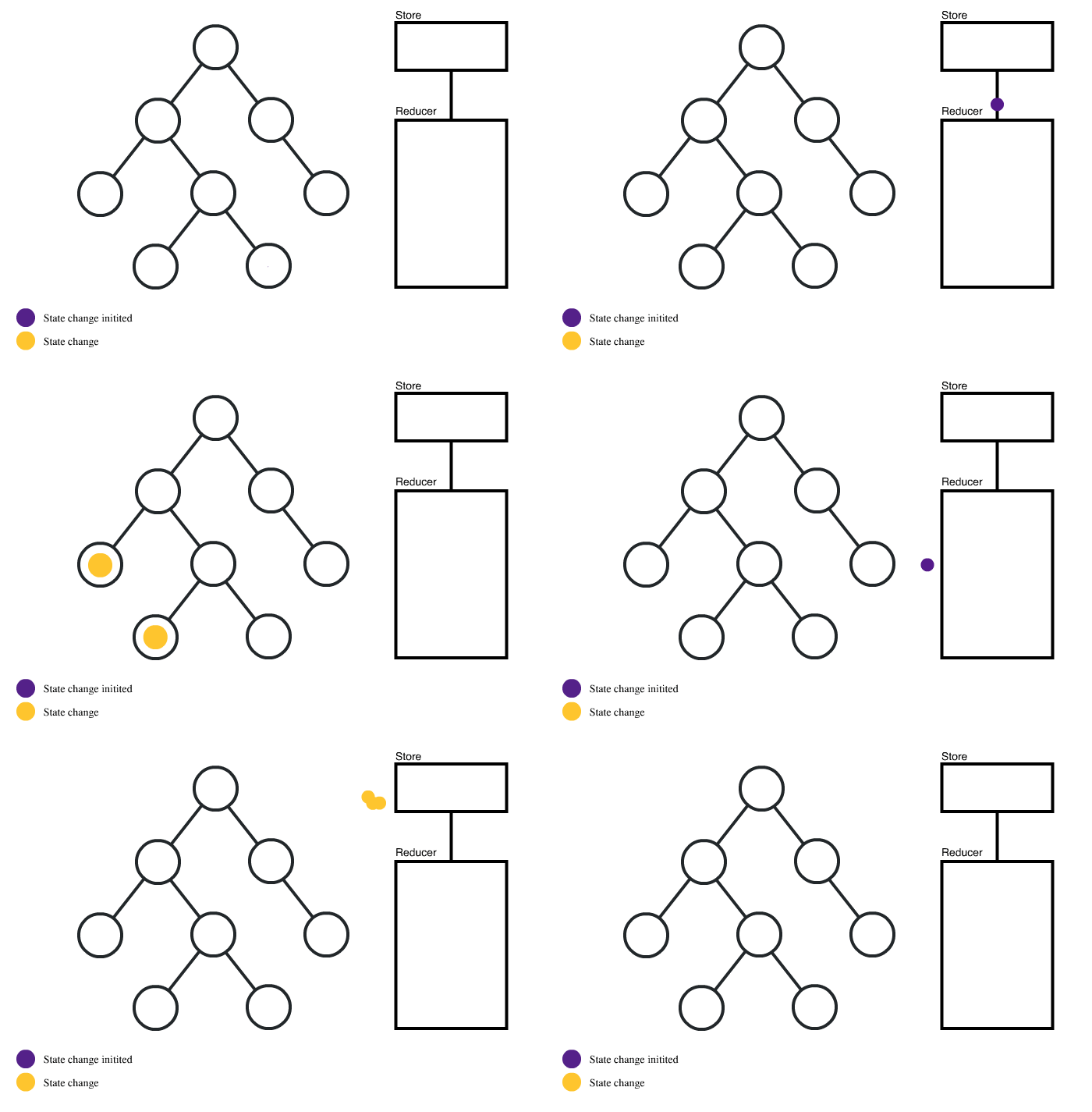
One-Way Data Flow會導致組件程式變得複雜,以及資料會經過沒有需要的組件,因此透過Redux的store可以在任何的組件中管理state,簡化流程
## 參考依據:
https://devs.tw/post/40
https://ithelp.ithome.com.tw/articles/10216984
https://tkssharma.gitbook.io/react-training/day-01/react-js-3-principles/one-way-data-flow
:::
### 如何在 React 中使用原生的 HTML Element。[Raiy]
:::spoiler Answer
我們了解 React 的機制是透過操作 Virtual DOM 來更新 Real DOM,但如果我們需要直接獲取 Real DOM 元素,就必須透過 React 提供的 ref 機制,有點類似原生語法的 document.querySelector。
* 使用 ref 就可以取得 DOM 節點 ,不需要使用原生 JS 語法
* ref 可以設定在 DOM 、 組件上
* 每個 ref 都有一個 current 物件,要操作必須是呼叫 ref.current
* class 使用 React.creatRef()、hook 使用 useRef()
* 更新current不會觸發re-render
**!不要過度依賴 ref**
仔細思考 state 應該放在哪個層級的組件,並由誰來決定狀態的更新,是否真的無法由 props / state 的改變來觸發?因為認知上,我們知道 DOM 會 render 表示 props / state 被改動了,但如果透過 ref 就會讓 debug 增加複雜度、code 難管理。
也因為 ref 的更新並不會觸動 render,所以要想重新渲染畫面,用 ref 是沒有用的。
:::
### 為什麼你要使用/不使用 Redux?
:::spoiler Answer
#### 什麼是 Redux?
實作 Flux 的概念,state management system

**Redux Cycle**
<img src="https://i.imgur.com/RNO0v23.png" width="800px">
#### code example
With Redux
```javascript=
import React, { Component } from 'react';
class Counter extends Component {
state = { value: 0 };
increment = () => {
this.setState(prevState => ({
value: prevState.value + 1
}));
};
decrement = () => {
this.setState(prevState => ({
value: prevState.value - 1
}));
};
render() {
return (
<div>
{this.state.value}
<button onClick={this.increment}>+</button>
<button onClick={this.decrement}>-</button>
</div>
)
}
}
```
With Redux
```javascript=
import React, { Component } from 'react';
const counter = (state = { value: 0 }, action) => {
switch (action.type) {
case 'INCREMENT':
return { value: state.value + 1 };
case 'DECREMENT':
return { value: state.value - 1 };
default:
return state;
}
}
class Counter extends Component {
state = counter(undefined, {});
dispatch(action) {
this.setState(prevState => counter(prevState, action));
}
increment = () => {
this.dispatch({ type: 'INCREMENT' });
};
decrement = () => {
this.dispatch({ type: 'DECREMENT' });
};
render() {
return (
<div>
{this.state.value}
<button onClick={this.increment}>+</button>
<button onClick={this.decrement}>-</button>
</div>
)
}
}
```
<img src="https://i.imgur.com/bpkbjp7.png" width="800px">
### 總結
#### 使用 Redux 的時機
- 當 component 的結構較為層數較多,且 state 都是在比較上層被宣告往下傳時
- 當 component 的 state 會因使用者互動而產生不斷變化時
- 希望可以透過 Redux 的狀態管理系統,更方便開發後的維護、測試、debug
#### 不需要使用 Redux 的原因
- 開發成本高,對於較小的 Application 反而耗時
- 元件結構曾數不多,以 props 的方式傳遞 state 就可以處理
- 即使元件的層數多,但 state 不太會因為使用者操作而改變,用 React Context api 處理更符合效率
:::
### 為什麼你要使用/不使用 React Context?[宜]
:::spoiler answer
Context API 的使用方法,你只需要在一個高層級的父組件上使用 `createContext()` 建立一個 context,並且用 `<Context.Provider>` 向下傳遞 。如果想要取得 context,只需要在子元件中呼叫 `useContext` 就可以輕易的拿到父元件的 context。
範例程式:https://codesandbox.io/s/contextapi-practice-i05tf
## Context API 在元件中造成的重新渲染問題
呼叫 useContext 的 component 總是會在 context 值更新時重新 render。重新 render component 的操作很昂貴,可以透過 memoization 來最佳化。
## memoization: useMemo
```jsx=
const MyComponent = () => {
const state = React.useContext(context);
const count = state.count;
return React.useMemo(() => {
return <div>{count}</div>
}, [count])
}
```
## 總結
因為context API在每一次context更新時都會迫使「有使用useContext取得該context」的元件更新。這在專案有規模時會造成很嚴重的效能問題。
1. 拆分Context 或是 子元件使用 useMemo(不推薦)。
2. 適用多個共用資料的元件 → 而不是用來進行多層state的管理。
:::
### 為什麼你要使用/不使用 React Hooks? [SOL]
:::spoiler answer
* 在 Component 之間重用 Stateful 的邏輯很困難
Class沒有提供一個方法來把可重用的行為「附加」(stateful logic)到一個 component 上,雖然可以用 render props 以及 higher-order components去解決,但使用它們時需要重新架構component,這會更複雜,而且會造成wrapper hell!

* 複雜的 component 變得很難理解
每個 lifecycle 方法常常包含不相關的邏輯混合在一起,這讓它很容易製造 bug 和不一致性。

* Class 容易造成開發者的誤解
必須了解 this 在 JavaScript 中如何運作,在寫event handler的時候要寫bind綁定this,除了冗長之外,「this」到底是什麼大概也沒人真的在乎。
==Hook 讓你不需要 class 就能使用更多 React 的功能。Hook 擁抱 function,但沒有犧牲 React 的實際精神==
:::
### 什麼是 Higher Order Component,用來解決什麼問題?[SOL]
:::spoiler answer
* Higher Order Component 指的是在 React 中能夠幫助我們重複使用程式碼的 React Component。具體來說 Higher Order Component 是一個 function,而這個 function 可以把 Component 當作參數傳入,並且回傳一個「增強版」的 Component。
>Higher Order Component 就是一個“接收其他元件作為參數的函數”,
React 官方有更嚴格的定義:只接受一個元件作為輸入,並且輸出也是一個元件。

* 被當作參數放入的 Component 稱作 Wrapped Component (ChildComponent),因為它是被 HOC 包住的。
* Higher-Order Component 又稱作 Enhanced Component 或 Composed Component,但它其實是 Function。
HOC實際程式碼:
```javascript=
function withSecondElapsed(WrappedComponent) {
return class extends React.Component {
//一些重複的程式碼....
state = {
secondElapsed: 0
};
tick = () => {
this.setState(({ secondElapsed }) => ({
secondElapsed: secondElapsed + 1
}));
};
componentDidMount() {
this.interval = setInterval(this.tick, 1000);
}
componentWillUnmount() {
clearInterval(this.interval);
}
render() {
return <WrappedComponent secondElapsed={this.state.secondElapsed} />;
}
};
}
```
要套用HOC的Component計時器:
```javascript=
import withSecondElapsed from "./withSecondElapsed"
class Counter extends React.Component {
static propTypes = {
secondElapsed: PropTypes.number.isRequired
};
render() {
const { secondElapsed } = this.props;
return <div>{secondElapsed} 秒</div>;
}
}
export default withSecondElapsed(Counter);
```
要套用HOC的Component時鐘:
```javascript=
class Clock extends React.Component {
static propTypes = {
secondElapsed: PropTypes.number.isRequired
};
state = {
date: new Date()
};
render() {
const { secondElapsed } = this.props;
const { date } = this.state;
return (
<div>
{new Date(date.getTime() + secondElapsed * 1000).toLocaleString()}
</div>
);
}
}
export default withSecondElapsed(Clock);
```
### 參考連結:
[[react] Higher Order Component(HOC)](https://pjchender.dev/react/react-higher-order-component/)
[React Developer 不可不知的 Higher Order Component(HOC / 高階元件)](https://max80713.medium.com/react-developer-%E4%B8%8D%E5%8F%AF%E4%B8%8D%E7%9F%A5%E7%9A%84-higher-order-component-fb5028167fad)
:::
### Single Page Application 的優缺點?[SOL]
:::spoiler answer
* 優點
**1.良好的互動體驗:**
使用者不需要重新重新整理頁面,獲取資料也是通過Ajax非同步獲取,頁面顯示流暢。
**2.良好的前後端工作分離模式:**
單頁Web應用可以和RESTful規約一起使用,通過REST API提供介面資料,並使用Ajax非同步獲取,這樣有助於分離客戶端和伺服器端工作。
**3.減輕伺服器壓力&減少頻寬浪費:**
伺服器只用出資料就可以,不用管展示邏輯和頁面合成,吞吐能力會提高几倍;
**4.共用一套後端程式程式碼:**
不用修改後端程式程式碼就可以同時用於Web介面、手機、平板等多種客戶端;
* 缺點
**1.SEO難度較高:**
由於所有的內容都在一個頁面中動態替換顯示,所以在SEO上其有著天然的弱勢,所以如果你的站點對SEO很看重,且要用單頁應用,那麼就做些靜態頁面給搜尋引擎用吧。--->解決方式:同構,SSR框架
**2.前進、後退管理:**
由於單頁Web應用在一個頁面中顯示所有的內容,所以不能使用瀏覽器的前進後退功能。--->解決方式:History API, pushState..
**3.初次載入耗時多:**
為實現單頁Web應用功能及顯示效果,需要在載入頁面的時候將JavaScript、CSS統一載入。部分頁面可以在需要的時候載入。

### 參考連結:
[瞭解 JavaScript 搜尋引擎最佳化 (SEO)](https://developers.google.com/search/docs/advanced/javascript/javascript-seo-basics?hl=zh-tw)
[Loading Script Files Dynamically](https://www.kirupa.com/html5/loading_script_files_dynamically.htm)
[load and execute order of scripts](https://stackoverflow.com/questions/8996852/load-and-execute-order-of-scripts)
[淺述 SSR SPA 優缺點](https://blog.niclin.tw/2019/01/06/%E6%B7%BA%E8%BF%B0-ssr-spa-%E5%84%AA%E7%BC%BA%E9%BB%9E/)
:::
### 如何解決 SPA 的 SEO 問題?[Raiy]
:::spoiler Answer
SPA SEO 不佳的情況是因為瀏覽器首次載入時,僅載入了最基本的骨架,導致爬蟲在真正的內容渲染完成前就已經爬完了空殼,可以使用以下兩個方式(依據專案大小以及時程人力去選擇):
### SSR 渲染
- 概念:將 SPA 打包到 伺服器上,改成在 server 渲染出HTML後再送到瀏覽器,但此時的 HTML 不包含互動的功能,需要跟 SPA 框架配合 ( React 的 Next、Vue.js 的 Nuxt ),在瀏覽器上再度「混合」成可互動的應用程式
- SSR 的優點 -
更快的響應時間,無需等所有 JS 檔案下載完成,即可顯示畫面
更好的 SEO,關鍵標籤在 server 後端已完成渲染,因此爬蟲都捕捉得到
- SSR 的缺點 -
佔用 CPU 和 內部記憶體
部份 Web API 無法使用,window、docment和alert,需要另外處理
開發相對複雜、技術含量高
### Prerender 預渲染
* 也可稱為靜態渲染,快速、簡單,適合專案不龐大、內容異動不大的網站
* 在使用者訪問網站前就已渲染好 html ,將各個路由生成特定的 html
* 多一個另外的 server 專門給爬蟲爬
* 比較不吃 server 後端開發經驗
例如:React-Static庫 [https://github.com/react-static/react-static](https://github.com/react-static/react-static)、Navi庫 [https://frontarm.com/navi/en/](https://frontarm.com/navi/en/)、Gatsby、webpack 也有提供插件 prerender-spa-plugin

:::
 Sign in via Google
 Sign in via Facebook
 Sign in via X(Twitter)
 Sign in via GitHub
 Sign in via Dropbox
 Sign in with Wallet
Connect another wallet
Sign in with Wallet
Connect another wallet