- Extensive Libraries and Ecosystem:
- Python boasts a rich ecosystem of libraries and tools for data science, including NumPy, pandas, Matplotlib, Seaborn, Scikit-learn, TensorFlow, PyTorch, and more.
- Data Visualization:
- Python provides excellent libraries for data visualization, such as Matplotlib and Seaborn. Visualizing data is a crucial aspect of data science, helping you understand patterns, trends, and insights from your datasets.
- Integration with Big Data Technologies:
- Python seamlessly integrates with big data technologies such as Apache Spark. This is essential for handling large-scale data processing and analytics.

---

---
---


---
### Print "Hello World"
```python=
print("Hello World")
```
---
### Variable declaration
```python=
variable_name = value
```
---
### Operators
#### Arithmetic Operators
```python=
# Addition
result_add = 5 + 3 # result_add is 8
# Subtraction
result_sub = 7 - 2 # result_sub is 5
# Multiplication
result_mul = 4 * 6 # result_mul is 24
# Division
result_div = 15 / 3 # result_div is 5.0 (float)
# Modulus (remainder)
result_mod = 17 % 5 # result_mod is 2
# Exponentiation
result_exp = 2 ** 3 # result_exp is 8
```
#### Comparison Operators
```python=
# Equal to
is_equal = (10 == 10) # is_equal is True
# Not equal to
not_equal = (5 != 3) # not_equal is True
# Greater than
greater_than = (8 > 5) # greater_than is True
# Less than
less_than = (4 < 7) # less_than is True
# Greater than or equal to
greater_equal = (6 >= 6) # greater_equal is True
# Less than or equal to
less_equal = (9 <= 9) # less_equal is True
```
#### Logical Operators
```python=
# Logical AND
logical_and = True and False # logical_and is False
# Logical OR
logical_or = True or False # logical_or is True
# Logical NOT
logical_not = not True # logical_not is False
```
---
### Data Types
#### Numbers
```python=
# Integer
num_int = 10
# Float
num_float = 3.14
```
#### Strings
```python=
# Single line string
single_line_str = "Hello, World!"
# Multi-line string
multi_line_str = """This is a
multi-line string."""
```
---
### Conditions and Loops
#### if-else
```python=
age = 18
if age >= 18:
print("You are an adult.")
elif age<16:
print("FBI is coming")
else:
print("You are a minor.")
```
#### For Loop
```python=
numbers = [1, 2, 3, 4, 5]
for num in numbers:
print(num)
```
#### while loop
```python=
count = 0
while count < 5:
print(count)
count += 1
```
---
### Data Structures
#### Lists
```python=
# List declaration
fruits = ['aple','banana','orange']
# Accessing list items
first_fruit = fruits[0] # first_fruit is 'apple'
last_fruit = fruits[-1] # last_fruit is 'orange'
# Modifying list items
fruits[0] = 'grape' # Now, fruits is ['grape', 'banana', 'orange']
# Adding items to a list
fruits.append('kiwi') # Now, fruits is ['grape', 'banana', 'orange', 'kiwi']
fruits.insert(1, 'melon') # Now, fruits is ['grape', 'melon', 'banana', 'orange', 'kiwi']
# Removing items from a list
fruits.remove('banana') # Now, fruits is ['grape', 'melon', 'orange', 'kiwi']
removed_item = fruits.pop(2) # Now, fruits is ['grape', 'melon', 'kiwi'], and removed_item is 'orange'
# List slicing
sliced_list = fruits[1:3] # sliced_list is ['melon', 'kiwi']
every_second_item = fruits[::2] # every_second_item is ['grape', 'kiwi']
# Count Rows and Columns of List ,return a list
return list(players.shape)
```
#### Tuples - Immutable(不可變
```python=
# Tuple declaration
fruit_tuple = ("apple", "banana", "orange", "grape")
# Accessing tuple items
first_fruit = fruit_tuple[0] # first_fruit is 'apple'
last_fruit = fruit_tuple[-1] # last_fruit is 'grape'
# Tuple slicing
sliced_fruits = fruit_tuple[1:3] # sliced_fruits is ('banana', 'orange')
```
#### Sets
```python=
# Set declaration
fruits_set1 = {"apple", "banana", "orange"}
fruits_set2 = {"orange", "grape", "kiwi"}
# Adding items to a set
fruits_set1.add("strawberry")
# Removing items from a set
fruits_set2.remove("kiwi")
# Set operations
union_set = fruits_set1.union(fruits_set2) # Union of sets
intersection_set = fruits_set1.intersection(fruits_set2) # Intersection of sets
difference_set = fruits_set1.difference(fruits_set2) # Set difference
print("Union Set:", union_set)
print("Intersection Set:", intersection_set)
print("Difference Set:", difference_set)
```
#### Dictionaries
```python=
# Dictionary declaration
person = {"name": "John", "age": 25, "city": "New York"}
# Accessing dictionary values
name = person["name"] # name is 'John'
# Modifying dictionary values
person["age"] = 26 # Now, person is {"name": "John", "age": 26, "city": "New York"}
# Adding items to a dictionary
person["gender"] = "Male" # Now, person is {"name": "John", "age": 26, "city": "New York", "gender": "Male"}
# Removing items from a dictionary
del person["city"] # Now, person is {"name": "John", "age": 26, "gender": "Male"}
# Getting keys and values from a dictionary
keys = person.keys() # keys is dict_keys(['name', 'age', 'gender'])
values = person.values() # values is dict_values(['John', 26, 'Male'])
```
#### List Comprehension
```python=
# Creating a new list from an existing list
numbers = [1, 2, 3, 4, 5]
squared_numbers = [x**2 for x in numbers]
# Conditionally creating a new list from an existing list
even_numbers = [x for x in numbers if x % 2 == 0]
print("Original List:", numbers)
print("Squared Numbers:", squared_numbers)
print("Even Numbers:", even_numbers)
```
#### Dictionary Comprehension
```python=
# Creating a new dictionary from an existing list
numbers = [1, 2, 3, 4, 5]
squared_numbers_dict = {x: x**2 for x in numbers}
# Conditionally creating a new dictionary from an existing dictionary
original_dict = {'a': 1, 'b': 2, 'c': 3}
even_numbers_dict = {key: value for key, value in original_dict.items() if value % 2 == 0}
print("Original Dictionary:", original_dict)
print("Squared Numbers Dictionary:", squared_numbers_dict)
print("Even Numbers Dictionary:", even_numbers_dict)
```
---
### Functions
```python=
# Function definition
def greet(name):
return "Hello, {name}!"
# Function call
greeting = greet("Alice") # greeting is "Hello, Alice!"
```
---
### Error Handling
```python=
# try-except block
try:
# code block
except ErrorType:
# code block
# try-except-else block
try:
# code block
except ErrorType:
# code block
else:
# code block
# try-except-finally block
try:
# code block
except ErrorType:
# code block
finally:
# code block
```
---
## ==Modules and Packages==
```python=
# Importing a module
import module_name
# Importing a specific function from a
module
from module_name import function_name
# Importing all functions from a module
from module_name import *
# Importing a package
import package_name
# Importing a specific module from a
package
from package_name import module_name
# Importing a specific function from a
module in a package
from package_name.module_name import
function_name
```
---
### ==File Handling==
```python=
# Opening a file
file = open("filename", "mode")
# Reading from a file
file_contents = file.read()
# Writing to a file
file.write("text")
# Closing a file
file.close()
```
---
### ==Virtual Environments==
```python=
# Creating a virtual environment
python -m venv virtual_environment_name
# Activating a virtual environment
source virtual_environment_name/bin/activate
# Installing packages in a virtual environment
pip install package_name
# Deactivating a virtual environment
deactivate
```
---
### ==Context Managers==
```python=
# Context manager class
class ContextManagerClass:
def __enter__(self):
# code block
return value
def __exit__(self, exc_type, exc_value,
traceback):
# code block
# Using a context manager with 'with' statement
with ContextManagerClass() as value:
# code block
```
---
### Classes and Objects
```python=
# Class declaration
class ClassName:
def __init__(self, parameter1,
parameter2):
self.parameter1 = parameter1
self.parameter2 = parameter2
def method_name(self):
# code block
# Object creation
object_name = ClassName(argument1,
argument2)
# Accessing object properties
property_value = object_name.property_name
# Calling object methods
object_name.method_name()
```
---
## Inheritance
```python=
# Parent class
class ParentClass:
def parent_method(self):
# code block
# Child class
class ChildClass(ParentClass):
def child_method(self):
# code block
# Object creation
object_name = ChildClass()
# Accessing inherited methods
object_name.parent_method()
```
---
## Polymorphism
```python=
# Parent class
class ParentClass:
def polymorphic_method(self):
# code block
# Child class 1
class ChildClass1(ParentClass):
def polymorphic_method(self):
# code block
# Child class 2
class ChildClass2(ParentClass):
def polymorphic_method(self):
# code block
# Object creation
object1 = ChildClass1()
object2 = ChildClass2()
# Polymorphic method calls
object1.polymorphic_method()
object2.polymorphic_method()
```
---
## Lambda Functions
```python=
# Lambda function declaration
lambda_function = lambda p1,p2: expression
# Lambda function call
result = lambda_function(a1, a2)
```
---
## Map, Filter, and Reduce
```python=
# Map function
new_list = map(function, iterable)
# Filter function
new_list = filter(function, iterable)
# Reduce function
from functools import reduce
result = reduce(function, iterable)
```
---
## Decorators
```python=
# Decorator function
def decorator_function(original_function):
def wrapper_function(*args, **kwargs):
# code before original function
result = original_function(*args, **kwargs)
# code after original function
return result
return wrapper_function
# Applying a decorator to a function
@decorator_function
def original_function(*args, **kwargs):
# code block
```
---
## Generators
```python=
# Generator function
def generator_function():
for i in range(10):
yield i
# Using a generator
for value in generator_function():
# code block
```
---
### Threading and Multiprocessing
```python=
import threading
import multiprocessing
# Threading
thread = threading.Thread(target=function_name,
args=(argument1, argument2))
thread.start()
# Multiprocessing
process =
multiprocessing.Process(target=function_name,
args=(argument1, argument2))
process.start()
```
---
## We will use google colab to learn python
[Google Colab](https://colab.google)
[Kraggle titanic-dataset](https://www.kaggle.com/datasets/mahmoudshogaa/titanic-dataset)
---

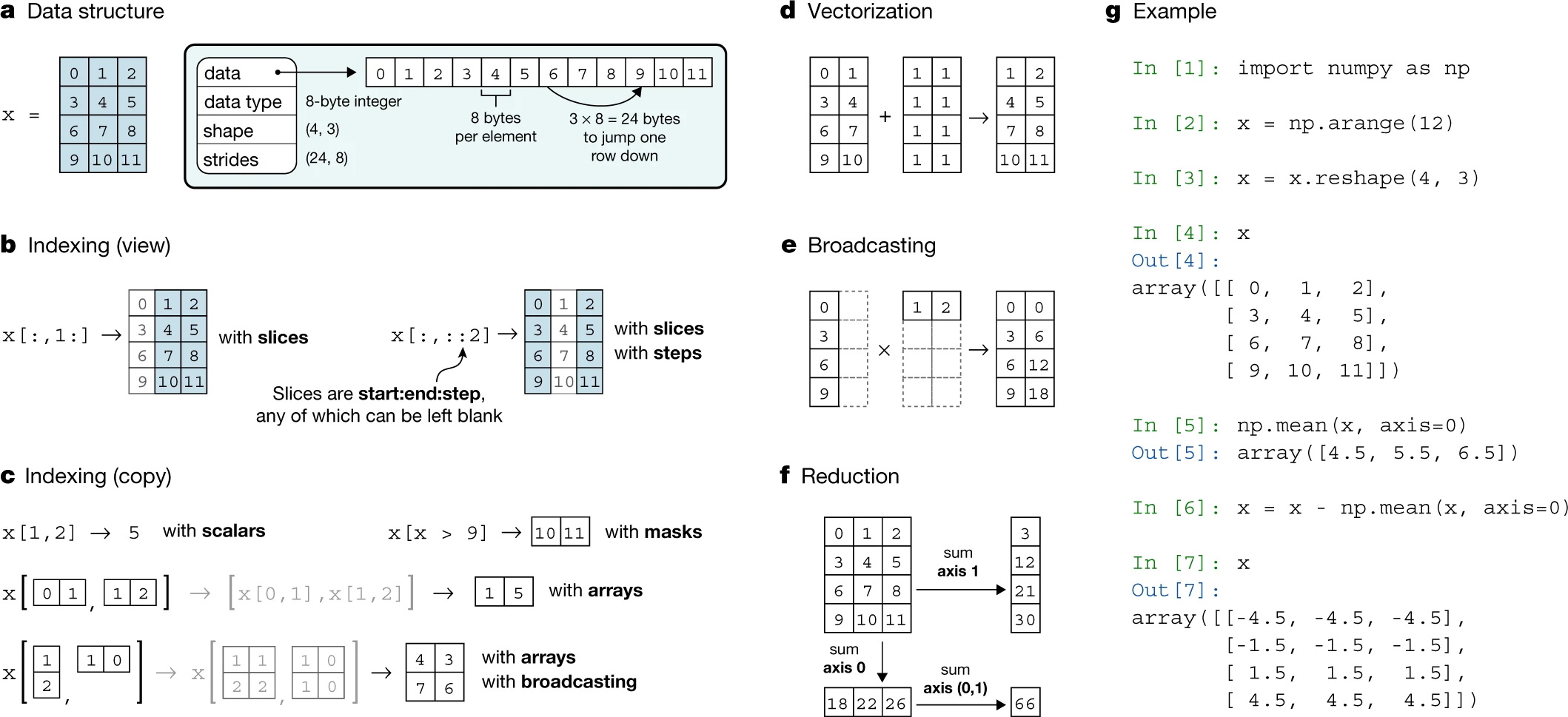
### Numpy
- Creating and editing multidimensioal arrays
- 1D,2D,3D arrays
- Arithmetic operations
- Array comparsion
- Array manipulation
- 數組操作: NumPy 提供 ndarray 對象,可進行高效的數組操作和數學計算。
- 數學函數: 內置了豐富的數學函數,如線性代數、統計學、傅立葉變換等,支援多維數組計算。
- 隨機數生成: 提供隨機數生成函數,用於模擬和實驗。
- 數組索引和切片: 支援數組的靈活索引和切片,使數據提取更加方便。
- 廣播: 能夠進行不同形狀數組之間的廣播操作,提高代碼的可讀性和性能。
```python=
# 安裝 NumPy
pip install numpy
# 使用 NumPy 創建數組
import numpy as np
arr = np.array([1, 2, 3, 4, 5])
# 數組運算
arr_squared = arr ** 2
# 線性代數操作
matrix = np.array([[1, 2], [3, 4]])
det = np.linalg.det(matrix)
# 隨機數生成
random_array = np.random.rand(5)
# 數組索引和切片
subset = arr[1:4]
```
[numpy datacamp](https://www.datacamp.com/cheat-sheet/numpy-cheat-sheet-data-analysis-in-python)
[numpy cheetsheet](https://images.datacamp.com/image/upload/v1676302459/Marketing/Blog/Numpy_Cheat_Sheet.pdf)
---

### Pandas
- Creating and editing series & dataframes
- Series and dataframe structure
- Data sorting
- Applying functions
- Dataframe manipulation
- 數據結構: Pandas 提供 DataFrame 和 Series 兩種主要的數據結構,用於處理二維表格數據。
- 數據清洗: 支援缺失數據處理、數據合併、重複數據刪除等功能,使數據更加乾淨。
- 數據選擇和過濾: 提供直觀的方式來選擇和過濾數據,快速提取需要的信息。
- 統計分析: 內置許多統計分析函數,支援快速生成統計數據和可視化。
- 數據讀寫: 能夠從多種數據源讀取數據,並將處理後的數據保存到文件。
```python=
# 安裝 Pandas
pip install pandas
# 使用 Pandas 創建 DataFrame
import pandas as pd
data = {'Name': ['Alice', 'Bob', 'Charlie'],
'Age': [25, 30, 35],
'City': ['New York', 'San Francisco', 'Los Angeles']}
df = pd.DataFrame(data)
# 數據選擇和過濾
subset = df[df['Age'] > 30]
# 統計分析
mean_age = df['Age'].mean()
# 數據讀寫
df.to_csv('data.csv', index=False)
```
[pandas datacamp](https://www.datacamp.com/cheat-sheet/pandas-cheat-sheet-for-data-science-in-python)
[pandas cheetsheet](https://images.datacamp.com/image/upload/v1676302204/Marketing/Blog/Pandas_Cheat_Sheet.pdf)
---
1. iloc方法:
iloc是透過==整數位置==來選擇數據的方法,即基於數據的位置進行索引。它使用整數索引來定位行和列。語法為:
python
Copy code
df.iloc[row_index, column_index]
其中,row_index表示行的整數位置,可以是單個整數、切片或者整數列表;column_index表示列的整數位置,同樣可以是單個整數、切片或整數列表。
例子:
python
Copy code
import pandas as pd
data = {'A': [1, 2, 3], 'B': [4, 5, 6], 'C': [7, 8, 9]}
df = pd.DataFrame(data)
# 選擇第二行第三列的元素
value = df.iloc[1, 2]
2. loc方法:
loc是透過==標籤==來選擇數據的方法,即基於==行和列==的標籤進行索引。語法為:
python
Copy code
df.loc[row_label, column_label]
其中,row_label表示行的標籤,可以是單個標籤、標籤列表或者標籤切片;column_label表示列的標籤,同樣可以是單個標籤、標籤列表或者標籤切片。
例子:
python
Copy code
import pandas as pd
data = {'A': [1, 2, 3], 'B': [4, 5, 6], 'C': [7, 8, 9]}
df = pd.DataFrame(data, index=['row1', 'row2', 'row3'])
# 選擇標籤為'row2'和'row3'的行,以及標籤為'B'和'C'的列
subset = df.loc[['row2', 'row3'], ['B', 'C']]
總結:
iloc使用整數位置進行索引,適用於基於==位置==的索引。
loc使用標籤進行索引,適用於基於==標籤==的索引。
---
## Importing and Exporting
### 1. Reading Data from Internal Files
- a. Reading CSV Files:
```python
import pandas as pd
# Read CSV file
data = pd.read_csv('filename.csv')
# Display the DataFrame
print(data)
```
- b. Reading Excel Files:
```python
import pandas as pd
# Read Excel file
data = pd.read_excel('filename.xlsx', sheet_name='Sheet1')
# Display the DataFrame
print(data)
```
- c. Reading Text Files:
```python=
# Read text file
with open('filename.txt', 'r') as file:
data = file.read()
# Display the data
print(data)
```
### 2. Reading Data from APIs
* .csv is a common form of file for transferring datasets
* Reading data from internal files
* Reading data from APIs
- a. Using requests Library for JSON APIs:
```python=
import requests
import json
# Make a GET request to the API
response = requests.get('https://api.example.com/data')
# Parse JSON data
data = json.loads(response.text)
# Display the data
print(data)
```
- b. Using pandas for API Responses:
```python=
import pandas as pd
# Make a GET request to the API
url = 'https://api.example.com/data'
data = pd.read_json(url)
# Display the DataFrame
print(data)
```
---
## Sorting Data & Applying Functions
- Sorting data in a series or dataframe
- Applying functions to elements stored in a series or dataframe
---

### Plotly
- Interactive data visualizations
- Basic charts(e.g. Line plots)
- Statistical charts(e.g. Histograms)
- Maps(e.g. Bubble map)
- 3D charts
- 交互性數據可視化: Plotly 是一個用於建立交互性數據可視化的庫,支援線圖、散點圖、長條圖等多種圖表。
- 線上共享和嵌入: 可將 Plotly 圖表分享到 Plotly 在線平台,也可以輕鬆嵌入到網頁中,實現動態數據呈現。
- 豐富的圖表設定: 提供豐富的圖表配置選項,支援自定義佈局、主題、標籤等,使圖表更具吸引力。
- 支援多種編程語言: Plotly 不僅支援 Python,還支援 R、JavaScript 等多種編程語言,實現跨平台開發。
```python=
# 安裝 Plotly
pip install plotly
# 使用 Plotly 繪製散點圖
import plotly.express as px
# 創建數據框
data = px.data.iris()
# 繪製散點圖
fig = px.scatter(data, x='sepal_width', y='sepal_length', color='species', size='petal_length')
# 顯示圖表
fig.show()
```
---

### SciPy
- Advanced mathematical / statistical functions
- Shape manipulation
- Vectoriation
- Matrix operations
- 科學計算工具套件: SciPy 是一個建立在 NumPy 基礎上的科學計算工具套件,提供了許多高效且方便的數學函數。
- 優化和線性代數: SciPy 包含優化、線性代數、積分和許多其他數學操作的函數,為科學家和工程師提供了豐富的工具。
- 統計分析: 提供統計學函數,能夠進行統計分析、機器學習和數據視覺化。
- 訊號和圖像處理: 提供了處理訊號和圖像的函數,用於信號處理、影像處理和計算機視覺。
- 科學實驗設計和最佳化: SciPy 提供了實驗設計和最佳化問題的解決方案,可應用於實驗室研究和工程領域。
```python=
# 安裝 SciPy
pip install scipy
# 使用 SciPy 的最佳化模組
from scipy.optimize import minimize
# 定義一個最小化的目標函數
def objective_function(x):
return x**2 + 4*x + 4
# 最小化目標函數
result = minimize(objective_function, 0)
# 顯示最小化結果
print(result)
```
---
# smtplib
smtplib模組是 Python 中的一個工具,用於實現 SMTP(Simple Mail Transfer Protocol)客戶端會話,使您能夠向支持 SMTP 或 ESMTP 的郵件伺服器發送郵件。以下是對 smtplib 模組的簡要介紹:
1. SMTP 類別 (smtplib.SMTP):
- 用於建立 SMTP 連接,支援 SMTP 和 ESMTP 操作。
- 提供 connect()、helo()、ehlo() 等方法進行連接和身份驗證。
- 用於發送郵件的 sendmail() 方法。
2. SMTP_SSL 類別 (smtplib.SMTP_SSL):
- 與 SMTP 類別相似,但提供 SSL 加密的連接。
- 使用 starttls() 不適用的情況下,直接支援 SSL 連接。
- 支援的身份驗證機制包括 CRAM-MD5、PLAIN 和 LOGIN。
3. LMTP 類別 (smtplib.LMTP):
- 用於支援 LMTP(Local Mail Transfer Protocol)的連接。
- 支援 Unix sockets 和常規主機:端口伺服器的連接。
4. 例外(Exceptions):
- SMTPException 是所有其他例外的基類。
- SMTPServerDisconnected 在伺服器意外斷開連接時引發。
- SMTPResponseException 是所有包含 SMTP 錯誤碼的例外的基類。
5. SMTP 方法:
- set_debuglevel() 設置調試輸出級別。
- connect() 連接到指定主機和端口。
- helo() 和 ehlo() 用於身份驗證。
- sendmail() 用於發送郵件。
- starttls() 將 SMTP 連接轉換為 TLS(Transport Layer Security)模式。
```python=
import smtplib
# 設定郵件參數
from_addr = "your_email@gmail.com"
to_addrs = ["recipient1@example.com", "recipient2@example.com"]
subject = "Test Email"
body = "This is a test email from Python."
# 連接到 SMTP 伺服器
with smtplib.SMTP("smtp.gmail.com", 587) as server:
# 啟用 TLS 模式
server.starttls()
# 登錄到郵件伺服器
server.login("your_email@gmail.com", "your_password")
# 構造郵件內容
msg = f"Subject: {subject}\n\n{body}"
# 發送郵件
server.sendmail(from_addr, to_addrs, msg)
# 郵件發送完成後,連接會自動關閉
```
---
### 與springboot配合
```python=
# python_script.py
import requests
def get_user_by_id(user_id):
api_url = f"http://localhost:8080/api/users/{user_id}"
response = requests.get(api_url)
if response.status_code == 200:
user_data = response.json()
return user_data
else:
return None
# 使用例子
user_id = 1
user_data = get_user_by_id(user_id)
print(user_data)
```
---
# Data Manipulation & Visualizations
## Data Visualization(Cont.)
- Common applications of data visualization(Plotly)
Multiple Y-Axes
• Box Plot
• Log Plot
• Heat Map
Time Series
• Gantt Chart
## Data Visualization (Cont.)
Adding custom controls to plots
Sliders
• Timeframe
• Restyling
## Apply data visualizations
## Data Cleaning
Making imported data more usable for analysis
* Restructuring the dataset
* Resolving anomalies
* Resolving null data
* Extrapolating missing data
## Common Biases & Fallacies
The common pitfalls during data analysis
Regression Toward the Mean Correlation ≠ Causation
Sampling Bias
Quantitative Fallacy
Apply data cleaning prior to visualization
## Regression
Finding the correlation between variables.
• Direct correlation
• Weak/no correlation
• Inverse correlation
## Modelling Fundamentals
What is the purpose of creating data models?
## Machine Learning 101
Basic concepts about building machine learning models:
• Supervised vs unsupervised
• Training data & test data
• Underfitting and overfitting
• Model refinement
## Classification
Using provided data to train a model, and then classify unknown entries based on other features
## Clustering
Using available data to identify the “appropriate” label for the dataset.
## Web Scraping
Using BeautifulSoup to scrap web-based data on the browser without the need to download a dataset made available by third-party providers.
- Example 1: Basic Web Scraping with BeautifulSoup:
```python=
# Import necessary libraries
from bs4 import BeautifulSoup
import requests
# Specify the URL of the website you want to scrape
url = 'https://example.com'
# Make a GET request to the website
response = requests.get(url)
# Parse the HTML content of the page
soup = BeautifulSoup(response.text, 'html.parser')
# Extract specific information from the page
title = soup.title.text
paragraphs = soup.find_all('p')
# Print the results
print(f'Title: {title}')
for i, paragraph in enumerate(paragraphs, 1):
print(f'Paragraph {i}: {paragraph.text}')
```
- Example 2: Scraping Images from a Website:
```python=
import requests
from bs4 import BeautifulSoup
from urllib.parse import urljoin
url = 'https://example.com/images'
response = requests.get(url)
soup = BeautifulSoup(response.text, 'html.parser')
# Find all image tags
img_tags = soup.find_all('img')
# Download and save each image
for img_tag in img_tags:
img_url = urljoin(url, img_tag['src'])
img_data = requests.get(img_url).content
with open(f'img_{img_tags.index(img_tag) + 1}.jpg', 'wb') as f:
f.write(img_data)
```
- Example 3: Scraping Data from a Table:
```python=
import requests
from bs4 import BeautifulSoup
url = 'https://example.com/table-data'
response = requests.get(url)
soup = BeautifulSoup(response.text, 'html.parser')
# Find the table on the page
table = soup.find('table')
# Extract data from the table
for row in table.find_all('tr'):
columns = row.find_all('td')
if columns: # Check if it's not a header row
data = [column.text.strip() for column in columns]
print(data)
```
 Sign in with Wallet
Connect another wallet
Sign in with Wallet
Connect another wallet