---
title: "8X8 LED超大貪食蛇 (MAX7219)"
tags: hackpad
---
# 8X8 LED超大貪食蛇 (MAX7219)
> [點此觀看原始內容](https://openlabtaipei.hackpad.tw/zmhqrqDFdR4)
8X8 LED超大貪食蛇 (MAX7219)
專案概述:
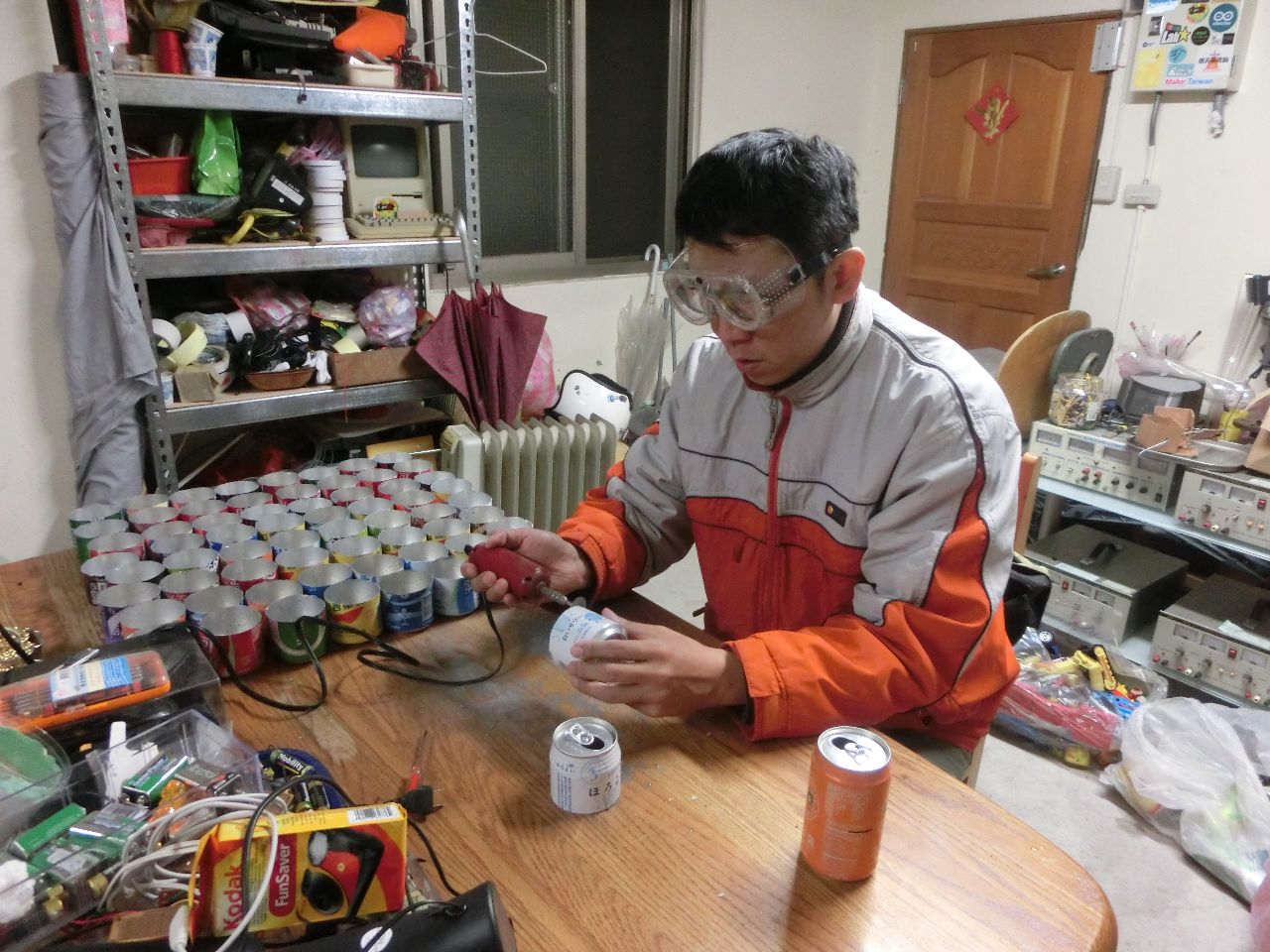
最近到口丁發現鴻旗跟謝老闆超大LED鋁罐燈這個專案,於是起了邪念想要借來玩超大LED貪食蛇,這個改造是可逆的,他還可以還原,只是改寫功能˙。
網路上別人用8x8LED做貪食蛇的實際影片
[http://makerflux.com/wiki/electronics-wiki/development_boards/arduino/arduino-projects/snake-game-with-an-8x8-led-matrix/](http://makerflux.com/wiki/electronics-wiki/development_boards/arduino/arduino-projects/snake-game-with-an-8x8-led-matrix/)
網路上别人用Adafruit 8x8 LED Matrix做好的Snake Game專案文章
================================================================================= STEP ONE 學會自由運用MAX7219的副函式
==================================================================================
目前˙小弟想要用Adafruit寫好的貪食蛇專案套用到台灣買的到的8X8 LED Matrix上,我目前想到兩個方法:
第一個是把原本Adafruit的matrix.drawpixel換成台灣的setDot();
[https://code.google.com/p/arudino-maxmatrix-library/wiki/Usage](https://code.google.com/p/arudino-maxmatrix-library/wiki/Usage)
↑解釋了所有的函數代表的意思
看來這個指令是可以的→m.setDot(0, 0, HIGH);
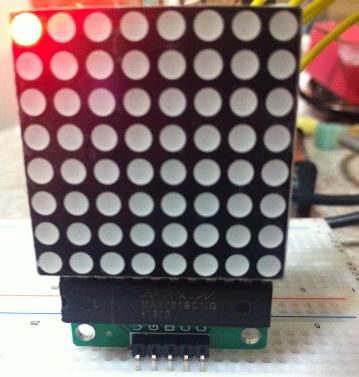
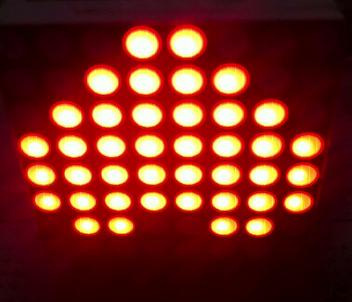
byte CH_A\[\] = { 8,8,B00111000, B01111100, B01111110, B00111111, B00111111,B01111110,B01111100,B00111000 };
m.writeSprite(0, 0, CH_A);
↑ 顯示各種圖形或是漢字
第二個是猜Adafruit的驅動IC也是MAX7219想辦法Debug讓他們相容。

===================================================================================
```txt
STEP TWO 製作Snake game code
```
=====================================================================================
大致上已經瞭解整個8X8 LED陣列的操作範例,接下來又有兩個出發點
第一個方法是Haker Adafruit的範例碼
// Snake on 8x8Matrix
//
[#include](https://openlabtaipei.hackpad.tw/ep/search/?q=%23include&via=zmhqrqDFdR4) <MaxMatrix.h>
[#include](https://openlabtaipei.hackpad.tw/ep/search/?q=%23include&via=zmhqrqDFdR4) <avr/pgmspace.h>
// Button pin
const int buttonRightPin = 2;
const int buttonLeftPin = 3;
// Game constants
// buttons
const int RIGHTBUTTON = 0;
const int LEFTBUTTON = 1;
// direction
const int TOP = 0;
const int RIGHT = 1;
const int BOTTOM = 2;
const int LEFT = 3;
// Snake
const int MAX\_SNAKE\_LENGTH = 10;
// Variables
int data = 8; // DIN pin of MAX7219 module
int load = 9; // CS pin of MAX7219 module
int clock = 10; // CLK pin of MAX7219 module
int maxInUse = 1; //change this variable to set how many MAX7219's you'll use
MaxMatrix m(data, load, clock, maxInUse); // define module
int direction = TOP; // direction of movement
int snakeX\[MAX\_SNAKE\_LENGTH\]; // X-coordinates of snake
int snakeY\[MAX\_SNAKE\_LENGTH\]; // Y-coordinates of snake
int snakeLength = 1; // nr of parts of snake
boolean buttonRead = false; // is button already read in this loop
unsigned long prevTime = 0; // for gamedelay (ms)
unsigned long delayTime = 500; // Game step in ms
int fruitX, fruitY;
unsigned long fruitPrevTime = 0;
unsigned long fruitBlinkTime = 1000/250;
int fruitLed = HIGH;
void setup(){
m.init(); // module initialize
m.setIntensity(15); // dot matix intensity 0-15
Serial.begin(9600);
Serial.println("Snake is started");
randomSeed(analogRead(0));
// Init led matrix
//matrix.begin(0x70);
// init buttons
int buttonpins\[\] = {buttonRightPin, buttonLeftPin};
initButtons(buttonpins, 2);
// init snake
snakeX\[0\] = 4;
snakeY\[0\] = 7;
for(int i=1; i<MAX\_SNAKE\_LENGTH; i++){
snakeX\[i\] = snakeY\[i\] = -1;
}
makeFruit();
}
void loop(){
checkButtons();
unsigned long currentTime = millis();
if(currentTime - prevTime >= delayTime){
nextstep();
buttonRead = false;
prevTime = currentTime;
}
draw();
}
void checkButtons(){
if(!buttonRead){
int currentDirection = direction;
if(buttonClicked(LEFTBUTTON)){
direction--;
if(direction < 0){
direction = LEFT;
}
}
else if(buttonClicked(RIGHTBUTTON)){
direction++;
if(direction > 3){
direction = TOP;
}
}
buttonRead = (currentDirection != direction);
}
}
void draw(){
m.clear();
drawSnake();
drawFruit();
// matrix.writeDisplay();
}
void drawSnake(){
for(int i=0; i<snakeLength; i++){
//m.setDot(0, 0, HIGH);
m.setDot(snakeX\[i\], snakeY\[i\], HIGH);
}
}
void drawFruit(){
if(inPlayField(fruitX, fruitY)){
unsigned long currenttime = millis();
if(currenttime - fruitPrevTime >= fruitBlinkTime){
fruitLed = (fruitLed == HIGH) ? LOW : HIGH;
fruitPrevTime = currenttime;
}
m.setDot(fruitX, fruitY, fruitLed);
}
}
boolean inPlayField(int x, int y){
return (x>=0) && (x<8) && (y>=0) && (y<8);
}
void nextstep(){
for(int i=snakeLength-1; i>0; i--){
snakeX\[i\] = snakeX\[i-1\];
snakeY\[i\] = snakeY\[i-1\];
}
switch(direction){
case TOP:
snakeY\[0\] = snakeY\[0\]-1;
break;
case RIGHT:
snakeX\[0\] = snakeX\[0\]+1;
break;
case BOTTOM:
snakeY\[0\] = snakeY\[0\]+1;
break;
case LEFT:
snakeX\[0\]=snakeX\[0\]-1;
break;
}
if((snakeX\[0\] == fruitX) && (snakeY\[0\] == fruitY)){
snakeLength++;
if(snakeLength < MAX\_SNAKE\_LENGTH){
makeFruit();
}
else {
fruitX = fruitY = -1;
}
}
}
void makeFruit(){
int x, y;
x = random(0, 8);
y = random(0, 8);
while(isPartOfSnake(x, y)){
x = random(0, 8);
y = random(0, 8);
}
fruitX = x;
fruitY = y;
}
boolean isPartOfSnake(int x, int y){
for(int i=0; i<snakeLength-1; i++){
if((x == snakeX\[i\]) && (y == snakeY\[i\])){
return true;
}
}
return false;
}
第二個方法是自己寫一個Snake game的code

有鑑於此,先土炮了一段CODE,大致上會走
測試電路
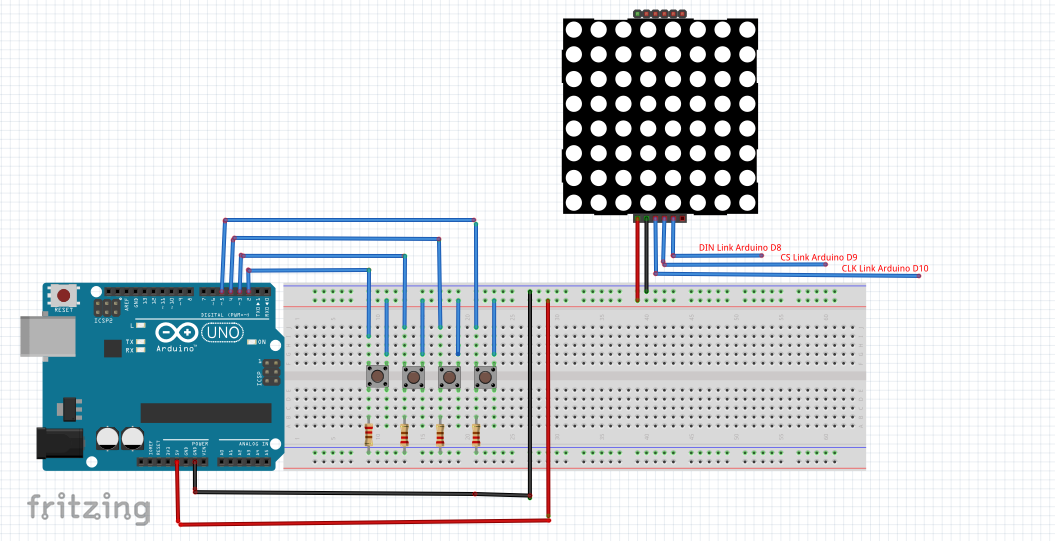
boolean UP = 2;
boolean DOWN = 3;
boolean RIGHT = 4;
boolean LEFT = 5;
boolean UP_BOTTOM;
boolean DOWN_BOTTOM;
booleansnake (1).zip LEFT_BOTTOM;
boolean RIGHT_BOTTOM;
void loop(){
//=========================================
// SCAN BUTTOM
//=========================================
UP_BOTTOM= digitalRead(UP);
if(UP_BOTTOM == true)
{
while(UP_BOTTOM)
{
UP_BOTTOM= digitalRead(UP);
}
Serial.println("U");
if(X == 7) X=0;
else X = X + 1;
}
DOWN_BOTTOM= digitalRead(DOWN);
if( DOWN_BOTTOM == true)
{
while(DOWN_BOTTOM)
{
DOWN_BOTTOM= digitalRead(DOWN);
}
Serial.println("D");
if(X == 0) X = 7;
else X = X -1 ;
}
LEFT_BOTTOM= digitalRead(LEFT);
if(LEFT_BOTTOM == true)
{
while(LEFT_BOTTOM)
{
LEFT_BOTTOM= digitalRead(LEFT);
}
Serial.println("L");
if(Y == 7 ) Y=0 ;
else Y=Y+1;
}
RIGHT_BOTTOM= digitalRead(RIGHT);
if(RIGHT_BOTTOM == true)
{
while(RIGHT_BOTTOM)
{
RIGHT_BOTTOM= digitalRead(RIGHT);
}
Serial.println("R");
if(Y == 0 ) Y = 7;
else Y=Y-1;
}
//=====================================================
m.clear();
m.setDot(X, Y, HIGH);
}
======================================================================================
We god a snake game code from Arduino Taipei in Facebook
======================================================================================
[snake (1).zip](https://www.dropbox.com/s/ra41w5yf00fnqmg/snake%20%281%29.zip?dl=0)
↑直接就可以體驗的8x8 snake game code
[https://processing.org/download/](https://processing.org/download/)
↑不過要先去下載Processing
=====================================================================================
======================================================================================
問題與討論
======================================================================================
過程中發現幾個問題,雖然都是8x8 LED Matrix,單是光硬體就讓小弟頭痛了。
光硬體結構就可以大致上分成以下三大類別:
※第一個是大家在台灣的電子商場都可以買到的8X8 LED MATRIX模組如下圖,他是用MAX7219這個驅動IC,走的是I2C的資料傳輸,模組的連接介面有五隻腳,正負電+DIN、CS、CLK,大家要注意在後面三隻腳與ARDUINO的連接,在程式上也要修正,下面有附程式的連結轉貼,正常操作下可以顯示字元,如果要顯示中文,必須先自己建立中文圖庫陣列,在口丁過往專案中有用過可以到FB社群裡求籤,或許會有大神回應。
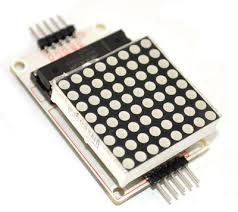
[http://swf.com.tw/?p=738](http://swf.com.tw/?p=738)
↑這個網址說明得很詳細而且也有現成的範例碼可以用
[https://code.google.com/p/arudino-maxmatrix-library/wiki/Usage](https://code.google.com/p/arudino-maxmatrix-library/wiki/Usage)
↑解釋了所有的函數代表的意思
[MAX7219_5.zip](https://www.dropbox.com/s/dxjzapte9loni9y/MAX7219_5.zip?dl=0)
↑可以用這個檔案來改
軟體使用上大家要特別注意後面三隻腳在程式裡面的定義,還有這一行程式碼,有沒有設定自己所使用8x8陣列數目,這個範例就是串連兩組陣列 → (const byte maxInUse = 2; // 代表串連兩個MAX7219模組),接下來要點亮跑英文字與數字倒是沒問題,不過如果要跑中文字就得要自己建一個圖庫了,可以來口丁尋求解決之道。
※第二個
你有可能從網站上買到高檔貨,Adafruit的LED 8x8 Matrix(如下圖),要玩貪食蛇用這個硬體最洽當,因為貪食蛇的專案幾乎都建立在這個硬體上面,因為小弟手上沒有這個硬體,所以也沒有多研究。
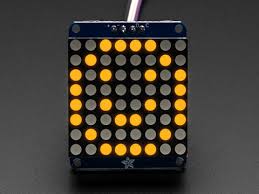
[http://makerflux.com/wiki/electronics-wiki/development_boards/arduino/arduino-projects/snake-game-with-an-8x8-led-matrix/](http://makerflux.com/wiki/electronics-wiki/development_boards/arduino/arduino-projects/snake-game-with-an-8x8-led-matrix/)
↑可以大略跟隨這個網站的做法
記得到GitHub下載他的副函式來使用
[https://github.com/adafruit/Adafruit-LED-Backpack-Library](https://github.com/adafruit/Adafruit-LED-Backpack-Library)
[https://github.com/adafruit/Adafruit-GFX-Library](https://github.com/adafruit/Adafruit-GFX-Library)
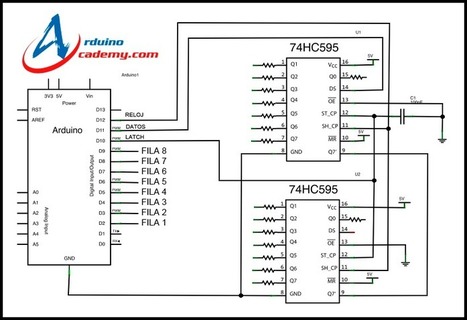
第三種就是用74系列的邏輯閘各種土炮(如下圖),個人覺得這個方法最有趣也最浪費時間,不過可理解性最高,程式操作自由度較高,可是最花時間。
 Sign in with Wallet
Connect another wallet
Sign in with Wallet
Connect another wallet