# Requesting eID Data from the ONCE Wallet
###### tags: `documentation`
A ONCE compliant Wallet will allows users to manage / share different types of verifiable (attested) data. At this stage, the main types / categories of data are:
- [W3C Verifiable Credentials](https://www.w3.org/TR/vc-data-model/) — Signed data structures which can be used to encode any "arbitrary" / use case specific signed attestations.
- Data persisted on the eID card — the complete list of attributes which can be requested is defined [here](https://www.ausweisapp.bund.de/sdk/messages.html#values).
Service providers can request both eID data and Verifiable Credentials from a ONCE Compliant Wallet. This document will outline **the interfaces, as well as data structures relevant to exchanging eID data**.
## 1. eID interaction -- core components
In the example use case -- *"a service provider (e.g. a car rental service) would like to request some specific eID data from a potential user as part of it's service offering"*.
The following core components / roles would be involved:
1. Service Provider - this role is usually taken by a relying party interested in requesting / consuming various types of verifiable data provided by the ONCE Wallet. The requested data is usually required in order to provide a specific service. The back end service, implementing logic specific to the business case, can interact with the ID Gateway component in order to request eID data from a ONCE compliant Wallet.
2. ONCE Wallet - A mobile application, allowing users to securely share eID data (as well as W3C Verifiable Credentials) with various services, as well as manage their digital identity and associated documents.
1. Internally, the ONCE compliant Wallet will need to integrate an eID Client to support the described interactions (in the case of the Jolocom SmartWallet, this is the [AusweisApp2 SDK](https://www.ausweisapp.bund.de/sdk/)).
3. ID Gateway - This component simplifies the integration between the Service Provider component and the (potentially multiple) eID Service(s) / infrastructure.
4. eID Service - As a hard- and software component, the eID-Server implements the server-side eCard-API-Framework as specified in [TR-03112] and establishes communication to the client-side eCard-API-Framework implementation (eID-Client).
For further documentation / illustrations on how the various components interact, please refer to section [2 Infrastructure and general regulations](https://www.bsi.bund.de/SharedDocs/Downloads/DE/BSI/Publikationen/TechnischeRichtlinien/TR03130/TR-03130_TR-eID-Server_Part1.pdf;jsessionid=0E0CA28CDB627F32E452B6BF3C020DB8.internet081?__blob=publicationFile&v=3).
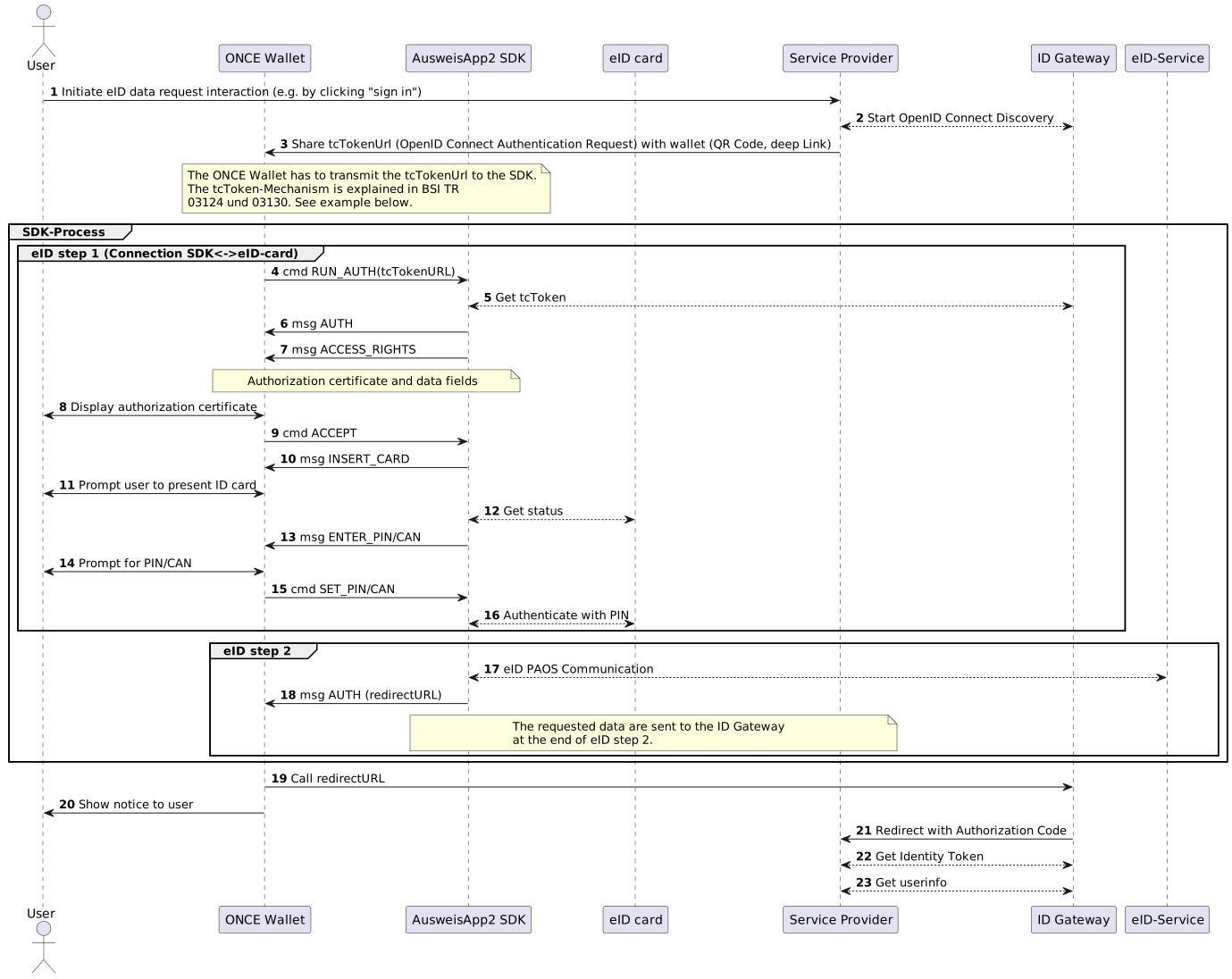
The following diagram describes (in detail) the individual steps which need to take place as part of a data exchange interaction:
## 2. Example interaction
The interaction illustrated above can be split in the following three main parts:
1. Generating / sharing the request for eID data — The service provider interacts with the ID-Gateway component (step 2) in order to generate a request for eID data. This step should result in a `tcTokenUrl`. As soon as the URL is generated, it can be shared with the ONCE Wallet, e.g. by encoding it as a QR code (step 3 on the diagram).
2. Processing the request — The ONCE Wallet passess the received `tcTokenUrl` to the integrated eID client (i.e. the [AusweisApp SDK](https://www.ausweisapp.bund.de/sdk/)). The eID client sends a request to the received URL (as described in [section 3.1.1. in TR-03130](https://www.bsi.bund.de/SharedDocs/Downloads/DE/BSI/Publikationen/TechnischeRichtlinien/TR03130/TR-03130_TR-eID-Server_Part1.pdf;jsessionid=0E0CA28CDB627F32E452B6BF3C020DB8.internet081?__blob=publicationFile&v=3)),
3. Retrieving the requested data — Once the request has been successfully processed by the ONCE compliant Wallet, the Service Provider is notified by the ID-Gateway component that the requested data is available.
The following sections will provide more detail on the relevant steps.
### 2.1 Generating the request for data
The service provider can generate an [OpenID Authentication Request](https://openid.net/specs/openid-connect-core-1_0.html#AuthorizationEndpoint) (which is the `tcTokenUrl`) as follows:
`https://{ID_gateway_authorization_endpoint}?response_type=code&redirect_uri={service_provider_redirect_uri}&state={state_value}&nonce={nonce_value}&client_id={client_id_value}&acr_values=integrated&scope=openid`
The `redirect_uri` of the service provider is given to the ID Gateway during registration process. The `scope` is a space seperated array of requested attributes, must contain openid, may contain other values. The `acr_values` must be `integrated`.
To get the url of the authorization endpoint and the names of valid scopes, see the discovery endpoint of the ID Gateway `{ID_gateway_url}/.well-known/openid-configuration`. For an example see [here](https://servicekonto.test.governikus-eid.de/AutentIDConnect/npa/.well-known/openid-configuration).
An example resulting `tcTokenUrl` would be:
```
https://test.governikus-eid.de/Autent-DemoApplication/RequestServlet?provider=demo_epa_20&redirect=true
```
*Extracted from [the documentation](https://www.ausweisapp.bund.de/sdk/commands.html#run-auth).*
### 2.2 Sharing the TC Token URL to the ONCE Wallet
As briefly mentioned previously, the resulting URI can be communicated to a ONCE compliant Wallet via one of the two supported interfaces -- QR codes or Deep Links. Regardless of the selected interface, the requesting party first needs to encode the `tcTokenUrl` as follows:
```
https://jolocom.app.link/eID?tcTokenURL={utlEncode(tokenUrl)}
```
>Example implementation for the encodeUrl function for JavaScript:
https://www.w3schools.com/jsref/jsrefencodeuricomponent.asp.
The original `tcTokenUrl` value generated in section 1 needs to be URL encoded (as per [RFC 3986](https://datatracker.ietf.org/doc/html/rfc3986#section-2.1)) before it can be appended as a query argument to the URI above.
The final resulting URI would look as follows:
```
https://jolocom.app.link/eID?tcTokenURL=https%3A%2F%2Ftest.governikus-eid.de%2FAutent-DemoApplication%2FRequestServlet%3Fprovider%3Ddemo_epa_20%26redirect%3Dtrue
```
The URL can now be shared with the Wallet via the available interfaces, namely:
1. Deep Linking — The URI generated above can be embedded in a web page or mobile application. Attempting to open the URI will trigger the ONCE compliant Wallet and navigate to the appropriate consent screen.
2. QR Code / camera — The URI shown above can be encoded as a QR Code. The QR code can be rendered on the service provider's page, and scanned by a ONCE Compliant Wallet. Once the QR code is scanned, the Wallet will render the appropriate consent screen / prompt the user to participate in the interaction.
In case the ONCE Wallet is not installed on the user's device, invoking or scanning these interaction requests should forward the user to the appropriate application store platform to install the ONCE Compliant wallet. This feature will become available as soon as the ONCE Compliant Wallet, with included eID functionality, is published to the appropriate stores / marketplaces.
### 3. Retrieving the data
Once the user consents to the request, and completes the interaction using their ONCE compliant wallet, the embedded eID client will share the requested data with the corresponding eID server (step 19 in the interaction diagram). The service provider can then retrieve the requested data as follows:
The service provider sends an [OpenID Connect token request](https://openid.net/specs/openid-connect-core-1_0.html#TokenRequest). It authorizes against the ID Gateway with Basic Authentication, the client secret is given to the client during registration. The service provider receives a token response:
```
{
"access_token": "bP9v6[...]",
"scope": "openid",
"id_token": "eyJhbGciOiJSUzI1NiJ9.[...]",
"token_type": "Bearer",
"expires_in": 3599
}
```
The `id_token` is a signed jwt which contains the claims: `sub`, `aud`, `auth_time`, `iss`, `exp`, `nonce`, `iat`, `acr`, `amr`. The `amr` value contains the method of authentication: `eid_de` and the `acr` value contains the level of authentication `high`.
The jwt must be validated by the service provider.
With the `access_token` the service provider can [request the userinfo](https://openid.net/specs/openid-connect-core-1_0.html#UserInfo). The userinfo response contains another signed jwt, which must be validated as well. The body of this jwt contains the eID data and looks like this
```
{
"name": "ERIKA MUSTERMANN",
"given_name": "ERIKA",
"family_name": "MUSTERMANN",
"birthdate": "1970-01-01",
"address": {
"country": "D",
"street_address": "MUSTERSTRAẞE 1",
"locality": "MUSTERSTADT",
"postal_code": "12345"
},
"http://www.governikus.de/npa/birth_name": "MUSTERNAME",
"http://www.governikus.de/npa/place_of_birth": {
"formatted": "MUSTERORT"
},
"http://www.governikus.de/npa/place_of_birth_type": "FREE_TEXT",
"http://www.governikus.de/npa/address_type": "STRUCTURED",
"http://www.governikus.de/npa/nationality": "D",
"http://www.governikus.de/npa/restricted_id": [...],
"http://www.governikus.de/npa/issuing_state": "D",
"http://www.governikus.de/npa/date_of_expiry": "2029-01-01",
"http://www.governikus.de/npa/document_type": "ID"
"sub": [...],
"aud": [...],
"iat": 1632466629,
"jti": [...],
"iss": [...],
}
```
 Sign in via Google
 Sign in via Facebook
 Sign in via X(Twitter)
 Sign in via GitHub
 Sign in via Dropbox
 Sign in with Wallet
Connect another wallet
Sign in with Wallet
Connect another wallet