# Making a CV that passes ATS "Applicant Tracking Systems" By [Omar Barakat](https://https://www.linkedin.com/in/omarbarakota/)
## Overview
**Table Of Content**
[TOC]
### Simple Roadmap

## Choose a suitable template
This diagram shows the best CV Format for each applicant

This is the most common and recommended sturcture of a CV

It's Recommended to use clean straight forward format that:
1. Doesn't include Images
2. Doesn't Include Tables or Charts
3. Use Basic and Simple Formatting
4. Avoid Headers and footers
- For Example "I Will leave tempelates links at the end of this article"

Note: You can also avoid the horiziontal lines after each headline
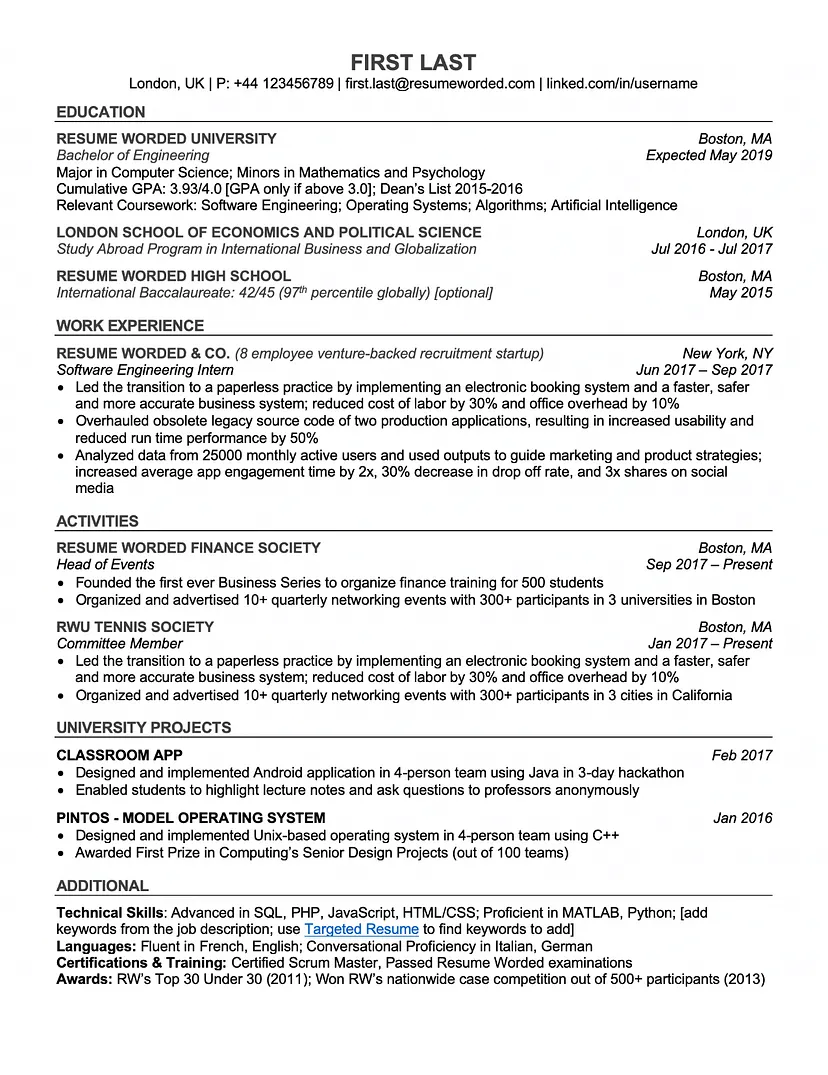
Note: You can also Add "About me" or "Objective" Section as the first section of the CV
## Tips & Tricks
### Important Tips & Tricks
#### 1. Submit a tailored resume for each job.
Even if two positions you are applying for are very similar, you should tailor your resume to each one. The job descriptions are likely to vary from each other in some way, so use any differences you find to make your resume more specific to each job. The companies are different as well. Take the time to visit each company's website to get an idea of their values and the business they do. You can then incorporate what you learned into your resume and cover letter to stand out.
#### 2. Use basic language.
It may be tempting to use section headers that are a little less traditional, especially if you're applying for a creative role and want to show your personality, but **using uncommon language on a resume can confuse an applicant tracking system**.
**Use basic language and terms that are easy** to understand, and mimic how you would address your qualifications during an in-person interview.
#### 3. Use relevant keywords.
Look at the job posting, and use the same keywords in your application in a way that naturally highlights your experience and skills. Consider looking up similar jobs to get ideas for other terms you can include that may pique the interest of the applicant tracking system and hiring manager. To determine the most important keywords, make a note of specific software, education, certifications and methodologies that a job posting mentions.
#### 4. Connect your keywords to unique experiences.
The applicant tracking system is more likely to send your resume through if there are enough mentions of certain keywords relevant to the position, but hiring managers want to see how those keywords connect to real skills and experiences in the workplace. Think about your unique job history, and concisely explain how it makes you the perfect person for the position.
#### 5. Keep your resume simple.
You may want to create a resume that's graphically enhanced, especially if you're applying for a graphic design position, but it's best to keep it as simple as possible. An interesting-looking resume may be attractive to the hiring manager, but you need to make it past the applicant tracking system first. Some tracking systems have a hard time processing complicated resumes and may place the content in the wrong places.
#### 6. Write out acronyms.
Depending on an applicant tracking system's settings, it may either search for acronyms or written-out phrases. It's more likely going to look for the long-form term or phrase, but it's best practice to include both. For example, you could say something like, "Experienced in Search Engine Optimization (SEO)."
#### 7.Use basic formatting.
Consider using a universally basic font throughout your resume, such as Arial, Times New Roman or Georgia. Also, instead of charts or graphical elements, use bullet points and bolded or underlined words to bring attention to something specific.
#### 8. Include referrals in your application.
Referrals have always been an **important** part of getting a job.
Some companies have employee referral systems that can move your application straight through the ATS to a hiring manager, so you should use this to your advantage if you have a contact within an organization.
Note: It's okay if you don't have referrals but try to increase your connections with people related to your field or track, that may help.
#### 9. Submit the right type of file.
After completing your resume, it's important to pay attention to how the job portal tells you to submit it. Specifically, you need to ensure that you are using an acceptable file type. If you submit any other type of file, the tracking system is less likely to read it accurately or even at all.
Even if there are many acceptable file types listed, **try to upload only .PDF**
#### 10. Inserting a Hyperlink
Sometimes ATS filters out words with Hyperlink so its recommended **NOT** to insert a link in a sentence and its better to insert links individually
### Recommended Tips & Tricks
#### 1. Update your information online. (Recommended)
Keep your online profiles up to date to make your application more complete.
#### 2. Include a skills section. (Recommended)
A skills section is your chance to include relevant keywords in another location on your resume, especially for assets that didn't naturally fit into your work history section. Including a skills section with keywords makes it easier to scan your application for the terms the hiring manager is looking for.
## More Examples
- [**How to write a resume**](https://www.jobscan.co/blog/how-to-write-a-resume/)
- [**Mistakes To avoid**](https://www.jobscan.co/blog/ats-formatting-mistakes/)
- [**ATS Friendly Format**](https://www.jobscan.co/blog/convert-your-resume-to-an-ats-friendly-format/)
[Chornological Resume Format Reference](https://www.indeed.com/career-advice/resumes-cover-letters/chronological-resume-tips-and-examples)
[Resume Cover Letter](https://www.indeed.com/career-advice/resumes-cover-letters/how-to-write-a-cover-letters)
## Key ATS Technical Notes
1. Resume Headline match it to the position you're applying for and to be detailed
3. Keep your CV tailored for each application
4. Use these fonts `Arial, Times New Roman, Calibri` fonts size from `10:16`
5. Main headlines in order `About me, Education, Experience, Internships, Courses and certificates, Activities (Volunteering), Additional Skills (Optional)`
6. Keep in mind to mention dates with each experiences, internships and courses `formatting dates mm/yyyy or month, year`
7. Avoid Images graphs, charts, icons and logos
8. Don't insert links in the middle of sentences
9. Add revelent skills "Add them from the job description" and include them in your experience
10. Dont overstuff with keywords
11. Its better to submit .doc or .pdf take in notes that .doc is more friendly to ATS but of you're sending your CV by mail always send it in .pdf
## Resources & Services **(FREE)**
Best ATS CV and Resume **FREE** Checkers
These are some of the best free services that can help you making the CV that you want
- [**Resume Worded**](https://resumeworded.com/)
- [**ResumeGo**](https://www.resumego.net/resume-checker/)
- [**EnhanCV**](https://enhancv.com/)
- [**JobScan**](https://www.jobscan.co/)
- [**FlowCV**](https://Flowcv.com)
- [**Resume.com**](https://www.resume.com/)
- [**Canva**](https://www.canva.com/create/resumes/)
- [**Resume.io**](https://resume.io/)
- [**Resume Builder**](https://www.resumebuilder.com/)
Disclaimer: Not all companies use Applicant Tracking Systems but most of them do.
I hope this article have been helpful to all of you and I wish you all the best in your career.
Don't forget to follow us on:
- [Youtube Channel](https://www.youtube.com/@omarbarakota)
- [LinkedIn Profile](https://linkedin.com/in/omarbarakota/)
Made by
[Omar Barakat](https://linkedin.com/in/omarbarakota/)
 Sign in via Facebook
 Sign in via X(Twitter)
 Sign in via GitHub
 Sign in via Dropbox
 Sign in with Wallet
Connect another wallet
Sign in with Wallet
Connect another wallet