# 1. from monolith to microservice
## monolith to microservice
## refactoring
* big-bang
* cause change from monolith to microservice
* which componets to separate?
* decouple the databases from the application to separate data complexity from appllication logic
* check microservices
* test
* dependencies
* refactoring is hard but advantage
## challenges
* laguages
* cobal or Assembler
* give up
* re-build it
* after refactoring
* suitable tools
* keep alive all the decoupled modules
* choosing runtmes
* lib conflict
* containerised application
* higher utilization
* individual module scalabillty
* easy integration with automation tools
## sucess stories
* AppDirect
* box - a cloud storage solutions provicer
* Crowdfire
* GolfNow
* Pinterest
# Chapter 2. Container Orchestration
## learning Objective
* Define the concept of container orchestration.
* Explain the benefits of using container orchestration.
* Discuss different container orchestration options.
* Discuss different container orchestration deployment options.
## what are containers?
* best suited to deliver microservices
* containers encapsulate microservices
* do not run them directly
* containers run container images
## what are container Orchestration?
* development environments need to:
* fault-tolerance
* on-demand scalability
* Optimal resource usage
* Auto-discovery to automatically discover and communicate with each other
* Accessibility from the outside world
* Seamless updates/rollbacks without any downtime.
## container orchestrators
* Amazon Elastic container Service
* Azure Container Instances
* Azure Service Fabric
* Kubernetes
* Marathon
* Nomad
* Docker Swarm
## why use container orchestrators?
* Group hosts together while creating a cluster
* Shedule containers to run on hosts in the cluster based on resources availability
* Enable containers in a cluster to communicate with each other regardless of the host they are deployed to in the cluster
* Bind containers and storage resources
* Group sets of similar containers and bind them to **load-balancing** constructs to simplify access to containerized applications by creating a level of abstraction between the containers and the user
* Manage and optimize resource usage
* Allow for implementation of policies to secure access to applications running inside containers.
# Chapter 3. Kubernetes
## Learning Objectives
* Define Kubernetes.
* Explain the resons for using Kubernetes.
* Discuss the features of Kubernetes.
* Discuss the evolution of Kubernetes from Borg.
* Explain the role of the Cloud Native Computing Foundation.
## What is Kubernetes?
Kubernetes is an open-source system for automating deployment, scaling, and management of containerized applications.
## From Brog to Kubernetes
[Large-scale cluster management at Google with Borg](https://research.google/pubs/pub43438/)
* kubernetes learned from it:
* API servers
* Pods
* IP-per-Pod
* Services
* Labels
## Kubernetes Features
* Automatic bin packing
* schedules containers based on resource needs
* Self-healing
* Horizontal scaling
* Service discovery and load balancing
* Automated rollouts and rollbacks
* seamlessly
* deploy app
* configuration
* Secret and configuration management
* Storage orchestration
* Batch execution
## Why Use Kubernetes?
* extensible
* modular
* pluggable
* community
## Cloud Native Computing Foundation (CNCF)
## CNCF and Kubernetes
For Kubernetes, the Cloud Native Computing Foundation:
# Chapter 4. Kubernetes Architecture
* kubernetes architecture
* control plan
* master
* worker node
* Container Network Interface
## Learning Objectives
* Discuss the Kubernetes architecture.
* Explain the different componets for master and worker nodes.
* Discuss about cluster state management with etcd.
* Review the Kubernetes network setup requiremetments.
## Kubernetes Architecture
* One or more **master nodes**, partof the **control plane**
* One or more **worker nodes**.
## Master Node Overview
* user use
* cli
* web ui
* API
* etcd: a distributed key-value
## master node components
* components
* API Server
* Scheduler
* Controller Managers
* Data Store
* master runs
* Container Runtime
* Node Agent
* Proxy
## API Server
* API server intercepts RESTful calls from users, operators, agents
* read state from etcd
* only component to talk to etcd
* highly configurable
* customizable
## sheculer
* role
* assign new workload
* pods
* node
* obtains from etcd (via API)
* recives requirements (from API)
* through sheduling policies, plugins
* configurable
* customization
## controler managers
* kube-controller-manager
* cloud-controller-manager
* load balancing
## data store
* etcd
* strongly consistent
* key-value
* only API server is able to communicate with etcd
* etcdctl
* backup
* snapshot (take photo)
* restore capabilities
* kubeadm provision
* stacked etcd master node
* externel etcd master node
* reducing the chances of an etcd failure
* master and follower
* any node can be treated as a master
* besides store cluster state
* subnets
* ConfigMaps
* Secrets
## node overview
* applications are encapsulated in Pods
* controlled by cluster control plane
* pod is the smallest scheduling unit
* network is handled by worker node
## Worker Node components
* container runtime
* node Agent - kubelet
* proxy - kube-proxy
* Addons for DNS, Dashboard user interface, cluster-level monitoring and logging
## container runtime
* docker
* CRI-O
* containerd
* frakti
## node Agent - kubelet
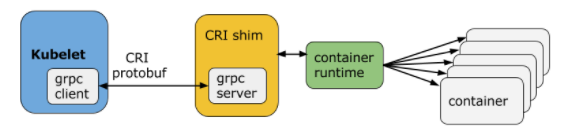
* CRI: container runtime interface
* kubelet <-> shim <-> container runtime
* kubelet: grpc client
* CRI implements two services
* ImageService
* image related
* RuntimeService
* pod and container related
## CRI shim
* dockershim
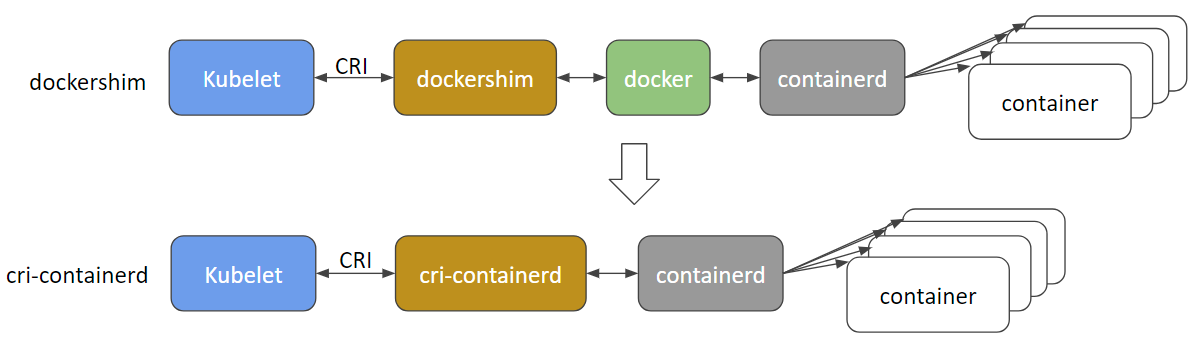
* docker uses containerd to manage containers
* cri-containerd
* CRI-O
* frakti
## proxy - kube-proxy
* network agent
* TCP
* UDP
* SCTP
* implements forwarding rules defined by users through Service API objects
## Addons
third-party pod and service
* DNS
* Dashboard
* Monitoring
* logging
## networking challenges
all these networking challenges must be addresses before deploying a kubernetes cluster
* container
* communication inside pods
* pod-to-pod
* pod-to-Service
* within the same namespace
* across cluster namespaces
* External-toService
* clients to access application in a cluster
## container-to-Container communication inside pods
* special **pause** container
## Pod-to-Pod Communicaion Across Nodes
* pods are expected to be able to communicate with all other pods in the cluster
* without NAT
* IP-per-Pod
* ensures pod-to-pod
* through CNI(Container Network Interface)
* supported by CNI plugins
## Pod-toExternal World Communication
* shrough Services
* stored in iptables
* implemented by kube-proxy agents
# Kubernetes Building Blocks
## Pods
![]()
* smallest and simplest
* one **or more** containers
* schceduledd togeter on the same host with the pod
* Share the same network namespace(share a single IP address)
* Access to mount the same external storage(volumes)
```yaml=
apiVersion: v1
kind: Pod
metadata:
name: nginx-pod
labels:
app: nginx
spec:
containers:
- name: nginx
image: nginx:1.15.11
ports:
- containerPort: 80
```
## Labels
Labels are **key-value pairs** attachd to Kubernetes objects (e.g. Pods, ReplicaSets, Nodes, Namespaces, Persistent Volumes)
* select a subset of objects
* do not provide uniqueness to objects
* one objects can have muitiple objects
## Label Selectors
* ```env == dev```, ```env != dev```
* ```env in (dev, qa)```
* ```!app```
## ReplicationControllers
* no longer a recommended controller
The default recommended controller is the Deployment which configures a ReplicaSet controller to manage Pods' lifecycle
## ReplicaSets
* next-generation ReplicationController
* replication
* self-healing
## Deployment
* rollouts rollback
* manages ReplicaSets for app scaling
* roll back
* to a prior Revision
## namespace
partition the cluster into virtual sub-cluster using Namespaces
# Chapter 9. Authentication, Authorization, Admission Control
## Overview
to access a API endpoint on API server. Each access request goes through the following access control stages:
* Authentication
* Authorization
* Admission Control
## Authentication
two kinds of users:
* Normal Users
* Servicd Accounts
* via the API server
* manually
[authenticaion modules](https://kubernetes.io/docs/reference/access-authn-authz/authentication/#authentication-strategies)
## Authorization
users can send the API requests to perform different poerations. Here these API requests get **authorized** by Kubernetes.
 Sign in with Wallet
Connect another wallet
Sign in with Wallet
Connect another wallet