Misc by zhen
===
:::danger
請愛惜共筆,勿進行惡意刪減
:::
:::info
[課程講義](https://slides.com/zhenzhen-1/misc)
[CTF平台](https://class.nisra.net/challenges)
:::
# 課程大綱
- 資安是什麼
- Info Leakage
- CTF intro
- What is Misc?
- Recon, Encode
- Steganography
- Stegsolve
## 課前環境準備
- [010 Editor](https://www.sweetscape.com/010editor/)
- [課程平台](https://class.nisra.net/)
- Token: `NISRA{w31c0me_2_n15ra_2O23}`
- [匿名發問](https://app.sli.do/event/1we7NsaWtNbfjkfp37zTcw/live/questions)
# 資安是什麼
- 病毒、個資、密碼、駭客...
- [宣導影片 遠懼](https://youtu.be/ilEXci8RAhc?feature=shared)
## Info Leakage 資訊洩漏
- 未經授權或未預期的揭露 or 洩漏機密 or 敏感資訊的情況
- 通常原因
- 沒設權限或密碼(密碼太簡單)
- 社交工程(釣魚郵件,詐騙電話)
### [弱密碼?強密碼?](https://zh.wikipedia.org/zh-tw/密码强度)

- [have i been pwned?](https://haveibeenpwned.com/)
- 查看密碼是否被破解
- [使用預設密碼的監視器們](http://www.insecam.org/)
### 常見的資訊洩漏
- 可疑連結?
- 要求許可權?
- [巴哈: 有關最近line上的整人連結](https://home.gamer.com.tw/artwork.php?sn=5091842)
# CTF Intro
## CTF
- **C**apture **T**he **F**lag
- 搶旗子 **Flag**
- Jeopardy(解謎)
- flag 形式
- [Leet](https://zh.wikipedia.org/wiki/Leet)
- NISRA{XXXX}
## 題目種類
- Web
- Crypto
- Reserve
- Pwn
- Forensic
- Misc
## CTF 推薦
- [pico CTF](https://play.picoctf.org/)
- [CTFlearn](https://ctflearn.com/)
- [Root Me](https://www.root-me.org/?lang=en)
- [TryHackMe](https://tryhackme.com/)
- [Hacker101](https://ctf.hacker101.com/)
# What is Misc?
## Misc
- **Misc**ellaneous
- 雜項、混合的、大雜燴
- 綜合題型/不知道分類的/新技術/~~主辦方想搞的~~
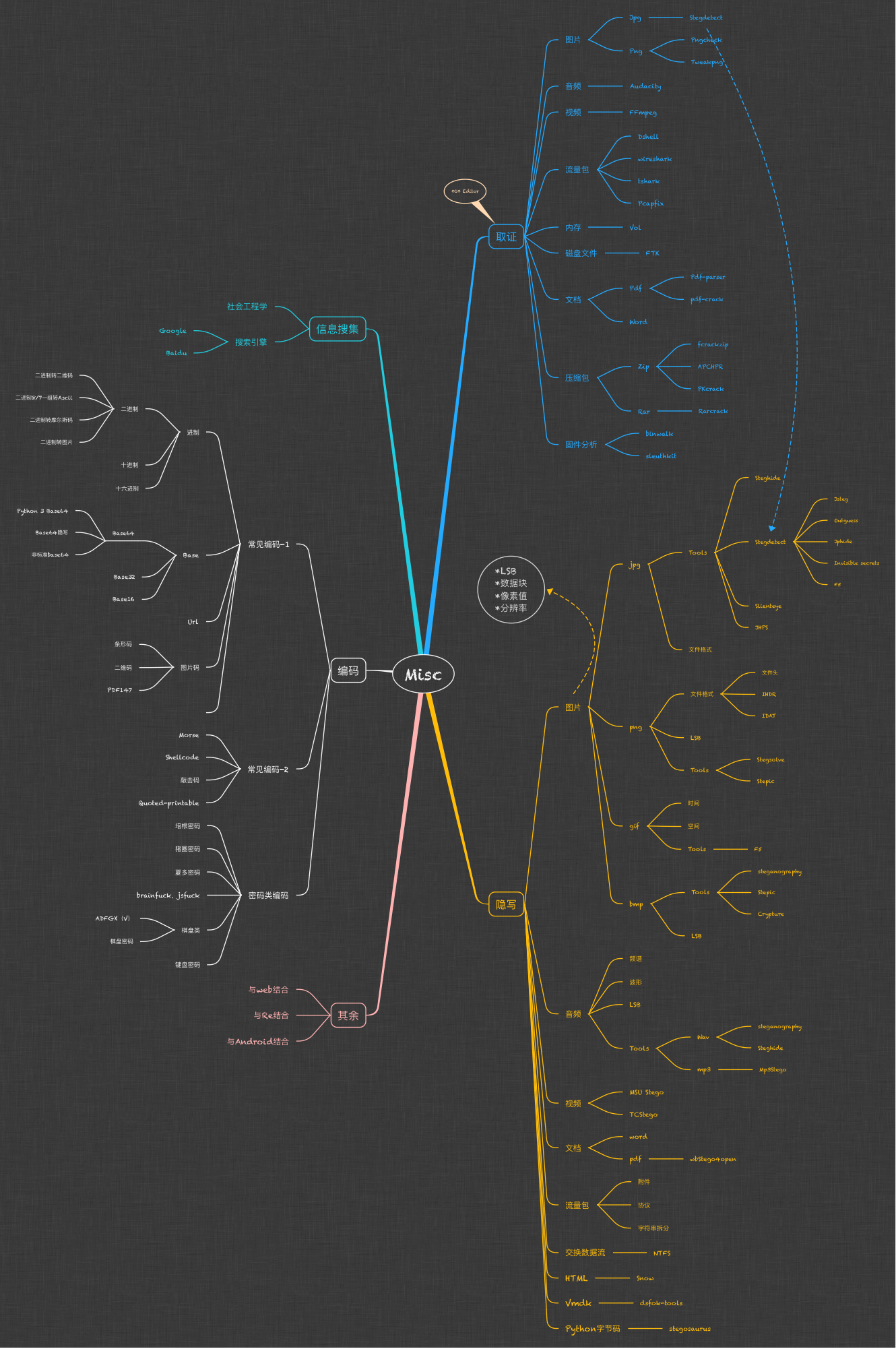
- 主要包含
- Recon (訊息蒐集)
- Encode (編碼轉換)
- Steganography (檔案隱寫術)
- Other (通靈)
- 涉及範圍
## Recon 訊息蒐集
- 社交工程
- ~~肉搜~~
- 善用 Google 的力量
- [Google hacking](https://www.exploit-db.com/google-hacking-database)
### Google hacking 語法
| 語法 | 功能 |
| --- | --- |
| site | 搜尋指定網址的內容 |
| filetype | 搜尋指定類型的文件 |
| intext | 搜尋網頁內容,列出符合關鍵字的網頁 |
| intitle | 搜尋網頁中的標題 |
| inurl | 尋找指定的字串是否在網址列當中 |
| cache | 搜尋指定網址的快取、緩存 |
| info | 搜尋指定網站的基本資訊 |
| 語法 | 功能 |
| --- | --- |
| `-` | 忽略關鍵字 |
| `..` | 範圍 |
| `*` | 萬用字元 |
| `"` | 精準查詢,一定要符合關鍵字 |
| `+` | 連接多個關鍵字 |
### Wayback Machine
- https://archive.org/web/
* 可查詢網址的歷史頁面
### Lab 0x0
:::spoiler sol
把連結丟到wayback machine
可以發現8/26有被存取過,點進去就可以找到存取權限未被關閉時的狀態
:::
## Encode
- 常見的編碼
- Binary, Base64, ASCII, Morse code...
- 不常見的編碼
### ASCII 編碼表

### BaseXX code
- XX表示用幾個字元編碼
- `=` 為統一填充字元
- Base64
- 'a'\~'z' , 'A'\~'Z' , '0'\~'9' , + , /
- 26+26+10+2 = 64

e.g. A → QQ==
e.g. BC → QkM=

- Base16
- '0'~'9' , 'A'~'F'
- 不會有填充字元 `=`
- Base32
- 'A'~'Z' , '2'~'7'
- [CyberChef](https://gchq.github.io/CyberChef/)
### Lab 0x1
:::spoiler sol
- [cyberchef](https://gchq.github.io/CyberChef/)
- from Base32
- from Base64

:::
# Steganography
## Steganography 隱寫術
- 把訊息用各種手段藏起來
## 常見類型
- 圖片
- LSB, 像素值, 檔頭
- 音訊
- 波型, 摩斯密碼
- 文檔
- word, pdf ...
- 更多
- HTML, 壓縮檔 ...
## 初見隱寫術
### File signatures
- 表示是什麼類型的檔案
- 基本上會在檔頭(File header)

- [List of file signatures](https://en.wikipedia.org/wiki/List_of_file_signatures)
### 怎麼看到File signatures
- 16進位編譯器
- 推薦工具
- [Winhex](https://x-ways.net/winhex/)
- [010 Editor](https://www.sweetscape.com/010editor/)
- ~~Sublime~~
### Lab 0x2
:::spoiler sol
將檔案轉成 txt 之後用 sublime 打開
會發現檔案是 PDF 格式的
轉成 PDF 後打開
Ctrl + A 答案就出來了
:::
## 圖片隱寫
### Pixel
- 像素
- 組成點陣數位影像的最小單位
#### 點陣圖?向量圖?
- 向量圖
- svg, pdf ...
- 點陣圖
- bmp, jpg, png ...
### RGB
- **R**ed, **G**reen, **B**lue
- 每個顏色佔8bits,也就是0~255 (binary)
- google "color picker"


[RGB延伸閱讀](https://web.ntnu.edu.tw/~algo/Image.html#1)
### JPG
- 失真壓縮點陣格式
- 檔案大小較小
- 結尾為FF D9

- 支持 Exif
### PNG
- 支援無失真壓縮的點陣圖格是
- Alpha 表示透明度
- [Chunk Specification](http://www.libpng.org/pub/png/spec/1.2/PNG-Chunks.html)
- Header Chunk
* 在文件最前面
* 只出現一次

### Lab 0x3
:::spoiler sol
先將檔案轉成 txt 打開
發現他是 PNG 但開頭少了一點甚麼
插入 `89 50 4E 47` 存檔
再轉成 PNG 打開就可以了
:::
## StegSolve
- 圖片隱寫神器
- 需要 Java
- [下載連結](http://www.caesum.com/handbook/Stegsolve.jar)
- 雙擊 or `java -jar Stegsolve.jar`
- [Online Tool](https://stegonline.georgeom.net/upload)
### Stereogram
- 3D 立體圖
- [Magic Eye](https://magiceye.ecksdee.co.uk/)
- 利用視覺差所形成的立體圖像
- 用2D圖像模擬3D
 
### Frame Browser
- Frame 觀察工具
- 常用於[GIF](https://zh.wikipedia.org/wiki/GIF)
- 利用左右鍵分析每一幀畫面

### Lab 0x4
:::spoiler sol
把檔案灌進去之後
選擇 Analyse → Stereogram Solver
當 offset = 90 的時候就有答案了
:::
### Lab 0x5
:::spoiler sol
把檔案灌進去
選擇 Analyse → Frame Brower
Frame = 70 就有答案了
:::
## Image Comboner
- 將兩張照片RGB值帶入各種運算,形成新的圖片
- XOR, OR, AND, ADD, SUB, MUL ...

### 布林運算
- **AND (‧)**
- **OR (+)**
- **NOT (')**
- **XOR (^)**
| A | B | A.B | A + B | 'A | A ^ B |
|:---:|:---:|:----:|:-----:|:---:|:-----:|
| 0 | 0 | 0 | 0 | 1 | 0 |
| 0 | 1 | 0 | 1 | 1 | 1 |
| 1 | 0 | 0 | 1 | 0 | 1 |
| 1 | 1 | 1 | 1 | 0 | 0 |
### Lab 0x6
:::spoiler sol
先將其中一個檔案灌進去
選擇 analyse → Image Combiner
然後灌入另外一張照片
SUB 的時候會出現一個 QR code
掃下去就是答案了
:::
## LSB
- **L**east **S**ignificant **B**it 最低有效位
- 將訊息藏到每個像素顏色的最後一個bits
- 肉眼無法區分
- 每個像素可以藏到3個bits (RGB各一)

## Data Extract
- 數據提取
- 按照特定方式、順序提取圖片資訊
- [Bit plane](https://en.wikipedia.org/wiki/Bit_plane)

### Lab 0x7
:::spoiler sol
將圖片塞進去後
選擇 analyse -> Data Extract
R = 0, G = 0, B = 0
選擇 LSB
選擇 BGR
最後記得把空格去掉就 OK 了
:::
# 延伸補充
上完OS的課可以自己試試看
## Binwalk
- 快速、簡單的分析檔案資料與結構
- 基於Python
### 安裝 Python 3 & git
```
sudo apt-get update
sudo apt-get install python3
sudo apt install git
```
### 安裝 Binwalk
```
sudo apt-get update //更新
git clone https://github.com/ReFirmLabs/binwalk //下載binwalk
cd binwalk //進入binwalk文件夹
sudo python3 setup.py install //安裝 or
sudo apt install binwalk //安裝
```
## 使用 Binwalk
- 分析文件
* binwalk 文件名
- 提取文件
* binwalk -e 文件名
* ~~直接把副檔名改zip~~
- 更多
* [Linux Binwalk 指令](https://cloud.tencent.com/developer/article/1515285)
# 參考資料
- [CTF Wiki](https://ctf-wiki.org/misc/introduction/)
- [CTF Misc 總結](https://www.cnblogs.com/Em0sEr1t/p/15579439.html)
- [Encode](https://juejin.cn/post/7052978567390429215)
- [Google hacking 教學 by飛飛](https://feifei.tw/ithelp-information-security-supplement-002-learn-programming-and-google-hacking/)
- 香噴噴的NISRA學長姐講義
 Sign in with Wallet
Connect another wallet
Sign in with Wallet
Connect another wallet