# Tele Flow Service - Dev Notes
## Twilio
### Twilio Request Params
https://www.twilio.com/docs/voice/twiml#twilios-request-to-your-application
Twilio always sends the following parameters when it sends a request to your application to retrieve instructions for how to handle a call.
These will send as either POST parameters or URL query parameters, depending on which HTTP method you've configured.
| Parameter | Description |
| ----------- | ----------- |
| CallSid | A unique identifier for this call, generated by Twilio. |
| AccountSid | Your Twilio account ID. It is 34 characters long, and always starts with the letters `AC`. |
| From | The phone number or client identifier of the party that initiated the call. Phone numbers are formatted with a '+' and country code, e.g., `+16175551212` (E.164 format). Client identifiers begin with the `client`: URI scheme; for example, on a call from a client named ‘charlie’, the `From` parameter will be `client:charlie` |
| To | The phone number or client identifier of the called party. Phone numbers are formatted with a ‘+’ and country code, e.g., `+16175551212`(E.164 format). Client identifiers begin with the `client`: URI scheme; for example, for a call to a client named ‘joey’, the `To` parameter will be `client:joey`. |
| CallStatus | A descriptive status for the call. The value is one of the following: `queued`, `ringing`, `in-progress`, `completed`, `busy`, `failed` or `no-answer`. See the CallStatus section below for more details|
| ApiVersion | The version of the Twilio API used to handle this call. For incoming calls, this is determined by the API version set on the called number. For outgoing calls, this is the version used by the REST API request from the outgoing call.|
| Direction | A string describing the direction of the call: `inbound` for inbound calls. `outbound-api` for calls initiated via the REST API. `outbound-dial` for calls initiated by a `<Dial> verb|
| ForwardedFrom | This parameter is set only when Twilio receives a forwarded call, but its value depends on the caller's carrier including information when forwarding. Not all carriers support passing this information.|
| CallerName|This parameter is set when the IncomingPhoneNumber that received the call has had its VoiceCallerIdLookup value set to `true` ($0.01 per lookup).|
| ParentCallSid| A unique identifier for the call that created this leg. This parameter is not passed if this is the first leg of a call.|
| CallToken | A token string needed to invoke a forwarded call. |
| FromCity | The city of the caller |
| FromState | The state or province of the caller|
| FromZip | The postal code of the caller|
|FromCountry | The country of the caller |
| ToCity | The city of the called party |
| ToState | The state or province of the called party|
| ToZip | The postal code of the called party|
| ToCountry | The country of the called party|
<br/>
`CallStatus` values
The following are the possible values for the `CallStatus` parameter. These values also apply to the `DialCallStatus` parameter, which is sent with HTTP requests to a `<Dial>` action URL.
| Status | Description |
| ----------- | ----------- |
|`queued `| The call is ready and waiting in line before going out. |
|`ringing `| The call is currently ringing. |
|`in-progress`| The call was answered and is actively in progress.|
|`completed ` | The call was answered and has ended normally.|
| `busy`| The caller received a busy signal.|
| `failed ` | The call could not be completed as dialed, most likely because the phone number was non-existent |
| `no-answer` | The call ended without being answered.|
| `canceled`| The call was canceled via the REST API while queued or ringing. |
<br/>
### Identify whether incoming call is landline or mobile
#### Why?
Once the new Phone Service is capable of receiving a Twilio callback for an incoming phone call, we should be able to begin identifying various attributes of the call. One of the first things that we would like to know about the incoming call is whether or not the caller is calling from a landline or a mobile number. This information will allow us to begin experimenting with different workflows for calls originating from mobile or landlines.
#### How?
Twilio Lookup API https://www.twilio.com/docs/lookup/api - provides a way to retrieve additional information about a phone number. Lookup currently supports the following types of data.
* Region-specific number formatting and validation
* Carrier Information
* Caller Name
When calling the Lookup API we can stipulate the the type of information to return. Can be: `carrier` or `caller-name`. To retrieve both types of information, specify this parameter twice; once with `carrier` and once with `caller-name` as the value. The default is null.
Worth noting that Carrier information costs $0.005 per phone number looked up (should we look at persisting/caching this info to reduce costs?). Caller Name information costs $0.01 per phone number looked up, don't think we will need this info.
#### Carrier lookup in Go
```golang=
// Download the helper library from https://www.twilio.com/docs/go/install
package main
import (
"fmt"
"github.com/twilio/twilio-go"
lookups "github.com/twilio/twilio-go/rest/lookups/v1"
)
func main() {
// Find your Account SID and Auth Token at twilio.com/console
// and set the environment variables. See http://twil.io/secure
client := twilio.NewRestClient()
params := &lookups.FetchPhoneNumberParams{}
params.SetType([]string{"carrier"})
resp, err := client.LookupsV1.FetchPhoneNumber("+15108675310", params)
if err != nil {
fmt.Println(err.Error())
} else {
if resp.Carrier != nil {
fmt.Println(*resp.Carrier)
} else {
fmt.Println(resp.Carrier)
}
}
}
```
#### Lookup API Response
```jsonld=
{
"caller_name": null,
"carrier": {
"error_code": null,
"mobile_country_code": "310",
"mobile_network_code": "456",
"name": "verizon",
"type": "mobile"
},
"country_code": "US",
"national_format": "(510) 867-5310",
"phone_number": "+15108675310",
"add_ons": null,
"url": "https://lookups.twilio.com/v1/PhoneNumbers/+15108675310"
}
```
## MyPizzadb ReceivedCalls table investigation
[Original ticket](https://app.shortcut.com/slicelife/story/350765/spike-tele-flow-service-figure-out-what-the-data-is-mypizzadb-received-calls-is-being-used-for-and-by-who)
### Who consumes or uses this data once its persisted?
tbd - waiting on answer from dataeng [here](https://mypizza.slack.com/archives/C67UWNLBA/p1670941200306039) to see if that table is used for anything but I think it's safe to assume it is used for looker dashboards etc. Assuming that and what I've outlined below I think we will need to continue to maintain that table (and probably received_call.settings).
### When and how are records in this table created and/or updated?
See this [Miro board](https://miro.com/app/board/uXjVP7MFpXI=/?share_link_id=676929357262) for a detailed breakdown. The sequence diagrams show when in the flow `received_calls` are created/updated for the different scenarios.
In addition `recieved_call_setting` records are created upon receiving webhook events from Voicebase.
**Note**: if Voicebase determines that the call resulted in an order we set `is_order: true` on the `received_call`. This has the [effect](https://github.com/slicelife/myr-admin/blob/0233ae29cb2cbfd641dcf74d3cdbfe3ebc425bf1/app/models/received_call.rb#L128-L134) of causing credit/debit transfers to happen, so we will want to keep doing this.
### How can a new phone service continue to create/update this data?
As we already have the `POST /received_call` endpoint in Admin so does it make sense to keep using this at least initially?
Currently we [include the received_call.id](https://github.com/slicelife/myr-admin/blob/0233ae29cb2cbfd641dcf74d3cdbfe3ebc425bf1/lib/voicebase/client.rb#L45) in the request to Voicebase. Do we need to keep doing this or can we use any unique identifier? If we need to keep using the `received_call.id` then the record will need to be created in mypizzadb _before_ we make the Voicebase request.
I think we [also rely](https://github.com/slicelife/myr-admin/blob/0233ae29cb2cbfd641dcf74d3cdbfe3ebc425bf1/app/models/received_call.rb#L60) on the received_call.id to generate the path to the recording in s3 so we may need to keep doing this.
```ruby=
has_attached_file(
:audio_recording,
{
storage: :s3,
s3_credentials: {
bucket: RECEIVED_CALL_S3_BUCKET
},
s3_permissions: 'bucket-owner-full-control',
path: ':class/:id/:style/:filename'
}
)
```
If we want to make this a more event driven process we would probably need to address this question as we won't have created the `received_call` before sending the Voicebase request / doing the s3 upload. Or perhaps responsibility for this should remain in Admin?
Paul informed me that the process for order attribution is the following:
```
1. call gets streamed to VoiceBase shortly after it ends
2. VoiceBase transcribe it into text
3. Voicebase then runs an ML model that determines order yes / no
4. that order attribution gets returned to us and goes into the order table
5. that audio file gets redacted to remove PII then posted back to S3
```
I don't fully understand the process. Does Voicebase have access to our Twilio account? Or do they retrieve it from the s3 bucket? It may not be relevant to us but it may be something we need to be aware of if we wanted to start using something other that the `received_call.id`
### Should the new phone service have its own datastore for this data?
I think the architecture is already pointing in that direction since we want to be able to keep the "state" of ongoing calls so we don't need specific endpoints to handle the different actions.
I think most likely we will want to keep our own datastore but at least initially update the `received_calls` table in mypizzadb at the end of our flow, kicking off the credit/debit procedure.
Longer term we could consider transitioning to a service specific datastore but will likely require coordination with other teams. I don't think it should be considered part of this initial phase
### Are there additional attributes that we should be persisting when we process a phone call?
That's hard to answer right now but will likely become clearer as we progress
**Follow up questions**:
- Will the new service take responsibility for sending requests to Voicebase / uploading recordings to s3 and handling the responses? I think it should but just want to pose the question
- Document the [Sms::AlertJob](https://github.com/slicelife/myr-admin/blob/0233ae29cb2cbfd641dcf74d3cdbfe3ebc425bf1/app/jobs/sms/alert_job.rb) including what analytics are fired and the callback functionality (`/sms-receipts`). Will we want to port this functionality over to the new service?
- Are we using any [authentication](https://www.twilio.com/docs/voice/tutorials/how-to-respond-to-incoming-phone-calls/ruby#protect-your-webhooks) on our Twilio callback endpoint in Admin? I couldn't find anything - we should try to follow best practices with the new service.
# Testing / QA
## How to test received calls on dev/qa
These are instructions on how to test with the “Slice ReceivedCalls Forwarder Staging” TwiML app so that you can make/receive calls and test the existing IVR flow.
### Prerequisites
- A google voice number (requires IT ticket): https://voice.google.com/
- Access to Amazon Connect (requires IT ticket): This will be accessible via onelogin. You need to be in the QA queue mapped to 646 233 0913 as outline [here](https://mypizza.atlassian.net/wiki/spaces/QATeam/pages/1254817838/Phone+Email+SMS+Testing+in+QA)
### Setting up your shop with a Twilio number
- You will need a shop setup in Admin dev. I’m not sure how to create new shops - I just found an existing one that no-one seems to be using
- You need to purchase a Twilio number for the shop if it doesn’t already have one. Do so by clicking “Purchase Number” in the sidebar. I received an error at this point that no numbers were available. Admin is using the Twilio REST client to request a list of available numbers and the list was returning empty. We use the shop’s area code and lat/lng to retrieve numbers and the area code for my shop’s existing number was for a different location than the lat/lng. So I found a number with the area code for my shop’s lat/lng and set that as my shop’s number. I was then able to purchase a Twilio number. You may or may not need to do this depending on how your dev shop is configured.
- It seems you can just buy the numbers manually in Twilio and update your shop in Admin
- Now update your shop’s phone number with the Amazon Connect number above: 646 233 0913
### Making a call
- Go to https://voice.google.com/ and dial the Twilio number you just purchased for the shop
- You should hear the IVR flow. Press 1 to receive the download app SMS or press 2 to go through to the shop
- In Amazon Connect make yourself “Available”
- The phone should ring and you will be connected.
- You can check that a record was persisted in the received_calls table in mypizzadb
- You can even log into Twilio and hear the recording!
## How to test teleflow calls on dev/qa
### Prerequisites
- A google voice number (requires IT ticket): https://voice.google.com/
- Access to Amazon Connect (requires IT ticket): This will be accessible via onelogin. You need to be in the QA queue mapped to 646 233 0913 as outline [here](https://mypizza.atlassian.net/wiki/spaces/QATeam/pages/1254817838/Phone+Email+SMS+Testing+in+QA)
- A shop that’s setup as outlined above in the testing received_calls section
- Twilio console access
### Set up required for testing from landline / mobile
If you can’t test by calling from an actual landline or mobile then follow these steps:
- For testing the landline flow - go to the [Teleflow forward from landline test](https://www.twilio.com/console/twiml-bins/EHffda7172a2f68e3f704f014ea2dc7d3a) TwiML Bin app

- Change the number inside the <Number/> tags to the Twilio number of the shop number you wish to call
- Buy a new number (or use an existing one, different from the shop number) and associate it with the above Twiml bin app:

- Go to https://voice.google.com/ and dial the Twilio number you assigned to the Twiml Bin app above instead of the shop number
- When you call this number the call should be forwarded to the shop number (tele-flow) but with a “From” attribute corresponding to the forwarding landline number in the Twiml bin app.
- The process for mobile is the same but using the Twiml Bin app set up for mobile. Or you can call from a voip number to test this.
### Testing a flow via the internal endpoints
For times when we can't test directly from Twilio we instead need to make requests to the internal endpoint and examine the XML response
For all these examples update the url to be that of the feature branch you want to test: e.g. https://tele-flow-service-fb-89.qa.slicelife.com.
Also note that we are going via the internal routes (there is no `/pubic`). Every flow will start with a request to `/incoming_call` without any additional query params.
The POST body payload will include any data Twilio has sent along. Below is just a snippet of the important params but there may be others in real life.
Request
```bash
curl --location 'https://tele-flow-service-fb-89.qa.slicelife.com/api/v1/incoming_call' \
--header 'Content-Type: application/x-www-form-urlencoded' \
--data-urlencode 'CallSid=CA9029e890889218f86d21108b5fac282e' \
--data-urlencode 'To=+16469701612' \
--data-urlencode 'CallStatus=ringing' \
--data-urlencode 'From=+16469701612' \
```
Response
```xml
<?xml version="1.0" encoding="UTF-8"?>
<Response>
<Gather numDigits="1" timeout="12" action="/public/api/v1/incoming_call?flowName=adminIvr&nextTrigger=processInputPlaceOrder">
<Play>https://webhooks.dev.slicelife.com/assets/app-download-or-shop-connection.mp3</Play>
</Gather>
</Response>
```
- This response tells Twilio to play this mp3: `app-download-or-shop-connection.mp3` and where to find the asset.
- It also tells Twilio that we want to gather input from the user. We expect the user to enter one digit. The call will timeout in 12 seconds if the user does nothing. And finally, when the user takes that action Twilio will make a POST request to us at the url we provided for the action callback. Note that the url has these query params `flowName=adminIvr&nextTrigger=processInputPlaceOrder`. These will tell the teleflow service how to handle the POST request. Teleflow uses these to determine what flow the caller is on and what the next trigger should be in that flow.
To follow the flow you now need to make another request to the action url like so:
Request:
```bash
curl --location 'https://tele-flow-service-fb-89/api/v1/incoming_call?flowName=adminIvr&nextTrigger=processInputPlaceOrder' \
--header 'Content-Type: application/x-www-form-urlencoded' \
--data-urlencode 'CallSid=CA9029e890889218f86d21108b5fac282e' \
--data-urlencode 'To=+16469701612' \
--data-urlencode 'CallStatus=ringing' \
--data-urlencode 'From=+16469701612' \
--data-urlencode 'Digits=2'
```
- Note: remember to remove the `/public` part and remove the `amp;`. Also note the `--data-urlencode 'Digits=2'` in the payload. This is what we would get from Twilio if the user pressed 2. And we would then respond with the below XML. I haven’t shown it here but to see how the service would respond if the user chose to receive the SMS set this to 1 instead.
Response:
```xml
<?xml version="1.0" encoding="UTF-8"?>
<Response>
<Play>https://webhooks.dev.slicelife.com/assets/app-download-declined-and-connect-received-call-to-shop.mp3</Play>
<Dial record="record-from-answer-dual" recordingStatusCallback="/public/api/v1/incoming_call/record">
<Number>6462330913</Number>
</Dial>
</Response>
```
- This response tells Twilio to first play this mp3: `app-download-declined-and-connect-received-call-to-shop.mp3` and where to find it.
- Then it tells Twilio to dial the shop number while recording both channels. And when the call is over to POST back to us at the url provided in `recordingStatusCallback`
## Testing a Tele Flow IVR Flow other than the default
1. Find a shop in QA Admin that didn’t seem to have much activity
2. Update the shops phone number to number with an area code that matched the shop’s location via the `Contact` tab in Admin
3. Purchased a Twilio phone number via the Admin button
4. Go into Twilio and witch to the `dev` sub account 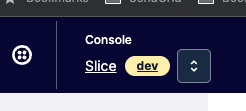
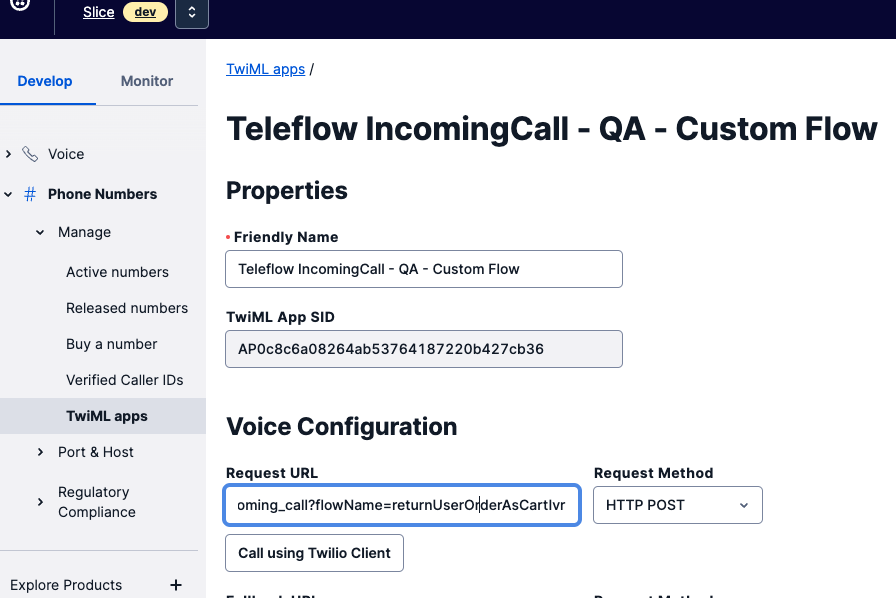
1. Navigate to Phone Numbers > Manage > TwiML apps and select the `Teleflow IncomingCall - QA - Custom Flow` app
3. Update the `flowName` param in the `Request URL` to the flow name you want to test - in this case `flowName=returnUserOrderAsCartIvr`
1. 
4. Navigate to Phone Numbers > Active Numbers and search for the number you just purchased for the shop
5. Update the `TwiML App` assigned to the phone number to be the `Teleflow IncomingCall - QA - Custom Flow`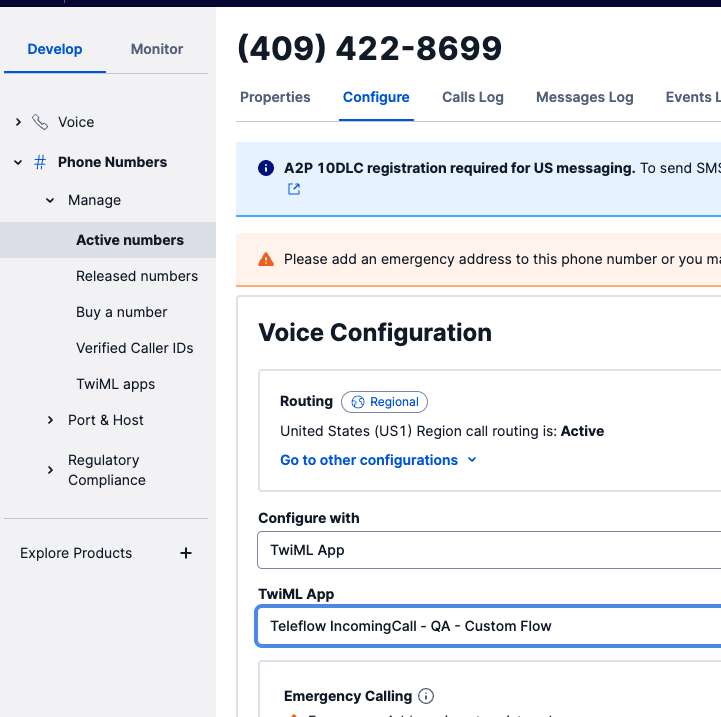
5. The shop’s phone number should now be using the custom flow when an incoming call is received
6. In order to actually test the Return user SMS flow you would need to have placed an order with the shop or created a past order with the shop using the phone number that you are going to try calling the shop with. This is because the flow will look up the caller based on the caller’s phone number and try to find a past order associated with that phone number. If no past orders for the phone number are found, the caller will be connected to the shop rather than be prompted for a reorder SMS
1. To create an order
1. Log in or create a user here: https://storefront.qa.slicelife.com/ Use the phone number you intend to test Tele Flow with as part of the user creation process
1. Just add items to your cart and checkout as usual but use 4242 4242 4242 4242
1. 
## Testing a Tele Flow IVR Flow that requires mobile number when you're on voip
1. Navigate to the TeleFlow Twiml app that you are using in the Twilio console e.g. Dev / QA / QA Custom flow
2. Update the webhook url to have the `isMobile=true` query param e.g. `https://tele-flow-service.dev.slicelife.com/public/api/v1/incoming_call?isMobile=true`
Now Twilio will always include the `isMobile=true` param and Teleflow will treat the call as if it came from mobile
### Helpful Resources
- [Teleflow Landline experiment Initial Testing](https://docs.google.com/document/d/1XmTMWc4RDADjcw0slS-1l7KSk7o_AFfzSxL1LyXYoqE/edit#heading=h.9j4arhdhvaj0)
- [How to test received calls on dev/qa](https://docs.google.com/document/d/1CUpDxo41-rpTB6_xS-i4H67TXTAFGE7Oi-Cqz28LxiU/edit#)
- Helpful Testing Number: Here is a number that always rings, with no answer: 908-355-9969 - useful for testing unanswered call behavior
## Magic cart creation
[Shortcut ticket for investigation](https://app.shortcut.com/slicelife/story/378982/core-api-test-validate-functionality-of-activitiescontoroller-v2)
### Questions
**Q** - Will we be linking users to storefront or to a shop's direct website?
**A** - Storefront
**Q** - Will the link take them to the shopping cart page or the checkout page?
**A** - Not the `/checkout` page. It will be somewhere earlier in the flow. However the `/checkout` page already supports taking an activity uuid as a query parameter and populating the user’s shopping cart, but the frontend team will be working on adding this functionality to earlier in the flow, for example `/menu`. For now we can create links that take the user directly to the checkout page to test/validate
We will also need to include the storefront path to the shop in the link so it looks like the link below. We therefore may need to adjust our flow to either do an extra shop-cms lookup from Teleflow or store the path somehow upon doing the shop-cms lookup `by_twilio_phone`. Maybe we can include it in the Twilio query params?
`https://slicelife.com/restaurants/ca/los-angeles/90029/ny-crust-pizzeria-5421-santa-monica-blvd-los-angeles/checkout?uuid=activity_v_1_2c82f3af-93fa-4725-a4a6-f347fcb45714&utm_campaign=direct_websites`
**Q** - Have the frontend changes already been made to enable that functionality?
**A** - Not yet. I've spoken to @Alastiar and he is going to schedule some time for us to agree on an interface between frontend and backend
**Q** - Do we need any sort of authentication to create a v2 activities link?
**A** - There is no issue creating a v2 magic cart without a user:
I can only see 2 places during magic creation that care about the user:
In `metadata.rb`
If no user is present `order.customer_id` will simply be nil. This is fine as this is what already happens with guest user orders.
https://github.com/slicelife/core_api/blob/master/app/services/orders/creation/enrichment/metadata.rb#L9
In `loyalty_reward.rb`
This handles no user being present. We would never end up here anyway when creating a magic cart from tele flow as we won’t be adding any loyalty redemptions
https://github.com/slicelife/core_api/blob/master/app/services/orders/creation/enrichment/loyalty_reward.rb#L33
The MagicCartV2 presenter is just a wrapper around the existing OrderRepresenter which doesn’t have the user or customer_id:
https://github.com/slicelife/core_api/blob/master/lib/presenters/activities/payloads/magic_cart_v2.rb#L11
I've added an example of how this will work below that will hopefully make it clearer.
**Q** - Do we need to have the user login to storefront to use the link?
**A**- No. As long as Storefront works the same as with the current implementation on the `/checkout` page. I created the activity below by POSTing direct to core_api with no `X-Auth0-Sub-Claim`. If I then visit storefront while not logged in I’m still presented with the shopping cart and can log in if I choose or checkout without logging in: `https://storefront.qa.slicelife.com/restaurants/ca/los-angeles/90029/ny-crust-pizzeria-5421-santa-monica-blvd-los-angeles/checkout?uuid=activity_v_2_0cf3183a-defd-492f-8c2c-5942ae64812d&utm_campaign=direct_websites`
**Q** - How do we attribute an order to a user if they don't have to login?
**A** - I’m not sure I understand this one. If the user is not logged in then the customer_id on the order will be nil so it will be considered a guest order i.e not attributed to a user. This is how ordering works for guests afaik. Does this make sense?
**Q** - What's the difference between the V1 & V2 activities endpoints and which should we use?
**A** - See this [PR](https://github.com/slicelife/core_api/pull/1927) for adding the v2 endpoint aswell as [this RFC](https://mypizza.atlassian.net/wiki/spaces/EN/pages/4047863827/RFC+Change+Magic+Cart+to+Standard+Order+Representation). This seems to be the go forward solution and means that the magic_cart "order" matches the schema of an actual order.
V2 was implemented in a way that means V1 activities and V2 activites can be created/used interchangeably. So for example if you look at the link below it has a V2 activity but Storefront can still retrieve the shopping cart:
`https://storefront.qa.slicelife.com/restaurants/ca/los-angeles/90029/ny-crust-pizzeria-5421-santa-monica-blvd-los-angeles/checkout?uuid=activity_v_2_0cf3183a-defd-492f-8c2c-5942ae64812d&utm_campaign=direct_websites`
### Example magic cart creation
- Retrieve a list of orders by shop id and phone number:
```
GET https://admin.qa.slicelife.com/api/v2/shops/46708/orders/by_phone/8888888887
Response:
{
"orders": [
{
"adjustments_attributes": [...],
"coupon_ids": [],
"customer_origin": "marketplace",
"customers_id": 16512853,
"date_purchased": "2023-03-23T14:17:52.000Z",
"deliver_at": "2023-03-23T22:00:00.000Z",
"delivery_address": null,
"delivery_city": null,
"delivery_first_name": "Colm",
"delivery_floor": null,
"delivery_instruction": null,
"delivery_last_name": "Heaney",
"delivery_name": "Colm Heaney",
"delivery_postcode": null,
"delivery_state": null,
"delivery_telephone": "8888888887",
"email": "colm.heaney+180522-12@slicelife.com",
"id": 27805623,
"lat": null,
"lng": null,
"order_coupons_attributes": [],
"order_fees_attributes": [...],
"order_items_attributes": [
{
"coupon_id": null,
"order_item_selections_attributes": [
{
"addon_name": "Choose Crust",
"options_att_price": 0,
"products_addon_id": 15439528,
"products_att_id": 208032110,
"selection_name": "Regular Crust",
"selection_price": 0
},
{
"addon_name": "Whole Pizza Toppings",
"options_att_price": 125,
"products_addon_id": 15439372,
"products_att_id": 208028512,
"selection_name": "Mozzarella Cheese",
"selection_price": 125
},
{
"addon_name": "Second Half Pizza Toppings",
"options_att_price": 125,
"products_addon_id": 15439372,
"products_att_id": 208028489,
"selection_name": "Feta Cheese",
"selection_price": 125
}
],
"product_categorization_id": 25797735,
"product_category_id": 36021,
"product_category_name": "NY Crust Specialty Pizza",
"product_description": "Roma tomato, basil leaves, extra virgin olive oil base & mozzarella cheese.",
"product_name": "Margherita Pizza",
"product_type_name": "Small",
"product_type_price": 1199,
"products_final_price": 1199,
"products_id": 8809197,
"products_instruction": null,
"products_quantity": 1,
"products_type_id": 11742888
}
],
"payment_method": "credit",
"payment_method_id": 9351,
"payment_status": "authorized",
"placed_via": "web",
"promo_code_id": null,
"remote_ip": "193.161.9.218",
"shipping_type": "Pickup",
"shop_id": 46708,
"subtotal": 1449,
"tax": 140,
"third_party_order_attributes": {
"third_party_id": "09324236032214372521",
"third_party_type": "google"
},
"tip": 0,
"total": 1612,
"uuid": "38aff949-c667-4bea-9ca4-07ecad8471ab",
"voided": "false",
"order_options_attributes": [],
"eta_max": 30,
"eta_min": 15
},
```
- Creating a magic cart from Tele-flow
```
POST https://core-api.private.qa.slicelife.com/api/v2/activities
{
"type": "magic_cart",
"payload": {
"order": {
"shop_id": 46708,
"order_items_attributes": [
{
"products_quantity": 1,
"products_type_id": 11742888,
"selection_ids": [208032110, 208028512, 208028489]
}
],
"shipping_type": "pickup",
"deliver_at": "2023-03-23T22:00:00.000Z"
}
}
}
Response:
{
"envelope_id": "activity_v_2_0cf3183a-defd-492f-8c2c-5942ae64812d"
}
```
- We construct a link:
`https://storefront.qa.slicelife.com/restaurants/ca/los-angeles/90029/ny-crust-pizzeria-5421-santa-monica-blvd-los-angeles/checkout?uuid=activity_v_2_0cf3183a-defd-492f-8c2c-5942ae64812d&utm_campaign=direct_websites`
- Storefront retrieves the activity via the link by taking the link out of the query params and making a GET request. Note: even though the path in the url below is to `/v1/activities` we can give it a `v_2` activity uuid and Storefront can still retrieve the activity.
```
GET https://consumer.qa.slicelife.com/services/core/api/v1/activities/activity_v_2_0cf3183a-defd-492f-8c2c-5942ae64812d
Response:
{
"type": "magic_cart",
"payload": {
"order": {
"coupons": [],
"order_items": [
{
"products_final_price": "11.99",
"products_quantity": 1,
"products_id": 8809197,
"products_instruction": null,
"product_name": "Margherita Pizza",
"product_type_name": "Small",
"product_type_price": "11.99",
"products_type_id": 11742888,
"coupon_id": null,
"order_item_selections": [
{
"name": "Regular Crust",
"price": "0.0",
"selection_id": 208032110,
"addon_id": 15439528
},
{
"name": "Mozzarella Cheese",
"price": "1.25",
"selection_id": 208028512,
"addon_id": 15439372
},
{
"name": "Feta Cheese",
"price": "1.25",
"selection_id": 208028489,
"addon_id": 15439372
}
]
}
],
"shipping_type": "pickup",
"payment_method": "credit",
"shop_id": 46708,
"shop_name": "NY Crust Pizza",
"deliver_at": "2023-03-23T22:00:00.000Z"
}
}
}
```
# Useful Resources
- [Tele Flow RFC](https://mypizza.atlassian.net/wiki/spaces/EN/pages/4213997569/RFC+Tele+Flow+Service)
- [Tele Flow Shared Google Drive](https://drive.google.com/drive/u/1/folders/0ACGg4x4fcllVUk9PVA)
- [Miro Board with flow diagrams](https://miro.com/app/board/uXjVPBVM7uE=/)
- [Teleflow Landline experiment Initial Testing](https://docs.google.com/document/d/1XmTMWc4RDADjcw0slS-1l7KSk7o_AFfzSxL1LyXYoqE/edit#heading=h.9j4arhdhvaj0)
- [How to test received calls on dev/qa](https://docs.google.com/document/d/1CUpDxo41-rpTB6_xS-i4H67TXTAFGE7Oi-Cqz28LxiU/edit#)
- [Mobile Caller IVR on/off Segment Events](https://slice.hackmd.io/@ZOfIwsFaRF2coQwGuX2UEw/BJiNP1TIn#)
- [Return User Reorder SMS Segment Events](https://slice.hackmd.io/XInqmPPHTJehpoBRufuFqA?both)
 Sign in with Wallet
Connect another wallet
Sign in with Wallet
Connect another wallet